This page has been machine-translated from the original page.
This time, I used a SECCON 2022 challenge called Devil Hunter as a theme to summarize ClamAV signature notation and analysis methods.
Reference: SECCON2022onlineCTF/reversing/devilhunter at main · SECCON/SECCON2022online_CTF
Reference: Summary of building ClamAV from source and setting up OnAccessScan
Table of Contents
- Challenge Overview: Devil Hunter (Rev)
- Database-format Signatures (CDV, CLD)
- YARA Rule Format
- Configuring Allow Rules
- sigtool Usage Examples
- Summary
Challenge Overview: Devil Hunter (Rev)
Clam Devil; Asari no Akuma
The challenge provides flag.cbc and check.sh as the problem binaries.
Looking at check.sh, you can see that the text detected when scanning with clamscan and flag.cbc, as shown below, becomes the Flag.
#!/bin/sh
if [ -z "$1" ]
then
    echo "[+] ${0} <flag.txt>"
    exit 1
else
    clamscan --bytecode-unsigned=yes --quiet -dflag.cbc "$1"
    if [ $? -eq 1 ]
    then
        echo "Correct!"
    else
        echo "Wrong..."
    fi
fi
flag.cbc contained the following text.
ClamBCafhaio`lfcf|aa```c``a```|ah`cnbac`cecnb`c``beaacp`clamcoincidencejb:4096
Seccon.Reversing.{FLAG};Engine:56-255,Target:0;0;0:534543434f4e7b
Teddaaahdabahdacahdadahdaeahdafahdagahebdeebaddbdbahebndebceaacb`bbadb`baacb`bb`bb`bdaib`bdbfaah
Eaeacabbae|aebgefafdf``adbbe|aecgefefkf``aebae|amcgefdgfgifbgegcgnfafmfef``
G`ad`@`bdeBceBefBcfBcfBofBnfBnbBbeBefBfgBefBbgBcgBifBnfBgfBnbBfdBldBadBgd@`bad@Aa`bad@Aa`
A`b`bLabaa`b`b`Faeac
Baa``b`abTaa`aaab
Bb`baaabbaeAc`BeadTbaab
BTcab`b@dE
A`aaLbhfb`dab`dab`daahabndabad`bndabad`b`b`aa`b`d`b`d`b`d`b`b`bad`bad`b`b`aa`b`d`b`b`aa`ah`aa`aa`b`b`aa`b`d`b`d`b`d`b`b`bad`bad`b`b`b`b`b`d`b`d`b`b`b`b`bad`b`b`bad`b`d`aa`b`b`aa`b`b`bad`b`b`bad`b`b`aa`aa`b`b`bad`b`b`bad`b`b`aa`aa`b`b`bad`b`b`bad`b`b`aa`aa`b`b`bad`b`b`bad`b`b`aa`aa`b`b`bad`b`b`bad`b`b`aa`aa`b`b`bad`b`b`bad`b`b`aa`aa`b`b`bad`b`b`bad`b`b`aa`aa`b`b`bad`b`b`bad`b`b`aa`aa`b`d`b`d`aa`Fbcgah
Bbadaedbbodad@dbadagdbbodaf@db`bahabbadAgd@db`d`bb@habTbaab
Baaaiiab`dbbaBdbhb`d`bbbbaabTaaaiabac
Bb`dajbbabajb`dakh`ajB`bhb`dalj`akB`bhb`bamn`albadandbbodad@dbadaocbbadanamb`bb`aabbabaoAadaabaanab`bb`aAadb`dbbaa`ajAahb`d`bb@h`Taabaaagaa
Bb`bbcaabbabacAadaabdakab`bbca@dahbeabbacbeaaabfaeaahbeaBmgaaabgak`bdabfab`d`bb@h`Taabgaadag
Bb`bbhaabbabacAadaabiakab`bbha@db`d`bb@haab`d`bb@h`Taabiaagae
Bb`dbjabbaabjab`dbkah`bjaB`bhb`dblaj`bkaB`bhb`bbman`blabadbnadbbodad@dbadboacbbadbnabmab`bb`bgbboab`bbab`baacb`bb`dbbbh`bjaBnahb`dbcbj`bbbB`bhb`bbdbn`bcbb`bbebc`Add@dbadbfbcbbadagbebb`bbgbc`Addbdbbadbhbcbbadbfbbgbb`b`fbbabbhbb`dbiba`bjaAdhaabjbiab`dbibBdbhb`d`bbbibaaTaabjbaeaf
Bb`bbkbgbagaablbeab`bbkbHbj`hnicgdb`bbmbc`Add@dbadbnbcbbadagbmbb`bbobc`AddAadbadb`ccbbadbnbbobb`bbacgbb`caabbceab`bbacHcj`hnjjcdaabcck`blbbbcb`bbdcc`Add@dbadbeccbbadagbdcb`bbfcc`AddAbdbadbgccbbadbecbfcb`bbhcgbbgcaabiceab`bbhcHoigndjkcdaabjck`bccbicb`bbkcc`Add@dbadblccbbadagbkcb`bbmcc`AddAcdbadbnccbbadblcbmcb`bbocgbbncaab`deab`bbocHcoaljkhgdaabadk`bjcb`db`bbbdc`Add@dbadbcdcbbadagbbdb`bbddc`AddAddbadbedcbbadbcdbddb`bbfdgbbedaabgdeab`bbfdHcoalionedaabhdk`badbgdb`bbidc`Add@dbadbjdcbbadagbidb`bbkdc`AddAedbadbldcbbadbjdbkdb`bbmdgbbldaabndeab`bbmdHoilnikkcdaabodk`bhdbndb`bb`ec`Add@dbadbaecbbadagb`eb`bbbec`AddAfdbadbcecbbadbaebbeb`bbdegbbceaabeeeab`bbdeHdochfheedaabfek`bodbeeb`bbgec`Add@dbadbhecbbadagbgeb`bbiec`AddAgdbadbjecbbadbhebieb`bbkegbbjeaableeab`bbkeHdiemjoeedaabmek`bfebleb`bbnec`Add@dbadboecbbadagbneb`bb`fc`AddAhdbadbafcbbadboeb`fb`bbbfgbbafaabcfeab`bbbfHoimmoklfdaabdfk`bmebcfb`dbefo`bdfb`d`bbbef`Tbaag
Bb`dbffbb`bffaabgfn`bffTcaaabgfE
Aab`bLbaab`b`b`dab`dab`d`b`d`b`b`b`b`b`b`b`b`b`b`b`b`b`b`b`b`b`b`b`b`aa`b`d`b`d`Fbfaac
Bb`d`bb@habb`d`bbG`lckjljhaaTbaaa
Bb`dacbbaaacb`dadbbabadb`baen`acb`bafn`adb`bagh`afAcdb`bahi``agb`baik`ahBoodb`bajm`aiaeb`bakh`ajAhdb`bali`aeBhadb`baml`akalb`bana`afAadaaaoeab`banAddb`db`ao`anb`dbaao`amb`d`bbb`aabb`d`bbbaaaaTaaaoabaa
BTcab`bamE
Snfofdg`bcgof`befafcgig`bjc`ej`
Since this CBC file is a ClamAV bytecode signature, the way to obtain the Flag seems to be to identify the text that matches this signature.
Reference: Bytecode Signatures - ClamAV Documentation
Before solving the challenge, I decided to first read through the documentation on ClamAV signatures.
Reference: Signatures - ClamAV Documentation
ClamAV signatures appear to fall broadly into the following categories.
- Database-format signatures (CDV/CLD)
- Body-based signatures
From here on, I will organize the documentation for each type of ClamAV signature.
Database-format Signatures (CDV, CLD)
In ClamAV, signatures are distributed as archive files in database formats called CDV and CLD.
CLD files are created when updates are applied through a differential update mechanism called CDIFF.
Reference: Terminology - ClamAV Documentation
Reference: ClamAV® blog: ClamAV, CVDs, CDIFFs and the magic behind the curtain
A CVD is a compressed signature database archive that is digitally signed and distributed by Cisco-Talos.
On machines that use ClamAV, CVD files are normally downloaded by the freshclam module.
The extension for a CVD is .cvd, but when a CVD or CLD database is updated with a CDIFF patch file, the extension becomes .cld.
In addition to the CDV databases distributed by Cisco-Talos, ClamAV can also perform scans using custom database files.
Body-based Signatures
In ClamAV, you can use Body-based signatures in addition to database-format signatures.
A Body-based signature is a signature that defines detection conditions based on specific byte sequences in the scan target, rather than hashes.
The main types of Body-based signatures available in ClamAV are as follows.
Note: Signatures whose extension ends with u are loaded only when PUA signatures are enabled.
*.ndb / *.ndu: Extended signatures*.ldb / *.ldu / *.idb: Logical Signatures*.cdb: Container Metadata Signatures*.cbc: Bytecode Signatures*.pdb / *.gdb / *.wdb: Phishing URL Signatures
The bytecode signature (.cbc) used in this challenge is also one type of Body-based signature.
Extended Signatures
*.ndb / *.ndu refers to extended signatures.
Extended signatures can be written in the following format, defining items such as TargetType, Virus offset, and FLEVEL in addition to the hex signature.
MalwareName:TargetType:Offset:HexSignature[:min_flevel:[max_flevel]]Reference: Extended Signatures - ClamAV Documentation
MalwareName can be any value, but official signatures are usually defined according to the following naming convention.
{platform}.{category}.{name}-{signature id}-{revision}Reference: Signatures - ClamAV Documentation
TargetType specifies the type of file to scan.
If you want the signature to target arbitrary files, specify 0.
Reference: ClamAV File Types and Target Types - ClamAV Documentation
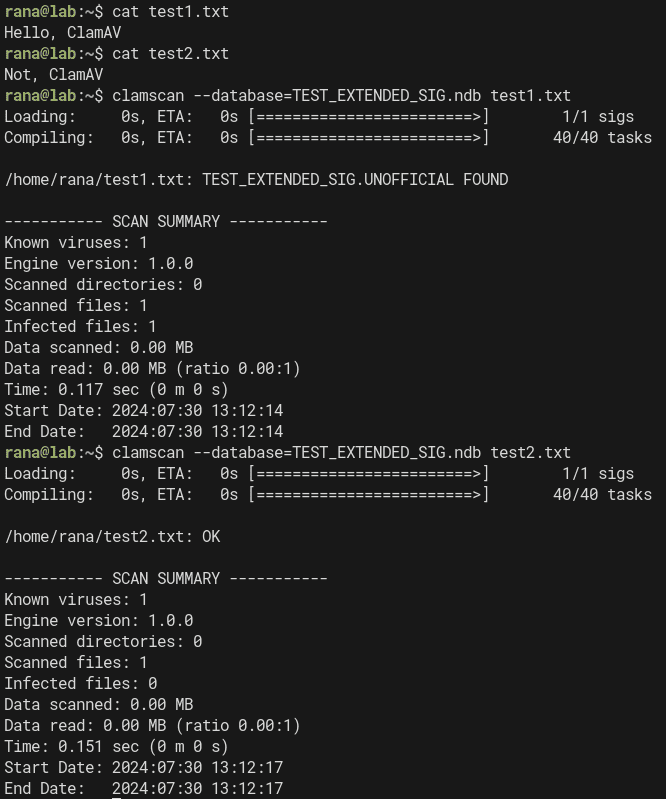
For example, you can define an extended signature that detects files under the detection name TEST_EXTENDED_SIG as follows.
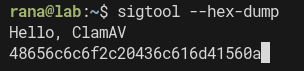
TEST_EXTENDED_SIG:0:*:48656c6c6f2c20436c616d4156With this signature, you can detect the string Hello, ClamAV, represented as a hex dump with sigtool --hex-dump, in files of any type.
When I actually scanned with the command clamscan --database=TEST_EXTENDED_SIG.ndb test1.txt, I was able to detect files containing the text Hello, ClamAV under the detection name TEST_EXTENDED_SIG.
Logical Signatures
Signatures with the extensions *.ldb / *.ldu / *.idb are logical signatures.
Logical signatures can combine multiple signatures using logical operators.
The format of a logical signature is as follows.
SignatureName;TargetDescriptionBlock;LogicalExpression;Subsig0;Subsig1;Subsig2;...In TargetDescriptionBlock, information about the engine and target files is written as comma-separated pairs.
Although TargetDescriptionBlock can include items other than Engine, it is recommended to place the Engine specification first for compatibility reasons.
The Engine field is written in a format such as Engine:81-255.
This Engine setting is especially important for signatures that use features added in specific versions.
Incidentally, this field is expressed as a range of FLEVEL values. An FLEVEL value of 81 corresponds to version 0.99.
Reference: ClamAV Versions and Functionality Levels - ClamAV Documentation
Other values that can be specified in TargetDescriptionBlock include Target, FileSize, and EntryPoint offsets, among others.
Target lets you specify the file to be scanned. As with extended signatures, 0 means an arbitrary file.
Reference: ClamAV File Types and Target Types - ClamAV Documentation
In the following LogicalExpression section, you write the logical expression that defines the relationships among the sub-signatures that follow.
You can define up to 64 sub-signatures, and they are referenced in order as 0, 1, 2, and so on.
The implementation is a little hard to grasp, but these sub-signatures can contain expressions and values.
For example, in the following signature, which is the same as the sample in the documentation, the logical expression 0&1 defines a signature that detects the target file only when both Subsig0 (41414141::i) and Subsig1 (424242424242::i) match.
TEST_LOGICAL_SIG;Engine:81-255,Target:0;0&1;41414141::i;424242424242::i::i is an option that instructs ClamAV to ignore case.
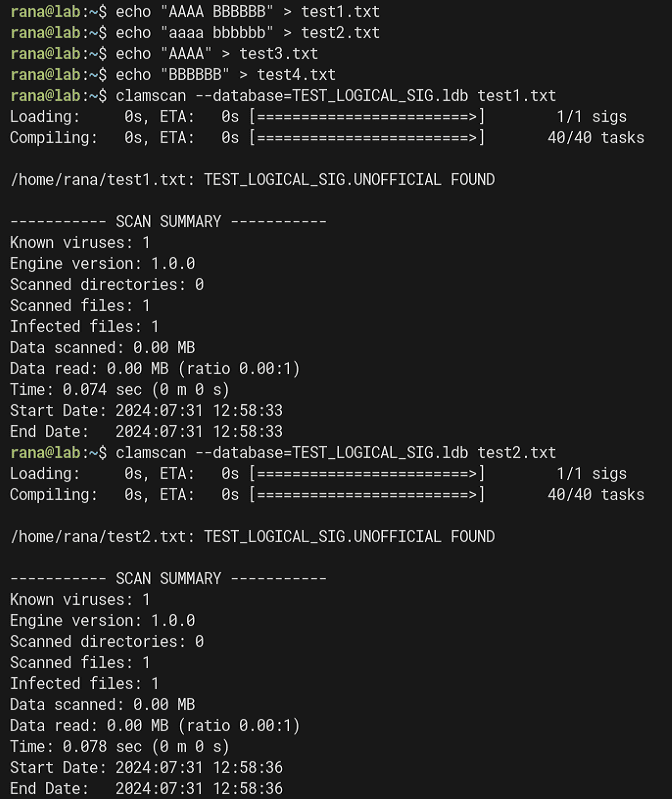
In other words, the above signature detects a file when both AAAA (or aaaa) and BBBBBB (or bbbbbb) are present in the file.
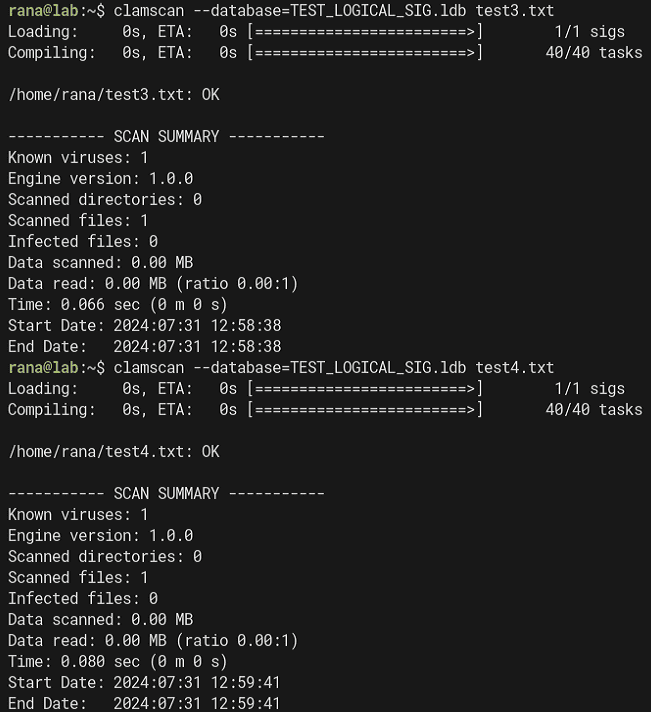
If you actually test this signature against the text files from test1 to test4, you can confirm that detection occurs only when both AAAA (or aaaa) and BBBBBB (or bbbbbb) are present in the file.
Since test3 and test4 contain only one of AAAA or BBBBBB, they are not detected by this signature.
There are a great many sub-signature notations, so I will not cover them in this article.
The details are summarized in the following documentation.
Reference: Logical Signatures - ClamAV Documentation
Container Metadata Signatures
Container metadata signatures are defined in files with the *.cdb extension.
The format of the signature is as follows.
VirusName:ContainerType:ContainerSize:FileNameREGEX:FileSizeInContainer:FileSizeReal:IsEncrypted:FilePos:Res1:Res2[:MinFL[:MaxFL]]For ContainerType, you specify archive file types defined by ClamAV itself, such as CL_TYPE_ZIP and CL_TYPE_7Z.
It appears that * can be used to specify an arbitrary file type.
Reference: ClamAV File Types and Target Types - ClamAV Documentation
There is not much information about container metadata signatures, but they seem to be signatures that can detect archive files by specifying various conditions such as file type and size.
For example, with the following signature that specifies only CL_TYPE_ZIP for ContainerType, you can detect any ZIP file.
TEST_CONTAINER_METADATA_SIG:CL_TYPE_ZIP:*:*:*:*:*:*:*:*
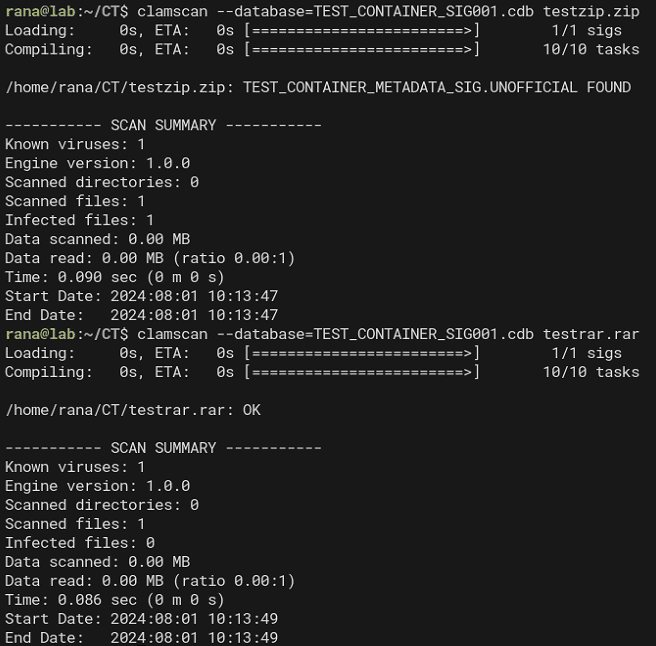
In addition, the ContainerSize option lets you specify the size of the container file itself, such as a ZIP, in bytes.
If you change the value of ContainerSize to 80000000-90000000, testzip.zip is no longer detected, but bigsizezip.zip, whose file size is 88843043, is detected.
TEST_CONTAINER_METADATA_SIG:CL_TYPE_ZIP:80000000-90000000:*:*:*:*:*:*:*
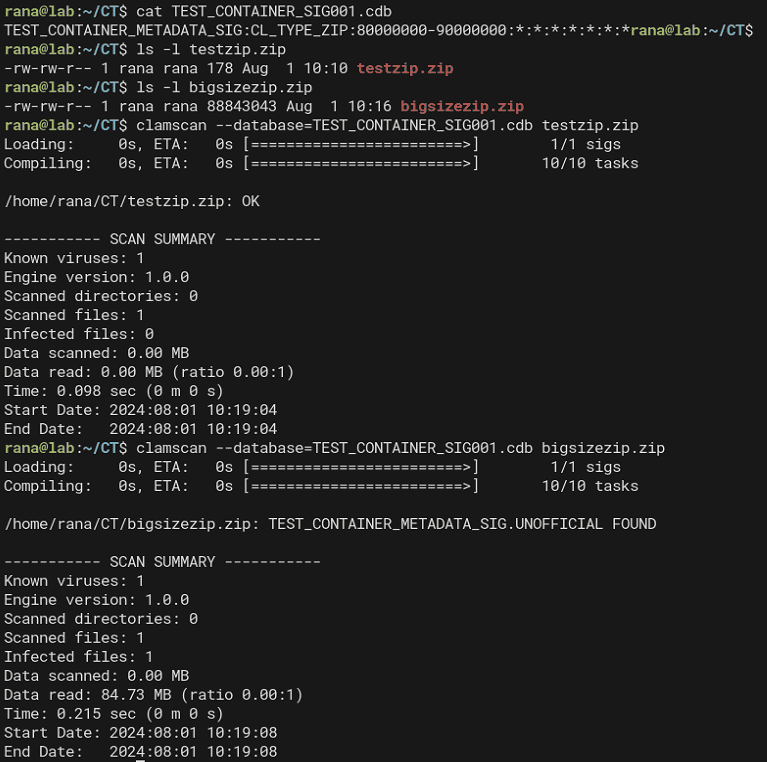
You can also detect container files by specifying various other conditions, such as the container file name, compressed size, and whether it is encrypted.
Bytecode Signatures
Signatures with the .cbc extension, like the one provided as the Devil Hunter challenge binary, are bytecode signatures.
Reference: Bytecode Signatures - ClamAV Documentation
In ClamAV, you can implement more complex pattern matching by writing C code that analyzes content.
At that point, signatures written in C are compiled into an intermediate language called bytecode.
This bytecode is generated as an ASCII-format .cbc file and can be distributed in .cvd / .cld database files.
I will explain how to write and compile bytecode signatures later.
Phishing Signatures (Phishing URL Signatures)
ClamAV can inspect the displayed links in HTML, such as those contained in email, and the actual destination addresses of those links.
Reference: Phishing Signatures - ClamAV Documentation
The documentation contains a great deal of information about phishing signatures, but I will omit them this time.
Hash-based Signatures
ClamAV can use Hash-based signatures to detect files by checking file hashes.
There are two types of Hash-based signatures.
*.hdb *.hsb *.hdu *.hsu: File hash signatures*.mdb *.msb *.mdu *.msu: PE section hash signatures
File Hash Signatures
File hash signatures are defined in the following format.
HashString:FileSize:MalwareNameYou can use MD5, SHA1, SHA256, and other hashes for file hashes, and you can create a file hash signature for a specific file with sigtool as follows.
sigtool --md5 test1.txt > test.hdb
sigtool --sha1 test1.txt > test.hdb
sigtool --sha256 test1.txt > test.hdb
The file hash signatures generated by these commands can be used for static matching.
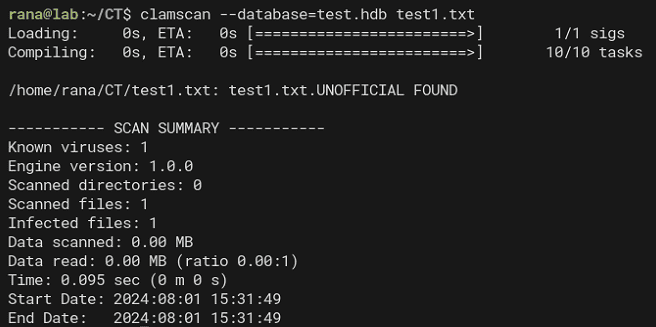
Note that the file hash signatures generated by sigtool include the target file’s size in the FileSize field.
However, if the file size is unknown and only the hash is known, you can also detect it by replacing FileSize with a wildcard as shown below.
bf47ba8d5e3af20bd79fa2c9ed028c5a9501a00f:*:test1.txt:73When using this notation, you need to append a value at the end to specify a minimum engine level of 73 or higher.
PE Section Hash Signatures
ClamAV can use not only file hashes but also hash signatures for specific sections within PE files for detection.
PE section hash signatures can also be created with sigtool.
sigtool --mdb /path/to/32bit/PE/fileHowever, as of the time of writing this article (August 2024), even the latest version of ClamAV does not appear to support creating section hash signatures for 64-bit PE binaries.
Note: PE import table hash signatures are likewise supported only for 32-bit files.
YARA Rule Format
Because ClamAV can process YARA rules, you can define signatures with the .yar / .yara extensions that contain YARA rules.
However, ClamAV has some limitations on the YARA rules it can handle, so caution is required.
I will omit the detailed limitations and usage in this article.
Reference: YARA Rules - ClamAV Documentation
Configuring Allow Rules
ClamAV lets you configure several allow rules to suppress false positives.
Allow rules can be configured either per file hash or per signature.
Creating an allow rule that suppresses detection for a specific file is simple: just add a line output by sigtool, much like a file hash signature.
When adding a SHA1 or SHA256 hash as an allow rule, use .sfp as the extension for the allow list.
sigtool --sha256 ~/Downloads/eicar.com >> /var/lib/clamav/false-positives.sfpsigtool Usage Examples
# Check the hex string to use for signatures
echo -n "test" | sigtool --hex-dump

# Create file hash signatures
sigtool --md5 test1.txt > test.hdb
sigtool --sha1 test1.txt > test.hdb
sigtool --sha256 test1.txt > test.hdb

# Create allowlist rules
sigtool --sha256 ~/Downloads/eicar.com >> /var/lib/clamav/false-positives.sfp
Reference: Signatures - ClamAV Documentation
Bytecode Signatures Tutorial
To solve Devil Hunter, the challenge covered in this post, I dug deeper into the documentation on bytecode signatures.
Reference: clamav-bytecode-compiler/docs/user/clambc-user.pdf at main · Cisco-Talos/clamav-bytecode-compiler
Preparing the Bytecode Compiler
First, prepare the bytecode compiler.
Install clang and LLVM, which are required to build the bytecode compiler.
clang and LLVM need to use matching versions, and version 8 appears to be the recommended one.
I tried using the latest version 18 available through apt, but the build failed, so I decided to use Docker to prepare an environment with clang/LLVM version 8.
Reference: clamav-docker/clamav-bytecode-compiler/README.md at main · Cisco-Talos/clamav-docker
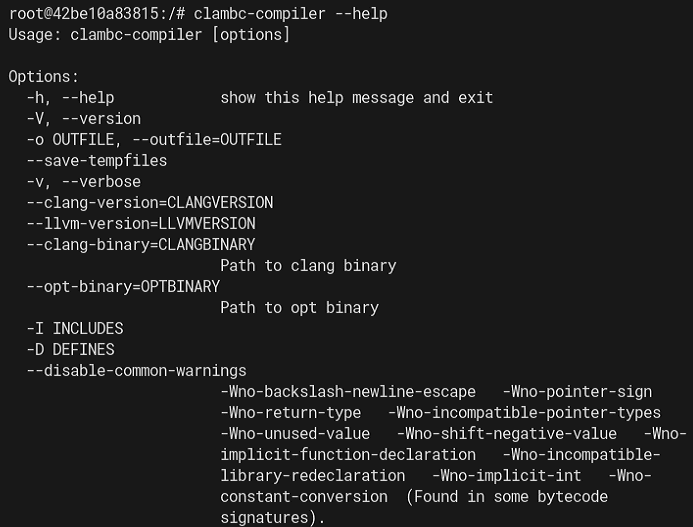
With any directory set as the current directory, run the following command:
docker run -v `pwd`:/src -it clamav/clambc-compiler:stable /bin/bashThis makes it possible to run clambc-compiler.
Logical Signature Bytecodes (Algorithmic Detection Bytecodes)
Logical signature bytecodes (also known as Algorithmic detection bytecodes) are bytecode signatures triggered by signatures equivalent to Logical signatures (.ldb).
The CDV/CLV signatures officially distributed by ClamAV also fall into the category of bytecode signatures.
By default, however, ClamAV treats any bytecode signature other than those officially distributed by Cisco as an “untrusted” signature.
Because of this, when scanning with a custom bytecode signature you created yourself, be aware that you must explicitly enable the option in clamscan or clamd that allows the use of untrusted bytecode signatures.
Reference: ClamAV® blog: Brief Re-introduction to ClamAV Bytecode Signatures
Using Logical signature bytecodes lets you define more complex detection logic that can run faster than using Logical signatures directly.
Algorithmic detection bytecodes are broadly made up of the following elements:
- The signature and its corresponding malware name
- Pattern definitions (for logical subexpressions)
- A Logical signature written as a simple C function (
bool logical_trigger(void)) - The signature triggered when the Logical signature matches (
int entrypoint(void) - (Optional) Other functions and constants used by the entrypoint
Specifying Malware Names and Targets
In a bytecode signature, you define the required VIRUSNAME_PREFIX and the optional VIRUSNAMES as the malware names used for detection.
The name specified in VIRUSNAME_PREFIX is always used when a detection occurs.
The optional values defined in VIRUSNAMES, separated by commas, are appended after VIRUSNAME_PREFIX.
// TESTMALWARE.001.A
// TESTMALWARE.001.B
VIRUSNAME_PREFIX("TESTMALWARE.001")
VIRUSNAMES("A","B")
This optional part is determined by passing a value like foundVirus("A"); as the argument to the foundVirus function inside the bytecode signature.
You also need to specify an integer in TARGET that indicates the type the bytecode signature will scan.
As with the other signatures used so far, this integer should use one of the values listed in the following documentation.
Reference: ClamAV File Types and Target Types - ClamAV Documentation
For example, the following specifies HTML(normalized) as the target.
// HTML(normalized)
// HTML - Whitespace transformed to spaces, tags/tag attributes normalized, all lowercase.
TARGET(3)
When HTML(normalized) is specified as the target, note that whitespace and tags are transformed and all text is interpreted as lowercase. (Signatures that target uppercase text will no longer work as intended.)
Specifying FLEVEL
Bytecode signatures can also specify the minimum required FLEVEL.
When you define it inside a bytecode signature, you do not use the integer FLEVEL value directly. Instead, you specify a value such as FUNC_LEVEL_098_5.
// FUNC_LEVEL_098_5 = 78
FUNCTIONALITY_LEVEL_MIN(FUNC_LEVEL_098_5)
For the possible values, use the entries in the FunctionalityLevel (bytecode enum) column in the documentation below.
Reference: ClamAV Versions and Functionality Levels - ClamAV Documentation
Declarations and Definitions
Inside a bytecode signature, you can define Declarations and Definitions.
Declarations are used like variable declarations, while Definitions are used like variable definitions.
Because of that, Declarations must always come before Definitions.
In the following example, two Declarations are defined: magic and trojan.
// Declarations
SIGNATURES_DECL_BEGIN
DECLARE_SIGNATURE(magic)
DECLARE_SIGNATURE(trojan)
SIGNATURES_DECL_END
The Definitions corresponding to these Declarations can be written as follows.
// Definitions
SIGNATURES_DEF_BEGIN
DEFINE_SIGNATURE(magic,"61616161")
DEFINE_SIGNATURE(trojan,"74726f6a616e")
SIGNATURES_END
This registers two global variables, magic and trojan, so you can use these values inside the bytecode signature logic.
Also, if you want a signature to detect a specific string, you need to specify the hex-dumped string just as you would with Logical signatures.
In the example above, because the target string is aaaa, the definition uses DEFINE_SIGNATURE(magic,"61616161") instead of DEFINE_SIGNATURE(magic,"aaaa").
Defining the Logical Signature Function
In a bytecode signature, the actual signature (int entrypoint(void)) is triggered when the pattern in the Logical signature written as a simple C function (bool logical_trigger(void)) matches.
So first, define the logical_trigger function as follows.
// All bytecode triggered by logical signatures must have this function
bool logical_trigger(void)
{
    return count_match(Signatures.magic) > 1;
}
The count_match function counts how many times a specific pattern matched and returns that count.
In the example above, it returns the number of matches for the pattern defined by magic.
// This is the bytecode function that is actually executed when the logical signature matched
int entrypoint(void)
{
    if (matches(Signatures.deadbeef)) { foundVirus ("A") ; }
    else { foundVirus("B"); }

    // success, return 0
    return 0;
}
Defining the Signature
Define the actual bytecode signature body (int entrypoint(void)), which is called when the Logical signature matches.
If the entrypoint processing succeeds, it is recommended that this function always return 0.
Also, use the foundVirus function when a malware condition matches.
// This is the bytecode function that is actually executed when the logical signature matched
int entrypoint(void)
{
    if (matches(Signatures.trojan)) { foundVirus("A"); }
    else { foundVirus("B"); }

    // success, return 0
    return 0;
}
In the example above, if the pattern matches(Signatures.deadbeef) matches, it uses A, the optional VIRUSNAMES value, and if it does not match, it uses B for detection.
The full signature created this time is shown below.
// TESTMALWARE.001.A
// TESTMALWARE.001.B
VIRUSNAME_PREFIX("TESTMALWARE.001")
VIRUSNAMES("A","B")
TARGET(0)

// FUNC_LEVEL_098_5 = 78
FUNCTIONALITY_LEVEL_MIN(FUNC_LEVEL_098_5)

// Declarations
SIGNATURES_DECL_BEGIN
DECLARE_SIGNATURE(magic)
DECLARE_SIGNATURE(trojan)
SIGNATURES_DECL_END

// Definitions
SIGNATURES_DEF_BEGIN
DEFINE_SIGNATURE(magic,"61616161")
DEFINE_SIGNATURE(trojan,"74726f6a616e")
SIGNATURES_END

// All bytecode triggered by logical signatures must have this function
bool logical_trigger(void)
{
    return count_match(Signatures.magic) > 1;
}

// This is the bytecode function that is actually executed when the logical signature matched
int entrypoint(void)
{
    if (matches(Signatures.trojan)) { foundVirus("A"); }
    else { foundVirus("B"); }

    // success, return 0
    return 0;
}
Compiling and Scanning Bytecode Signatures
Now compile the bytecode signature created so far and scan with it.
The directory structure is as follows.
$ tree
.
├── bytecodes
│   └── TESTCODE001.c
├── samplefiles
│   ├── TEST001.html
│   └── TEST001.txt
└── up_bytecodes.sh
First, pull and start the clambc-compiler container image.
At this point, the volume directory is set to the bytecodes directory that contains the C file.
# Pull and start the clambc-compiler Docker container
docker run -v ./bytecodes:/src -it clamav/clambc-compiler:stable /bin/bash

# Compile TESTCODE001.c to TESTCODE001.cbc
cd /src
clambc-compiler /src/TESTCODE001.c -o TESTCODE001.cbc -O2
In the example above, -O2 is specified as the optimization option.
You can use any optimization option from -O0 to -O3, but it seems to be recommended to use at least -O1 or higher.
Once this is done, you can scan using the compiled CBC file.
When using a bytecode signature not distributed by Cisco, you must use the --bytecode-unsigned=yes option.
Also, if detection does not work as intended, you can investigate with the --debug option.
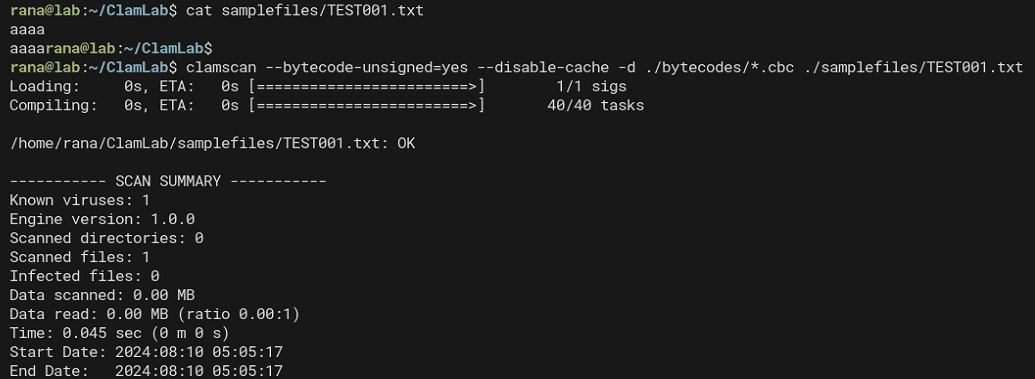
clamscan --bytecode-unsigned=yes --disable-cache -d ./bytecodes/TESTCODE001.cbc ./samplefiles/TEST001.txtThis time, because the target file type is specified as HTML(normalized), a txt file is not detected even if it contains strings such as aaaa.
On the other hand, if you scan an HTML file that contains trojan and at least two occurrences of aaaa, it is detected as TESTMALWARE.001.A.
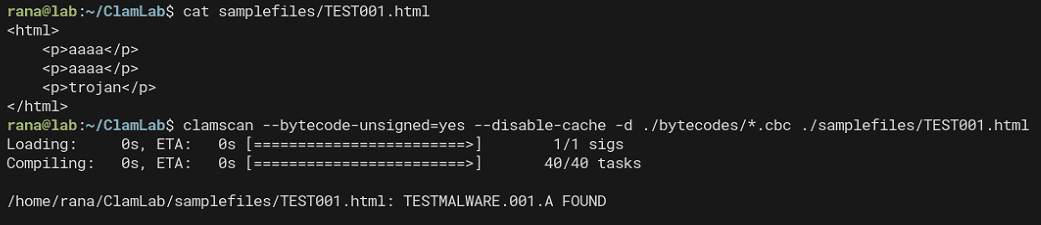
If the file contains only two or more occurrences of aaaa, the condition if (matches(Signatures.trojan)) { foundVirus("A"); } no longer matches, so it is detected as TESTMALWARE.001.B.

Reference: ClamAV® blog: Sample File Properties Collection Analysis Bytecode Signature Walkthrough
Using Bytecode Signatures
From here, I would like to try out various bytecode signature techniques.
Using File Properties Collection Analysis
If libclamav is configured to generate File Properties Collection JSON, a bytecode signature can use the generated JSON object as a detection condition.
Reference: ClamAV® blog: Sample File Properties Collection Analysis Bytecode Signature Walkthrough
The following is a customized version of the sample signature in the ClamAV repository.
VIRUSNAME_PREFIX("SUBMIT.filetype")
VIRUSNAMES("CL_TYPE_MSWORD", "CL_TYPE_MSPPT", "CL_TYPE_MSXL",
           "CL_TYPE_OOXML_WORD", "CL_TYPE_OOXML_PPT", "CL_TYPE_OOXML_XL",
           "CL_TYPE_MSEXE", "CL_TYPE_PDF", "CL_TYPE_MSOLE2", "CL_TYPE_UNKNOWN", "InActive")

/* Target type is 0, all relevant files */
TARGET(0)

/* JSON API call will require FUNC_LEVEL_098_5 = 78 */
/* PRECLASS_HOOK_DECLARE will require FUNC_LEVEL_098_7 = 80 */
FUNCTIONALITY_LEVEL_MIN(FUNC_LEVEL_098_7)

#define STR_MAXLEN 256

// Declarations
SIGNATURES_DECL_BEGIN
DECLARE_SIGNATURE(magic)
SIGNATURES_DECL_END

// Definitions
SIGNATURES_DEF_BEGIN
DEFINE_SIGNATURE(magic,"73616d706c65")
SIGNATURES_END

// All bytecode triggered by logical signatures must have this function
bool logical_trigger(void)
{
    return matches(Signatures.magic);
}

int entrypoint()
{
    int32_t objid, type, strlen;
    char str[STR_MAXLEN];

    /* check is json is available, alerts on inactive (optional) */
    if (!json_is_active())
        foundVirus("InActive");

    /* acquire the filetype object */
    objid = json_get_object("FileType", 8, 0);
    if (objid <= 0) {
        debug_print_str("json object has no filetype!", 28);
        return 1;
    }
    type = json_get_type(objid);
    if (type != JSON_TYPE_STRING) {
        debug_print_str("json object filetype property is not string!", 44);
        return 1;
    }

    /* acquire string length, note +1 is for the NULL terminator */
    strlen = json_get_string_length(objid) + 1;
    /* prevent buffer overflow */
    if (strlen > STR_MAXLEN)
        strlen = STR_MAXLEN;

    /* acquire string data, note strlen includes NULL terminator */
    if (json_get_string(str, strlen, objid)) {
        /* debug print str (with '\n' and prepended message */
        debug_print_str(str, strlen);

        /* check the contained object's filetype */
        if (strlen == 14 && !memcmp(str, "CL_TYPE_MSEXE", 14)) {
            foundVirus("CL_TYPE_MSEXE");
            return 0;
        }
        if (strlen == 12 && !memcmp(str, "CL_TYPE_PDF", 12)) {
            foundVirus("CL_TYPE_PDF");
            return 0;
        }
        if (strlen == 19 && !memcmp(str, "CL_TYPE_OOXML_WORD", 19)) {
            foundVirus("CL_TYPE_OOXML_WORD");
            return 0;
        }
        if (strlen == 18 && !memcmp(str, "CL_TYPE_OOXML_PPT", 18)) {
            foundVirus("CL_TYPE_OOXML_PPT");
            return 0;
        }
        if (strlen == 17 && !memcmp(str, "CL_TYPE_OOXML_XL", 17)) {
            foundVirus("CL_TYPE_OOXML_XL");
            return 0;
        }
        if (strlen == 15 && !memcmp(str, "CL_TYPE_MSWORD", 15)) {
            foundVirus("CL_TYPE_MSWORD");
            return 0;
        }
        if (strlen == 14 && !memcmp(str, "CL_TYPE_MSPPT", 14)) {
            foundVirus("CL_TYPE_MSPPT");
            return 0;
        }
        if (strlen == 13 && !memcmp(str, "CL_TYPE_MSXL", 13)) {
            foundVirus("CL_TYPE_MSXL");
            return 0;
        }
        if (strlen == 15 && !memcmp(str, "CL_TYPE_MSOLE2", 15)) {
            foundVirus("CL_TYPE_MSOLE2");
            return 0;
        }

        foundVirus("CL_TYPE_UNKNOWN");
        return 0;
    }

    return 0;
}
In the signature above, json_is_active() checks whether File Properties Collection JSON is being generated. If it is not, the file is detected as InActive.
If JSON is being generated, you can detect the target file type by comparing the string value of the FileType element.
if (strlen == 14 && !memcmp(str, "CL_TYPE_MSEXE", 14)) {
    foundVirus("CL_TYPE_MSEXE");
    return 0;
}
You can scan with the CBC file compiled from this signature using the following command.
When using clamscan, you need to specify the --gen-json option.
clamscan --gen-json --bytecode-unsigned=yes --disable-cache -d ./bytecodes/TESTCODE002.cbc ./samplefiles/doc_sample.docxWhen you scan the sample Word file with this signature, the file is detected as SUBMIT.filetype.CL_TYPE_OOXML_WORD.

Also, if you use the --debug option with clamscan, you can dump the generated JSON object.
In this case, the following JSON was dumped.
{
  "Magic":"CLAMJSONv0",
  "RootFileType":"CL_TYPE_OOXML_WORD",
  "FileName":"doc_sample.docx",
  "FileType":"CL_TYPE_OOXML_WORD",
  "FileSize":29864,
  "FileMD5":"1d45f29f2c0523d334d4665acd30a208",
  "CoreProperties":{
    "Attributes":{
      "cp":"http://schemas.openxmlformats.org/package/2006/metadata/core-properties",
      "dc":"http://purl.org/dc/elements/1.1/",
      "dcterms":"http://purl.org/dc/terms/",
      "dcmitype":"http://purl.org/dc/dcmitype/",
      "xsi":"http://www.w3.org/2001/XMLSchema-instance"
    },
    "Title":{},
    "Keywords":{},
    "Created":{
      "Value":[
        "2024-07-26T03:53:00Z"
      ]
    },
    "Modified":{
      "Value":[
        "2024-07-26T03:53:00Z"
      ]
    }
  },
  "CorePropertiesFileCount":1,
  "CustomPropertiesFileCount":1,
  "ContainedObjects":[
    {
      "FileName":"app.xml",
      "FilePath":"/tmp/20240812_032807-scantemp.57234350df/clamav-05142ae220fd85d0de8aa5fdbb679e88.tmp",
      "FileType":"CL_TYPE_TEXT_ASCII",
      "FileSize":1105,
      "FileMD5":"133656865921af498aa28ec5b4f77b24"
    },
    {
      "FileName":".rels",
      "FilePath":"/tmp/20240812_032807-scantemp.57234350df/clamav-1e11204e3c8bc451adce2bbf9684d61f.tmp",
      "FileType":"CL_TYPE_TEXT_ASCII",
      "FileSize":877,
      "FileMD5":"834bb9f139e2c89042bc5f73ca3681ac"
    },
    {
      "FileName":"core.xml",
      "FilePath":"/tmp/20240812_032807-scantemp.57234350df/clamav-16f795eae2e129a3bc2d6b6d045d7ec6.tmp",
      "FileType":"CL_TYPE_TEXT_ASCII",
      "FileSize":602,
      "FileMD5":"48d63fac37f1798301b4a380bc7fbd47"
    },
    {
      "FileName":"document.xml",
      "FilePath":"/tmp/20240812_032807-scantemp.57234350df/clamav-df7bee169e6486afa59bea2b33a0c6aa.tmp",
      "FileType":"CL_TYPE_TEXT_ASCII",
      "FileSize":16079,
      "FileMD5":"7caa4d90df6f35547e9a0212c52c3cfb"
    },
    {
      "FileName":"webSettings.xml",
      "FilePath":"/tmp/20240812_032807-scantemp.57234350df/clamav-e66fe6b6cdc5505ef6837c41f64a7dc9.tmp",
      "FileType":"CL_TYPE_TEXT_ASCII",
      "FileSize":976,
      "FileMD5":"e6ef4ee039cfbbe805db5fd64c9285d6"
    },
    {
      "FileName":"document.xml.rels",
      "FilePath":"/tmp/20240812_032807-scantemp.57234350df/clamav-fcb2cd75df0a7781452fb1173c41b495.tmp",
      "FileType":"CL_TYPE_TEXT_ASCII",
      "FileSize":1962,
      "FileMD5":"a272a252c4514589d0f0b4095edbf65b"
    },
    {
      "FileName":"theme11.xml",
      "FilePath":"/tmp/20240812_032807-scantemp.57234350df/clamav-1196c9448d0bd47e20333d0bdd69f464.tmp",
      "FileType":"CL_TYPE_TEXT_ASCII",
      "FileSize":6808,
      "FileMD5":"d4c5d9b2fbc2334a7d960978173fcbc1"
    },
    {
      "FileName":"item3.xml",
      "FilePath":"/tmp/20240812_032807-scantemp.57234350df/clamav-c2d5f805bdde863a8c614f7b89a9ebda.tmp",
      "FileType":"CL_TYPE_TEXT_ASCII",
      "FileSize":219,
      "FileMD5":"5eca9e027b94e6cd1bc64f2a06dcee92"
    },
    {
      "FileName":"itemProps31.xml",
      "FilePath":"/tmp/20240812_032807-scantemp.57234350df/clamav-5c0ec7b9b208dd18bc16221dd74383a8.tmp",
      "FileType":"CL_TYPE_TEXT_ASCII",
      "FileSize":335,
      "FileMD5":"08962c42256ecf756d4c628af592ff6f"
    },
    {
      "FileName":"item3.xml.rels",
      "FilePath":"/tmp/20240812_032807-scantemp.57234350df/clamav-5fef1f0b8a132ec493b0cb870a6ffc2d.tmp",
      "FileType":"CL_TYPE_TEXT_ASCII",
      "FileSize":293,
      "FileMD5":"14d033452b3fba1be7138b73fa7d2e4b"
    },
    {
      "FileName":"settings.xml",
      "FilePath":"/tmp/20240812_032807-scantemp.57234350df/clamav-99884602b93a2ddf9d3eeaa0e70f0967.tmp",
      "FileType":"CL_TYPE_TEXT_ASCII",
      "FileSize":6081,
      "FileMD5":"de6f78fd2ae424ff5fd54310e161a25b"
    },
    {
      "FileName":"fontTable.xml",
      "FilePath":"/tmp/20240812_032807-scantemp.57234350df/clamav-b2a1927c2e99604e8697311d48fd4e48.tmp",
      "FileType":"CL_TYPE_TEXT_ASCII",
      "FileSize":3025,
      "FileMD5":"aadd621b59bb8af6b1324ce4579db1d8"
    },
    {
      "FileName":"item22.xml",
      "FilePath":"/tmp/20240812_032807-scantemp.57234350df/clamav-bce3cc1fe0e193e1f97ad4aa8bded549.tmp",
      "FileType":"CL_TYPE_TEXT_ASCII",
      "FileSize":1131,
      "FileMD5":"1aa7d8c84bbb518b7eec09d8fa79bdf7"
    },
    {
      "FileName":"itemProps22.xml",
      "FilePath":"/tmp/20240812_032807-scantemp.57234350df/clamav-c1f279419e99fb98be3876f2ffaa58bc.tmp",
      "FileType":"CL_TYPE_TEXT_ASCII",
      "FileSize":614,
      "FileMD5":"bbb569ce2200d3b8e0f5af2fd0ee87f2"
    },
    {
      "FileName":"item22.xml.rels",
      "FilePath":"/tmp/20240812_032807-scantemp.57234350df/clamav-68018783a654cc1de6c75725876934cf.tmp",
      "FileType":"CL_TYPE_TEXT_ASCII",
      "FileSize":293,
      "FileMD5":"1b52716de290d728812bdd805e6ee277"
    },
    {
      "FileName":"item13.xml",
      "FilePath":"/tmp/20240812_032807-scantemp.57234350df/clamav-1cb43cc91c383ab4dc962120b926aafb.tmp",
      "FileType":"CL_TYPE_TEXT_ASCII",
      "FileSize":306,
      "FileMD5":"217ee5ba5f9835428ff1ab7501faf018"
    },
    {
      "FileName":"itemProps13.xml",
      "FilePath":"/tmp/20240812_032807-scantemp.57234350df/clamav-1832e99cda5310119c2166934cca1c9c.tmp",
      "FileType":"CL_TYPE_TEXT_ASCII",
      "FileSize":341,
      "FileMD5":"f8fb694a3d90c965a676bdfec949186a"
    },
    {
      "FileName":"item13.xml.rels",
      "FilePath":"/tmp/20240812_032807-scantemp.57234350df/clamav-395ccc11d1cb463e8e27d5075cd0f4ed.tmp",
      "FileType":"CL_TYPE_TEXT_ASCII",
      "FileSize":293,
      "FileMD5":"4c767529172a3f3e3f06c29757972fd2"
    },
    {
      "FileName":"styles.xml",
      "FilePath":"/tmp/20240812_032807-scantemp.57234350df/clamav-5e22fe74d8b0fa6e8b63533680ba5d43.tmp",
      "FileType":"CL_TYPE_TEXT_ASCII",
      "FileSize":51823,
      "FileMD5":"6092dcc046c92f52c15c83ef435e4f35",
      "Viruses":[
        "SUBMIT.filetype.CL_TYPE_OOXML_WORD"
      ]
    }
  ]
}
Using Regular Expressions
You can use POSIX regular expressions inside bytecode signatures.
Here, it looks like you can also use features such as specifying scan positions with seek and loop processing.
For details, please refer to the official documentation.
int entrypoint(void) {
    REGEX_SCANNER;

    seek(0, SEEK_SET);

    for (;;) {
        REGEX_LOOP_BEGIN
        /*
         * ! re2c
         * ANY = [^];
         *
         * "eval(" [a-zA-Z_] [a-zA-Z_0-9]* ".unescape" {
         *     long pos = REGEX_POS;
         *     if (pos < 0)
         *         continue;
         *     debug("unescape found at: ");
         *     debug(pos);
         * }
         * ANY {
         *     continue;
         * }
         */
    }
    return 0;
}
Analyzing Bytecode Signatures
Displaying Bytecode Signature Summary Information
Using the clambc --info command, you can display summary information for a compiled bytecode signature.
Below is an example of dumping information from TESTCODE001.cbc.
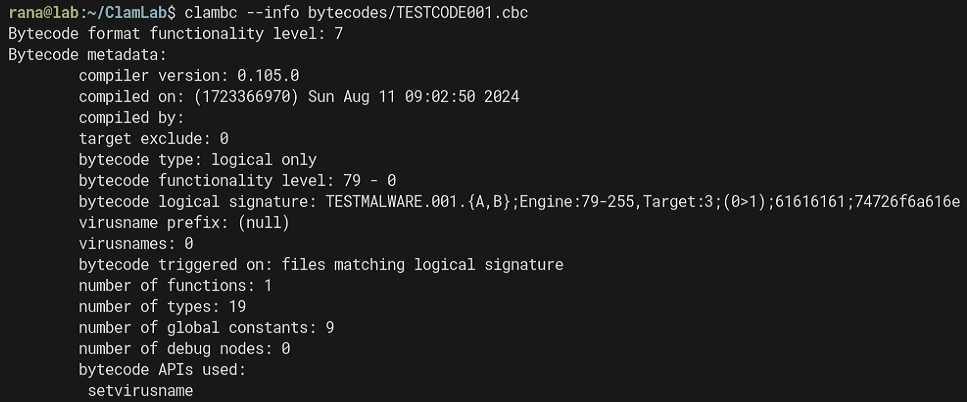
From the dump result above, you can understand information such as the Logical signature details and the number of functions inside the bytecode signature.
bytecode logical signature: TESTMALWARE.001.{A,B};Engine:79-255,Target:3;(0>1);61616161;74726f6a616eViewing the Source Code of a Bytecode Signature
Using the clambc --printsrc command, you can view the original source code used to build the bytecode signature, as shown below.
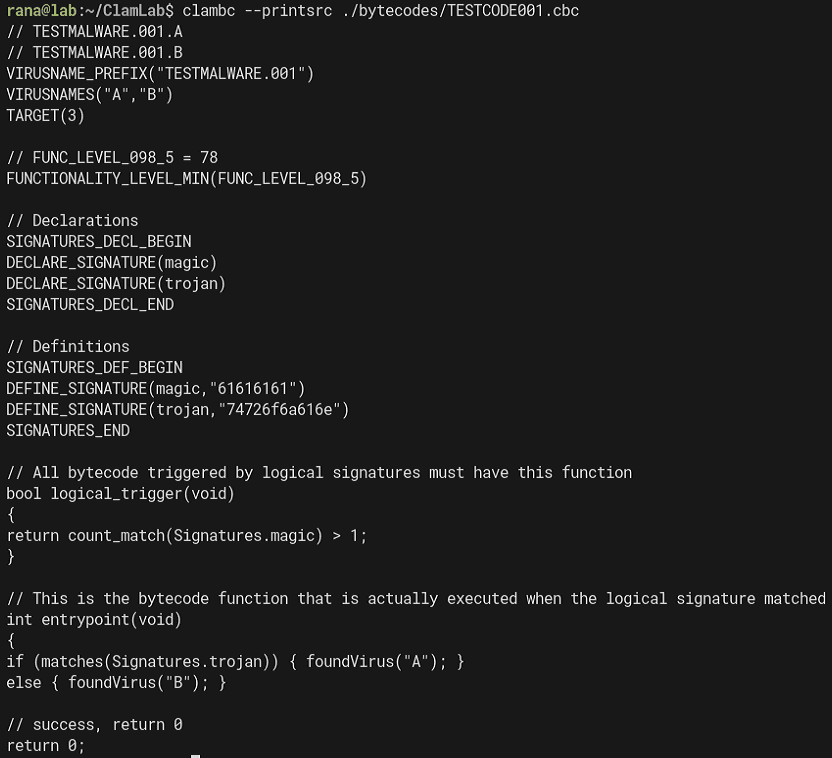
As you can see from the clambc code, this source code is embedded in encoded form in lines beginning with S inside the compiled bytecode signature.
static void print_src(const char *file)
{
    char buf[4096];
    int nread, i, found = 0, lcnt = 0;
    FILE *f = fopen(file, "r");
    if (!f) {
        fprintf(stderr, "Unable to reopen %s\n", file);
        return;
    }
    do {
        nread = fread(buf, 1, sizeof(buf), f);
        for (i = 0; i < nread - 1; i++) {
            if (buf[i] == '\n') {
                lcnt++;
            }
            /* skip over the logical trigger */
            if (lcnt >= 2 && buf[i] == '\n' && buf[i + 1] == 'S') {
                found = 1;
                i += 2;
                break;
            }
        }
    } while (!found && (nread == sizeof(buf)));
    if (debug_flag)
        printf("[clambc] Source code:");
    do {
        for (; i + 1 < nread; i++) {
            if (buf[i] == 'S' || buf[i] == '\n') {
                putc('\n', stdout);
                continue;
            }
            putc(((buf[i] & 0xf) | ((buf[i + 1] & 0xf) << 4)), stdout);
            i++;
        }
        if (i == nread - 1 && nread != 1)
            fseek(f, -1, SEEK_CUR);
        i     = 0;
        nread = fread(buf, 1, sizeof(buf), f);
    } while (nread > 0);
    fclose(f);
}
This code extracts the source using (buf[i] & 0xf) | ((buf[i + 1] & 0xf) << 4).
Reference: clamav/clambc/bcrun.c at main · Cisco-Talos/clamav
Next, we create the following Python script and confirm that the source code embedded in the bytecode signature can in fact be decoded.
code = r"""Sobob`bdeedcedemdadldgeadbeednb`c`cacnbadSobob`bdeedcedemdadldgeadbeednb`c`cacnbbdSfeidbeeecendadmdedoe`ebeedfdidhehbbbdeedcedemdadldgeadbeednb`c`cacbbibSfeidbeeecendadmdedcehbbbadbblbbbbdbbib
deadbegdeddehbccibSSobob`bfdeendcdoeldedfeedldoe`cichcoeec`bmc`bgchcSfdeendcddeidodndadldiddeieoeldedfeedldoemdidndhbfdeendcdoeldedfeedldoe`cichcoeecibSSobob`bddefcflfafbgafdgifofnfcg
ceidgdndaddeeebeedceoeddedcdldoebdedgdidndSddedcdldadbeedoeceidgdndaddeeebeedhbmfafgfifcfibSddedcdldadbeedoeceidgdndaddeeebeedhbdgbgofjfafnfibSceidgdndaddeeebeedceoeddedcdldoeednddd
Sobob`bddefffifnfifdgifofnfcg`bSceidgdndaddeeebeedceoeddedfdoebdedgdidndSddedfdidndedoeceidgdndaddeeebeedhbmfafgfifcflbbbfcacfcacfcacfcacbbibSddedfdidndedoeceidgdndaddeeebeedhbdgbgofjfafnflbbbgcdcgcbcfcfffcaffcacfcefbbib
ceidgdndaddeeebeedceoeedndddSSobob`badlflf`bbfigdgefcfofdfef`bdgbgifgfgfefbgefdf`bbfig`blfofgfifcfaflf`bcgifgfnfafdgegbgefcg`bmfegcgdg`bhfaffgef`bdghfifcg`bffegnfcfdgifofnf
bfofoflf`blfofgfifcfaflfoedgbgifgfgfefbghbfgofifdfibSkgSbgefdgegbgnf`bcfofegnfdgoemfafdgcfhfhbceifgfnfafdgegbgefcgnbmfafgfifcfib`bnc`backcSmgSSobob`bdehfifcg`bifcg`bdghfef`bbfigdgefcfofdfef`bffegnfcfdgifofnf`bdghfafdg`bifcg`bafcfdgegaflflfig`befhgefcfegdgefdf`bgghfefnf`bdghfef`blfofgfifcfaflf`bcgifgfnfafdgegbgef`bmfafdgcfhfefdf
ifnfdg`befnfdgbgig`gofifnfdghbfgofifdfibSkgSifff`bhbmfafdgcfhfefcghbceifgfnfafdgegbgefcgnbdgbgofjfafnfibib`bkg`bffofegnfdffeifbgegcghbbbadbbibkc`bmgSeflfcgef`bkg`bffofegnfdffeifbgegcghbbbbdbbibkc`bmg
Sobob`bcgegcfcfefcgcglb`bbgefdgegbgnf`b`cSbgefdgegbgnf`b`ckcSmg"""

i = 0
while True:
    if i >= len(code):
        break
    else:
        if code[i] == "S" or code[i] == "\n":
            print()
            i += 1
        else:
            w = ((ord(code[i])) & 0xf) | (((ord(code[i+1])) & 0xf) << 4)
            print(chr(w), end="")
            i += 2
Running the Python script above shows that, just as when using clambc, we can recover the original source code used for compilation.
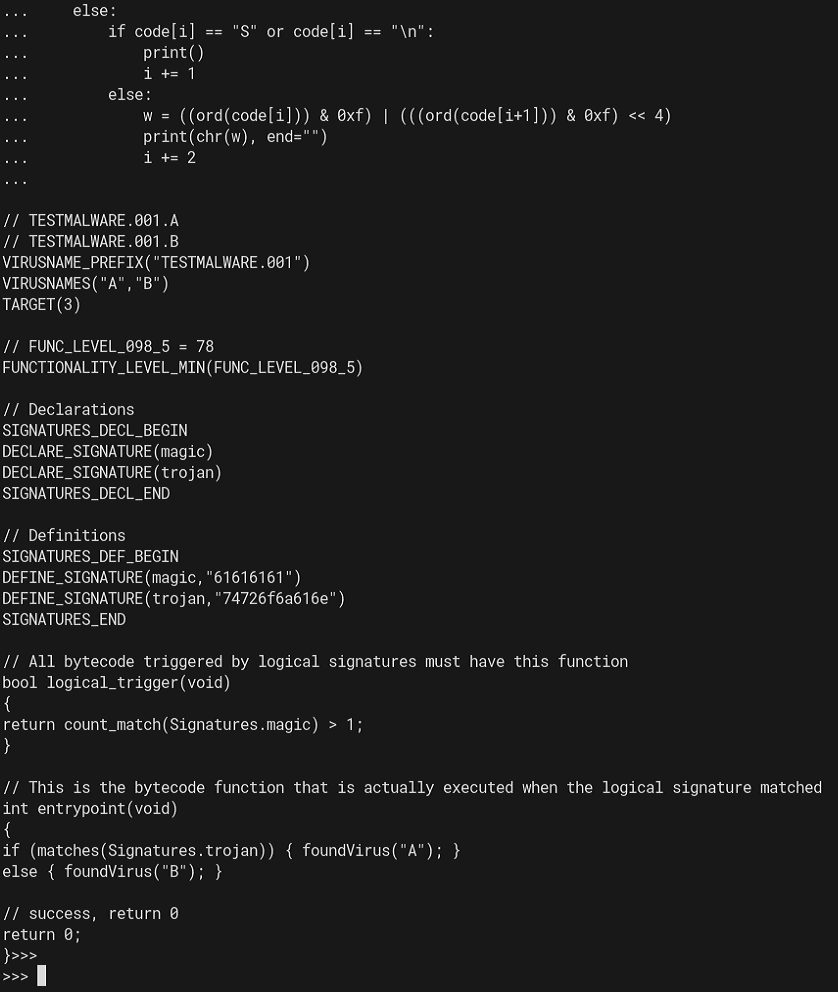
When bytecode signatures distributed officially or used in CTF problems are involved, it seems the source-code portion inside the bytecode signature is sometimes removed or replaced so that the source cannot be easily recovered with clambc.
In fact, in the Devil Hunter challenge binary, fake data generated by the following code was embedded so that the original source could not be viewed with the clambc command.
fake = b"not so easy :P\n"
line = "S"
for c in fake:
    line += chr(0x60 + (c & 0xf))
    line += chr(0x60 + ((c>>4) & 0xf))
print(line)
Reference: SECCON2022onlineCTF/reversing/devilhunter/builds/gen.py at main · SECCON/SECCON2022online_CTF
Disassembling a Bytecode Signature
If clambc --printsrc cannot be used, you can use clambc --printbcir to display the bytecode signature as readable text and analyze it.
For example, analyzing TESTCODE001.cbc, which we have been using so far, gives the following result.
$ clambc --printbcir ./bytecodes/TESTCODE001.cbc

found 19 extra types of 83 total, starting at tid 69
TID  KIND                INTERNAL
------------------------------------------------------------------------
 65: DPointerType        i8*
 66: DPointerType        i16*
 67: DPointerType        i32*
 68: DPointerType        i64*
 69: DArrayType          [1 x i8]
 70: DArrayType          [2 x i8]
 71: DArrayType          [3 x i8]
 72: DArrayType          [4 x i8]
 73: DArrayType          [5 x i8]
 74: DArrayType          [6 x i8]
 75: DArrayType          [7 x i8]
 76: DPointerType        [64 x i32]*
 77: DPointerType        [18 x i8]*
 78: DPointerType        i32**
 79: DPointerType        i8**
 80: DFunctionType       i32 func ( i32 i32 )
 81: DArrayType          [18 x i8]
 82: DArrayType          [64 x i32]
------------------------------------------------------------------------
########################################################################
####################### Function id   0 ################################
########################################################################
found a total of 9 globals
GID  ID    VALUE
------------------------------------------------------------------------
  0 [  0]: i0 unknown
  1 [  1]: [18 x i8] unknown
  2 [  2]: [18 x i8] unknown
  3 [  3]: i32* unknown
  4 [  4]: i32* unknown
  5 [  5]: i8* unknown
  6 [  6]: i8* unknown
  7 [  7]: i8* unknown
  8 [  8]: i8* unknown
------------------------------------------------------------------------
found 4 values with 0 arguments and 4 locals
VID  ID    VALUE
------------------------------------------------------------------------
  0 [  0]: i32
  1 [  1]: i1
  2 [  2]: i32
  3 [  3]: i32
------------------------------------------------------------------------
found a total of 4 constants
CID  ID    VALUE
------------------------------------------------------------------------
  0 [  4]: 0(0x0)
  1 [  5]: 17(0x11)
  2 [  6]: 17(0x11)
  3 [  7]: 0(0x0)
------------------------------------------------------------------------
found a total of 8 total values
------------------------------------------------------------------------
FUNCTION ID: F.0 -> NUMINSTS 8
BB   IDX  OPCODE              [ID /IID/MOD]  INST
------------------------------------------------------------------------
  0    0  OP_BC_LOAD          [39 /198/  3]  load  0 <- p.-2147483644
  0    1  OP_BC_ICMP_EQ       [21 /108/  3]  1 = (0 == 4)
  0    2  OP_BC_BRANCH        [17 / 85/  0]  br 1 ? bb.2 : bb.1

  1    3  OP_BC_CALL_API      [33 /168/  3]  2 = setvirusname[4] (p.-2147483640, 5)
  1    4  OP_BC_JMP           [18 / 90/  0]  jmp bb.3

  2    5  OP_BC_CALL_API      [33 /168/  3]  3 = setvirusname[4] (p.-2147483642, 6)
  2    6  OP_BC_JMP           [18 / 90/  0]  jmp bb.3

  3    7  OP_BC_RET           [19 / 98/  3]  ret 7
------------------------------------------------------------------------
The code in TESTCODE001.c was as follows.
Since this bytecode signature has only a single function, the entrypoint, only Function id 0 appears in the dump result as well.
// TESTMALWARE.001.A
// TESTMALWARE.001.B
VIRUSNAME_PREFIX("TESTMALWARE.001")
VIRUSNAMES("A","B")
TARGET(3)

// FUNC_LEVEL_098_5 = 78
FUNCTIONALITY_LEVEL_MIN(FUNC_LEVEL_098_5)

// Declarations
SIGNATURES_DECL_BEGIN
DECLARE_SIGNATURE(magic)
DECLARE_SIGNATURE(trojan)
SIGNATURES_DECL_END

// Definitions
SIGNATURES_DEF_BEGIN
DEFINE_SIGNATURE(magic,"61616161")
DEFINE_SIGNATURE(trojan,"74726f6a616e")
SIGNATURES_END

// All bytecode triggered by logical signatures must have this function
bool logical_trigger(void)
{
    return count_match(Signatures.magic) > 1;
}

// This is the bytecode function that is actually executed when the logical signature matched
int entrypoint(void)
{
    if (matches(Signatures.trojan)) { foundVirus("A"); }
    else { foundVirus("B"); }

    // success, return 0
    return 0;
}
From here, we will organize and interpret the disassembled code.
Because there is almost no public information about this disassembly output, I will work through it by trial and error while referring to the ClamAV source code.
Reference: clamav/libclamav/bytecode.c at main · Cisco-Talos/clamav
Reference: clamav/libclamav/bytecode_vm.c at main · Cisco-Talos/clamav
Reference: clamav/libclamav/clambc.h at main · Cisco-Talos/clamav
BB   IDX  OPCODE              [ID /IID/MOD]  INST
------------------------------------------------------------------------
0    0  OP_BC_LOAD          [39 /198/  3]  load  0 <- p.-2147483644
0    1  OP_BC_ICMP_EQ       [21 /108/  3]  1 = (0 == 4)
0    2  OP_BC_BRANCH        [17 / 85/  0]  br 1 ? bb.2 : bb.1
1    3  OP_BC_CALL_API      [33 /168/  3]  2 = setvirusname[4] (p.-2147483640, 5)
1    4  OP_BC_JMP           [18 / 90/  0]  jmp bb.3
2    5  OP_BC_CALL_API      [33 /168/  3]  3 = setvirusname[4] (p.-2147483642, 6)
2    6  OP_BC_JMP           [18 / 90/  0]  jmp bb.3
3    7  OP_BC_RET           [19 / 98/  3]  ret 7
First, the initial OP_BC_LOAD appears to load some value into a variable (probably the variable with ID 0).
The following OP_BC_ICMP_EQ stores the result of comparing two operands into a variable (probably the variable with ID 1).
In this case, it seems to be comparing against the constant 0 with ID 4.
OP_BC_BRANCH then determines whether to jump to bb.2 or bb.1 depending on the comparison result.
Values such as VIRUSNAME are represented as p.-2147483640, so we cannot tell which is which from that alone, but looking at the source code confirms that the structure is condition ? True : False.
// control operations (termination instructions)
case OP_BC_BRANCH:
    printf("br %d ? bb.%d : bb.%d", inst->u.branch.condition,inst->u.branch.br_true, inst->u.branch.br_false);
    (*bbnum)++;
    break;
Because having many signature variables makes it hard to read, next we will disassemble a bytecode signature generated from the following code.
int entrypoint(void)
{
    int a = 1;
    int b = 2;
    int c;

    c = a * count_match(Signatures.magic) + b * count_match(Signatures.trojan);
    if (c > 5) { foundVirus("A"); }
    else { foundVirus("B"); }

    // success, return 0
    return 0;
}
Disassembling the bytecode signature generated from this code gives the following result.
found 7 values with 0 arguments and 7 locals
VID  ID    VALUE
------------------------------------------------------------------------
0 [  0]: i32
1 [  1]: i32
2 [  2]: i32
3 [  3]: i32
4 [  4]: i1
5 [  5]: i32
6 [  6]: i32
------------------------------------------------------------------------
found a total of 5 constants
CID  ID    VALUE
------------------------------------------------------------------------
0 [  7]: 1(0x1)
1 [  8]: 5(0x5)
2 [  9]: 17(0x11)
3 [ 10]: 17(0x11)
4 [ 11]: 0(0x0)
------------------------------------------------------------------------
found a total of 12 total values
------------------------------------------------------------------------
FUNCTION ID: F.0 -> NUMINSTS 11
BB   IDX  OPCODE              [ID /IID/MOD]  INST
------------------------------------------------------------------------
0    0  OP_BC_LOAD          [39 /198/  3]  load  0 <- p.-2147483642
0    1  OP_BC_LOAD          [39 /198/  3]  load  1 <- p.-2147483643
0    2  OP_BC_SHL           [8  / 43/  3]  2 = 1 << 7
0    3  OP_BC_ADD           [1  /  8/  0]  3 = 2 + 0
0    4  OP_BC_ICMP_SGT      [27 /138/  3]  4 = (3 > 8)
0    5  OP_BC_BRANCH        [17 / 85/  0]  br 4 ? bb.1 : bb.2

1    6  OP_BC_CALL_API      [33 /168/  3]  5 = setvirusname[4] (p.-2147483638, 9)
1    7  OP_BC_JMP           [18 / 90/  0]  jmp bb.3

2    8  OP_BC_CALL_API      [33 /168/  3]  6 = setvirusname[4] (p.-2147483640, 10)
2    9  OP_BC_JMP           [18 / 90/  0]  jmp bb.3

3   10  OP_BC_RET           [19 / 98/  3]  ret 11
------------------------------------------------------------------------
First, it stores the counts of magic and trojan in variables 0 and 1.
After that, it stores the result of shifting variable 1 left by one bit (that is, multiplying by 2) into variable 2, and then adds variable 0 to it.
The computation up to this point corresponds to the following code.
int a = 1;
int b = 2;
int c;
c = a * count_match(Signatures.magic) + b * count_match(Signatures.trojan);
It then uses OP_BC_ICMP_SGT to compare whether the computed result (variable 3) is greater than 5, and branches accordingly.
In this way, the disassembly output of a bytecode signature can be read much like VM code.
Debugging Bytecode Signatures
You can debug the VM execution of a bytecode signature to some extent using gdb.
You can run the debugging session with the following commands.
gdb ~/clamav/build/clamscan/clamscan

# Load libclamav
run --bytecode-unsigned=yes --disable-cache -d ./bytecodes/TESTCODE001.cbc ./samplefiles/TEST001.txt

# Set a breakpoint and run
b cli_vm_execute
run --bytecode-unsigned=yes --disable-cache -d ./bytecodes/TESTCODE001.cbc ./samplefiles/TEST001.txt
cli_vm_execute is a function defined in bytecode_vm.c that is responsible for interpreting and executing the opcodes and operands inside a bytecode signature.
Reference: clamav/libclamav/bytecode_vm.c at main · Cisco-Talos/clamav
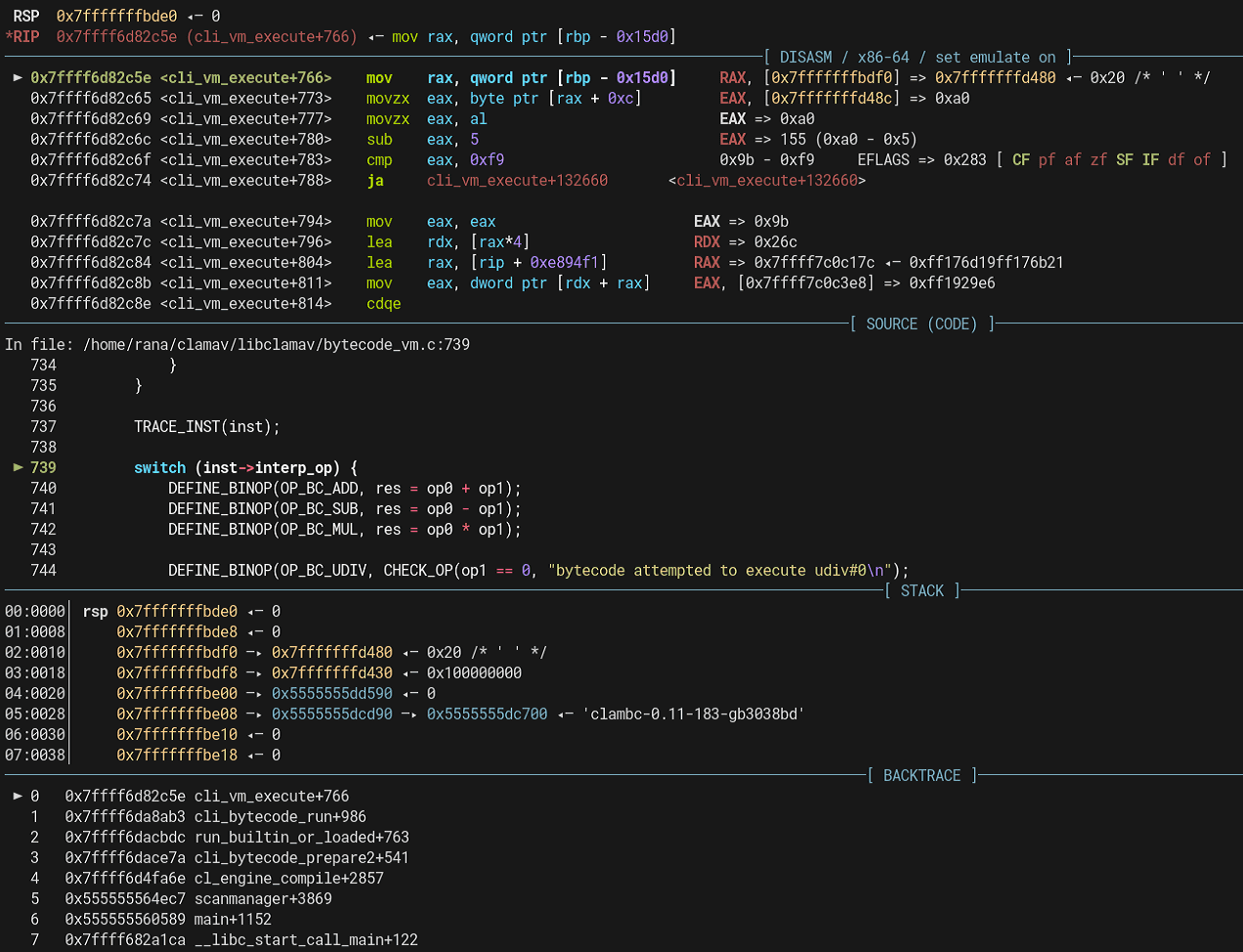
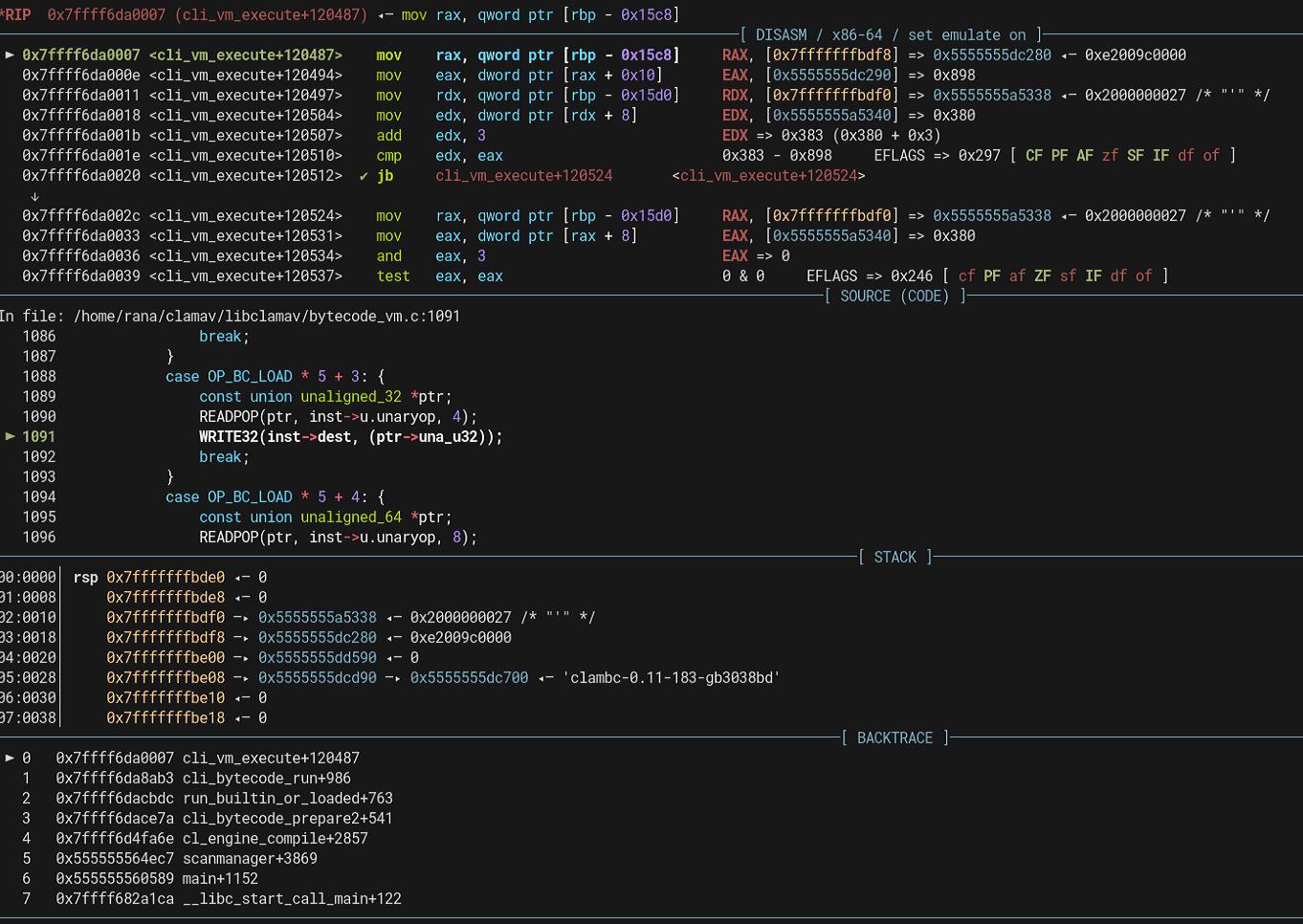
If you continue debugging this function, you can reach the execution code for handling each opcode as shown below.
Enabling Bytecode Signature Debug Traces in libclamav
Although this article does not use it, when debugging bytecode signatures, a very convenient approach is to modify the libclamav source code so that it outputs debug traces.
I have summarized the details in the following article.
Reference: How to Enable Bytecode Signature Debug Traces in libclamav
Solving Devil Hunter by Analyzing the Bytecode Signature
Now that I have mostly organized my understanding of ClamAV signatures, it is finally time to solve the Devil Hunter challenge.
The Devil Hunter challenge binary was the following cbc file.
ClamBCafhaio`lfcf|aa```c``a```|ah`cnbac`cecnb`c``beaacp`clamcoincidencejb:4096
Seccon.Reversing.{FLAG};Engine:56-255,Target:0;0;0:534543434f4e7b
Teddaaahdabahdacahdadahdaeahdafahdagahebdeebaddbdbahebndebceaacb`bbadb`baacb`bb`bb`bdaib`bdbfaah
Eaeacabbae|aebgefafdf``adbbe|aecgefefkf``aebae|amcgefdgfgifbgegcgnfafmfef``
G`ad`@`bdeBceBefBcfBcfBofBnfBnbBbeBefBfgBefBbgBcgBifBnfBgfBnbBfdBldBadBgd@`bad@Aa`bad@Aa`
A`b`bLabaa`b`b`Faeac
Baa``b`abTaa`aaab
Bb`baaabbaeAc`BeadTbaab
BTcab`b@dE
A`aaLbhfb`dab`dab`daahabndabad`bndabad`b`b`aa`b`d`b`d`b`d`b`b`bad`bad`b`b`aa`b`d`b`b`aa`ah`aa`aa`b`b`aa`b`d`b`d`b`d`b`b`bad`bad`b`b`b`b`b`d`b`d`b`b`b`b`bad`b`b`bad`b`d`aa`b`b`aa`b`b`bad`b`b`bad`b`b`aa`aa`b`b`bad`b`b`bad`b`b`aa`aa`b`b`bad`b`b`bad`b`b`aa`aa`b`b`bad`b`b`bad`b`b`aa`aa`b`b`bad`b`b`bad`b`b`aa`aa`b`b`bad`b`b`bad`b`b`aa`aa`b`b`bad`b`b`bad`b`b`aa`aa`b`b`bad`b`b`bad`b`b`aa`aa`b`d`b`d`aa`Fbcgah
Bbadaedbbodad@dbadagdbbodaf@db`bahabbadAgd@db`d`bb@habTbaab
Baaaiiab`dbbaBdbhb`d`bbbbaabTaaaiabac
Bb`dajbbabajb`dakh`ajB`bhb`dalj`akB`bhb`bamn`albadandbbodad@dbadaocbbadanamb`bb`aabbabaoAadaabaanab`bb`aAadb`dbbaa`ajAahb`d`bb@h`Taabaaagaa
Bb`bbcaabbabacAadaabdakab`bbca@dahbeabbacbeaaabfaeaahbeaBmgaaabgak`bdabfab`d`bb@h`Taabgaadag
Bb`bbhaabbabacAadaabiakab`bbha@db`d`bb@haab`d`bb@h`Taabiaagae
Bb`dbjabbaabjab`dbkah`bjaB`bhb`dblaj`bkaB`bhb`bbman`blabadbnadbbodad@dbadboacbbadbnabmab`bb`bgbboab`bbab`baacb`bb`dbbbh`bjaBnahb`dbcbj`bbbB`bhb`bbdbn`bcbb`bbebc`Add@dbadbfbcbbadagbebb`bbgbc`Addbdbbadbhbcbbadbfbbgbb`b`fbbabbhbb`dbiba`bjaAdhaabjbiab`dbibBdbhb`d`bbbibaaTaabjbaeaf
Bb`bbkbgbagaablbeab`bbkbHbj`hnicgdb`bbmbc`Add@dbadbnbcbbadagbmbb`bbobc`AddAadbadb`ccbbadbnbbobb`bbacgbb`caabbceab`bbacHcj`hnjjcdaabcck`blbbbcb`bbdcc`Add@dbadbeccbbadagbdcb`bbfcc`AddAbdbadbgccbbadbecbfcb`bbhcgbbgcaabiceab`bbhcHoigndjkcdaabjck`bccbicb`bbkcc`Add@dbadblccbbadagbkcb`bbmcc`AddAcdbadbnccbbadblcbmcb`bbocgbbncaab`deab`bbocHcoaljkhgdaabadk`bjcb`db`bbbdc`Add@dbadbcdcbbadagbbdb`bbddc`AddAddbadbedcbbadbcdbddb`bbfdgbbedaabgdeab`bbfdHcoalionedaabhdk`badbgdb`bbidc`Add@dbadbjdcbbadagbidb`bbkdc`AddAedbadbldcbbadbjdbkdb`bbmdgbbldaabndeab`bbmdHoilnikkcdaabodk`bhdbndb`bb`ec`Add@dbadbaecbbadagb`eb`bbbec`AddAfdbadbcecbbadbaebbeb`bbdegbbceaabeeeab`bbdeHdochfheedaabfek`bodbeeb`bbgec`Add@dbadbhecbbadagbgeb`bbiec`AddAgdbadbjecbbadbhebieb`bbkegbbjeaableeab`bbkeHdiemjoeedaabmek`bfebleb`bbnec`Add@dbadboecbbadagbneb`bb`fc`AddAhdbadbafcbbadboeb`fb`bbbfgbbafaabcfeab`bbbfHoimmoklfdaabdfk`bmebcfb`dbefo`bdfb`d`bbbef`Tbaag
Bb`dbffbb`bffaabgfn`bffTcaaabgfE
Aab`bLbaab`b`b`dab`dab`d`b`d`b`b`b`b`b`b`b`b`b`b`b`b`b`b`b`b`b`b`b`b`aa`b`d`b`d`Fbfaac
Bb`d`bb@habb`d`bbG`lckjljhaaTbaaa
Bb`dacbbaaacb`dadbbabadb`baen`acb`bafn`adb`bagh`afAcdb`bahi``agb`baik`ahBoodb`bajm`aiaeb`bakh`ajAhdb`bali`aeBhadb`baml`akalb`bana`afAadaaaoeab`banAddb`db`ao`anb`dbaao`amb`d`bbb`aabb`d`bbbaaaaTaaaoabaa
BTcab`bamE
Snfofdg`bcgof`befafcgig`bjc`ej`
Inspecting the CBC File Information
First, I checked the file information with clambc --info.
The logical signature that triggers this bytecode signature appears to be the one defined with 534543434f4e7b(SECCON{) as the signature.
$ clambc --info flag.cbc

Bytecode format functionality level: 6
Bytecode metadata:
        compiler version: 0.105.0
        compiled on: (1668026257) Wed Nov  9 20:37:37 2022
        compiled by:
        target exclude: 0
        bytecode type: logical only
        bytecode functionality level: 0 - 0
        bytecode logical signature: Seccon.Reversing.{FLAG};Engine:56-255,Target:0;0;0:534543434f4e7b
        virusname prefix: (null)
        virusnames: 0
        bytecode triggered on: files matching logical signature
        number of functions: 3
        number of types: 21
        number of global constants: 4
        number of debug nodes: 0
        bytecode APIs used:
         read, seek, setvirusname
Unfortunately, the source-code information seems to have been tampered with, and I could not retrieve it even with clambc --printsrc.

So I decided to inspect the output of clambc --printbc instead.
$ clambc --printbc flag.cbc
found 21 extra types of 85 total, starting at tid 69
TID  KIND                INTERNAL
------------------------------------------------------------------------
65: DPointerType        i8*
66: DPointerType        i16*
67: DPointerType        i32*
68: DPointerType        i64*
69: DArrayType          [1 x i8]
70: DArrayType          [2 x i8]
71: DArrayType          [3 x i8]
72: DArrayType          [4 x i8]
73: DArrayType          [5 x i8]
74: DArrayType          [6 x i8]
75: DArrayType          [7 x i8]
76: DPointerType        [22 x i8]*
77: DPointerType        i8**
78: DArrayType          [36 x i8]
79: DPointerType        [36 x i8]*
80: DPointerType        [9 x i32]*
81: DFunctionType       i32 func ( i32 i32 )
82: DFunctionType       i32 func ( i32 i32 )
83: DArrayType          [9 x i32]
84: DArrayType          [22 x i8]
------------------------------------------------------------------------
########################################################################
####################### Function id   0 ################################
########################################################################
found a total of 4 globals
GID  ID    VALUE
------------------------------------------------------------------------
0 [  0]: i0 unknown
1 [  1]: [22 x i8] unknown
2 [  2]: i8* unknown
3 [  3]: i8* unknown
------------------------------------------------------------------------
found 2 values with 0 arguments and 2 locals
VID  ID    VALUE
------------------------------------------------------------------------
0 [  0]: i1
1 [  1]: i32
------------------------------------------------------------------------
found a total of 2 constants
CID  ID    VALUE
------------------------------------------------------------------------
0 [  2]: 21(0x15)
1 [  3]: 0(0x0)
------------------------------------------------------------------------
found a total of 4 total values
------------------------------------------------------------------------
FUNCTION ID: F.0 -> NUMINSTS 5
BB   IDX  OPCODE              [ID /IID/MOD]  INST
------------------------------------------------------------------------
0    0  OP_BC_CALL_DIRECT   [32 /160/  0]  0 = call F.1 ()
0    1  OP_BC_BRANCH        [17 / 85/  0]  br 0 ? bb.1 : bb.2

1    2  OP_BC_CALL_API      [33 /168/  3]  1 = setvirusname[4] (p.-2147483645, 2)
1    3  OP_BC_JMP           [18 / 90/  0]  jmp bb.2

2    4  OP_BC_RET           [19 / 98/  3]  ret 3
------------------------------------------------------------------------
########################################################################
####################### Function id   1 ################################
########################################################################
found a total of 4 globals
GID  ID    VALUE
------------------------------------------------------------------------
0 [  0]: i0 unknown
1 [  1]: [22 x i8] unknown
2 [  2]: i8* unknown
3 [  3]: i8* unknown
------------------------------------------------------------------------
found 104 values with 0 arguments and 104 locals
VID  ID    VALUE
------------------------------------------------------------------------
0 [  0]: alloc i64
1 [  1]: alloc i64
2 [  2]: alloc i64
3 [  3]: alloc i8
4 [  4]: alloc [36 x i8]
5 [  5]: i8*
6 [  6]: alloc [36 x i8]
7 [  7]: i8*
8 [  8]: i32
9 [  9]: i1
10 [ 10]: i64
11 [ 11]: i64
12 [ 12]: i64
13 [ 13]: i32
14 [ 14]: i8*
15 [ 15]: i8*
16 [ 16]: i32
17 [ 17]: i1
18 [ 18]: i64
19 [ 19]: i32
20 [ 20]: i1
21 [ 21]: i8
22 [ 22]: i1
23 [ 23]: i1
24 [ 24]: i32
25 [ 25]: i1
26 [ 26]: i64
27 [ 27]: i64
28 [ 28]: i64
29 [ 29]: i32
30 [ 30]: i8*
31 [ 31]: i8*
32 [ 32]: i32
33 [ 33]: i32
34 [ 34]: i64
35 [ 35]: i64
36 [ 36]: i32
37 [ 37]: i32
38 [ 38]: i8*
39 [ 39]: i32
40 [ 40]: i8*
41 [ 41]: i64
42 [ 42]: i1
43 [ 43]: i32
44 [ 44]: i1
45 [ 45]: i32
46 [ 46]: i8*
47 [ 47]: i32
48 [ 48]: i8*
49 [ 49]: i32
50 [ 50]: i1
51 [ 51]: i1
52 [ 52]: i32
53 [ 53]: i8*
54 [ 54]: i32
55 [ 55]: i8*
56 [ 56]: i32
57 [ 57]: i1
58 [ 58]: i1
59 [ 59]: i32
60 [ 60]: i8*
61 [ 61]: i32
62 [ 62]: i8*
63 [ 63]: i32
64 [ 64]: i1
65 [ 65]: i1
66 [ 66]: i32
67 [ 67]: i8*
68 [ 68]: i32
69 [ 69]: i8*
70 [ 70]: i32
71 [ 71]: i1
72 [ 72]: i1
73 [ 73]: i32
74 [ 74]: i8*
75 [ 75]: i32
76 [ 76]: i8*
77 [ 77]: i32
78 [ 78]: i1
79 [ 79]: i1
80 [ 80]: i32
81 [ 81]: i8*
82 [ 82]: i32
83 [ 83]: i8*
84 [ 84]: i32
85 [ 85]: i1
86 [ 86]: i1
87 [ 87]: i32
88 [ 88]: i8*
89 [ 89]: i32
90 [ 90]: i8*
91 [ 91]: i32
92 [ 92]: i1
93 [ 93]: i1
94 [ 94]: i32
95 [ 95]: i8*
96 [ 96]: i32
97 [ 97]: i8*
98 [ 98]: i32
99 [ 99]: i1
100 [100]: i1
101 [101]: i64
102 [102]: i64
103 [103]: i1
------------------------------------------------------------------------
found a total of 72 constants
CID  ID    VALUE
------------------------------------------------------------------------
0 [104]: 0(0x0)
1 [105]: 0(0x0)
2 [106]: 7(0x7)
3 [107]: 0(0x0)
4 [108]: 0(0x0)
5 [109]: 36(0x24)
6 [110]: 32(0x20)
7 [111]: 32(0x20)
8 [112]: 0(0x0)
9 [113]: 1(0x1)
10 [114]: 1(0x1)
11 [115]: 1(0x1)
12 [116]: 0(0x0)
13 [117]: 1(0x1)
14 [118]: 0(0x0)
15 [119]: 125(0x7d)
16 [120]: 0(0x0)
17 [121]: 1(0x1)
18 [122]: 0(0x0)
19 [123]: 0(0x0)
20 [124]: 0(0x0)
21 [125]: 32(0x20)
22 [126]: 32(0x20)
23 [127]: 0(0x0)
24 [128]: 30(0x1e)
25 [129]: 32(0x20)
26 [130]: 4(0x4)
27 [131]: 0(0x0)
28 [132]: 4(0x4)
29 [133]: 4(0x4)
30 [134]: 36(0x24)
31 [135]: 1939767458(0x739e80a2)
32 [136]: 4(0x4)
33 [137]: 0(0x0)
34 [138]: 4(0x4)
35 [139]: 1(0x1)
36 [140]: 984514723(0x3aae80a3)
37 [141]: 4(0x4)
38 [142]: 0(0x0)
39 [143]: 4(0x4)
40 [144]: 2(0x2)
41 [145]: 1000662943(0x3ba4e79f)
42 [146]: 4(0x4)
43 [147]: 0(0x0)
44 [148]: 4(0x4)
45 [149]: 3(0x3)
46 [150]: 2025505267(0x78bac1f3)
47 [151]: 4(0x4)
48 [152]: 0(0x0)
49 [153]: 4(0x4)
50 [154]: 4(0x4)
51 [155]: 1593426419(0x5ef9c1f3)
52 [156]: 4(0x4)
53 [157]: 0(0x0)
54 [158]: 4(0x4)
55 [159]: 5(0x5)
56 [160]: 1002040479(0x3bb9ec9f)
57 [161]: 4(0x4)
58 [162]: 0(0x0)
59 [163]: 4(0x4)
60 [164]: 6(0x6)
61 [165]: 1434878964(0x558683f4)
62 [166]: 4(0x4)
63 [167]: 0(0x0)
64 [168]: 4(0x4)
65 [169]: 7(0x7)
66 [170]: 1442502036(0x55fad594)
67 [171]: 4(0x4)
68 [172]: 0(0x0)
69 [173]: 4(0x4)
70 [174]: 8(0x8)
71 [175]: 1824513439(0x6cbfdd9f)
------------------------------------------------------------------------
found a total of 176 total values
------------------------------------------------------------------------
FUNCTION ID: F.1 -> NUMINSTS 115
BB   IDX  OPCODE              [ID /IID/MOD]  INST
------------------------------------------------------------------------
0    0  OP_BC_GEPZ          [36 /184/  4]  5 = gepz p.4 + (104)
0    1  OP_BC_GEPZ          [36 /184/  4]  7 = gepz p.6 + (105)
0    2  OP_BC_CALL_API      [33 /168/  3]  8 = seek[3] (106, 107)
0    3  OP_BC_COPY          [34 /174/  4]  cp 108 -> 2
0    4  OP_BC_JMP           [18 / 90/  0]  jmp bb.2

1    5  OP_BC_ICMP_ULT      [25 /129/  4]  9 = (18 < 109)
1    6  OP_BC_COPY          [34 /174/  4]  cp 18 -> 2
1    7  OP_BC_BRANCH        [17 / 85/  0]  br 9 ? bb.2 : bb.3

2    8  OP_BC_COPY          [34 /174/  4]  cp 2 -> 10
2    9  OP_BC_SHL           [8  / 44/  4]  11 = 10 << 110
2   10  OP_BC_ASHR          [10 / 54/  4]  12 = 11 >> 111
2   11  OP_BC_TRUNC         [14 / 73/  3]  13 = 12 trunc ffffffffffffffff
2   12  OP_BC_GEPZ          [36 /184/  4]  14 = gepz p.4 + (112)
2   13  OP_BC_GEP1          [35 /179/  4]  15 = gep1 p.14 + (13 * 65)
2   14  OP_BC_CALL_API      [33 /168/  3]  16 = read[1] (p.15, 113)
2   15  OP_BC_ICMP_SLT      [30 /153/  3]  17 = (16 < 114)
2   16  OP_BC_ADD           [1  /  9/  0]  18 = 10 + 115
2   17  OP_BC_COPY          [34 /174/  4]  cp 116 -> 0
2   18  OP_BC_BRANCH        [17 / 85/  0]  br 17 ? bb.7 : bb.1

3   19  OP_BC_CALL_API      [33 /168/  3]  19 = read[1] (p.3, 117)
3   20  OP_BC_ICMP_SGT      [27 /138/  3]  20 = (19 > 118)
3   21  OP_BC_COPY          [34 /171/  1]  cp 3 -> 21
3   22  OP_BC_ICMP_EQ       [21 /106/  1]  22 = (21 == 119)
3   23  OP_BC_AND           [11 / 55/  0]  23 = 20 & 22
3   24  OP_BC_COPY          [34 /174/  4]  cp 120 -> 0
3   25  OP_BC_BRANCH        [17 / 85/  0]  br 23 ? bb.4 : bb.7

4   26  OP_BC_CALL_API      [33 /168/  3]  24 = read[1] (p.3, 121)
4   27  OP_BC_ICMP_SGT      [27 /138/  3]  25 = (24 > 122)
4   28  OP_BC_COPY          [34 /174/  4]  cp 123 -> 1
4   29  OP_BC_COPY          [34 /174/  4]  cp 124 -> 0
4   30  OP_BC_BRANCH        [17 / 85/  0]  br 25 ? bb.7 : bb.5

5   31  OP_BC_COPY          [34 /174/  4]  cp 1 -> 26
5   32  OP_BC_SHL           [8  / 44/  4]  27 = 26 << 125
5   33  OP_BC_ASHR          [10 / 54/  4]  28 = 27 >> 126
5   34  OP_BC_TRUNC         [14 / 73/  3]  29 = 28 trunc ffffffffffffffff
5   35  OP_BC_GEPZ          [36 /184/  4]  30 = gepz p.4 + (127)
5   36  OP_BC_GEP1          [35 /179/  4]  31 = gep1 p.30 + (29 * 65)
5   37  OP_BC_LOAD          [39 /198/  3]  load  32 <- p.31
5   38  OP_BC_CALL_DIRECT   [32 /163/  3]  33 = call F.2 (32)
5   39  OP_BC_SHL           [8  / 44/  4]  34 = 26 << 128
5   40  OP_BC_ASHR          [10 / 54/  4]  35 = 34 >> 129
5   41  OP_BC_TRUNC         [14 / 73/  3]  36 = 35 trunc ffffffffffffffff
5   42  OP_BC_MUL           [3  / 18/  0]  37 = 130 * 131
5   43  OP_BC_GEP1          [35 /179/  4]  38 = gep1 p.7 + (37 * 65)
5   44  OP_BC_MUL           [3  / 18/  0]  39 = 132 * 36
5   45  OP_BC_GEP1          [35 /179/  4]  40 = gep1 p.38 + (39 * 65)
5   46  OP_BC_STORE         [38 /193/  3]  store 33 -> p.40
5   47  OP_BC_ADD           [1  /  9/  0]  41 = 26 + 133
5   48  OP_BC_ICMP_ULT      [25 /129/  4]  42 = (41 < 134)
5   49  OP_BC_COPY          [34 /174/  4]  cp 41 -> 1
5   50  OP_BC_BRANCH        [17 / 85/  0]  br 42 ? bb.5 : bb.6

6   51  OP_BC_LOAD          [39 /198/  3]  load  43 <- p.7
6   52  OP_BC_ICMP_EQ       [21 /108/  3]  44 = (43 == 135)
6   53  OP_BC_MUL           [3  / 18/  0]  45 = 136 * 137
6   54  OP_BC_GEP1          [35 /179/  4]  46 = gep1 p.7 + (45 * 65)
6   55  OP_BC_MUL           [3  / 18/  0]  47 = 138 * 139
6   56  OP_BC_GEP1          [35 /179/  4]  48 = gep1 p.46 + (47 * 65)
6   57  OP_BC_LOAD          [39 /198/  3]  load  49 <- p.48
6   58  OP_BC_ICMP_EQ       [21 /108/  3]  50 = (49 == 140)
6   59  OP_BC_AND           [11 / 55/  0]  51 = 44 & 50
6   60  OP_BC_MUL           [3  / 18/  0]  52 = 141 * 142
6   61  OP_BC_GEP1          [35 /179/  4]  53 = gep1 p.7 + (52 * 65)
6   62  OP_BC_MUL           [3  / 18/  0]  54 = 143 * 144
6   63  OP_BC_GEP1          [35 /179/  4]  55 = gep1 p.53 + (54 * 65)
6   64  OP_BC_LOAD          [39 /198/  3]  load  56 <- p.55
6   65  OP_BC_ICMP_EQ       [21 /108/  3]  57 = (56 == 145)
6   66  OP_BC_AND           [11 / 55/  0]  58 = 51 & 57
6   67  OP_BC_MUL           [3  / 18/  0]  59 = 146 * 147
6   68  OP_BC_GEP1          [35 /179/  4]  60 = gep1 p.7 + (59 * 65)
6   69  OP_BC_MUL           [3  / 18/  0]  61 = 148 * 149
6   70  OP_BC_GEP1          [35 /179/  4]  62 = gep1 p.60 + (61 * 65)
6   71  OP_BC_LOAD          [39 /198/  3]  load  63 <- p.62
6   72  OP_BC_ICMP_EQ       [21 /108/  3]  64 = (63 == 150)
6   73  OP_BC_AND           [11 / 55/  0]  65 = 58 & 64
6   74  OP_BC_MUL           [3  / 18/  0]  66 = 151 * 152
6   75  OP_BC_GEP1          [35 /179/  4]  67 = gep1 p.7 + (66 * 65)
6   76  OP_BC_MUL           [3  / 18/  0]  68 = 153 * 154
6   77  OP_BC_GEP1          [35 /179/  4]  69 = gep1 p.67 + (68 * 65)
6   78  OP_BC_LOAD          [39 /198/  3]  load  70 <- p.69
6   79  OP_BC_ICMP_EQ       [21 /108/  3]  71 = (70 == 155)
6   80  OP_BC_AND           [11 / 55/  0]  72 = 65 & 71
6   81  OP_BC_MUL           [3  / 18/  0]  73 = 156 * 157
6   82  OP_BC_GEP1          [35 /179/  4]  74 = gep1 p.7 + (73 * 65)
6   83  OP_BC_MUL           [3  / 18/  0]  75 = 158 * 159
6   84  OP_BC_GEP1          [35 /179/  4]  76 = gep1 p.74 + (75 * 65)
6   85  OP_BC_LOAD          [39 /198/  3]  load  77 <- p.76
6   86  OP_BC_ICMP_EQ       [21 /108/  3]  78 = (77 == 160)
6   87  OP_BC_AND           [11 / 55/  0]  79 = 72 & 78
6   88  OP_BC_MUL           [3  / 18/  0]  80 = 161 * 162
6   89  OP_BC_GEP1          [35 /179/  4]  81 = gep1 p.7 + (80 * 65)
6   90  OP_BC_MUL           [3  / 18/  0]  82 = 163 * 164
6   91  OP_BC_GEP1          [35 /179/  4]  83 = gep1 p.81 + (82 * 65)
6   92  OP_BC_LOAD          [39 /198/  3]  load  84 <- p.83
6   93  OP_BC_ICMP_EQ       [21 /108/  3]  85 = (84 == 165)
6   94  OP_BC_AND           [11 / 55/  0]  86 = 79 & 85
6   95  OP_BC_MUL           [3  / 18/  0]  87 = 166 * 167
6   96  OP_BC_GEP1          [35 /179/  4]  88 = gep1 p.7 + (87 * 65)
6   97  OP_BC_MUL           [3  / 18/  0]  89 = 168 * 169
6   98  OP_BC_GEP1          [35 /179/  4]  90 = gep1 p.88 + (89 * 65)
6   99  OP_BC_LOAD          [39 /198/  3]  load  91 <- p.90
6  100  OP_BC_ICMP_EQ       [21 /108/  3]  92 = (91 == 170)
6  101  OP_BC_AND           [11 / 55/  0]  93 = 86 & 92
6  102  OP_BC_MUL           [3  / 18/  0]  94 = 171 * 172
6  103  OP_BC_GEP1          [35 /179/  4]  95 = gep1 p.7 + (94 * 65)
6  104  OP_BC_MUL           [3  / 18/  0]  96 = 173 * 174
6  105  OP_BC_GEP1          [35 /179/  4]  97 = gep1 p.95 + (96 * 65)
6  106  OP_BC_LOAD          [39 /198/  3]  load  98 <- p.97
6  107  OP_BC_ICMP_EQ       [21 /108/  3]  99 = (98 == 175)
6  108  OP_BC_AND           [11 / 55/  0]  100 = 93 & 99
6  109  OP_BC_SEXT          [15 / 79/  4]  101 = 100 sext 1
6  110  OP_BC_COPY          [34 /174/  4]  cp 101 -> 0
6  111  OP_BC_JMP           [18 / 90/  0]  jmp bb.7

7  112  OP_BC_COPY          [34 /174/  4]  cp 0 -> 102
7  113  OP_BC_TRUNC         [14 / 70/  0]  103 = 102 trunc ffffffffffffffff
7  114  OP_BC_RET           [19 / 95/  0]  ret 103
------------------------------------------------------------------------
########################################################################
####################### Function id   2 ################################
########################################################################
found a total of 4 globals
GID  ID    VALUE
------------------------------------------------------------------------
0 [  0]: i0 unknown
1 [  1]: [22 x i8] unknown
2 [  2]: i8* unknown
3 [  3]: i8* unknown
------------------------------------------------------------------------
found 18 values with 1 arguments and 17 locals
VID  ID    VALUE
------------------------------------------------------------------------
0 [  0]: i32 argument
1 [  1]: alloc i64
2 [  2]: alloc i64
3 [  3]: i64
4 [  4]: i64
5 [  5]: i32
6 [  6]: i32
7 [  7]: i32
8 [  8]: i32
9 [  9]: i32
10 [ 10]: i32
11 [ 11]: i32
12 [ 12]: i32
13 [ 13]: i32
14 [ 14]: i32
15 [ 15]: i1
16 [ 16]: i64
17 [ 17]: i64
------------------------------------------------------------------------
found a total of 8 constants
CID  ID    VALUE
------------------------------------------------------------------------
0 [ 18]: 0(0x0)
1 [ 19]: 181056448(0xacab3c0)
2 [ 20]: 3(0x3)
3 [ 21]: 255(0xff)
4 [ 22]: 8(0x8)
5 [ 23]: 24(0x18)
6 [ 24]: 1(0x1)
7 [ 25]: 4(0x4)
------------------------------------------------------------------------
found a total of 26 total values
------------------------------------------------------------------------
FUNCTION ID: F.2 -> NUMINSTS 22
BB   IDX  OPCODE              [ID /IID/MOD]  INST
------------------------------------------------------------------------
0    0  OP_BC_COPY          [34 /174/  4]  cp 18 -> 2
0    1  OP_BC_COPY          [34 /174/  4]  cp 19 -> 1
0    2  OP_BC_JMP           [18 / 90/  0]  jmp bb.1

1    3  OP_BC_COPY          [34 /174/  4]  cp 1 -> 3
1    4  OP_BC_COPY          [34 /174/  4]  cp 2 -> 4
1    5  OP_BC_TRUNC         [14 / 73/  3]  5 = 3 trunc ffffffffffffffff
1    6  OP_BC_TRUNC         [14 / 73/  3]  6 = 4 trunc ffffffffffffffff
1    7  OP_BC_SHL           [8  / 43/  3]  7 = 6 << 20
1    8  OP_BC_LSHR          [9  / 48/  3]  8 = 0 >> 7
1    9  OP_BC_AND           [11 / 58/  3]  9 = 8 & 21
1   10  OP_BC_XOR           [13 / 68/  3]  10 = 9 ^ 5
1   11  OP_BC_SHL           [8  / 43/  3]  11 = 10 << 22
1   12  OP_BC_LSHR          [9  / 48/  3]  12 = 5 >> 23
1   13  OP_BC_OR            [12 / 63/  3]  13 = 11 | 12
1   14  OP_BC_ADD           [1  /  8/  0]  14 = 6 + 24
1   15  OP_BC_ICMP_EQ       [21 /108/  3]  15 = (14 == 25)
1   16  OP_BC_SEXT          [15 / 79/  4]  16 = 14 sext 20
1   17  OP_BC_SEXT          [15 / 79/  4]  17 = 13 sext 20
1   18  OP_BC_COPY          [34 /174/  4]  cp 16 -> 2
1   19  OP_BC_COPY          [34 /174/  4]  cp 17 -> 1
1   20  OP_BC_BRANCH        [17 / 85/  0]  br 15 ? bb.2 : bb.1

2   21  OP_BC_RET           [19 / 98/  3]  ret 13
------------------------------------------------------------------------
This signature appears to define three functions, with IDs 0 through 2.
Among them, the function with ID 0 shown below looks like the entry point.
Inside it, the result of call F.1 () is evaluated, and if it is True, the implementation returns foundVirus.
BB   IDX  OPCODE              [ID /IID/MOD]  INST
------------------------------------------------------------------------
0    0  OP_BC_CALL_DIRECT   [32 /160/  0]  0 = call F.1 ()
0    1  OP_BC_BRANCH        [17 / 85/  0]  br 0 ? bb.1 : bb.2

1    2  OP_BC_CALL_API      [33 /168/  3]  1 = setvirusname[4] (p.-2147483645, 2)
1    3  OP_BC_JMP           [18 / 90/  0]  jmp bb.2

2    4  OP_BC_RET           [19 / 98/  3]  ret 3
That suggests the correct Flag is the input for which call F.1 () returns True.
The function with ID 1 seems to compare some kind of values.
It also executes the function with ID 2 via call F.2 (32).
Investigating Func2
The function with ID 1 seems to contain the main logic, but I decided to examine the shorter function with ID 2 first.
Below is the disassembly of the function with ID 2 (hereafter, Func2).
########################################################################
####################### Function id   2 ################################
########################################################################
found a total of 4 globals
GID  ID    VALUE
------------------------------------------------------------------------
0 [  0]: i0 unknown
1 [  1]: [22 x i8] unknown
2 [  2]: i8* unknown
3 [  3]: i8* unknown
------------------------------------------------------------------------
found 18 values with 1 arguments and 17 locals
VID  ID    VALUE
------------------------------------------------------------------------
0 [  0]: i32 argument
1 [  1]: alloc i64
2 [  2]: alloc i64
3 [  3]: i64
4 [  4]: i64
5 [  5]: i32
6 [  6]: i32
7 [  7]: i32
8 [  8]: i32
9 [  9]: i32
10 [ 10]: i32
11 [ 11]: i32
12 [ 12]: i32
13 [ 13]: i32
14 [ 14]: i32
15 [ 15]: i1
16 [ 16]: i64
17 [ 17]: i64
------------------------------------------------------------------------
found a total of 8 constants
CID  ID    VALUE
------------------------------------------------------------------------
0 [ 18]: 0(0x0)
1 [ 19]: 181056448(0xacab3c0)
2 [ 20]: 3(0x3)
3 [ 21]: 255(0xff)
4 [ 22]: 8(0x8)
5 [ 23]: 24(0x18)
6 [ 24]: 1(0x1)
7 [ 25]: 4(0x4)
------------------------------------------------------------------------
found a total of 26 total values
------------------------------------------------------------------------
FUNCTION ID: F.2 -> NUMINSTS 22
BB   IDX  OPCODE              [ID /IID/MOD]  INST
------------------------------------------------------------------------
0    0  OP_BC_COPY          [34 /174/  4]  cp 18 -> 2
0    1  OP_BC_COPY          [34 /174/  4]  cp 19 -> 1
0    2  OP_BC_JMP           [18 / 90/  0]  jmp bb.1

1    3  OP_BC_COPY          [34 /174/  4]  cp 1 -> 3
1    4  OP_BC_COPY          [34 /174/  4]  cp 2 -> 4
1    5  OP_BC_TRUNC         [14 / 73/  3]  5 = 3 trunc ffffffffffffffff
1    6  OP_BC_TRUNC         [14 / 73/  3]  6 = 4 trunc ffffffffffffffff
1    7  OP_BC_SHL           [8  / 43/  3]  7 = 6 << 20
1    8  OP_BC_LSHR          [9  / 48/  3]  8 = 0 >> 7
1    9  OP_BC_AND           [11 / 58/  3]  9 = 8 & 21
1   10  OP_BC_XOR           [13 / 68/  3]  10 = 9 ^ 5
1   11  OP_BC_SHL           [8  / 43/  3]  11 = 10 << 22
1   12  OP_BC_LSHR          [9  / 48/  3]  12 = 5 >> 23
1   13  OP_BC_OR            [12 / 63/  3]  13 = 11 | 12
1   14  OP_BC_ADD           [1  /  8/  0]  14 = 6 + 24
1   15  OP_BC_ICMP_EQ       [21 /108/  3]  15 = (14 == 25)
1   16  OP_BC_SEXT          [15 / 79/  4]  16 = 14 sext 20
1   17  OP_BC_SEXT          [15 / 79/  4]  17 = 13 sext 20
1   18  OP_BC_COPY          [34 /174/  4]  cp 16 -> 2
1   19  OP_BC_COPY          [34 /174/  4]  cp 17 -> 1
1   20  OP_BC_BRANCH        [17 / 85/  0]  br 15 ? bb.2 : bb.1

2   21  OP_BC_RET           [19 / 98/  3]  ret 13
------------------------------------------------------------------------
This code has three BB sections.
The first section is simple: it copies the values of several constants into local variables.
0    0  OP_BC_COPY          [34 /174/  4]  cp 18 -> 2
0    1  OP_BC_COPY          [34 /174/  4]  cp 19 -> 1
0    2  OP_BC_JMP           [18 / 90/  0]  jmp bb.1
The last section returns the variable with ID 13 via ret 13.
The middle section is implemented as follows.
The presence of br 15 ? bb.2 : bb.1 shows that this block performs a loop.
Also, the variable with ID 15 being evaluated here corresponds to the result of OP_BC_ICMP_EQ 15 = (14 == 25).
Since ID 25 is the constant 0x4, it is reasonable to assume that the variable with ID 14 serves as a counter and that the loop runs four times.
1    3  OP_BC_COPY          [34 /174/  4]  cp 1 -> 3
1    4  OP_BC_COPY          [34 /174/  4]  cp 2 -> 4
1    5  OP_BC_TRUNC         [14 / 73/  3]  5 = 3 trunc ffffffffffffffff
1    6  OP_BC_TRUNC         [14 / 73/  3]  6 = 4 trunc ffffffffffffffff
1    7  OP_BC_SHL           [8  / 43/  3]  7 = 6 << 20
1    8  OP_BC_LSHR          [9  / 48/  3]  8 = 0 >> 7
1    9  OP_BC_AND           [11 / 58/  3]  9 = 8 & 21
1   10  OP_BC_XOR           [13 / 68/  3]  10 = 9 ^ 5
1   11  OP_BC_SHL           [8  / 43/  3]  11 = 10 << 22
1   12  OP_BC_LSHR          [9  / 48/  3]  12 = 5 >> 23
1   13  OP_BC_OR            [12 / 63/  3]  13 = 11 | 12
1   14  OP_BC_ADD           [1  /  8/  0]  14 = 6 + 24
1   15  OP_BC_ICMP_EQ       [21 /108/  3]  15 = (14 == 25)
1   16  OP_BC_SEXT          [15 / 79/  4]  16 = 14 sext 20
1   17  OP_BC_SEXT          [15 / 79/  4]  17 = 13 sext 20
1   18  OP_BC_COPY          [34 /174/  4]  cp 16 -> 2
1   19  OP_BC_COPY          [34 /174/  4]  cp 17 -> 1
1   20  OP_BC_BRANCH        [17 / 85/  0]  br 15 ? bb.2 : bb.1
Inside the loop, several variables are processed with XOR and shift operations.
OP_BC_TRUNC and OP_BC_SEXT were a little hard to interpret, but they most likely just mean bit truncation when copying an i64 variable into an i32 variable for TRUNC, and sign extension when copying an i32 variable into an i64 variable for SEXT, so in practice they can probably be treated as simple copy operations.
Another key point is variable 0, which is logically right-shifted by OP_BC_LSHR. As indicated by 0 [ 0]: i32 argument, this stores the 32-bit argument received from Func1.
Translating that behavior into C gave the following code.
uint32_t func2(uint32_t v0) {
    uint64_t v1 = 0xacab3c0; // v19 = 0xacab3c0
    uint64_t v2 = 0; // v18 = 0
    uint32_t v3, v4, v5, v6, v7, v8, v9, v10, v11, v12, v13, v14;

    for (int i = 0; i < 4; i++) {
        v3 = (uint32_t)v1;
        v4 = (uint32_t)v2;

        v5 = v3;
        v6 = v4;
        v7 = v6 << 3; // v20 = 0x3
        v8 = v0 >> v7;
        v9 = v8 & 0xFF; // v21 = 0xFF
        v10 = v9 ^ v5;
        v11 = v10 << 8; // v22 = 0x8
        v12 = v5 >> 24; // v23 = 0x18
        v13 = v11 | v12;

        v2 = (uint64_t)(v6 + 1); // v24 = 1
        v1 = (uint64_t)v13;
    }

    return v13;
}
Apparently, this function takes a 32-bit integer argument, splits it into four 8-bit chunks, and returns the result of performing shift and logical operations using those values.
Investigating Func1
After reading the implementation of Func2, I moved on to the code of Func1.
Func1 defines a very large number of variables and constants, but the constants that stood out in particular were the following.
30 [134]: 36(0x24)
31 [135]: 1939767458(0x739e80a2)
32 [136]: 4(0x4)
33 [137]: 0(0x0)
34 [138]: 4(0x4)
35 [139]: 1(0x1)
36 [140]: 984514723(0x3aae80a3)
37 [141]: 4(0x4)
38 [142]: 0(0x0)
39 [143]: 4(0x4)
40 [144]: 2(0x2)
41 [145]: 1000662943(0x3ba4e79f)
42 [146]: 4(0x4)
43 [147]: 0(0x0)
44 [148]: 4(0x4)
45 [149]: 3(0x3)
46 [150]: 2025505267(0x78bac1f3)
47 [151]: 4(0x4)
48 [152]: 0(0x0)
49 [153]: 4(0x4)
50 [154]: 4(0x4)
51 [155]: 1593426419(0x5ef9c1f3)
52 [156]: 4(0x4)
53 [157]: 0(0x0)
54 [158]: 4(0x4)
55 [159]: 5(0x5)
56 [160]: 1002040479(0x3bb9ec9f)
57 [161]: 4(0x4)
58 [162]: 0(0x0)
59 [163]: 4(0x4)
60 [164]: 6(0x6)
61 [165]: 1434878964(0x558683f4)
62 [166]: 4(0x4)
63 [167]: 0(0x0)
64 [168]: 4(0x4)
65 [169]: 7(0x7)
66 [170]: 1442502036(0x55fad594)
67 [171]: 4(0x4)
68 [172]: 0(0x0)
69 [173]: 4(0x4)
70 [174]: 8(0x8)
71 [175]: 1824513439(0x6cbfdd9f)
Among these, nine total 32-bit integer values are defined, including 0x739e80a2 and 0x3aae80a3.
These values seemed likely to be used somehow in Flag verification.
Func1 consists of BB blocks 0 through 7.
The code of the first block is as follows.
0    0  OP_BC_GEPZ          [36 /184/  4]  5 = gepz p.4 + (104)
0    1  OP_BC_GEPZ          [36 /184/  4]  7 = gepz p.6 + (105)
0    2  OP_BC_CALL_API      [33 /168/  3]  8 = seek[3] (106, 107)
0    3  OP_BC_COPY          [34 /174/  4]  cp 108 -> 2
0    4  OP_BC_JMP           [18 / 90/  0]  jmp bb.2
OP_BC_GEPZ is defined in bytecode_vm.c as follows.
The GEP in GEPZ is probably short for GetElementPtr, and it appears to perform pointer-address calculation just like LLVM’s GEP instruction.
DEFINE_OP(OP_BC_GEPZ)
{
    int64_t ptr, iptr;
    int32_t off;
    READ32(off, inst->u.three[2]);

    // negative values checking, valid for intermediate GEP calculations
    if (off < 0) {
        cli_dbgmsg("bytecode warning: found GEP with negative offset %d!\n", off);
    }

    if (!(inst->interp_op % 5)) {
        // how do negative offsets affect pointer initialization?
        WRITE64(inst->dest, ptr_compose(stackid,
                                        inst->u.three[1] + off));
    } else {
        READ64(ptr, inst->u.three[1]);
        off += (ptr & 0x00000000ffffffffULL);
        iptr = (ptr & 0xffffffff00000000ULL) + (uint64_t)(off);
        WRITE64(inst->dest, iptr);
    }
    break;
}
I do not know LLVM very well, but based on the reference, it seems to be a process for working with the value pointed to by a pointer address.
Reference: The Often Misunderstood GEP Instruction — LLVM 20.0.0git documentation
In the next instruction, 8 = seek[3] (106, 107), it skips the first 7 bytes from the start of the data being scanned. (Constant ID 106 stores 7, and constant ID 107 stores 0, which means SEEK_SET.)
enum {
    /**set file position to specified absolute position */
    SEEK_SET = 0,
    /**set file position relative to current position */
    SEEK_CUR,
    /**set file position relative to file end*/
    SEEK_END
};

/**
\group_file
 * Changes the current file position to the specified one.
 * @sa SEEK_SET, SEEK_CUR, SEEK_END
 * @param[in] pos offset (absolute or relative depending on \p whence param)
 * @param[in] whence one of \p SEEK_SET, \p SEEK_CUR, \p SEEK_END
 * @return absolute position in file
 */
int32_t seek(int32_t pos, uint32_t whence);
Reference: clamav/libclamav/bytecode_api.h at main · Cisco-Talos/clamav
As we already saw from the logical-signature settings, this scan target contains the text SECCON{, so this is probably processing to ignore that string.
In the final instruction, the value of constant ID 8 (0) is copied into variable ID 2, and then execution jumps to BB2.
The code implemented in BB2 is as follows.
From the definitions of br 9 ? bb.2 : bb.3 and br 17 ? bb.7 : bb.1, we can see that some kind of conditional-branch loop processing is taking place.
BB7 appears to be the failure path, so here we need to determine the branch that does not jump to BB7.
1    5  OP_BC_ICMP_ULT      [25 /129/  4]  9 = (18 < 109)
1    6  OP_BC_COPY          [34 /174/  4]  cp 18 -> 2
1    7  OP_BC_BRANCH        [17 / 85/  0]  br 9 ? bb.2 : bb.3

2    8  OP_BC_COPY          [34 /174/  4]  cp 2 -> 10
2    9  OP_BC_SHL           [8  / 44/  4]  11 = 10 << 110
2   10  OP_BC_ASHR          [10 / 54/  4]  12 = 11 >> 111
2   11  OP_BC_TRUNC         [14 / 73/  3]  13 = 12 trunc ffffffffffffffff
2   12  OP_BC_GEPZ          [36 /184/  4]  14 = gepz p.4 + (112)
2   13  OP_BC_GEP1          [35 /179/  4]  15 = gep1 p.14 + (13 * 65)
2   14  OP_BC_CALL_API      [33 /168/  3]  16 = read[1] (p.15, 113)
2   15  OP_BC_ICMP_SLT      [30 /153/  3]  17 = (16 < 114)
2   16  OP_BC_ADD           [1  /  9/  0]  18 = 10 + 115
2   17  OP_BC_COPY          [34 /174/  4]  cp 116 -> 0
2   18  OP_BC_BRANCH        [17 / 85/  0]  br 17 ? bb.7 : bb.1
I extracted the branching part and replaced the constants with their actual values.
1    5  OP_BC_ICMP_ULT      [25 /129/  4]  v9 = (v18 < 0x24)
1    6  OP_BC_COPY          [34 /174/  4]  cp v18 -> v2
1    7  OP_BC_BRANCH        [17 / 85/  0]  br 9 ? bb.2 : bb.3

2    8  OP_BC_COPY          [34 /174/  4]  cp v2 -> v10

2   14  OP_BC_CALL_API      [33 /168/  3]  v16 = read[1] (p.15, 0x1)
2   15  OP_BC_ICMP_SLT      [30 /153/  3]  v17 = (v16 < 0x1)
2   16  OP_BC_ADD           [1  /  9/  0]  v18 = v10 + 0x1

2   18  OP_BC_BRANCH        [17 / 85/  0]  br v17 ? bb.7 : bb.1
From this, we can see that the variable v2 is used as a counter for a loop that runs 36 (0x24) times.
Since read is being called, this is probably reading one character at a time from the seeked position of the scan target and repeating that 36 times.
It is unclear what p.15 points to, but judging from the implementation of the read function, it seems to point to the destination buffer for the data being read. (Perhaps variables prefixed with p. indicate that they are treated as pointers?)
/**
\group_file
 * Reads specified amount of bytes from the current file
 * into a buffer. Also moves current position in the file.
 * @param[in] size amount of bytes to read
 * @param[out] data pointer to buffer where data is read into
 * @return amount read.
 */
int32_t read(uint8_t* data, int32_t size);
After reading 36 characters and storing them somewhere, the BB3 block is invoked.
Here, it reads one additional character and appears to verify that the character matches 0x7d (}), which is stored in variable ID 119.
3   19  OP_BC_CALL_API      [33 /168/  3]  19 = read[1] (p.3, 117)
3   20  OP_BC_ICMP_SGT      [27 /138/  3]  20 = (19 > 118)
3   21  OP_BC_COPY          [34 /171/  1]  cp 3 -> 21
3   22  OP_BC_ICMP_EQ       [21 /106/  1]  22 = (21 == 119)
3   23  OP_BC_AND           [11 / 55/  0]  23 = 20 & 22
3   24  OP_BC_COPY          [34 /174/  4]  cp 120 -> 0
3   25  OP_BC_BRANCH        [17 / 85/  0]  br 23 ? bb.4 : bb.7
From the information so far, we can see that the correct Flag has the form SECCON{<36-character string>}.
In the next block, it reads one more character and checks that the read probably fails.
4   26  OP_BC_CALL_API      [33 /168/  3]  24 = read[1] (p.3, 121)
4   27  OP_BC_ICMP_SGT      [27 /138/  3]  25 = (24 > 122)
4   28  OP_BC_COPY          [34 /174/  4]  cp 123 -> 1
4   29  OP_BC_COPY          [34 /174/  4]  cp 124 -> 0
4   30  OP_BC_BRANCH        [17 / 85/  0]  br 25 ? bb.7 : bb.5
In other words, it is likely checking that the scan target ends with }.
In the BB5 block, the variable with ID 26 appears to be used as a counter for another loop.
The constant 134 used in the loop-termination branch (OP_BC_ICMP_ULT 42 = (41 < 134)) is 36 (0x24), but the constant ID 133 added to the counter in each loop is 4 (0x4), so this loop appears to run 9 times.
Inside it, the previously examined Func2 is also called.
5   31  OP_BC_COPY          [34 /174/  4]  cp 1 -> 26
5   32  OP_BC_SHL           [8  / 44/  4]  27 = 26 << 125
5   33  OP_BC_ASHR          [10 / 54/  4]  28 = 27 >> 126
5   34  OP_BC_TRUNC         [14 / 73/  3]  29 = 28 trunc ffffffffffffffff
5   35  OP_BC_GEPZ          [36 /184/  4]  30 = gepz p.4 + (127)
5   36  OP_BC_GEP1          [35 /179/  4]  31 = gep1 p.30 + (29 * 65)
5   37  OP_BC_LOAD          [39 /198/  3]  load  32 <- p.31
5   38  OP_BC_CALL_DIRECT   [32 /163/  3]  33 = call F.2 (32)
5   39  OP_BC_SHL           [8  / 44/  4]  34 = 26 << 128
5   40  OP_BC_ASHR          [10 / 54/  4]  35 = 34 >> 129
5   41  OP_BC_TRUNC         [14 / 73/  3]  36 = 35 trunc ffffffffffffffff
5   42  OP_BC_MUL           [3  / 18/  0]  37 = 130 * 131
5   43  OP_BC_GEP1          [35 /179/  4]  38 = gep1 p.7 + (37 * 65)
5   44  OP_BC_MUL           [3  / 18/  0]  39 = 132 * 36
5   45  OP_BC_GEP1          [35 /179/  4]  40 = gep1 p.38 + (39 * 65)
5   46  OP_BC_STORE         [38 /193/  3]  store 33 -> p.40
5   47  OP_BC_ADD           [1  /  9/  0]  41 = 26 + 133
5   48  OP_BC_ICMP_ULT      [25 /129/  4]  42 = (41 < 134)
5   49  OP_BC_COPY          [34 /174/  4]  cp 41 -> 1
5   50  OP_BC_BRANCH        [17 / 85/  0]  br 42 ? bb.5 : bb.6
The argument passed when calling Func2 is the variable with ID 32, but it is not at all clear what gets stored there.
However, p.4, referenced by OP_BC_GEPZ 30 = gepz p.4 + (127) on an earlier line, appears to be the same one used when obtaining the pointer to where the input characters are stored.
For that reason, and also considering the structure of the challenge itself, it seems reasonable to assume that the value passed as the argument to Func2 is obtained by taking 4 characters (32 bits) from the input.
This return value then appears to be stored, on the line OP_BC_STORE store 33 -> p.40, at the pointer address obtained from OP_BC_GEP1 38 = gep1 p.7 + (37 * 65).
In BB6, the final block, the values extracted from p.7 are compared in order against the nine integer values confirmed earlier, such as 0x739e80a2, and it appears to return 1 only if all checks succeed.
{[ ... (omitted) ]}
6  100  OP_BC_ICMP_EQ       [21 /108/  3]  92 = (91 == 170)
6  101  OP_BC_AND           [11 / 55/  0]  93 = 86 & 92
6  102  OP_BC_MUL           [3  / 18/  0]  94 = 171 * 172
6  103  OP_BC_GEP1          [35 /179/  4]  95 = gep1 p.7 + (94 * 65)
6  104  OP_BC_MUL           [3  / 18/  0]  96 = 173 * 174
6  105  OP_BC_GEP1          [35 /179/  4]  97 = gep1 p.95 + (96 * 65)
6  106  OP_BC_LOAD          [39 /198/  3]  load  98 <- p.97
6  107  OP_BC_ICMP_EQ       [21 /108/  3]  99 = (98 == 175)
6  108  OP_BC_AND           [11 / 55/  0]  100 = 93 & 99
6  109  OP_BC_SEXT          [15 / 79/  4]  101 = 100 sext 1
6  110  OP_BC_COPY          [34 /174/  4]  cp 101 -> 0
6  111  OP_BC_JMP           [18 / 90/  0]  jmp bb.7
Based on everything confirmed so far, this bytecode signature seems to scan any file containing a Flag of the form SECCON{<36 characters>}, extract the 36 characters inside the Flag as 32-bit integers four characters at a time, run them through Func2, and compare the results against hardcoded integer values.
Creating a Solver to Identify the Flag
Based on the findings so far, I tried creating a solver in Z3Py to identify an input that makes Func2 output the hardcoded values.
I wrote the following solver, but even after various customizations I could not identify values that returned SAT. (I suspect I was not handling the types correctly, but I could not determine the exact cause.)
from z3 import *

s = Solver()

v0 = BitVec(f"v0", 32)  # i32 argument
v1, v2 = BitVec("v1", 64), BitVec("v2", 64) # v18 = 0 v19 = 0xacab3c0

for i in range(4):
    v3 = Extract(31,0,v1)
    v4 = Extract(31,0,v2)

    v5 = v3
    v6 = v4
    v7 = v6 << 0x3  # v20 = 0x3
    v8 = v0 >> v7  # Extend v0 to 64 bits to match operations
    v9 = v8 & 0xFF  # v21 = 0xFF
    v10 = v9 ^ v5
    v11 = v10 << 0x8  # v22 = 0x8
    v12 = v5 >> 0x18  # v23 = 0x18
    v13 = v11 | v12

    v14 = v6 + 1  # v24 = 1
    v2 = v14  # v16
    v1 = v13  # v17

ans = v13
print(ans)

s.add(v1 == 0xacab3c0)
s.add(v2 == 0)
s.add(ans == 1939767458)

if s.check() == sat:
    m = s.model()
    print(m)
So instead, I decided to identify the Flag by brute force using the following Func2 function implemented with ctypes.
import ctypes

def func2(v0):
    v1 = ctypes.c_uint64(0xacab3c0)  # v19 = 0xacab3c0
    v2 = ctypes.c_uint64(0)  # v18 = 0

    v3 = ctypes.c_uint32(0)
    v4 = ctypes.c_uint32(0)
    v5 = ctypes.c_uint32(0)
    v6 = ctypes.c_uint32(0)
    v7 = ctypes.c_uint32(0)
    v8 = ctypes.c_uint32(0)
    v9 = ctypes.c_uint32(0)
    v10 = ctypes.c_uint32(0)
    v11 = ctypes.c_uint32(0)
    v12 = ctypes.c_uint32(0)
    v13 = ctypes.c_uint32(0)

    for i in range(4):
        v3.value = ctypes.c_uint32(v1.value & 0xFFFFFFFF).value
        v4.value = ctypes.c_uint32(v2.value & 0xFFFFFFFF).value

        v5.value = v3.value
        v6.value = v4.value

        v7.value = v6.value << 3  # v20 = 0x3
        v8.value = v0 >> v7.value
        v9.value = v8.value & 0xFF  # v21 = 0xFF
        v10.value = v9.value ^ v5.value
        v11.value = v10.value << 8  # v22 = 0x8
        v12.value = v5.value >> 24  # v23 = 0x18
        v13.value = v11.value | v12.value

        v2.value = ctypes.c_uint64(v6.value + 1).value  # v24 = 1
        v1.value = ctypes.c_uint64(v13.value).value

    return v13.value

ans = [0x739e80a2,0x3aae80a3,0x3ba4e79f,0x78bac1f3,0x5ef9c1f3,0x3bb9ec9f,0x558683f4,0x55fad594,0x6cbfdd9f]
flag = ["" for i in range(9)]
for a in range(0x21,0x7e):
    for b in range(0x21,0x7e):
        for c in range(0x21,0x7e):
            for d in range(0x21,0x7e):
                res = func2(
                    a << 24 | b << 16 | c << 8 | d
                )
                if res in ans:
                    flag[ans.index(res)] = chr(d) + chr(c) + chr(b) + chr(a)
                    print(flag)

print("SECCON{" + "".join(flag) + "}")
By the time I finished writing it, I was thinking it might have been faster to write it in plain C instead of ctypes, but I was still able to identify the correct Flag using this solver.
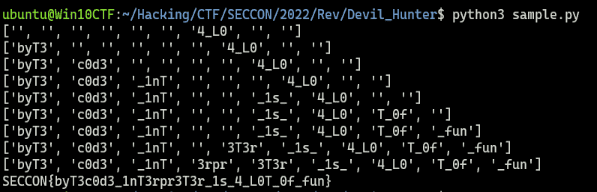
Using this Flag also lets you get past the ClamAV scan.

Summary
I had been meaning to properly dig into ClamAV bytecode signatures someday, but about a year had already gone by, so I am glad I was finally able to work through it.