This page has been machine-translated from the original page.
I participated in WaniCTF’21-spring the other day.
Since I competed solo this time, I also solved some problems outside Reversing for the first time in a while.
In the end, I only cleared Rev and Misc, and finished in 56th place. It looks like I still have a long way to go before I outgrow the beginner stage.
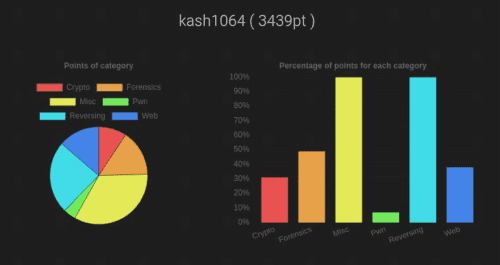
It was an extremely worthwhile opportunity, partly because it highlighted many new issues I need to work on, such as how much I struggled with Pwn beyond what I expected.
This time, through the Very Hard Reversing challenge “licence,” I was able to learn how to use angr, a tool that analyzes complex processing with symbolic execution, so I would like to look back on that experience and summarize how to use angr.
What I Learned
- How to use angr
- How angr works
Solving licence
The challenge I solved this time was “licence,” and it looked like this.
Since only 36 people solved it, it may have been a fairly difficult problem.
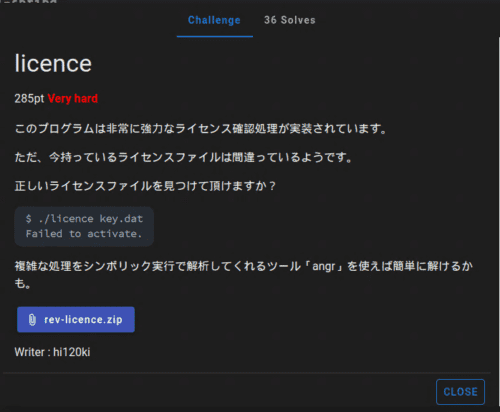
The rough solution was as follows.
- Decompile the binary and inspect the key file format and the behavior of the
checkfunction that validates the flag - Identify the address where execution ultimately lands when the correct key is provided
- Use angr to inspect the data that appears when the
checkfunction’s validation is bypassed
Before diving into the solution, I will first introduce angr, which is the main theme of this article.
What Is angr?
angr is a Python framework for analyzing binaries.
It is an open-source analysis tool that uses symbolic execution (a technique for exhaustively extracting the execution paths a program can take), and it was developed by the University of California’s SEFCOM lab and the Shellphish CTF team.
Its source code is published on GitHub.
angr seems to have many functions, but this time I will use its symbolic execution features to recover the flag.
Trying Out angr
What I struggled with most when using angr for the first time was simply how high the barrier to entry felt.
Part of that was probably because I had almost no background in this area, but it still took me a very long time to understand which part of angr I needed in order to recover the flag.
In any case, let’s first prepare an environment where angr can run.
angr does not support being used outside a virtual environment. In fact, even on the ParrotOS environment I use, it conflicts with other Python packages, so I think using a virtual environment is the best option.
By the way, Docker containers are also provided.
The officially recommended method is to use mkvirtualenv, but this time I used pipenv.
If you run the following commands, you will be able to use angr.
pipenv install
pipenv shell
pip install angr
To make sure it works, let’s use angr to print some basic information about the binary file. I mostly ran it interactively.
>>> import angr
>>> import monkeyhex

>>> proj = angr.Project("licence.exe", auto_load_libs=False)
WARNING | 2021-05-05 02:02:01,328 | cle.loader | The main binary is a position-independent executable. It is being loaded with a base address of 0x400000.

>>> print("ARCH", proj.arch)
ARCH <Arch AMD64 (LE)>
>>> print("EntryPoint", proj.entry)
EntryPoint 4198656
>>> print("FileName", proj.filename)
FileName licence.exe
Symbolic Analysis with angr
If you want to learn how to use angr, I recommend reading through the angr Documentation once from start to finish.
I skipped that step, and as a result I ended up wasting extra time. The sections that were especially helpful for me this time were the following.
- Top Level Interfaces - angr Documentation
- Loading a Binary - angr Documentation
- Solver Engine - angr Documentation
- Simulation Managers - angr Documentation
- Examples - angr Documentation
angr is not a binary emulator; it is a tool that analyzes programs through symbolic execution.
Not having any real intuition for what symbolic execution actually was turned out to be the biggest hurdle to recovering the flag with angr.
The following may not be perfectly accurate, but this is what I came to understand about symbolic execution.
- It executes programs using symbolic variables
- A symbolic variable refers not to a concrete value such as 1, 2, or 3, but to a “symbol” (a name?) attached to variables and arguments used inside the program
- Arithmetic on symbolic variables produces an abstract syntax tree (AST)
- When the program evaluates branches involving symbols, it records and executes both the true and false cases as separate possibilities
- An SMT solver (used to solve constraint satisfaction problems quickly) determines whether each recorded case is actually possible
- In other words, by using ASTs, you can ask questions such as, “Given the output of this sequence of operations, what must the input have been?”
- angr is a tool for answering that question
- The only data types that can be used symbolically are numbers and strings, so it cannot handle variable-length data structures such as arrays
That still leaves the question of what this all actually means, of course, but the rough idea is that by using angr, you can identify what value the key must have in order to reach the output produced when the correct key is entered.
Now let’s look at the basic way to use angr.
CLE loader
First, angr loads a binary file as a Project.
This creates <class 'angr.project.Project'>, which becomes the starting point for all subsequent processing.
import angr
proj = angr.Project('licence.exe')
The next important concept is the loader.
The loader refers to the CLE module used to lay out the binary file in a virtual address space (I think), and you can use it through the .loader property.
When you actually use it on the challenge binary, you get the following output.
>>> proj.loader
<Loaded licence.exe, maps [0x400000:0x807fff]>
>>> proj.loader.min_addr
0x400000
>>> proj.loader.max_addr
0x807fff
>>> proj.loader.main_object
<ELF Object licence.exe, maps [0x400000:0x408017]>
Here, the loader (the CLE module) is responsible for loading the binary file in a form suitable for later processing by angr.
More concretely, it is the module that obtains the executable program and libraries loaded as a Project and creates the address space into which the program is loaded so it can run.
The binaries loaded by the loader are read by cle.Backend class modules corresponding to their format (ELF and so on) and expanded into a single memory space.
The following documentation is helpful for the options available in the CLE module, though it seems extremely feature-rich and I have not managed to read all of it.
Simulation Managers
This time, in order to recover the flag, I wanted to determine what value the key must have in order to reach the output produced when the correct key is entered.
For that, I use Simulation Managers.
I would like to write a proper explanation of what Simulation Managers are, but unfortunately my understanding does not go much beyond “some amazing thing that can identify input values by symbolic execution,” so I will skip that part.
For now, let’s use Simulation Managers with the Project we created from the challenge binary.
>>> init_state = proj.factory.entry_state(args = ['licence.exe', 'key.dat'])
>>> simgr = proj.factory.simgr(init_state)
>>> simgr.active
[<SimState @ 0x401100>]
.factory.entry_state is a state constructor that performs the initialization for symbolic execution.
There are several variants, but entry_state seems to construct a state in which execution can begin from the binary’s entry point.
If you want to perform symbolic execution while supplying runtime arguments, define those arguments here.
At this point, you need to remember that the first argument must include the invocation of the binary itself. The idea is that you provide the same arguments the program would receive when launched from the console with command-line arguments.
With that, the symbolic-execution setup for recovering the flag is complete.
Now it is finally time to get the flag.
About the Challenge Binary
To recover the flag, I analyzed the challenge binary.
There are a lot of branches inside the main function, and most of them lead to the fail function.
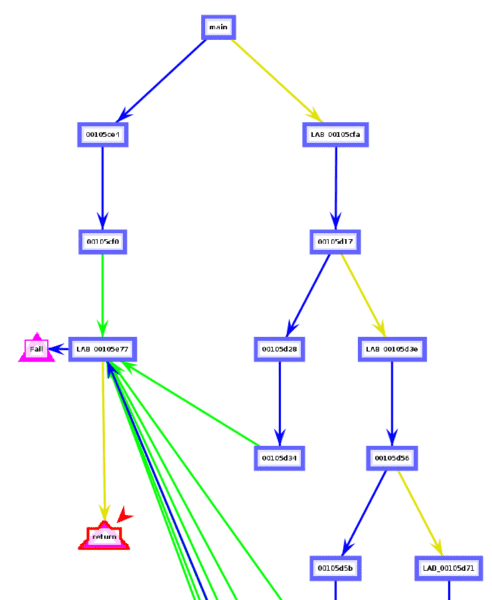
More concretely, you fail if even one of the following conditions is triggered.

- Whether the runtime arguments include a file
- Whether the file contents are not empty
- Whether the first line of the file is `-----BEGIN LICENCE KEY-----
- Whether the return value of thecheckfunction is not1- Whether the end of the file is-----END LICENCE KEY-----
`
Everything except the return value of the `check` function is easy to satisfy.

From this, we can see that the final key file must look like this.
-----BEGIN LICENCE KEY-----
FLAG{xxxxxxxxxx}
-----END LICENCE KEY-----In other words, the value of FLAG{xxxxxxxxx} that can get past the check function is the correct flag.
So let’s look inside the check function.
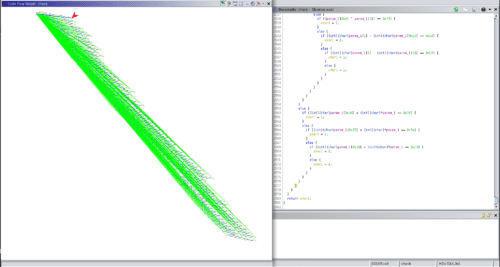
Unbelievably, the decompiled result contained 2,581 lines of conditional branches, and it was a function that failed if even one of them matched!
If we were looking for a flag that had to match all of the conditions, we might be able to find it with enough grit and determination, but when the goal is to find a string that does not match them, it seems essentially impossible to do by hand.
So from here on, the goal is to use angr to get past this check function.
Retrieving the Flag
As we saw earlier, angr can determine what value the key must have in order to reach the output produced when the correct key is entered.
Therefore, to recover the flag, we need to give angr the following information.
- The virtual address reached when the correct key is entered
- The virtual address reached when an incorrect key is entered
You can identify both of these from the disassembly results.
First, when the correct key is entered, execution reaches the output at 0x5e57.

However, as we already saw, angr’s loader maps the challenge binary into the virtual address space [0x400000:0x807fff], so we need to convert 0x5e57 to 0x405e57 before passing it in.
Next, when an incorrect key is entered, the binary always calls the function at 0x5e86.
So we instruct angr not to reach that address.

With that, by passing the correct address to find and the failure address to avoid in the Simulation Manager and calling the explore function, I was able to obtain the symbolic data needed to reach 0x5e57.
>>> simgr.explore(find=(0x405e57), avoid=(0x405e86))
・・・
<SimulationManager with 3 active, 390 deadended, 1 found>

>>> simgr.found[0].posix.dumps(3)
b'-----BEGIN LICENCE KEY-----\nFLAG{4n6r_15_4_5up3r_p0w3rfu1_5ymb0l1c_xxxxxxx_xxxxxxxx}\n-----END LICENCE KEY-----\n'
Summary
Through the WaniCTF Reversing challenge “licence,” I looked back on what I learned about using angr, the tool that analyzes complex processing through symbolic execution.
I am glad I was able to learn about a tool that will be extremely useful as I continue solving reversing challenges.
At the same time, there are still many things I do not fully understand, so I plan to keep studying. If there is anything inaccurate in this article, I would appreciate it if you point it out.
Once again, thanks to the people who ran such a worthwhile CTF and to the players who competed with me.
Next time I want to place higher…
Solver Used This Time
import angr
import monkeyhex

proj = angr.Project("licence.exe", auto_load_libs=False)

"""
pipenv shell
pip install angr
"""

# create project
proj = angr.Project('licence.exe')

# initial_state at the entry point of the binary
init_state = proj.factory.entry_state(args = ['licence.exe', 'key.dat'])

# create simulation
simgr = proj.factory.simgr(init_state)

simgr.explore(find=(0x405e57), avoid=(0x405e86))
if len(simgr.found) > 0:
    print(simgr.found[0].posix.dumps(3))
References
- angr Document
- Exhaustive Test Case Generation Using Symbolic Execution
- Trying Symbolic Execution with angr - Momoiro Technology
- GitHub - angr/angr: A powerful and user-friendly binary analysis platform!
- cle — Binary Loader — angr 9.0.6885 documentation
- Notes from Studying Symbolic Execution · GitHub
- Prepack · Partial evaluator for JavaScript