This page has been machine-translated from the original page.
I participated in ESCAPE CTF, which was held on 8/5, as part of 0nePadding.
It was a pretty rough CTF where the challenge pages were inaccessible for most of the contest period, but for now I’ll at least leave a quick writeup of the problems I solved.
I’m skipping the problems I couldn’t solve for now, since I haven’t been able to find a single writeup for them.
Table of Contents
ransom system(Rev)
The enemy has spread ransomware on important systems of the country. Please analyze the ransomware and recover the files!
When I decompiled the EXE provided for the challenge in Ghidra, I found that it performs the following operations.
int __cdecl _main(int _Argc,char **_Argv,char **_Env)

{
  char data;
  FILE *_File;
  FILE *_File_00;
  int iVar1;

  __main();
  _File = _file_open("flag.exe","rb");
  _File_00 = _file_open("flag.exe.enc","wb");
  while( true ) {
    iVar1 = _feof(_File);
    if (iVar1 != 0) break;
    data = _read_data(_File);
    data = _encrypt(data);
    _write_data(_File_00,data);
  }
  _fclose(_File);
  _fclose(_File_00);
  return 0;
}
Apparently, it reads a file named flag.exe one byte at a time, encrypts each byte with the _encrypt function, and writes the result to flag.exe.enc.
The decompiled _encrypt function looked like this.
char __cdecl _encrypt(char param_1)
{
  byte bVar1;

  bVar1 = param_1 + 5U ^ 6;
  return bVar1 + (char)((int)(char)bVar1 / 0xff);
}
Since the logic was simple, I decrypted the encrypted file provided with the challenge using the following script.
with open("enc", "rb") as f:
    data = f.read()

with open("flag.exe", "wb") as f:
    for d in data:
        b = (((d^6)-5) & 0xff).to_bytes(1, byteorder="big")
        f.write(b)

# ESCAPE{ransomeware_decrypt_key_get!}
Running the decrypted flag.exe gave me the flag.
Hidden(Forensic)
Find the flag hidden in the picture
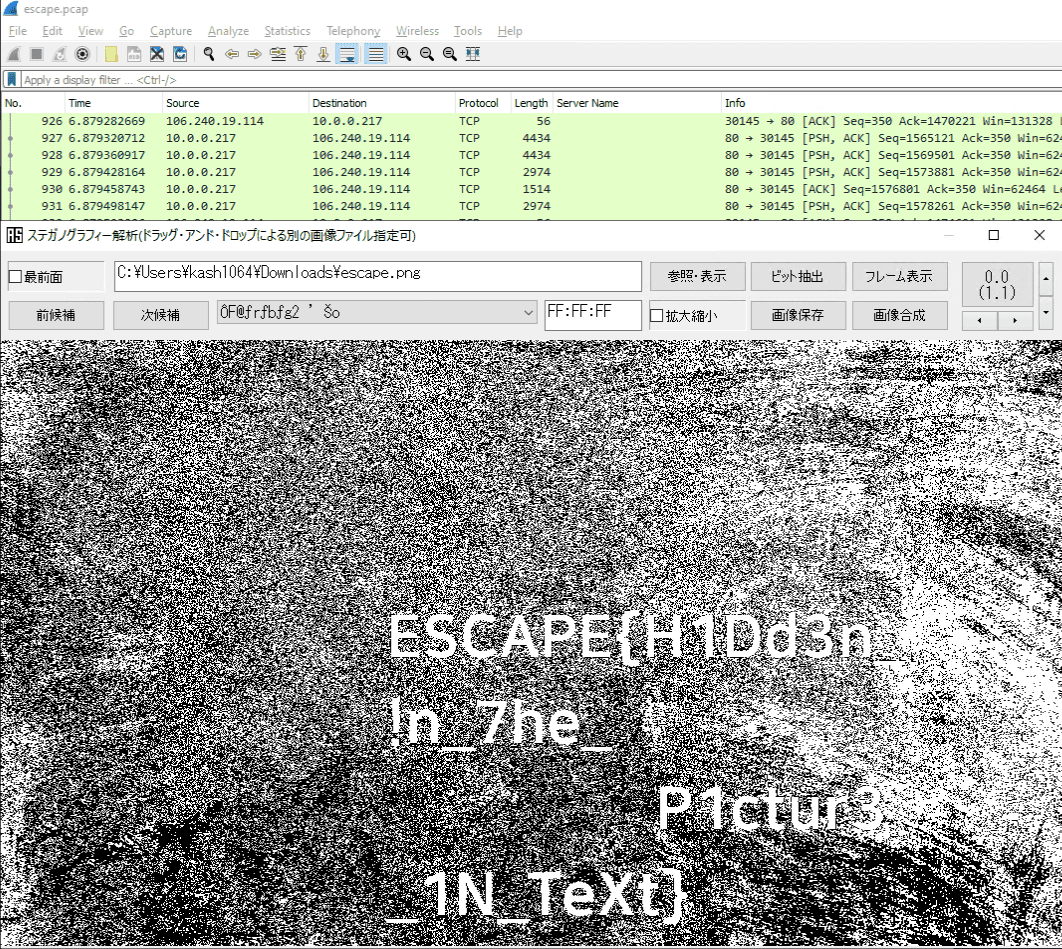
The JPG file provided for the challenge was actually a pcap file.
So I changed the extension and analyzed it with Wireshark.
From the pcap file, I could see that image files were being exchanged, so I exported the image and performed steganography analysis on it to obtain the flag.
Summary
That’s all.