This page has been machine-translated from the original page.
I participated as a solo player in HITCON CTF 2024 and placed 120th.
I only solved one problem, so it’s a very short writeup.
Table of Contents
AntiVirus (Rev)
Overview
A .cbc file (ClamAV bytecode signature file) was provided and we needed to determine what conditions that bytecode checks.
ClamAV Bytecode Signature
ClamAV can detect malicious files using three types of signatures:
- Pattern Signatures — match specific byte sequences in files
- Logical Signatures — combine multiple pattern signatures with AND/OR/NOT logic
- Bytecode Signatures — arbitrary programs compiled to ClamAV bytecode, capable of complex analysis
Bytecode signatures are compiled with clambc and distributed as .cbc files. When ClamAV scans a file, the bytecode is executed against it.
Understanding the .cbc File Structure
Running the file through clambc --printbcir disassembles the bytecode into a human-readable IR format.
The output is very long, but the key structure is:
- Func0 — Entry point; checks file size, reads bytes, drives main logic
- Func1 — Core transformation function; 93 basic blocks of byte operations
Disassembling with clambc
clambc --printbcir AntiVirus.cbc > AntiVirus.cbc.irThe IR uses a virtual-register SSA form. Key instructions:
%RXX = load i8 ... from @apiptr[...]— read bytes from the scanned file%RXX = (RXXX RXXX == comparisons)- Branch instructions route execution based on comparison results
Func0 Analysis
Func0 performs the following checks at a high level:
- File size check: Verifies the file is exactly
0x18cbytes long - Header check: Checks that the first two bytes are
MZ(i.e.,0x4d 0x5a) — a Windows PE header - Main loop: For each remaining byte position, calls Func1 to transform the byte, then compares the result against an expected value stored in the bytecode
If all comparisons pass, the file is flagged as “malicious” — meaning it is actually the correct flag executable.
if (filesize != 0x18c) -> return NOT_FOUND
if (bytes[0] != 0x4d) -> return NOT_FOUND
if (bytes[1] != 0x5a) -> return NOT_FOUND
for i in 2..0x18c:
    transformed = Func1(input[i], i)
    if transformed != expected[i]: return NOT_FOUND
return FOUND (i.e., this is the flag)
Func1 Analysis
Func1 takes the byte value and its index as inputs and applies a complex transformation across 93 basic blocks. The transformation involves:
- Multiple bitwise operations (AND, OR, XOR, shifts)
- Index-dependent branching
- Comparisons against hardcoded lookup values embedded in the IR
Fully reversing Func1 is possible but time-consuming due to the 93-block structure.
Brute-Force Approach
Rather than fully reversing Func1, we can use a side-channel approach:
- Construct a candidate 0x18c-byte MZ file
- Scan it with a patched libclamav that emits debug traces of bytecode execution
- Parse the trace output to find which byte-comparison succeeded (the
1185 = (1136 == 1184)pattern in the trace indicates a match) - Iterate byte-by-byte from position 2 to 0x18c
Patching libclamav to enable bytecode debug tracing:
# Build ClamAV with debug output enabled
cmake .. -DCMAKE_BUILD_TYPE=Debug -DENABLE_BYTECODE_TRACE=ON
make -j$(nproc)
Brute-force script:
import subprocess

target = 0

def bruteforce(target):
    for n in range(0x100):
        with open("print_flag.exe", "r+b") as f:
            f.seek(2 + target)
            f.write(bytes([n]))

        command = ["clamscan", "--bytecode-unsigned", "-d", "print_flag.cbc", "print_flag.exe"]
        result = subprocess.run(command, stdout=subprocess.PIPE, stderr=subprocess.PIPE)
        outputs = result.stdout.decode("utf-8").splitlines()

        is_find = False
        counter = 0
        for i, line in enumerate(outputs):
            if "1185 = (1136 == 1184)" in line:
                r = int(outputs[i+3][-1])
                if r == 1:
                    if counter == target:
                        is_find = True
                        print(hex(n), line, counter, target)
                        return n
                    counter += 1
                else:
                    break
    return -1

for x in range(0x18c - 2):
    r = bruteforce(target)
    if r >= 0:
        target += 1
    else:
        exit()
Running this script takes several hours (worst-case complexity is 0xFF × 0x18c iterations, each requiring an EXE write and a clamscan invocation), but it successfully recovers the correct EXE byte by byte.
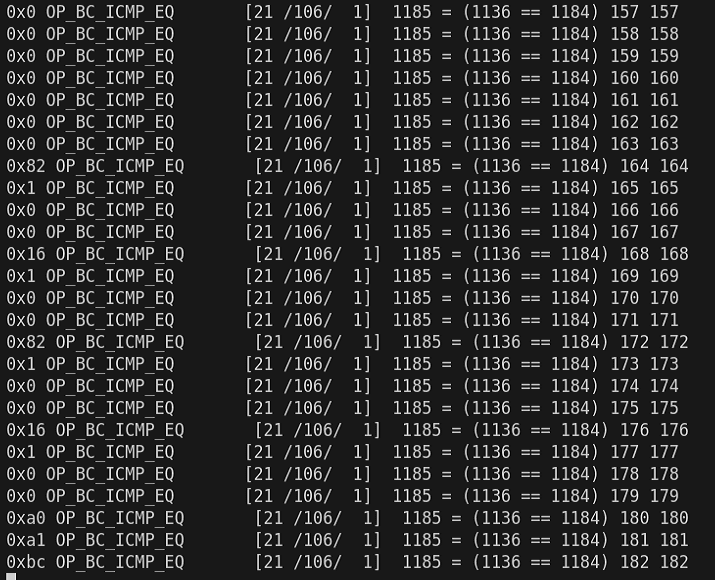
Once all bytes are recovered and the complete EXE is assembled, executing it yields the flag.

Wrap-up
This was a low-solver problem, but after studying ClamAV bytecode signatures and libclamav debug tracing, it was possible to solve it fairly smoothly.
If you understand the bytecode IR format and can set up the debug trace pipeline, the brute-force approach — though slow — is methodical and reliable.