This page has been machine-translated from the original page.
I participated in Insomni’hack CTF 2024 (January 2024) with team 0nePadding.
We bailed out early and switched to Knight CTF, so we only solved 3 problems — final placement was 120th.

The overall difficulty seemed high.
Here is a writeup / review of the challenge.
frown (Rev)
How good is your Tetris? Connect, win, and reveal the flag!
During the contest I solved this via an unintended guess, so here I’ll walk through the intended solution.
No binary is provided for this challenge; you are only given SSH credentials to connect to the challenge server.
Connecting via SSH launches a Tetris game.
Playing for a while, once your score increases by some amount the message [Frida INFO] Listening on 127.0.0.1 TCP port 27042 appears.
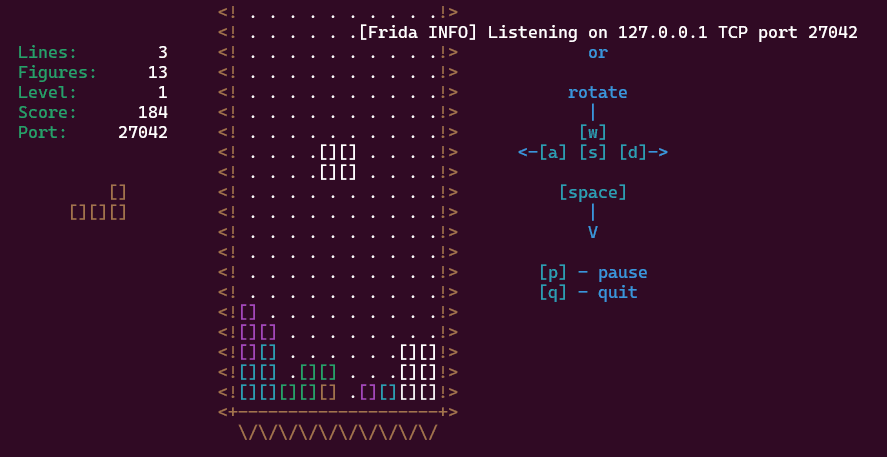
As the score continues to increase, an encrypted-looking Flag string starts appearing in the console.
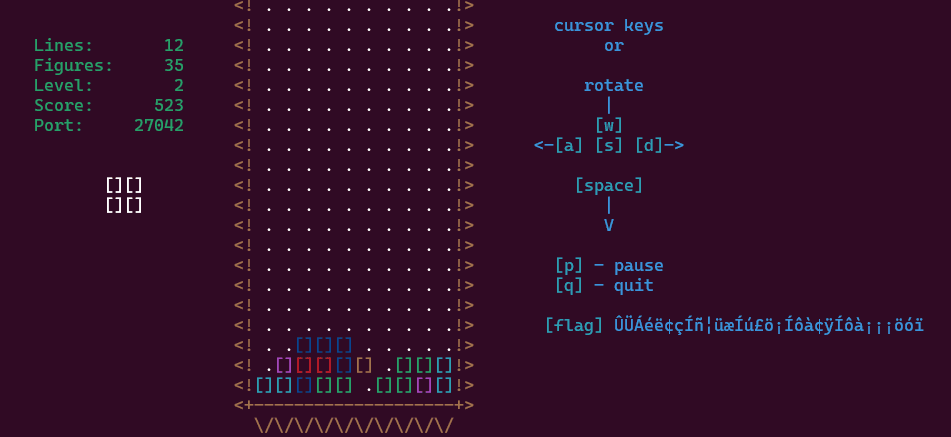
At this point, we try to connect to the Frida server to retrieve the Flag.
Port 27042, where the Frida server appears to be listening, is of course not accessible from outside.
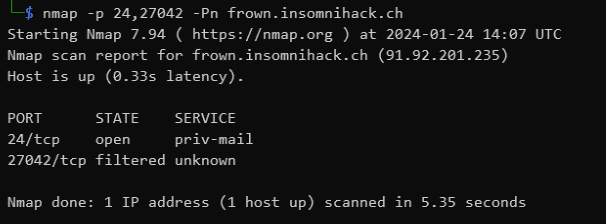
Port-forward to the Frida Server and identify the process
Since we have SSH credentials, we can set up SSH tunneling to reach the local Frida server.
Set up port forwarding with the following command while replaying Tetris:
sudo ssh -L 27042:127.0.0.1:27042 user@frown.insomnihack.ch -p 24Once the Frida server starts, run frida-ps -H localhost to identify the PID and name of the target process:
pip install frida frida-tools
frida-ps -H localhost

Retrieve the application binary via the Frida server
The official writeup states that the application binary can be retrieved through the Frida server.
Reference: frown/solution at master · leonjza/frown
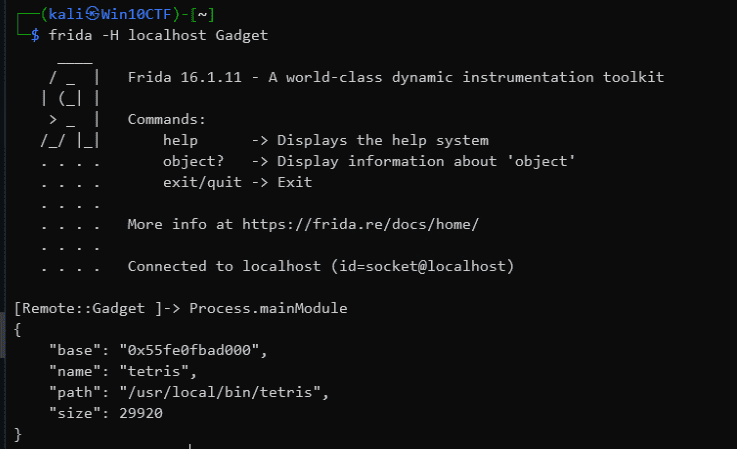
First, attach to the Frida server using the identified process name: frida -H localhost Gadget.
Then run Process.mainModule to get information about the process’s main module.
Reference: JavaScript API | A world-class dynamic instrumentation toolkitFrida
From this we determine that the application is located at /usr/local/bin/tetris.
We can then use Frida to attach to the remote process (Gadget) and download a file in its execution context:
node -v #v16.13.1
cd solution/frida/agent/
npm i
python3 -m solution getfile "/usr/local/bin/tetris"
Below is a slightly customized version of the official solver. Calling getfile with a path retrieves the binary Base64-encoded via fs.readFileSync(p).toString('base64'):
import fs from "fs";
import http from "http";

rpc.exports = {
  dir: (p: string) => fs.readdirSync(p),
  binpath: () => Process.mainModule.path,
  getfile: (p: string) => fs.readFileSync(p).toString('base64'),
  modules: () => Process.enumerateModules(),
  watchoffset: (a: number) => {
    const offset = Process.mainModule.base.add(ptr(a));
    send(`watching func at ${a}. offset="${offset}"`);
    Interceptor.attach(offset, {
      onEnter(args) {
        send(`watchfunc: ${a} called. arg[0]="${args[0]}"`);
      }
    });
  },
  watchlibs: () => {
    Interceptor.attach(Module.getExportByName(null, "dlopen"), {
      onEnter(args) {
        const path = args[0].readUtf8String();
        const flags = args[1].toInt32();
        send(`dlopen() path="${path}", flags="${flags}"`);
      }
    });

    Interceptor.attach(Module.getExportByName(null, "dlclose"), {
      onEnter(args) {
        const handle = args[0];
        send(`dlclose() handle="${handle}"`);
      }
    });
  },
  blockdlclose: () => {
    Interceptor.replace(Module.getExportByName(null, "dlclose"), new NativeCallback((handle) => {
      return 0;
    }, 'int', ['pointer']));
  },
  pinscore: () => {
    const tetris_refresh = Process.mainModule.base.add(0x00002dc8);
    Interceptor.attach(tetris_refresh, {
      onEnter(args) {
        const tetris_t = args[0];
        const score_t = tetris_t.add(Process.pointerSize * 14);
        const score_ptr = score_t.add(4 * 4);

        send(`tetris_t=${tetris_t}, score_t=${score_t}, score=${score_ptr.readInt()}`);

        score_ptr.writeInt(9179);
      }
    });
  },
  flagkey: (key: number) => {
    const m = Module.load("libttyris.so");
    const flag_key_ptr = m.getExportByName("flag_key");

    const flag_key = new NativeFunction(flag_key_ptr, 'void', ['int', 'pointer', 'int']);
    const flag_len = 100;
    const flag = Memory.alloc(flag_len);

    flag_key(key, flag, flag_len);

    const flag_value = flag.readUtf8String();
    return flag_value;
  },
  watchcurl: () => {
    const curl_ptr = Process.mainModule.base.add(0x00001d2f);

    Interceptor.attach(curl_ptr, {
      onEnter(args) {
        send(`curl->() arg0="${args[0].readUtf8String()}" arg1=${args[1].readUtf8String()}`);
        this.response = args[2];
      },
      onLeave(retval) {
        send(`curl<-() arg3="${this.response.readUtf8String()}"`);
      }
    });
  },
  usecurl: (key: number) => {
    const curl_ptr = Process.mainModule.base.add(0x00001d2f);

    const curl = new NativeFunction(curl_ptr, 'void', ['pointer', 'pointer', 'pointer']);
    const response = Memory.alloc(100);

    const url = Memory.allocUtf8String("http://frown-service/");
    const key_ptr = Memory.allocUtf8String(key.toString());

    curl(url, key_ptr, response);

    return response.readUtf8String();
  },
  sendkey: (key: number) => {
    return new Promise((resolve, reject) => {
      const opts: http.RequestOptions = {
        hostname: 'frown-service',
        port: 80,
        path: '/',
        method: 'POST',
        headers: {
          'Content-Type': 'text/plain',
          'content-length': key.toString().length
        }
      };

      const req = http.request(opts, (res) => {
        let body = '';

        res.on('data', (chunk) => {
          body += chunk;
        });

        res.on('end', () => {
          resolve(body);
        });
      });

      req.on('error', (error) => {
        reject(error);
      });

      req.write(key);
      req.end();
    });
  },
  exec: (c: string) => {
    const popen_ptr = Module.getExportByName(null, "popen");
    const fgets_ptr = Module.getExportByName(null, "fgets");
    const pclose_ptr = Module.getExportByName(null, "pclose");

    const popen = new NativeFunction(popen_ptr, 'pointer', ['pointer', 'pointer']);
    const fgets = new NativeFunction(fgets_ptr, 'pointer', ['pointer', 'int', 'pointer']);
    const pclose = new NativeFunction(pclose_ptr, 'int', ['pointer']);

    const command = Memory.allocUtf8String(c);
    const mode = Memory.allocUtf8String("r");
    const output_size = Process.pointerSize * 80;
    const output = Memory.alloc(output_size);

    const pipe = popen(command, mode);
    fgets(output, output_size, pipe);
    pclose(pipe);

    return output.readUtf8String();
  }
};
Running the downloaded binary lets you play the same Tetris game as on the remote server.
Analyze the binary to retrieve the Flag
Analyzing the downloaded binary in Ghidra revealed that it loads a library called libttyris.so and retrieves the flag_key function.
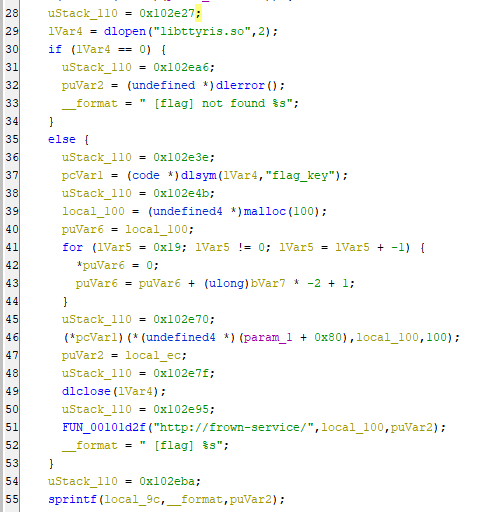
At this point the server went down and I couldn’t proceed further, but based on other writeups, downloading libttyris.so in the same way and analyzing it would reveal the hardcoded value needed to identify the correct Flag.
Wrap-up
The challenge server went offline while I was reviewing this, making it feel a bit incomplete, but it did give me strong motivation to learn more about Frida.