This page has been machine-translated from the original page.
My first CTF of the new year was IrisCTF again, just like last year.
Here is a brief writeup.
Table of Contents
- The Johnson’s(Rev)
- Rune? What’s that?(Rev)
- Secure Computing(Rev)
- Not Just Media(Forensic)
- Where’s skat?(Network)
- Summary
The Johnson’s(Rev)
Please socialize with the Johnson’s and get off your phone. You might be quizzed on it!
Analyzing the provided ELF challenge binary showed that it was a program that accepted, in order, strings corresponding to Color and Food.
Investigating the check function revealed that it checks which variables store the IDs corresponding to the input Color and Food values, as shown below.
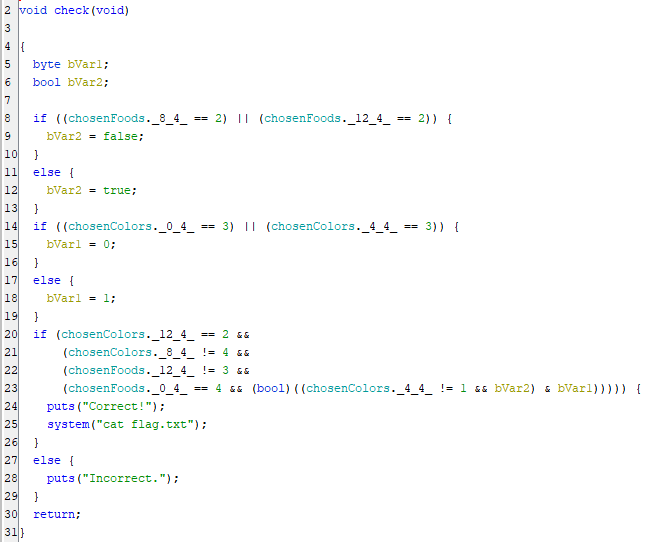
Once I organized that check logic, I found that it was performing the following conditions and equality comparisons.
food[0] == chicken
food[2] != pasta
food[3] != pasta
food[3] != steak

color[0] != green
color[1] != red
color[1] != green
color[2] != yellow
color[3] == blue
From this, I was able to determine that the required input order to obtain the flag was as follows.
color[0] == red
color[1] == yellow
color[2] == green
color[3] == blue

food[0] == chicken
food[1] == pasta
food[2] == steak
food[3] == pizza
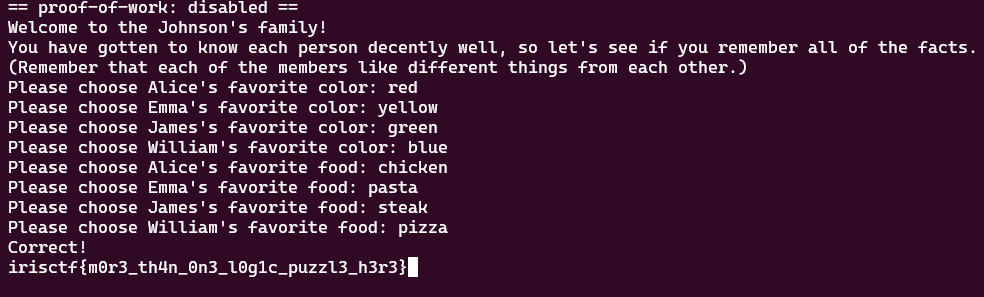
Entering the strings in that order produced the correct flag.
Rune? What’s that?(Rev)
Rune? Like the ancient alphabet?
The challenge provided the following Go script and a mysterious string, iÛÛÜÖ×ÚáäÈÑ¥gebªØÔÍãâ£i¥§²ËÅÒÍÈä.
package main

import (
	"fmt"
	"os"
	"strings"
)

var flag = "irisctf{this_is_not_the_real_flag}"

func init() {
	runed := []string{}
	z := rune(0)

	for _, v := range flag {
		runed = append(runed, string(v+z))
		z = v
	}

	flag = strings.Join(runed, "")
}

func main() {
	file, err := os.OpenFile("the", os.O_RDWR|os.O_CREATE, 0644)
	if err != nil {
		fmt.Println(err)
		return
	}

	defer file.Close()
	if _, err := file.Write([]byte(flag)); err != nil {
		fmt.Println(err)
		return
	}
}
Reading the script shows that it transforms the flag string defined in the flag variable and outputs the resulting gibberish string that was given in the challenge.
Looking more closely at the transformation, it simply adds each character to the previous one and displays the result as a Unicode character.
So I used the following script to determine that the correct flag was irisctf{i_r3411y_1ik3_num63r5}.
def decode_string(encoded_string):
decoded_chars = []
previous_char_unicode = 0
for char in encoded_string:
original_char_unicode = ord(char) - previous_char_unicode
original_char = chr(original_char_unicode)
decoded_chars.append(original_char)
previous_char_unicode = ord(original_char)
return ''.join(decoded_chars)
encoded_string = r'iÛÛÜÖ×ÚáäÈÑ¥gebªØÔÍãâ£i¥§²ËÅÒÍÈä'
original_string = decode_string(encoded_string)
print(original_string)Secure Computing(Rev)
Your own secure computer can check the flag! Might have forgotten to add the logic to the program, but I think if you guess enough, you can figure it out. Not sure
The challenge provided an ELF binary named chal, the following C code, and a Dockerfile.
// Here's a snippet of the source code for you
int main() {
    printf("Guess: ");
    char flag[49+8+1] = {0};
    if(scanf("%57s", flag) != 1 || strlen(flag) != 57 || strncmp(flag, "irisctf{", 8) != 0 || strncmp(flag + 56, "}", 1)) {
        printf("Guess harder\n");
        return 0;
    }
#define flg(n) *((__uint64_t*)((flag+8))+n)
    syscall(0x1337, flg(0), flg(1), flg(2), flg(3), flg(4), flg(5));
    printf("Maybe? idk bro\n");

    return 0;
}
FROM ubuntu:latest
RUN apt update && apt install -y gdbserver
COPY chal /
CMD /chalAnalyzing the provided binary in Ghidra showed that it seemed to match the C code supplied with the challenge.
It accepts a 57-character input that starts with irisctf{ and ends with }.
Then, via flg(n) as defined by #define flg(n) *((__uint64_t*)((flag+8))+n), characters 8 through 56 of the flag are passed to the syscall function as arguments in 8-character chunks.
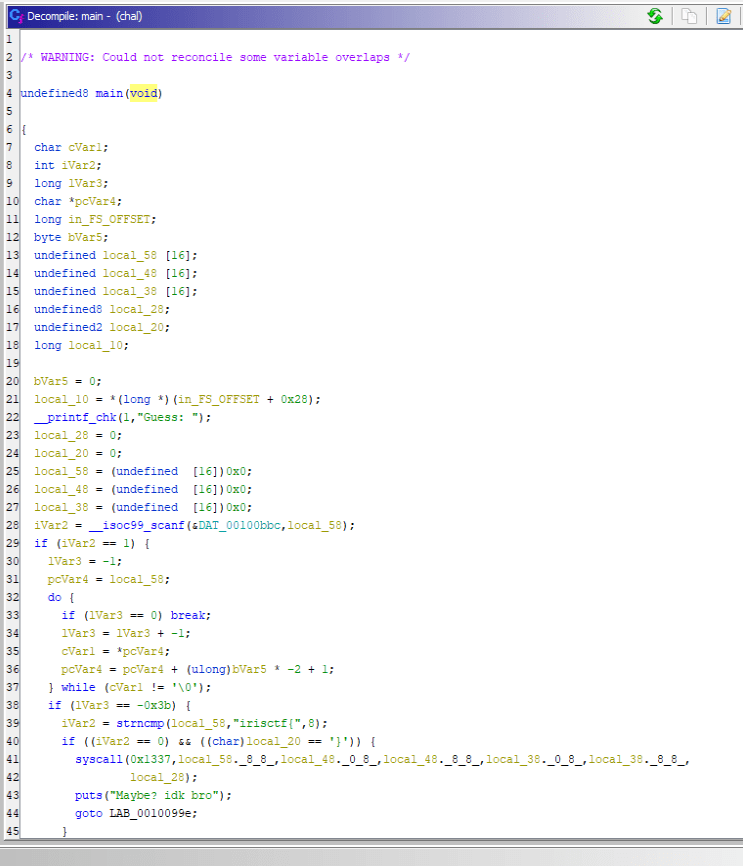
The actual processing of the flag string appears to happen in the syscall function invoked with 0x1337, but from this alone it is not clear what that syscall does.
Since 0x1337 does not look like a standard Linux syscall, it seemed likely that it was defined somewhere specially.
However, judging from the Dockerfile for the challenge binary, the image used to run it is the official Ubuntu image, and it does not appear to add anything like a kernel module.
After puzzling over it for a bit, I realized that it apparently was not actually executing any real handler for syscall 0x1337.
One approach that lets a program control what happens when a system call is made is seccomp.
The Linux kernel introduced a mechanism called seccomp in version 2.6.12.
seccomp is a feature that improves security by restricting the system calls an application can execute.
With seccomp, the system calls a process may execute are controlled in a whitelist format.
Because of this mechanism, when a process issues a system call, actions such as deciding whether execution is allowed are carried out through the seccomp filter.
The following article was helpful for the details.
Reference: Restrict system calls issued by your own process using seccomp
As described in the article above, seccomp filters can be added with prctl.
In the program used in that article, the seccomp-tools dump tool could be used to list the seccomp filters, but that method could not be used with this challenge binary.
sudo apt install gcc ruby-dev -y
sudo gem install seccomp-tool
seccomp-tools dump ./a.out
Reference: david942j/seccomp-tools: Provide powerful tools for seccomp analysis
To determine what kind of seccomp filters were registered, I analyzed the binary.
Looking at the call to __libc_start_main in Ghidra’s decompiled entry function, I saw that something was defined in the fourth and fifth arguments corresponding to init and fini.
void FUN_555555400a20(undefined8 param_1,undefined8 param_2,undefined8 param_3)
{
  undefined8 unaff_retaddr;
  undefined auStack_8 [8];
  __libc_start_main(main,unaff_retaddr,&stack0x00000008,FUN_555555400b30,FUN_555555400ba0,param_3,
                    auStack_8);
  do {
                    /* WARNING: Do nothing block with infinite loop */
  } while( true );
}
In __libc_start_main, init refers to an initialization function. If init is defined, some processing is called before the main function runs. In general, this is where things like global-variable initialization are executed.
Reference: _libcstart_main
In Ghidra, the function specified in init could be referenced as __DT_INIT_ARRAY.
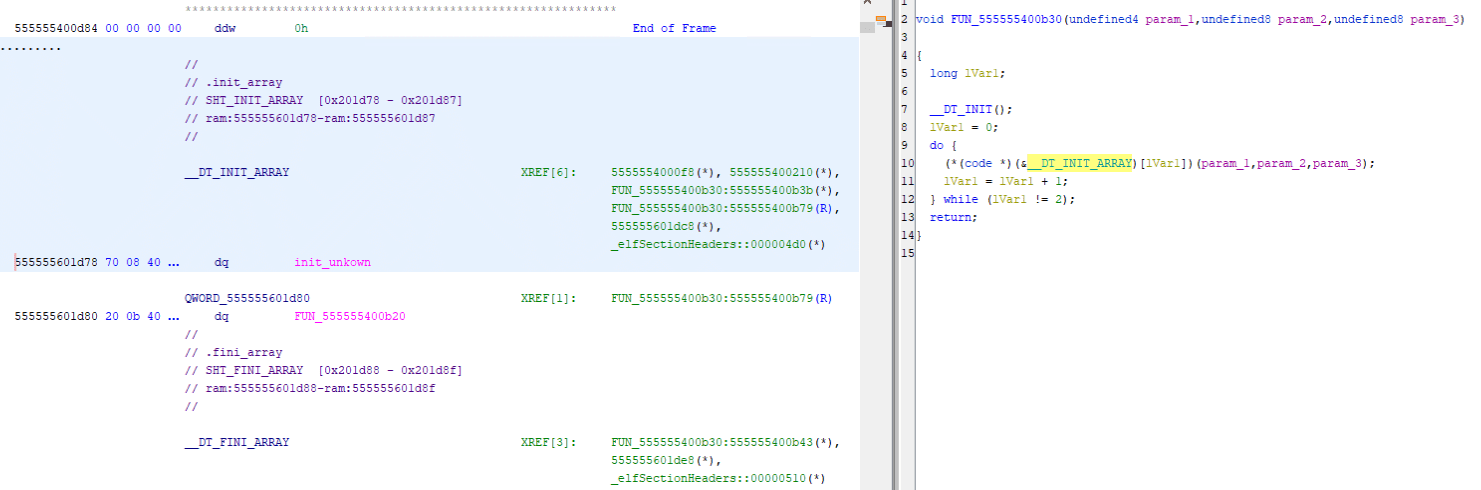
From this, we can see that the following code using prctl is called when the program starts.
void init_unkown(void)
{
  long lVar1;
  long in_FS_OFFSET;
  undefined2 local_48 [4];
  undefined8 local_40;
  long local_30;

  local_30 = *(long *)(in_FS_OFFSET + 0x28);
  lVar1 = ptrace(PTRACE_TRACEME,0);
  if (-1 < lVar1) {
    lVar1 = 0;
    prctl(0x26,1,0,0,0);
    do {
      local_48[0] = (undefined2)*(undefined8 *)((long)&DAT_555555602020 + lVar1);
      local_40 = *(undefined8 *)((long)&PTR_DAT_55555563d560 + lVar1);
      lVar1 = lVar1 + 8;
      syscall(0x13d,1,0,local_48);
    } while (lVar1 != 0x40);
  }
  if (local_30 == *(long *)(in_FS_OFFSET + 0x28)) {
    return;
  }
                    /* WARNING: Subroutine does not return */
  __stack_chk_fail();
}
It appears to register the seccomp filters here.
First, judging from the actual code, it looks like the seccomp filters are being registered at the line syscall(0x13d,1,0,local_48); inside the while loop.
I could not find any information on the ID 0x13d, but because the fourth argument is a seccomp filter, it can be inferred that this corresponds to a call to syscall(SYS_seccomp, SECCOMP_SET_MODE_FILTER, 0, &prog).
Reference: seccomp(2) - Linux manual page
This code is called 0x40 / 8 times inside the while loop, that is, 8 times.
Looking at the section at &PTR_DAT_55555563d560, I confirmed that it lists the addresses of eight memory regions beginning with 20 00 00 00 ..., that is, A = sys_number.
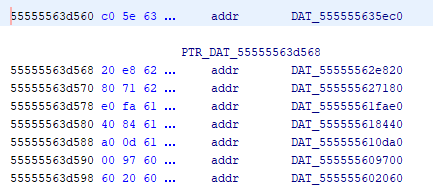
In other words, this program appears to register eight seccomp filters at startup.
It looked like I could extract each filter by pulling out the eight filters individually and using seccomp-tools disasm --no-bpf, but I gave up because I could not determine the end of each one.
So I analyzed the code further in order to obtain output from seccomp-tools dump after all.
It seems that seccomp-tools dump extracts the seccomp filters by running the program and attaching with ptrace.
Looking back at the code above, the line ptrace(PTRACE_TRACEME,0); adds anti-debugging functionality.
In other words, when seccomp-tools uses ptrace, the filter-registration process is skipped, which explains why seccomp-tools dump had failed to output the filters earlier.
So I patched the binary in Ghidra and disabled all of this anti-debugging logic.
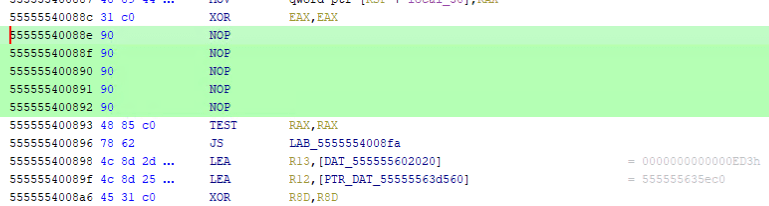
After that, I was able to dump the filters with the seccomp-tools dump command.
The filter output was enormous, so I am only including a portion of it.
In broad terms, it first checks whether the system call ID is 0x1337, then repeatedly performs operations on certain values, and finally compares them against specific values.
$ seccomp-tools dump ./chal_patched

line  CODE  JT   JF      K
=================================
 0000: 0x20 0x00 0x00 0x00000000  A = sys_number
 0001: 0x15 0x01 0x00 0x00001337  if (A == 0x1337) goto 0003
 0002: 0x06 0x00 0x00 0x7fff0000  return ALLOW
 0003: 0x03 0x00 0x00 0x0000000b  mem[11] = X
 0004: 0x04 0x00 0x00 0x9a0b31d4  A += 0x9a0b31d4
 0005: 0x04 0x00 0x00 0x5245d02a  A += 0x5245d02a
 0006: 0x1c 0x00 0x00 0x00000000  A -= X
 0007: 0x04 0x00 0x00 0x7d5a280a  A += 0x7d5a280a
 0008: 0x1c 0x00 0x00 0x00000000  A -= X
 0009: 0x24 0x00 0x00 0x000081af  A *= 0x81af
 0010: 0x03 0x00 0x00 0x00000003  mem[3] = X
**
 2692: 0x04 0x00 0x00 0xb06bedbc  A += 0xb06bedbc
 2693: 0x20 0x00 0x00 0x0000001c  A = args[1] >> 32
 2694: 0x44 0x00 0x00 0xc7fdf7c2  A |= 0xc7fdf7c2
 2695: 0x04 0x00 0x00 0x88410078  A += 0x88410078
**
 3791: 0x60 0x00 0x00 0x0000000f  A = mem[15]
 3792: 0x15 0x00 0x01 0xd101957e  if (A != 3506541950) goto 3794
 3793: 0x06 0x00 0x00 0x00050000  return ERRNO(0)
 3794: 0x06 0x00 0x00 0x00000000  return KILL
If this check fails, seccomp terminates the thread, and if it succeeds, it appears to return true.
Let’s look at a few of the variables.
First, arg[] appears to be treated as an array variable indexed from 0 to 5.
This likely corresponds to the flag characters passed in syscall(0x1337, flg(0), flg(1), flg(2), flg(3), flg(4), flg(5));, split into 8-character values.
Next, A and X are most likely temporary variables used like registers.
Finally, mem[] is an array variable indexed from 0 to 15.
The final comparisons against hardcoded values are performed on each element of this mem array.
For that reason, I expected that the input flag characters were being transformed somehow and stored in mem.
Judging from the actual processing, it looked like this computation itself could be solved with Z3.
However, I gave up on manually converting nearly 4,000 lines of processing into Z3.
So, using a solver shared on Discord as a reference, I wrote a program that automatically generated Z3 constraints from this output and recovered the flag.
First, use the following command to remove the unnecessary parts from the output of seccomp-tools dump.
seccomp-tools dump ./chal_patched -l 8 | grep -Pv "=======|CODE" > seccomp_filter.txtNext, set up the initial values.
For the arch variable, set the value of AUDIT_ARCH_X86_64.
from z3 import *

s = Solver()
def add_cons(v):
    s.add(And(v > ord(' '), v <= ord('~')))

mem = [0, ]*16
X = 0
A = 0
sys_number = 0x1337
arch = 0xc000003e # AUDIT_ARCH_X86_64

# bpf is 32 bits
args = []       # low DWORD
args2 = []      # hight DWORDs
In the next part, define six values from 0 to 5 for arg and arg_2.
Then split each of them into 4 bytes and apply Printable ASCII constraints byte by byte.
# args is lower DWORD
for x in range(6):
    v = BitVec("arg%d"%x, 32)
    args.append(v)
    add_cons(Extract(7, 0, v))
    add_cons(Extract(15, 8, v))
    add_cons(Extract(23, 16, v))
    add_cons(Extract(31, 24, v))

# args2 is upper DWORD
for x in range(6):
    v = BitVec("arg_2%d"%x, 32)
    args2.append(v)
    add_cons(Extract(7, 0, v))
    add_cons(Extract(15, 8, v))
    add_cons(Extract(23, 16, v))
    add_cons(Extract(31, 24, v))
This defines the variables for each argument (= the flag stored in 8-character chunks).
From here, process seccomp_filter.txt line by line.
i = -1
with open("seccomp_filter.txt") as fp:
    for line in fp:
        i += 1

        # 命令の抽出
        ins = line.split("  ")[1].strip()
        # print(line)
        # print(ins)

        # Return 文を無視する
        if ins.startswith("return "):
            continue

        # args[0] >> 32 のような演算を特定する
        # これによって、上位 32 bit 文の文字を取得し、変数名をベクタ名に合わせる
        elif " >> " in ins:
            ins = ins[:11] # A = args[x]
            ins = ins.replace("args", "args2")

        # if (A == 0x1337) goto 0003 のような if 文の処理を制約に追加する
        if ins.startswith("if ("):
            val = ins.split()[3][:-1] # if (A == val)
            if val.startswith("0x"):
                val = int(val[2:], 16)
            else:
                val = int(val)

            s.add(A == val)
            continue

        # A ^= X など、そのまま Python コードとして実行可能な行を実行する
        exec(ins)

        # 32 bit int を維持
        A &= 0xffffffff
Finally, by solving the constraints with Z3, we can determine that the correct flag string is 1f_0nly_s3cc0mp_c0ulD_us3_4ll_eBPF_1nstruct10ns!.
assert s.check() == sat
model = s.model()
out = b''

# 各 arg と atg_2 の文字を連結して出力
for x in range(len(args)):
    v = model[args[x]].as_long()
    out += bytes.fromhex(hex(v)[2:])[::-1]
    v = model[args2[x]].as_long()
    out += bytes.fromhex(hex(v)[2:])[::-1]
print(out)
The full solver is below.
# seccomp-tools dump ./chal_patched -l 8 > seccomp_filter.txt && sed -i '1,2d' seccomp_filter.txt
from z3 import *

s = Solver()
def add_cons(v):
    s.add(And(v > ord(' '), v <= ord('~')))

mem = [0, ]*16
X = 0
A = 0
sys_number = 0x1337
arch = 0xc000003e # AUDIT_ARCH_X86_64

# bpf is 32 bits
args = []       # low DWORD
args2 = []      # hight DWORDs


# args is lower DWORD
for x in range(6):
    v = BitVec("arg%d"%x, 32)
    args.append(v)
    add_cons(Extract(7, 0, v))
    add_cons(Extract(15, 8, v))
    add_cons(Extract(23, 16, v))
    add_cons(Extract(31, 24, v))

# args2 is upper DWORD
for x in range(6):
    v = BitVec("arg_2%d"%x, 32)
    args2.append(v)
    add_cons(Extract(7, 0, v))
    add_cons(Extract(15, 8, v))
    add_cons(Extract(23, 16, v))
    add_cons(Extract(31, 24, v))


i = -1
with open("seccomp_filter.txt") as fp:
    for line in fp:
        i += 1

        # 命令の抽出
        ins = line.split("  ")[1].strip()
        # print(line)
        # print(ins)

        # Return 文を無視する
        if ins.startswith("return "):
            continue

        # args[0] >> 32 のような演算を特定する
        # これによって、上位 32 bit 文の文字を取得し、変数名をベクタ名に合わせる
        elif " >> " in ins:
            ins = ins[:11] # A = args[x]
            ins = ins.replace("args", "args2")

        # if (A == 0x1337) goto 0003 のような if 文の処理を制約に追加する
        if ins.startswith("if ("):
            val = ins.split()[3][:-1] # if (A == val)
            if val.startswith("0x"):
                val = int(val[2:], 16)
            else:
                val = int(val)

            s.add(A == val)
            continue

        # A ^= X など、そのまま Python コードとして実行可能な行を実行する
        exec(ins)

        # 32 bit int を維持
        A &= 0xffffffff

assert s.check() == sat
model = s.model()
out = b''

# 各 arg と atg_2 の文字を連結して出力
for x in range(len(args)):
    v = model[args[x]].as_long()
    out += bytes.fromhex(hex(v)[2:])[::-1]
    v = model[args2[x]].as_long()
    out += bytes.fromhex(hex(v)[2:])[::-1]
print(out)
Not Just Media(Forensic)
I downloaded a video from the internet, but I think I got the wrong subtitles.
Note: The flag is all lowercase.
Analyze the MKV file provided in the challenge with mkvinfo.
$ mkvinfo chal.mkv
+ EBML head
|+ EBML version: 1
|+ EBML read version: 1
|+ Maximum EBML ID length: 4
|+ Maximum EBML size length: 8
|+ Document type: matroska
|+ Document type version: 4
|+ Document type read version: 2
+ Segment: size 25689323
|+ Seek head (subentries will be skipped)
|+ EBML void: size 4012
|+ Segment information
| + Timestamp scale: 1000000
| + Multiplexing application: libebml v1.4.4 + libmatroska v1.7.1
| + Writing application: mkvmerge v80.0 ('Roundabout') 64-bit
| + Duration: 00:02:11.674000000
| + Date: 2024-01-05 00:28:38 UTC
| + Segment UID: 0x0b 0xea 0x43 0x59 0xc7 0xd0 0x77 0xd9 0x8a 0xaf 0x19 0x68 0x93 0x40 0xd7 0xe4
|+ Tracks
| + Track
|  + Track number: 1 (track ID for mkvmerge & mkvextract: 0)
|  + Track UID: 15645917742896964978
|  + Track type: video
|  + "Lacing" flag: 0
|  + Language: und
|  + Codec ID: V_MPEG4/ISO/AVC
|  + Codec's private data: size 51 (H.264 profile: High @L3.2)
|  + Default duration: 00:00:00.016666666 (60.000 frames/fields per second for a video track)
|  + Language (IETF BCP 47): und
|  + Video track
|   + Pixel width: 1280
|   + Pixel height: 720
|   + Display width: 1280
|   + Display height: 720
| + Track
|  + Track number: 2 (track ID for mkvmerge & mkvextract: 1)
|  + Track UID: 516687677308344442
|  + Track type: audio
|  + Language: und
|  + Codec ID: A_AAC
|  + Codec's private data: size 5
|  + Default duration: 00:00:00.023219954 (43.066 frames/fields per second for a video track)
|  + Language (IETF BCP 47): und
|  + Audio track
|   + Sampling frequency: 44100
|   + Channels: 2
| + Track
|  + Track number: 3 (track ID for mkvmerge & mkvextract: 2)
|  + Track UID: 4321065271376252327
|  + Track type: subtitles
|  + "Forced display" flag: 1
|  + "Lacing" flag: 0
|  + Language: und
|  + Codec ID: S_TEXT/ASS
|  + Codec's private data: size 965
|  + Language (IETF BCP 47): und
|+ EBML void: size 1172
|+ Attachments
| + Attached
|  + File name: NotoSansTC-Regular_0.ttf
|  + MIME type: font/ttf
|  + File data: size 7110560
|  + File UID: 13897746459734659379
|  + File description: Imported font from Untitled.ass
| + Attached
|  + File name: FakeFont_0.ttf
|  + MIME type: font/ttf
|  + File data: size 64304
|  + File UID: 13557627962983747543
|  + File description: Imported font from Untitled.ass
| + Attached
|  + File name: NotoSans-Regular_0.ttf
|  + MIME type: font/ttf
|  + File data: size 582748
|  + File UID: 7918181187782517176
|  + File description: Imported font from Untitled.ass
|+ Cluster
This shows that, in addition to video and audio, the file contains subtitle settings that display the text 我們歡迎您接受一生中最大的挑戰,即嘗試理解這段文字的含義.
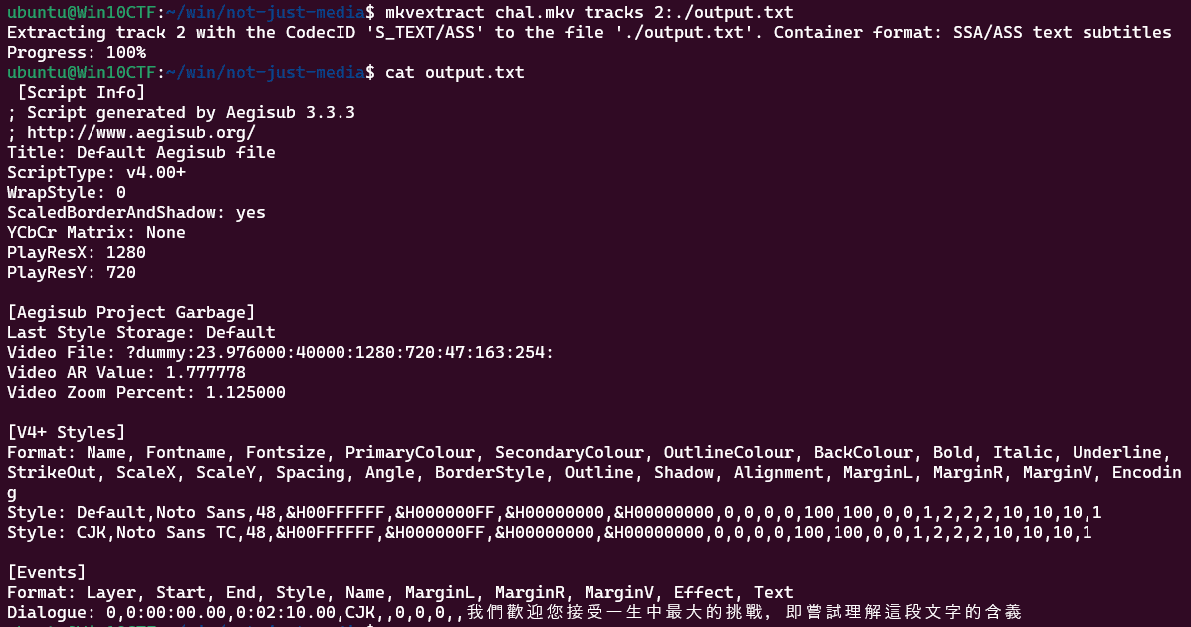
However, the subtitles do not display correctly even when the video is played.
Further analysis of the mkvinfo result shows that a suspicious font file named FakeFont_0.ttf is embedded in the Attachments section.
I extracted only the font data with the following command.
mkvextract attachments chal.mkv 2:FakeFont_0.ttfAs a test, I rendered the string 我們歡迎您接受一生中最大的挑戰,即嘗試理解這段文字的含義 using the extracted font data, and the correct flag was displayed.

I used the following script to render the font.
from PIL import Image, ImageDraw, ImageFont

font_file = './FakeFont_0.ttf'
font = ImageFont.truetype(font_file, 40)

image = Image.new('RGB', (1024, 300), color=(255, 255, 255))
draw = ImageDraw.Draw(image)

text = "我們歡迎您接受一生中最大的挑戰,即嘗試理解這段文字的含義"
draw.text((10, 10), text, fill=(0, 0, 0), font=font)

image_path = './flag.png'
image.save(image_path)
Where’s skat?(Network)
While traveling over the holidays, I was doing some casual wardriving (as I often do). Can you use my capture to find where I went?
Note: the flag is irisctf{thelocation}, where thelocation is the full name of my destination location, not the street address. For example, irisctf{Washington_Monument}. Note that the flag is not case sensitive.
Analyzing the provided PCAP file shows that it was communicating with access points having the following SSIDs.
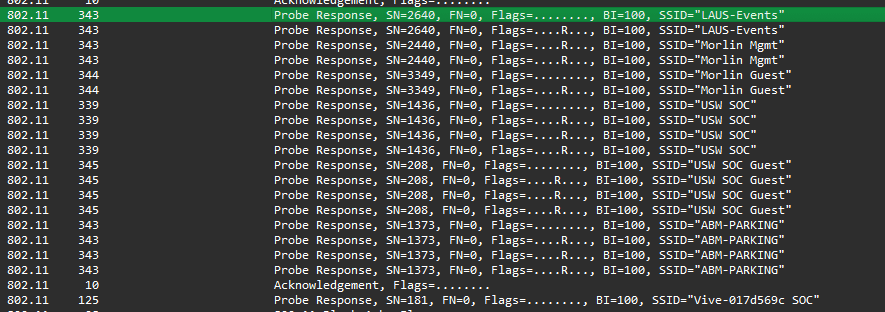
Looking up those access points on Wigle allowed me to identify the coordinates where they existed.
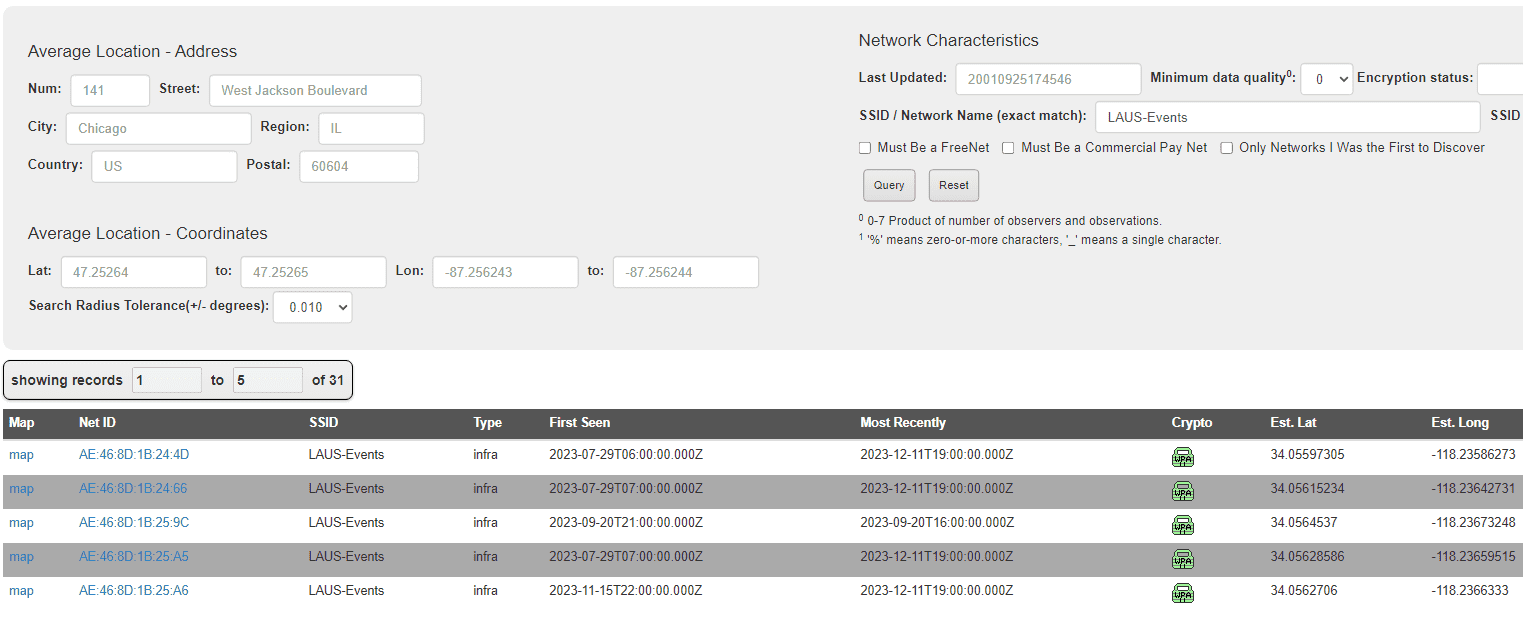
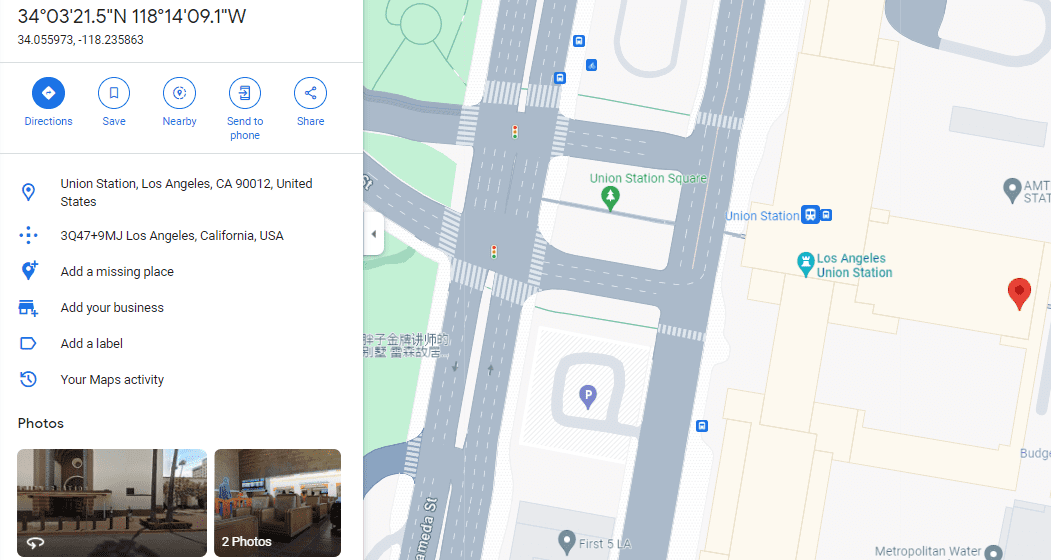
Checking those coordinates on Google Maps showed that irisctf{Los_Angeles_Union_Station} was the correct flag.
Summary
It was my first CTF of the new year, but I learned a lot and had a great time.
Lately, I feel like I keep running into eBPF in one way or another, so I need to study the lower layers of Linux more as well.