This page has been machine-translated from the original page.
I participated in SECCON Beginners CTF 2021, held on May 22–23.
In fact, the first CTF I ever entered when I started was last year’s SECCON Beginners CTF, and at the time I could only solve one or two problems and lost badly.
This time I was pumped up to participate as a rematch, to confirm how much I had grown over the past year.
And the result — I managed to solve all five Reversing problems!
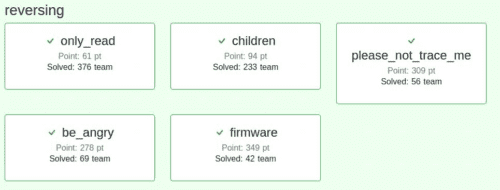
This time I would like to write a brief writeup for the “firmware” problem from among the Reversing challenges.
Disclaimer
The content of this article is not intended to promote any actions that violate social order.
Please note in advance that attempting to attack systems other than those you own or have been authorized to test may violate the “Act on Prohibition of Unauthorized Computer Access.”
WriteUp
First, extracting the provided archive file revealed the following two files:
- firmware.bin
- README.txt
The contents of README.txt were as follows:
ctf4b networks SUPER SECURE device's firmware

*NOTE*

It is allowed to reverse engineer this firmware.
I hope you enjoy reversing this file!
It appears that firmware.bin is a firmware program for some kind of network device.
Running the file command on it showed that it is a data file:
$file firmware.bin
firmware.bin: data
Next, running strings on it revealed the following filenames:
ascii.txt
square.svg
bootstrap-grid.css
fa-regular-400.woff2
file.svg
logo.png
firm
logo.jpg
folder.svg
certificate.pem
index.html
plus-square.svg
star.svg
The following text was also found:
This is a IoT device made by ctf4b networks. Password authentication is required to operate.
Input password (password is FLAG) >
Incorrect password.
Correct password!!!
GCC: (Ubuntu 9.3.0-17ubuntu1~20.04) 9.3.0
It became clear that firmware.bin consists of multiple files, and that the executable inside it would ask for a password string that is the FLAG.
However, since firmware.bin showed as a data file, I could not successfully analyze it with Ghidra, radare2, objdump, or similar tools.
About firmware.bin
So I changed my approach and researched firmware analysis tools, and found that binwalk is a tool designed specifically for firmware analysis.
I had used binwalk before to decompress ZLIB files in steganography challenges, but I did not realize that firmware analysis was its original purpose.
Running binwalk on firmware.bin produced the following output:
$binwalk firmware.bin

DECIMAL       HEXADECIMAL     DESCRIPTION
--------------------------------------------------------------------------------
127           0x7F            Base64 standard index table
2343          0x927           Copyright string: "Copyright 2011-2021 The Bootstrap Authors"
2388          0x954           Copyright string: "Copyright 2011-2021 Twitter, Inc."
83503         0x1462F         PNG image, 594 x 100, 8-bit grayscale, non-interlaced
83544         0x14658         Zlib compressed data, best compression
90593         0x161E1         ELF, 32-bit LSB shared object, ARM, version 1 (SYSV)
100906        0x18A2A         Unix path: /usr/lib/gcc/arm-linux-gnueabihf/9/../../../arm-linux-gnueabihf/Scrt1.o
103485        0x1943D         JPEG image data, JFIF standard 1.01
117167        0x1C9AF         PEM certificate
117786        0x1CC1A         HTML document header
118641        0x1CF71         HTML document footer
From this output, it is clear that I need to extract the ELF file that handles the FLAG password string.
Extracting Binary Data Between Arbitrary Addresses
I had done this a few times before, so it was not particularly difficult.
Specifically, I used the dd command.
Many people have used dd when writing an ISO image to a USB drive on Linux — it is a command for file conversion and copying.
Reference: dd(1) - Linux manual page
Using dd to extract binary data requires nothing particularly complicated.
As shown below, I specified firmware.bin as the input file, set bs to 1 to write one byte at a time, and set the start address and byte count obtained from binwalk:
$ dd if=./firmware.bin of=./program bs=1 skip=90593 count=12892
12892+0 records in
12892+0 records out
12892 bytes (13 kB, 13 KiB) copied, 0.0391655 s, 329 kB/s
Checking the extracted file confirms it was properly obtained as an ELF file:
$ file program
program: ELF 32-bit LSB pie executable, ARM, EABI5 version 1 (SYSV), dynamically linked, interpreter /lib/ld-linux-armhf.so.3, missing section headers
Analyzing the Binary File
I considered setting up an ELF32 execution environment for dynamic analysis to extract the FLAG, but setting up the dynamically linked libraries was too much trouble, so I skipped it.
Since the binary was fairly straightforward, static analysis alone was sufficient to obtain the FLAG.
I loaded it into Ghidra.
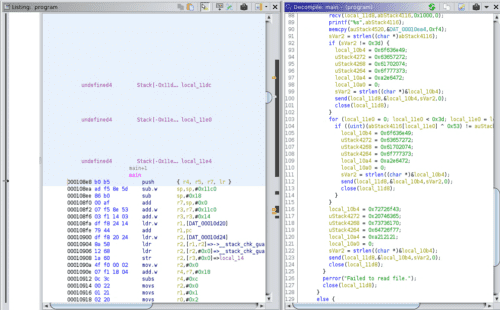
The main function is a bit lengthy, but the important parts are not that many.
Since strings had already revealed a section that receives a password input and checks whether it is correct, I searched for that.
The branch just before reaching the “Correct Password” address looked suspicious.
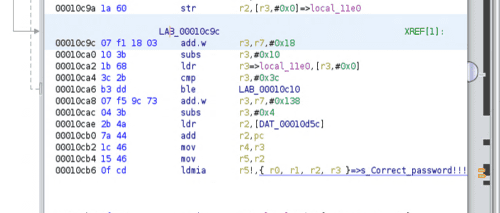
Searching around, I found a branch that clearly looked like a password check. (Variable names were edited during analysis.)
Reading the decompiled code, it appears to compare the input value against the FLAG string character by character from position 0 to 60.
The input is XORed with 0x53 (83) for each character before comparison.
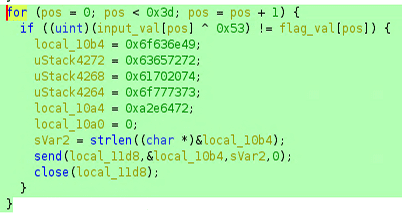
Once I understood this, the rest was straightforward.
I determined the address range of the flag_val array from the decompiled output.
I found that addresses 0xea4 to 0xf94 correspond to this array.
Since the array is defined as uint, the difference is 0xF0, meaning exactly 60 characters of storage are allocated.
With this information, I wrote a solver that extracts the binary data in that address range and XORs each byte with 0x53 to output the characters:
with open("program", "rb") as prog:
    data = prog.read()
    data = data[3748:3988]
    for i in range(0, 240, 4):
        print(chr(data[i]^83), end="")

print("")
Running it yields the FLAG:
$ python3 solver.py
ctf4b{i0t_dev1ce_xxxxxxxx_xxxxxxxx_xxxxxxxx_a_l0t_of_5ecre7s}
Summary
Looking back, it was an Easy-level problem, but I wasted a lot of time on silly mistakes.
In particular, carelessly editing the freshly extracted file in a text editor — which corrupted it and prevented binwalk from analyzing it correctly — was a painful mistake.
Going forward, if I get stuck for a while, trying to re-download the problem file might be a good first step.
That said, having settled last year’s score and confirmed that I can now clear all problems in my strongest genre at SECCON Beginners CTF shows tremendous growth, which I am happy about.
I will continue to study while aiming for even higher rankings.
Once again, many thanks to the organizers for such a great contest! I heard there were some infrastructure issues, but personally I enjoyed it without any major stress.
Next time I will aim for a satisfying result at SECCON CTF as well.