This page has been machine-translated from the original page.
I participated in TUCTF 2024 (which was actually held in 2025) with 0nePadding.
I was so busy that the scoreboard had already been closed by the time I got around to writing a writeup, but I will at least document the challenges I solved.
Table of Contents
- Mystery Box(Rev)
- Simple Login(Rev)
- Custom Image Generator(Rev)
- Mystery Presentation(Forensic)
- Packet Detective(Forensic)
- Security Rocks(Forensic)
- Summary
Mystery Box(Rev)
Lets play a game!!! You spend hours trying to guess my secret phrase! Can you figure out the secret code and retrieve the flag?
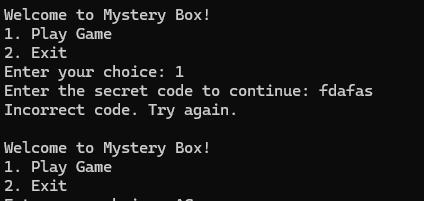
Running the challenge binary launches a menu like the one below asking whether you want to play the game.
Tracing the relevant part in the binary shows that it has functionality to display, as the flag, a string obtained by XORing data hardcoded in the data section with 0x5a.
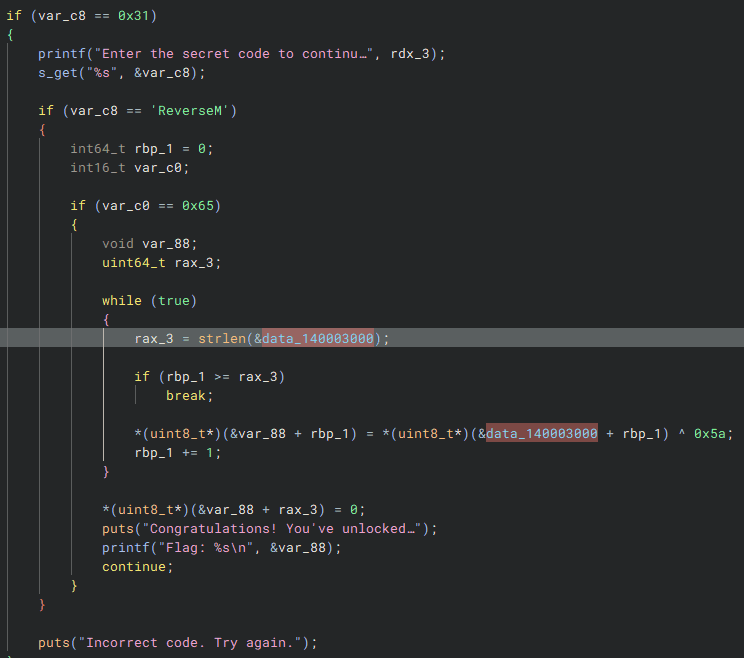
Analyzing this reveals that the correct flag is TUCTF{Banana_Socks}.
Simple Login(Rev)
Muhahaha, you will never get past my secret defenses. (When done correctly, this challenge returns the flag missing the opening curly brace; this needs to be there for the flag to work, and can be added easily).
Analyzing the challenge binary shows that it first checks whether the keyword TheSuperSecureAdminWhoseSecretWillNeverBeGotten has been entered.
And once the user enters TheSuperSecureAdminWhoseSecretWillNeverBeGotten, it next asks for an authentication password in order to display the flag.
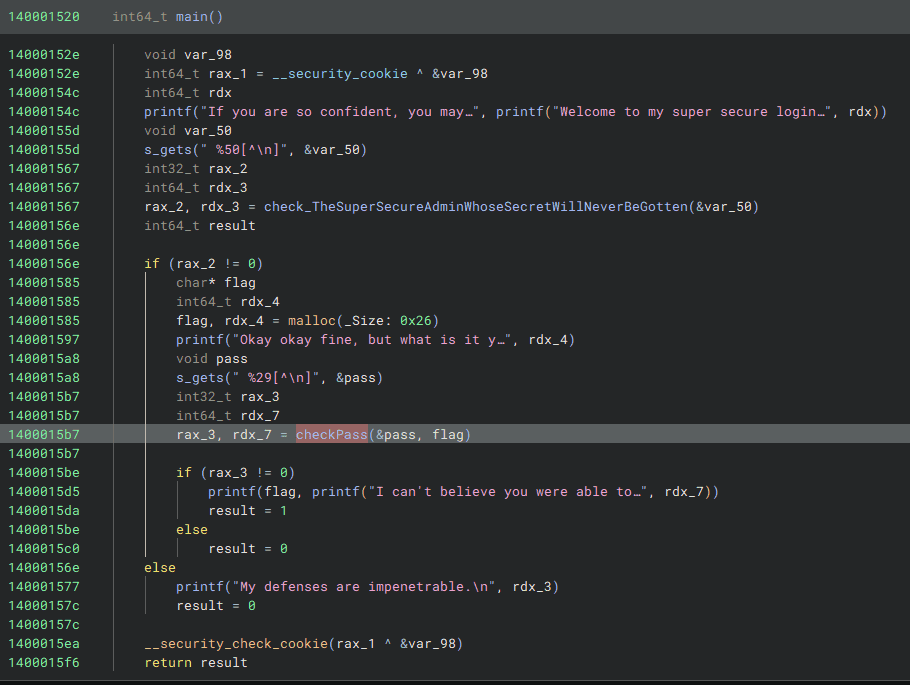
This password is checked in three stages from the beginning of the string, and if all validations succeed, the correct flag is decrypted and displayed.
The first validation is implemented as shown below; if the string starts with ruint, execution proceeds to the next check.
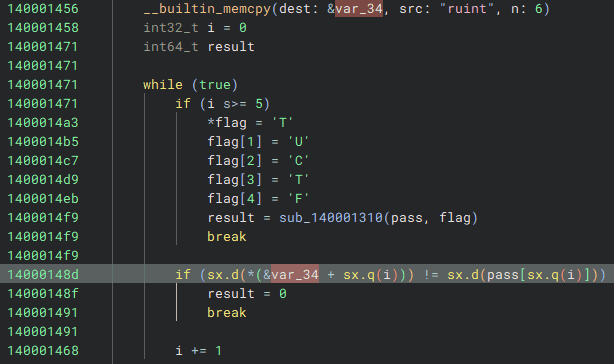
The next validation is implemented as follows and checks whether each character XORed with 0x32 matches a hardcoded value.
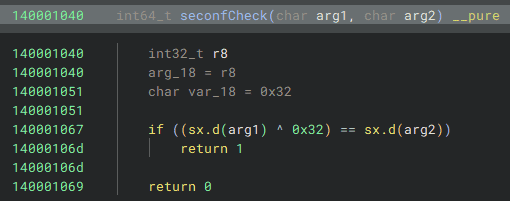
In the final validation, it checks whether taking each character, subtracting 0x54, reducing it modulo 0x1a, and then adding 0x61 yields the hardcoded values.

A string satisfying these conditions can be generated with the following code.
S = "reingvbaonetr"
for s in S:
    tmp = ord(s) - 0x61
    print(chr(tmp + 0x54),end="")
In the end, entering the password ruinthosepreseX\aZiUTbaXge produced the correct flag, TUCTF{running_through_the_subroutines!!}.

Custom Image Generator(Rev)
It’s still a work in progress, but I made my own file format! It is pretty efficient I think, but there may be improvements.
In the next challenge, we are given the code below, which generates files by encoding RGB data in a custom format, along with a file produced by encoding an image with that code.
from PIL import Image
import numpy as np
import crc8

def main():
    inp = input("""
                Welcome to the TU Image Program
                It can convert images to TIMGs
                It will also display TIGMs

                [1] Convert Image to TIMG
                [2] Display TIMG

                """)
    match inp:
        case "1":
            conv()
        case "2":
            display() #TODO: Add
            '''
⣿⣿⣿⣿⣿⣿⣿⣿⣿⣿⣿⡿⠟⠛⠛⠛⠋⠉⠉⠉⠉⠉⠉⠉⠉⠉⠉⠉⠉⠉⠙⠛⠛⠛⠿⠻⠿⣿⣿⣿⣿⣿⣿⣿⣿⣿⣿⣿⣿⣿
⣿⣿⣿⣿⣿⣿⣿⣿⣿⡿⠋⠀⠀⠀⠀⠀⡀⠠⠤⠒⢂⣉⣉⣉⣑⣒⣒⠒⠒⠒⠒⠒⠒⠒⠀⠀⠐⠒⠚⠻⠿⠿⣿⣿⣿⣿⣿⣿⣿⣿
⣿⣿⣿⣿⣿⣿⣿⣿⠏⠀⠀⠀⠀⡠⠔⠉⣀⠔⠒⠉⣀⣀⠀⠀⠀⣀⡀⠈⠉⠑⠒⠒⠒⠒⠒⠈⠉⠉⠉⠁⠂⠀⠈⠙⢿⣿⣿⣿⣿⣿
⣿⣿⣿⣿⣿⣿⣿⠇⠀⠀⠀⠔⠁⠠⠖⠡⠔⠊⠀⠀⠀⠀⠀⠀⠀⠐⡄⠀⠀⠀⠀⠀⠀⡄⠀⠀⠀⠀⠉⠲⢄⠀⠀⠀⠈⣿⣿⣿⣿⣿
⣿⣿⣿⣿⣿⣿⠋⠀⠀⠀⠀⠀⠀⠀⠊⠀⢀⣀⣤⣤⣤⣤⣀⠀⠀⠀⢸⠀⠀⠀⠀⠀⠜⠀⠀⠀⠀⣀⡀⠀⠈⠃⠀⠀⠀⠸⣿⣿⣿⣿
⣿⣿⣿⣿⡿⠥⠐⠂⠀⠀⠀⠀⡄⠀⠰⢺⣿⣿⣿⣿⣿⣟⠀⠈⠐⢤⠀⠀⠀⠀⠀⠀⢀⣠⣶⣾⣯⠀⠀⠉⠂⠀⠠⠤⢄⣀⠙⢿⣿⣿
⣿⡿⠋⠡⠐⠈⣉⠭⠤⠤⢄⡀⠈⠀⠈⠁⠉⠁⡠⠀⠀⠀⠉⠐⠠⠔⠀⠀⠀⠀⠀⠲⣿⠿⠛⠛⠓⠒⠂⠀⠀⠀⠀⠀⠀⠠⡉⢢⠙⣿
⣿⠀⢀⠁⠀⠊⠀⠀⠀⠀⠀⠈⠁⠒⠂⠀⠒⠊⠀⠀⠀⠀⠀⠀⠀⠀⠀⠀⠀⠀⠀⠀⡇⠀⠀⠀⠀⠀⢀⣀⡠⠔⠒⠒⠂⠀⠈⠀⡇⣿
⣿⠀⢸⠀⠀⠀⢀⣀⡠⠋⠓⠤⣀⡀⠀⠀⠀⠀⠀⠀⠀⠀⠀⠀⠀⠄⠀⠀⠀⠀⠀⠀⠈⠢⠤⡀⠀⠀⠀⠀⠀⠀⢠⠀⠀⠀⡠⠀⡇⣿
⣿⡀⠘⠀⠀⠀⠀⠀⠘⡄⠀⠀⠀⠈⠑⡦⢄⣀⠀⠀⠐⠒⠁⢸⠀⠀⠠⠒⠄⠀⠀⠀⠀⠀⢀⠇⠀⣀⡀⠀⠀⢀⢾⡆⠀⠈⡀⠎⣸⣿
⣿⣿⣄⡈⠢⠀⠀⠀⠀⠘⣶⣄⡀⠀⠀⡇⠀⠀⠈⠉⠒⠢⡤⣀⡀⠀⠀⠀⠀⠀⠐⠦⠤⠒⠁⠀⠀⠀⠀⣀⢴⠁⠀⢷⠀⠀⠀⢰⣿⣿
⣿⣿⣿⣿⣇⠂⠀⠀⠀⠀⠈⢂⠀⠈⠹⡧⣀⠀⠀⠀⠀⠀⡇⠀⠀⠉⠉⠉⢱⠒⠒⠒⠒⢖⠒⠒⠂⠙⠏⠀⠘⡀⠀⢸⠀⠀⠀⣿⣿⣿
⣿⣿⣿⣿⣿⣧⠀⠀⠀⠀⠀⠀⠑⠄⠰⠀⠀⠁⠐⠲⣤⣴⣄⡀⠀⠀⠀⠀⢸⠀⠀⠀⠀⢸⠀⠀⠀⠀⢠⠀⣠⣷⣶⣿⠀⠀⢰⣿⣿⣿
⣿⣿⣿⣿⣿⣿⣧⠀⠀⠀⠀⠀⠀⠀⠁⢀⠀⠀⠀⠀⠀⡙⠋⠙⠓⠲⢤⣤⣷⣤⣤⣤⣤⣾⣦⣤⣤⣶⣿⣿⣿⣿⡟⢹⠀⠀⢸⣿⣿⣿
⣿⣿⣿⣿⣿⣿⣿⣧⡀⠀⠀⠀⠀⠀⠀⠀⠑⠀⢄⠀⡰⠁⠀⠀⠀⠀⠀⠈⠉⠁⠈⠉⠻⠋⠉⠛⢛⠉⠉⢹⠁⢀⢇⠎⠀⠀⢸⣿⣿⣿
⣿⣿⣿⣿⣿⣿⣿⣿⣿⣦⣀⠈⠢⢄⡉⠂⠄⡀⠀⠈⠒⠢⠄⠀⢀⣀⣀⣰⠀⠀⠀⠀⠀⠀⠀⠀⡀⠀⢀⣎⠀⠼⠊⠀⠀⠀⠘⣿⣿⣿
⣿⣿⣿⣿⣿⣿⣿⣿⣿⣿⣿⣷⣄⡀⠉⠢⢄⡈⠑⠢⢄⡀⠀⠀⠀⠀⠀⠀⠉⠉⠉⠉⠉⠉⠉⠉⠉⠉⠁⠀⠀⢀⠀⠀⠀⠀⠀⢻⣿⣿
⣿⣿⣿⣿⣿⣿⣿⣿⣿⣿⣿⣿⣿⣿⣷⣦⣀⡈⠑⠢⢄⡀⠈⠑⠒⠤⠄⣀⣀⠀⠉⠉⠉⠉⠀⠀⠀⣀⡀⠤⠂⠁⠀⢀⠆⠀⠀⢸⣿⣿
⣿⣿⣿⣿⣿⣿⣿⣿⣿⣿⣿⣿⣿⣿⣿⣿⣿⣿⣷⣦⣄⡀⠁⠉⠒⠂⠤⠤⣀⣀⣉⡉⠉⠉⠉⠉⢀⣀⣀⡠⠤⠒⠈⠀⠀⠀⠀⣸⣿⣿
⣿⣿⣿⣿⣿⣿⣿⣿⣿⣿⣿⣿⣿⣿⣿⣿⣿⣿⣿⣿⣿⣿⣿⣷⣶⣤⣄⣀⠀⠀⠀⠀⠀⠀⠀⠀⠀⠀⠀⠀⠀⠀⠀⠀⠀⠀⣰⣿⣿⣿
⣿⣿⣿⣿⣿⣿⣿⣿⣿⣿⣿⣿⣿⣿⣿⣿⣿⣿⣿⣿⣿⣿⣿⣿⣿⣿⣿⣿⣿⣿⣶⣶⣶⣶⣤⣤⣤⣤⣀⣀⣤⣤⣤⣶⣾⣿⣿⣿⣿⣿
'''


        case _:
            return 0
    return 0


def conv():
    file = input("Enter the path to you image you want converted to a TIMG file:\n")
    out = input("Enter the path youd like to write the TIMG to:\n")
    img = Image.open(file)
    w,h = img.size
    write = [b'\x54',b'\x49',b'\x4D',b'\x47',b'\x00',b'\x01',b'\x00',b'\x02']
    for x in w.to_bytes(4):
        write.append(x.to_bytes(1))
    for y in h.to_bytes(4):
        write.append(y.to_bytes(1))
    write.append(b'\x52')
    write.append(b'\x55')
    write.append(b'\x42')
    write.append(b'\x59')


    for i in range(h):
        dat = [b'\x44',b'\x41',b'\x54',b'\x52']
        for j in range(w):
            dat.append(img.getpixel([j,i])[0].to_bytes(1))
        dat.append(getCheck(dat[4:]))
        for wa in dat:
            write.append(wa)

    for i in range(h):
        dat = [b'\x44',b'\x41',b'\x54',b'\x47']
        for j in range(w):
            dat.append(img.getpixel([j,i])[1].to_bytes(1))
        dat.append(getCheck(dat[4:]))
        for wa in dat:
            write.append(wa)

    for i in range(h):
        dat = [b'\x44',b'\x41',b'\x54',b'\x42'  ]
        for j in range(w):
            print(img.getpixel([j,i])[2].to_bytes(1))
            dat.append(img.getpixel([j,i])[2].to_bytes(1))
        print(dat)
        dat.append(getCheck(dat[4:]))
        for wa in dat:
            write.append(wa)

    write.append(b'\x44')
    write.append(b'\x41')
    write.append(b'\x54')
    write.append(b'\x45')

    with open(out,"ab") as f:
        for b in write:
            f.write(b)

    return 0

def getCheck(datr):
    dat = ''
    for w in datr:
        dat+=chr(int.from_bytes(w))
    print(datr      )
    print(dat.encode())
    return int.to_bytes(int(crc8.crc8(dat.encode()).hexdigest(),base=16),1)

if __name__=='__main__':
    main()
This code simply stores an image’s RGB data in a custom format, so the original image can be recovered easily with the following solver.
from PIL import Image
import numpy as np
import struct
import crc8

def timg_to_jpg(timg_file, output_file):
    try:
        with open(timg_file, "rb") as f:
            data = f.read()

        # Check TIMG header
        if data[:4] != b'TIMG':
            raise ValueError("Invalid TIMG file")

        # Extract width and height
        width = int.from_bytes(data[8:12], "big")
        height = int.from_bytes(data[12:16], "big")

        # Verify header consistency
        if data[16:20] != b'RUBY':
            raise ValueError("Invalid RUBY header")

        # Initialize RGB arrays
        r_channel = np.zeros((height, width), dtype=np.uint8)
        g_channel = np.zeros((height, width), dtype=np.uint8)
        b_channel = np.zeros((height, width), dtype=np.uint8)

        # Parse data sections
        offset = 20  # Start after header
        for color, channel in zip([b'DATR', b'DATG', b'DATB'], [r_channel, g_channel, b_channel]):
            for i in range(height):
                if data[offset:offset+4] != color:
                    raise ValueError(f"Missing {color.decode()} section")
                offset += 4  # Skip section header
                for j in range(width):
                    channel[i, j] = data[offset]
                    offset += 1

                # Skip checksum (1 byte)
                offset += 1

        # Verify footer
        if data[offset:offset+4] != b'DATE':
            raise ValueError("Invalid footer")

        # Combine channels into an image
        rgb_array = np.stack((r_channel, g_channel, b_channel), axis=2)
        img = Image.fromarray(rgb_array, "RGB")

        # Save as JPG
        img.save(output_file, "JPEG")
        print(f"Successfully converted TIMG to {output_file}")

    except Exception as e:
        print(f"Error: {e}")

# Example usage
timg_to_jpg("flag.timg", "output.jpg")
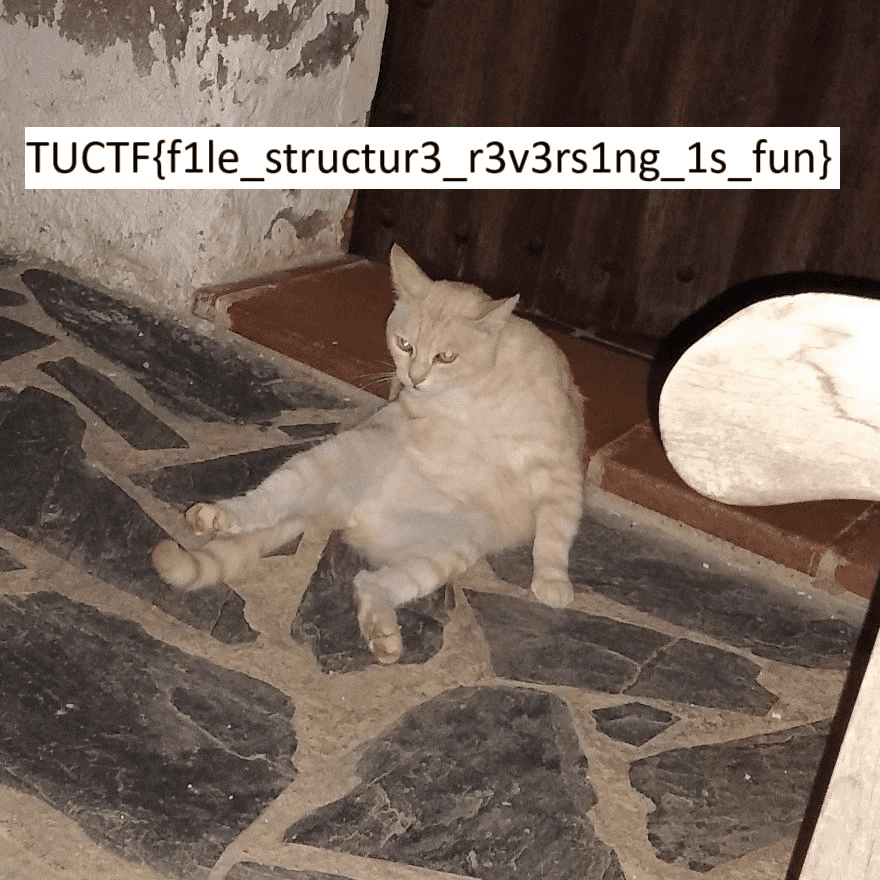
Decoding the challenge file with this code yields the correct flag as shown below.
Mystery Presentation(Forensic)
We recently got this absolutely non-sensical presentation from a confidential informant, along with a notes that said “The truth hurts boomers, but it’s what on the inside that counts <3”. We can’t make heads or tails of it, but it has to be important! Can you help us out?
If you unzip the Office file provided with the challenge, you will find a folder named secret_data.7z inside.
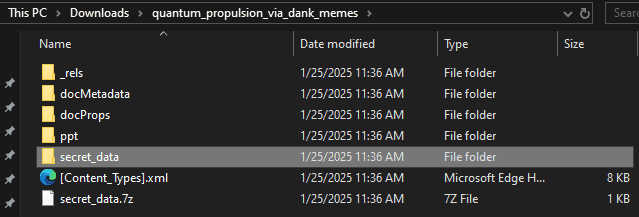
The correct flag can be extracted from there.

Packet Detective(Forensic)
You are security analyst given a pcap file containing network traffic. Hidden among these packets is a secret flag transmitted. Your task is to analyze the pcap file, filter out common traffic, and pinpoint the packet carrying the hidden flag.
By searching through the large amount of TCP traffic in the packet capture provided with the challenge, you can identify the stream that transmits the flag in plaintext.

Security Rocks(Forensic)
I shared a super secret message, I hope its secure.
I analyzed the packet capture of wireless traffic provided with the challenge.
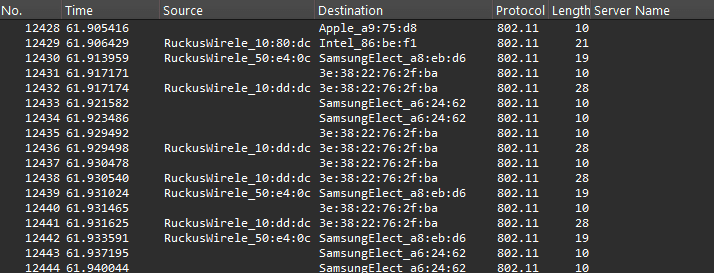
Using Wireshark shows that this traffic appears to be encrypted with WPA.
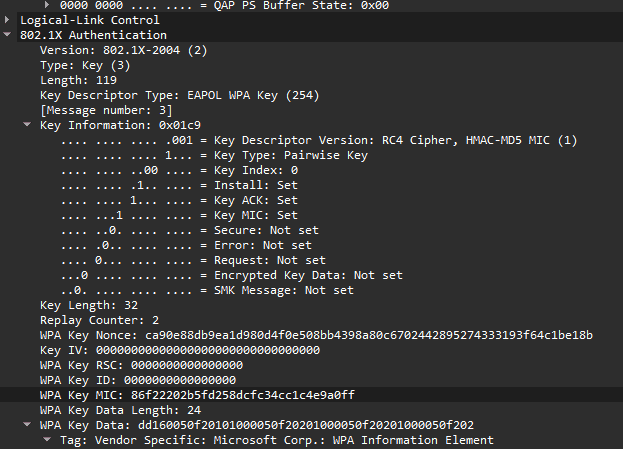
So I decided to check whether the WPA password could be recovered using airodump-ng.
airodump-ng -r dump-05.cap
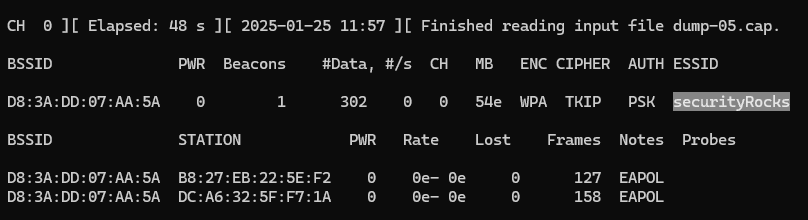
From this result, we can determine the WPA decryption password by performing a dictionary attack with rockyou.txt.
aircrack-ng -w /usr/share/wordlists/rockyou.txt -b D8:3A:DD:07:AA:5A dump-05.cap
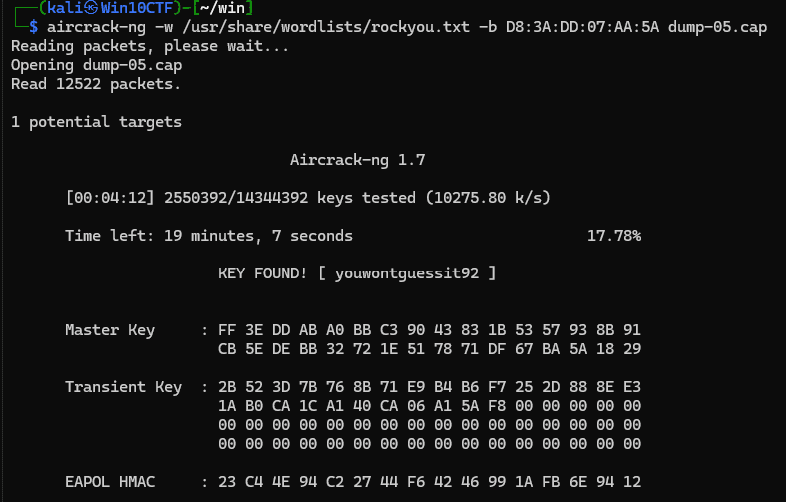
Reference: ja:cracking_wpa [Aircrack-ng]
I then used the recovered password in Wireshark to decrypt the WPA traffic.
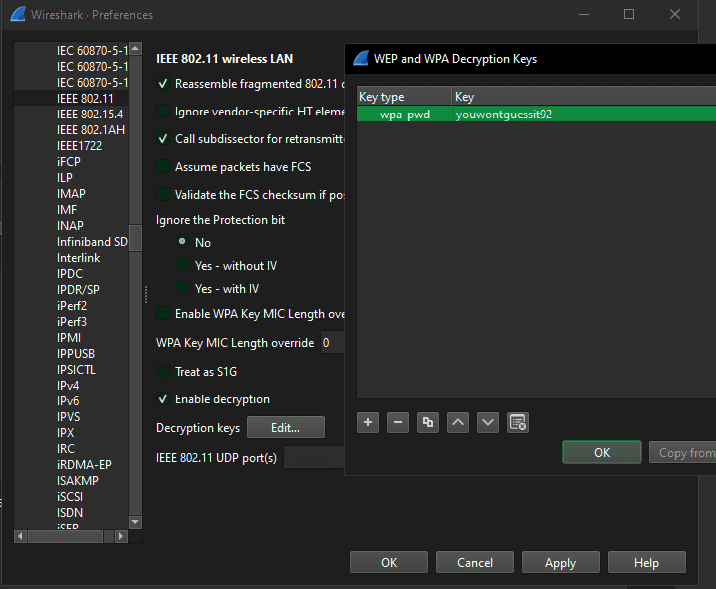
From the decrypted packets, we can confirm that a file containing sensitive information was being transmitted.
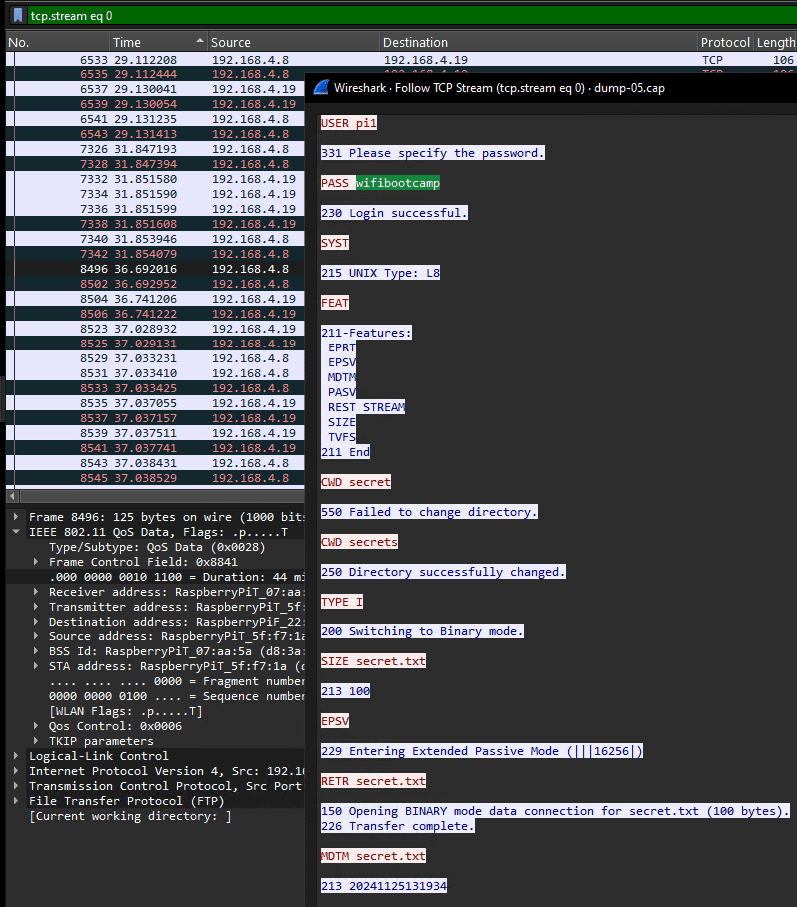
This file contained an encoded string like the one shown below.
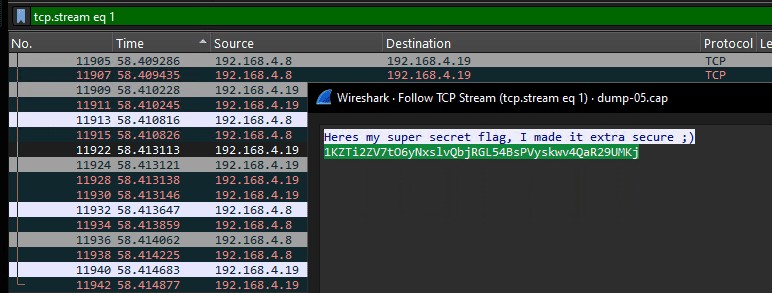
Unfortunately, trying ordinary approaches such as Base64 decoding did not work, but thanks to a teammate discovering that the flag could be decoded with Base62, we were able to determine that the correct flag was TUCTF{w1f1_15_d3f1n173ly_53cure3}.
Summary
I had so little time to write this up that it ended up being a bit rushed…