This page has been machine-translated from the original page.
I use the penetration-testing learning platform “Hack The Box” to study security. At the time of writing, my rank on Hack The Box is ProHacker.

This time I am writing up the retired HackTheBox machine “Teacher”.
About This Article
The content of this article is not intended to encourage acts that are contrary to social order.
Please note that attempting attacks against environments other than those you own or are authorized to use may violate the Act on the Prohibition of Unauthorized Computer Access (the Unauthorized Access Prohibition Act).
All statements here are my own and do not represent any organization I belong to.
Table of Contents
Enumeration
As usual, I started with a port scan.
$ sudo sed -i 's/^[0-9].*$RHOST/10.10.10.153  $RHOST/g' /etc/hosts

$ nmap -sV -sC -Pn -T4 $RHOST| tee nmap1.txt
Nmap scan report for $RHOST (10.10.10.153)
Host is up.
All 1000 scanned ports on $RHOST (10.10.10.153) are in ignored states.
Not shown: 1000 filtered tcp ports (no-response)

$ nmap -p- $RHOST -Pn -sC -sV -A  | tee nmap_max.txt
It looked like all ports in the fast scan were being filtered.
With everything filtered, it was impossible to tell whether any ports were actually open.
I also tried scanning all ports, but unfortunately those were filtered as well.
I thought I was completely stuck, but it turned out to be a silly mistake — I simply was not connected to the VPN.
After connecting to the VPN, I found the following open ports:
PORT      STATE    SERVICE         VERSION
80/tcp    open     http            Apache httpd 2.4.25 ((Debian))
|_http-title: Blackhat highschool
|_http-server-header: Apache/2.4.25 (Debian)
1069/tcp  filtered cognex-insight
1084/tcp  filtered ansoft-lm-2
1085/tcp  filtered webobjects
1434/tcp  filtered ms-sql-m
2222/tcp  filtered EtherNetIP-1
3766/tcp  filtered sitewatch-s
5544/tcp  filtered unknown
5815/tcp  filtered unknown
6004/tcp  filtered X11:4
7402/tcp  filtered rtps-dd-mt
8087/tcp  filtered simplifymedia
8181/tcp  filtered intermapper
9071/tcp  filtered unknown
9099/tcp  filtered unknown
9415/tcp  filtered unknown
9929/tcp  filtered nping-echo
15004/tcp filtered unknown
32776/tcp filtered sometimes-rpc15
32782/tcp filtered unknown
49167/tcp filtered unknown
65000/tcp filtered unknown
For now, I connected to the open port 80 and continued enumeration.
Port 80 appeared to be running some kind of CMS site.

Since there were no obvious clues, I ran feroxbuster, which revealed a redirect when accessing the /moodle path.
$ feroxbuster -u http://$RHOST/ -x php -w /usr/share/wordlists/raft-medium-directories.txt --no-recursion | tee feroxbuster.txt

301      GET        9l       28w      317c http://$RHOST/moodle => http://$RHOST/moodle/
Opening that address in a browser redirected to http://teacher.htb/moodle/, so I updated the hosts file and accessed the page.
This connected me to what appeared to be a Moodle administration site.
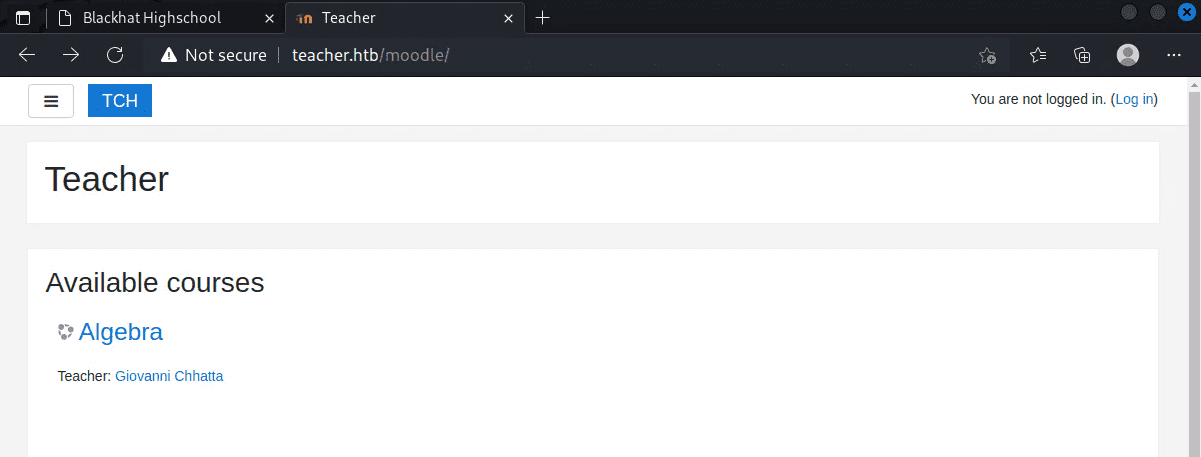
I wanted to look for exploits from here, but it turned out that the Moodle version can only be viewed by accounts with teacher-level privileges or higher.
Reference: Moodle 3.8 - Unrestricted File Upload - PHP webapps Exploit

I spent a while trying various exploits from here, but none of them landed.
Going back to enumeration, I noticed that the file images/5.png in the gallery appeared as blank space, which caught my attention.

Gaining a Shell
After exploring the console, researching vulnerabilities, and trying many approaches, the following exploit finally worked.
Reference: Moodle 3.4.1 - Remote Code Execution - PHP webapps Exploit
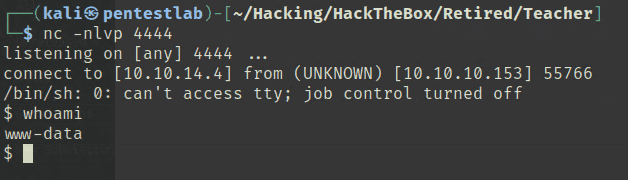
This gave me a shell, but the privileges were still low, so I continued enumeration from here.
Getting a User
Browsing around, I found DB credentials embedded in a file called config.php.
I extracted a database dump with the following command:
$ mysqldump -u 'root' -p -h 'localhost' 'moodle' > /tmp/output.txtGoing through the DB contents, I found that in addition to Giovanni (whose credentials I had obtained), there was an Admin user, and password hashes were stored in the DB.
Admin $2y$10$7VPsdU9/9y2J4Mynlt6vM.a4coqHRXsNTOq/1aA6wCWTsF2wtrDO2
giovanni $2y$10$38V6kI7LNudORa7lBAT0q.vsQsv4PemY7rf/M1Zkj/i1VqLO0FSYO
I spent a while trying to crack the Admin hash, but on closer inspection I noticed there was another user registered called Giovannibak.
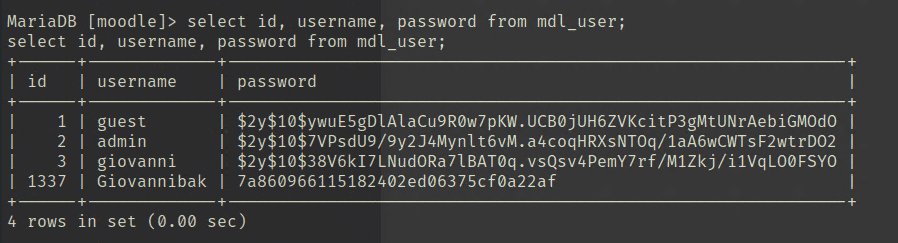
The Giovannibak hash cracked instantly, and using that password I was able to obtain the User flag.
Privilege Escalation
Inside the user’s home directory there are several answersAlgebra files. The directory owner in the backup was giovanni, but the folders placed inside the directory were owned by root.
giovanni@teacher:/tmp/courses/algebra$ strings answersAlgebra Point a = 3 Point b = 5 Point c = ? 3 * 3 = 9 5 * 5 = 25 ---+ v34 = 5,83 Point c = 5,83 score: 1/2
Another observation: only the backup files were owned by root, and their modification timestamps were changing frequently.
This suggested that root was periodically compressing the courses folder into a backup archive — making it a good entry point for privilege escalation.
I used pspy to check running tasks and found that a script called backup.sh was being called.

The script looked like this:
#!/bin/bash
cd /home/giovanni/work;
tar -czvf tmp/backup_courses.tar.gz courses/*;
cd tmp;
tar -xf backup_courses.tar.gz;
chmod 777 * -R;
The key observation: after moving to the tmp directory, chmod 777 * -R recursively changes permissions on everything there.
This means that by removing the tmp directory and replacing it with an arbitrary symbolic link, I could cause chmod 777 -R to apply to every file in any target directory.
Any directory would work, but since I wanted to get a shell from backup.sh running as root, I set the symlink as ln -s /usr/bin tmp.
This let me overwrite backup.sh and obtain a root shell.