This page has been machine-translated from the original page.
I am studying security using “Hack The Box,” a penetration testing learning platform. My current rank on “Hack The Box” is ProHacker at the time of writing.

In this article, I summarize what I learned about attack techniques related to “EternalBlue” through solving a HackTheBox machine.
To better understand attacks related to “EternalBlue,” which caused enormous real-world damage, I will summarize what I studied.
“EternalBlue” is also known for having been a major factor in the spread of the ransomware “WannaCry,” which wreaked havoc around the world.
About This Article
The content of this article is not intended to promote any actions that violate social order.
Please note in advance that attempting to attack environments you do not own or have not been authorized to access may violate the “Act on Prohibition of Unauthorized Computer Access” (Unauthorized Access Prohibition Act).
All opinions expressed here are my own and do not represent any organization I belong to.
Table of Contents
- What Is EternalBlue
- The Mechanism of EternalBlue
- About the SMB Protocol
- Getting a Reverse Shell by Exploiting the Vulnerability
- Summary
Theme of This Article
This article’s theme is to learn the details of the vulnerability and how it is exploited by reproducing “EternalBlue,” and to apply that knowledge to security measures.
What Is EternalBlue
EternalBlue refers to an attack tool that exploits a security flaw in Windows SMB1.0.
By exploiting a flaw in “Windows SMB1.0 (SMBv1),” EternalBlue allows an attacker to execute arbitrary code.
EternalBlue was addressed by the update “MS17-010,” published in March 2017. Reference: Microsoft Security Bulletin MS17-010 - Critical | Microsoft Docs
EternalBlue was used by the ransomware “WannaCry,” which spread worldwide. It reportedly affected around 230,000 computers, and the total global damage caused by WannaCry is estimated to have reached 4 billion USD.
In Japan as well, many companies, including Hitachi, were affected.
Reference: Everything About the WannaCry Ransomware | Kaspersky Reference: What Did Hitachi Learn from the WannaCry Incident? Turning It into an IoT Security Service: IoT Security (1/2) - MONOist
EternalBlue was included in the offensive tools leaked by the group known as “Shadow Brokers.” These tools are said to have been leaked from the NSA, although the truth of that remains unclear.
When searching the internet, you will find pages that describe EternalBlue as a vulnerability and others that use the name for the exploit itself. Based on reports from ESET and Trend Micro, however, it seems most accurate to regard EternalBlue as an exploit that abuses the vulnerability addressed by “MS17-010.”
Reference: One year later: EternalBlue exploit more popular now than during WannaCryptor outbreak | WeLiveSecurity Reference: Trend Micro Security Blog: Explaining How EternalBlue, the Vulnerability Exploit That Spread WannaCry, Works | Trend Micro Security Blog
An interesting point is that by the time EternalBlue was publicly leaked, a patch for “MS17-010” had already been released.
Reference: Protecting customers and evaluating risk – Microsoft Security Response Center
Despite the availability of a patch, EternalBlue was still abused around the world. According to research by Avast, even one year after the WannaCry outbreak, 29% of Windows PCs worldwide still had not been patched and remained vulnerable.
If critical patches had simply been applied, infection of individual machines—or at least the spread of the infection—could likely have been prevented. In that sense, this is probably an incident we should learn from.
The Mechanism of EternalBlue
Now, let’s take a closer look at the attack mechanism used by EternalBlue.
The vulnerability exploited by EternalBlue causes a buffer overflow in the Large Non-PagedPool region during File ExtendedAttribute (FEA) processing by the Windows SMB1.0 kernel function srv!SrvOs2FeaListToNt.
More specifically, when the kernel function srv!SrvOs2FeaListToNt converts FEA (extended file attributes) into NTFEA (Windows NT FEA), it calls srv!SrvOs2FeaListSizeToNt to calculate the size of the FEA list. A bug in that size calculation leads to the overflow.
According to Trend Micro’s analysis, the overflow occurs through the following flow.
- The
srv!SrvOs2FeaListSizeToNtfunction calculates the size of the FEA list and updates the received FEA list size.- At that point, because of a type conversion to the wrong data type (
WORD, an unsigned 2-byte integer in C), the FEA size becomes larger than the original value.- Because the list size is inaccurate, an overflow occurs in the non-paged pool during the iterative conversion of the FEA list into an NTFEA list.
What Is File ExtendedAttribute (FEA)?
So what exactly is FEA (extended file attributes), the feature whose vulnerability is abused by EternalBlue?
According to RFC8276, extended file attributes are provided to associate opaque metadata that is not interpreted by the file system with files and directories.
In other words, you can think of them as a mechanism that allows users to associate metadata with a file even though the file system itself does not interpret that metadata.
On the other hand, permissions and attributes such as atime and ctime are strictly defined by the file system as ordinary attributes and are treated separately from FEA.
Reference:
- Extended file attribute - Wikipedia
- RFC 8276 - File System Extended Attributes in NFSv4 (Japanese translation)
The srv!SrvOs2FeaListSizeToNt Function
EternalBlue exploits the buffer overflow that occurs when the FEA list size calculated by srv!SrvOs2FeaListSizeToNt is handled.
srv!SrvOs2FeaListSizeToNt is a function included in SRV.sys, the kernel driver for the SMB protocol, and it is responsible for converting an OS/2 FEA list into an NT FEA list.
Reference:
About the SMB Protocol
We have now seen that the srv!SrvOs2FeaListSizeToNt function exploited by EternalBlue exists in the kernel driver SRV.sys used by the SMB protocol.
But what exactly is the SMB protocol in the first place? (I didn’t really know.) I had heard the name often, but I never had a solid grasp of what it actually was.
The SMB protocol is a collective name for communication protocols used mainly in Windows environments for things like file sharing and printer sharing.
The SMB protocol can operate over several different protocols, and SMBv1 can also run directly over TCP on port 445 through a feature called direct hosting SMB.
Originally, the SMB protocol was a file-sharing protocol for file servers running on OS/2-based file server operating systems. It became widely used after file server functionality was added to Windows 3.x and 9x.
That historical background also seems to explain why srv!SrvOs2FeaListSizeToNt performs a conversion from OS/2 FEA lists to NT FEA lists.
Reference:
- Server Message Block - Wikipedia
- Part 7: An Overview of the SMB File-Sharing Protocol: Windows Network Basics - @IT
- Explanation of the SMB Protocol
EternalBlue Test Environment
Now that I had roughly finished researching how EternalBlue is exploited and what environment is needed, I wanted to verify the attack technique in practice.
For this validation, I prepared the following environment.
Target Machine (Virtual Machine)
-
Windows 7 64bit (IP:169.254.100.60)
kd> vertarget

Windows 7 Kernel Version 7601 (Service Pack 1) MP (1 procs) Free x64
Built by: 7601.17514.amd64fre.win7sp1_rtm.101119-1850
Machine Name:
Kernel base = 0xfffff800`02e1f000 PsLoadedModuleList = 0xfffff800`03064e90
Debug session time: Mon Apr 26 01:19:52.742 2021 (UTC + 9:00)
System Uptime: 0 days 0:08:03.468
Attacker Machine (Virtual Machine)
- Parrot OS (IP:169.254.100.10)
- WireShark
Debug Machine (Host)
- Windows 10 Pro 20H2
- Hyper-V
- WinDbg 10.0.19041.685 X86
Preparing the Target Machine
Enabling Kernel-Mode Debugging
First, enable kernel debugging on the target machine’s Windows 7.
Because the target machine in this case is a virtual machine built with Hyper-V, I configured the serial port used for debugging as a named pipe.
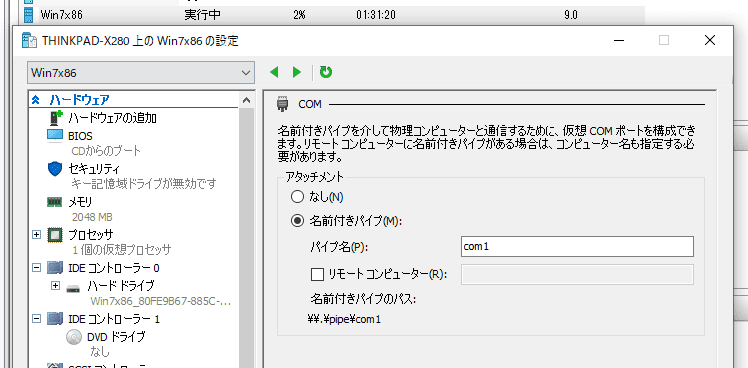
Next, log in to the target machine and enable kernel-mode debugging.
You can enable it by running the following commands from a command prompt started with administrator privileges.
bcdedit /debug on
bcdedit /dbgsettings serial debugport:1 baudrate:115200
shutdown /r /t 0
It is also fine to launch Msconfig.exe, specify the COM1 port from Advanced options, enable debugging, and then reboot.
Verifying SMBv1 Is Enabled
Next, on the target host’s Windows 7, verify that SMBv1 is enabled.
If DEPENDENCIES: MRxSmb10 is present in the output of the following command, you can conclude that SMB 1.0 is enabled.
sc.exe qc lanmanworkstation
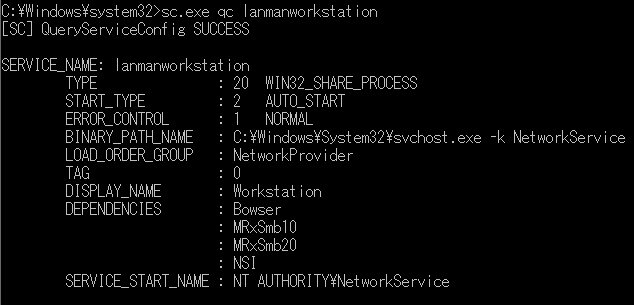
With that, preparation on the target machine side is complete.
Kernel Debugging with WinDbg
Installation
Set up WinDbg on the host-side Windows 10 and use it to perform kernel debugging on the target machine.
WinDbg is a kernel-mode and user-mode debugger included in Debugging Tools for Windows. Using WinDbg also makes it possible to debug Windows system drivers.
At the time of writing, there are two major ways to set up WinDbg.
- Get the UWP app “WinDbg Preview” from the Microsoft Store
- Get the Windows SDK, which includes Debugging Tools for Windows, from Windows 10 SDK
Reference: Download Debugging Tools for Windows - WinDbg - Windows drivers | Microsoft Docs
The easiest method is to get the preview build of WinDbg from the Microsoft Store, but because it had not yet been officially released and still had many issues, installing the Windows SDK was the safer option.
Once the Windows SDK installation completes with the Debugging Tools for Windows checkbox enabled, a folder called C:\Program Files (x86)\Windows Kits\ is created.
WinDbg is included there.
Because the target machine this time is 64-bit Windows 7, I used the WinDbg located under C:\Program Files (x86)\Windows Kits\10\Debuggers\x64\.
Connecting to the Target Machine with WinDbg
Launch WinDbg from the downloaded C:\Program Files (x86)\Windows Kits\10\Debuggers\x64\ directory with administrator privileges.
Be careful: if you launch it as a normal user, kernel debugging will fail with the error Kernel debugger failed initialization, Win32 error 5 Access is denied when connecting to the target machine.
After launching WinDbg as administrator, choose [File] > [Kernel Debug], and connect to the target machine using a named pipe as shown in the image below.
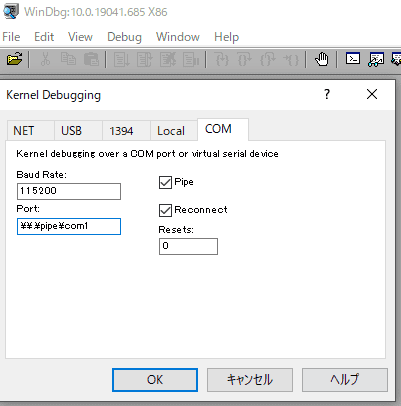
If a prompt opens and running dt nt!_* prints a symbol list like the one below, the connection has succeeded.
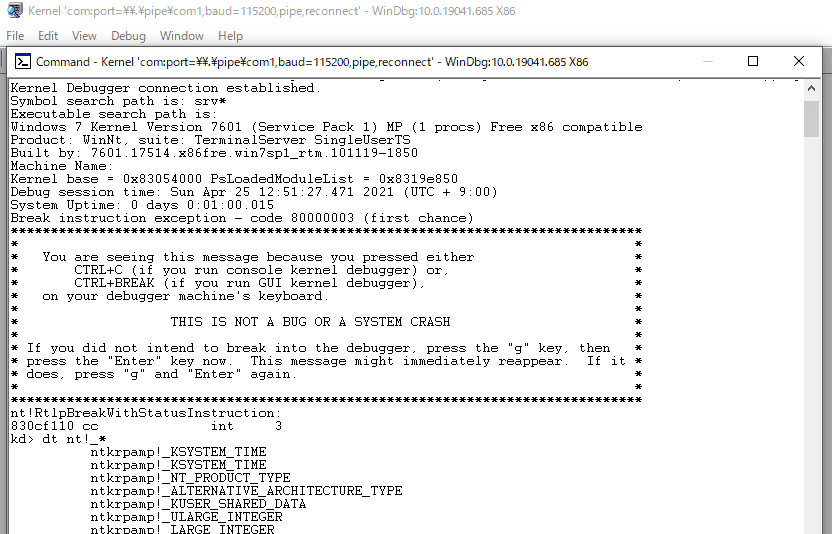
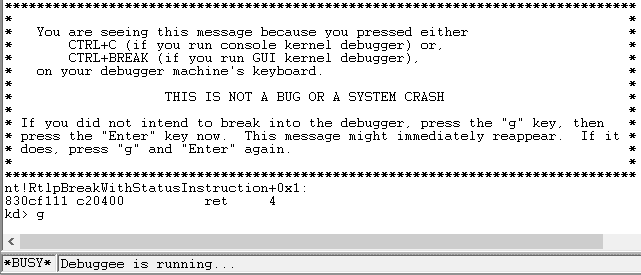
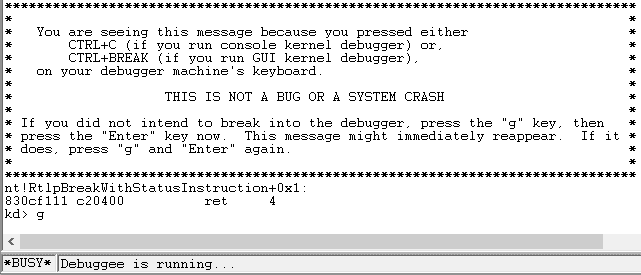
On the first connection, the kernel on the target machine is still running, so it will likely show Busy and you may be unable to enter commands.
To make WinDbg accept commands, press Ctrl+Break (or Ctrl+Fn+B if your keyboard has no Break key), or click the Break button.
While kernel debugging is active, you cannot operate the target machine. If you want to use the target machine again, press F5 or click the Go button.
Getting a Reverse Shell by Exploiting the Vulnerability
Now that I was ready to observe the behavior of the kernel driver, I went ahead and reproduced the EternalBlue attack.
For the attack, I used Metasploit’s windows/smb/ms17_010_eternalblue.
When I executed the exploit from the attack server, I was able to obtain a shell with SYSTEM privileges.
This confirmed that the EternalBlue attack could be reproduced in the environment built for this article.
Practicing Kernel Debugging with WinDbg
Now let’s finally look at the behavior of SRV.sys in WinDbg while the exploit is running.
Because I was debugging a kernel driver, I proceeded while referring to the steps in Debugging Windows Drivers.
First, after enabling Debugger Markup Language (DML), display the command reference help.
This help is extremely useful.
kd> .prefer_dml 1
kd> .hh .prefer_dml
Next, display the list of loaded kernel modules with the lm command.
A number of modules will be displayed, and among them you need to identify SRV.sys, which is the target this time.
You can search for strings with Ctrl+f.
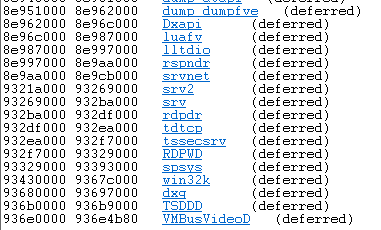
I found what looked like SRV.sys, and when I clicked it, the following details were displayed.
kd> lmDvmsrv
Browse full module list
start    end        module name
93269000 932ba000   srv        (deferred)
    Image path: \SystemRoot\System32\DRIVERS\srv.sys
    Image name: srv.sys
    Browse all global symbols  functions  data
    Timestamp:        Sat Nov 20 17:45:29 2010 (4CE78AA9)
    CheckSum:         0005542B
    ImageSize:        00051000
    Translations:     0000.04b0 0000.04e4 0409.04b0 0409.04e4
    Information from resource tables
It appears that SRV.sys is loaded starting at address 93269000.
Next, I identified the address of the problematic function inside SRV.sys.
Running the srv!a* command displayed the functions in SRV.sys alphabetically.
The vulnerable function is SrvOs2FeaListSizeToNt, but because the problematic function is called from srv!SrvSmbOpen2, I first identified the address of srv!SrvSmbOpen2.

After confirming that srv!SrvSmbOpen2 is located at 932a156f, I set a breakpoint on the function with the following command.
bp srv!SrvSmbOpen2You can verify breakpoints with the bl command or from the Disassembly window.
If you open the Disassembly window with Alt+Shift+7, the address where the breakpoint is set is highlighted.
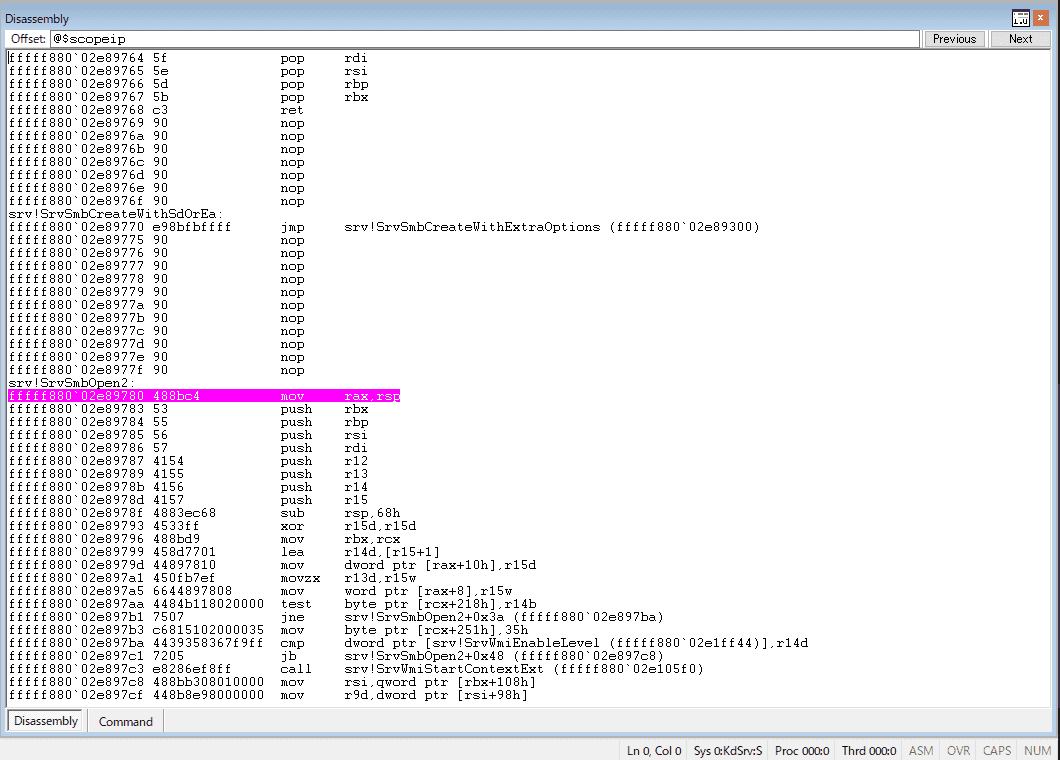
At this point, when I re-ran the exploit, I confirmed that execution stopped and switched to debug mode at the moment the kernel function on which I had set the breakpoint was called.

This completes the setup for kernel debugging with WinDbg.
Tracing Traffic During Exploitation
Before tracing memory behavior during the EternalBlue attack, I wanted to inspect the traffic and see what kind of attack packets were being sent.
SMB Traffic from the Attack Server
Surprisingly, there were only about 40 SMB packets sent from the attack server, so I started by looking at those.
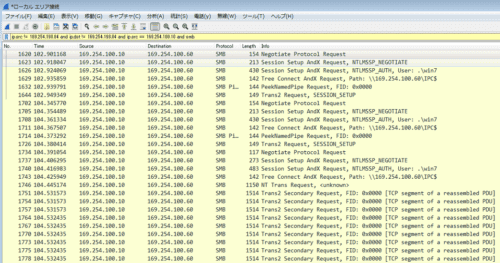
The first thing that caught my eye was a suspicious NT Trans Request from the attack server.
Looking at the packet information, Total Data Count is set to 66512.
The data immediately after the SMB header is set to 0x00010000, followed by a large amount of continuous data.
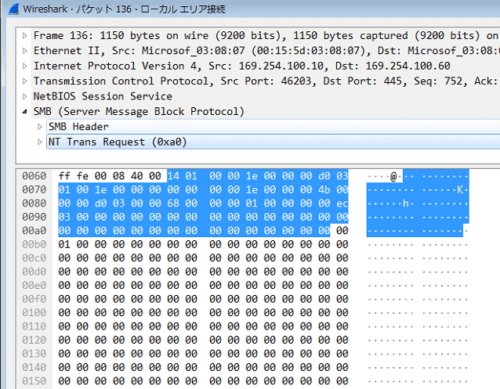
This value, 0x00010000, is SizeOfListInBytes, which is the key point in the buffer overflow vulnerability exploited by EternalBlue, and the empty data that follows appears to be a crafted FEA list.
Based on this SizeOfListInBytes information, the SMB driver secures the memory buffer needed to convert the FEA list into an NTFEA list.
It appears that the vulnerable srv!SrvOs2FeaListSizeToNt is called in order to allocate this buffer region.
Reference: Virus Bulletin :: EternalBlue: a prominent threat actor of 2017–2018
Next, a Trans2 Secondary Request with Total Data Count equal to 4096 is sent 15 times in a row.
At first I had absolutely no idea what this was doing, but apparently, in order to exploit the vulnerability, after sending 605 empty FEA records, it is necessary to send a crafted 606th FEA record of size 0xf383 + 5 and a 607th FEA record of size 0xa8 + 5.
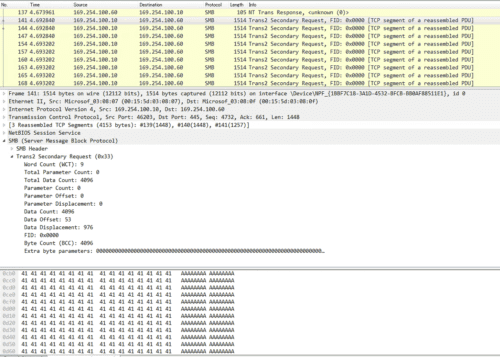
The combined size of the 606th and 607th FEA records is 62517 in decimal, and the transfer is carried by exactly 15 packets of 4096 bytes.
At the point where the 607th FEA record is sent, the flow appears to be that the buffer overflow is achieved by exceeding the 0x10000 region specified by SizeOfListInBytes and overwriting the next pool in memory, which belongs to SRVNET.sys.
Kernel Debugging During the Buffer Overflow
Finally, I wanted to observe via kernel debugging how sending this 607th record overwrites the SRVNET buffer and part of SRVNET itself.
I set the breakpoints like this.
bp srv!SrvOs2FeaToNt+04d “.printf \”MOV2: dst: %p src: %p size:%p\\n\”,ebx,eax,poi(esp+8);g;”

bp srv!SrvOs2FeaListToNt+0xd4
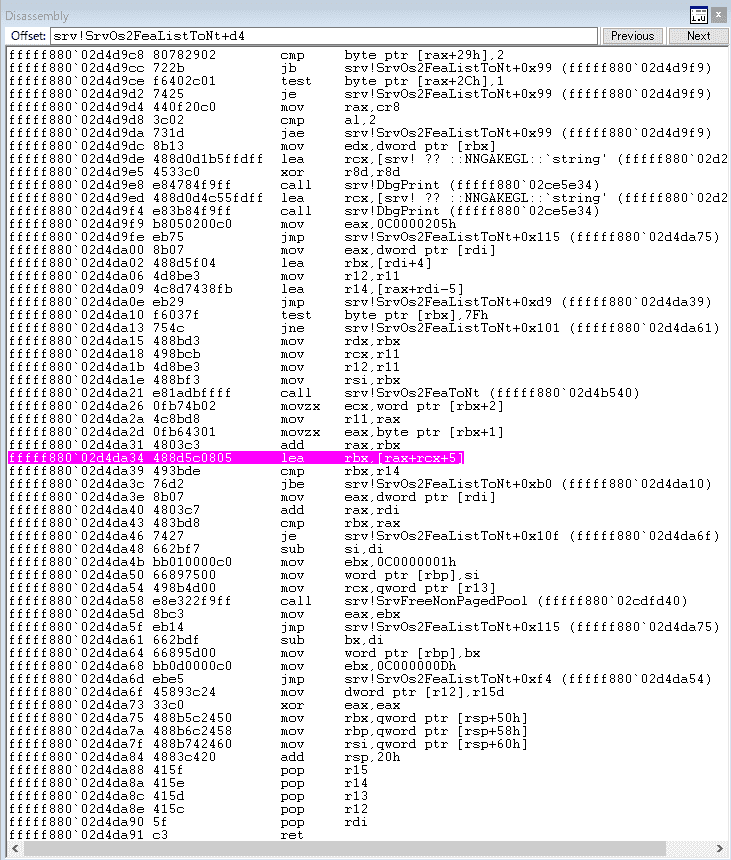
When I inspected memory with the dd command at the timing where execution stopped on the breakpoint, it was filled with zeros.
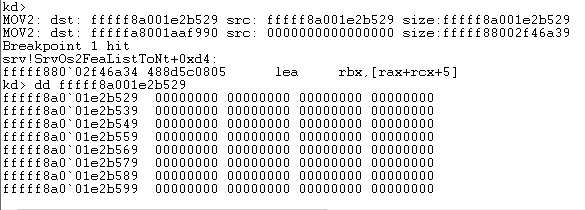
Because the addresses also increase by +5 each time, it seems reasonable to think that this is the part filled with empty FEA records (probably).
Doing this 605 times is quite a lot of work, so I temporarily removed the breakpoint at srv!SrvOs2FeaListToNt+0xd4 and changed it to srv!SrvOs2FeaListToNt+0x120 just before the function ends.
I then let the exploit run all the way through, confirmed that the above processing had executed 607 times, and captured the output.
In the end, the 607th record was copied to fffffa8001c9b000 from a value obtained by adding 0xf383 + 0x5 + 0x5 to the previous address, which suggests that the overflow caused by the 607th FEA is happening from there.

Finally, I wanted to confirm that the overflow-based exploit had succeeded by dumping the memory from this address through +a8, but I could not tell from the binary sequence alone whether the overwrite had actually succeeded, so I gave up.
I plan to try again someday after I have gained more knowledge of kernel debugging.
Summary
This time, I summarized the results of various experiments conducted with the goal of learning the details of the vulnerability and how it is exploited by reproducing “EternalBlue.”
Because this was my very first experience with Windows kernel debugging, I proceeded by trial and error, and it took quite a bit of time.
I think it is extremely educational not only to solve HackTheBox machines, but also to dig more deeply into the vulnerabilities used there.
In particular, the “EternalBlue” covered this time can be reproduced easily using code from Metasploit or ExploitDB, so the machine itself is very easy from a box-solving perspective. Even so, I felt that properly understanding the details of the vulnerability is fairly difficult.
I would like to continue writing deep-dive articles on vulnerabilities in the future. I was reminded once again that protocol-related topics are still a bit difficult for me, so I am thinking of approaching them by starting with OSS that can be tested more lightly.
References
Book
Web
- Trend Micro Security Blog: Explaining How EternalBlue, the Vulnerability Exploit That Spread WannaCry, Works | Trend Micro Security Blog
- One year later: EternalBlue exploit more popular now than during WannaCryptor outbreak | WeLiveSecurity
- Microsoft Security Bulletin MS17-010 - Critical | Microsoft Docs
- Hacking tools leaked from the NSA may have been abused in attacks on U.S. cities - ZDNet Japan
- Protecting customers and evaluating risk – Microsoft Security Response Center
- Everything About the WannaCry Ransomware | Kaspersky
- What Did Hitachi Learn from the WannaCry Incident? Turning It into an IoT Security Service: IoT Security (1/2) - MONOist
- Avast Press | Avast reports that even one year after the WannaCry outbreak, about 10% of PCs in Japan remain at risk of infection
- Microsoft Windows 7/8.1/2008 R2/2012 R2/2016 R2 - ‘EternalBlue’ SMB Remote Code Execution (MS17-010) - Windows remote Exploit
- Download Debugging Tools for Windows - WinDbg - Windows drivers | Microsoft Docs
- Debugging Windows Drivers—Step-by-Step Lab (Echo Kernel Mode) - Windows drivers | Microsoft Docs
- u, ub, uu (Unassemble) - Windows drivers | Microsoft Docs
- RFC 8276 - File System Extended Attributes in NFSv4 日本語訳
- 拡張ファイル属性 - Wikipedia
- Eternal Series — Part 1 | Eternal Blue and Analysis | Windows 7 and 8.1 Exploitation | Hack Windows 7 and 8.1 Remotely | by Abhijeet Singh | Medium
- Server Message Block - Wikipedia
- 第7回 ファイル共有プロトコルSMBの概要:Windowsネットワークの基礎 - @IT
- SMB プロトコルの説明
- Microsoft Windows 7/8.1/2008 R2/2012 R2/2016 R2 - ‘EternalBlue’ SMB Remote Code Execution (MS17-010) - Windows remote Exploit
- MS17-010/mysmb.py at master · worawit/MS17-010
- Windows ドライバーのデバッグ-ステップバイステップラボ (Echo カーネルモード) - Windows drivers | Microsoft Docs
- WinDbg でのアセンブリ コードのデバッグ - Windows drivers | Microsoft Docs
- EternalBlue – Everything There Is To Know
- Virus Bulletin :: EternalBlue: a prominent threat actor of 2017–2018