This page has been machine-translated from the original page.
This article summarizes the issues that occurred when making XRDP connections to Ubuntu machines.
Table of Contents
- Setting to Display Sidebar When Connecting to Ubuntu via XRDP
- Dealing with the Issue of Japanese Keyboard Settings Not Working When Connecting to Ubuntu via XRDP
- Issue of Slow Scroll Operations When Browsing with Browser
- Summary
Setting to Display Sidebar When Connecting to Ubuntu via XRDP
When setting up a Linux machine such as Ubuntu, XRDP is used to access it via RDP from the host.
In this case, if you just use XRDP, the following commands alone would be fine, but in Ubuntu’s case, the sidebar that serves as the application launcher will no longer be displayed.
sudo apt install -y xrdp
sudo systemctl enable xrdp
In that case, you can display the sidebar by creating .xsessionrc in your home directory and writing the necessary settings.
Specifically, just copy and paste the following commands.
# Write to ~/.xsessionrc
export GNOME_SHELL_SESSION_MODE=ubuntu
export XDG_CURRENT_DESKTOP=ubuntu:GNOME
export XDG_DATA_DIRS=/usr/share/ubuntu:/usr/local/share:/usr/share:/var/lib/snapd/desktop

cat <<EOF > ~/.xsessionrc
export XDG_CONFIG_DIRS=/etc/xdg/xdg-ubuntu:/etc/xdg
EOF
Once .xsessionrc is created with the above command, restart the service with the following command.
sudo systemctl restart xrdpReference: Ubuntu 18.04: Connect to GNOME desktop environment with XRDP - Narrow Escape
Dealing with the Issue of Japanese Keyboard Settings Not Working When Connecting to Ubuntu via XRDP
When accessing via XRDP in the default state, Ubuntu’s keyboard may become US layout.
To avoid this problem, implement the following settings.
First, open the settings screen.
gnome-session-propertiesNext, click [Add] and enter the following for Name and Command respectively.
# Name
Set JP keyboard on X startup

# Command
setxkbmap jp
Here’s the settings screen.
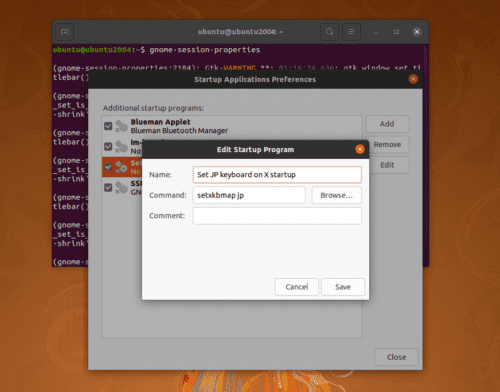
When you restart the OS, JIS layout will be reflected from the next access.
Reference: Ubuntu Japanese keyboard layout - Qiita
Issue of Slow Scroll Operations When Browsing with Browser
The issue of scroll settings not being reflected via XRDP is a known issue, but it seems it hasn’t been fixed for a long time.
Reference: Vertical scroll speed too fast (xrdpMouse) · Issue #150 · neutrinolabs/xorgxrdp
I tried tools like imwheel but they had no effect.
Summary
I’ve summarized solutions to problems I personally encountered.
If I run into more troubles with Ubuntu setup, I’d like to add to this as needed.