This time, I am putting together some notes on Rust test syntax.
Table of Contents
About Rust Testing
Rust provides the following three testing features out of the box.
- Unit tests
- Integration tests
- Documentation tests
You can apparently add various other testing features by bringing in third-party crates, but this time I will focus on the standard testing approaches, mainly unit tests and integration tests.
I will not use documentation tests this time, so I will skip them.
Unit Tests
Unit tests are tests that verify individual functions or modules in isolation.
In Rust, they can be implemented by placing them in a #[cfg(test)] module inside the same file as the code being tested.
fn internal_helper(x: i32) -> i32 {
    x * 2
}

pub fn public_function(x: i32) -> i32 {
    internal_helper(x) + 1
}

#[cfg(test)]  // Compiled only when running cargo test
mod tests {
    use super::*;  // Import all items from the parent module

    #[test]
    fn test_internal_helper() {
        // Private functions can also be accessed directly
        assert_eq!(internal_helper(5), 10);
    }

    #[test]
    fn test_public_function() {
        assert_eq!(public_function(5), 11);
    }
}
Basic Structure of Unit Tests
To implement a simple unit test, I will use the following function.
/// Adds two integers
pub fn add(a: i32, b: i32) -> i32 {
    a + b
}
For this, implement the test module in the same file, with the #[cfg(test)] annotation added.
Reference: Test Organization - The Rust Programming Language
A test module with the #[cfg(test)] annotation is compiled and run by Rust only when you execute cargo test.
Because unit tests are written in the same file as the production source code, the #[cfg(test)] annotation is used to ensure that the test module is not included in build artifacts. (Integration tests are written in a separate file, so #[cfg(test)] is not required.)
#[cfg(test)]
mod tests {

    use super::*;

    #[test]
    fn test_add_basic() {
        let result = add(2, 3);
        assert!(result == 5);
    }

}
This kind of test module can be run with cargo test or cargo test <test_function>.
For example, in the sample above, you can confirm that the add function test succeeds by running cargo test test_add_basic.

Unit Test Example 1
In Rust unit tests, you can evaluate behavior with the standard assert! macro.
For example, create the following three functions for testing.
/// Adds two integers
pub fn add(a: i32, b: i32) -> i32 {
    a + b
}

/// Multiplies two integers
pub fn multiply(a: i32, b: i32) -> i32 {
    a * b
}

/// Checks whether a string is empty
pub fn is_empty(s: &str) -> bool {
    s.is_empty()
}
To test the behavior of these functions, you can use separate test functions for each case.
First, the function below uses the assert! macro to verify whether add(2, 3) returns 5.
assert! can verify that a condition is true.
#[test]
fn test_add_basic() {
    let result = add(2, 3);
    assert!(result == 5);
}
The assert! macro can also define the text to display when a test fails.
#[test]
fn test_add_with_text() {
    let result = add(2, 3);
    assert!(result == 5, "2 + 3 = 5, but the actual result was {}.", result);
}
If the test above fails, it can display text like the following.

You can also use a macro called assert_eq!.
This macro lets you confirm that the values of the two elements passed as parameters are equal.
#[test]
fn test_add_with_assert_eq() {
    assert_eq!(add(2, 3), 5);
    assert_eq!(add(0, 0), 0);
    assert_eq!(add(-1, 1), 0);
}
Conversely, the assert_ne! macro lets you confirm that two elements do not match.
In the example below, the result of running multiply(3, 4) is 12, so the test fails when the second parameter is 12.
#[test]
fn test_multiply_not_zero() {
    assert_ne!(multiply(3, 4), 0);
}
Also, because a test function can be used like an ordinary function, you can include things like variable declarations inside the test as shown below.
#[test]
fn test_with_setup() {
    let input_a = 100;
    let input_b = 200;
    let actual = add(input_a, input_b);

    assert_eq!(actual, input_a + input_b);
}
Unit Test Example 2
Next, implement simple code like the following using a custom Point struct.
use std::fmt;

pub struct Point {
    pub x: f64,
    pub y: f64,
}

impl Point {
    pub fn new(x: f64, y: f64) -> Self {
        Self { x, y }
    }

    pub fn origin() -> Self {
        Self { x: 0.0, y: 0.0 }
    }

    pub fn distance_from_origin(&self) -> f64 {
        (self.x * self.x + self.y * self.y).sqrt()
    }

}

impl fmt::Display for Point {
    fn fmt(&self, f: &mut fmt::Formatter<'_>) -> fmt::Result {
        write!(f, "({}, {})", self.x, self.y)
    }
}

fn main() {

    // Create a Point using new
    let p1 = Point::new(3.0, 4.0);
    println!("p1 coordinates = {}", p1);

    // Create the origin using origin
    let origin = Point::origin();
    println!("origin coordinates = {}", origin);


    // Calculate the distance from the origin using distance_from_origin
    let distance = p1.distance_from_origin();
    println!("p1 distance from origin = {}", distance);

    println!("\n");
}
For this code, you can, for example, use the custom Point struct loaded inside a unit test as shown below.
#[cfg(test)]
mod tests {
    use super::*;

    #[test]
    fn test_main_ne_custom_struct() {
        let p = Point::new(1.0, 1.0);
        assert_ne!(p, Point::origin());
    }

}
However, if you run the test above with this code, the test will fail because the implementations of Debug and PartialEq, which assert_ne! depends on, do not exist.
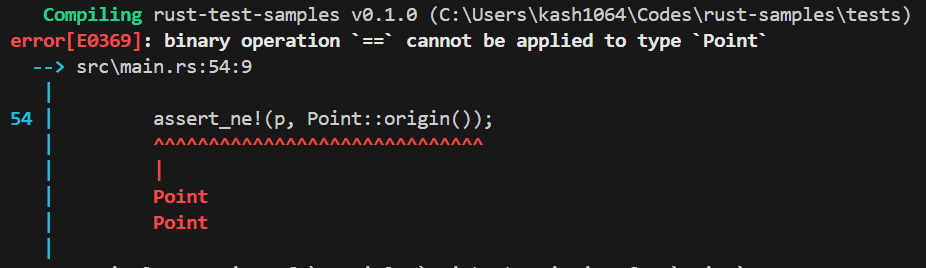
When you use macros such as assert_ne! for tests involving a custom struct like this, you need to derive the implementation by adding #[derive(Debug,PartialEq)] to the struct.
Unit Test Example 3
Up to this point, tests failed whenever a panic occurred inside a test function. However, for functions where you intentionally want a panic to occur, you can also test whether that panic occurs properly.
For example, suppose you want to test the following division function, which triggers a panic when division by zero occurs.
pub fn divide(a: i32, b: i32) -> i32 {
    if b == 0 {
        panic!("Cannot divide by zero: {} / {}", a, b);
    }
    a / b
}
In this case, add the #[should_panic] attribute to the test function as shown below.
#[test]
#[should_panic]
fn test_divide_by_zero_panics() {
    divide(10, 0); // Because it panics, the test succeeds
}
When this test is executed, it succeeds if a panic caused by division by zero occurs. Conversely, if no panic occurs and the division performed by the divide function succeeds, the test fails.
Reference: Unit testing - Rust By Example
You can also specify the message produced when the panic occurs in the attribute, as in #[should_panic(expected = "message")].
Unit Test Example 4
The following is quoted directly from the documentation sample, but by writing the #[ignore] attribute you can prevent a specific test function from being executed during cargo test.
You can run such excluded tests with cargo test -- --ignored.
pub fn add(a: i32, b: i32) -> i32 {
    a + b
}

#[cfg(test)]
mod tests {
    use super::*;

    #[test]
    fn test_add() {
        assert_eq!(add(2, 2), 4);
    }

    #[test]
    fn test_add_hundred() {
        assert_eq!(add(100, 2), 102);
        assert_eq!(add(2, 100), 102);
    }

    #[test]
    #[ignore]
    fn ignored_test() {
        assert_eq!(add(0, 0), 0);
    }
}
Other Notes on Unit Tests
Rust tests appear to run in parallel on multiple threads by default.
For that reason, if multiple tests need to share resources such as files or a DB, you need to be careful to protect those resources appropriately, for example by using a Mutex.
If you want to disable parallel execution during tests, you can use cargo test -- --test-threads=1.
Reference: Controlling How Tests Are Run - The Rust Programming Language (Japanese Edition)
Also, because the execution order of tests is not guaranteed, you need to be careful not to create dependencies between tests.
Integration Tests
Basic Structure of Integration Tests
Rust integration tests run from outside the crate and test a program using only its public interface, from the same perspective as a user.
Integration tests are used to verify that the modules in a library work together correctly.
Cargo treats a tests directory placed alongside the src directory as integration tests, as shown below.
my_project/
├── Cargo.toml
├── src/
│   ├── lib.rs          # Main library implementation
│   └── utils.rs
└── tests/              # Directory dedicated to integration tests
    ├── api_test.rs     # Individual test file (each is its own crate)
    ├── edge_cases.rs
    └── common/         # Shared test utilities
        └── mod.rs      # Because it is mod.rs, it is not recognized as a test file, so helper code for tests can be placed here
Reference: Integration Testing - Rust By Example (Japanese Edition)
Integration Test Example 1
This time, I will create integration tests for a calculator library that I had Claude throw together.
When using this library from a client program, the application needs to import the various modules from the rust_integration_test_samples crate as follows.
use rust_integration_test_samples::calculator::Calculator;
use rust_integration_test_samples::storage::{Storage, StorageValue};
use rust_integration_test_samples::user::{Role, UserService};
The same applies to test code that performs integration tests. Just as when implementing a client program, the test code also needs to import modules in order to use the library from the outside.
The following is the simplest integration test implementation.
Below, just like a client program, the test imports the library’s Calculator module and tests the return values of functions such as add, subtract, and multiply in a test function called test_calculator_basic_operations.
use rust_integration_test_samples::calculator::Calculator;

#[test]
fn test_calculator_basic_operations() {
    let mut calc = Calculator::new();

    assert_eq!(calc.add(2.0, 3.0), 5.0);
    assert_eq!(calc.subtract(10.0, 4.0), 6.0);
    assert_eq!(calc.multiply(3.0, 7.0), 21.0);
}
This test code is written in a file placed under tests.
my_project/
├── Cargo.toml
├── src/
│   ├── lib.rs          # Main library implementation
│   └── utils.rs
└── tests/              # Directory dedicated to integration tests
    └── api_test.rs     # Individual test file (each is its own crate)
Integration Test Example 2
You can also test normal and error cases in the same test code as shown below.
/// Division test (normal case)
#[test]
fn test_calculator_division() {
    let mut calc = Calculator::new();

    let result = calc.divide(10.0, 2.0);
    assert_eq!(result, Ok(5.0));
}

/// Division test (error case: division by zero)
#[test]
fn test_calculator_division_by_zero() {
    let mut calc = Calculator::new();

    let result = calc.divide(10.0, 0.0);
    assert_eq!(result, Err(CalcError::DivisionByZero));
}
The divide function on the library side is implemented as follows and returns Result<f64, CalcError>, so the integration test code also evaluates the result with assertions such as assert_eq!(result, Ok(5.0)); and assert_eq!(result, Err(CalcError::DivisionByZero));.
pub fn divide(&mut self, a: f64, b: f64) -> Result<f64, CalcError> {
    if b == 0.0 {
        return Err(CalcError::DivisionByZero);
    }
    let result = a / b;
    self.record(format!("{} / {}", a, b), result);
    Ok(result)
}
Integration Test Example 3
In integration tests, you can also test state after a sequence of operations in the same way a user would operate a client program.
For example, in the sample below, the test checks the number of calculation history entries managed by the library after calculations are performed and after the history is cleared, and it also verifies that calculations can continue after the history has been cleared.
#[test]
fn test_calculator_history_management() {
    let mut calc = Calculator::new();

    // Initial state
    assert_eq!(calc.history().len(), 0);

    // Perform operations
    calc.add(1.0, 2.0);
    calc.multiply(3.0, 4.0);
    assert_eq!(calc.history().len(), 2);

    // Clear history
    calc.clear_history();
    assert_eq!(calc.history().len(), 0);

    // Operations are still possible after clearing
    calc.add(5.0, 6.0);
    assert_eq!(calc.history().len(), 1);
}
Summary
There are many more patterns for unit tests and integration tests, and it seems possible to implement more complex tests as well, but I will stop here for now.
Lately I rely on AI all the time, so I want to get better at writing tests more aggressively myself.