This page has been machine-translated from the original page.
Following on from the previous articles, I wanted to keep trying to build various programs in Rust that call Windows APIs.
This time, I wanted to build a program that enumerates process information in the system using CreateToolhelp32Snapshot and Process32First/Process32Next, which I had also implemented previously in the article below.
](/win32api-getprocesslist)
The detailed API explanations are already covered there, so this time I am simply aiming to reimplement that code in Rust.
Table of Contents
The Code I Created
The final code I created is shown below.
// cargo run --bin EnumProcess.rs

use windows::Win32::{
    System::Diagnostics::ToolHelp::{
        CreateToolhelp32Snapshot, Process32FirstW, Process32NextW, PROCESSENTRY32W, TH32CS_SNAPPROCESS
    },
    Foundation::{CloseHandle, INVALID_HANDLE_VALUE},
};


fn main() {
    unsafe {
        //HANDLE CreateToolhelp32Snapshot(
        //[in] DWORD dwFlags,
        //[in] DWORD th32ProcessID
        //);

        // Result<HANDLE> を返すため unwrap で HANDLE を取得
        let h_toolhelp32_snapshot = CreateToolhelp32Snapshot(TH32CS_SNAPPROCESS, 0).unwrap();
        if h_toolhelp32_snapshot == INVALID_HANDLE_VALUE {
            eprintln!("ERROR: Could not get a Toolhelp32Snapshot");
            return;
        }


        //typedef struct tagPROCESSENTRY32
        //{
        //DWORD   dwSize;
        //DWORD   cntUsage;
        //DWORD   th32ProcessID;
        //ULONG_PTR th32DefaultHeapID;
        //DWORD   th32ModuleID;
        //DWORD   cntThreads;
        //DWORD   th32ParentProcessID;
        //LONG    pcPriClassBase;
        //DWORD   dwFlags;
        //CHAR    szExeFile[MAX_PATH];
        //} PROCESSENTRY32;

        // BOOL Process32First(
        //     [in]      HANDLE           hSnapshot,
        //     [in, out] LPPROCESSENTRY32 lppe
        // );

        let mut pe32 = PROCESSENTRY32W {
            dwSize: std::mem::size_of::<PROCESSENTRY32W>() as u32,
            ..Default::default()
        };

        match Process32FirstW(h_toolhelp32_snapshot, &mut pe32) {
            Ok(_) => {
                println!("Got process snapshot.");

                loop {
                    let exe_file = {
                        let len = pe32.szExeFile.iter()
                                                        .position(|&c| c == 0)
                                                        .unwrap_or(pe32.szExeFile.len());
                        String::from_utf16_lossy(&pe32.szExeFile[..len])
                    };

                    println!("Process name: {}", exe_file);
                    println!("=====> PID: {}", pe32.th32ProcessID);
                    println!("=====> Threads count: {}", pe32.cntThreads);

                    match Process32NextW(h_toolhelp32_snapshot, &mut pe32) {
                        Ok(_) => {  },
                        Err(_e) => {
                            // eprintln!("Failed to get next process: {}", e);
                            break;
                        }
                    }

                }

            },
            Err(e) => {
                eprintln!("Failed to get first process: {}", e);
            }
        }

        // Close h_toolhelp32_snapshot handle.
        let handle_name = "h_toolhelp32_snapshot";
        match CloseHandle(h_toolhelp32_snapshot) {
            Ok(_) => {
                println!("Handle closed: {}", handle_name);
            },
            Err(e) => {
                eprintln!("Failed to close handle:{} {}", handle_name, e);
            }
        }

    }

    return;

}
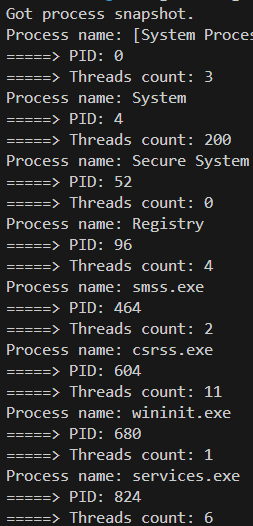
When I built and ran this code, I was able to enumerate the process information in the system just like the code I had written in C.
Adding Dependencies
To implement the code above with the Windows Crate, I added a setting to Cargo.toml that specifies Win32_System_Diagnostics_ToolHelp in features.
[dependencies]
windows = { version = "0.60.0", features = [
    "Win32_System_Diagnostics_ToolHelp"
] }
Loading Modules
To call the Windows APIs required for process enumeration, I loaded the following modules.
use windows::Win32::{
    System::Diagnostics::ToolHelp::{
        CreateToolhelp32Snapshot, Process32FirstW, Process32NextW, PROCESSENTRY32W, TH32CS_SNAPPROCESS
    },
    Foundation::{CloseHandle, INVALID_HANDLE_VALUE},
};
Since the three APIs CreateToolhelp32Snapshot and Process32FirstW/Process32NextW appeared to exist under windows::Win32::System::Diagnostics::ToolHelp in the Windows Crate, I loaded that module.
Reference: windows::Win32::System::Diagnostics::ToolHelp - Rust
I also loaded CloseHandle so that I could close the handle that gets created.
Reference: CloseHandle in windows::Win32::Foundation - Rust
Obtaining a Handle with CreateToolhelp32Snapshot
Inside the unsafe block in main, I first call the CreateToolhelp32Snapshot API to obtain a handle to the process snapshot.
//HANDLE CreateToolhelp32Snapshot(
//[in] DWORD dwFlags,
//[in] DWORD th32ProcessID
//);

// Result<HANDLE> を返すため unwrap で HANDLE を取得
let h_toolhelp32_snapshot = CreateToolhelp32Snapshot(TH32CS_SNAPPROCESS, 0).unwrap();
if h_toolhelp32_snapshot == INVALID_HANDLE_VALUE {
    eprintln!("ERROR: Could not get a Toolhelp32Snapshot");
    return;
}
One difference from the C implementation is that CreateToolhelp32Snapshot in the Windows Crate returns a value of type Result<HANDLE> rather than HANDLE.
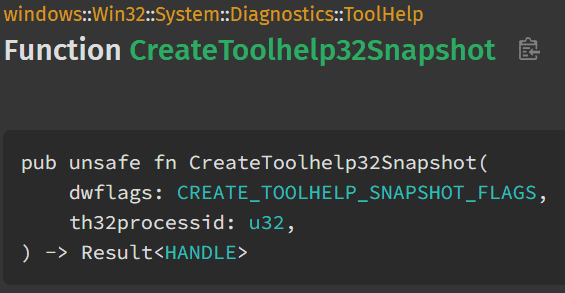
Reference: CreateToolhelp32Snapshot in windows::Win32::System::Diagnostics::ToolHelp - Rust
A Result like this seems to be a special type prepared for error handling in Rust.
Basically, Result is an enum with two variants, Ok and Err, and it seems to let you implement different actions depending on the returned value.
enum Result<T, E> {
    Ok(T),
    Err(E),
}
Reference: Recoverable Errors with Result - The Rust Programming Language
Reference: RustによるResult型のエラーハンドリング入門
There seem to be several ways to extract a return value from a Result, but this time I used unwrap.
When you use unwrap, if the Result value is Ok, it extracts the function’s return value, and if it is Err, it seems to crash the program with panic!.
This stores the obtained handle in the _h_toolhelp32_snapshot variable.
Also, when I tried to use a variable named hToolhelp32Snapshot at this point, the compiler scolded me for not using a snake_case variable name.

It seems possible to suppress this warning with a setting in Cargo.toml, but for now I decided to follow Rust’s coding conventions and use snake_case.
Reference: Rust の勉強: snake case name ? | Jura-Zakki 樹羅雑記
Handling Unused Variables
In this code, I had to define some variables that are not actually used, such as the T in Ok(T), and when I implemented it as-is, the compiler warned me during the build.
After looking for a workaround, I found information saying that by prefixing a variable name with _, you can suppress warnings about unused variables, and by using _ alone as the variable name, you can indicate that the variable itself will not be used.
Reference: Rustの変数名におけるアンダースコアの意味 | rs.nkmk.me
So in this code, I used underscores for unused variables such as Ok(_) to avoid the warning.
Declaring Mutable Variables
In Rust, variables declared with let seem to be treated as mutable variables by default, and changing a variable’s value causes an error.
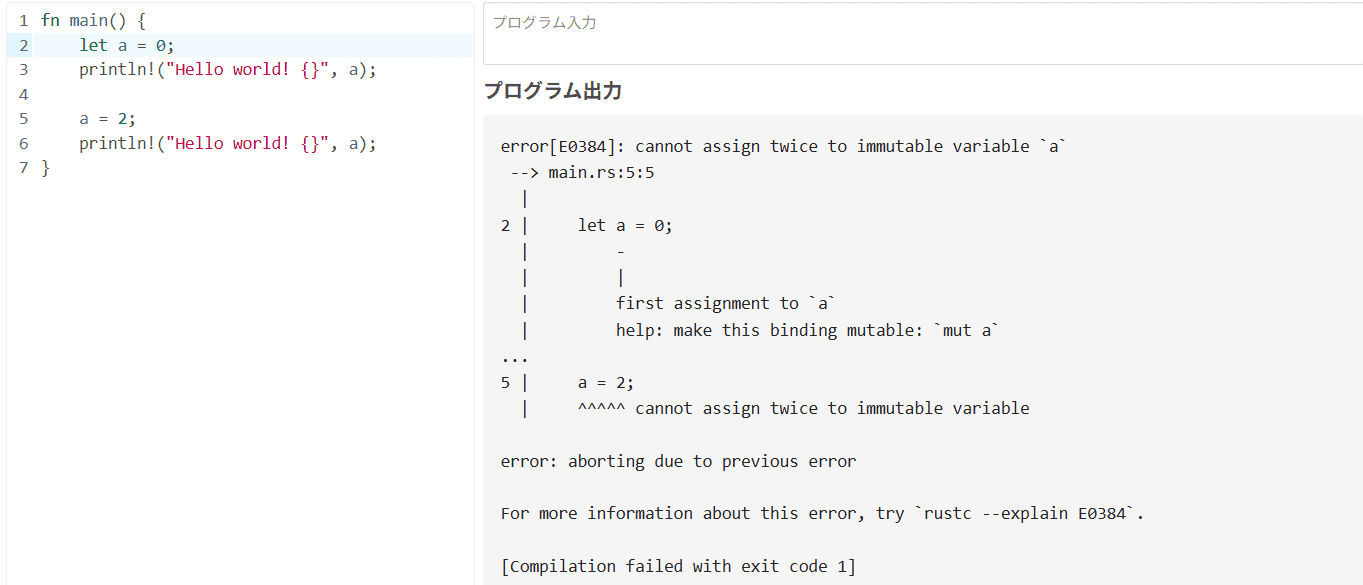
Therefore, when declaring a variable whose value will be changed later, it seems you need to use mut and declare it as an immutable variable.
So the pe32 variable that stores the PROCESSENTRY32 structure is declared as let mut pe32, as shown below.
//typedef struct tagPROCESSENTRY32
//{
//DWORD   dwSize;
//DWORD   cntUsage;
//DWORD   th32ProcessID;
//ULONG_PTR th32DefaultHeapID;
//DWORD   th32ModuleID;
//DWORD   cntThreads;
//DWORD   th32ParentProcessID;
//LONG    pcPriClassBase;
//DWORD   dwFlags;
//CHAR    szExeFile[MAX_PATH];
//} PROCESSENTRY32;

let mut pe32 = PROCESSENTRY32W {
    dwSize: std::mem::size_of::<PROCESSENTRY32W>() as u32,
    ..Default::default()
};
At that time, you also need to specify the size of the structure in dwSize and initialize the structure members.
It seems you can also implement initialization of the structure members by specifying them explicitly as shown below, but this time I used ..Default::default() to set the other structure members to their default values.
// Initialise a process entry. In order to use `Process32First`, you need to set `dwSize`.
let mut process_entry : PROCESSENTRY32W = PROCESSENTRY32W {
    dwSize: mem::size_of::<PROCESSENTRY32W>() as u32,
    cntUsage: 0,
    th32ProcessID: 0,
    th32DefaultHeapID: 0,
    th32ModuleID: 0,
    cntThreads: 0,
    th32ParentProcessID: 0,
    pcPriClassBase: 0,
    dwFlags: 0,
    szExeFile: [0; MAX_PATH],
};
Reference: Comparing a string to an array of i8 - help - The Rust Programming Language Forum
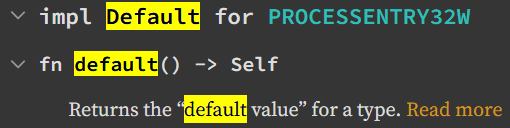
This kind of initialization seems to be usable with structs that provide the Default trait.
Reference: Rustのstd::default::Default – うたもく
For PROCESSENTRY32W, it appears that you can use the Default trait as described below (probably).
Implementing the Loop
Once all the operations up to this point are complete, all that remains is to use the Process32FirstW/Process32NextW APIs to retrieve process information in order from the snapshot handle.
Both Process32FirstW and Process32NextW in the Windows Crate return an empty(?) Result as their return value.
So this time I used match rather than unwrap.
match Process32FirstW(h_toolhelp32_snapshot, &mut pe32) {
    Ok(_) => {
        println!("Got process snapshot.");

        loop {
            let exe_file = {
                let len = pe32.szExeFile.iter()
                                                .position(|&c| c == 0)
                                                .unwrap_or(pe32.szExeFile.len());
                String::from_utf16_lossy(&pe32.szExeFile[..len])
            };

            println!("Process name: {}", exe_file);
            println!("=====> PID: {}", pe32.th32ProcessID);
            println!("=====> Threads count: {}", pe32.cntThreads);

            match Process32NextW(h_toolhelp32_snapshot, &mut pe32) {
                Ok(_) => {  },
                Err(_e) => {
                    // eprintln!("Failed to get next process: {}", e);
                    break;
                }
            }

        }

    },
    Err(e) => {
        eprintln!("Failed to get first process: {}", e);
    }
}
When you use match with Result, you can implement the handling for both cases where Ok and Err are returned.
In the example above, within the processing that succeeds in retrieving information using Process32FirstW, I perform loop processing with a loop block and keep outputting process information until retrieving information with Process32NextW fails.
Closing the Handle
After all processing is complete, I close the handle to the process snapshot that I obtained using CloseHandle.
// Close h_toolhelp32_snapshot handle.
let handle_name = "h_toolhelp32_snapshot";
match CloseHandle(h_toolhelp32_snapshot) {
    Ok(_) => {
        println!("Handle closed: {}", handle_name);
    },
    Err(e) => {
        eprintln!("Failed to close handle:{} {}", handle_name, e);
    }
}
Summary
Rust seems to have quite a few quirks, but it is quite fun to write.