This page has been machine-translated from the original page.
Continuing on from the previous articles, this time I tried creating a program that uses the windows crate in Rust to load a DLL with APIs such as GetModuleHandleW, and then uses NTAPI such as NtQuerySystemInformation, which is not included in the official windows crate.
Reference: NtQuerySystemInformation function (winternl.h) - Win32 apps | Microsoft Learn
Table of Contents
- The Code I Wrote
- Modules Used
- Using GetModuleHandleW
- Getting the Address of NtQuerySystemInformation
- Parsing the Structures
- Summary
The Code I Wrote
The code I wrote this time is shown below.
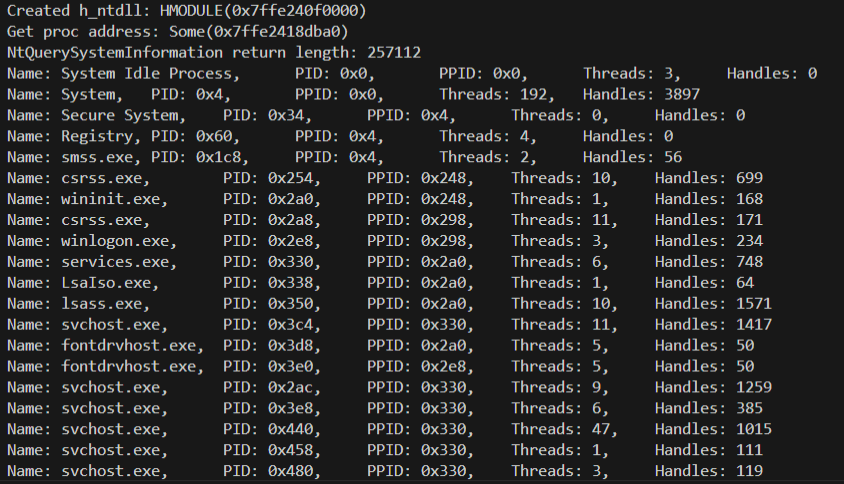
When you run this code, it uses the NtQuerySystemInformation API to enumerate information such as the processes and handles running in the system.
// cargo run --bin CallNtApi

use windows::{
    // core::{ HSTRING, PCSTR },
    core:: { s, w },
    Wdk::System::SystemServices::VM_COUNTERS,
    Win32::{Foundation::CloseHandle, System::{
        LibraryLoader::{ GetModuleHandleW, GetProcAddress },
        Threading::IO_COUNTERS
    }}
};

use std::{
    // ffi::CString,
    io::stdin,
    mem::transmute,
    os::raw::{ c_void, c_ulong, c_ushort },
    ptr::null_mut,
    slice::from_raw_parts
};

type HANDLE = *mut c_void;
type ULONG = c_ulong;
type USHORT = c_ushort;
type WCHAR = u16;

#[repr(C)]
struct UNICODE_STRING {
    Length: USHORT,
    MaximumLength: USHORT,
    Buffer: *const WCHAR,
}

#[repr(C)]
struct SYSTEM_PROCESS_INFORMATION {
    NextEntryOffset: ULONG,
    NumberOfThreads: ULONG,
    Reserved: [u8; 48],
    ImageName: UNICODE_STRING,
    BasePriority: ULONG,
    UniqueProcessId: HANDLE,
    InheritedFromUniqueProcessId: HANDLE,
    HandleCount: ULONG,
    Reserved2: ULONG,
    PrivatePageCount: ULONG,
    VirtualMemoryCounters: VM_COUNTERS,
    IoCounters: IO_COUNTERS
    // 省略 Threads: SYSTEM_THREAD
}

type NtQuerySystemInformationFn = unsafe extern "system" fn(
    SystemInformationClass: ULONG,
    SystemInformation: *mut c_void,
    SystemInformationLength: ULONG,
    ReturnLength: *mut ULONG,
) -> i32;


fn get_input(input_string: &str) {
    println!("{}", input_string);
    let mut input = String::new();
    stdin().read_line(&mut input).expect("Failed to read input.");
    return;
}


fn main() {
    unsafe {

        // Load ntdll
        // let ntdll = &HSTRING::from("ntdll.dll");
        let ntdll = w!("ntdll.dll");
        let h_ntdll_module = GetModuleHandleW(ntdll).unwrap();
        if h_ntdll_module.is_invalid() {
            eprintln!("Failed to get handle to ntdll.dll");
            return;
        } else {
            println!("Created h_ntdll: {:?}", h_ntdll_module);
        }

        // Get proc address
        // let s_func_name = CString::new("NtQuerySystemInformation").unwrap();
        let s_func_name = s!("NtQuerySystemInformation");
        let func_addr = GetProcAddress(h_ntdll_module, s_func_name);
        if func_addr.is_none() {
            eprintln!("Failed to get proc address.");
            return;
        } else {
            println!("Get proc address: {:?}", func_addr);
        }
        let nt_query_system_information: NtQuerySystemInformationFn = transmute(func_addr);

        // First call func
        let system_process_information = 5; // SystemProcessInformation
        let mut u_return_length: ULONG = 0;
        let status = nt_query_system_information(
            system_process_information,
            null_mut(),
            0,
            &mut u_return_length,
        );
        // println!("First NtQuerySystemInformation call status: {:#x}", status);
        assert!(status as u32 == 0xc0000004);
        println!("NtQuerySystemInformation return length: {:?}", u_return_length);

        // Second call func
        let buffer = vec![0u8; u_return_length as usize];
        let status = nt_query_system_information(
            system_process_information,
            buffer.as_ptr() as *mut c_void,
            u_return_length,
            &mut u_return_length,
        );
        if status != 0 {
            eprintln!("NtQuerySystemInformation failed: {:?}", status);
            return;
        }

        // Analyze buffer
        let mut offset = 0;
        while offset < u_return_length {
            let spi = &*(buffer.as_ptr().add(offset as usize) as *const SYSTEM_PROCESS_INFORMATION);

            let name = if !spi.ImageName.Buffer.is_null() && spi.ImageName.Length > 0 {
                let slice = from_raw_parts(spi.ImageName.Buffer, (spi.ImageName.Length / 2) as usize);
                String::from_utf16_lossy(slice)
            } else {
                String::from("System Idle Process")
            };

            println!(
                "Name: {},\tPID: {:?},\tPPID: {:?},\tThreads: {:?},\tHandles: {:?}",
                name,
                spi.UniqueProcessId,
                spi.InheritedFromUniqueProcessId,
                spi.NumberOfThreads,
                spi.HandleCount
            );

            if spi.NextEntryOffset == 0 {
                break;
            }

            offset += spi.NextEntryOffset;

        }

    }

    get_input("Finish program.");
    return;
}
Modules Used
This time I load the following modules.
The commented-out modules were ones I had been using to prepare Param<PCWSTR> and Param<PCSTR> values for Windows API arguments, but I stopped using them because it is more convenient to use handy macros such as s! and w! from windows::core.
Reference: w in windows_sys::core - Rust
Reference: s in windows_sys::core - Rust
use windows::{
    // core::{ HSTRING, PCSTR },
    core:: { s, w },
    Wdk::System::SystemServices::VM_COUNTERS,
    Win32::{Foundation::CloseHandle, System::{
        LibraryLoader::{ GetModuleHandleW, GetProcAddress },
        Threading::IO_COUNTERS
    }}
};

use std::{
    // ffi::CString,
    io::stdin,
    mem::transmute,
    os::raw::{ c_void, c_ulong, c_ushort },
    ptr::null_mut,
    slice::from_raw_parts
};
Using GetModuleHandleW
First, I use the GetModuleHandleW API to obtain the module handle of ntdll.dll, which exports NtQuerySystemInformation.
GetModuleHandleW is an API that can obtain the module handle of a module loaded in the caller process.
Reference: GetModuleHandleW function (libloaderapi.h) - Win32 apps | Microsoft Learn
Because GetModuleHandleW requires Param<PCWSTR> as an argument, I use w!("ntdll.dll") to convert the string literal.
Reference: GetModuleHandleW in windows::Win32::System::LibraryLoader - Rust
Reference: HMODULE in windows::Win32::Foundation - Rust
// Load ntdll
// let ntdll = &HSTRING::from("ntdll.dll");
let ntdll = w!("ntdll.dll");
let h_ntdll_module = GetModuleHandleW(ntdll).unwrap();
if h_ntdll_module.is_invalid() {
    eprintln!("Failed to get handle to ntdll.dll");
    return;
} else {
    println!("Created h_ntdll: {:?}", h_ntdll_module);
}
Also, the windows crate’s GetModuleHandleW returns Result<HMODULE>, so I use unwrap to extract the HMODULE.
Getting the Address of NtQuerySystemInformation
Next, using the module handle I obtained, I call GetProcAddress to retrieve the function address of NtQuerySystemInformation.
Reference: GetProcAddress function (libloaderapi.h) - Win32 apps | Microsoft Learn
This one requires Param<PCSTR> rather than Param<PCWSTR>, so I pass a string literal converted with s!("NtQuerySystemInformation").
Reference: GetProcAddress in windows::Win32::System::LibraryLoader - Rust
// Get proc address
// let s_func_name = CString::new("NtQuerySystemInformation").unwrap();
let s_func_name = s!("NtQuerySystemInformation");
let func_addr = GetProcAddress(h_ntdll_module, s_func_name);
if func_addr.is_none() {
    eprintln!("Failed to get proc address.");
    return;
} else {
    println!("Get proc address: {:?}", func_addr);
}
let nt_query_system_information: NtQuerySystemInformationFn = transmute(func_addr);
Using the NtQuerySystemInformation Function
Next, I use the function address I obtained to enumerate process information via NtQuerySystemInformation.
// First call func
let system_process_information = 5; // SystemProcessInformation
let mut u_return_length: ULONG = 0;
let status = nt_query_system_information(
    system_process_information,
    null_mut(),
    0,
    &mut u_return_length,
);
// println!("First NtQuerySystemInformation call status: {:#x}", status);
assert!(status as u32 == 0xc0000004);
println!("NtQuerySystemInformation return length: {:?}", u_return_length);

// Second call func
let buffer = vec![0u8; u_return_length as usize];
let status = nt_query_system_information(
    system_process_information,
    buffer.as_ptr() as *mut c_void,
    u_return_length,
    &mut u_return_length,
);
if status != 0 {
    eprintln!("NtQuerySystemInformation failed: {:?}", status);
    return;
}
Checking the Array Size to Retrieve
Because the goal this time is to enumerate processes, I call the NtQuerySystemInformation function with the SystemProcessInformation flag as its argument.
Reference: SystemProcessInformation
At that point, the size of the returned array of SYSTEM_PROCESS_INFORMATION structures is unknown, so I first call NtQuerySystemInformation once to obtain the size.
This call fails with error 0xc0000004 because inappropriate values are set for the second and third arguments, but u_return_length is populated with the size of the returned structure array.
// First call func
let system_process_information = 5; // SystemProcessInformation
let mut u_return_length: ULONG = 0;
let status = nt_query_system_information(
    system_process_information,
    null_mut(),
    0,
    &mut u_return_length,
);
// println!("First NtQuerySystemInformation call status: {:#x}", status);
assert!(status as u32 == 0xc0000004);
println!("NtQuerySystemInformation return length: {:?}", u_return_length);
Retrieving an Array of Structures Containing Process Information
Once I can obtain the size of the structure array returned by the first function call, I next call the NtQuerySystemInformation function again, using that size as the third argument, SystemInformationLength.
The returned structure array is stored in a vector of size u_return_length allocated with the vec! macro.
// Second call func
let buffer = vec![0u8; u_return_length as usize];
let status = nt_query_system_information(
    system_process_information,
    buffer.as_ptr() as *mut c_void,
    u_return_length,
    &mut u_return_length,
);
if status != 0 {
    eprintln!("NtQuerySystemInformation failed: {:?}", status);
    return;
}
With this, I was able to obtain the SYSTEM_PROCESS_INFORMATION structure array containing process information.
Parsing the Structures
Finally, I parse the information for each process from the array of SYSTEM_PROCESS_INFORMATION structures I retrieved.
Handling C-defined structures like SYSTEM_PROCESS_INFORMATION from Rust was a little tedious, but it worked once I defined the structure information myself based on how it is implemented in the C header files.
type HANDLE = *mut c_void;
type ULONG = c_ulong;
type USHORT = c_ushort;
type WCHAR = u16;

#[repr(C)]
struct UNICODE_STRING {
    Length: USHORT,
    MaximumLength: USHORT,
    Buffer: *const WCHAR,
}

#[repr(C)]
struct SYSTEM_PROCESS_INFORMATION {
    NextEntryOffset: ULONG,
    NumberOfThreads: ULONG,
    Reserved: [u8; 48],
    ImageName: UNICODE_STRING,
    BasePriority: ULONG,
    UniqueProcessId: HANDLE,
    InheritedFromUniqueProcessId: HANDLE,
    HandleCount: ULONG,
    Reserved2: ULONG,
    PrivatePageCount: ULONG,
    VirtualMemoryCounters: VM_COUNTERS,
    IoCounters: IO_COUNTERS
    // 省略 Threads: SYSTEM_THREAD
}
I use Rust’s #[repr(C)] to define the structure information.
This notation instructs Rust to use the C data layout, making it possible to define a structure with the same memory layout as a C structure rather than allowing Rust to optimize the layout freely.
Reference: Rust Struct Memory Layout - ryochack.blog
Reference: Other reprs - The Rustonomicon
This time I defined two structures: UNICODE_STRING and SYSTEM_PROCESS_INFORMATION.
However, I omitted the SYSTEM_THREAD structure this time because I could not find its definition and did not particularly need it.
Reference: NTAPI Undocumented Functions
Reference: UNICODESTRING (ntdef.h) - Win32 apps | Microsoft Learn
Once the structure definitions were ready, I finally parsed the array of SYSTEM_PROCESS_INFORMATION structures obtained with the NtQuerySystemInformation function.
Conveniently, the SYSTEM_PROCESS_INFORMATION structure has a member called NextEntryOffset that contains the offset to the next array element, so I access the next element by adding that value inside the loop.
// Analyze buffer
let mut offset = 0;
while offset < u_return_length {
    let spi = &*(buffer.as_ptr().add(offset as usize) as *const SYSTEM_PROCESS_INFORMATION);

    let name = if !spi.ImageName.Buffer.is_null() && spi.ImageName.Length > 0 {
        let slice = from_raw_parts(spi.ImageName.Buffer, (spi.ImageName.Length / 2) as usize);
        String::from_utf16_lossy(slice)
    } else {
        String::from("System Idle Process")
    };

    println!(
        "Name: {},\tPID: {:?},\tPPID: {:?},\tThreads: {:?},\tHandles: {:?}",
        name,
        spi.UniqueProcessId,
        spi.InheritedFromUniqueProcessId,
        spi.NumberOfThreads,
        spi.HandleCount
    );

    if spi.NextEntryOffset == 0 {
        break;
    }

    offset += spi.NextEntryOffset;

}
Also, in &*(buffer.as_ptr().add(offset as usize) as *const SYSTEM_PROCESS_INFORMATION);, I declare a variable that interprets the address obtained by adding the offset from the array pointer to the target structure as a SYSTEM_PROCESS_INFORMATION structure.
Furthermore, to extract the process name from ImageName stored in the UNICODE_STRING structure, I create a slice of UTF-16 code units with from_raw_parts and decode it with from_utf16_lossy.
let name = if !spi.ImageName.Buffer.is_null() && spi.ImageName.Length > 0 {
    let slice = from_raw_parts(spi.ImageName.Buffer, (spi.ImageName.Length / 2) as usize);
    String::from_utf16_lossy(slice)
} else {
    String::from("System Idle Process")
};
Reference: fromrawparts in std::slice - Rust
Reference: String in std::string - Rust
With this, I was able to obtain various kinds of process information, including process names.
Summary
Now I can use NTAPI from Rust as well.
However, I am still not entirely sure whether there is any benefit to going out of my way to use it from Rust.