This page has been machine-translated from the original page.
Inspired by Reading OS Code for the First Time ~Learning Kernel Mechanisms with UNIX V6~, I have been reading xv6 OS.
I want to strengthen my reverse engineering skills and deepen my understanding of kernels and operating systems.
Understanding the Linux Kernel was quite heavy, so I was looking for something lighter to start with. I came across UNIX V6, which has a total codebase of around 10,000 lines — just barely within the range a human can understand — and became interested.
However, since UNIX V6 itself does not run on x86 CPUs, I decided to read the source code of kash1064/xv6-public: xv6 OS, which is my fork of xv6 OS — a port of UNIX V6 that runs on the x86 architecture.
xv6 was originally developed as an educational OS for MIT’s OS course.
Reference: Xv6, a simple Unix-like teaching operating system
The textbook used in this course is also distributed online.
Reference: xv6 a simple, Unix-like teaching operating system
The upstream repository is no longer maintained; active maintenance has moved to a RISC-V version of xv6.
Table of Contents
-
- Compiler
- Note: Position-Independent Code (PIC)
- Overview of bootmain.c
- Overview of bootblock.o
- Linking the Boot Program
- Real Mode and Protected Mode
- Booting in Real Mode
- Disabling CPU Interrupts with cli and sti
- Initializing Segment Registers
- Enabling the A20 Line
- Switching to Protected Mode
- Memory Address References in Protected Mode
- lgdt gdtdesc
- Starting 32-bit Mode
- Why Use the ljmp Instruction?
- Post-Protected-Mode Setup
- Initializing Segment Registers
- Calling bootmain.c
- Loading the Kernel
- Loading the ELF Kernel Image from Disk
- Reading Sectors from Disk
- Verifying the Loaded Kernel
- Loading Program Headers
- Summary
- Reference Books
Image File Structure
xv6 boots using two image files: xv6.img and fs.img.
xv6.img
xv6.img has the following structure:
# Makefile
xv6.img: bootblock kernel
	dd if=/dev/zero of=xv6.img count=10000
	dd if=bootblock of=xv6.img conv=notrunc
	dd if=kernel of=xv6.img seek=1 conv=notrunc
dd if=/dev/zero of=xv6.img count=10000 reads 512×10^4 bytes (51.2 MB) from /dev/zero and saves it as xv6.img.
Since the default block size (bs) of the dd command is 512, this results in the behavior described above.
conv=notrunc is an option that writes the specified binary while preserving the original file size.
This ensures that when the 512-byte bootblock is written to the beginning of xv6.img, the original size of xv6.img is maintained.
seek=1 is an option that skips the write start position by one block.
Since the default block size is 512, dd if=kernel of=xv6.img seek=1 conv=notrunc means the kernel is placed starting at byte 512.
As these commands show, first an empty image file of 512×10^4 bytes (51.2 MB) is created, then the bootblock is placed in the first 512 bytes, followed by the kernel.
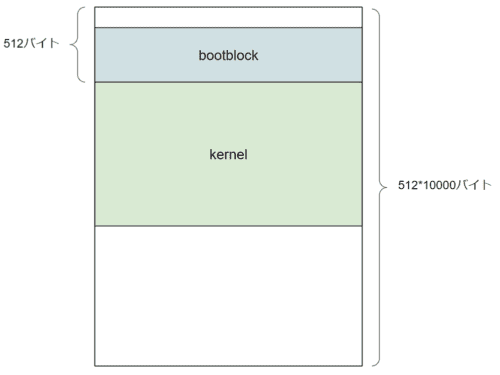
The remaining empty space is used by the system.
fs.img
fs.img has the following structure:
# Makefile
UPROGS=\
	_cat\
	_echo\
	_forktest\
	_grep\
	_init\
	_kill\
	_ln\
	_ls\
	_mkdir\
	_rm\
	_sh\
	_stressfs\
	_usertests\
	_wc\
	_zombie\

mkfs: mkfs.c fs.h
	gcc -Werror -Wall -o mkfs mkfs.c

fs.img: mkfs README $(UPROGS)
	./mkfs fs.img README $(UPROGS)
It contains the user command program binaries and the README.
This is the disk that users interact with.
Reading bootblock
Let us start with bootblock.
bootblock: bootasm.S bootmain.c
	$(CC) $(CFLAGS) -fno-pic -O -nostdinc -I. -c bootmain.c
	$(CC) $(CFLAGS) -fno-pic -nostdinc -I. -c bootasm.S
	$(LD) $(LDFLAGS) -N -e start -Ttext 0x7C00 -o bootblock.o bootasm.o bootmain.o
	$(OBJDUMP) -S bootblock.o > bootblock.asm
	$(OBJCOPY) -S -O binary -j .text bootblock.o bootblock
	./sign.pl bootblock
Let us start by examining the build options.
Compiler
The following is the section of the Makefile related to $(CC):
# Cross-compiling (e.g., on Mac OS X)
# TOOLPREFIX = i386-jos-elf

# Using native tools (e.g., on X86 Linux)
#TOOLPREFIX =

# Try to infer the correct TOOLPREFIX if not set
ifndef TOOLPREFIX
TOOLPREFIX := $(shell if i386-jos-elf-objdump -i 2>&1 | grep '^elf32-i386$$' >/dev/null 2>&1; \
	then echo 'i386-jos-elf-'; \
	elif objdump -i 2>&1 | grep 'elf32-i386' >/dev/null 2>&1; \
	then echo ''; \
	else echo "***" 1>&2; \
	echo "*** Error: Couldn't find an i386-*-elf version of GCC/binutils." 1>&2; \
	echo "*** Is the directory with i386-jos-elf-gcc in your PATH?" 1>&2; \
	echo "*** If your i386-*-elf toolchain is installed with a command" 1>&2; \
	echo "*** prefix other than 'i386-jos-elf-', set your TOOLPREFIX" 1>&2; \
	echo "*** environment variable to that prefix and run 'make' again." 1>&2; \
	echo "*** To turn off this error, run 'gmake TOOLPREFIX= ...'." 1>&2; \
	echo "***" 1>&2; exit 1; fi)
endif

CC = $(TOOLPREFIX)gcc
By default, it compiles using gcc.
If you are building on macOS or another non-Linux environment, you will need to change the TOOLPREFIX setting to cross-compile.
Reference: Building and running xv6 on OS X Yosemite - Qiita
Next, here is the CFLAGS section:
CFLAGS = -fno-pic -static -fno-builtin -fno-strict-aliasing -O2 -Wall -MD -ggdb -m32 -Werror -fno-omit-frame-pointer
CFLAGS += $(shell $(CC) -fno-stack-protector -E -x c /dev/null >/dev/null 2>&1 && echo -fno-stack-protector)
I will skip a detailed explanation of every option and focus on the defaults.
Reference: Man page of GCC
| Option | Purpose |
|---|---|
| -fno-pic | Do not generate position-independent code (PIC) |
| -static | Compile the program with static linking |
| -fno-builtin | Do not use compiler built-in functions |
| -fno-strict-aliasing | Disable strict aliasing |
| -O2 | Enable all supported optimization options |
| -Wall | Enable all compiler warning messages |
| -MD | List both system and user header files |
| -ggdb | Generate debug information targeting gdb |
| -m32 | Compile as 32-bit object |
| -Werror | Treat unused function arguments as compile errors |
| -fno-omit-frame-pointer | Retain the frame pointer even in functions that do not need it |
Note: Position-Independent Code (PIC)
Position-independent code (PIC), or position-independent executable (PIE), refers to machine code that can be executed correctly regardless of where it is placed in memory.
PIC is primarily used for shared libraries.
Reference: Position Independent Code (PIC) in shared libraries - Eli Bendersky’s website
Reference: Why compile with PIC when making a shared library on Linux - bkブログ
Overview of bootmain.c
When building xv6, the first step generates bootmain.o from the following bootmain.c:
// Boot loader.
//
// Part of the boot block, along with bootasm.S, which calls bootmain().
// bootasm.S has put the processor into protected 32-bit mode.
// bootmain() loads an ELF kernel image from the disk starting at
// sector 1 and then jumps to the kernel entry routine.

#include "types.h"
#include "elf.h"
#include "x86.h"
#include "memlayout.h"

#define SECTSIZE  512

void readseg(uchar*, uint, uint);

void
bootmain(void)
{
  struct elfhdr *elf;
  struct proghdr *ph, *eph;
  void (*entry)(void);
  uchar* pa;

  elf = (struct elfhdr*)0x10000;  // scratch space

  // Read 1st page off disk
  readseg((uchar*)elf, 4096, 0);

  // Is this an ELF executable?
  if(elf->magic != ELF_MAGIC)
    return;  // let bootasm.S handle error

  // Load each program segment (ignores ph flags).
  ph = (struct proghdr*)((uchar*)elf + elf->phoff);
  eph = ph + elf->phnum;
  for(; ph < eph; ph++){
    pa = (uchar*)ph->paddr;
    readseg(pa, ph->filesz, ph->off);
    if(ph->memsz > ph->filesz)
      stosb(pa + ph->filesz, 0, ph->memsz - ph->filesz);
  }

  // Call the entry point from the ELF header.
  // Does not return!
  entry = (void(*)(void))(elf->entry);
  entry();
}

void
waitdisk(void)
{
  // Wait for disk ready.
  while((inb(0x1F7) & 0xC0) != 0x40)
    ;
}

// Read a single sector at offset into dst.
void
readsect(void *dst, uint offset)
{
  // Issue command.
  waitdisk();
  outb(0x1F2, 1);   // count = 1
  outb(0x1F3, offset);
  outb(0x1F4, offset >> 8);
  outb(0x1F5, offset >> 16);
  outb(0x1F6, (offset >> 24) | 0xE0);
  outb(0x1F7, 0x20);  // cmd 0x20 - read sectors

  // Read data.
  waitdisk();
  insl(0x1F0, dst, SECTSIZE/4);
}

// Read 'count' bytes at 'offset' from kernel into physical address 'pa'.
// Might copy more than asked.
void
readseg(uchar* pa, uint count, uint offset)
{
  uchar* epa;

  epa = pa + count;

  // Round down to sector boundary.
  pa -= offset % SECTSIZE;

  // Translate from bytes to sectors; kernel starts at sector 1.
  offset = (offset / SECTSIZE) + 1;

  // If this is too slow, we could read lots of sectors at a time.
  // We'd write more to memory than asked, but it doesn't matter --
  // we load in increasing order.
  for(; pa < epa; pa += SECTSIZE, offset++)
    readsect(pa, offset);
}
The four functions defined are:
- void bootmain(void)
- void waitdisk(void)
- void readsect(void *dst, uint offset)
- void readsect(void *dst, uint offset)
The behavior of each function will be examined later.
Overview of bootblock.o
Next, bootasm.o is generated from bootasm.S, and linked together with the previously generated bootmain.o to produce bootblock.o.
Here is bootasm.S:
#include "asm.h"
#include "memlayout.h"
#include "mmu.h"

# Start the first CPU: switch to 32-bit protected mode, jump into C.
# The BIOS loads this code from the first sector of the hard disk into
# memory at physical address 0x7c00 and starts executing in real mode
# with %cs=0 %ip=7c00.

.code16                       # Assemble for 16-bit mode
.globl start
start:
  cli                         # BIOS enabled interrupts; disable

  # Zero data segment registers DS, ES, and SS.
  xorw    %ax,%ax             # Set %ax to zero
  movw    %ax,%ds             # -> Data Segment
  movw    %ax,%es             # -> Extra Segment
  movw    %ax,%ss             # -> Stack Segment

  # Physical address line A20 is tied to zero so that the first PCs
  # with 2 MB would run software that assumed 1 MB.  Undo that.
seta20.1:
  inb     $0x64,%al               # Wait for not busy
  testb   $0x2,%al
  jnz     seta20.1

  movb    $0xd1,%al               # 0xd1 -> port 0x64
  outb    %al,$0x64

seta20.2:
  inb     $0x64,%al               # Wait for not busy
  testb   $0x2,%al
  jnz     seta20.2

  movb    $0xdf,%al               # 0xdf -> port 0x60
  outb    %al,$0x60

  # Switch from real to protected mode.  Use a bootstrap GDT that makes
  # virtual addresses map directly to physical addresses so that the
  # effective memory map doesn't change during the transition.
  lgdt    gdtdesc
  movl    %cr0, %eax
  orl     $CR0_PE, %eax
  movl    %eax, %cr0

//PAGEBREAK!
  # Complete the transition to 32-bit protected mode by using a long jmp
  # to reload %cs and %eip.  The segment descriptors are set up with no
  # translation, so that the mapping is still the identity mapping.
  ljmp    $(SEG_KCODE<<3), $start32

.code32  # Tell assembler to generate 32-bit code now.
start32:
  # Set up the protected-mode data segment registers
  movw    $(SEG_KDATA<<3), %ax    # Our data segment selector
  movw    %ax, %ds                # -> DS: Data Segment
  movw    %ax, %es                # -> ES: Extra Segment
  movw    %ax, %ss                # -> SS: Stack Segment
  movw    $0, %ax                 # Zero segments not ready for use
  movw    %ax, %fs                # -> FS
  movw    %ax, %gs                # -> GS

  # Set up the stack pointer and call into C.
  movl    $start, %esp
  call    bootmain

  # If bootmain returns (it shouldn't), trigger a Bochs
  # breakpoint if running under Bochs, then loop.
  movw    $0x8a00, %ax            # 0x8a00 -> port 0x8a00
  movw    %ax, %dx
  outw    %ax, %dx
  movw    $0x8ae0, %ax            # 0x8ae0 -> port 0x8a00
  outw    %ax, %dx
spin:
  jmp     spin

# Bootstrap GDT
.p2align 2                                # force 4 byte alignment
gdt:
  SEG_NULLASM                             # null seg
  SEG_ASM(STA_X|STA_R, 0x0, 0xffffffff)   # code seg
  SEG_ASM(STA_W, 0x0, 0xffffffff)         # data seg

gdtdesc:
  .word   (gdtdesc - gdt - 1)             # sizeof(gdt) - 1
  .long   gdt                             # address gdt
Before diving into the content, let us look at how the boot program is linked.
Linking the Boot Program
Linking is performed with the following command:
ld -m elf_i386 -N -e start -Ttext 0x7C00 -o bootblock.o bootasm.o bootmain.oThe ld command combines multiple binaries and compiles a new executable program.
Reference: ld command description - Linux command reference
In the command above, it is linked as an elf_i386 binary.
The -N option makes both the text section and data section readable/writable, and the start symbol is treated as the entry point.
The starting address of the entry point is defined at 0x7C00.
For x86 CPUs, after the BIOS POST (Power On Self Test) runs at startup, the boot program is read from the MBR, loaded at 0x7C00, and treated as the boot sector.
The reason this specific address is used is explained in great detail in the following excellent article:
Reference: Assembler/Why is the MBR loaded at “0x7C00” in x86? (Complete edition) - Glamenv-Septzen.net
To summarize briefly: there was a need to reserve the minimum 32 KB of memory required by the ROM BIOS, and the range from 0x0 to 0x3FF is reserved for interrupt vectors. As a result, it was decided to place the boot sector at the end of the 32 KB region.
Consequently, reserving 512 bytes for the boot sector area and 512 bytes for the MBR bootstrap data/stack region, the starting address of the boot sector became 0x7C00 (32KB - 1024B).
This background was not covered in much detail in the DIY OS books I had read before (or so I recall), so it was very informative.
Now that the boot program is assembled, let us examine its contents.
Real Mode and Protected Mode
x86 CPUs start in “real mode,” which is software-compatible with the Intel 8086.
The Intel 8086 is a 16-bit processor.
Therefore, real mode operates as a 16-bit mode.
Reference: Intel 8086 - Wikipedia
From here, we will trace the steps for transitioning to 32-bit mode.
The code that runs in real mode is the following:
#include "asm.h"
#include "memlayout.h"
#include "mmu.h"

# Start the first CPU: switch to 32-bit protected mode, jump into C.
# The BIOS loads this code from the first sector of the hard disk into
# memory at physical address 0x7c00 and starts executing in real mode
# with %cs=0 %ip=7c00.

.code16                       # Assemble for 16-bit mode
.globl start
start:
  cli                         # BIOS enabled interrupts; disable

  # Zero data segment registers DS, ES, and SS.
  xorw    %ax,%ax             # Set %ax to zero
  movw    %ax,%ds             # -> Data Segment
  movw    %ax,%es             # -> Extra Segment
  movw    %ax,%ss             # -> Stack Segment

  # Physical address line A20 is tied to zero so that the first PCs
  # with 2 MB would run software that assumed 1 MB.  Undo that.
seta20.1:
  inb     $0x64,%al               # Wait for not busy
  testb   $0x2,%al
  jnz     seta20.1

  movb    $0xd1,%al               # 0xd1 -> port 0x64
  outb    %al,$0x64

seta20.2:
  inb     $0x64,%al               # Wait for not busy
  testb   $0x2,%al
  jnz     seta20.2

  movb    $0xdf,%al               # 0xdf -> port 0x60
  outb    %al,$0x60

  # Switch from real to protected mode.  Use a bootstrap GDT that makes
  # virtual addresses map directly to physical addresses so that the
  # effective memory map doesn't change during the transition.
  lgdt    gdtdesc
  movl    %cr0, %eax
  orl     $CR0_PE, %eax
  movl    %eax, %cr0

//PAGEBREAK!
  # Complete the transition to 32-bit protected mode by using a long jmp
  # to reload %cs and %eip.  The segment descriptors are set up with no
  # translation, so that the mapping is still the identity mapping.
  ljmp    $(SEG_KCODE<<3), $start32

.code32  # Tell assembler to generate 32-bit code now.
start32:
{{ 省略 }}
Booting in Real Mode
The .code16 directive at the top tells the assembler that the code is expected to execute in 16-bit mode.
The start section is the symbol that was linked as the entry point earlier.
.code16                       # Assemble for 16-bit mode
.globl start
start:
  cli                         # BIOS enabled interrupts; disable

  # Zero data segment registers DS, ES, and SS.
  xorw    %ax,%ax             # Set %ax to zero
  movw    %ax,%ds             # -> Data Segment
  movw    %ax,%es             # -> Extra Segment
  movw    %ax,%ss             # -> Stack Segment
Reference: Objdump of .code16 and .code32 x86 assembly - Stack Overflow
Disabling CPU Interrupts with cli and sti
cli is an instruction that disables CPU interrupts.
From the point cli is called until the sti instruction is called, CPU interrupts are disabled. (More precisely, interrupt requests from the CPU are still generated but are ignored.)
Reference: CLI : Clear Interrupt Flag (x86 Instruction Set Reference)
This is because if the interrupts set by the BIOS remain enabled, the boot program’s processing will not work correctly.
Therefore, while the boot program is setting up the stack pointer and interrupt configuration, interrupts must be disabled.
Initializing Segment Registers
The following four lines initialize the AX, DS, ES, and SS registers to 0x0000.
The AX register is the accumulator; the other three are segment registers.
Reference: Intel 8086 - Wikipedia
Reference: Intel 8086 CPU Basics - Qiita
Here, the segment register values set by the BIOS are being initialized.
For reference, here is a brief summary of each segment register’s purpose:
| Register | Purpose |
|---|---|
| DS register | Default segment register for data |
| ES register | Segment register for data; normally DS register is used |
| SS register | Segment register for the stack; used with SP/BP memory references |
| CS register | Segment register for code; the instruction pointer (IP) uses the CS register |
Reference: 8086 Registers
Enabling the A20 Line
In the Intel 8086, the A20 Line (bit 21 of memory access) is disabled by default for backward compatibility.
Therefore, to access up to 2 MB of memory, the A20 Line must be enabled.
The A20 Line is initially connected to the KBC (Keyboard Controller).
The KBC is a mechanism for transmitting keyboard input to the CPU.
The KBC receives information from the keyboard via serial communication, buffers it, and then checks whether it is a KBC control command or input data to be forwarded to the CPU.
Data to be forwarded to the CPU goes through port 0x60; control commands go through port 0x64.
In the following code, each step first confirms that the KBC buffer has no pending input, then sends control commands to ports 0x60 and 0x64 to enable A20.
  # Physical address line A20 is tied to zero so that the first PCs
  # with 2 MB would run software that assumed 1 MB.  Undo that.
seta20.1:
  inb     $0x64,%al               # Wait for not busy
  testb   $0x2,%al
  jnz     seta20.1

  movb    $0xd1,%al               # 0xd1 -> port 0x64
  outb    %al,$0x64

seta20.2:
  inb     $0x64,%al               # Wait for not busy
  testb   $0x2,%al
  jnz     seta20.2

  movb    $0xdf,%al               # 0xdf -> port 0x60
  outb    %al,$0x60
In the example above, control command 0xd1 is sent to port 0x64, followed by 0xdf being sent to port 0x60, which enables A20.
Reference: A20 Line - OSDev Wiki
Reference: A20 gate and keyboard controller (using xv6 as example) - 私のひらめき日記
Reference: assembly - The A20 Line with JOS - Stack Overflow
Switching to Protected Mode
From here, the program switches to protected mode.
Unlike real mode, protected mode provides memory protection — programs can only access memory regions they are permitted to access.
Therefore, when transitioning from real mode to protected mode, the memory regions accessible to the kernel being loaded must be defined in advance.
  # Switch from real to protected mode.  Use a bootstrap GDT that makes
  # virtual addresses map directly to physical addresses so that the
  # effective memory map doesn't change during the transition.
  lgdt    gdtdesc
  movl    %cr0, %eax
  orl     $CR0_PE, %eax
  movl    %eax, %cr0

//PAGEBREAK!
  # Complete the transition to 32-bit protected mode by using a long jmp
  # to reload %cs and %eip.  The segment descriptors are set up with no
  # translation, so that the mapping is still the identity mapping.
  ljmp    $(SEG_KCODE<<3), $start32

.code32  # Tell assembler to generate 32-bit code now.
start32:
The actual switch to protected mode happens in these lines:
movl    %cr0, %eax
orl     $CR0_PE, %eax
movl    %eax, %cr0
On x86 CPUs, enabling protected mode requires setting the PE flag in the control register to 1.
The assembly code above uses an or operation to set the PE flag of the control register to 1.
This completes the transition to protected mode.
The GDT must be initialized before this step.
Reference: Control register - Wikipedia
Memory Address References in Protected Mode
In protected mode, the GDT (Global Descriptor Table) is used for memory address references.
The GDT mechanism is a larger topic, so I have summarized it as a separate article.
Reference: Notes on x86 CPU Memory Protection (GDT and LDT)
lgdt gdtdesc
The lgdt instruction registers a GDT data structure into the GDTR.
The gdtdesc stored here is the following label defined in bootasm.S:
# Bootstrap GDT
.p2align 2                                # force 4 byte alignment
gdt:
  SEG_NULLASM                             # null seg
  SEG_ASM(STA_X|STA_R, 0x0, 0xffffffff)   # code seg
  SEG_ASM(STA_W, 0x0, 0xffffffff)         # data seg

gdtdesc:
  .word   (gdtdesc - gdt - 1)             # sizeof(gdt) - 1
  .long   gdt                             # address gdt
.p2align 2 forces the immediately following instruction or data to be placed on a 4-byte boundary.
This means data is placed starting at an address that is a multiple of 4.
Reference: c - What is meant by “memory is 8 bytes aligned”? - Stack Overflow
The next line attaches the gdt label to the line where the SEG_NULLASM macro and others are placed.
These macros are defined in asm.h as follows:
//
// assembler macros to create x86 segments
//

#define SEG_NULLASM                                             \
        .word 0, 0;                                             \
        .byte 0, 0, 0, 0

// The 0xC0 means the limit is in 4096-byte units
// and (for executable segments) 32-bit mode.
#define SEG_ASM(type,base,lim)                                  \
        .word (((lim) >> 12) & 0xffff), ((base) & 0xffff);      \
        .byte (((base) >> 16) & 0xff), (0x90 | (type)),         \
                (0xC0 | (((lim) >> 28) & 0xf)), (((base) >> 24) & 0xff)

#define STA_X     0x8       // Executable segment
#define STA_W     0x2       // Writeable (non-executable segments)
#define STA_R     0x2       // Readable (executable segments)
The GDT in an x86 CPU is basically a structure consisting of multiple 8-byte descriptors placed consecutively.
Reference: Global Descriptor Table - Wikipedia
Reference: Writing an OS from Scratch (ゼロからのOS自作入門)
The following is the descriptor structure introduced in 30-Day OS Development (30日でできる! OS自作入門).
It is easier to understand than the xv6 code, so I am including it here:
struct SEGMENT_DESCRIPTOR{
    short limit_low, base_low;
    char base_mid, access_right;
    char limit_high, base_high;
};
Reference: 30-Day OS Development (30日でできる! OS自作入門)
At the beginning of the GDT (the first descriptor), a null descriptor with all values set to 0 is placed.
This is never referenced by the system.
The null descriptor is used to invalidate segment registers.
Reference: Why x86 processor need a NULL descriptor in GDT? - Stack Overflow
The second descriptor defines the code segment descriptor, and the third defines the data segment descriptor.
The code segment is granted read and execute permissions; the data segment is granted write permission.
Finally, using the address of the GDT created by these macros, the lgdt gdtdesc instruction initializes the GDTR.
The GDTR holds a 48-bit value.
The upper 32 bits hold the starting address of the GDT (the gdt label).
The lower 16 bits hold the limit value (the number of GDT entries).
Reference: GDTR (Global Descriptor Table Register) - ゆずさん研究所
When a program uses a descriptor such as LDT, it is referenced as an offset from the starting address set in the GDTR.
This completes the GDTR initialization.
Reference: assembly - Why in xv6 there’s sizeof(gdt)-1 in gdtdesc - Stack Overflow
Reference: OS boot series ⑮-2 entryother.S (Reading Unix xv6 ~ OS Code Reading ~) - 野良プログラマーのCS日記
Starting 32-bit Mode
With GDTR initialization and the transition to protected mode complete, the system now operates in 32-bit mode.
//PAGEBREAK!
  # Complete the transition to 32-bit protected mode by using a long jmp
  # to reload %cs and %eip.  The segment descriptors are set up with no
  # translation, so that the mapping is still the identity mapping.
  ljmp    $(SEG_KCODE<<3), $start32

.code32  # Tell assembler to generate 32-bit code now.
start32:
The ljmp instruction takes a segment selector as its first operand and an offset address (the start32 label) as its second operand, then jumps to the address corresponding to the segment base + offset for the given selector.
SEG_KCODE is defined in mmu.h as follows:
// various segment selectors.
#define SEG_KCODE 1  // kernel code
#define SEG_KDATA 2  // kernel data+stack
#define SEG_UCODE 3  // user code
#define SEG_UDATA 4  // user data+stack
#define SEG_TSS   5  // this process's task state
From the above, the segment selector defined by $(SEG_KCODE<<3) is 0b1000.
This points to the second segment in the GDT, which is the code segment.
A segment selector is 16 bits, as described on the following page: the upper 13 bits hold the descriptor index (index from the beginning of the GDT), and the lower 3 bits hold the Table Indicator (TI) and Requestor Privilege Level (RPL).
Reference: Segment Selector - ゆずさん研究所
When TI is 0, the GDT is referenced. (When TI is 1, the LDT is referenced.)
When RPL is 0, it indicates privileged access.
Here, the segment selector 0b1000 defined by $(SEG_KCODE<<3) represents a segment register with index 1, TI 0, and RPL 0.
Why Use the ljmp Instruction?
This code raised a question for me.
Once the %cr0 setting is complete and the transition to protected mode has been performed, it should be possible to call the start32 processing without explicitly using the ljmp instruction.
  lgdt    gdtdesc
  movl    %cr0, %eax
  orl     $CR0_PE, %eax
  movl    %eax, %cr0
  ljmp    $(SEG_KCODE<<3), $start32

.code32  # Tell assembler to generate 32-bit code now.
start32:
{{ 省略 }}
The reason ljmp is explicitly used here is to discard the instructions that the CPU pre-fetched from memory while still operating in real mode.
CPUs have a mechanism called a pipeline to execute instructions at high speed, which pre-fetches the next instruction.
However, when transitioning to protected mode, the interpretation of machine code changes from real mode, so this pipeline must be reset.
By calling the ljmp instruction, the values of the cs register and the eip register are reloaded.
Post-Protected-Mode Setup
We are almost done tracing all of bootasm.S.
The last behavior to examine is the following:
.code32  # Tell assembler to generate 32-bit code now.
start32:
  # Set up the protected-mode data segment registers
  movw    $(SEG_KDATA<<3), %ax    # Our data segment selector
  movw    %ax, %ds                # -> DS: Data Segment
  movw    %ax, %es                # -> ES: Extra Segment
  movw    %ax, %ss                # -> SS: Stack Segment
  movw    $0, %ax                 # Zero segments not ready for use
  movw    %ax, %fs                # -> FS
  movw    %ax, %gs                # -> GS

  # Set up the stack pointer and call into C.
  movl    $start, %esp
  call    bootmain

  # If bootmain returns (it shouldn't), trigger a Bochs
  # breakpoint if running under Bochs, then loop.
  movw    $0x8a00, %ax            # 0x8a00 -> port 0x8a00
  movw    %ax, %dx
  outw    %ax, %dx
  movw    $0x8ae0, %ax            # 0x8ae0 -> port 0x8a00
  outw    %ax, %dx
spin:
  jmp     spin
Initializing Segment Registers
Here, segment registers other than CS are initialized.
Having transitioned from real mode to protected mode, the usage of segment selectors has changed.
Specifically, in real mode, memory address references used a scheme of multiplying the segment portion by 16 and adding it to the offset; in protected mode, this changes to referencing segment descriptors.
Reference: Insider’s Computer Dictionary: What is 8086? - @IT
Therefore, in protected mode, segment selectors must be stored in segment registers.
start32:
  # Set up the protected-mode data segment registers
  movw    $(SEG_KDATA<<3), %ax    # Our data segment selector
  movw    %ax, %ds                # -> DS: Data Segment
  movw    %ax, %es                # -> ES: Extra Segment
  movw    %ax, %ss                # -> SS: Stack Segment

  movw    $0, %ax                 # Zero segments not ready for use
  movw    %ax, %fs                # -> FS
  movw    %ax, %gs                # -> GS
The segment selector is set by $(SEG_KDATA<<3).
SEG_KDATA was defined as 2 in mmu.h.
Therefore, $(SEG_KDATA<<3) becomes 0b10000.
This is the selector that specifies the third segment descriptor defined in the GDT, SEG_ASM(STA_W, 0x0, 0xffffffff).
Using these values, the DS, ES, and SS segment registers are initialized.
FS and GS are set to 0.
When a segment selector is 0, the segment register is invalidated.
Calling bootmain.c
From here, processing moves to bootmain.c.
As seen earlier, $start is placed at 0x7C00.
That is, the stack pointer (the base address for the stack) is 0x7C00.
# Set up the stack pointer and call into C.
movl    $start, %esp
call    bootmain
Based on the understanding so far, this diagram shows the layout (please correct me if I am wrong):

Note: the following code handles what happens if bootmain.c returns (which it should not), so it is omitted here.
  # If bootmain returns (it shouldn't), trigger a Bochs
  # breakpoint if running under Bochs, then loop.
  movw    $0x8a00, %ax            # 0x8a00 -> port 0x8a00
  movw    %ax, %dx
  outw    %ax, %dx
  movw    $0x8ae0, %ax            # 0x8ae0 -> port 0x8a00
  outw    %ax, %dx
spin:
  jmp     spin
Loading the Kernel
The transition to protected mode is now complete, and processing has switched to bootmain.c.
bootmain.c defines the following four functions:
- void bootmain(void)
- void waitdisk(void)
- void readsect(void *dst, uint offset)
- void readsect(void *dst, uint offset)
From here, we will trace the behavior of bootmain.c.
Loading the ELF Kernel Image from Disk
bootmain() is the function responsible for loading the ELF kernel image from disk.
Let us walk through it from the beginning.
void bootmain(void)
{
  struct elfhdr *elf;
  struct proghdr *ph, *eph;
  void (*entry)(void);
  uchar* pa;

  elf = (struct elfhdr*)0x10000;  // scratch space

  // Read 1st page off disk
  readseg((uchar*)elf, 4096, 0);

  // Is this an ELF executable?
  if(elf->magic != ELF_MAGIC)
    return;  // let bootasm.S handle error

  // Load each program segment (ignores ph flags).
  ph = (struct proghdr*)((uchar*)elf + elf->phoff);
  eph = ph + elf->phnum;
  for(; ph < eph; ph++){
    pa = (uchar*)ph->paddr;
    readseg(pa, ph->filesz, ph->off);
    if(ph->memsz > ph->filesz)
      stosb(pa + ph->filesz, 0, ph->memsz - ph->filesz);
  }

  // Call the entry point from the ELF header.
  // Does not return!
  entry = (void(*)(void))(elf->entry);
  entry();
}
The structs elfhdr and proghdr declared at the top are both defined in elf.h:
// Format of an ELF executable file

#define ELF_MAGIC 0x464C457FU  // "\x7FELF" in little endian

// File header
struct elfhdr {
  uint magic;  // must equal ELF_MAGIC
  uchar elf[12];
  ushort type;
  ushort machine;
  uint version;
  uint entry;
  uint phoff;
  uint shoff;
  uint flags;
  ushort ehsize;
  ushort phentsize;
  ushort phnum;
  ushort shentsize;
  ushort shnum;
  ushort shstrndx;
};

// Program section header
struct proghdr {
  uint type;
  uint off;
  uint vaddr;
  uint paddr;
  uint filesz;
  uint memsz;
  uint flags;
  uint align;
};

// Values for Proghdr type
#define ELF_PROG_LOAD           1

// Flag bits for Proghdr flags
#define ELF_PROG_FLAG_EXEC      1
#define ELF_PROG_FLAG_WRITE     2
#define ELF_PROG_FLAG_READ      4
The details of this struct are covered by the following page, so I will skip them here.
Reference: Executable and Linkable Format - Wikipedia
The line void (*entry)(void); declares a function pointer.
Ultimately, it retrieves the entry point from the loaded ELF header and calls it.
Reading Sectors from Disk
Next, let us look at the following section:
elf = (struct elfhdr*)0x10000;  // scratch space

// Read 1st page off disk
readseg((uchar*)elf, 4096, 0);
I was initially unclear about what elf = (struct elfhdr*)0x10000; was doing. It casts the region starting at address 0x10000 as an elfhdr struct, allowing access to that region through the pointer variable elf.
This pointer variable elf is then cast to an unsigned char pointer on the next line and passed as the first argument to the readseg function.
Reference: Reading the xv6 Boot Loader
The line readseg((uchar*)elf, 4096, 0); loads 4096 bytes of data into the address (uchar*)elf.
The reason 4096 bytes are read even though an ELF header is only 52 bytes is explained in the following reference:
Reference: x86 - XV6: bootmain - loading kernel ELF header - Stack Overflow
The background is that since the combined size of the ELF header and program headers is unknown at call time, one full page of data is read with the expectation that the ELF header and program headers will fit within 4 KB.
The page size for x86 CPUs is 4096 bytes (4 KB) (note: the original source contains a typo of 4069).
Reference: Why is the page size of Linux (x86) 4 KB, how is that calculated? - Stack Overflow
The readseg function looks like this.
Internally, the readsect function reads 4096 bytes of data from the second sector (sector 1) one sector at a time from disk and writes it to the uchar* pa region.
// Read 'count' bytes at 'offset' from kernel into physical address 'pa'.
// Might copy more than asked.
void readseg(uchar* pa, uint count, uint offset)
{
  uchar* epa;
  epa = pa + count;

  // Round down to sector boundary.
  pa -= offset % SECTSIZE;

  // Translate from bytes to sectors; kernel starts at sector 1.
  offset = (offset / SECTSIZE) + 1;

  // If this is too slow, we could read lots of sectors at a time.
  // We'd write more to memory than asked, but it doesn't matter --
  // we load in increasing order.
  for(; pa < epa; pa += SECTSIZE, offset++)
    readsect(pa, offset);
}
Here is the readsect function:
// Read a single sector at offset into dst.
void readsect(void *dst, uint offset)
{
  // Issue command.
  waitdisk();
  outb(0x1F2, 1);   // count = 1
  outb(0x1F3, offset);
  outb(0x1F4, offset >> 8);
  outb(0x1F5, offset >> 16);
  outb(0x1F6, (offset >> 24) | 0xE0);
  outb(0x1F7, 0x20);  // cmd 0x20 - read sectors

  // Read data.
  waitdisk();
  insl(0x1F0, dst, SECTSIZE/4);
}
This type of disk access uses a method called Cylinder-head-sector (CHS).
Modern operating systems (probably) do not implement disk reads this way, so I will skip the details of CHS.
Reference: Cylinder-head-sector - Wikipedia
Reference: c - xv6 boot loader: Reading sectors off disk using CHS - Stack Overflow
The reason the line offset = (offset / SECTSIZE) + 1; reads from the second sector (sector 1) is that, as confirmed in the Makefile section, the kernel program is placed at offset 512 bytes into the image.
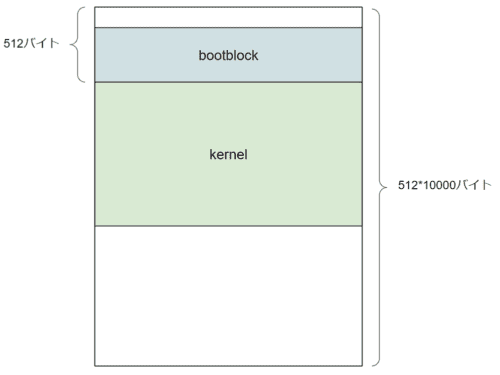
In xv6 OS, as noted by #define SECTSIZE 512, one sector is defined as 512 bytes.
Therefore, the first byte of the kernel is expected to be at the beginning of sector 2.
Verifying the Loaded Kernel
The next step checks whether the kernel was loaded correctly by inspecting the magic number.
// Is this an ELF executable?
if(elf->magic != ELF_MAGIC)
	return;  // let bootasm.S handle error
Loading Program Headers
Next, the program headers are loaded.
The behavior is essentially the same as when the kernel was loaded.
// Load each program segment (ignores ph flags).
ph = (struct proghdr*)((uchar*)elf + elf->phoff);
eph = ph + elf->phnum;
for(; ph < eph; ph++){
  pa = (uchar*)ph->paddr;
  readseg(pa, ph->filesz, ph->off);
  if(ph->memsz > ph->filesz)
    stosb(pa + ph->filesz, 0, ph->memsz - ph->filesz);
}
First, the address (uchar*)elf + elf->phoff is cast as a proghdr struct.
(uchar*)elf + elf->phoff is the starting offset of the program headers.
Since 4096 bytes of data were read earlier, both the ELF header and all program headers are expected to have been loaded, so the program header information is already present at the position (uchar*)elf + elf->phoff.
From here, the data for each program segment is loaded.
This is the step that loads the actual programs to be executed.
Note that stosb is defined in x86.h and is used to zero-fill when ph->memsz is greater than ph->filesz.
static inline void
stosb(void *addr, int data, int cnt)
{
  asm volatile("cld; rep stosb" :
               "=D" (addr), "=c" (cnt) :
               "0" (addr), "1" (cnt), "a" (data) :
               "memory", "cc");
}
Reference: elf - Difference between pfilesz and pmemsz of Elf32_Phdr - Stack Overflow
Now that the kernel program has been loaded from disk, all subsequent processing is handed off to the kernel.
// Call the entry point from the ELF header.
// Does not return!
entry = (void(*)(void))(elf->entry);
entry();
Summary
It took quite a bit of time, but I have now thoroughly read through and analyzed the xv6 UNIX bootstrap process.
Starting from the next article, I can finally get into the main topic — reading the kernel source code.
Reference Books
- 30-Day OS Development (30日でできる! OS自作入門)
- Writing an OS from Scratch (ゼロからのOS自作入門)
- Reading OS Code for the First Time ~Learning Kernel Mechanisms with UNIX V6~
- Understanding the Linux Kernel (詳解 Linuxカーネル)
- Building and Understanding an OS: Theory and Implementation for x86 Computers (作って理解するOS x86系コンピュータを動かす理論と実装)