This page has been machine-translated from the original page.
I’m reading xv6 OS inspired by Your First OS Code Reading: Learning Kernel Internals with UNIX V6.
Because UNIX V6 itself does not run on x86 CPUs, I decided to read the source code of kash1064/xv6-public: xv6 OS, a fork of the xv6 OS repository that adapts UNIXv6 to run on the x86 architecture.
Last time, we looked at the picinit and ioapicinit functions executed from main.
This time, I’ll follow the behavior of the consoleinit function.
Table of Contents
The consoleinit function
The consoleinit function is defined in console.c as follows.
void consoleinit(void)
{
  initlock(&cons.lock, "console");

  devsw[CONSOLE].write = consolewrite;
  devsw[CONSOLE].read = consoleread;
  cons.locking = 1;

  ioapicenable(IRQ_KBD, 0);
}
First, initlock(&cons.lock, "console"); on the first line is the function that initializes the spinlock structure used for the memory lock we looked at in the memory allocation and mutual exclusion article.
The &cons.lock used here is defined as follows.
static struct {
  struct spinlock lock;
  int locking;
} cons;
Incidentally, consoleinit itself does not lock memory.
Instead, memory locking is performed using cons when functions such as consoleread and consolewrite run.
Next, let’s look at the following lines.
devsw[CONSOLE].write = consolewrite;
devsw[CONSOLE].read = consoleread;
The devsw referenced here is an array of devsw structures, and this array is defined in file.c.
struct devsw devsw[NDEV];The devsw structure itself is defined in file.h.
// table mapping major device number to
// device functions
struct devsw {
  int (*read)(struct inode*, char*, int);
  int (*write)(struct inode*, char*, int);
};

extern struct devsw devsw[];
#define CONSOLE 1
By the way, NDEV is defined as 10 in param.h.
#define NDEV 10 // maximum major device numberAbout the devsw structure
What I wanted to understand in more detail here was what exactly the devsw structure is.
Looking at UNIX manuals and similar material, the devsw structure seems to be used when device drivers provide character device interfaces.
Reference: devsw(9) - NetBSD Manual Pages
Also, based on the following page, I think character device interfaces correspond to I/O interfaces for devices where the system transfers data one character at a time.
Reference: Device file - Wikipedia
Looking at the definition of the devsw structure here, two kinds of function pointers are set: read and write.
Arbitrary functions are assigned here, as in the consoleinit function.
Both functions take an inode structure as an argument.
Like the devsw structure, the inode structure is defined in file.h.
// in-memory copy of an inode
struct inode {
  uint dev;           // Device number
  uint inum;          // Inode number
  int ref;            // Reference count
  struct sleeplock lock; // protects everything below here
  int valid;          // inode has been read from disk?

  short type;         // copy of disk inode
  short major;
  short minor;
  short nlink;
  uint size;
  uint addrs[NDIRECT+1];
};
What is an inode
Before going further, I’ll briefly touch on what an inode is.
Roughly speaking, an inode is a structure that stores information about file system objects such as files and directories.
The kinds of information an inode holds include the following.
- File size (number of bytes)
- The device ID of the device storing the file
- The owner and group IDs of the file
- The inode number used to identify the file within the file system
- Timestamps
Reference: inode - Wikipedia
If you look at xv6OS’s inode structure, you can see that it stores similar information.
inodes are managed by unique IDs within the system (in xv6OS, inum probably fills that role).
There is usually an upper limit on assignable inode numbers, and if the available inode numbers are exhausted, you can no longer create new files even if there is still free disk space on the storage device.
On a typical Linux system, you can check each device’s inode limit with the df -i command.
$ df -i
Filesystem                         Inodes  IUsed   IFree IUse% Mounted on
udev                              1007124    449 1006675    1% /dev
tmpfs                             1019154    919 1018235    1% /run
/dev/mapper/ubuntu--vg-ubuntu--lv 1310720 380878  929842   30% /
tmpfs                             1019154      1 1019153    1% /dev/shm
tmpfs                             1019154      5 1019149    1% /run/lock
tmpfs                             1019154     18 1019136    1% /sys/fs/cgroup
/dev/loop0                             29     29       0  100% /snap/bare/5
/dev/loop2                          10847  10847       0  100% /snap/core18/2284
/dev/loop1                          10836  10836       0  100% /snap/core18/2253
/dev/loop3                          11776  11776       0  100% /snap/core20/1270
/dev/loop5                          18500  18500       0  100% /snap/gnome-3-34-1804/72
/dev/loop4                          11777  11777       0  100% /snap/core20/1328
/dev/loop6                          18500  18500       0  100% /snap/gnome-3-34-1804/77
/dev/loop7                          65095  65095       0  100% /snap/gtk-common-themes/1519
/dev/loop8                            796    796       0  100% /snap/lxd/21835
/dev/loop9                          64986  64986       0  100% /snap/gtk-common-themes/1515
/dev/loop10                           796    796       0  100% /snap/lxd/21545
/dev/loop11                           479    479       0  100% /snap/snapd/14295
/dev/loop12                           482    482       0  100% /snap/snapd/14549
/dev/sda2                           65536    320   65216    1% /boot
tmpfs                             1019154     45 1019109    1% /run/user/121
tmpfs                             1019154     83 1019071    1% /run/user/1000
Reference: What Is an i-node (inode)?
Reading the consolewrite function
At this point, we still are not creating files using inode, so for now let’s return to xv6OS’s code.
devsw[CONSOLE].write = consolewrite;
devsw[CONSOLE].read = consoleread;
The write and read fields of the CONSOLE = 1 element in the devsw array are assigned the functions defined in console.c.
First, let’s read the consolewrite function.
int consolewrite(struct inode *ip, char *buf, int n)
{
  int i;

  iunlock(ip);
  acquire(&cons.lock);
  for(i = 0; i < n; i++) consputc(buf[i] & 0xff);
  release(&cons.lock);
  ilock(ip);

  return n;
}
The consolewrite function takes a pointer to the target inode structure variable, along with the characters to pass to consputc and their length.
First is the iunlock function, which is defined in fs.c.
// Unlock the given inode.
void iunlock(struct inode *ip)
{
  if(ip == 0 || !holdingsleep(&ip->lock) || ip->ref < 1) panic("iunlock");
  releasesleep(&ip->lock);
}
I’ll look at this function in more detail when I get to the file system, but it releases the lock by manipulating the sleeplock structure held by the passed inode.
Next, after acquiring the lock with acquire, it feeds the passed string into consputc one character at a time.
At this point, the supplied string is ANDed with 0xFF, so only the lower 8 bits are passed along.
void consputc(int c)
{
  if(panicked){
    cli();
    for(;;) ;
  }

  if(c == BACKSPACE){
    uartputc('\b'); uartputc(' '); uartputc('\b');
  } else{
      uartputc(c);
  }
  cgaputc(c);
}
Here, uartputc is called with the supplied value as its argument.
The uartputc function is defined in uart.c, and it writes to the serial port (UART).
Here, it writes the received value to COM1 (I/O port 0x3f8).
void uartputc(int c)
{
  int i;

  if(!uart) return;
  for(i = 0; i < 128 && !(inb(COM1+5) & 0x20); i++) microdelay(10);
  outb(COM1+0, c);
}
COM1+0 is the data register, and writing a value here writes it to the transmit buffer.
The previous line, inb(COM1+5), reads the value of the line status register.
The sixth bit of the line status register is called THRE, and when this bit is set, it means the transmit buffer is empty and ready to send new data.
Reference: Serial Ports - OSDev Wiki
In other words, the line !(inb(COM1+5) & 0x20) checks the THRE bit in the line status register, and if the transmit buffer is not available, it delays processing with the microdelay function.
By the way, when BACKSPACE is entered, the sequence uartputc('\b'); uartputc(' '); uartputc('\b'); seems to mean: move the cursor back one position, overwrite that position with a space, and then move the cursor back once more to the position before the write.
Writing to video memory
Once writing to the serial port is done, the cgaputc function is called at the end.
cgaputc writes the input value to video memory and displays it.
static void cgaputc(int c)
{
  int pos;

  // Cursor position: col + 80*row.
  outb(CRTPORT, 14);
  pos = inb(CRTPORT+1) << 8;
  outb(CRTPORT, 15);
  pos |= inb(CRTPORT+1);

  if(c == '\n') pos += 80 - pos%80;
  else if(c == BACKSPACE){
    if(pos > 0) --pos;
  } else{
    crt[pos++] = (c&0xff) | 0x0700;  // black on white
  }
  if(pos < 0 || pos > 25*80) panic("pos under/overflow");

  if((pos/80) >= 24){  // Scroll up.
    memmove(crt, crt+80, sizeof(crt[0])*23*80);
    pos -= 80;
    memset(crt+pos, 0, sizeof(crt[0])*(24*80 - pos));
  }

  outb(CRTPORT, 14);
  outb(CRTPORT+1, pos>>8);
  outb(CRTPORT, 15);
  outb(CRTPORT+1, pos);
  crt[pos] = ' ' | 0x0700;
}
The crt destination used here points to the region at address 0xb8000.
This region is called the frame buffer.
//PAGEBREAK: 50
#define BACKSPACE 0x100
#define CRTPORT 0x3d4
static ushort *crt = (ushort*)P2V(0xb8000);  // CGA memory
Reference: What Is a Frame Buffer? - e-Words IT Dictionary
Reference: 3.-The Screen
First, CRTPORT points to 0x3D4, the register of the CRT Controller.
This is a control register, and the data register area corresponding to 0x3D4 is 0x3D5.
Using these two regions, you can control the cursor position on the console.
Setting 14 in 0x3D4 selects control of the upper 8 bits of the 16-bit cursor value.
Setting 15 selects control of the lower 8 bits of the cursor value.
In other words, the following lines store the current 16-bit cursor position in the variable pos.
outb(CRTPORT, 14);
pos = inb(CRTPORT+1) << 8;
outb(CRTPORT, 15);
pos |= inb(CRTPORT+1);
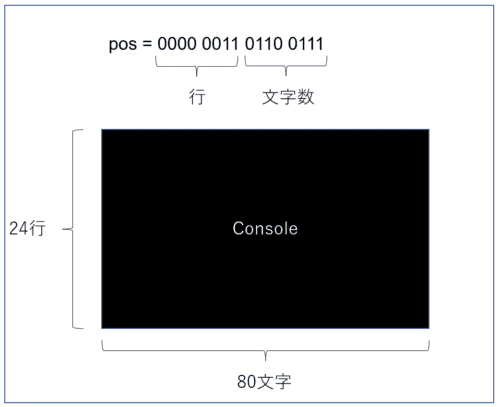
The relationship between the upper and lower bits of the cursor value obtained here is shown below.
The upper 8 bits indicate the cursor’s row position, and the lower 8 bits indicate the column position.
The following line defines the behavior when a newline character is passed.
if(c == '\n') pos += 80 - pos%80;It increments pos so that the cursor moves to the leftmost position of the next line.
If BACKSPACE is given, the cursor position is moved back by one.
When ordinary character input is given, 16-bit character data is stored.
else if(c == BACKSPACE){
  if(pos > 0) --pos;
} else{
  crt[pos++] = (c&0xff) | 0x0700;  // black on white
}
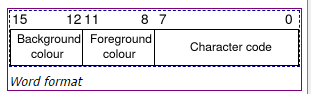
The upper 8 bits of this character data hold the background and text color information.
The lower 8 bits specify the character to display.
Reference image: 3.-The Screen
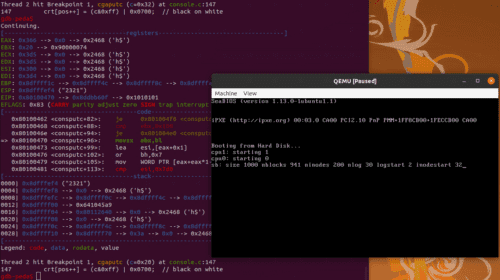
If you check it in the debugger, you can confirm that this processing actually displays characters on the console.
The next processing is very simple: if the output exceeds the maximum of 24 lines, it removes the first line, scrolls up, and makes the last line blank.
if((pos/80) >= 24){  // Scroll up.
  memmove(crt, crt+80, sizeof(crt[0])*23*80);
  pos -= 80;
  memset(crt+pos, 0, sizeof(crt[0])*(24*80 - pos));
}
Finally, the current cursor position is saved to CRTPORT and CRTPORT+1.
outb(CRTPORT, 14);
outb(CRTPORT+1, pos>>8);
outb(CRTPORT, 15);
outb(CRTPORT+1, pos);
crt[pos] = ' ' | 0x0700;
With that, writing to the console via the consputc function is complete.
After returning to consolewrite, it releases the memory lock and locks the inode, then finishes.
release(&cons.lock);
ilock(ip);
Reading the consoleread function
Next, I’ll read the consoleread function.
The consoleread function takes an inode, a pointer to the read destination, and the buffer size to read as arguments.
int consoleread(struct inode *ip, char *dst, int n)
{
  uint target;
  int c;

  iunlock(ip);
  target = n;
  acquire(&cons.lock);
  while(n > 0){
    while(input.r == input.w){
      if(myproc()->killed){
        release(&cons.lock);
        ilock(ip);
        return -1;
      }
      sleep(&input.r, &cons.lock);
    }
    c = input.buf[input.r++ % INPUT_BUF];
    if(c == C('D')){  // EOF
      if(n < target){
        // Save ^D for next time, to make sure
        // caller gets a 0-byte result.
        input.r--;
      }
      break;
    }
    *dst++ = c;
    --n;
    if(c == '\n')
      break;
  }
  release(&cons.lock);
  ilock(ip);

  return target - n;
}
As with consolewrite, after releasing the memory lock and the inode lock, it performs the following processing inside a loop over the specified buffer size.
c = input.buf[input.r++ % INPUT_BUF];
if(c == C('D')){  // EOF
  if(n < target){
    // Save ^D for next time, to make sure
    // caller gets a 0-byte result.
    input.r--;
  }
  break;
}

*dst++ = c;
--n;
if(c == '\n') break;
The input structure is the following structure.
#define INPUT_BUF 128
struct {
  char buf[INPUT_BUF];
  uint r;  // Read index
  uint w;  // Write index
  uint e;  // Edit index
} input;
It seems to read out the values stored in this input structure one character at a time.
In practice, this processing is not called until after the OS has finished booting.
More specifically, it is used when reading characters entered into the shell.
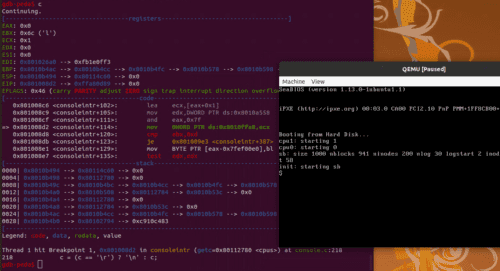
The following image shows what I observed in the debugger when I typed the character l into the console.
As for how user input is stored in input.buf, I’d like to trace that in more detail once the shell is actually usable.
Finally, ioapicenable(IRQ_KBD, 0); enables interrupts, and the consoleinit function ends.
Summary
This time, I initialized the console.
It was very interesting to learn how the input/output interface works.
Next time, I’d like to start from the uartinit function that initializes the serial port.