This page has been machine-translated from the original page.
This time, I will summarize what I learned about Windows clipboard operations, its mechanisms, and how to inspect data, together with sample programs.
Table of Contents
About the Windows Clipboard
The clipboard itself is a mechanism that allows applications to transfer data.
By using clipboard functionality, users can exchange various kinds of data such as text, files, and images between different applications.
Reference: About the Clipboard - Win32 apps | Microsoft Learn
Clipboard Formats
The Windows clipboard can store not only text, but also HTML, rich text, and objects in various formats.
Because of this, for example, when you copy text from a browser or editor to another application, situations can arise where not only plain text but also various kinds of information such as text decoration and background color are copied.
Many commonly used data types are included in the standard Windows clipboard formats, but users can also register new clipboard formats.
It also seems that applications can register what are called private formats.
Reference: Clipboard Formats - Win32 apps | Microsoft Learn
There are various kinds of system-predefined clipboard formats. For example, copied text appears to be automatically stored as CF_UNICODETEXT or CF_TEXT.
Reference: Standard Clipboard Formats (Winuser.h) - Win32 apps | Microsoft Learn
Clipboard Operations
There seem to be several available ways to implement clipboard operations, but regardless of which method you use, it appears that the starting point is ultimately to open the clipboard with OpenClipboard function (winuser.h).
Also, because only one application in the system can open the clipboard at a time, if a particular application has opened the clipboard by using the OpenClipboard function, other applications cannot open the clipboard.
Reference: Clipboard Operations - Win32 apps | Microsoft Learn
In practice, when I ran the following program as a test, copy and paste operations in other applications such as browsers stopped working during the sleep period after the clipboard was acquired by the OpenClipboard function.
#include <windows.h>
#include <iostream>
#include <string>

void OpenClipboardWithSleep() {

    if (!OpenClipboard(NULL)) {
        std::cerr << "Failed to open clipboard." << std::endl;
        return;
    }

    // Sleep for demonstration purposes (not required in production)
    Sleep(10000);

    CloseClipboard();

}

int wmain() {

    OpenClipboardWithSleep();
    return 0;
}
Sample code related to clipboard operations is collected below.
Reference: Using the Clipboard - Win32 apps | Microsoft Learn
Clipboard Ownership
When copying information to the clipboard, you first call the EmptyClipboard function (winuser.h) to empty the data in the clipboard and release handles, and then assign ownership of that clipboard to the window that currently has the clipboard open.
The owner of the clipboard can be checked with the GetClipboardOwner function (winuser.h).
The clipboard also has a mechanism called delayed rendering for improving performance, and you can use it by specifying NULL for the hMem parameter when saving data to the clipboard with the SetClipboardData function (winuser.h).
When delayed rendering is used, data in the requested format is copied from the clipboard owner not at copy time but when requested, such as during paste, which avoids the performance impact of unnecessary rendering.
Although delayed rendering can improve performance when copying large data and similar cases, it also seems to have disadvantages such as delayed application responsiveness during paste and being unable to copy data if the application has already exited.
Reference: Clipboard Operations - Win32 apps | Microsoft Learn
Reference: Windows clipboard performance varies depending on the hardware spec | Doslabo
Implementing Clipboard Operations
To study the Windows clipboard, I created some code and checked how it behaved.
Read Operations with the Win32 API
Below is a HEX dump of the result of reading data from the clipboard with the GetClipboardData function (winuser.h).
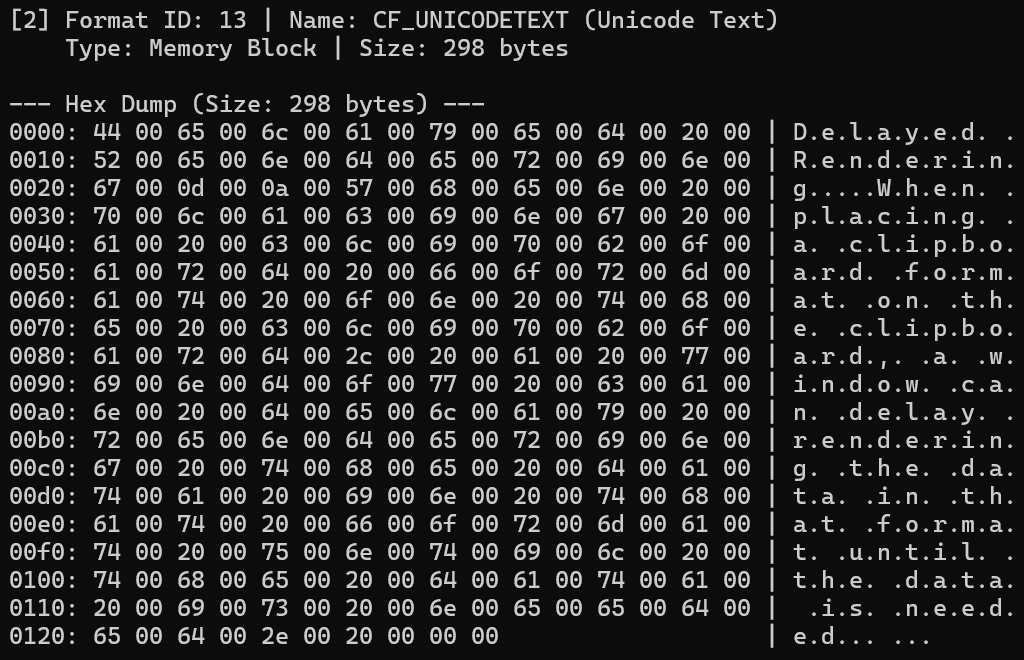
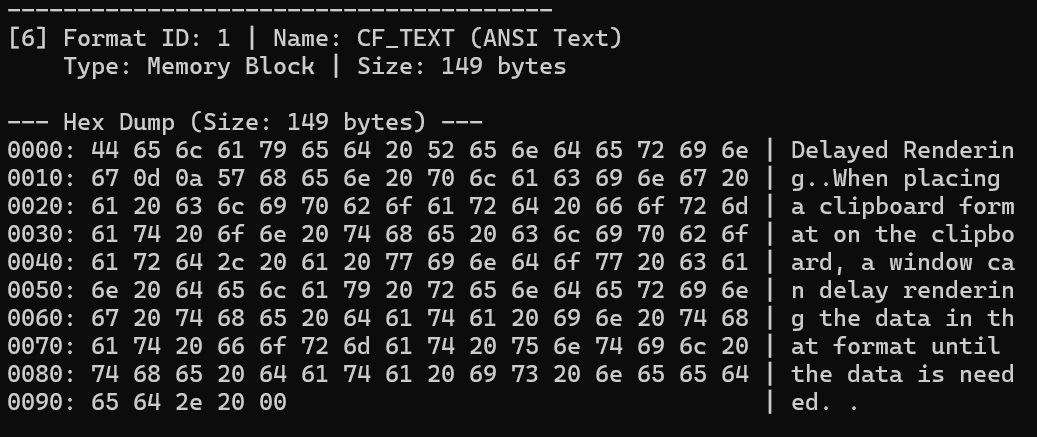
Below is the implementation of the function that reads data with the GetClipboardData function.
void ReadAndDumpClipboard() {

    if (!OpenClipboard(NULL)) {
        std::cerr << "Failed to open clipboard." << std::endl;
        return;
    }

    std::cout << "=== Clipboard Content Dump ===" << std::endl;

    UINT format = 0;
    int count = 0;

// Enumerate all clipboard formats
    while ((format = EnumClipboardFormats(format)) != 0) {
        count++;
        std::wstring formatName = GetFormatNameString(format);

        std::wcout << L"[" << count << L"] Format ID: " << std::dec << format
            << L" | Name: " << formatName << std::endl;

// Get clipboard data handle
        HANDLE hData = GetClipboardData(format);
        if (hData == NULL) {
            std::cout << "    [Error] GetClipboardData returned NULL." << std::endl;
            continue;
        }

// If we can lock the data, we assume it's a memory block
        void* pData = GlobalLock(hData);
        if (pData) {
            size_t size = GlobalSize(hData);
            std::cout << "    Type: Memory Block | Size: " << std::dec << size << " bytes" << std::endl << std::endl;

            PrintHexDump(pData, size);

            GlobalUnlock(hData);
        }
        else {
// Fallback for non-lockable formats
            std::cout << "    Type: GDI Handle or Non-Lockable Object (Cannot dump raw bytes safely)" << std::endl << std::endl;
        }
    }

    if (count == 0) {
        std::cout << "Clipboard is empty." << std::endl;
    }

    CloseClipboard();

}
The GetClipboardData function returns a handle to the clipboard object corresponding to the clipboard format value received as an argument.
HANDLE GetClipboardData(
  [in] UINT uFormat
);
The list of clipboard formats currently available in the clipboard can be obtained on each call to the EnumClipboardFormats function (winuser.h), so the following loop checks the clipboard data in sequence. (If there is no more available clipboard data, the function returns 0.)
// Enumerate all clipboard formats
while ((format = EnumClipboardFormats(format)) != 0) { }
The data inside the handle of the acquired clipboard object is read after locking the memory block with the GlobalLock function (winbase.h), as in the sample code in Paste Information from the Clipboard.
// If we can lock the data, we assume it's a memory block
void* pData = GlobalLock(hData);
if (pData) {
    size_t size = GlobalSize(hData);
    std::cout << "    Type: Memory Block | Size: " << std::dec << size << " bytes" << std::endl << std::endl;

    PrintHexDump(pData, size);

    GlobalUnlock(hData);
}
When saving clipboard data with the SetClipboardData function (winuser.h), the destination global memory must have been allocated as movable memory by using the GMEM_MOVEABLE flag, so the GlobalLock function is required to access that memory region.
If the hMem parameter identifies a memory object, the object must have been allocated by using a function with the GMEM_MOVEABLE flag.
Reference: c++ - Windows API - Clipboard - GlobalLock - use or not to use? - Stack Overflow
Reference: Clipboard
Write Operations with the Win32 API
Writing information to the clipboard (copying) can also be achieved by implementing processing similar to the sample code below.
Reference: Copy Information to the Clipboard
// Using Win32 API to write and read clipboard text
bool WriteTextToClipboard(const std::wstring& text) {

    if (!OpenClipboard(NULL)) {
        std::cerr << "Failed to open clipboard." << std::endl;
        return false;
    }
    if (!EmptyClipboard()) {
        std::cerr << "Failed to empty clipboard." << std::endl;
        CloseClipboard();
        return false;
}

// Calculate size in bytes (including null terminator)
    size_t size = (text.length() + 1) * sizeof(wchar_t);

// Need to allocate global memory for clipboard data(GMEM_MOVEABLE)
    HGLOBAL hGlob = GlobalAlloc(GMEM_MOVEABLE, size);
    if (!hGlob) {
        CloseClipboard();
        return false;
    }

// Lock the memory and copy the text
    void* pMem = GlobalLock(hGlob);
    if (pMem) {

        memcpy(pMem, text.c_str(), size);
        GlobalUnlock(hGlob);

// Set the clipboard data as CF_UNICODETEXT
        if (SetClipboardData(CF_UNICODETEXT, hGlob) == NULL) {
            GlobalFree(hGlob);
            std::cerr << "Failed to set clipboard data." << std::endl;
        }
        else {
            std::cout << "[Write] Successfully copied text to clipboard." << std::endl;
        }
    }

    CloseClipboard();
    return true;
}
In the above code, the clipboard is first opened and assigned to the current task with the OpenClipboard function called with NULL as its argument, then the clipboard is emptied with the EmptyClipboard function (winuser.h), after which ownership of the clipboard is assigned to the current window.
In addition, as mentioned above, movable memory is allocated by the GlobalAlloc function (winbase.h) using the GMEM_MOVEABLE flag, and the data to be stored in the clipboard is written with GlobalLock -> memcpy -> GlobalUnlock.
Finally, the handle into which the data to be stored was written is placed on the clipboard in CF_UNICODETEXT format with the SetClipboardData function (winuser.h).
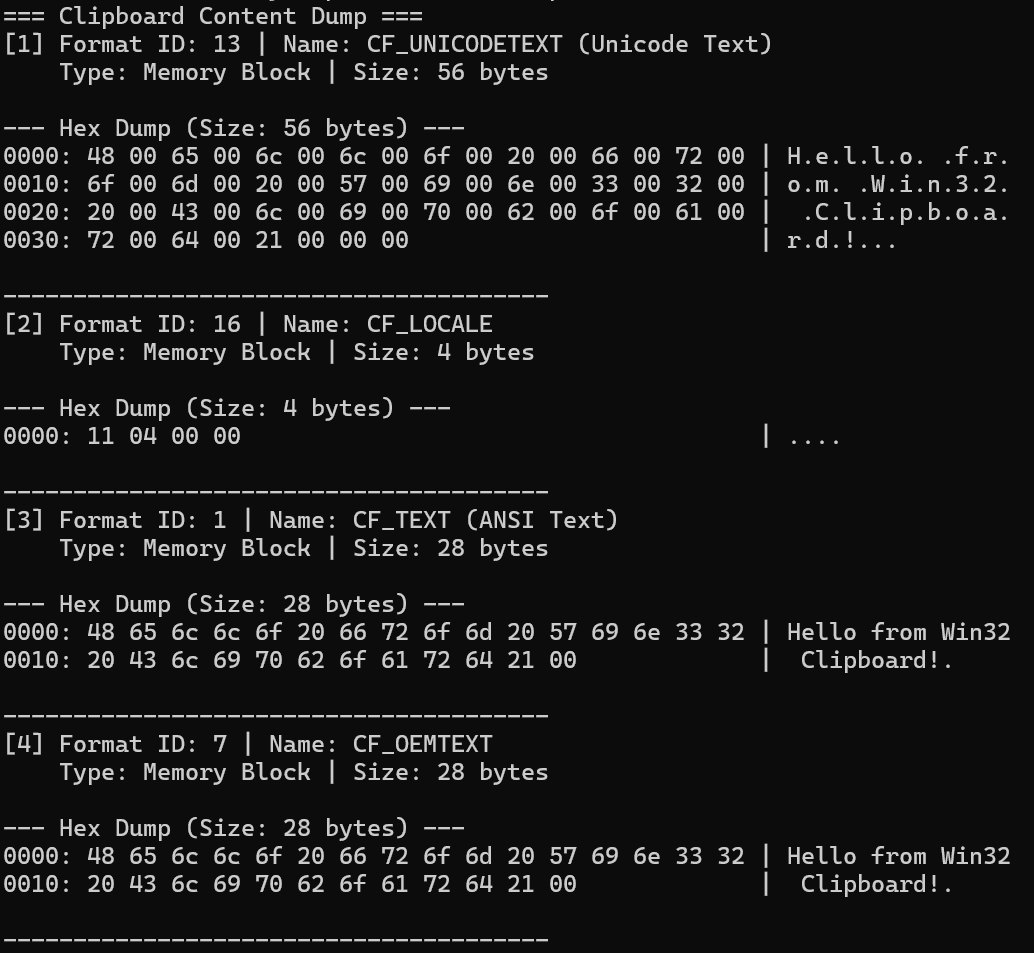
This confirms that, as shown below, the text saved to the clipboard in CF_UNICODETEXT format has been written as a wide string.
Windows also automatically stores certain clipboard formats as corresponding data in other formats.
Reference: Clipboard Formats - Win32 apps | Microsoft Learn
Therefore, even if data is explicitly saved only to the clipboard in CF_UNICODETEXT format by SetClipboardData(CF_UNICODETEXT, hGlob), it appears that the text is also automatically converted to a single-byte string and stored in CF_TEXT and CF_OEMTEXT, which are implicit type-conversion targets of CF_UNICODETEXT.
The OLE Clipboard
On Windows, in addition to the method confirmed so far that uses the Win32 API directly, implementation can also be done by using the OLE/COM model.
When using the COM-based OLE clipboard, data is exchanged by using the IDataObject interface (System.Windows.Forms) object obtained with the OleGetClipboard function (ole2.h) as the interface.
When reading clipboard data in various formats from the IDataObject interface used to receive clipboard data obtained by the OleGetClipboard function, call IDataObject.GetData method (System.Windows) with the format supported by the enumerated data object by using IDataObject::EnumFormatEtc (objidl.h) with DATADIR_GET passed as the parameter.
The FORMATETC (objidl.h) obtained by the EnumFormatEtc method abstracts generalized clipboard formats.
The OLE clipboard also seems to be extended so that storage media other than global memory can be used for data transfer, and the TYMED enumeration in the FORMATETC structure appears to indicate the type of medium.
For example, if this value indicates TYMED_HGLOBAL, it means that a global memory handle is being used as the storage medium.
Reference: Clipboard: Using the OLE Clipboard Mechanism | Microsoft Learn
Reference: The OLE Clipboard
Summary
I wrote down some notes about the Windows clipboard.