This page has been machine-translated from the original page.
Following the previous post, AMSI Overview and How It Works, this time I will summarize an application that issues AMSI scan requests by using the AMSI COM interface, along with its implementation.
Table of Contents
- Issuing AMSI Scan Requests from a Custom Application
- The main Function
- Calling the ScanArguments Function
- Initializing the CStreamScanner Class
- Summary
Issuing AMSI Scan Requests from a Custom Application
Broadly speaking, there seem to be two ways to integrate the AMSI interface into an application: using the AMSI Win32 API, or using the AMSI COM interface.
Reference: Developer audience and sample code - Win32 apps | Microsoft Learn
Since the PowerShell example examined in the previous article uses the AMSI Win32 API, this time I decided to try an implementation that uses the AMSI COM interface.
The official sample code is a good reference for creating an application that uses the AMSI COM interface.
You can obtain this sample code by downloading amsistream-sample.zip from the following repository.
Reference: Release MicrosoftDocs-Samples · microsoft/Windows-classic-samples
This sample program scans in-memory data and file contents by using the AMSI COM interface.
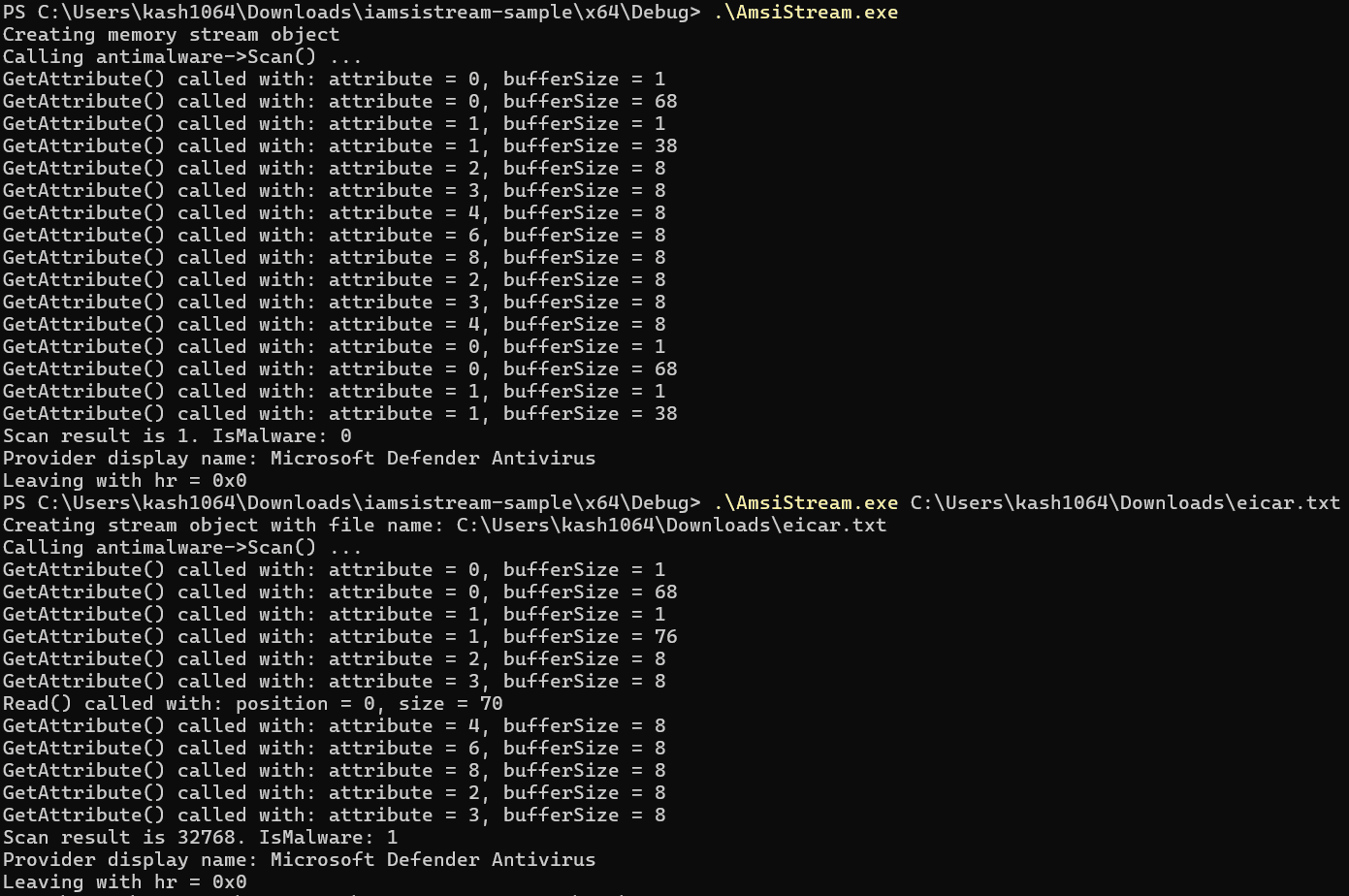
The code is implemented as a single file of about 300 lines, so I think it is comparatively easy to read.
First, I will read through this sample code in order, starting from the main function.
The main Function
int __cdecl wmain(_In_ int argc, _In_reads_(argc) WCHAR **argv)
{

HRESULT hr = CoInitializeEx(nullptr, COINIT_MULTITHREADED);
if (SUCCEEDED(hr)) {
        hr = ScanArguments(argc, argv);
        CoUninitialize();
}

wprintf(L"Leaving with hr = 0x%x\n", hr);

    return 0;
}
In the main function, the first thing done is initialization of the COM library with the CoInitializeEx function.
Reference: Initializing the COM Library - Win32 apps | Microsoft Learn
Reference: CoInitializeEx function (combaseapi.h) - Win32 apps | Microsoft Learn
This function must be called to initialize the COM library in Windows programs that use COM, and it appears to be called only once per thread that uses the COM library.
The first argument to CoInitializeEx is reserved and therefore must be NULL, and the second argument is used to specify the threading model the program uses (apartment thread or multithreaded).
In this sample, the argument is COINIT_MULTITHREADED, which uses the multithreaded model.
After the COM library is initialized, CoUninitialize is called after ScanArguments(argc, argv).
This function must be executed to uninitialize the thread before it exits.
Calling the ScanArguments Function
After initializing the COM library, the ScanArguments function is called with the command-line arguments.
HRESULT ScanArguments(_In_ int argc, _In_reads_(argc) wchar_t** argv)
{
    CStreamScanner scanner;
    HRESULT hr = scanner.Initialize();
    if (FAILED(hr))
    {
        return hr;
    }

    if (argc < 2)
    {
        // Scan a single memory stream.
        wprintf(L"Creating memory stream object\n");

        ComPtr<IAmsiStream> stream;
        hr = MakeAndInitialize<CAmsiMemoryStream>(&stream);
        if (FAILED(hr)) {
            return hr;
        }

        hr = scanner.ScanStream(stream.Get());
        if (FAILED(hr))
        {
            return hr;
        }
    }
    else
    {
        // Scan the files passed on the command line.
        for (int i = 1; i < argc; i++)
        {
            LPWSTR fileName = argv[i];

            wprintf(L"Creating stream object with file name: %s\n", fileName);
            ComPtr<IAmsiStream> stream;
            hr = MakeAndInitialize<CAmsiFileStream>(&stream, fileName);
            if (FAILED(hr)) {
                return hr;
            }

            hr = scanner.ScanStream(stream.Get());
            if (FAILED(hr))
            {
                return hr;
            }
        }
    }

    return S_OK;
}
Inside this function, an instance named scanner of the CStreamScanner class is first defined, and then initialized by its Initialize method.
CStreamScanner scanner;
HRESULT hr = scanner.Initialize();
Initializing the CStreamScanner Class
The CStreamScanner class is defined as follows, and its Initialize method initializes the object by calling CoCreateInstance.
Reference: CoCreateInstance function (combaseapi.h) - Win32 apps | Microsoft Learn
For the CLSID that specifies the class of the object to create, it uses the value defined in amsi.h and passes __uuidof(CAntimalware) to the CoCreateInstance function.
Also, the interface identifier (IID) used to communicate with the object is stored in the member defined as ComPtr<IAntimalware> m_antimalware;.
class CStreamScanner
{
public:
    HRESULT Initialize()
    {
        return CoCreateInstance(
            __uuidof(CAntimalware),
            nullptr,
            CLSCTX_INPROC_SERVER,
            IID_PPV_ARGS(&m_antimalware));
    }

    /* omitted */

private:
    ComPtr<IAntimalware> m_antimalware;
};
Scanning a Memory Stream
After the CStreamScanner class is initialized, the ScanArguments function decides whether to scan a predefined memory stream or a file received as a command-line argument, depending on whether command-line arguments are present.
If no command-line arguments are present, the following code is executed.
if (argc < 2)
{
    // Scan a single memory stream.
    wprintf(L"Creating memory stream object\n");

    ComPtr<IAmsiStream> stream;
    hr = MakeAndInitialize<CAmsiMemoryStream>(&stream);
    if (FAILED(hr)) {
        return hr;
    }

    hr = scanner.ScanStream(stream.Get());
    if (FAILED(hr))
    {
        return hr;
    }
}
In this code, an IAmsiStream interface pointer is first declared with ComPtr<IAmsiStream> stream;.
Reference: IAmsiStream (amsi.h) - Win32 apps | Microsoft Learn
Reference: ComPtr Class | Microsoft Learn
Next, MakeAndInitialize<CAmsiMemoryStream>(&stream); initializes CAmsiMemoryStream, which is a Windows Runtime C++ Template Library (WRL) class, by using the MakeAndInitialize function.
Reference: MakeAndInitialize function | Microsoft Learn
Reference: How to: Instantiate WRL Components Directly | Microsoft Learn
To be honest, my understanding of WRL is still a bit vague, but in this sample CAmsiMemoryStream seems to be a WRL class implemented to create a classic COM component.
Reference: How to: Create a Classic COM Component Using WRL | Microsoft Learn
The CAmsiMemoryStream Class
The WRL class CAmsiMemoryStream is used to implement the IAmsiStream interface.
This class appears to create IAmsiStream and the corresponding interface by using WRL through RuntimeClass<RuntimeClassFlags<ClassicCom>, IAmsiStream>.
It also inherits from CAmsiStreamBase, a separately defined class that provides common processing.
class CAmsiMemoryStream : public RuntimeClass<RuntimeClassFlags<ClassicCom>, IAmsiStream>, CAmsiStreamBase
{
public:
    HRESULT RuntimeClassInitialize()
    {
        m_contentSize = sizeof(SampleStream);
        return SetContentName(L"Sample content.txt");
    }

    // IAmsiStream

    STDMETHOD(GetAttribute)(
        _In_ AMSI_ATTRIBUTE attribute,
        _In_ ULONG bufferSize,
        _Out_writes_bytes_to_(bufferSize, *actualSize) PBYTE buffer,
        _Out_ ULONG* actualSize)
    {
        HRESULT hr = BaseGetAttribute(attribute, bufferSize, buffer, actualSize);
        if (hr == E_NOTIMPL)
        {
            switch (attribute)
            {
            case AMSI_ATTRIBUTE_CONTENT_ADDRESS:
                const void* contentAddress = SampleStream;
                hr = CopyAttribute(&contentAddress, sizeof(contentAddress), bufferSize, buffer, actualSize);
            }
        }
        return hr;
    }

    STDMETHOD(Read)(
        _In_ ULONGLONG position,
        _In_ ULONG size,
        _Out_writes_bytes_to_(size, *readSize) PBYTE buffer,
        _Out_ ULONG* readSize)
    {
        wprintf(L"Read() called with: position = %I64u, size = %u\n", position, size);

        *readSize = 0;
        if (position >= m_contentSize)
        {
            wprintf(L"Reading beyond end of stream\n");
            return HRESULT_FROM_WIN32(ERROR_HANDLE_EOF);
        }

        if (size > m_contentSize - position) {
            size = static_cast<ULONG>(m_contentSize - position);
        }

        *readSize = size;
        memcpy_s(buffer, size, SampleStream + position, size);
        return S_OK;
    }
};
First, the RuntimeClassInitialize function is said to be the function that performs initialization when creating an object by using the MakeAndInitialize function template.
Reference: RuntimeClass Class | Microsoft Learn
In this sample, the string SampleStream, defined as a global variable, is stored in memory, and SetContentName, which is defined separately in CAmsiStreamBase, is used in that process.
const char SampleStream[] = "Hello, world";

HRESULT RuntimeClassInitialize()
{
    m_contentSize = sizeof(SampleStream);
    return SetContentName(L"Sample content.txt");
}
The subsequent code implements the IAmsiStream interface.
STDMETHOD apparently is a macro used to define “a function that is __stdcall, virtual, and returns HRESULT.”
Reference: IAmsiStream (amsi.h) - Win32 apps | Microsoft Learn
In the CAmsiMemoryStream class, the GetAttribute and Read methods are defined as shown above.
The GetAttribute method uses BaseGetAttribute from the base class CAmsiStreamBase to handle attributes related to AMSI scanning.
Inside it, after checking items such as attribute and buffer, it ultimately returns the result of the CopyAttribute method defined in the base class.
STDMETHOD(GetAttribute)(
    _In_ AMSI_ATTRIBUTE attribute,
    _In_ ULONG bufferSize,
    _Out_writes_bytes_to_(bufferSize, *actualSize) PBYTE buffer,
    _Out_ ULONG* actualSize)
{
    HRESULT hr = BaseGetAttribute(attribute, bufferSize, buffer, actualSize);
    if (hr == E_NOTIMPL)
    {
        switch (attribute)
        {
        case AMSI_ATTRIBUTE_CONTENT_ADDRESS:
            const void* contentAddress = SampleStream;
            hr = CopyAttribute(&contentAddress, sizeof(contentAddress), bufferSize, buffer, actualSize);
        }
    }
    return hr;
}
The CopyAttribute method checks the buffer and size passed as arguments, then copies the received data by using the memcpy_s function.
HRESULT CopyAttribute(
    _In_ const void* resultData,
    _In_ size_t resultSize,
    _In_ ULONG bufferSize,
    _Out_writes_bytes_to_(bufferSize, *actualSize) PBYTE buffer,
    _Out_ ULONG* actualSize)
{
    *actualSize = (ULONG)resultSize;
    if (bufferSize < resultSize)
    {
        return E_NOT_SUFFICIENT_BUFFER;
    }
    memcpy_s(buffer, bufferSize, resultData, resultSize);
    return S_OK;
}
The other method defined in the CAmsiMemoryStream class is Read, shown below.
Here, the data of the content to be read is copied into the received buffer.
STDMETHOD(Read)(
    _In_ ULONGLONG position,
    _In_ ULONG size,
    _Out_writes_bytes_to_(size, *readSize) PBYTE buffer,
    _Out_ ULONG* readSize)
{
    wprintf(L"Read() called with: position = %I64u, size = %u\n", position, size);

    *readSize = 0;
    if (position >= m_contentSize)
    {
        wprintf(L"Reading beyond end of stream\n");
        return HRESULT_FROM_WIN32(ERROR_HANDLE_EOF);
    }

    if (size > m_contentSize - position) {
        size = static_cast<ULONG>(m_contentSize - position);
    }

    *readSize = size;
    memcpy_s(buffer, size, SampleStream + position, size);
    return S_OK;
}
Calling the ScanStream Method
After copying the content data, scanner.ScanStream(stream.Get()); passes a pointer to the IAmsiStream instance obtained by stream.Get() to the ScanStream method of the CStreamScanner class.
Inside it, the Scan method of the initialized IAntimalware interface is called.
Reference: IAntimalware::Scan (amsi.h) - Win32 apps | Microsoft Learn
class CStreamScanner
{
public:
    HRESULT Initialize()
    {
        return CoCreateInstance(
            __uuidof(CAntimalware),
            nullptr,
            CLSCTX_INPROC_SERVER,
            IID_PPV_ARGS(&m_antimalware));
    }

    HRESULT ScanStream(_In_ IAmsiStream* stream)
    {
        wprintf(L"Calling antimalware->Scan() ...\n");
        ComPtr<IAntimalwareProvider> provider;
        AMSI_RESULT r;
        HRESULT hr = m_antimalware->Scan(stream, &r, &provider);
        if (FAILED(hr)) {
            return hr;
        }

        wprintf(L"Scan result is %u. IsMalware: %d\n", r, AmsiResultIsMalware(r));

        if (provider) {
            PWSTR name;
            hr = provider->DisplayName(&name);
            if (SUCCEEDED(hr)) {
                wprintf(L"Provider display name: %s\n", name);
                CoTaskMemFree(name);
            }
            else
            {
                wprintf(L"DisplayName failed with 0x%x", hr);
            }
        }

        return S_OK;
    }

private:
    ComPtr<IAntimalware> m_antimalware;
};
The scan result is stored in the variable r of type AMSI_RESULT.
Also, by passing this AMSI_RESULT variable to the AmsiResultIsMalware macro, you can determine whether the content needs to be blocked.
Reference: AmsiResultIsMalware macro (amsi.h) - Win32 apps | Microsoft Learn
In addition, the sample displays the antimalware provider name from provider, which is an instance of the IAntimalwareProvider interface returned by the Scan method of the IAntimalware interface.
Reference: IAntimalwareProvider::D isplayName (amsi.h) - Win32 apps | Microsoft Learn
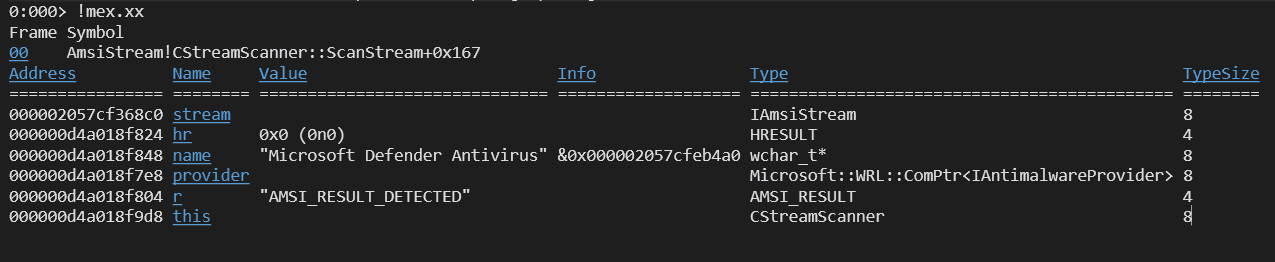
When malware is actually detected, you can confirm that the variable name contains the provider name Microsoft Defender Antivirus, and that the variable r contains the detection result AMSI_RESULT_DETECTED, as shown below.
Scanning a File Stream
If the sample program is run without command-line arguments, the memory scan discussed in the previous section is performed.
On the other hand, if a file path is included in the command-line arguments, the CAmsiFileStream class is initialized and the file is scanned.
else
{
    // Scan the files passed on the command line.
    for (int i = 1; i < argc; i++)
    {
        LPWSTR fileName = argv[i];

        wprintf(L"Creating stream object with file name: %s\n", fileName);
        ComPtr<IAmsiStream> stream;
        hr = MakeAndInitialize<CAmsiFileStream>(&stream, fileName);
        if (FAILED(hr)) {
            return hr;
        }

        hr = scanner.ScanStream(stream.Get());
        if (FAILED(hr))
        {
            return hr;
        }
    }
}
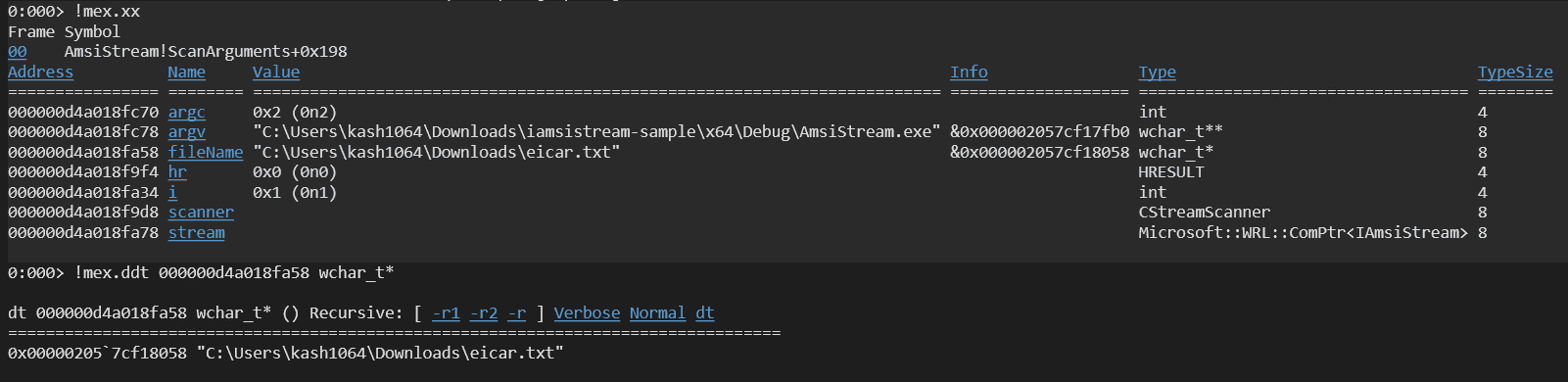
When the sample program is executed with the file path to be scanned specified, you can confirm in the debugger that the file path is obtained from the command-line arguments.
The CAmsiFileStream Class
Like CAmsiMemoryStream, the CAmsiFileStream class creates IAmsiStream and the corresponding interface by using WRL with RuntimeClass<RuntimeClassFlags<ClassicCom>, IAmsiStream>.
It also inherits from the separately defined CAmsiStreamBase class, which provides common processing.
In the RuntimeClassInitialize function, which performs initialization when creating an object by using the MakeAndInitialize function template, it is called with a file name as an argument, unlike the memory-scan case.
Inside it, the file handle of the target file obtained by CreateFileW is stored in the WRL FileHandle-typed variable m_fileHandle.
m_fileHandle.Attach(CreateFileW(fileName,
    GENERIC_READ,             // dwDesiredAccess
    0,                        // dwShareMode
    nullptr,                  // lpSecurityAttributes
    OPEN_EXISTING,            // dwCreationDisposition
    FILE_ATTRIBUTE_NORMAL,    // dwFlagsAndAttributes
    nullptr));                // hTemplateFile

if (!m_fileHandle.IsValid())
{
    hr = HRESULT_FROM_WIN32(GetLastError());
    wprintf(L"Unable to open file %s, hr = 0x%x\n", fileName, hr);
    return hr;
}
It then obtains the file size of this file and completes initialization.
LARGE_INTEGER fileSize;
if (!GetFileSizeEx(m_fileHandle.Get(), &fileSize))
{
    hr = HRESULT_FROM_WIN32(GetLastError());
    wprintf(L"GetFileSizeEx failed with 0x%x\n", hr);
    return hr;
}
m_contentSize = (ULONGLONG)fileSize.QuadPart;
Once initialization of the CAmsiFileStream class is complete, you can confirm that the member holding the file path to be scanned is assigned to m_contentName, and the member holding that file’s handle is assigned to m_fileHandle.

Also, just like CAmsiMemoryStream, the CAmsiFileStream class defines GetAttribute and Read methods for the IAmsiStream interface.
Unlike CAmsiMemoryStream, the GetAttribute method of the CAmsiFileStream class appears to simply call the BaseGetAttribute method of the base class.
Also, in the Read method, the file data is stored into buffer by using the file handle obtained from m_fileHandle.
// IAmsiStream

STDMETHOD(GetAttribute)(
    _In_ AMSI_ATTRIBUTE attribute,
    _In_ ULONG bufferSize,
    _Out_writes_bytes_to_(bufferSize, *actualSize) PBYTE buffer,
    _Out_ ULONG* actualSize)
{
    return BaseGetAttribute(attribute, bufferSize, buffer, actualSize);
}

STDMETHOD(Read)(
    _In_ ULONGLONG position,
    _In_ ULONG size,
    _Out_writes_bytes_to_(size, *readSize) PBYTE buffer,
    _Out_ ULONG* readSize)
{
    wprintf(L"Read() called with: position = %I64u, size = %u\n", position, size);

    OVERLAPPED o = {};
    o.Offset = LODWORD(position);
    o.OffsetHigh = HIDWORD(position);

    if (!ReadFile(m_fileHandle.Get(), buffer, size, readSize, &o))
    {
        HRESULT hr = HRESULT_FROM_WIN32(GetLastError());
        wprintf(L"ReadFile failed with 0x%x\n", hr);
        return hr;
    }

    return S_OK;
}
Finally, by calling the ScanStream method, the file contents are scanned just like in the memory-scan case.
Summary
This time, I read through sample code for a custom application that issues scan requests by using the AMSI interface.