This page has been machine-translated from the original page.
In this post, I put together a brief set of notes on the overview of AMSI (Windows Antimalware Scan Interface) and how it works on Windows.
All content here is based on information in official documentation and other websites, or in publicly available books and similar sources.
Table of Contents
About AMSI
AMSI (Windows Antimalware Scan Interface) is a feature that provides an interface allowing applications to use the AV providers registered on the system to determine whether the data they process is malicious.
According to the public documentation, AMSI supports a call structure that enables scanning files, memory, and streams, as well as reputation checks for URLs/IPs.
Reference: Antimalware Scan Interface (AMSI) - Win32 apps | Microsoft Learn
AMSI is also integrated into several Windows components such as UAC, PowerShell, and Office VBA, helping protect those applications.
Through this kind of integration with applications, AMSI is used mainly to address script-based threats.
Application developers can use AMSI to implement scan requests for arbitrary content from their own applications.
Also, AMSI itself is independent of any specific antimalware vendor, so any antimalware vendor can receive scan requests through AMSI.
Reference: The Rise and Fall of AMSI
Details of Protection Provided by AMSI
AMSI appeared at the same time as the release of Windows 10, especially as a countermeasure against detection-evasion techniques in script-based malware such as string concatenation and obfuscation.
If you look at the archived blog posts from when AMSI was released, you can see that AMSI was introduced as a solution to a protection gap caused by the increase in script-based threats and fileless attacks using tools such as PowerShell, along with the wide variety of evasion techniques used to avoid detection.
Applications such as PowerShell can send scan requests through AMSI to the antimalware engine registered on the system for the plain attack code produced after deobfuscation, before that code is executed.
This makes it possible to effectively detect things like heavily obfuscated attack scripts and fileless threats where malicious code exists only in memory.
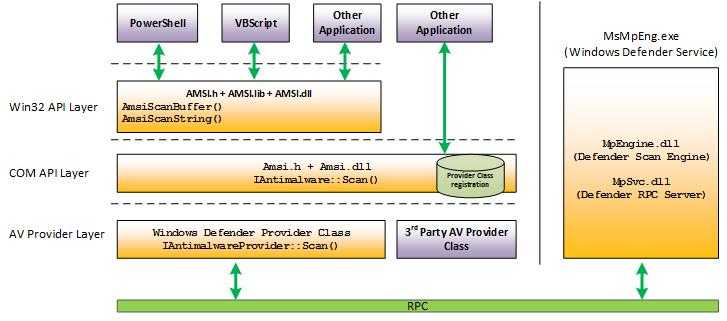
Reference: How AMSI helps defend against malware - Win32 apps | Microsoft Learn
How AMSI Works When Integrated with PowerShell
From here, I will walk through the sequence of operations by which PowerShell uses AMSI to prevent the execution of malicious scripts.
Fortunately, because PowerShell is open source and its source code is public, we can examine the details of its AMSI integration in depth.
Reference: PowerShell/PowerShell: PowerShell for every system!
Testing AMSI Behavior
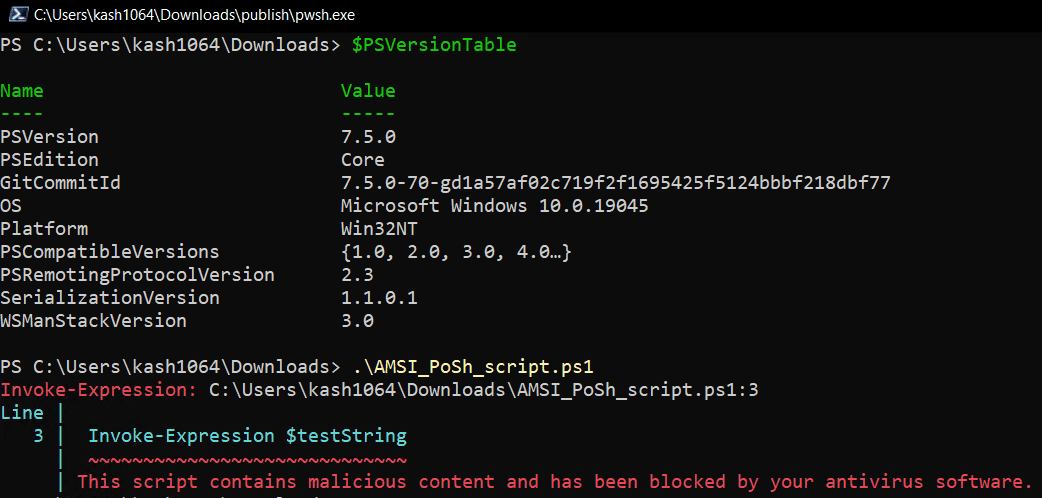
First, as described in the official documentation, let’s test AMSI’s execution blocking by saving the following sample code as AMSI_PoSh_script.ps1 and running it.
# Save this sample AMSI powershell script as AMSI_PoSh_script.ps1
$testString = "AMSI Test Sample: " + "7e72c3ce-861b-4339-8740-0ac1484c1386"
Invoke-Expression $testStringWhen you run this, you can confirm that script execution is blocked together with the error This script contains malicious content and has been blocked by your antivirus software.

Next, I also tested AMSI detection using a PowerShell build that I compiled myself from the cloned source code. (This time I used the release/v7.5 code.)
Building PowerShell succeeded easily by using the dedicated build tool. (Although some errors were output, .\src\powershell-win-core\bin\Debug\net9.0\win7-x64\publish\pwsh.exe was created successfully.)
Import-Module .\build.psm1
Start-PSBuild -Clean -PSModuleRestore -UseNuGetOrg -Configuration Debug
Reference: PowerShell/docs/building/windows-core.md at master · PowerShell/PowerShell
I then copied the entire .\src\powershell-win-core\bin\Debug\net9.0\win7-x64 directory containing the program built here to a test machine and ran the test script again. I was able to confirm that execution blocking by AMSI also worked there in the same way.
Examining the PowerShell-side Implementation
Looking at the image attached to the official documentation below, you can see that PowerShell uses AMSI by calling AmsiScanBuffer or AmsiScanString.
Tracing where these functions are called shows that they are invoked in the order PerformSecurityChecks() -> ScanContent() -> WinScanContent() -> AmsiScanBuffer() from the PerformSecurityChecks function in System.Management.Automation/engine/runtime/CompiledScriptBlock.cs.
The PerformSecurityChecks function is called more directly from the ReallyCompile function in System.Management.Automation, which performs compilation before script execution.
Looking at the implementation of PerformSecurityChecks, it appears that an exception containing a ParseError is returned when AmsiUtils.ScanContent(scriptExtent.Text, scriptFile) returns AMSI_RESULT_DETECTED.
private void PerformSecurityChecks()
{
    /* 省略 */

    // Call the AMSI API to determine if the script block has malicious content
    var amsiResult = AmsiUtils.ScanContent(scriptExtent.Text, scriptFile);

    if (amsiResult == AmsiUtils.AmsiNativeMethods.AMSI_RESULT.AMSI_RESULT_DETECTED)
    {
        var parseError = new ParseError(
            scriptExtent,
            "ScriptContainedMaliciousContent",
            ParserStrings.ScriptContainedMaliciousContent);
        throw new ParseException(new[] { parseError });
    }

    /* 省略 */
}
Within PerformSecurityChecks, a scan request is sent to AMSI by using ScanContent on the initialized AmsiUtils class.
In WinScanContent, which is called from ScanContent, the scan is ultimately performed by using the AmsiScanBuffer function loaded from amsi.dll.
AmsiNativeMethods.AMSI_RESULT result = AmsiNativeMethods.AMSI_RESULT.AMSI_RESULT_CLEAN;

// Run AMSI content scan
int hr;
unsafe
{
    fixed (char* buffer = content)
    {
        var buffPtr = new IntPtr(buffer);
        hr = AmsiNativeMethods.AmsiScanBuffer(
            s_amsiContext,
            buffPtr,
            (uint)(content.Length * sizeof(char)),
            sourceMetadata,
            s_amsiSession,
            ref result);
    }
}
The AmsiScanBuffer function receives a buffer for reading the data to be scanned.
It also receives session information as amsiSession, which is used to associate multiple scan requests.
Reference: AmsiScanBuffer function (amsi.h) - Win32 apps | Microsoft Learn
Reference: Better know a data source: Antimalware Scan Interface
This session information is implemented so that antimalware products can use it to associate various scan requests.
As a result, threats that cannot be judged from fragmented data alone may become detectable by associating each piece of data.
Understanding How amsi.dll Works
Fortunately, symbol information for amsi.dll, which PowerShell loads, is distributed through Microsoft’s public symbol server, so it is relatively easy to debug.
However, because this article is intended to stay within the bounds of publicly available information, this time I will summarize the behavior on the amsi.dll side based on Chapter 10, ANTIMALWARE SCAN INTERFACE, in Evading EDR.
First, amsi.dll loads the AMSI provider DLL by referring to the information registered in the registry.
Antimalware vendors register their AMSI providers in the registry by using the COM GUIDs registered under the registry key HKEY_LOCAL_MACHINE\SOFTWARE\Microsoft\AMSI\Providers.
Reference: Register a provider DLL with AMSI
For example, by default HKEY_LOCAL_MACHINE\SOFTWARE\Microsoft\AMSI\Providers\{2781761E-28E0-4109-99FE-B9D127C57AFE} is registered. If you inspect this GUID and the corresponding registry keys, you can see information related to Microsoft Defender has been written there, and from the value of the InprocServer32 key you can confirm the path to MpOav.dll.

Reference: Better know a data source: Antimalware Scan Interface
Once the provider DLL is loaded, initialization is complete, and AMSI is ready to use, it becomes able to receive scan requests such as those made through AmsiScanBuffer, together with information such as the AMSI session, from applications like PowerShell.
At this point, AMSI validates the parameters it received as input, and if they pass validation it calls amsi!CAmsiAntimalware::Scan.
When using Microsoft’s AMSI module (MpOav.dll), which is registered by default, the AMSI side performs initialization and then delegates processing to MpClient.dll, the client interface for Microsoft Defender Antivirus.
After that, the scan result from the Microsoft Defender Antivirus side is returned to the application, and if AMSI_RESULT_DETECTED is returned, execution is blocked.
Reference: Evading EDR | No Starch Press
Summary
I summarized the overview of AMSI here.
I had planned to continue by writing about how to issue AMSI scan requests from your own application and how to register a custom AMSI provider, but this post was getting long, so I decided to split those topics into separate articles.