This page has been machine-translated from the original page.
Following on from an overview of AMSI and how it works and issuing AMSI scan requests from a custom application, this time I will read through the sample code for a provider that processes scan requests using the AMSI interface.
Reference: Windows-classic-samples/Samples/AmsiProvider at main · microsoft/Windows-classic-samples
Table of Contents
Registering the provider
You can register AmsiProvider.dll, built from the AmsiProvider sample code, on the system with the command regsvr32 AmsiProvider.dll.
This command calls the DllRegisterServer function.
Reference: Implementing DllRegisterServer - Win32 apps | Microsoft Learn
In the sample code, the DllRegisterServer function is implemented as follows, and performs several registry operations required to register the DLL as an AMSI provider.
HRESULT SetKeyStringValue(_In_ HKEY key, _In_opt_ PCWSTR subkey, _In_opt_ PCWSTR valueName, _In_ PCWSTR stringValue)
{
    LONG status = RegSetKeyValue(key, subkey, valueName, REG_SZ, stringValue, (wcslen(stringValue) + 1) * sizeof(wchar_t));
    return HRESULT_FROM_WIN32(status);
}


STDAPI DllRegisterServer()
{
    wchar_t modulePath[MAX_PATH];
    if (GetModuleFileName(g_currentModule, modulePath, ARRAYSIZE(modulePath)) >= ARRAYSIZE(modulePath))
    {
        return E_UNEXPECTED;
    }

    // Create a standard COM registration for our CLSID.
    // The class must be registered as "Both" threading model
    // and support multithreaded access.
    wchar_t clsidString[40];
    if (StringFromGUID2(__uuidof(SampleAmsiProvider), clsidString, ARRAYSIZE(clsidString)) == 0)
    {
        return E_UNEXPECTED;
    }

    wchar_t keyPath[200];
    HRESULT hr = StringCchPrintf(keyPath, ARRAYSIZE(keyPath), L"Software\\Classes\\CLSID\\%ls", clsidString);
    if (FAILED(hr)) return hr;

    hr = SetKeyStringValue(HKEY_LOCAL_MACHINE, keyPath, nullptr, L"SampleAmsiProvider");
    if (FAILED(hr)) return hr;

    hr = StringCchPrintf(keyPath, ARRAYSIZE(keyPath), L"Software\\Classes\\CLSID\\%ls\\InProcServer32", clsidString);
    if (FAILED(hr)) return hr;

    hr = SetKeyStringValue(HKEY_LOCAL_MACHINE, keyPath, nullptr, modulePath);
    if (FAILED(hr)) return hr;

    hr = SetKeyStringValue(HKEY_LOCAL_MACHINE, keyPath, L"ThreadingModel", L"Both");
    if (FAILED(hr)) return hr;

    // Register this CLSID as an anti-malware provider.
    hr = StringCchPrintf(keyPath, ARRAYSIZE(keyPath), L"Software\\Microsoft\\AMSI\\Providers\\%ls", clsidString);
    if (FAILED(hr)) return hr;

    hr = SetKeyStringValue(HKEY_LOCAL_MACHINE, keyPath, nullptr, L"SampleAmsiProvider");
    if (FAILED(hr)) return hr;

    return S_OK;
}
This function performs the following registry key operations:
- Using the sample provider’s UUID,
{2E5D8A62-77F9-4F7B-A90C-2744820139B2}, it registers the provider nameSampleAmsiProviderunderHKEY_LOCAL_MACHINE\SOFTWARE\Classes\CLSID\{2E5D8A62-77F9-4F7B-A90C-2744820139B2}. - It adds
HKEY_LOCAL_MACHINE\SOFTWARE\Classes\CLSID\{2E5D8A62-77F9-4F7B-A90C-2744820139B2}\InProcServer32and registers the file path of the provider DLL. - It also adds a string value named
ThreadingModeldirectly under the same key and sets its value toBoth.

- Finally, it registers the sample provider’s UUID as a key directly under
HKEY_LOCAL_MACHINE\SOFTWARE\Microsoft\AMSI\Providers, and stores the provider nameSampleAmsiProvider.

To uninstall the provider registered this way, run the command regsvr32 /u AmsiProvider.dll.
The DllUnregisterServer function is responsible for deleting the registry keys created above.
STDAPI DllUnregisterServer()
{
    wchar_t clsidString[40];
    if (StringFromGUID2(__uuidof(SampleAmsiProvider), clsidString, ARRAYSIZE(clsidString)) == 0)
    {
        return E_UNEXPECTED;
    }

    // Unregister this CLSID as an anti-malware provider.
    wchar_t keyPath[200];
    HRESULT hr = StringCchPrintf(keyPath, ARRAYSIZE(keyPath), L"Software\\Microsoft\\AMSI\\Providers\\%ls", clsidString);
    if (FAILED(hr)) return hr;
    LONG status = RegDeleteTree(HKEY_LOCAL_MACHINE, keyPath);
    if (status != NO_ERROR && status != ERROR_PATH_NOT_FOUND) return HRESULT_FROM_WIN32(status);

    // Unregister this CLSID as a COM server.
    hr = StringCchPrintf(keyPath, ARRAYSIZE(keyPath), L"Software\\Classes\\CLSID\\%ls", clsidString);
    if (FAILED(hr)) return hr;
    status = RegDeleteTree(HKEY_LOCAL_MACHINE, keyPath);
    if (status != NO_ERROR && status != ERROR_PATH_NOT_FOUND) return HRESULT_FROM_WIN32(status);

    return S_OK;
}
The DllMain function
First, let’s look at the DllMain function, which serves as the entry point called when the DLL is loaded or unloaded.
Reference: DllMain entry point - Win32 apps | Microsoft Learn
BOOL APIENTRY DllMain(HMODULE module, DWORD reason, LPVOID reserved)
{
    switch (reason)
    {
    case DLL_PROCESS_ATTACH:
        g_currentModule = module;
        DisableThreadLibraryCalls(module);
        TraceLoggingRegister(g_traceLoggingProvider);
        TraceLoggingWrite(g_traceLoggingProvider, "Loaded");
        Module<InProc>::GetModule().Create();
        break;

    case DLL_PROCESS_DETACH:
        Module<InProc>::GetModule().Terminate();
        TraceLoggingWrite(g_traceLoggingProvider, "Unloaded");
        TraceLoggingUnregister(g_traceLoggingProvider);
        break;
    }
    return TRUE;
}
When this DLL is loaded, it first calls the DisableThreadLibraryCalls function with the handle to the DLL module it received, disabling DLL_THREAD_ATTACH and DLL_THREAD_DETACH notifications.
This seems to have the advantage of preventing unnecessary calls whenever threads are created or terminated within the process.
Reference: DisableThreadLibraryCalls function (libloaderapi.h) - Win32 apps | Microsoft Learn
Next, TraceLoggingRegister registers the TraceLogging provider.
This is for ETW trace logging. At this point, the provider given as the argument, g_traceLoggingProvider, is registered with the provider name SampleAmsiProvider and the GUID 00604c86-2d25-46d6-b814-cd149bfdf0b3.
// Define a trace logging provider: 00604c86-2d25-46d6-b814-cd149bfdf0b3
TRACELOGGING_DEFINE_PROVIDER(g_traceLoggingProvider, "SampleAmsiProvider",
    (0x00604c86, 0x2d25, 0x46d6, 0xb8, 0x14, 0xcd, 0x14, 0x9b, 0xfd, 0xf0, 0xb3));
Reference: TraceLoggingRegister - Win32 apps | Microsoft Learn
After that, TraceLoggingWrite(g_traceLoggingProvider, "Loaded"); outputs an event whose event name is Loaded.
Reference: TraceLoggingWrite macro (traceloggingprovider.h) - Win32 apps | Microsoft Learn
Finally, Module<InProc>::GetModule().Create(); is called.
I do not fully understand its behavior in detail, but it appears to prepare an instance using Microsoft::WRL::Module, a class WRL provides for managing modules for COM DLLs.
Reference: How to: Create a Classic COM Component Using WRL | Microsoft Learn
Reference: Module Class | Microsoft Learn
Overriding SampleAmsiProvider
An AMSI provider is, in practice, a COM server implemented as a DLL loaded into the host, and it exposes the IAntimalwareProvider interface, which inherits from IUnknown.
Reference: IAntimalwareProvider (amsi.h) - Win32 apps | Microsoft Learn
class
    DECLSPEC_UUID("2E5D8A62-77F9-4F7B-A90C-2744820139B2")
    SampleAmsiProvider : public RuntimeClass<RuntimeClassFlags<ClassicCom>, IAntimalwareProvider, FtmBase>
{
public:
    IFACEMETHOD(Scan)(_In_ IAmsiStream* stream, _Out_ AMSI_RESULT* result) override;
    IFACEMETHOD_(void, CloseSession)(_In_ ULONGLONG session) override;
    IFACEMETHOD(DisplayName)(_Outptr_ LPWSTR* displayName) override;

private:
    // We assign each Scan request a unique number for logging purposes.
    LONG m_requestNumber = 0;
};
By overriding the Scan method of the IAntimalwareProvider interface, AMSI provider developers can implement their own content scanning.
Overriding the DisplayName method
IAntimalwareProvider::DisplayName is a method that simply returns the name of the AMSI provider.
Reference: IAntimalwareProvider::DisplayName (amsi.h) - Win32 apps | Microsoft Learn
In SampleAmsiProvider, it is overridden as shown below and implemented to return the name Sample AMSI Provider.
HRESULT SampleAmsiProvider::DisplayName(_Outptr_ LPWSTR *displayName)
{
    *displayName = const_cast<LPWSTR>(L"Sample AMSI Provider");
    return S_OK;
}
Overriding the CloseSession method
IAntimalwareProvider::CloseSession is defined as a method that closes an AMSI session, but in this sample it only outputs Close session to the ETW trace session.
Reference: IAntimalwareProvider::CloseSession (amsi.h) - Win32 apps | Microsoft Learn
Presumably, if some kind of resource handling were performed during AMSI scanning, cleanup would need to happen here.
void SampleAmsiProvider::CloseSession(_In_ ULONGLONG session)
{
    TraceLoggingWrite(g_traceLoggingProvider, "Close session",
        TraceLoggingValue(session));
}
Overriding the Scan method
In this sample, the IAntimalwareProvider::Scan method, which scans the content stream, is overridden as follows.
Reference: IAntimalwareProvider::Scan (amsi.h) - Win32 apps | Microsoft Learn
Although it is called a Scan method, in practice this sample implements it as a method that simply XORs all bytes of the received data and outputs the result as an ETW trace event, returning AMSI_RESULT_NOT_DETECTED for every scan request.
HRESULT SampleAmsiProvider::Scan(_In_ IAmsiStream* stream, _Out_ AMSI_RESULT* result)
{
    LONG requestNumber = InterlockedIncrement(&m_requestNumber);
    TraceLoggingWrite(g_traceLoggingProvider, "Scan Start", TraceLoggingValue(requestNumber));

    auto appName = GetStringAttribute(stream, AMSI_ATTRIBUTE_APP_NAME);
    auto contentName = GetStringAttribute(stream, AMSI_ATTRIBUTE_CONTENT_NAME);
    auto contentSize = GetFixedSizeAttribute<ULONGLONG>(stream, AMSI_ATTRIBUTE_CONTENT_SIZE);
    auto session = GetFixedSizeAttribute<ULONGLONG>(stream, AMSI_ATTRIBUTE_SESSION);
    auto contentAddress = GetFixedSizeAttribute<PBYTE>(stream, AMSI_ATTRIBUTE_CONTENT_ADDRESS);

    TraceLoggingWrite(g_traceLoggingProvider, "Attributes",
        TraceLoggingValue(requestNumber),
        TraceLoggingWideString(appName.Get(), "App Name"),
        TraceLoggingWideString(contentName.Get(), "Content Name"),
        TraceLoggingUInt64(contentSize, "Content Size"),
        TraceLoggingUInt64(session, "Session"),
        TraceLoggingPointer(contentAddress, "Content Address"));

    if (contentAddress)
    {
        // The data to scan is provided in the form of a memory buffer.
        auto result = CalculateBufferXor(contentAddress, contentSize);
        TraceLoggingWrite(g_traceLoggingProvider, "Memory xor",
            TraceLoggingValue(requestNumber),
            TraceLoggingValue(result));
    }
    else
    {
        // Provided as a stream. Read it stream a chunk at a time.
        BYTE cumulativeXor = 0;
        BYTE chunk[1024];
        ULONG readSize;
        for (ULONGLONG position = 0; position < contentSize; position += readSize)
        {
            HRESULT hr = stream->Read(position, sizeof(chunk), chunk, &readSize);
            if (SUCCEEDED(hr))
            {
                cumulativeXor ^= CalculateBufferXor(chunk, readSize);
                TraceLoggingWrite(g_traceLoggingProvider, "Read chunk",
                    TraceLoggingValue(requestNumber),
                    TraceLoggingValue(position),
                    TraceLoggingValue(readSize),
                    TraceLoggingValue(cumulativeXor));
            }
            else
            {
                TraceLoggingWrite(g_traceLoggingProvider, "Read failed",
                    TraceLoggingValue(requestNumber),
                    TraceLoggingValue(position),
                    TraceLoggingValue(hr));
                break;
            }
        }
    }

    TraceLoggingWrite(g_traceLoggingProvider, "Scan End", TraceLoggingValue(requestNumber));

    // AMSI_RESULT_NOT_DETECTED means "We did not detect a problem but let other providers scan it, too."
    *result = AMSI_RESULT_NOT_DETECTED;
    return S_OK;
}
At the start of this method, it safely increments m_requestNumber using InterlockedIncrement, then outputs a log named Scan Start.
m_requestNumber is a variable added by the sample provider itself to identify scan requests for logging purposes.
Reference: InterlockedIncrement function (winnt.h) - Win32 apps | Microsoft Learn
LONG requestNumber = InterlockedIncrement(&m_requestNumber);
TraceLoggingWrite(g_traceLoggingProvider, "Scan Start", TraceLoggingValue(requestNumber));
In the following code, GetStringAttribute and GetFixedSizeAttribute are used to retrieve various attribute values such as AMSI_ATTRIBUTE_APP_NAME from the received stream and output them to the log.
auto appName = GetStringAttribute(stream, AMSI_ATTRIBUTE_APP_NAME);
auto contentName = GetStringAttribute(stream, AMSI_ATTRIBUTE_CONTENT_NAME);
auto contentSize = GetFixedSizeAttribute<ULONGLONG>(stream, AMSI_ATTRIBUTE_CONTENT_SIZE);
auto session = GetFixedSizeAttribute<ULONGLONG>(stream, AMSI_ATTRIBUTE_SESSION);
auto contentAddress = GetFixedSizeAttribute<PBYTE>(stream, AMSI_ATTRIBUTE_CONTENT_ADDRESS);

TraceLoggingWrite(g_traceLoggingProvider, "Attributes",
    TraceLoggingValue(requestNumber),
    TraceLoggingWideString(appName.Get(), "App Name"),
    TraceLoggingWideString(contentName.Get(), "Content Name"),
    TraceLoggingUInt64(contentSize, "Content Size"),
    TraceLoggingUInt64(session, "Session"),
    TraceLoggingPointer(contentAddress, "Content Address"));
GetStringAttribute and GetFixedSizeAttribute appear to be helper functions that retrieve AMSI scan request metadata by using the GetAttribute method of the IAmsiStream interface.
Reference: IAmsiStream::GetAttribute (amsi.h) - Win32 apps | Microsoft Learn
The GetAttribute method of IAmsiStream must return the attribute specified by the AMSI_ATTRIBUTE value in its first argument.
First, GetStringAttribute is implemented as follows and retrieves values such as AMSI_ATTRIBUTE_APP_NAME and AMSI_ATTRIBUTE_CONTENT_NAME.
When the output buffer size it receives is not large enough, GetAttribute returns E_NOT_SUFFICIENT_BUFFER and the required byte size is returned in allocSize, so the function uses that information to call GetAttribute again and retrieve the required attribute.
HeapMemPtr<wchar_t> GetStringAttribute(_In_ IAmsiStream* stream, _In_ AMSI_ATTRIBUTE attribute)
{
    HeapMemPtr<wchar_t> result;

    ULONG allocSize;
    ULONG actualSize;
    if (stream->GetAttribute(attribute, 0, nullptr, &allocSize) == E_NOT_SUFFICIENT_BUFFER &&
        SUCCEEDED(result.Alloc(allocSize)) &&
        SUCCEEDED(stream->GetAttribute(attribute, allocSize, reinterpret_cast<PBYTE>(result.Get()), &actualSize)) &&
        actualSize <= allocSize)
    {
        return result;
    }
    return HeapMemPtr<wchar_t>();
}
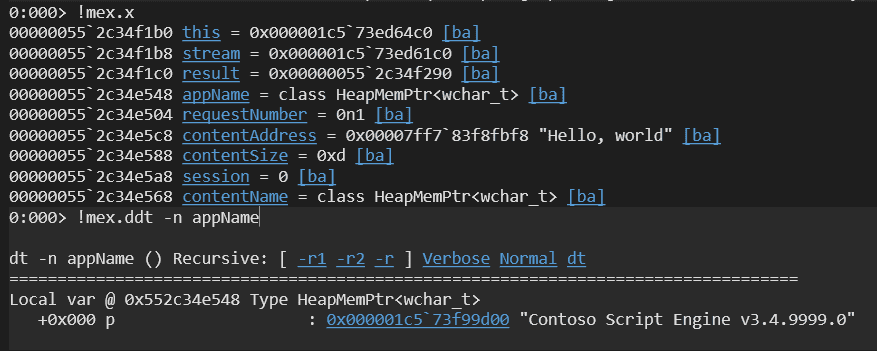
If you issue a memory scan request using the sample client program created in the previous article, you can confirm that the hard-coded Contoso Script Engine v3.4.9999.0 is indeed returned as the AppName, and that it obtains the address of the scan string Hello, World.
Meanwhile, GetFixedSizeAttribute is implemented as follows.
This function retrieves AMSI_ATTRIBUTE_CONTENT_SIZE, AMSI_ATTRIBUTE_SESSION, and AMSI_ATTRIBUTE_CONTENT_ADDRESS according to the type specified when it is called.
template<typename T>
T GetFixedSizeAttribute(_In_ IAmsiStream* stream, _In_ AMSI_ATTRIBUTE attribute)
{
    T result;

    ULONG actualSize;
    if (SUCCEEDED(stream->GetAttribute(attribute, sizeof(T), reinterpret_cast<PBYTE>(&result), &actualSize)) &&
        actualSize == sizeof(T))
    {
        return result;
    }
    return T();
}
When the attribute AMSI_ATTRIBUTE_CONTENT_ADDRESS, which is the memory address used when the content is fully loaded in memory, can be obtained, the sample uses CalculateBufferXor to compute the XOR of all bytes in the memory content and outputs the result to the log.
BYTE CalculateBufferXor(_In_ LPCBYTE buffer, _In_ ULONGLONG size)
{
    BYTE value = 0;
    for (ULONGLONG i = 0; i < size; i++)
    {
        value ^= buffer[i];
    }
    return value;
}
if (contentAddress)
{
// The data to scan is provided in the form of a memory buffer.
auto result = CalculateBufferXor(contentAddress, contentSize);
TraceLoggingWrite(g_traceLoggingProvider, "Memory xor",
TraceLoggingValue(requestNumber),
TraceLoggingValue(result));
}If the scan target is a file, it uses the Read method to obtain the content in 1024-byte chunks and performs the same calculation with CalculateBufferXor.
Reference: IAmsiStream::Read (amsi.h) - Win32 apps | Microsoft Learn
else
{
    // Provided as a stream. Read it stream a chunk at a time.
    BYTE cumulativeXor = 0;
    BYTE chunk[1024];
    ULONG readSize;
    for (ULONGLONG position = 0; position < contentSize; position += readSize)
    {
        HRESULT hr = stream->Read(position, sizeof(chunk), chunk, &readSize);
        if (SUCCEEDED(hr))
        {
            cumulativeXor ^= CalculateBufferXor(chunk, readSize);
            TraceLoggingWrite(g_traceLoggingProvider, "Read chunk",
                TraceLoggingValue(requestNumber),
                TraceLoggingValue(position),
                TraceLoggingValue(readSize),
                TraceLoggingValue(cumulativeXor));
        }
        else
        {
            TraceLoggingWrite(g_traceLoggingProvider, "Read failed",
                TraceLoggingValue(requestNumber),
                TraceLoggingValue(position),
                TraceLoggingValue(hr));
            break;
        }
    }
}
As you can see, the Scan method in this sample provider is implemented in a very simple way.
Collecting and analyzing ETW trace logs
This sample provider outputs ETW trace logs with the GUID {00604c86-2d25-46d6-b814-cd149bfdf0b3}.
You can capture ETW trace logs with various tools such as logman and traceview.exe.
If you use traceview.exe, which is included in the Windows WDK, it is convenient because you can easily browse ETW trace logs in a GUI or save them as ETL files.
If you have already installed the WDK, you can open traceview.exe from a path such as C:\Program Files (x86)\Windows Kits\10\bin\<version>\x64\traceview.exe.
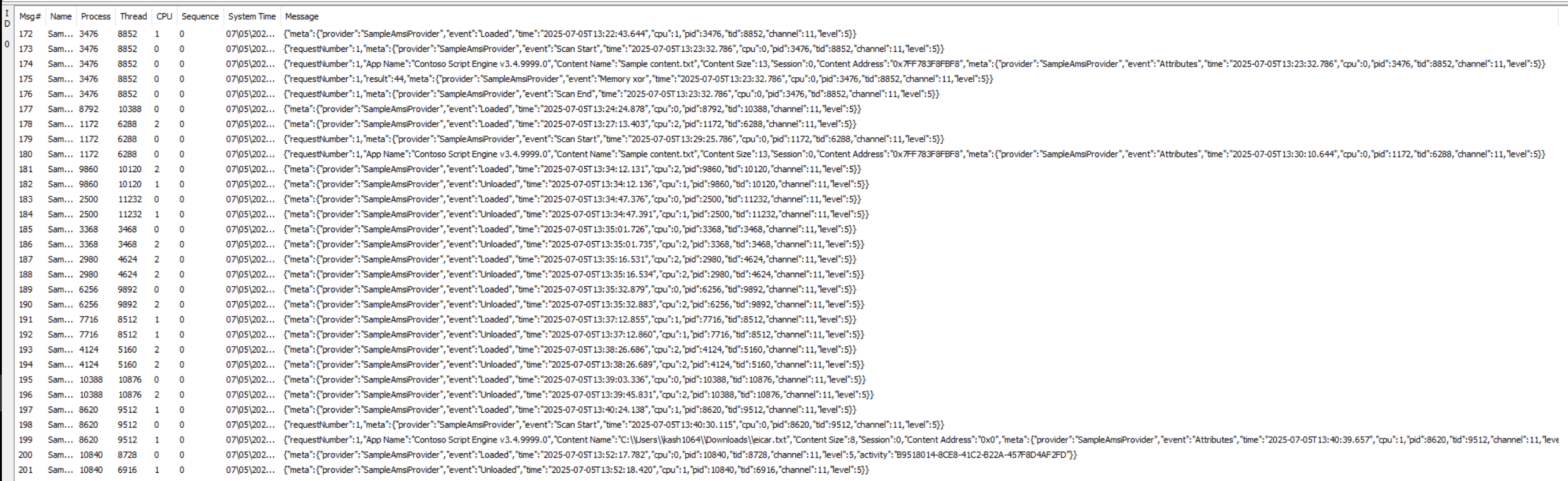
Also, if you have already saved ETW trace logs as an ETL file by using tools such as logman or traceview.exe, you can convert them to a text file with the following command using netsh and inspect them that way as well.
netsh trace convert input=logging.etl output=decode.txtBecause traceview.exe is not well suited to filtering or searching event data, I think decoding the ETL file into a text file is a good approach when you want to analyze specific events in detail.
Summary
This time, I read through the sample code for an AMSI provider.
I plan to write another article in the future about more detailed behavior, such as debugging it more deeply.