This page has been machine-translated from the original page.
I participated in Cryptoverse CTF 2023, which started on May 6, 2023, with 0nePadding.
We finished 17th out of 364 teams.
It was a very fun CTF and I learned a lot, so as usual I’m writing a writeup.
Table of Contents
- Simple Checkin(Rev)
- Micro Assembly(Rev)
- Mac and Cheese(Rev)
- Solid Reverse(Rev)
- Standard VM(Rev)
- Touhou Danmaku Kagura(Rev)
- The Cyber Heist(Forensic)
- Summary
Simple Checkin(Rev)
Just a checkin challenge. Nothing special.
You can recover the flag by extracting the arrays from the data section and XORing them.
I was able to recover the flag with the following solver.
for i in range(len(local_58)):
    print(chr(local_68[i]^local_58[i]),end="")
The flag was the following, and it was the longest flag I had ever seen.
cvctf{i_apologize_for_such_a_long_string_in_this_checkin_challenge,but_it_might_be_a_good_time_to_learn_about_automating_this_process?You_might_need_to_do_it_because_here_is_a_painful_hex:32a16b3a7eef8de1263812.Enjoy(or_not)!}Micro Assembly(Rev)
A special message is computed out of this short piece of assembly. Wrap the message you got in
cvctf{}.
The following assembly code is provided.
In the end, the values computed by this assembly code form the flag.
main:
   PUSH %BP
   MOV  %SP, %BP
@main_body:
   SUB  %SP, $28, %SP
   MOV  $154, -28(%BP)
   MOV  $16, -24(%BP)
   MOV  $16, -20(%BP)
   MOV  $228, -16(%BP)
   MOV  $66, -12(%BP)
   MOV  $286, -8(%BP)
   MOV  $3, -4(%BP)
@if0:
   DIV  -28(%BP), $2, %0
   CMP  %12, $0
   JNE  @false0
@true0:
   DIV  -28(%BP), $2, %0
   MOV  %0, -28(%BP)
   JMP  @exit0
@false0:
@exit0:
   MUL  -24(%BP), $3, %0
   ADD  %0, $1, %0
   MOV  %0, -24(%BP)
   SHL  -20(%BP), $2, %0
   ADD  %0, $3, %0
   MOV  %0, -20(%BP)
@if1:
   DIV  -16(%BP), $3, %0
   CMP  %12, $1
   JNE  @false1
@true1:
   SUB  -16(%BP), $1, %0
   DIV  %0, $3, %0
   MOV  %0, -16(%BP)
   JMP  @exit1
@false1:
   DIV  -16(%BP), $2, %0
   MOV  %0, -16(%BP)
@exit1:
   SUB  -12(%BP), $2, %0
   MOV  %0, -12(%BP)
@if2:
   DIV  -8(%BP), $3, %0
   CMP  %12, $1
   JNE  @false2
@true2:
   SUB  -8(%BP), $1, %0
   DIV  %0, $3, %0
   MOV  %0, -8(%BP)
   JMP  @exit2
@false2:
   DIV  -8(%BP), $2, %0
   MOV  %0, -8(%BP)
@exit2:
   SHL  $11, -4(%BP), %0
   ADD  %0, $11, %0
   MOV  %0, -4(%BP)
   LEA  -28(%BP), %0
   MOV  %0, %13
   JMP  @main_exit
@main_exit:
   MOV  %BP, %SP
   POP  %BP
   RET
I recovered the flag by tracing the assembly from top to bottom and rewriting it in C.
The code I wrote is shown below.
#include <stdio.h>
int main()
{
    int a = 154, b = 16, c = 16, d = 228, e = 66, f = 286, g = 3;
    int result = 0;

    a = a / 2;
    b = b * 3 + 1;

    c <<= 2;
    c += 3;

    d = d / 2;
    e -= 2;

    f = f / 3;
    g = 11 << g;
    g += 11;

    printf("%d %d %d %d %d %d %d\n", a, b, c, d, e, f, g);

    return 0;
}
Mac and Cheese(Rev)
Sorry that I lied, there’s Mac but no Cheese.
This was a reverse-engineering challenge involving an x86 macOS binary.
After decompiling it with Ghidra, I found that the program accepts five numeric inputs in total and checks whether each input value matches the value returned by FUN_100003e10.
So I rewrote in Python the sequence of processing that calls FUN_100003e10 from main.
# void FUN_100003e10(void)
# {
#   uint uVar1;

#   uVar1 = DAT_100008018 ^ DAT_100008018 << 0xb;
#   DAT_100008018 = DAT_10000801c;
#   DAT_10000801c = DAT_100008020;
#   DAT_100008020 = DAT_100008024;
#   DAT_100008024 = DAT_100008024 ^ DAT_100008024 >> 0x13 ^ uVar1 ^ uVar1 >> 8;
#   return;
# }

local10 = 0
DAT_100008018 = int.from_bytes(b'\xff\xd4\xb5\x20','little')
DAT_10000801c = int.from_bytes(b'\xc7\x8f\x37\x32','little')
DAT_100008020 = int.from_bytes(b'\x67\x87\x5f\xd5','little')
DAT_100008024 = int.from_bytes(b'\xad\xa1\x4a\x10','little')

for i in range(5):

    uVar1 = DAT_100008018 ^ DAT_100008018 << 0xb
    DAT_100008018 = DAT_10000801c
    DAT_10000801c = DAT_100008020
    DAT_100008020 = DAT_100008024
    DAT_100008024 = DAT_100008024 ^ DAT_100008024 >> 0x13 ^ uVar1 ^ uVar1 >> 8

    print(DAT_100008024)

    result = DAT_100008024
    local10 = (result % 0x539) + local10
However, even though the logic seemed correct, I could not recover the flag.
I realized later that when doing arithmetic in Python, integers do not overflow at the uint32 boundary, and that seems to have caused the difference in the final result.
After fixing the arithmetic as shown below, I was able to recover the flag.
uVar1 = DAT_100008018 ^ (DAT_100008018 << 0xb)
uVar1 = uVar1 & 0xFFFFFFFF
DAT_100008018 = DAT_10000801c
DAT_10000801c = DAT_100008020
DAT_100008020 = DAT_100008024
DAT_100008024 = DAT_100008024 ^ (DAT_100008024 >> 0x13) ^ uVar1 ^ (uVar1 >> 8)
DAT_100008024 = DAT_100008024 & 0xFFFFFFFF
I did not think of that fix while solving the challenge, so in the end I recovered the flag through dynamic analysis.
To run a macOS binary on WSL2, I used darling.
I installed it with the following steps.
# 依存モジュールのインストール(deb ファイルでインストールする場合は不要かも)
sudo apt install cmake clang bison flex libfuse-dev libudev-dev pkg-config libc6-dev-i386 \
gcc-multilib libcairo2-dev libgl1-mesa-dev libglu1-mesa-dev libtiff5-dev \
libfreetype6-dev git git-lfs libelf-dev libxml2-dev libegl1-mesa-dev libfontconfig1-dev \
libbsd-dev libxrandr-dev libxcursor-dev libgif-dev libavutil-dev libpulse-dev \
libavformat-dev libavcodec-dev libswresample-dev libdbus-1-dev libxkbfile-dev \
libssl-dev python2

# deb ファイルのダウンロード
wget https://github.com/darlinghq/darling/releases/download/v0.1.20220704/darling_0.1.20220704.focal_amd64.deb

# インストール
sudo dpkg -i darling_0.1.20220704.focal_amd64.deb
Next, you can run the macOS binary in darling with the following steps.
# シェルの起動
darling shell

# macOS バイナリの実行
./challenge
The process of the application started here can be seen from the host-side WSL2 environment.
So by opening another shell and running the following commands, you can attach gdb to the macOS binary running under darling.
ps aux | grep challenge
gdb attach <PID>
With that, I was able to recover the flag through dynamic analysis.
Solid Reverse(Rev)
Crypto in reverse??
The following script is provided as the challenge.
It appears to be code written in Solidity, a statically typed curly-brace language designed for developing smart contracts that run on Ethereum.
// SPDX-License-Identifier: MIT
pragma solidity ^0.8.0;

contract ReverseMe {
    uint goal = 0x57e4e375661c72654c31645f78455d19;

    function magic1(uint x, uint n) public pure returns (uint) {
        // Something magic
        uint m = (1 << n) - 1;
        return x & m;
    }

    function magic2(uint x) public pure returns (uint) {
        // Something else magic
        uint i = 0;
        while ((x >>= 1) > 0) {
            i += 1;
        }
        return i;
    }

    function checkflag(bytes16 flag, bytes16 y) public view returns (bool) {
        return (uint128(flag) ^ uint128(y) == goal);
    }

    modifier checker(bytes16 key) {
        require(bytes8(key) == 0x3492800100670155, "Wrong key!");
        require(uint64(uint128(key)) == uint32(uint128(key)), "Wrong key!");
        require(magic1(uint128(key), 16) == 0x1964, "Wrong key!");
        require(magic2(uint64(uint128(key))) == 16, "Wrong key!");
        _;
    }

    function unlock(bytes16 key, bytes16 flag) public view checker(key) {
        // Main function
        require(checkflag(flag, key), "Flag is wrong!");
    }
}
Ethereum? To be honest, I did not understand it at all, and I could not set up an execution environment, so I decided to statically analyze the code with the help of the documentation.
It seemed that the flag would be the result of XORing goal with a 16-byte value that can get past the checks in the checker function.
As I read the Solidity documentation, I learned that functions like bytes8 have a characteristic behavior where the upper bits are taken and the lower bits are discarded.
In other words, from the line require(bytes8(key) == 0x3492800100670155, "Wrong key!");, we know that the first 8 bytes of key must match 0x3492800100670155.
Next, from require(uint64(uint128(key)) == uint32(uint128(key)), "Wrong key!");, we can see that the value of the last 8 bytes of key must match the value of the last 4 bytes.
In other words, we can determine that bytes 5 through 8 of key are 0.
Next, magic1(uint128(key), 16) == 0x1964 means that the lower 2 bytes must match 0x1964.
That is because the following logic returns the result of an AND with 0xFFFF.
uint m = (1 << 16) - 1;
return x & m;
Finally, I rewrote the magic2 function in Python as shown below and searched for a value whose upper 4 bytes are 0, whose lower 2 bytes are 0x1964, and that satisfies magic2(uint64(uint128(key))) == 16.
def magic2(x: int) -> int:
    i = 0
    while True:
        x = x >> 1
        print(x)
        if x > 0:
            i += 1
        else:
            break
    return i

print(magic2(0x0000000000011964))
In the end, I found that 0x0000000000011964 was the corresponding value, which means key is 0x34928001006701550000000000011964.
With that, XORing key and goal recovered the flag.
Standard VM(Rev)
Yet Another Virtual Machine.
This was the only Hard problem we solved this time, but it was super easy. (Probably a challenge-authoring mistake?)
The challenge binary seems to take user input and validate the flag.
The decompiled output of the main part is as follows.
undefined8 FUN_00101396(void)
{
  int iVar1;
  undefined8 uVar2;

  printf("Flag: ");
  __isoc99_scanf(&DAT_0010200b,&DAT_00104110);
  uVar2 = FUN_00101209();
  FUN_00101356(uVar2);
  iVar1 = strcmp("N]N_MVdP}dSOT",&DAT_00104110);
  if (iVar1 == 0) {
    puts("Correct!");
  }
  else {
    puts("Wrong!");
  }
  return 0;
}
The part that validates the input looked like it was doing various complicated things, but as soon as I saw this decompilation I knew it looked solvable with angr, so I did not analyze it further.
I was able to recover the flag with the following script.
import angr

proj = angr.Project("standard_vm", auto_load_libs=False)
print("EntryPoint", proj.entry)

# initial_state at the entry point of the binary
init_state = proj.factory.entry_state(args = ['standard_vm'])

# create simulation
simgr = proj.factory.simgr(init_state)

simgr.explore(find=(0x401403), avoid=(0x401411))
print(simgr.found[0].posix.dumps(0))

# b'cvctf{MyVMxd}\x00\x00\x00\x00\x00\x00\x00\x00\x00\x00\x00\x00\x00\x00\x00\x00\x00\x00\x00\x00\x00\x00\x00\x00\x00\x00\x00\x00\x00\x00\x00\x00\x00\x00\x00\x00\x00\x00\x00\x00\x00\x00\x00\x00\x00\x00\x00'
Touhou Danmaku Kagura(Rev)
You will control Hakurei Reimu, a popular character from the Touhou Project, and challenge a danmaku battle. This game has a new style where you attack in rhythm while dodging enemy bullets. Clear it and the flag will be displayed. To find the flag, you need to reverse engineer the game. Good luck!
The fact that the challenge description itself was in Japanese made this a very amusing problem.
When you run the challenge binary, a bullet-hell shooter game screen appears.
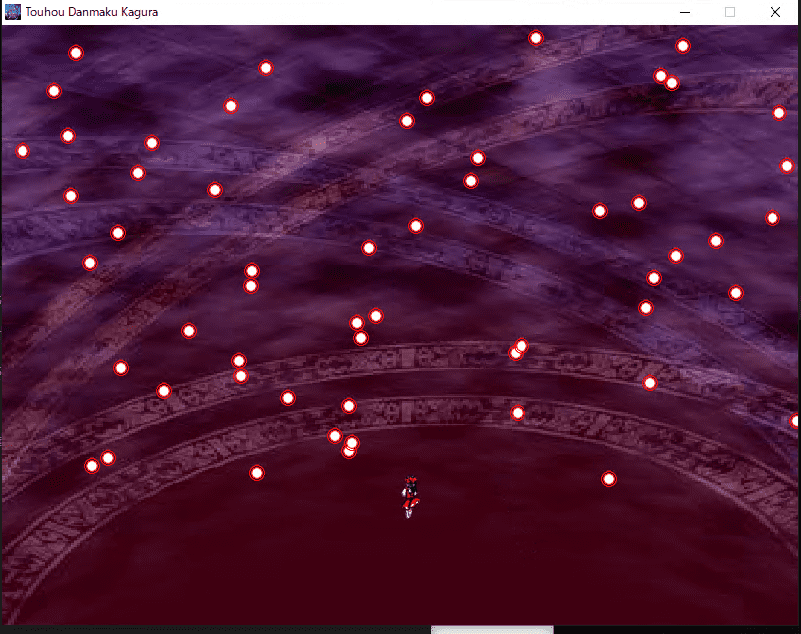
Apparently, clearing this game gives you the flag, but by design it seems impossible to clear.
I stared at the binary in Ghidra for a while, but there were too many functions and I could not narrow down the right analysis target.
So I decided to change approaches, and after investigating a bit I noticed that the target executable was built with PyInstaller.
So I tried extracting the file with PyInstaller Extractor.
Reference: extremecoders-re/pyinstxtractor: PyInstaller Extractor
py.exe pyinstxtractor.py Main.exeAfter extracting the binary with PyInstaller Extractor, I found that it had been created with PyGame.
To retrieve the executable code, I fed the extracted Main.pyc into the following online decompiler.
Reference: PyC decompile - Toolnb online toolbox
# uncompyle6 version 3.5.0
# Python bytecode 3.7 (3394)
# Decompiled from: Python 2.7.5 (default, Nov 16 2020, 22:23:17)
# [GCC 4.8.5 20150623 (Red Hat 4.8.5-44)]
# Embedded file name: Main.py
import os
os.environ['PYGAME_HIDE_SUPPORT_PROMPT'] = 'hide'
import pygame, math, random, time

class sizes:

    def __init__(self, width, height):
        self.Width = width
        self.Height = height


currentCount = 0
currentAnim = 1
animLimit = False
playerX = 400
playerY = 450
lastBullet = 0
bulletLimit = 5000
totalBullets = 0
toX = 0
toY = 0
bullets = []
bulletsDirection = [
 1]
bulletsY = []
bulletsX = []

def main():
    global bullets
    global bulletsX
    global bulletsY
    global currentAnim
    global currentCount
    global lastBullet
    global playerX
    global playerY
    global toX
    global toY
    global totalBullets
    pygame.init()
    pygame.mixer.init()
    pygame.mixer.music.load('Song.mp3')
    pygame.mixer.music.play()
    screenSizes = sizes(800, 600)
    screen = pygame.display.set_mode((screenSizes.Width, screenSizes.Height))
    startBullet = pygame.image.load('Bullet.png')
    startBullet = screen.blit(startBullet, (450, 300))
    bullets.append(startBullet)
    bulletsX.append(450)
    bulletsY.append(300)
    pygame.display.set_caption('Touhou Danmaku Kagura')
    pygame.display.set_icon(pygame.image.load('Icon.png'))
    background = pygame.image.load('Background.jpg')
    background = pygame.transform.scale(background, (screenSizes.Width, screenSizes.Height))

    def getPlayerDirection():
        global animLimit
        if toX == 0:
            animLimit = bool(False)
            return 'Idle'
        if toX >= 1:
            animLimit = bool(True)
            return 'Right'
        if toX <= -1:
            animLimit = bool(True)
            return 'Left'

    def getAnimation():
        global currentAnim
        global currentCount
        if currentCount >= 150:
            if currentAnim <= 7:
                currentCount = 0
                currentAnim += 1
            elif animLimit == False:
                currentCount = 0
                currentAnim = 1

    def loadBullet(x, y):
        newBullet = pygame.image.load('Bullet.png')
        newBullet = screen.blit(newBullet, (x, y))

    def bullet(x, y):
        newBullet = pygame.image.load('Bullet.png')
        newBullet = screen.blit(newBullet, (x, y))
        bulletsDirection.append(random.randint(1, 2))
        bullets.append(newBullet)
        bulletsX.append(x)
        bulletsY.append(y)

    def editDirection():
        global playerX
        global playerY
        if toY <= -1:
            if playerY <= 0:
                pass
            else:
                playerY -= 1
        elif toY >= 1:
            if playerY >= screenSizes.Height - 60:
                pass
            else:
                playerY += 1
            if toX <= -1:
                if playerX <= 0:
                    pass
                else:
                    playerX -= 1
            elif toX >= 1:
                if playerX >= screenSizes.Width - 25:
                    pass
                else:
                    playerX += 1

    def isCollision(bulletX, bulletY):
        distance = math.sqrt(math.pow(playerX - bulletX, 2) + math.pow(playerY - bulletY, 2))
        if distance < 12:
            return True
        else:
            return False

    def makePlayer(posX, posY):
        getAnimation()
        editDirection()
        getDir = getPlayerDirection()
        screen.blit(pygame.image.load(f"Reimu{getDir}{currentAnim}.png"), (posX, posY))

    screen.fill((24, 24, 24))
    pygame.display.update()
    isGameRunning = True
    start = time.time()
    while isGameRunning:
        if time.time() - start <= 1800:
            screen.blit(background, (0, 0))
            for event in pygame.event.get():
                if event.type == pygame.QUIT:
                    isGameRunning = False
                    break
                if event.type == pygame.KEYDOWN:
                    if event.key == pygame.K_LEFT:
                        toX = -1
                        currentAnim = 1
                    elif event.key == pygame.K_RIGHT:
                        toX = 1
                        currentAnim = 1
                    else:
                        if event.type == pygame.KEYDOWN:
                            pass

                if event.key == pygame.K_DOWN:
                    toY = 1
                elif event.key == pygame.K_UP:
                    toY = -1
                else:
                    if event.type == pygame.KEYUP:
                        if event.key == pygame.K_LEFT:
                            pass
                    if toX <= -1:
                        toX = 0
                    elif event.key == pygame.K_RIGHT:
                        toX = toX >= 1 and 0
                    elif event.key == pygame.K_UP:
                        if toY <= -1:
                            toY = 0

                if event.key == pygame.K_DOWN:
                    if toY >= 1:
                        toY = 0

            currentCount += 1
            lastBullet += 1
            for x in range(0, len(bullets)):
                if lastBullet >= 5:
                    lastBullet = 0
                    if totalBullets <= bulletLimit:
                        totalBullets += 1
                        bullet(random.randint(0, 800), 0)
                    try:
                        if bulletsDirection[x] == 1:
                            bulletsX[x] += 0.5
                        elif bulletsDirection[x] == 2:
                            bulletsX[x] -= 0.5
                        else:
                            bulletsY[x] += 1.5
                            loadBullet(bulletsX[x], bulletsY[x])
                            if bulletsY[x] >= 600:
                                totalBullets -= 1
                                bullets.pop(x)
                                bulletsX.pop(x)
                                bulletsY.pop(x)

                    except:
                        pass

                    try:
                        if isCollision(bulletsX[x], bulletsY[x]) == True:
                            totalBullets -= 1
                            isGameRunning = False
                            bullets.pop(x)
                            bulletsX.pop(x)
                            bulletsY.pop(x)
                    except:
                        pass

            makePlayer(playerX, playerY)
            pygame.display.update()

    if isGameRunning:
        dx = 50
        dy = 300
        totalBullets += 1
        bullet(dx, dy)
        for _ in range(42):
            bulletsY[(-1)] += 1
            loadBullet(bulletsX[(-1)], bulletsY[(-1)])

        dx += 62
        bullet(dx, dy)
        for _ in range(42):
            bulletsY[(-1)] += 1
            loadBullet(bulletsX[(-1)], bulletsY[(-1)])

        dx += 62
        bullet(dx, dy)
        for _ in range(30):
            bulletsX[(-1)] -= 1
            bulletsY[(-1)] += 1
            loadBullet(bulletsX[(-1)], bulletsY[(-1)])

        for _ in range(30):
            bulletsX[(-1)] += 1
            bulletsY[(-1)] += 1
            loadBullet(bulletsX[(-1)], bulletsY[(-1)])

        for _ in range(30):
            bulletsX[(-1)] += 1
            bulletsY[(-1)] -= 1
            loadBullet(bulletsX[(-1)], bulletsY[(-1)])

        for _ in range(30):
            bulletsX[(-1)] -= 1
            bulletsY[(-1)] -= 1
            loadBullet(bulletsX[(-1)], bulletsY[(-1)])

        {{ 省略 }}

        pygame.display.update()


if __name__ == '__main__':
    main()
It seems that if you get through the loop starting with while isGameRunning: while keeping isGameRunning true, the game is treated as cleared, but there is no clear condition.
So I identified the post-clear processing from the reversing results.
In the post-clear processing, it looked like the following two patterns were repeated.
# パターン 1
dx += 62
bullet(dx, dy)
for _ in range(42):
    bulletsY[(-1)] += 1
    loadBullet(bulletsX[(-1)], bulletsY[(-1)])

# パターン 2
dx += 62
bullet(dx, dy)
for _ in range(30):
    bulletsX[(-1)] -= 1
    bulletsY[(-1)] += 1
    loadBullet(bulletsX[(-1)], bulletsY[(-1)])

for _ in range(30):
    bulletsX[(-1)] += 1
    bulletsY[(-1)] += 1
    loadBullet(bulletsX[(-1)], bulletsY[(-1)])

for _ in range(30):
    bulletsX[(-1)] += 1
    bulletsY[(-1)] -= 1
    loadBullet(bulletsX[(-1)], bulletsY[(-1)])

for _ in range(30):
    bulletsX[(-1)] -= 1
    bulletsY[(-1)] -= 1
    loadBullet(bulletsX[(-1)], bulletsY[(-1)])
This code was drawing strings of 1 and 0 on the screen as shown below.
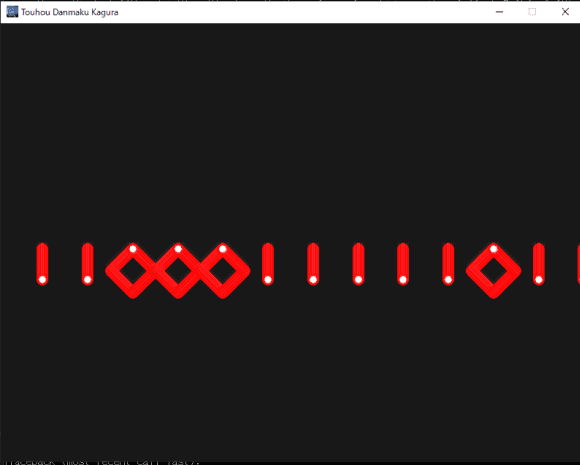
So by replacing “pattern 1” in the code above with 1 and “pattern 2” with 0, I was able to obtain the following bit string.
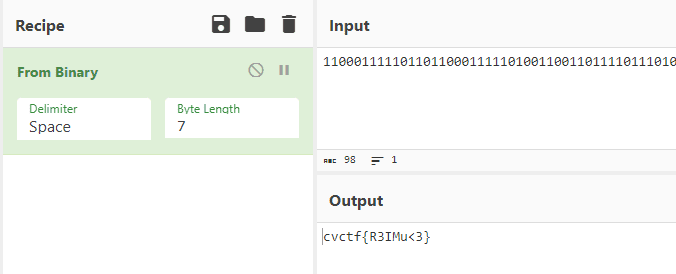
11000111110110110001111101001100110111101110100100110011100100110011011110101011110001100111111101I fed this bit string into CyberChef and recovered the flag.
The Cyber Heist(Forensic)
A group of hackers has stolen a sensitive piece of data, and it’s up to you to recover it. We only found this USB sniffer capture that was taken during the cyber attack. Can you uncover the message from the hackers left to us?
Note: All alphabetical characters in the flag are lower-case.
When I opened the challenge pcapng file in WireShark, I found that it was a series of communications captured with USBPcap.
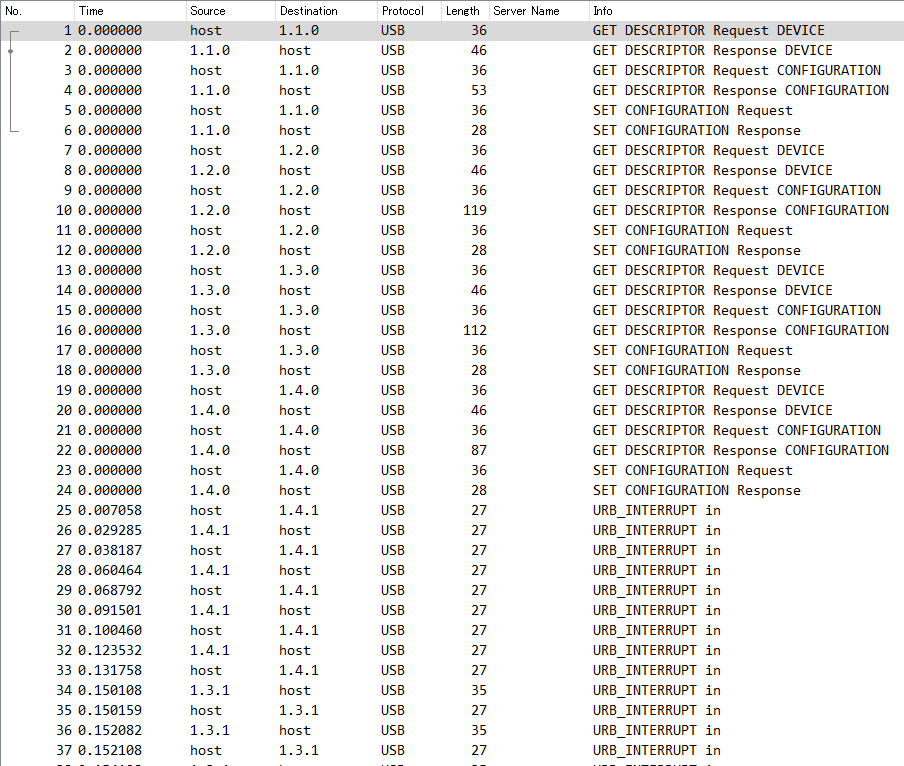
Coincidentally, a similar challenge had appeared in the WaniCTF I participated in previously, so I thought I might be able to solve it the same way. However, there were no packets containing Leftcver Capture Data, so I could not recover the flag.
Reference: Wani CTF 2023 Writeup - Frog’s Secret Base
I wondered whether it might not be keyboard traffic after all, so I decided to investigate what kinds of devices were connected.
I looked up the devices from the vendor IDs and product IDs as follows.
tshark -r ./challenge.pcap -T fields -e usb.idProduct -e usb.idVendor | grep -v '^\s*$'

# https://www.usb.org/sites/default/files/vendor_ids042523.pdf でベンダ ID を調べる
0x2813  0x2109 VIA Labs, Inc
0x0203  0x04d9 Holtek Semiconductor, Inc.
0x0037  0x1532 Razer (Asia‐Pacific) Pte Ltd.
0x006d  0x256c GRAPHICS TECHNOLOGY (HK) CO., LIMITED
As a result, I became interested in the fact that Holtek Semiconductor, Inc. is a manufacturer that makes keyboards and similar devices.
So I filtered WireShark to this device’s traffic and inspected it, and found that the values in HID Data looked very similar to the values in Leftcver Capture Data.
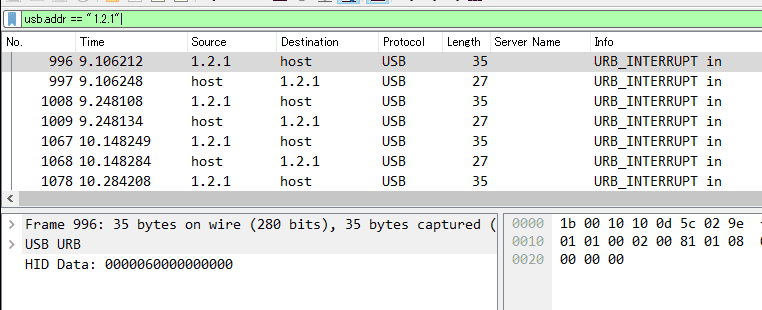
So I used tshark to extract only the HID Data of this device into keystrokes.txt and was able to recover the flag.
# HID Data を取得
tshark -r challenge.pcap -Y 'usbhid.data && usb.addr == "1.2.1"' -T fields -e usbhid.data | sed 's/../:&/g2' > keystrokes.txt

# keystrokes.txt からキー入力を解析
python3 solver.py ./keystrokes.txt
I used the following solver.py.
#!/usr/bin/python
# -*- coding: utf-8 -*-

import sys

#More symbols in https://www.fileformat.info/search/google.htm?q=capslock+symbol&domains=www.fileformat.info&sitesearch=www.fileformat.info&client=pub-6975096118196151&forid=1&channel=1657057343&ie=UTF-8&oe=UTF-8&cof=GALT%3A%23008000%3BGL%3A1%3BDIV%3A%23336699%3BVLC%3A663399%3BAH%3Acenter%3BBGC%3AFFFFFF%3BLBGC%3A336699%3BALC%3A0000FF%3BLC%3A0000FF%3BT%3A000000%3BGFNT%3A0000FF%3BGIMP%3A0000FF%3BFORID%3A11&hl=en
KEY_CODES = {
    0x04:['a', 'A'],
    0x05:['b', 'B'],
    0x06:['c', 'C'],
    0x07:['d', 'D'],
    0x08:['e', 'E'],
    0x09:['f', 'F'],
    0x0A:['g', 'G'],
    0x0B:['h', 'H'],
    0x0C:['i', 'I'],
    0x0D:['j', 'J'],
    0x0E:['k', 'K'],
    0x0F:['l', 'L'],
    0x10:['m', 'M'],
    0x11:['n', 'N'],
    0x12:['o', 'O'],
    0x13:['p', 'P'],
    0x14:['q', 'Q'],
    0x15:['r', 'R'],
    0x16:['s', 'S'],
    0x17:['t', 'T'],
    0x18:['u', 'U'],
    0x19:['v', 'V'],
    0x1A:['w', 'W'],
    0x1B:['x', 'X'],
    0x1C:['y', 'Y'],
    0x1D:['z', 'Z'],
    0x1E:['1', '!'],
    0x1F:['2', '@'],
    0x20:['3', '#'],
    0x21:['4', '$'],
    0x22:['5', '%'],
    0x23:['6', '^'],
    0x24:['7', '&'],
    0x25:['8', '*'],
    0x26:['9', '('],
    0x27:['0', ')'],
    0x28:['\n','\n'],
    0x29:['␛','␛'],
    0x2a:['⌫', '⌫'],
    0x2b:['\t','\t'],
    0x2C:[' ', ' '],
    0x2D:['-', '_'],
    0x2E:['=', '+'],
    0x2F:['[', '{'],
    0x30:[']', '}'],
    0x32:['#','~'],
    0x33:[';', ':'],
    0x34:['\'', '"'],
    0x36:[',', '<'],
    0x37:['.', '>'],
    0x38:['/', '?'],
    0x39:['⇪','⇪'],
    0x4f:[u'→',u'→'],
    0x50:[u'←',u'←'],
    0x51:[u'↓',u'↓'],
    0x52:[u'↑',u'↑']
}


#tshark -r ./usb.pcap -Y 'usb.capdata && usb.data_len == 8' -T fields -e usb.capdata | sed 's/../:&/g2' > keyboards.txt
def read_use(file):
    with open(file, 'r') as f:
        datas = f.readlines()

    datas = [d.strip() for d in datas if d]
    cursor_x = 0
    cursor_y = 0
    lines = []
    output = ''
    skip_next = False
    lines.append("")

    for data in datas:
        shift = int(data.split(':')[0], 16) # 0x2 is left shift 0x20 is right shift
        key = int(data.split(':')[2], 16)

        if skip_next:
            skip_next = False
            continue

        if key == 0 or int(data.split(':')[3], 16) > 0:
            continue

        #If you don't like output get a more verbose output here (maybe you need to map new rekeys or remap some of them)
        if not key in KEY_CODES:
            #print("Not found: "+str(key))
            continue

        if shift != 0:
            shift=1
            skip_next = True

        if KEY_CODES[key][shift] == u'↑':
            lines[cursor_y] += output
            output = ''
            cursor_y -= 1

        elif KEY_CODES[key][shift] == u'↓':
            lines[cursor_y] += output
            output = ''
            cursor_y += 1

        elif KEY_CODES[key][shift] == u'→':
            cursor_x += 1

        elif KEY_CODES[key][shift] == u'←':
            cursor_x -= 1

        elif KEY_CODES[key][shift] == '\n':
            lines.append("")
            lines[cursor_y] += output
            cursor_x = 0
            cursor_y += 1
            output = ''

        elif KEY_CODES[key][shift] == '[BACKSPACE]':
            output = output[:cursor_x-1] + output[cursor_x:]
            cursor_x -= 1

        else:
            output = output[:cursor_x] + KEY_CODES[key][shift] + output[cursor_x:]
            cursor_x += 1

    if lines == [""]:
        lines[0] = output

    if output != '' and output not in lines:
        lines[cursor_y] += output

    return '\n'.join(lines)

if __name__ == '__main__':
    if len(sys.argv) < 2:
        print('Missing file to read...')
        exit(-1)
    sys.stdout.write(read_use(sys.argv[1]))