This page has been machine-translated from the original page.
Table of Contents
I recently ran into the problem in WMCTF that I could neither recognize an AES implementation nor write a decryption script on my own, so I decided to sit down and properly study how AES (Rijndael) is implemented.
Rev problems that require AES decryption have come up several times before, but up to now I had only been able to solve the ones where I could identify the Key and IV and easily decrypt them with CyberChef. I had not been able to solve problems where I needed to identify the Rijndael SBox and create a decryption script, so I want to use this opportunity to get at least a little better at that.
References
Reference: FIPS 197 AES
Reference: [Introduction to Cryptography] Understand AES by Implementing It - YouTube
Reference: Rijndael S-box - Wikipedia
Reference: Understanding AES - Qiita
Reference: AES Encryption & Decryption In Python: Implementation, Modes & Key Management
Overview of AES(Rijndael)
Currently, AES as a secure encryption algorithm generally refers to the algorithm called Rijndael.
AES is a symmetric cipher that uses the same key for both data encryption and decryption.
AES is considered secure because a brute-force search for the key is computationally difficult, and one can say that the longer the key length is—such as AES-256—the stronger the security becomes.
When using AES for encryption, you first prepare a key whose length is one of 128, 192, 256, or 512 bits.
In many cases, AES-256, which uses a 256-bit key (44 characters when Base64-encoded), seems to be used.
Cipher and Inverse Cipher
In AES, the encryption process is called Cipher, and the decryption process is called Inverse Cipher. They are described by the following pseudocode.
Cipher(byte in[4*Nb], byte out[4*Nb], word w[Nb*(Nr+1)])
begin
    byte state[4,Nb]
    state = in
    AddRoundKey(state, w[0, Nb-1]) // See Sec. 5.1.4

    for round = 1 step 1 to Nr–1
        SubBytes(state) // See Sec. 5.1.1
        ShiftRows(state) // See Sec. 5.1.2
        MixColumns(state) // See Sec. 5.1.3
        AddRoundKey(state, w[round*Nb, (round+1)*Nb-1])
    end for

    SubBytes(state)
    ShiftRows(state)
    AddRoundKey(state, w[Nr*Nb, (Nr+1)*Nb-1])
    out = state
end
The Inverse Cipher for decryption performs the steps of the Cipher in reverse order.
InvCipher(byte in[4*Nb], byte out[4*Nb], word w[Nb*(Nr+1)])
begin
    byte state[4,Nb]
    state = in
    AddRoundKey(state, w[Nr*Nb, (Nr+1)*Nb-1]) // See Sec. 5.1.4

    for round = Nr-1 step -1 downto 1
        InvShiftRows(state) // See Sec. 5.3.1
        InvSubBytes(state) // See Sec. 5.3.2
        AddRoundKey(state, w[round*Nb, (round+1)*Nb-1])
        InvMixColumns(state) // See Sec. 5.3.3
    end for

    InvShiftRows(state)
    InvSubBytes(state)
    AddRoundKey(state, w[0, Nb-1])
    out = state
end
Below, I will work through each item.
Key, Block, and Round Parameters
For now, I will read the description in the Algorithm Specification section of FIPS 197 AES while watching [Introduction to Cryptography] Understand AES by Implementing It - YouTube.
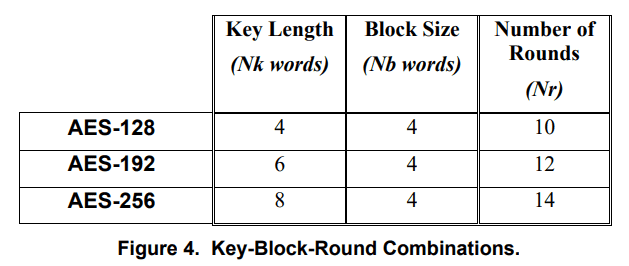
First, in the AES algorithm, the lengths of the data to be encrypted or decrypted (input block), the encrypted or decrypted data (output block), and the data being processed (State) are all represented as Nb = 4, and this is common across AES-128, 192, and 256.
Next, in the AES algorithm, the length of the Cipher Key is represented by Nk; for AES-128, 4 is specified, and for AES-256, 6 is specified.
Finally, the number of rounds, which indicates how many times the algorithm runs, is represented by Nr; for AES-128, 10 is specified, and for AES-256, 12 is specified.
In FIPS 197 AES, these combinations are summarized in the following table.
About the SBox
When doing Rev, you often see this SBox. It is a 16 * 16 byte array used by SubBytes in the Cipher function.
Likewise, when decrypting ciphertext, the Inverse SBox is used inside the InvSubBytes function.
The SBox itself is just a byte array, so I will look at its detailed usage in the sections on SubBytes and InvSubBytes.
By the way, as described in the following Wikipedia article, it seems that the SBox and Inverse SBox normally have default values.
The Inverse SBox is a byte array produced as the result of a special operation on the default SBox.
Reference: Rijndael S-box - Wikipedia
The operation for deriving the Inverse SBox from the SBox is shown in the following Python script.
sbox = [ 0x63, 0x7c, 0x77, 0x7b, 0xf2, 0x6b, 0x6f, 0xc5, 0x30, 0x01, 0x67, 0x2b, 0xfe, 0xd7, 0xab, 0x76, 0xca, 0x82, 0xc9, 0x7d, 0xfa, 0x59, 0x47, 0xf0, 0xad, 0xd4, 0xa2, 0xaf, 0x9c, 0xa4, 0x72, 0xc0, 0xb7, 0xfd, 0x93, 0x26, 0x36, 0x3f, 0xf7, 0xcc, 0x34, 0xa5, 0xe5, 0xf1, 0x71, 0xd8, 0x31, 0x15, 0x04, 0xc7, 0x23, 0xc3, 0x18, 0x96, 0x05, 0x9a, 0x07, 0x12, 0x80, 0xe2, 0xeb, 0x27, 0xb2, 0x75, 0x09, 0x83, 0x2c, 0x1a, 0x1b, 0x6e, 0x5a, 0xa0, 0x52, 0x3b, 0xd6, 0xb3, 0x29, 0xe3, 0x2f, 0x84, 0x53, 0xd1, 0x00, 0xed, 0x20, 0xfc, 0xb1, 0x5b, 0x6a, 0xcb, 0xbe, 0x39, 0x4a, 0x4c, 0x58, 0xcf, 0xd0, 0xef, 0xaa, 0xfb, 0x43, 0x4d, 0x33, 0x85, 0x45, 0xf9, 0x02, 0x7f, 0x50, 0x3c, 0x9f, 0xa8, 0x51, 0xa3, 0x40, 0x8f, 0x92, 0x9d, 0x38, 0xf5, 0xbc, 0xb6, 0xda, 0x21, 0x10, 0xff, 0xf3, 0xd2, 0xcd, 0x0c, 0x13, 0xec, 0x5f, 0x97, 0x44, 0x17, 0xc4, 0xa7, 0x7e, 0x3d, 0x64, 0x5d, 0x19, 0x73, 0x60, 0x81, 0x4f, 0xdc, 0x22, 0x2a, 0x90, 0x88, 0x46, 0xee, 0xb8, 0x14, 0xde, 0x5e, 0x0b, 0xdb, 0xe0, 0x32, 0x3a, 0x0a, 0x49, 0x06, 0x24, 0x5c, 0xc2, 0xd3, 0xac, 0x62, 0x91, 0x95, 0xe4, 0x79, 0xe7, 0xc8, 0x37, 0x6d, 0x8d, 0xd5, 0x4e, 0xa9, 0x6c, 0x56, 0xf4, 0xea, 0x65, 0x7a, 0xae, 0x08, 0xba, 0x78, 0x25, 0x2e, 0x1c, 0xa6, 0xb4, 0xc6, 0xe8, 0xdd, 0x74, 0x1f, 0x4b, 0xbd, 0x8b, 0x8a, 0x70, 0x3e, 0xb5, 0x66, 0x48, 0x03, 0xf6, 0x0e, 0x61, 0x35, 0x57, 0xb9, 0x86, 0xc1, 0x1d, 0x9e, 0xe1, 0xf8, 0x98, 0x11, 0x69, 0xd9, 0x8e, 0x94, 0x9b, 0x1e, 0x87, 0xe9, 0xce, 0x55, 0x28, 0xdf, 0x8c, 0xa1, 0x89, 0x0d, 0xbf, 0xe6, 0x42, 0x68, 0x41, 0x99, 0x2d, 0x0f, 0xb0, 0x54, 0xbb, 0x16 ]

inverse_sbox = [0] * 256

for i in range(256):
    line = (sbox[i] & 0xf0) >> 4
    rol = sbox[i] & 0xf
    inverse_sbox[(line * 16) + rol] = i

for i in range(len(inverse_sbox)):
    if (i % 16 == 0):
        print("")
    print("0x%02X"%inverse_sbox[i],end=",")
print("")
If you actually feed the default(?) SBox into this script and run it, you can obtain the same byte sequence as the Inverse SBox listed on the Wikipedia page.
$ python3 sample.py
>
0x52,0x09,0x6A,0xD5,0x30,0x36,0xA5,0x38,0xBF,0x40,0xA3,0x9E,0x81,0xF3,0xD7,0xFB,
0x7C,0xE3,0x39,0x82,0x9B,0x2F,0xFF,0x87,0x34,0x8E,0x43,0x44,0xC4,0xDE,0xE9,0xCB,
0x54,0x7B,0x94,0x32,0xA6,0xC2,0x23,0x3D,0xEE,0x4C,0x95,0x0B,0x42,0xFA,0xC3,0x4E,
0x08,0x2E,0xA1,0x66,0x28,0xD9,0x24,0xB2,0x76,0x5B,0xA2,0x49,0x6D,0x8B,0xD1,0x25,
0x72,0xF8,0xF6,0x64,0x86,0x68,0x98,0x16,0xD4,0xA4,0x5C,0xCC,0x5D,0x65,0xB6,0x92,
0x6C,0x70,0x48,0x50,0xFD,0xED,0xB9,0xDA,0x5E,0x15,0x46,0x57,0xA7,0x8D,0x9D,0x84,
0x90,0xD8,0xAB,0x00,0x8C,0xBC,0xD3,0x0A,0xF7,0xE4,0x58,0x05,0xB8,0xB3,0x45,0x06,
0xD0,0x2C,0x1E,0x8F,0xCA,0x3F,0x0F,0x02,0xC1,0xAF,0xBD,0x03,0x01,0x13,0x8A,0x6B,
0x3A,0x91,0x11,0x41,0x4F,0x67,0xDC,0xEA,0x97,0xF2,0xCF,0xCE,0xF0,0xB4,0xE6,0x73,
0x96,0xAC,0x74,0x22,0xE7,0xAD,0x35,0x85,0xE2,0xF9,0x37,0xE8,0x1C,0x75,0xDF,0x6E,
0x47,0xF1,0x1A,0x71,0x1D,0x29,0xC5,0x89,0x6F,0xB7,0x62,0x0E,0xAA,0x18,0xBE,0x1B,
0xFC,0x56,0x3E,0x4B,0xC6,0xD2,0x79,0x20,0x9A,0xDB,0xC0,0xFE,0x78,0xCD,0x5A,0xF4,
0x1F,0xDD,0xA8,0x33,0x88,0x07,0xC7,0x31,0xB1,0x12,0x10,0x59,0x27,0x80,0xEC,0x5F,
0x60,0x51,0x7F,0xA9,0x19,0xB5,0x4A,0x0D,0x2D,0xE5,0x7A,0x9F,0x93,0xC9,0x9C,0xEF,
0xA0,0xE0,0x3B,0x4D,0xAE,0x2A,0xF5,0xB0,0xC8,0xEB,0xBB,0x3C,0x83,0x53,0x99,0x61,
0x17,0x2B,0x04,0x7E,0xBA,0x77,0xD6,0x26,0xE1,0x69,0x14,0x63,0x55,0x21,0x0C,0x7D,
As in the challenge solved in Analyzing Android Native Library Functions and Decrypting RC4 and AES [WMCTF 2023] - Kaeru no Himitsukichi, when the SBox byte sequence is processed in the binary—for example, when it is swapped—or when a custom SBox is used in the first place, it seems necessary to run the above script in order to obtain the Inverse SBox used for decryption.
About the SubBytes Function
The SubBytes function appears to be a function that transforms each byte of the State using the substitution table called SBox.
For how SubBytes transforms input values, the Appendix B – Cipher Example section was helpful.
Here, the input value input is divided into blocks of 4 bytes, and the transitions when they are transformed using the SBox are shown as an example.
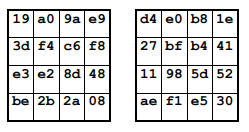
For details on the implementation of the SubBytes function, the explanation around the 13-minute mark in the video [Introduction to Cryptography] Understand AES by Implementing It was helpful.
About the ShiftRows Function
The ShiftRows function is called after SubBytes during the processing of each round in the Cipher.
This processing is relatively simple: it seems to left-rotate each column of the State(?), wrapping the overflowing bytes back around to the right side.
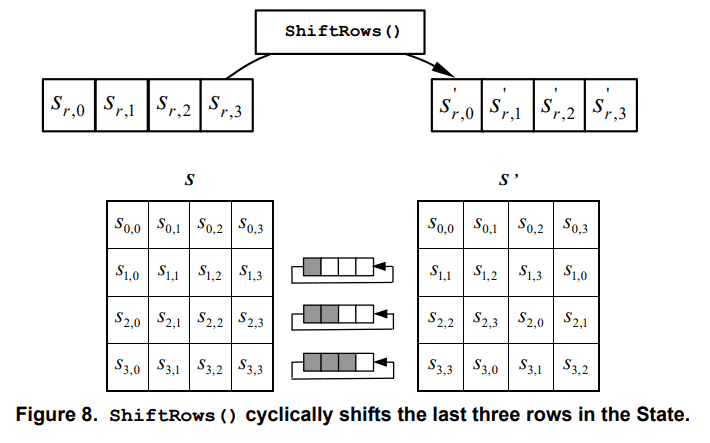
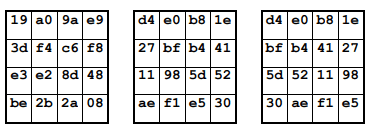
The Appendix examples also let you confirm the movement of the byte values.
About the MixColumns Function
During round processing, the function called after ShiftRows is MixColumns.
MixColumns seems to be a function that multiplies the State by a polynomial with coefficients.
(My understanding is shaky here, so please refer to FIPS 197 AES for details.)
The State transitions after running the MixColumns example shown in the Appendix are as follows.
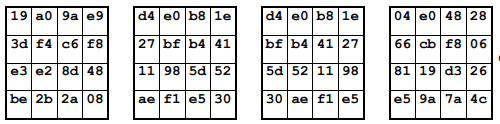
The video [Introduction to Cryptography] Understand AES by Implementing It - YouTube also explains this from around the 16-minute mark.
About the AddRoundKey Function
As can be seen from the following Cipher pseudocode, the AddRoundKey function seems to be called before the rounds begin, at the end of each round, and again at the end of the Cipher.
Cipher(byte in[4*Nb], byte out[4*Nb], word w[Nb*(Nr+1)])
begin
    byte state[4,Nb]
    state = in
    AddRoundKey(state, w[0, Nb-1]) // See Sec. 5.1.4

    for round = 1 step 1 to 1Nr
        SubBytes(state) // See Sec. 5.1.1
        ShiftRows(state) // See Sec. 5.1.2
        MixColumns(state) // See Sec. 5.1.3
        AddRoundKey(state, w[round*Nb, (round+1)*Nb-1])
    end for

    SubBytes(state)
    ShiftRows(state)
    AddRoundKey(state, w[Nr*Nb, (Nr+1)*Nb-1])
    out = state
end
The AddRoundKey function is used for the transformation that adds the Round Key to the State using XOR.
The length of the Round Key is equal to the size of the State, which seems to be 128 bits (16 bytes) when Nb = 4.
Trying Encryption and Decryption with AES
At this point, I have a rough image of the processing performed inside the AES Cipher, so I would like to actually try encrypting and decrypting data.
Implementing the AES logic myself is not the point this time, so I will simply use sample code I obtained from GitHub.
Reference: kokke/tiny-AES-c: Small portable AES128/192/256 in C
First, I download the code from my fork of the repository based on tiny-AES-c from the repository above, and try building test.elf with the make command.
git clone https://github.com/kash1064/tiny-AES-c
cd tiny-AES-c
make clean && make AES256=1 && ./test.elf
At build time, I specify AES-256 as the encryption algorithm.
Looking at the source code of the original repository, you can see that sbox and rsbox, as well as the AES Key and PlainText, are each hard-coded.
In the source code in my fork, I made it possible to encode arbitrary Key and Plain Text byte sequences and try encryption and decryption.

When embedding arbitrary input, edit the following code in test.c.
static int encrypt_ecb(void)
{
#if defined(AES256)
    uint8_t key[] = { 0x60, 0x3d, 0xeb, 0x10, 0x15, 0xca, 0x71, 0xbe, 0x2b, 0x73, 0xae, 0xf0, 0x85, 0x7d, 0x77, 0x81, 0x1f, 0x35, 0x2c, 0x07, 0x3b, 0x61, 0x08, 0xd7, 0x2d, 0x98, 0x10, 0xa3, 0x09, 0x14, 0xdf, 0xf4 };
#elif defined(AES192)
    uint8_t key[] = { 0x8e, 0x73, 0xb0, 0xf7, 0xda, 0x0e, 0x64, 0x52, 0xc8, 0x10, 0xf3, 0x2b, 0x80, 0x90, 0x79, 0xe5, 0x62, 0xf8, 0xea, 0xd2, 0x52, 0x2c, 0x6b, 0x7b };
#elif defined(AES128)
    uint8_t key[] = { 0x2b, 0x7e, 0x15, 0x16, 0x28, 0xae, 0xd2, 0xa6, 0xab, 0xf7, 0x15, 0x88, 0x09, 0xcf, 0x4f, 0x3c };
#endif

    // 16 バイトの倍数
    // ",".join([hex(ord(c)) for c in "testtesttesttest"])
    uint8_t in[]  = { 0x74,0x65,0x73,0x74,0x74,0x65,0x73,0x74,0x74,0x65,0x73,0x74,0x74,0x65,0x73,0x74 };
    struct AES_ctx ctx;

    printf("Plain Text:\n");
    for (int i = 0; i < sizeof(in) / sizeof(in[0]); i++)
    {
        printf("0x%02x, ", in[i]);
    }
    printf("\n");

    AES_init_ctx(&ctx, key);
    AES_ECB_encrypt(&ctx, in);
    printf("ECB encrypt:\n");

    for (int i = 0; i < sizeof(in) / sizeof(in[0]); i++)
    {
        printf("0x%02x, ", in[i]);
    }
    printf("\n");
    return(0);
}


static int decrypt_ecb(void)
{
#if defined(AES256)
    uint8_t key[] = { 0x60, 0x3d, 0xeb, 0x10, 0x15, 0xca, 0x71, 0xbe, 0x2b, 0x73, 0xae, 0xf0, 0x85, 0x7d, 0x77, 0x81, 0x1f, 0x35, 0x2c, 0x07, 0x3b, 0x61, 0x08, 0xd7, 0x2d, 0x98, 0x10, 0xa3, 0x09, 0x14, 0xdf, 0xf4 };
    uint8_t in[]  = { 0xc3, 0xd5, 0xb9, 0x28, 0x88, 0x50, 0x2c, 0x3c, 0x67, 0x92, 0x4b, 0x43, 0x1f, 0xd0, 0xeb, 0x0f };
#elif defined(AES192)
    uint8_t key[] = { 0x8e, 0x73, 0xb0, 0xf7, 0xda, 0x0e, 0x64, 0x52, 0xc8, 0x10, 0xf3, 0x2b, 0x80, 0x90, 0x79, 0xe5,
                      0x62, 0xf8, 0xea, 0xd2, 0x52, 0x2c, 0x6b, 0x7b };
    uint8_t in[]  = { 0xbd, 0x33, 0x4f, 0x1d, 0x6e, 0x45, 0xf2, 0x5f, 0xf7, 0x12, 0xa2, 0x14, 0x57, 0x1f, 0xa5, 0xcc };
#elif defined(AES128)
    uint8_t key[] = { 0x2b, 0x7e, 0x15, 0x16, 0x28, 0xae, 0xd2, 0xa6, 0xab, 0xf7, 0x15, 0x88, 0x09, 0xcf, 0x4f, 0x3c };
    uint8_t in[]  = { 0x3a, 0xd7, 0x7b, 0xb4, 0x0d, 0x7a, 0x36, 0x60, 0xa8, 0x9e, 0xca, 0xf3, 0x24, 0x66, 0xef, 0x97 };
#endif

    struct AES_ctx ctx;

    AES_init_ctx(&ctx, key);
    AES_ECB_decrypt(&ctx, in);

    // "".join([chr(b) for b in []])
    printf("ECB decrypt: \n");
    for (int i = 0; i < sizeof(in) / sizeof(in[0]); i++)
    {
        printf("0x%02x, ", in[i]);
    }
    printf("\n");

return(0);
}
I verified whether this result was actually correct by comparing it with the result of the following Python script.
from Crypto.Cipher import AES

key = [0x60, 0x3d, 0xeb, 0x10, 0x15, 0xca, 0x71, 0xbe, 0x2b, 0x73, 0xae, 0xf0, 0x85, 0x7d, 0x77, 0x81, 0x1f, 0x35, 0x2c, 0x07, 0x3b, 0x61, 0x08, 0xd7, 0x2d, 0x98, 0x10, 0xa3, 0x09, 0x14, 0xdf, 0xf4]
key = bytes([int(hex(x),0) for x in key])

cipher = AES.new(key, AES.MODE_ECB)

plaintext = b"testtesttesttest"
cipher_text = cipher.encrypt(plaintext)

print("PlainText : ", plaintext)
print("Encrypt : ", ",".join([hex(c) for c in cipher_text]))
print("Decrypt : ", cipher.decrypt(cipher_text))
Running the code above produced the same result as when encrypting with the customized C program.

Decrypting Data Encrypted with a Custom SBox
Next, I also tried customizing the SBox.
The SBox is hard-coded in aes.c.
Remembering the challenge in Analyzing Android Native Library Functions and Decrypting RC4 and AES [WMCTF 2023], I replaced the SBox and Inverse SBox with the following, respectively.
static const uint8_t sbox[256] = {
0x29,0x40,0x57,0x6e,0x85,0x9c,0xb3,0xca,
0xe1,0xf8,0x0f,0x26,0x3d,0x54,0x6b,0x82,
0x99,0xb0,0xc7,0xde,0xf5,0x0c,0x23,0x3a,
0x51,0x68,0x7f,0x96,0xad,0xc4,0xdb,0xf2,
0x09,0x20,0x37,0x4e,0x65,0x7c,0x93,0xaa,
0xc1,0xd8,0xef,0x06,0x1d,0x34,0x4b,0x62,
0x79,0x90,0xa7,0xbe,0xd5,0xec,0x03,0x1a,
0x31,0x48,0x5f,0x76,0x8d,0xa4,0xbb,0xd2,
0xe9,0x00,0x17,0x2e,0x45,0x5c,0x73,0x8a,
0xa1,0xb8,0xcf,0xe6,0xfd,0x14,0x2b,0x42,
0x59,0x70,0x87,0x9e,0xb5,0xcc,0xe3,0xfa,
0x11,0x28,0x3f,0x56,0x6d,0x84,0x9b,0xb2,
0xc9,0xe0,0xf7,0x0e,0x25,0x3c,0x53,0x6a,
0x81,0x98,0xaf,0xc6,0xdd,0xf4,0x0b,0x22,
0x39,0x50,0x67,0x7e,0x95,0xac,0xc3,0xda,
0xf1,0x08,0x1f,0x36,0x4d,0x64,0x7b,0x92,
0xa9,0xc0,0xd7,0xee,0x05,0x1c,0x33,0x4a,
0x61,0x78,0x8f,0xa6,0xbd,0xd4,0xeb,0x02,
0x19,0x30,0x47,0x5e,0x75,0x8c,0xa3,0xba,
0xd1,0xe8,0xff,0x16,0x2d,0x44,0x5b,0x72,
0x89,0xa0,0xb7,0xce,0xe5,0xfc,0x13,0x2a,
0x41,0x58,0x6f,0x86,0x9d,0xb4,0xcb,0xe2,
0xf9,0x10,0x27,0x3e,0x55,0x6c,0x83,0x9a,
0xb1,0xc8,0xdf,0xf6,0x0d,0x24,0x3b,0x52,
0x69,0x80,0x97,0xae,0xc5,0xdc,0xf3,0x0a,
0x21,0x38,0x4f,0x66,0x7d,0x94,0xab,0xc2,
0xd9,0xf0,0x07,0x1e,0x35,0x4c,0x63,0x7a,
0x91,0xa8,0xbf,0xd6,0xed,0x04,0x1b,0x32,
0x49,0x60,0x77,0x8e,0xa5,0xbc,0xd3,0xea,
0x01,0x18,0x2f,0x46,0x5d,0x74,0x8b,0xa2,
0xb9,0xd0,0xe7,0xfe,0x15,0x2c,0x43,0x5a,
0x71,0x88,0x9f,0xb6,0xcd,0xe4,0xfb,0x12 };

#if (defined(CBC) && CBC == 1) || (defined(ECB) && ECB == 1)
static const uint8_t rsbox[256] = {
0x41,0xE8,0x8F,0x36,0xDD,0x84,0x2B,0xD2,
0x79,0x20,0xC7,0x6E,0x15,0xBC,0x63,0x0A,
0xB1,0x58,0xFF,0xA6,0x4D,0xF4,0x9B,0x42,
0xE9,0x90,0x37,0xDE,0x85,0x2C,0xD3,0x7A,
0x21,0xC8,0x6F,0x16,0xBD,0x64,0x0B,0xB2,
0x59,0x00,0xA7,0x4E,0xF5,0x9C,0x43,0xEA,
0x91,0x38,0xDF,0x86,0x2D,0xD4,0x7B,0x22,
0xC9,0x70,0x17,0xBE,0x65,0x0C,0xB3,0x5A,
0x01,0xA8,0x4F,0xF6,0x9D,0x44,0xEB,0x92,
0x39,0xE0,0x87,0x2E,0xD5,0x7C,0x23,0xCA,
0x71,0x18,0xBF,0x66,0x0D,0xB4,0x5B,0x02,
0xA9,0x50,0xF7,0x9E,0x45,0xEC,0x93,0x3A,
0xE1,0x88,0x2F,0xD6,0x7D,0x24,0xCB,0x72,
0x19,0xC0,0x67,0x0E,0xB5,0x5C,0x03,0xAA,
0x51,0xF8,0x9F,0x46,0xED,0x94,0x3B,0xE2,
0x89,0x30,0xD7,0x7E,0x25,0xCC,0x73,0x1A,
0xC1,0x68,0x0F,0xB6,0x5D,0x04,0xAB,0x52,
0xF9,0xA0,0x47,0xEE,0x95,0x3C,0xE3,0x8A,
0x31,0xD8,0x7F,0x26,0xCD,0x74,0x1B,0xC2,
0x69,0x10,0xB7,0x5E,0x05,0xAC,0x53,0xFA,
0xA1,0x48,0xEF,0x96,0x3D,0xE4,0x8B,0x32,
0xD9,0x80,0x27,0xCE,0x75,0x1C,0xC3,0x6A,
0x11,0xB8,0x5F,0x06,0xAD,0x54,0xFB,0xA2,
0x49,0xF0,0x97,0x3E,0xE5,0x8C,0x33,0xDA,
0x81,0x28,0xCF,0x76,0x1D,0xC4,0x6B,0x12,
0xB9,0x60,0x07,0xAE,0x55,0xFC,0xA3,0x4A,
0xF1,0x98,0x3F,0xE6,0x8D,0x34,0xDB,0x82,
0x29,0xD0,0x77,0x1E,0xC5,0x6C,0x13,0xBA,
0x61,0x08,0xAF,0x56,0xFD,0xA4,0x4B,0xF2,
0x99,0x40,0xE7,0x8E,0x35,0xDC,0x83,0x2A,
0xD1,0x78,0x1F,0xC6,0x6D,0x14,0xBB,0x62,
0x09,0xB0,0x57,0xFE,0xA5,0x4C,0xF3,0x9A };
#endif
Next, using the key and encrypted data identified from the binary, I replaced the code in test.c with the following.
#include <stdio.h>
#include <stdint.h>
#include <string.h>
#include <math.h>
#include <stdlib.h>
#include <time.h>
#include "aes.h"

// test.c にコピーして使う
// SBox をカスタマイズする場合は、aes.c を編集する
os.environ['PYGAME_HIDE_SUPPORT_PROMPT'] = '
int main() {
    unsigned char buf[16] = {
        0x2B, 0xC8, 0x20, 0x8B, 0x5C, 0x0D, 0xA7, 0x9B, 0x2A, 0x51, 0x3A, 0xD2, 0x71, 0x71, 0xCA, 0x50
    };

    char *key = malloc(17);
    memcpy(key, "Re_1s_eaSy123456", 17);

    struct AES_ctx aesCtx;
    AES_init_ctx(&aesCtx, (uint8_t*)key);
    AES_ECB_decrypt(&aesCtx, buf);
    printf("%s\n", buf);
    // WMCTF{Re_1s_eaSy_eZ_Rc4_@nd_AES!}
    return 0;
}
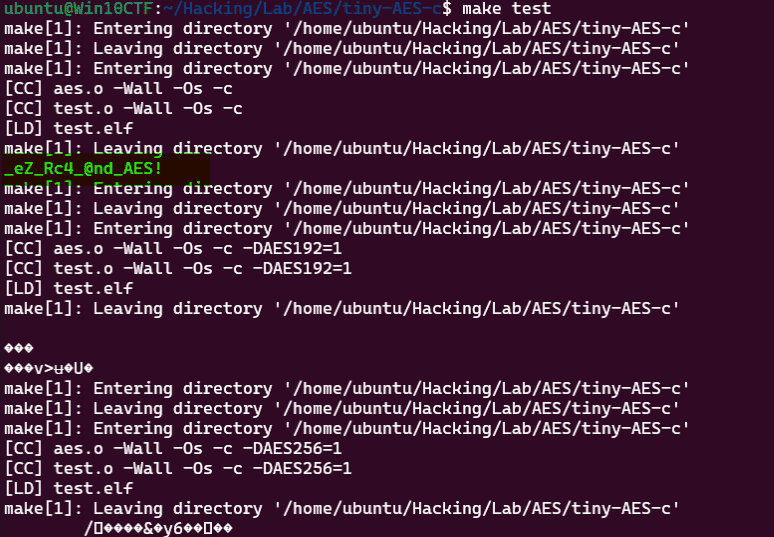
After that, when I ran make test, I was able to confirm that the AES-128 decryption result correctly became the password string _eZ_Rc4_@nd_AES!, as shown below.
Identifying AES Encryption Processing from Decompiled Output
At this point, I feel that I have somewhat grasped the overall feel of the processing that happens inside the AES Cipher.
Up to now, I had been thinking, “How am I supposed to identify AES from decompiled output?” But now that my understanding of AES implementations has improved a little, I feel like I will be able to spot it more smoothly than before.
So, let’s look at the decompiled output of tiny-AES-c in IDA.
- Decompiled output of the
Cipherfunction in tiny-AES-c
__int64 __fastcall Cipher(__int64 a1, __int64 a2)
{
  int v2; // r13d
  int v3; // r14d
  unsigned int v4; // ebx
  _BYTE *v5; // r10
  __int64 v6; // r11
  _BYTE *v7; // rcx
  unsigned __int8 *v8; // rdx
  unsigned __int8 *v9; // rax
  __int64 v10; // rsi
  __int64 v11; // r8
  char v12; // al
  char v13; // dl
  char v14; // al
  char v15; // dl
  char v16; // al
  char v17; // dl
  char v18; // al
  _BYTE *v19; // rcx
  int v20; // r12d
  char v21; // al
  int v22; // r12d
  char v23; // r8
  __int64 v24; // rcx
  __int64 v25; // rdx
  __int64 v26; // rcx
  __int64 v27; // rdx
  unsigned __int8 v28; // r8
  __int64 v29; // rcx
  __int64 v30; // rdx
  __int64 v31; // r10
  __int64 v32; // r11
  _BYTE *v33; // r9
  __int64 v34; // rdi

  v4 = 1;
  AddRoundKey(0LL, a1, a2);
  while ( 1 )
  {
    v7 = v5;
    v8 = v5;
    do
    {
      v9 = v8;
      LODWORD(v10) = 0;
      do
      {
        v11 = *v9;
        v10 = (unsigned int)(v10 + 1);
        v9 += 4;
        *(v9 - 4) = sbox[v11];
      }
      while ( (_BYTE)v10 != 4 );
      ++v8;
    }
    while ( v5 + 4 != v8 );
    v12 = v5[1];
    v5[1] = v5[5];
    v5[5] = v5[9];
    v13 = v5[13];
    v5[13] = v12;
    v14 = v5[2];
    v5[9] = v13;
    v15 = v5[10];
    v5[10] = v14;
    v16 = v5[6];
    v5[2] = v15;
    v17 = v5[14];
    v5[14] = v16;
    v18 = v5[3];
    v5[6] = v17;
    v5[3] = v5[15];
    v5[15] = v5[11];
    LOBYTE(v8) = v5[7];
    v5[7] = v18;
    v5[11] = (_BYTE)v8;
    if ( v4 == 10 )
      break;
    do
    {
      LOBYTE(v11) = *v7;
      LOBYTE(v3) = v7[1];
      v19 = v7 + 4;
      LOBYTE(v2) = *(v19 - 2);
      LOBYTE(v10) = *(v19 - 1);
      v20 = v3 ^ v11;
      v21 = xtime((unsigned __int8)(v3 ^ v11), v10, v8, v19);
      v22 = v10 ^ v2 ^ v20;
      *(_BYTE *)(v24 - 4) = v22 ^ v23 ^ v21;
      v3 ^= v22 ^ xtime((unsigned __int8)(v2 ^ v3), v10, v25, v24);
      *(_BYTE *)(v26 - 3) = v3;
      v2 ^= v22 ^ xtime((unsigned __int8)(v10 ^ v2), v10, v27, v26);
      *(_BYTE *)(v29 - 2) = v2;
      v10 = v22 ^ (unsigned int)xtime(v28, v10, v30, v29) ^ (unsigned int)v10;
      *(v7 - 1) = v10;
    }
    while ( v33 != v7 );
    v34 = v4++;
    AddRoundKey(v34, v31, v32);
  }
  return AddRoundKey(10LL, v5, v6);
}
If there were no AddRoundKey symbol, I feel it would be fairly hard to immediately conclude that this is using AES.
If I were to tackle it, I suppose I would look for the SBox definition in the data section and then find the function that references it to locate the initial State initialization process, or identify processing that keeps splitting things into 4 blocks.
I still feel like I need more practice around this area.
Summary
I will keep studying cryptography.
I want to improve my reversing skills.