This page has been machine-translated from the original page.
I participated in WaniCTF 2023 (held starting May 4, 2023) with team 0nePadding.
We solved all Rev and Forensic challenges and finished 39th out of 1110 teams.
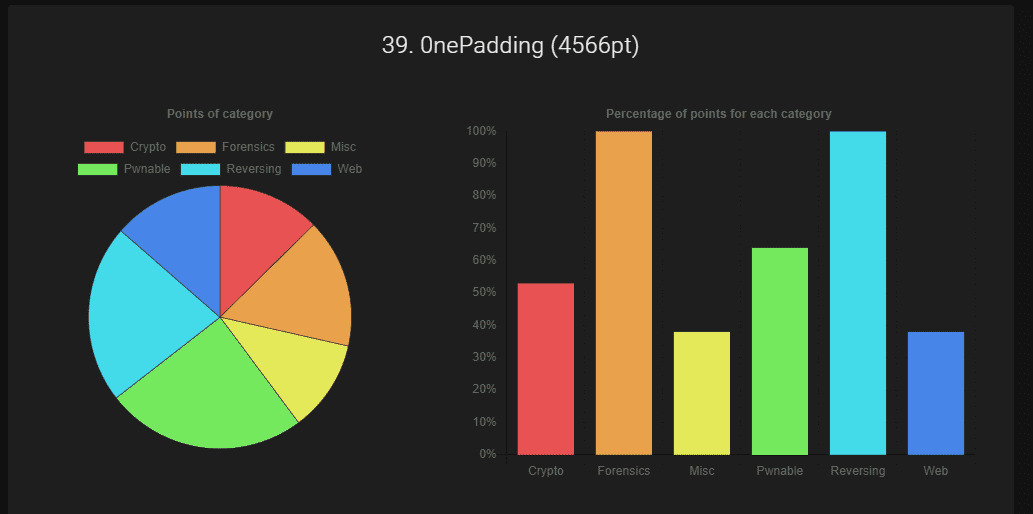
As usual I focused on Reversing and managed to clear everything, so here are writeups for selected problems.
Table of Contents
- javersing (Rev)
- Lua (Rev)
- theseus (Rev)
- web_assembly (Rev)
- lowkey_messedup (Forensic)
- web-64bps (Web)
- Wrap-up
javersing (Rev)
Decompiling javersing.jar with jd-gui yields the following:
import java.util.Scanner;

public class javersing {
  public static void main(String[] paramArrayOfString) {
    String str1 = "Fcn_yDlvaGpj_Logi}eias{iaeAm_s";
    boolean bool = true;
    Scanner scanner = new Scanner(System.in);
    System.out.println("Input password: ");
    String str2 = scanner.nextLine();
    str2 = String.format("%30s", new Object[] { str2 }).replace(" ", "0");
    for (byte b = 0; b < 30; b++) {
      if (str2.charAt(b * 7 % 30) != str1.charAt(b))
        bool = false;
    }
    if (bool) {
      System.out.println("Correct!");
    } else {
      System.out.println("Incorrect...");
    }
  }
}
Reading this code, it checks whether the character at index b * 7 % 30 of the input matches character b of str1.
So the following solver recovers the Flag by extracting the character of str1 at position b * 7 % 30:
base = "Fcn_yDlvaGpj_Logi}eias{iaeAm_s"
flag = [""] * 30

for i in range(30):
    flag[i*7%30] = base[i]

print("".join(flag))
Lua (Rev)
The challenge source code is written in Lua.
(~1300 lines, so I split it into a Gist.)
Skimming the code, function names, variable names, and values all appeared to be encrypted and embedded in the script.
Reading through it naively seemed painful, so I set a breakpoint around the likely decryption point.
I used a VSCode extension for debugging:
{
    // Use IntelliSense to learn about possible attributes.
    // Hover to view descriptions of existing attributes.
    // For more information, visit: https://go.microsoft.com/fwlink/?linkid=830387
    "version": "0.2.0",
    "configurations": [
        {
            "type": "lua",
            "request": "launch",
            "name": "Debug",
            "program": "${workspaceFolder}/CTF/2023/WaniCTF2023/Rev/Lua/main.lua",
            "consoleCoding": "utf8",
            "sourceCoding": "utf8",
            "luaexe": "/usr/bin/lua5.1",
            "outputCapture": [
                "print",
                "stderr",
            ],
        }
    ]
}
This challenge code could not be run on Lua 5.2+, so luaexe points to the installed lua5.1.
Setting a breakpoint at the following location in the challenge code yielded a Base64 string containing the decrypted Flag characters:
local CRYPTEDlIIllIII = "NGI2d3Q8YSp3KmsvYWc9K0c6dw=="
local CRYPTEDlIIlIIlI = function(a, b)
  local c = CRYPTEDlIIlIlIl(CRYPTEDlIIlIllI(a))
  local d = c["\99\105\112\104\101\114"](c, CRYPTEDlIIlIllI(b))
  return CRYPTEDlIIlIllI(d)
end
theseus (Rev)
Decompiling with Ghidra revealed that the Flag string is embedded in a region called compare, which is then verified against user input via a compare function.
Setting a breakpoint at the compare function was enough to retrieve the Flag.
web_assembly (Rev)
This was a WebAssembly challenge.
I started by decompiling the downloaded WASM binary with wasm-decompile:
./wasm-decompile index.wasm -o decompile.txtLooking at the output, there is a data section containing what appear to be split Flag fragments:
data d_3rinfinityFebruaryJanuaryJul(offset: 65536) =
  "3r!}\00infinity\00February\00January\00July\00Thursday\00Tuesday\00Wed"
  "nesday\00Saturday\00Sunday\00Monday\00Friday\00May\00%m/%d/%y\004n_3x\00"
  "-+   0X0x\00-0X+0X 0X-0x+0x 0x\00Nov\00Thu\00unsupported locale for st"
  "andard input\00August\00Oct\00Sat\000us\00Apr\00vector\00October\00Nov"
  "ember\00September\00December\00ios_base::clear\00Mar\00p_0n_Br\00Sep\00"
  "3cut3_Cp\00%I:%M:%S %p\00Sun\00Jun\00Mon\00nan\00Jan\00Jul\00ll\00Apri"
  "l\00Fri\00March\00Aug\00basic_string\00inf\00%.0Lf\00%Lf\00true\00Tue\00"
  "false\00June\00Wed\00Dec\00Feb\00Fla\00ckwajea\00%a %b %d %H:%M:%S %Y\00"
  "POSIX\00%H:%M:%S\00NAN\00PM\00AM\00LC_ALL\00LANG\00INF\00g{Y0u_C\00012"
  "3456789\00C.UTF-8\00.\00(null)\00Incorrect!\00Pure virtual function ca"
  "lled!\00Correct!! Flag is here!!\00feag5gwea1411_efae!!\00libc++abi: \00"
  "Your UserName : \00Your PassWord : \00\00\00\00\00\00L\04\01\00\02\00\00"
I could make a reasonable guess from this data alone, but in the end I used Chrome’s debug tools to trace the execution flow when the correct password is entered.
First, I identified that the code following $env.prompt_pass in func13 is the post-password-entry processing:
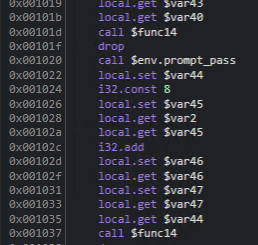
I then opened Chrome’s Memory Inspector:

This allowed me to identify the addresses where specific strings are stored:
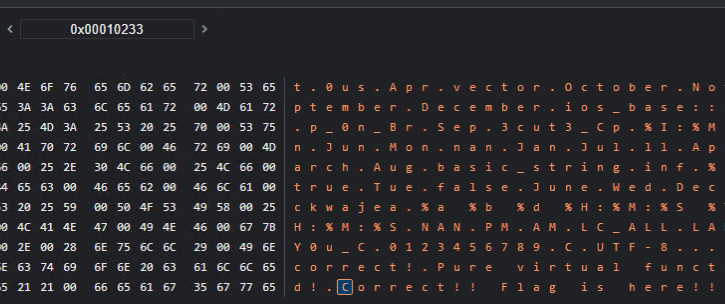
Reverse-looking up the addresses of strings that appeared to be Flag components, I found that func13 references them in the following order:
i32.const 65948
i32.const 66022
i32.const 65642
i32.const 65821
i32.const 65809
i32.const 65738
i32.const 65536
Entering each address into the Memory Inspector in order revealed the Flag.
lowkey_messedup (Forensic)
Opening the provided pcap file shows a series of USB packets containing Leftover Capture Data:
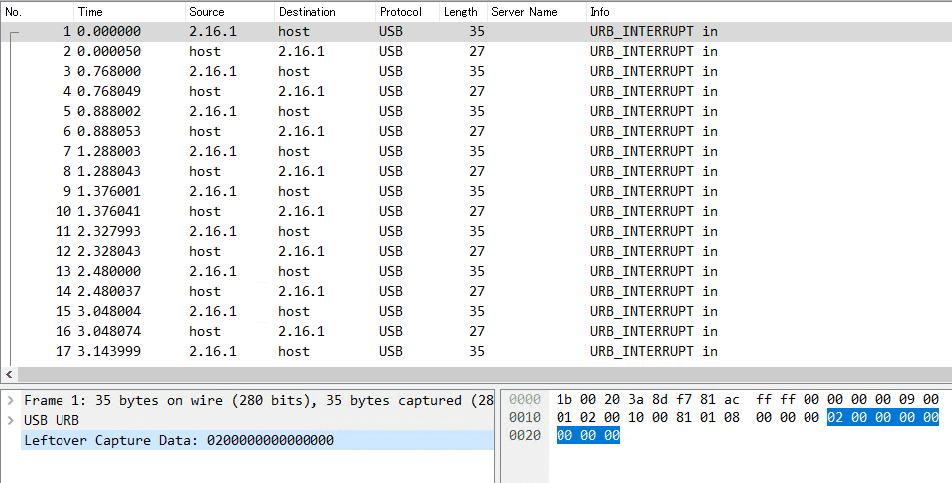
This type of traffic corresponds to USB Keystrokes as described in HackTricks:
Reference: USB Keystrokes - HackTricks
To extract the keystrokes, I ran:
# Extract usb.capdata
tshark -r ./chall.pcap -Y 'usb.capdata && usb.data_len == 8' -T fields -e usb.capdata | sed 's/../:&/g2' > keystrokes.txt

# Parse keystrokes from keystrokes.txt
python3 solver.py ./keystrokes.txt
This yielded FLAG{Big_br0ther_is_watching_y0ur_keyboard⌫⌫⌫⌫0ard}.
Since there were Backspace characters mid-stream, the actual input was FLAG{Big_br0ther_is_watching_y0ur_keyb0ard}.
The solver.py used:
#!/usr/bin/python
# -*- coding: utf-8 -*-

import sys

#More symbols in https://www.fileformat.info/search/google.htm?q=capslock+symbol&domains=www.fileformat.info&sitesearch=www.fileformat.info&client=pub-6975096118196151&forid=1&channel=1657057343&ie=UTF-8&oe=UTF-8&cof=GALT%3A%23008000%3BGL%3A1%3BDIV%3A%23336699%3BVLC%3A663399%3BAH%3Acenter%3BBGC%3AFFFFFF%3BLBGC%3A336699%3BALC%3A0000FF%3BLC%3A0000FF%3BT%3A000000%3BGFNT%3A0000FF%3BGIMP%3A0000FF%3BFORID%3A11&hl=en
KEY_CODES = {
    0x04:['a', 'A'],
    0x05:['b', 'B'],
    0x06:['c', 'C'],
    0x07:['d', 'D'],
    0x08:['e', 'E'],
    0x09:['f', 'F'],
    0x0A:['g', 'G'],
    0x0B:['h', 'H'],
    0x0C:['i', 'I'],
    0x0D:['j', 'J'],
    0x0E:['k', 'K'],
    0x0F:['l', 'L'],
    0x10:['m', 'M'],
    0x11:['n', 'N'],
    0x12:['o', 'O'],
    0x13:['p', 'P'],
    0x14:['q', 'Q'],
    0x15:['r', 'R'],
    0x16:['s', 'S'],
    0x17:['t', 'T'],
    0x18:['u', 'U'],
    0x19:['v', 'V'],
    0x1A:['w', 'W'],
    0x1B:['x', 'X'],
    0x1C:['y', 'Y'],
    0x1D:['z', 'Z'],
    0x1E:['1', '!'],
    0x1F:['2', '@'],
    0x20:['3', '#'],
    0x21:['4', '$'],
    0x22:['5', '%'],
    0x23:['6', '^'],
    0x24:['7', '&'],
    0x25:['8', '*'],
    0x26:['9', '('],
    0x27:['0', ')'],
    0x28:['\n','\n'],
    0x29:['␛','␛'],
    0x2a:['⌫', '⌫'],
    0x2b:['\t','\t'],
    0x2C:[' ', ' '],
    0x2D:['-', '_'],
    0x2E:['=', '+'],
    0x2F:['[', '{'],
    0x30:[']', '}'],
    0x32:['#','~'],
    0x33:[';', ':'],
    0x34:['\'', '"'],
    0x36:[',', '<'],
    0x37:['.', '>'],
    0x38:['/', '?'],
    0x39:['⇪','⇪'],
    0x4f:[u'→',u'→'],
    0x50:[u'←',u'←'],
    0x51:[u'↓',u'↓'],
    0x52:[u'↑',u'↑']
}


#tshark -r ./usb.pcap -Y 'usb.capdata && usb.data_len == 8' -T fields -e usb.capdata | sed 's/../:&/g2' > keyboards.txt
def read_use(file):
    with open(file, 'r') as f:
        datas = f.readlines()

    datas = [d.strip() for d in datas if d]
    cursor_x = 0
    cursor_y = 0
    lines = []
    output = ''
    skip_next = False
    lines.append("")

    for data in datas:
        shift = int(data.split(':')[0], 16) # 0x2 is left shift 0x20 is right shift
        key = int(data.split(':')[2], 16)

        if skip_next:
            skip_next = False
            continue

        if key == 0 or int(data.split(':')[3], 16) > 0:
            continue

        #If you don't like output get a more verbose output here (maybe you need to map new rekeys or remap some of them)
        if not key in KEY_CODES:
            #print("Not found: "+str(key))
            continue

        if shift != 0:
            shift=1
            skip_next = True

        if KEY_CODES[key][shift] == u'↑':
            lines[cursor_y] += output
            output = ''
            cursor_y -= 1

        elif KEY_CODES[key][shift] == u'↓':
            lines[cursor_y] += output
            output = ''
            cursor_y += 1

        elif KEY_CODES[key][shift] == u'→':
            cursor_x += 1

        elif KEY_CODES[key][shift] == u'←':
            cursor_x -= 1

        elif KEY_CODES[key][shift] == '\n':
            lines.append("")
            lines[cursor_y] += output
            cursor_x = 0
            cursor_y += 1
            output = ''

        elif KEY_CODES[key][shift] == '[BACKSPACE]':
            output = output[:cursor_x-1] + output[cursor_x:]
            cursor_x -= 1

        else:
            output = output[:cursor_x] + KEY_CODES[key][shift] + output[cursor_x:]
            cursor_x += 1

    if lines == [""]:
        lines[0] = output

    if output != '' and output not in lines:
        lines[cursor_y] += output

    return '\n'.join(lines)

if __name__ == '__main__':
    if len(sys.argv) < 2:
        print('Missing file to read...')
        exit(-1)
    sys.stdout.write(read_use(sys.argv[1]))
web-64bps (Web)
Haven’t touched Web challenges in a while!
The challenge server is configured with the following Dockerfile and nginx.conf:
FROM nginx:1.23.3-alpine-slim

COPY nginx.conf /etc/nginx/nginx.conf
COPY flag.txt /usr/share/nginx/html/flag.txt

RUN cd /usr/share/nginx/html && \
    dd if=/dev/random of=2gb.txt bs=1M count=2048 && \
    cat flag.txt >> 2gb.txt && \
    rm flag.txt
user nginx;
worker_processes auto;
error_log /var/log/nginx/error.log notice;
pid /var/run/nginx.pid;
events {
worker_connections 1024;
}
http {
include /etc/nginx/mime.types;
default_type application/octet-stream;
keepalive_timeout 65;
gzip off;
limit_rate 8; # 8 bytes/s = 64 bps
server {
listen 80;
listen [::]:80;
server_name localhost;
location / {
root /usr/share/nginx/html;
index index.html index.htm;
}
}
}The Flag text is appended to the end of a 2 GB random binary file, and Nginx’s limit_rate is set extremely low, making it practically impossible to download the full file.
The solution is to use HTTP Range requests (specifying Content-Range and Content-Length) to fetch only the bytes at a specific offset.
Reference: python - read file from server with some offset - Stack Overflow
This type of request can also be issued with curl’s -r option.
In this case, fetching roughly 200 bytes from offset 2147483603 to 2147483793 yielded the Flag:
curl -r 2147483603-2147483793 "https://64bps-web.wanictf.org/2gb.txt" -o flag.txtWrap-up
We were on pace to break the top 10 early on, but ran out of solvable problems mid-contest and stalled.
The competitive-programming-style Misc challenges were beyond my implementation speed, which was frustrating.
Maybe I should get back into competitive programming…