This page has been machine-translated from the original page.
The scripting feature available in the reverse engineering tool Ghidra is very powerful and quite nice, but when reading binaries in CTFs I had not really been making good use of it and ended up letting it go to waste.
Since useful tools should be used proactively, this time I decided to actually use Ghidra Script through a CTF challenge.
Ghidra Script is convenient, but there is fairly little beginner-friendly information, and if you cannot read the code or the reference, it can be hard to know what to do. I want this article to help bridge that gap.
(If you are doing reverse engineering, maybe the answer is simply to read the code yourself…)
Table of Contents
About Ghidra Scripting
By using Ghidra Script, you can automate searches within a binary, add comments, run analysis routines, and more.
Ghidra scripting runs through an interface called the Ghidra API, and it can be used from Java or Python.
In Python, you can run scripts not only from the Script Manager, but also through the interpreter.
However, the interpreter built into the Ghidra 10.2.3 that I am currently using is Jython-based and is not compatible with Python 3.
There is also a third-party module called Ghidrathon that lets you work with Python 3 instead of the built-in Python interpreter, but unfortunately (at least as far as the interpreter goes) it is not very comfortable to use, so in this article I will use the standard interpreter.
Note: For instructions on setting up Ghidrathon, see my earlier article Ghidra Environment Setup Notes for CTF.
Still, so that the code will continue to work as-is even if I move to Python 3 in the future, I will write it as much as possible in a Python 3 style.
About the Ghidra API
First, let us briefly organize the overall structure of the Ghidra API.
The interface to a program analyzed in Ghidra appears to be provided by the Program API.
Within Ghidra, this Program API is positioned as a lower-level layer, and access to the entire Program API is exposed through FlatProgramAPI.
There is also something called GhidraScript that extends FlatProgramAPI.
GhidraScript is provided as a subclass of FlatProgramAPI.
Reference: Program
Reference: FlatProgramAPI
Reference: GhidraScript
Summary of Frequently Used Classes
ghidra.program.flatapi.FlatProgramAPI
As mentioned above, when using Ghidra Script from Python, FlatProgramAPI is the main interface.
You can create an instance by passing as an argument the ghidra.program.database.ProgramDB object corresponding to the current program, which can be referenced from the interpreter as currentProgram.
This class has a large number of methods. For example, there is the getFunctionContaining method, which takes a ghidra.program.model.address.GenericAddress object such as the one referenced by currentAddress and returns the function that contains that address.
Other methods are also very useful, such as toAddr, which returns a GenericAddress object for an arbitrary offset.
# 以下で取得できるオブジェクト
fpapi = FlatProgramAPI(currentProgram)

# currentAddress が含まれる関数の FunctionDB オブジェクトを返す
func = fpapi.getFunctionContaining(currentAddress)

# 指定のオフセットの GenericAddress オブジェクトを返す
addr = fpapi.toAddr(0x10000)
Reference: FlatProgramAPI
ghidra.program.database.ProgramDB
The Program object that you can obtain with currentProgram is this class.
It is the top-level object in the Program API hierarchy.
It includes objects such as ListingDB, which you can obtain with the getListing function.
# 現在のプログラムの ListingDB オブジェクトを取得
listing = currentProgram.getListing()

# すべての関数へのアクセスを提供する FunctionManagerDB オブジェクトを取得
func_mgr = currentProgram.getFunctionManager()

# プログラムのバイナリコンテンツを扱える MemoryMapDB オブジェクトを取得
mem = currentProgram.getMemory()
Reference: Program
ghidra.program.database.function.FunctionDB
# 様々な関数から取得できる
func = fpapi.getFirstFunction() # 最初の関数を返す
func = fpapi.getFunctionContaining(currentAddress)

# 関数の先頭と末尾アドレスを持つ ghidra.program.model.address.AddressSet を返す
func_body = func.getBody()

# 先頭と末尾のアドレスの ghidra.program.model.address.GenericAddress オブジェクトを取得する
start = func.getEntryPoint()
end = func.getBody().getMaxAddress()
Reference: FunctionDB
ghidra.program.database.ListingDB
When you use ListingDB together with FunctionDB, you can obtain information including iterable disassembly results as an InstructionRecordIterator object.
# 特定の関数の
listing = currentProgram.getListing()
func_body = func.getBody()

# 関数内の命令を順に列挙する(line_instruct は InstructionDB オブジェクト)
for line_instruct in listing.getInstructions(func_body, True):
    print(line_instruct)
    print(line_instruct.toString())
    print(line_instruct.getMnemonicString())
    print(line_instruct.getNumOperands())
Reference: Listing
ghidra.program.model.address.GenericAddress
This class provides the Address interface.
In Ghidra, all addresses are represented as offsets of up to 64 bits.
# 指定のオフセットの GenericAddress オブジェクトを返す
addr = fpapi.toAddr(0x10000)

# GenericAddress からアドレスオフセットを long 型で取得
addr_offset = addr.getOffset()
hex(int(addr_offset))
Reference: GenericAddress
ghidra.program.model.address.AddressSet
AddressSet is an object composed of one or more address ranges, and it can also represent cases where a function’s code is allocated across multiple non-contiguous memory ranges.
# 関数の先頭と末尾アドレスを持つ ghidra.program.model.address.AddressSet を返す
func_body = func.getBody()

# AddressSet 内のアドレスは  AddressIterator オブジェクトで探索できる
for line_addr in func_body.getAddresses(True):
    print(line_addr)

# 逆順で列挙
for line_addr in func_body.getAddresses(False):
    print(line_addr)


# 指定の範囲で任意の AddressSet を取得する
from ghidra.program.model.address import Address, AddressSet
factory = currentProgram.getAddressFactory()

# 空の AddressSet を作成
addr_set = AddressSet()
start = factory.getAddress("0x1000")
end = start.add(0x1000);

# 指定の範囲の AddressSet を取得する
addr_set.add(start, end)
Reference: AddressSet
Hurry up! Wait!(Rev)
svchost.exe
Now that we have covered the minimum basics of Ghidra Script, let us solve an actual CTF challenge.
This time I solved a picoCTF challenge called Hurry up! Wait!.
First, I was given a file named svchost.exe, but its format was just a normal ELF.
I tried running it locally for now, but it failed with the error error while loading shared libraries: libgnat-7.so.1.
So instead, I decided to try static analysis first.
After identifying the main function and following the processing flow, I reached a point where an extremely large number of functions were being called, as shown below.
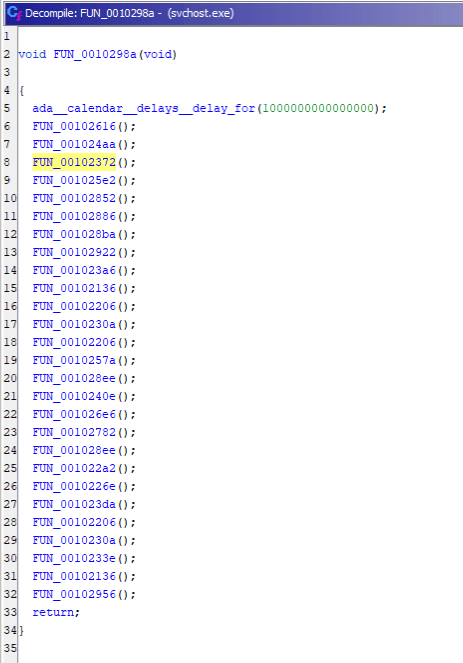
It turns out that this function prints the flag one character at a time—p, i, c, o, …—from top to bottom.
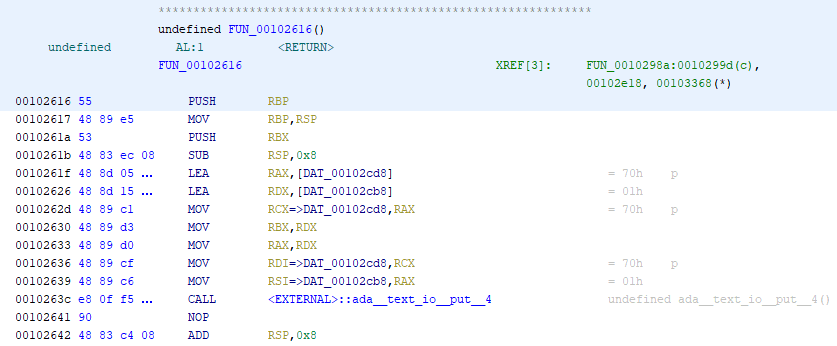
We will retrieve these functions with a Ghidra Script.
With the following script, you can get the list of functions called within a function and the order of the Call instructions.
from ghidra.program.model.listing import CodeUnit
from ghidra.program.model.symbol import SourceType

# currentAddress is ghidra.program.model.address.GenericAddress
program = getCurrentProgram()
fm = program.getFunctionManager()
function = fm.getFunctionAt(currentAddress)
calls = function.getCalledFunctions(monitor)
for c in calls:
    print(c)

# 呼び出し順序を維持する
for i in program.listing.getInstructions(function.body, True):
    print(i)
Reference: Function call sequence for each function · Issue #2134 · NationalSecurityAgency/ghidra
Based on the above, I created the following script.
from ghidra.program.flatapi import FlatProgramAPI

program = getCurrentProgram()
listing = currentProgram.getListing()
fpapi = FlatProgramAPI(currentProgram)
addr = fpapi.toAddr(0x10298a)
func = fpapi.getFunctionContaining(addr)

flag = ""

# 関数内の呼び出しアドレスを列挙する(呼び出し順ではない)
for p in program.listing.getInstructions(func.body, True):
    oprand = str(p.getDefaultOperandRepresentation(0))
    if oprand[:2] == "0x":
        # 呼び出し関数のオブジェクトを取得
        addr = fpapi.toAddr(int(oprand,16))
        func = fpapi.getFunctionContaining(addr)

        # 各関数のデータ参照位置まで移動
        start = func.getEntryPoint()
        end = func.getBody().getMaxAddress()
        instr = listing.getInstructionAt(start)
        for i in range(4):
            instr = instr.getNext()

        # データアドレスの取得
        operands = []
        i = 0
        while len(instr.getOpObjects(i)) > 0:
            i += 1
            for op in instr.getOpObjects(i):
                operands.append(op)
        d_addr = "".join(str(op) for op in operands)
        if d_addr[:2] == "0x":
            addr = fpapi.toAddr(int(d_addr,16))
            data = listing.getDataAt(addr)
            flag += chr(int(data.getValue().getValue()))


print(flag)
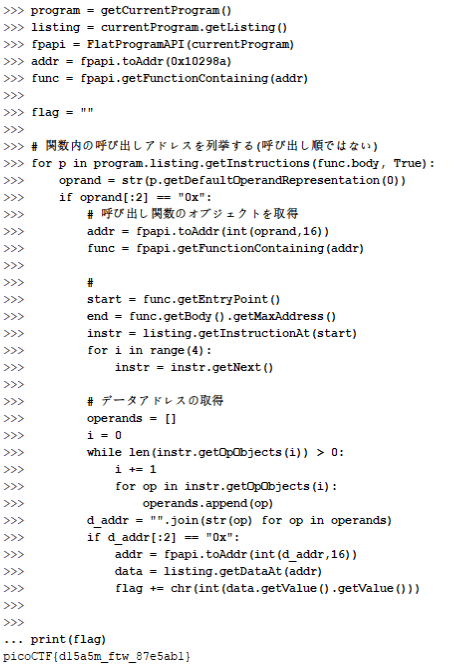
If you run the above script in the interpreter, you can retrieve the flag as shown below.
Useful Sites and References for Ghidra Scripting
I have collected below some sites and materials that are useful for Ghidra scripting.
Sample Scripts by Use Case
Previously, I had collected these sample scripts in this article, but because the number of them grew, I split them out into the following separate article.
Reference: Ghidra Script Samples by Use Case
Mastering Ghidra
Reference: O’Reilly Japan - Mastering Ghidra
Ghidra Practical Guide
Reference: Ghidra Practical Guide | Mynavi Books
Malware Analysis at Scale ~ Defeating EMOTET by Ghidra ~
These are slides by the author of Ghidra Practical Guide.
Reference: Malware Analysis at Scale ~ Defeating EMOTET by Ghidra ~