This page has been machine-translated from the original page.
The other day I wrote an article about setting up a honeypot on Azure, and this is a continuation of that.
As I begin actual honeypot operations, I decided to review the modules and honeypots that T-Pot runs, which I installed last time.
There were 25 types of honeypots built into T-Pot, so it took quite a while lol
About this Article
The content of this article is not intended to encourage acts that violate social order.
Please be aware that attempting attacks on environments other than your own or those you have permission to access may violate the “Act on Prohibition of Unauthorized Computer Access (Unauthorized Access Prohibition Act)“.
All statements are attributed to me personally, not to any organization I belong to.
Table of Contents
About T-Pot Consoles
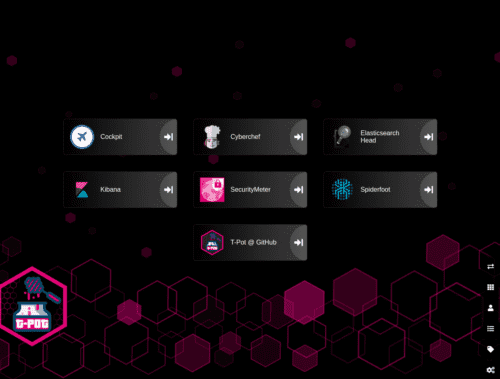
As seen at the end of the previous article, the T-Pot console after login looks like this.
This time I’ll look at each console.
Cockpit
“Cockpit” is a web console application that can monitor Linux system containers, storage, networks, services, logs, etc.
Reference: cockpit-project/cockpit: There’s code a goin’ on
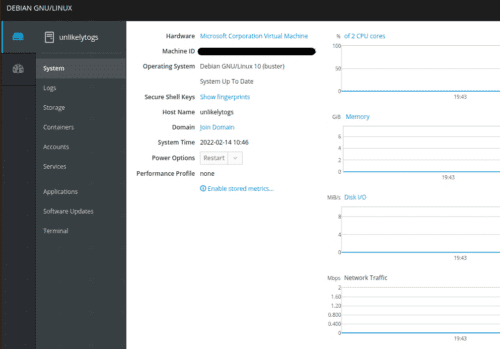
As shown in the image above, it visualizes system resource usage in real time.
Convenient.
Cyberchef
A local version of Cyberchef is available for use within the T-Pot machine.
Elasticserch Head
A web console for viewing and operating Elastic Search Clusters.
Reference: ElasticSearch Head
Reference: Free and Open Search: The Creators of Elasticsearch, ELK & Kibana | Elastic
Elastic Search is a distributed search and analytics engine.
In other words, it’s a tool for efficiently extracting necessary information from large amounts of information.
It seems Elasticsearch can be used for various purposes.
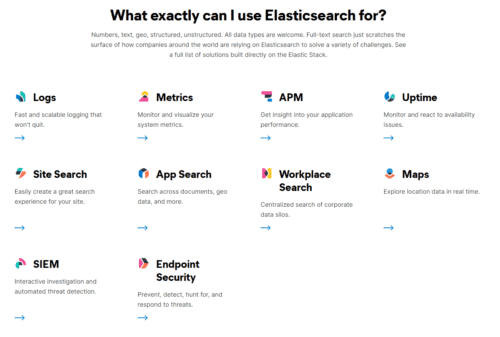
Reference: Elasticsearch: The Official Distributed Search & Analytics Engine | Elastic
I don’t fully understand it yet, but it seems Elasticsearch is composed of Clusters consisting of multiple Elasticsearch Server Nodes to increase search traffic and distribute data and writes.
I think Elasticsearch Head is probably a tool that can operate this Cluster.
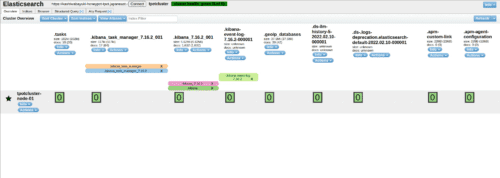
I’ll write about detailed usage in another article sometime.
Kibana
Kibana is a tool for visualizing data in conjunction with Elasticsearch.
You can perform data analysis and graphical visualization in Kibana using data stored in Elasticsearch.
In T-Pot, dashboards for visualizing information collected by each honeypot were created by default.
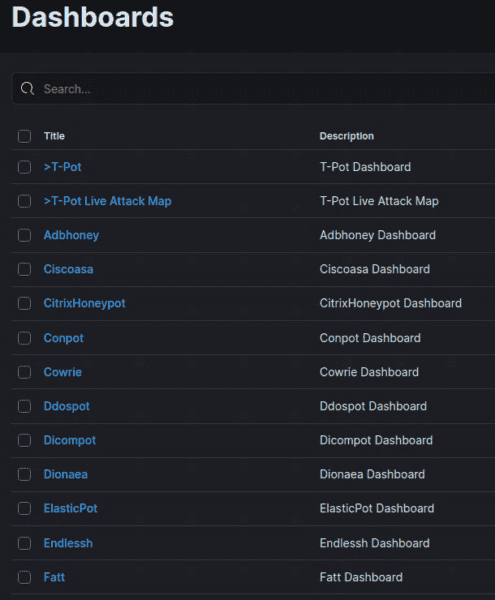
Since I haven’t opened T-Pot to the internet yet, no data has been collected, but once I actually start operating the honeypot, I’ll basically be looking at the information on this dashboard.
Security Meter
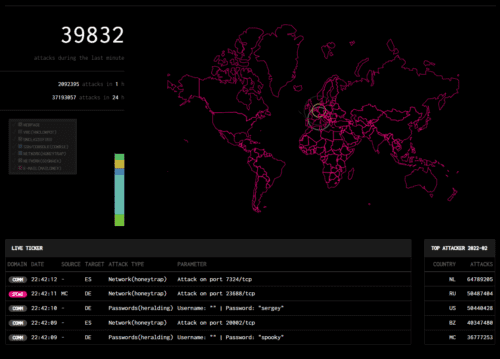
Security Meter seems to be a tool that collects and visualizes information observed by a module called security sensors from Telekom, the German company that developed T-Pot.
There are over 90 security sensors worldwide, and the information collected there is being used.
Reference: Security dashboard shows cyber attacks in real time | Deutsche Telekom
You can also access it from the following link without a T-Pot environment.
Reference: Sicherheitstacho
The UI looks so cool…
Spiderfoot
Spiderfoot is an OSS OSINT tool.
Reference: Home - SpiderFoot
It seems you can automate intelligent information gathering.
For example, it seems you could automate intelligent analysis such as associating information like IP addresses collected by honeypots, email addresses, URLs, etc. with specific attack campaigns.
Since I haven’t opened T-Pot to the internet yet and no data has been collected, I’ll try this once I start actual operation.
T-Pot@Github
T-Pot’s GitHub repository is linked.
Reference: GitHub - telekom-security/tpotce: T-Pot - The All In One Honeypot Platform
Types of Honeypots
It’s quite detailed, but the overall picture of T-Pot looks like this.
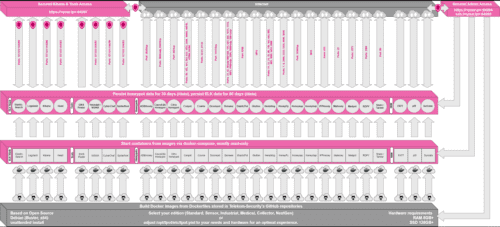
Reference image: tpotce/architecture.png at master · telekom-security/tpotce
The aforementioned tools and honeypots are each launched as containers managed by docker-compose.
This image shows only 18 honeypots, but as of this article’s writing (2022/02/14), T-Pot has a total of 25 honeypots.
Amazing.
Since we’re here, let’s roughly look at what each honeypot is.
ADBHoney
“ADBHoney” is a honeypot for Android Debug Bridge (ADB) over TCP/IP.
Reference: huuck/ADBHoney: Low interaction honeypot designed for Android Debug Bridge over TCP/IP
Android Debug Bridge (ADB) is a command-line tool that enables communication with Android devices.
You can perform debugging by connecting from an ADB client to a daemon (adbd) running on an Android device.
Reference: Android Debug Bridge (adb) | Android Developers
Normally, ADB on devices is only done through protected communication, but if the ADB service port is exposed unprotected to the internet, the device accepts arbitrary code execution from malicious attackers over the internet.
“ADBHoney” is a honeypot aimed at catching attacks targeting this open port 5555 with the purpose of downloading malware.
Cisco ASA honeypot
“Cisco ASA honeypot” is a honeypot that can detect attacks against CVE-2018-0101, which causes DoS and RCE.
It’s a vulnerability rated 10.0 in CVSSv3, and seems to be an exploitation of double-free.
So there are also honeypots aimed only at collecting attacks against specific vulnerabilities.
Reference: CVE - CVE-2018-0101
Reference: JVNDB-2018-001897 - JVN iPedia - Vulnerability Countermeasure Information Database
Honepot for CVE-2019-19781 (Citrix ADC)
“Honepot for CVE-2019-19781 (Citrix ADC)” is also a honeypot targeting a specific vulnerability.
It catches attacks aimed at exploiting CVE-2019-19781.
Reference: MalwareTech/CitrixHoneypot: Detect and log CVE-2019-19781 scan and exploitation attempts.
This vulnerability also allows RCE through exploitation.
It’s rated 9.8 in CVSSv3, and is a path traversal vulnerability.
Reference: Alert Regarding Vulnerabilities in Multiple Citrix Products (CVE-2019-19781)
Reference: JVNDB-2019-013490 - JVN iPedia - Vulnerability Countermeasure Information Database
CONPOT
“CONPOT” is a honeypot for catching attacks against industrial facilities.
It emulates complex infrastructure environments using common industrial control protocols.
I don’t really understand how it’s done specifically, but it seems it can also intentionally delay responses to simulate an environment under certain load.
Reference: Conpot
Cowrie
“Cowrie” seems to be able to monitor brute force attacks against SSH and Telnet, as well as attacker behavior after system intrusion.
Reference: cowrie/cowrie: Cowrie SSH/Telnet Honeypot https://cowrie.readthedocs.io
“Cowrie” can change what behavior it catches depending on the operation mode, but looking at T-Pot’s default configuration file, it seems SSH, Telnet, JSON format logging, etc. are all enabled.
Reference: tpotce/cowrie.cfg at master · telekom-security/tpotce
DDoSPot
“DDoSPot” is a honeypot for catching UDP-based DDoS attacks.
It supports the following services:
- DNS server
- NTP server
- SSDP server
- CHARGEN server
- Random/mock UDP server
Reference: aelth/ddospot: NTP, DNS, SSDP, Chargen and generic UDP-based amplification DDoS honeypot
Dicompot
“Dicompot” is a honeypot targeting A Digital Imaging and Communications in Medicine (DICOM).
Reference: nsmfoo/dicompot: DICOM Honeypot
DICOM seems to refer to the format of medical images taken with CT, MRI, CR, etc., and the communication protocol standards between medical imaging equipment that handles them.
Reference: DICOM - Wikipedia
I heard about this standard for the first time, but port 104 is known as a common communication port, and attacks targeting this port have also been observed.
Dionaea
“Dionaea” means Venus flytrap in Japanese, and is a honeypot aimed at collecting malware.
Reference: DinoTools/dionaea: Home of the dionaea honeypot
Malware acquired by “Dionaea” seems to be saved in the binaries directory.
Reference: Collecting Malware with Honeypot Dionaea, Scanning with API, and Visualizing the Results - Qiita
ElasticPot
“ElasticPot” is a honeypot that emulates a vulnerable Elasticsearch server and captures attacks against Elasticsearch.
Reference: Vesselin Bontchev / ElasticPot · GitLab
Endlessh
“Endlessh” is an SSH tarpit.
Reference: skeeto/endlessh: SSH tarpit that slowly sends an endless banner
What is a “tarpit”, you ask? It’s a system aimed at wasting attackers’ time and resources by intentionally delaying server-side responses.
Reference: Tarpit | Cybersecurity Information Bureau
“Endlessh” is an SSH tarpit that hangs attackers’ SSH clients and wastes up to several days of time.
Reference: Endlessh: an SSH Tarpit
Glutton
“Glutton” is a honeypot that functions as a proxy between attackers and other honeypots, and can capture and record attacker traffic using methods similar to MITM.
Reference: mushorg/glutton: Generic Low Interaction Honeypot
Reference: An analysis of Glutton — All Eating honeypot | by Muhammad Tayyab Sheikh (CS Tayyab) | Medium
Heralding
“Heralding” is a honeypot for capturing traffic and credentials when attackers attempt authentication.
Reference: johnnykv/heralding: Credentials catching honeypot
Using “Heralding”, you can capture authentication information used by attackers.
Reference: Heralding - Credentials catching honeypot - SecTechno
HellPot
“HellPot” is a honeypot based on Heffalump that sends unlimited streams to malicious attackers, overflowing their memory and storage.
Reference: yunginnanet/HellPot: HellPot is a portal to endless suffering meant to punish unruly HTTP bots.
It’s a different approach from SSH tarpit, but there are quite a few honeypots like this that are counter-traps against attackers.
Honeypots
“Honeypots” is a honeypot that can monitor network traffic, BOT activity, and credential information used by attackers.
“Honeypots” incorporates 23 different simple honeypots.
This is the first pattern I’ve seen where multiple honeypots are embedded within a honeypot that’s part of T-Pot.
HoneyPy
“HoneyPy” is a honeypot that can emulate TCP and UDP services and capture attacker activity.
Reference: foospidy/HoneyPy: A low to medium interaction honeypot.
Reference: Home - HoneyPy Docs
By adding services in units called plugins, it seems you can capture attacks against TCP/UDP services such as DNS and Telnet.
Reference: Plugins - HoneyPy Docs
HoneySAP
“HoneySAP” is a honeypot for capturing attacks against SAP systems.
Reference: SecureAuthCorp/HoneySAP: HoneySAP: SAP Low-interaction research honeypot
The documentation specifically states it can capture the purposes and techniques of attackers targeting SAP services.
Reference: HoneySAP: SAP Low-interaction honeypot — HoneySAP 0.1.2 documentation
Honeytrap
“Honeytrap” emulates TCP and UDP services and captures attacker network traffic.
IPP Honey
“IPP Honey” is an Internet Printing Protocol Honeypot.
Reference: Vesselin Bontchev / IPP Honey · GitLab
It emulates printers exposed to the internet and can capture attacks against printers.
Log4Pot
“Log4Pot” is a honeypot targeting the Log4Shell vulnerability “CVE-2021-44228”, which is currently having a major impact worldwide.
Reference: thomaspatzke/Log4Pot: A honeypot for the Log4Shell vulnerability (CVE-2021-44228).
This honeypot captures behavior related to Log4Shell exploitation.
Mailoney
“Mailoney” is an SMTP honeypot.
Reference: phin3has/mailoney: An SMTP Honeypot
It can capture attacks against SMTP ports.
medpot
“medpot” seems to be an HL7/FHIR honeypot.
Reference: schmalle/medpot: HL7 / FHIR honeypot
I wondered what HL7/FHIR was, but it seems to be a communication protocol being standardized for medical information exchange.
Reference: Research on HL7 FHIR
As expected, the medical field is quite targeted.
RDPY
“RDPY” is a honeypot that implements Microsoft RDP in Python.
Reference: citronneur/rdpy: Remote Desktop Protocol in Twisted Python
RedisHoneyPot
“RedisHoneyPot” is a honeypot targeting the Redis protocol.
Reference: cypwnpwnsocute/RedisHoneyPot: High Interaction Honeypot Solution for Redis protocol
Written in Golang.
SNARE and TANNER
“SNARE” and “TANNER” are web application honeypot sensors.
Reference: MushMush
“TANNER” seems to be a module that evaluates events captured by “SNARE” and determines how “SNARE” should respond to attackers.
Summary
For now, I’ve reviewed all the components of the latest version of T-Pot (as of 2022/02/15).
I want to start actual operation soon, but there still seems to be a lot to do.