This page has been machine-translated from the original page.
This article explains how to resolve the issue where Noriben fails to function properly in FlareVM 3.1, the malware analysis and forensics distribution I recently set up.
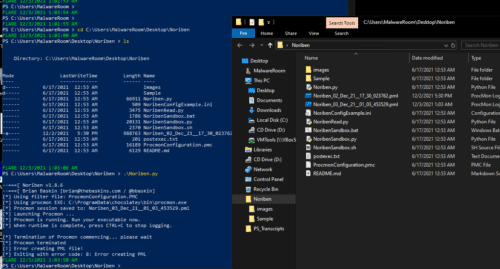
I documented the solution to the problem where PML files are generated in the Noriben folder, but even when running with full privileges, the files cannot be opened and result in an error.
By the way, the FlareVM environment setup procedure is documented here.
Table of Contents
Solution
Download Procmon separately from Sysinternals Suite - Windows Sysinternals | Microsoft Docs, place it in any folder, and set a PATH with higher priority than the default C:\ProgramData\chocolatey\bin\procmon.exe to resolve the issue.
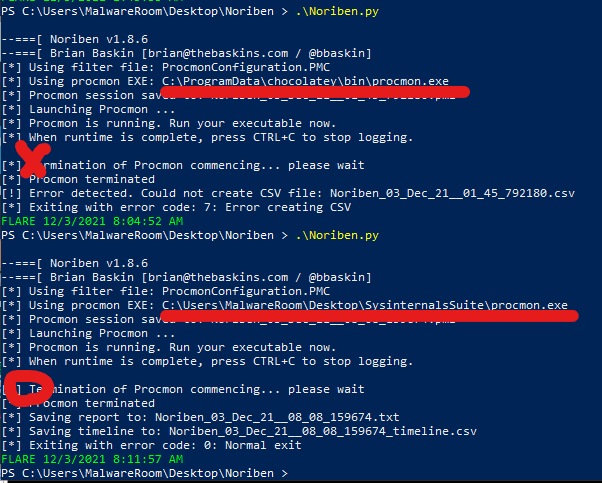
It seems that when using modules under chocolatey, files created by Procmon become inaccessible, causing errors.
In terms of module usage priority, the current directory has the highest priority, and the following issue mentions resolving it using this method.
However, in my environment and according to the following article, Noriben didn’t work properly just by placing the module in the current directory.
Reference: Noribenが「Error creating CSV」で動作しない問題の解決方法 - Qiita
Also, the above article mentions that the issue was resolved by setting default apps for txt/csv/pml, but this method didn’t solve the problem in my environment.
Configuration Details
Downloading Modules and Setting Environment Variables
I placed the Procmon downloaded from Sysinternals Suite - Windows Sysinternals | Microsoft Docs in a subfolder under Desktop and set the system environment variable.
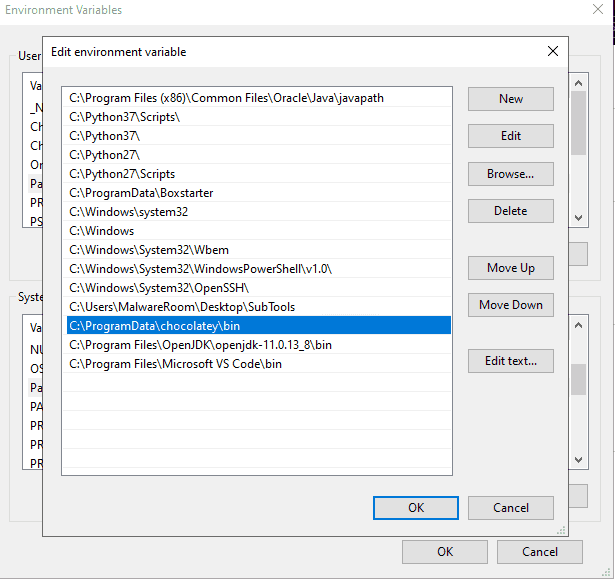
In this image, the SubTools folder containing Procmon is set one position above C:\ProgramData\chocolatey\bin\.
Reference: Windows 10でPath環境変数を設定/編集する:Tech TIPS - @IT
When changing environment variables from this screen, the change notification is sent via WM_SETTINGCHANGE, so it takes effect immediately and Noriben becomes usable.
If it doesn’t take effect, try restarting the OS.
PATH Search Order
When the system searches for executable modules, it explores PATHs in the following order:
- Current directory
- Environment variable PATH
- “HKLM\SOFTWARE\Microsoft\Windows\CurrentVersion\App Paths”
The PATHs set in the environment variable PATH are searched and prioritized from top to bottom.
Additionally, environment variables are divided into system environment variables and user environment variables, with PATHs set in system environment variables taking priority over those in user environment variables.
In this case, it was necessary to define the PATH of the folder containing Procmon in the system environment variables at a position above C:\ProgramData\chocolatey\bin\.
Summary
Noriben is now working in FlareVM.