This page has been machine-translated from the original page.
In this article, I summarize how to manage files other than published articles in a private repository for this blog, which I run with Gatsby and GitHub Pages.
With a GitHub Pro-or-higher subscription, you can publish only a specific branch from a private repository with GitHub Pages. However, I wanted even Free users to be able to manage files other than published articles in a private repository by using GitHub Actions, so I used the procedure in this article.
Table of Contents
Prerequisites
To follow this procedure, you need to prepare the following in advance.
- A GitHub account on the Free plan
- A private repository to manage the files for the published pages and GitHub Actions
- A public repository that contains only the published articles generated by a static site generator and is published with GitHub Pages
This article does not cover how to use the static site generator or how to configure GitHub Pages.
For how to use Gatsby locally and publish deployed articles on GitHub Pages, please see the following.
Set Up Automatic Gatsby Deployment
First, add the following GitHub Actions workflow to the private repository that manages Gatsby and the Markdown files.
name: deploy-and-push
on:
  push:
    branches:
      - main
jobs:
  deploy-and-push:
    runs-on: ubuntu-latest
    container: kashiwabayuki/gatsby-env

    steps:
    - uses: actions/checkout@v2
      with:
        submodules: true

    - name: Install npm
      env:
        NODE_OPTIONS: "--max_old_space_size=4096"
      run: npm install

    - name: Deploy
      run: gatsby clean && gatsby build --prefix-paths && echo 'kashiwaba-yuki.com' > public/CNAME

    - name: Pushes to public repository
      uses: cpina/github-action-push-to-another-repository@main
      env:
        SSH_DEPLOY_KEY: ${{ secrets.SSH_DEPLOY_KEY }}
      with:
        source-directory: './public'
        destination-github-username: 'kash1064'
        destination-repository-name: 'Kaeru-no-Himitsukichi-Public'
        user-email: kashiwabayuki@gmail.com
        target-branch: public
About the GitHub Action for Automatic Deployment
Let’s look at it from top to bottom.
First, the following section defines the action name and when it runs.
This time, I set it to run when a push is made to the main branch.
name: deploy-and-push
on:
  push:
    branches:
      - main
Next, inside the job it uses the ubuntu-latest workflow and prepares a custom deployment container called kashiwabayuki/gatsby-env.
deploy-and-push:
  runs-on: ubuntu-latest
  container: kashiwabayuki/gatsby-env
This container image was created using the procedure in the following article.
Then, using actions/checkout@v2, it clones the files from the main branch of the private repository into the container, installs the dependent node modules, and finally builds the articles with the Gatsby command.
Incidentally, it takes about 10 minutes in total to finish npm install and gatsby build. It is wasteful in terms of resources, and private repositories also have a 2000 minutes/month execution time limit, so I would like to shorten it, but I could not come up with a good idea.
This Action only runs when publishing an article, and there is no way it will exceed 2000 minutes, so I am leaving it on hold for now.
I plan to revisit it if I think of something later.
steps:
- uses: actions/checkout@v2
  with:
    submodules: true

- name: Install npm
  env:
    NODE_OPTIONS: "--max_old_space_size=4096"
  run: npm install

- name: Deploy
  run: gatsby clean && gatsby build --prefix-paths && echo 'kashiwaba-yuki.com' > public/CNAME
At this point, the files for publishing have been built in the ./public directory inside the container, so push the generated files to the public repository.
Push Files to Another Repository with GitHub Actions
When you push files to another repository with GitHub Actions, you need to set a deploy key with write access for the destination repository.
To register this key, generate a public/private key pair in advance with the ssh-keygen command.
Register the Private Key in the Repository That Runs GitHub Actions (Source Repository)
First, register the private key in the repository that runs GitHub Actions.
From [Secrets] > [Actions] in [Settings] on the GitHub repository page, you can register a new Secret.
At this time, set the Secret name to SSH_DEPLOY_KEY.
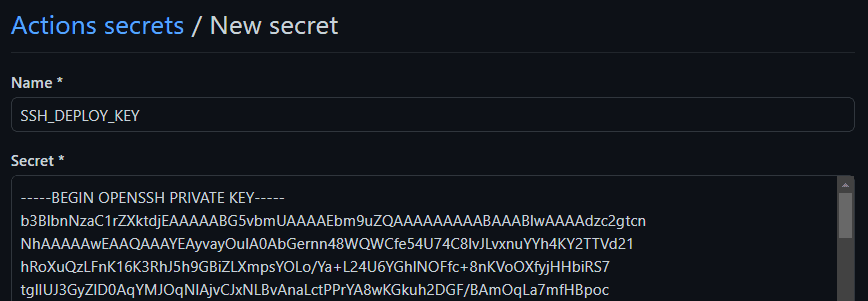
SSH_DEPLOY_KEY is used in the processing of cpina/github-action-push-to-another-repository@main, as shown below.
name: Pushes to public repository
	uses: cpina/github-action-push-to-another-repository@main
    env:
    	SSH_DEPLOY_KEY: ${{ secrets.SSH_DEPLOY_KEY }}
Register the Public Key in the Destination Repository
Next, register the public key as a Deploy key from [Settings] in the repository used for publishing.
You can choose any name you like for the Title, but you need to enable [Allow write access].
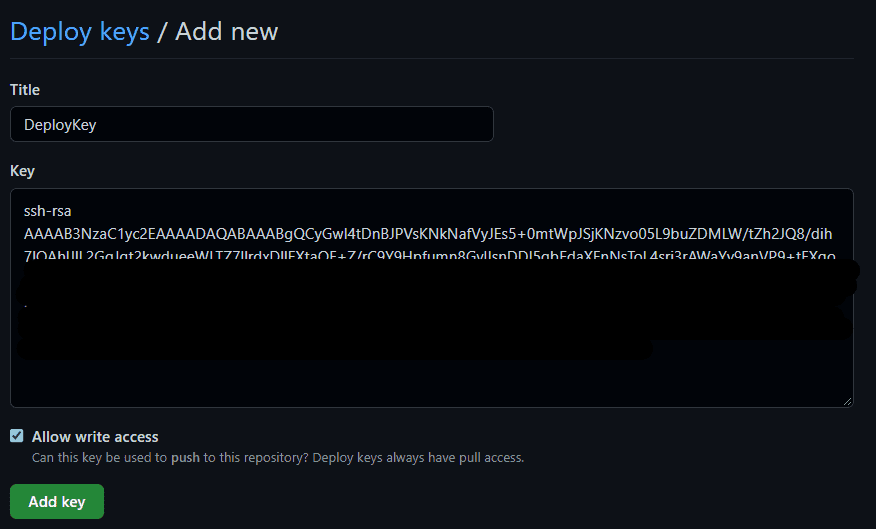
Now the private key and public key pair have been registered in the source repository and the publishing repository.
Push Files to Another Repository with GitHub Actions
Now that everything is ready, push the deployed Gatsby files to the public repository.
I could have written the process myself, but this time I decided to use cpina/github-action-push-to-another-repository.
I added the following step at the end of the steps.
name: Pushes to public repository
  uses: cpina/github-action-push-to-another-repository@main
  env:
    SSH_DEPLOY_KEY: ${{ secrets.SSH_DEPLOY_KEY }}
  with:
    source-directory: './public'
    destination-github-username: 'kash1064'
    destination-repository-name: 'Kaeru-no-Himitsukichi-Public'
    user-email: kashiwabayuki@gmail.com
    target-branch: public
As described in the following documentation, cpina/github-action-push-to-another-repository can use a private key stored in Secrets to push any directory inside the container to a specified repository.
Reference: Overview — github-action-push-to-another-repository documentation
This time it is configured to push the ./public directory, where Gatsby places the deployed files, to the public branch of the repository used for publishing.
Once the Action finishes successfully, updates to the private repository trigger a build, the built articles are pushed to the publishing branch of the public repository, and the blog on GitHub Pages is updated.
Summary
GitHub Actions are handy.