This page has been machine-translated from the original page.
While studying the behavior of code injection in Malware, I came to wonder how Malware identifies the PID to reference in the OpenProcess API.
The Injection section on MalAPI.io lists the following three APIs, and one implementation example appears to be using CreateToolhelp32Snapshot.
- CreateToolhelp32Snapshot
- Process32First
- Process32Next
So, this article summarizes how to enumerate process information in the system using the Win32 API’s CreateToolhelp32Snapshot.
Reference: Taking a Snapshot and Viewing Processes - Win32 apps | Microsoft Learn
Reference: Snapshots of the System - Win32 apps | Microsoft Learn
Table of Contents
- Preface
- APIs Used in This Article
- CreateToolhelp32Snapshot
- Process32First
- Process32Next
- Sample Program
- Summary
Preface
All content in this article is created based solely on publicly available information, published books, or results from testing in personal verification environments.
Related articles:
- WinDbg でダンプ解析、ライブデバッグを行う時のチートシート
- WinDbg で Windows のプロセス情報を読むためのメモ書き
- Knowledge Base for Advanced Debugging with GFlags Global Flags
APIs Used in This Article
CreateToolhelp32Snapshot
The CreateToolhelp32Snapshot function is a function that can take a snapshot of the heap, modules, and threads of a specified process.
This function retrieves information for the process with the PID specified in th32ProcessID, but if dFlags is given TH32CS_SNAPHEAPLIST, TH32CS_SNAPMODULE, TH32CS_SNAPMODULE32, or TH32CS_SNAPALL, it is ignored and returns information for all processes.
HANDLE CreateToolhelp32Snapshot(
  [in] DWORD dwFlags,
  [in] DWORD th32ProcessID
);
If this function executes successfully, it returns a handle to the obtained snapshot as the return value.
You can reference information within the snapshot using helper functions like Process32First described later.
Reference: CreateToolhelp32Snapshot function (tlhelp32.h) - Win32 apps | Microsoft Learn
I investigated what this function actually does by enumerating the functions it calls using WinDbg.
KERNEL32!CreateToolhelp32Snapshot
===>
call to KERNELBASE!GetCurrentProcessId (00007fff`3ae04080)
call to KERNEL32!ThpCreateRawSnap (00007fff`3d3fe480)
call to KERNEL32!BaseSetLastNTError (00007fff`3d3f30e0)
call to KERNEL32!BaseSetLastNTError (00007fff`3d3f30e0)
call to KERNEL32!ULongMult (00007fff`3d3ffd84)
call to KERNEL32!BaseSetLastNTError (00007fff`3d3f30e0)
call to KERNEL32!BaseSetLastNTError (00007fff`3d3f30e0)
call to KERNEL32!BaseSetLastNTError (00007fff`3d3f30e0)
call to KERNEL32!ULongMult (00007fff`3d3ffd84)
call to KERNEL32!BaseSetLastNTError (00007fff`3d3f30e0)
call to KERNEL32!BaseSetLastNTError (00007fff`3d3f30e0)
call to KERNEL32!ThpAllocateSnapshotSection (00007fff`3d3fd8c4)
call to KERNEL32!BaseSetLastNTError (00007fff`3d3f30e0)
call to KERNEL32!ThpProcessToSnap (00007fff`3d3fb274)
call to KERNEL32!BaseSetLastNTError (00007fff`3d3f30e0)
call to ntdll!NtClose (00007fff`3d66d230)
call to ntdll!NtUnmapViewOfSection (00007fff`3d66d590)
call to ntdll!NtFreeVirtualMemory (00007fff`3d66d410)
call to ntdll!RtlDestroyQueryDebugBuffer (00007fff`3d6a76d0)
call to ntdll!RtlDestroyQueryDebugBuffer (00007fff`3d6a76d0)
This alone doesn’t make things very clear, but the ThpCreateRawSnap function and ThpAllocateSnapshotSection function seem to be closely related to the snapshot retrieval process.
The ThpCreateRawSnap function appears to be retrieving system information and process information, judging by the names of the functions it calls.
KERNEL32!ThpCreateRawSnap
===>
call to ntdll!NtAllocateVirtualMemory (00007fff`3d66d350)
call to ntdll!NtQuerySystemInformation (00007fff`3d66d710)
call to ntdll!RtlDestroyQueryDebugBuffer (00007fff`3d6a76d0)
call to ntdll!RtlCreateQueryDebugBuffer (00007fff`3d6a7420)
call to ntdll!RtlQueryProcessDebugInformation (00007fff`3d6a78a0)
call to ntdll!NtFreeVirtualMemory (00007fff`3d66d410)
call to ntdll!RtlCreateQueryDebugBuffer (00007fff`3d6a7420)
call to ntdll!RtlQueryProcessDebugInformation (00007fff`3d6a78a0)
call to ntdll!NtFreeVirtualMemory (00007fff`3d66d410)
call to ntdll!RtlDestroyQueryDebugBuffer (00007fff`3d6a76d0)
Reference: NtQuerySystemInformation function (winternl.h) - Win32 apps | Microsoft Learn
Reference: NtQueryInformationProcess function (winternl.h) - Win32 apps | Microsoft Learn
Also, the ThpAllocateSnapshotSection function was calling the following functions.
I wonder if this is where the area to store the handle is actually allocated?
KERNEL32!ThpAllocateSnapshotSection
===>
call to KERNELBASE!BaseFormatObjectAttributes (00007fff`3addf5f0)
call to ntdll!NtCreateSection (00007fff`3d66d990)
call to ntdll!NtMapViewOfSection (00007fff`3d66d550)
Reference: NtCreateSection 関数 (ntifs.h) - Windows drivers | Microsoft Learn
Reference: NtCreateSection + NtMapViewOfSection Code Injection - Red Team Notes
Reference: MalAPI.io NtMapViewOfSection
Process32First
A function to retrieve information about the first process in the snapshot.
If the function executes successfully it returns True, and if it fails it returns False. (It returns an error value when no process exists, etc.)
The retrieved process information is stored in the area pointed to by the pointer address of the PROCESSENTRY32 (tlhelp32.h) structure given as the second argument.
BOOL Process32First(
  [in]      HANDLE           hSnapshot,
  [in, out] LPPROCESSENTRY32 lppe
);
The PROCESSENTRY32 (tlhelp32.h) structure contains the following information:
typedef struct tagPROCESSENTRY32 {
  DWORD     dwSize;
  DWORD     cntUsage;
  DWORD     th32ProcessID;
  ULONG_PTR th32DefaultHeapID;
  DWORD     th32ModuleID;
  DWORD     cntThreads;
  DWORD     th32ParentProcessID;
  LONG      pcPriClassBase;
  DWORD     dwFlags;
  CHAR      szExeFile[MAX_PATH];
} PROCESSENTRY32;
Reference: Process32First function (tlhelp32.h) - Win32 apps | Microsoft Learn
The functions being called are like this:
KERNEL32!Process32FirstW
===>
call to ntdll!NtMapViewOfSection (00007fff`3d66d550)
call to ntdll!NtUnmapViewOfSection (00007fff`3d66d590)
call to KERNEL32!memset (00007fff`3d408147)
call to ntdll!RtlSetLastWin32Error (00007fff`3d6207c0)
call to KERNEL32!BaseSetLastNTError (00007fff`3d3f30e0)
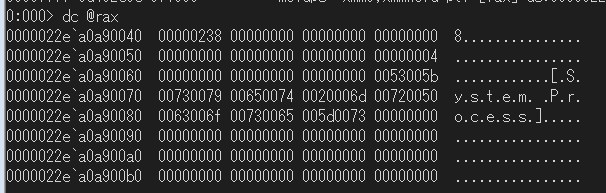
Looking in the debugger, data that appears to be from PROCESSENTRY32->szExeFile was stored at the pointer address given as an argument after the call to ntdll!NtMapViewOfSection.
Process32Next
Retrieves information about the next process recorded in the system snapshot.
This function can retrieve the PROCESSENTRY32 of the next process by providing the same snapshot handle given to the Process32FirstW function.
BOOL Process32Next(
  [in]  HANDLE           hSnapshot,
  [out] LPPROCESSENTRY32 lppe
);
Reference: PROCESSENTRY32 (tlhelp32.h) - Win32 apps | Microsoft Learn
The snapshot handle appears to have a buffer for identifying the currently referenced process information. When the Process32First function is executed, it points to the first one, and when the Process32Next function is executed, it sequentially points to the next process one by one.
Therefore, if you execute the Process32First function in the middle of a loop executing the Process32Next function, the reference buffer returns to the first one, causing the process to loop continuously.
Sample Program
I created a program that enumerates process information using these APIs.
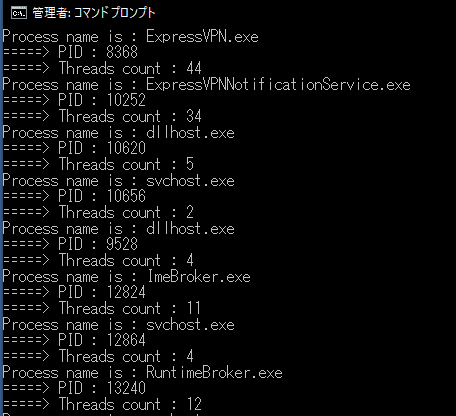
This program retrieves a snapshot of all processes by specifying TH32CS_SNAPPROCESS as an argument to the CreateToolhelp32Snapshot function, and loops the helper function to sequentially output the process name, PID, and number of running threads from the PROCESSENTRY32 structure of each process from the beginning.
#include <windows.h>
#include <tlhelp32.h>
#include <tchar.h>

#pragma comment(lib, "advapi32.lib")

int main() {

//HANDLE CreateToolhelp32Snapshot(
//[in] DWORD dwFlags,
//[in] DWORD th32ProcessID
//);

HANDLE hToolhelp32Snapshot = NULL;
hToolhelp32Snapshot = CreateToolhelp32Snapshot(
TH32CS_SNAPPROCESS,
NULL
);

if (hToolhelp32Snapshot == INVALID_HANDLE_VALUE) {
wprintf(L"ERROR: Could not get a Toolhelp32Snapshot\n");
wprintf(L"Faild with %u.\n", GetLastError());
return 1;
}

//typedef struct tagPROCESSENTRY32
//{
//DWORD   dwSize;
//DWORD   cntUsage;
//DWORD   th32ProcessID;
//ULONG_PTR th32DefaultHeapID;
//DWORD   th32ModuleID;
//DWORD   cntThreads;
//DWORD   th32ParentProcessID;
//LONG    pcPriClassBase;
//DWORD   dwFlags;
//CHAR    szExeFile[MAX_PATH];
//} PROCESSENTRY32;

/*BOOL Process32First(
[in]      HANDLE           hSnapshot,
[in, out] LPPROCESSENTRY32 lppe
);*/

PROCESSENTRY32 pe32;
pe32.dwSize = sizeof(PROCESSENTRY32);

if (Process32First(hToolhelp32Snapshot, &pe32)) {
do {
wprintf(L"Process name is : %s\n", pe32.szExeFile);
wprintf(L"=====> PID : %d\n", pe32.th32ProcessID);
wprintf(L"=====> Threads count : %d\n", pe32.cntThreads);
} while (Process32Next(hToolhelp32Snapshot, &pe32));
wprintf(L"Got all process entries.\n");
}
else {
wprintf(L"ERROR: Could not get the first PROCESSENTRY32.\n");
wprintf(L"Faild with %u.\n", GetLastError());
CloseHandle(hToolhelp32Snapshot);
return 1;
}

return 0;
}
The execution result looked like this:
I’m running it from a command prompt launched with administrator privileges, but it also worked effectively at Medium Integrity.
Summary
It seems that when retrieving process information on Windows, you need to first obtain a snapshot object and then pass it to the program.
I wonder if Task Manager uses the same implementation?
I’d like to attach a debugger and investigate next time.