This page has been machine-translated from the original page.
I have been reverse-engineering my own modules in order to improve my reverse-engineering skills and become proficient with WinDbg.
This time I will analyze a Windows socket communication program implemented in C.
Note: This program was created for verification purposes and does not implement error handling, so it is not intended for production use.
Table of Contents
The Program
The program created for this article is available in the following repository.
Reference: Try2WinDbg/wintcpudp.c
It implements the following two functions:
- Establish a TCP connection and send a POST request
- Send data over UDP
The following header files are used:
#include <winsock2.h>
#include <stdio.h>
#include <stdlib.h>
#include <stdint.h>

#pragma comment(lib, "ws2_32.lib")

// Use when handling IP addresses, etc.
// #include <ws2tcpip.h>
// #include <iphlpapi.h>
// #pragma comment(lib, "iphlpapi.lib")

// When used alongside winsock2.h, always place this include after winsock2.h
// #include <windows.h>
winsock2
winsock2.h is a header file used when implementing Windows Sockets 2 and related functionality.
It contains API functions and other definitions used for socket communication on Windows.
Reference: Winsock2.h header - Win32 apps | Microsoft Docs
Reference: Windows Sockets 2 - Win32 apps | Microsoft Docs
Reference: Winsock - Wikipedia
The first step in Windows socket programming is to initialize the WSADATA structure using the WSAStartup function defined in winsock2.h.
Reference: WSADATA (winsock.h) - Win32 apps | Microsoft Docs
Reference: WSAStartup function (winsock2.h) - Win32 apps | Microsoft Docs
WSAStartup takes two arguments: the Windows Sockets version to use, and the WSADATA structure to initialize.
One slightly tricky point is that the first argument to WSAStartup is a 16-bit unsigned integer (WORD type), where the lower 8 bits specify the major version and the upper 8 bits specify the minor version of Windows Sockets.
For this reason, the MAKEWORD macro is used to construct the argument value.
Reference: MAKEWORD macro (Windows) | Microsoft Docs
On success, WSAStartup returns 0; on failure, it returns one of the defined error codes.
Although not included in this implementation, error handling for the WSAStartup return value should be added in practice.
pragma comment()
When you try to compile source files that include headers like winsock2.h, you may encounter errors such as error LNK2019: unresolved external symbol.
win_tcp_udp.obj : error LNK2019: unresolved external symbol __imp__closesocket@4 referenced in function _send_http_post
win_tcp_udp.obj : error LNK2019: unresolved external symbol __imp__connect@12 referenced in function _send_http_post
win_tcp_udp.obj : error LNK2019: unresolved external symbol __imp__htons@4 referenced in function _send_http_post
win_tcp_udp.obj : error LNK2019: unresolved external symbol __imp__inet_addr@4 referenced in function _send_http_post
win_tcp_udp.obj : error LNK2019: unresolved external symbol __imp__send@16 referenced in function _send_http_post
win_tcp_udp.obj : error LNK2019: unresolved external symbol __imp__sendto@24 referenced in function _send_udp
win_tcp_udp.obj : error LNK2019: unresolved external symbol __imp__socket@12 referenced in function _send_http_post
win_tcp_udp.obj : error LNK2019: unresolved external symbol __imp__WSAStartup@8 referenced in function _send_http_post
win_tcp_udp.obj : error LNK2019: unresolved external symbol __imp__WSACleanup@0 referenced in function _send_http_post
.\build\bin\win_tcp_udp.exe : fatal error LNK1120: 9 unresolved externals
This occurs when the compiler cannot link the required library.
To resolve this, do one of the following:
- If developing in Visual Studio, go to the project properties under [Configuration Properties] > [Linker] > [Input] and add the library causing the reference error to [Additional Dependencies].
- Add
#pragma comment(lib, "<library-name>.lib")to the source.
Since I am compiling the C file directly with cl.exe without creating a project, I will use pragma.
pragma is a directive that instructs the compiler to perform a specific action at compile time.
In particular, using the comment pragma with the lib argument lets you specify from the source code which library to link at compile time.
Reference: C Pragmas | Microsoft Docs
Reference: comment pragma | Microsoft Docs
Therefore, adding #pragma comment(lib, "ws2_32.lib") avoids the linker error for winsock2.h.
ws2tcpip.h
Not needed for this implementation, but ws2tcpip.h is a header file required for TCP/IP communication that defines structures related to IP address retrieval.
Reference: Creating a Basic Winsock Application - Win32 apps | Microsoft Docs
Reference: Ws2Tcpip.h header - Win32 apps | Microsoft Docs
The POST Request Sending Function
The function that sends a POST request to an arbitrary address is as follows:
int send_http_post(unsigned char *senddata){
    char destination[] = RSERVER;
    unsigned short port = 80;
    unsigned char httppath[20] = "/upload";
    char httphost[] = LSERVER;
    int dstSocket;
    int result;

    char toSendText[MAXBUF];
    char postdata[MAXBUF];
    int read_size;

    // Initialize WSADATA
    WSADATA data;
    WSAStartup(MAKEWORD(2, 0), &data);

    // Set AF_INET
    struct sockaddr_in dstAddr;
    memset(&dstAddr, 0, sizeof(dstAddr));
    dstAddr.sin_port = htons(port);
    dstAddr.sin_family = AF_INET;
    dstAddr.sin_addr.s_addr = inet_addr(destination);

    // Start socket communication (specify SOCK_STREAM)
    printf("\t==>Creating socket...\n");
    dstSocket = socket(AF_INET, SOCK_STREAM, 0);
    if (dstSocket < 0){
        printf("\t==>Creating socket failed!!\n");
        return 0;
    }
    printf("\t==>Creating socket succeeded!!\n");

    // Establish connection
    printf("\t==>Connecting...\n");
    result = connect(dstSocket, (struct sockaddr *) &dstAddr, sizeof(dstAddr));
    if (result < 0){
        printf("\t==>Binding failed!!\n");
        return 0;
    }
    printf("\t==>Connecting succeeded!!\n");

    // Build HTTP request
    printf("\t==>Creating HTTP request...\n");
    sprintf(toSendText, "POST %s HTTP/1.1\r\n", httppath);
    send(dstSocket, toSendText, strlen(toSendText) , 0);

    sprintf(toSendText, "Host: %s:%d\r\n", httphost, port);
    send(dstSocket, toSendText, strlen(toSendText), 0);

    sprintf(postdata, "%s\r\n", senddata);
    sprintf(toSendText, "Content-Length: %d\r\n", strlen(postdata));
    send(dstSocket, toSendText, strlen(toSendText), 0);

    sprintf(toSendText, "\r\n");
    send(dstSocket, toSendText, strlen(toSendText), 0);

    // Send HTTP request
    printf("\t==>Sending HTTP request...\n");
    send(dstSocket, postdata, strlen(postdata), 0);

    // Close connection
    printf("\t==>HTTP request is sent!!\n");
    closesocket(dstSocket);
    WSACleanup();

    return 0;
}
Initializing WSADATA
First, initialize the WSADATA structure required for socket communication using the WSAStartup function.
Windows Sockets version 2.0 is specified.
// Initialize WSADATA
WSADATA data;
WSAStartup(MAKEWORD(2, 0), &data);
Specifying the Destination
// Set AF_INET
struct sockaddr_in dstAddr;
memset(&dstAddr, 0, sizeof(dstAddr));
dstAddr.sin_port = htons(port);
dstAddr.sin_family = AF_INET;
dstAddr.sin_addr.s_addr = inet_addr(destination);
After initializing the WSADATA structure, create a sockaddr_in structure and set the address family, destination address, and port number.
The official documentation shows a method using the addrinfo structure, but this implementation uses sockaddr_in.
Reference: Creating a Socket for the Client - Win32 apps | Microsoft Docs
The sockaddr_in structure is only for IPv4 communication; use sockaddr_in6 for IPv6.
The addrinfo structure used in the official documentation works with both IPv4 and IPv6 sockets.
Unless there is a specific reason, using addrinfo should be fine.
Reference: c - What is the difference between struct addrinfo and struct sockaddr - Stack Overflow
AF_INET is specified as the address family.
AF_INET is the address family for IPv4 communication.
Reference: sockets - What is AF_INET, and why do I need it? - Stack Overflow
Creating the Socket
Create a socket using the socket function.
// Start socket communication (specify SOCK_STREAM)
printf("\t==>Creating socket...\n");
dstSocket = socket(AF_INET, SOCK_STREAM, 0);
if (dstSocket < 0){
    printf("\t==>Creating socket failed!!\n");
    return 0;
}
printf("\t==>Creating socket succeeded!!\n");
Because this is a TCP connection, SOCK_STREAM is specified as the second argument.
Reference: socket function (winsock2.h) - Win32 apps | Microsoft Docs
The third argument is the protocol parameter, which defines the protocol to use.
Here TCP is not explicitly specified; 0 is passed instead.
This means the caller does not specify a protocol.
Reference: c - what does 0 indicate in socket() system call? - Stack Overflow
Establishing the Connection
Next, use the connect function to establish the socket connection.
// Establish connection
printf("\t==>Connecting...\n");
result = connect(dstSocket, (struct sockaddr *) &dstAddr, sizeof(dstAddr));
if (result < 0){
    printf("\t==>Binding failed!!\n");
    return 0;
}
printf("\t==>Connecting succeeded!!\n");
The connect function performs the client-side connection in socket communication.
Reference: Connecting to a Socket - Win32 apps | Microsoft Docs
This function establishes a TCP connection with the bound socket server.
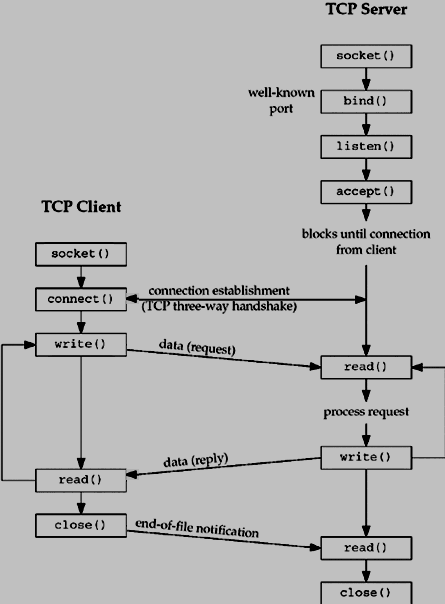
Image source: Unix Socket - Client Server Model
Sending the HTTP Request
The pre-built POST request data is sent to the server using the send function.
// Send HTTP request
printf("\t==>Sending HTTP request...\n");
send(dstSocket, postdata, strlen(postdata), 0);
Although not implemented here, receiving a response would use the recv function.
Reference: Sending and Receiving Data on the Client - Win32 apps | Microsoft Docs
The UDP Communication Function
The function that performs UDP communication is as follows:
int send_udp(unsigned char *senddata)
{
    char destination[] = RSERVER;
    unsigned short port = 80;
    char httphost[] = LSERVER;
    int dstSocket;
    int result;

    char toSendText[MAXBUF];
    int read_size;

    // Initialize WSADATA
    WSADATA wsaData;
    WSAStartup(MAKEWORD(2, 0), &wsaData);

    struct sockaddr_in dstAddr;
    memset(&dstAddr, 0, sizeof(dstAddr));
    dstAddr.sin_port = htons(port);
    dstAddr.sin_family = AF_INET;
    dstAddr.sin_addr.s_addr = inet_addr(destination);

    // Start socket communication (specify SOCK_DGRAM)
    printf("\t==>Creating socket...\n");
    dstSocket = socket(AF_INET, SOCK_DGRAM, 0);
    if (dstSocket < 0)
    {
        printf("\t==>Creating socket failed!!\n");
        return 0;
    }
    printf("\t==>Creating socket succeeded!!\n");

    // Send UDP packet
    printf("\t==>Sending UDP...\n");
    sendto(dstSocket, senddata, strlen(senddata), 0, (SOCKADDR *)&dstAddr, sizeof(dstAddr));

    printf("\t==>UDP is sent!!\n");
    closesocket(dstSocket);
    WSACleanup();

    return 0;
}
The implementation is essentially the same as the TCP version, so details are omitted.
The differences are: the socket is created with SOCK_DGRAM for UDP, and since there is no three-way handshake, connect is not used; data is transferred with sendto instead.
Verifying Communication
I ran this program and used Wireshark to verify that communication was actually taking place.
First, I confirmed that the POST request was sent:
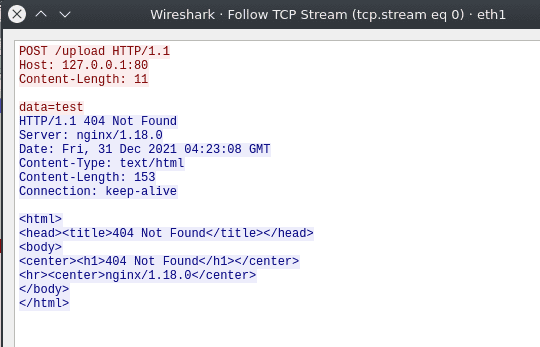
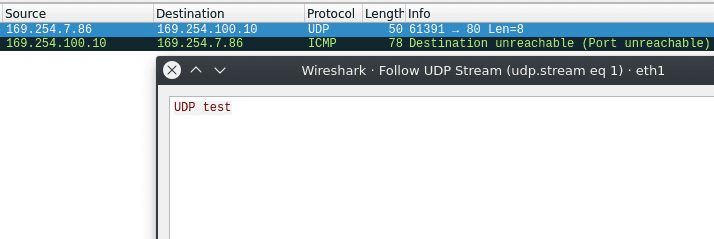
I also confirmed that the UDP packet was received:
Now that I’ve confirmed the program works correctly, let’s reverse-engineer it.
Reversing
Decompiling with Ghidra
I started by locating the main function from the entry function.
I then identified the send_http_post and send_udp functions, and set the image base to the value loaded when win_tcp_udp.exe was executed.
Capturing a TTD Trace with WinDbg
To facilitate analysis, I captured a TTD trace of the compiled program.
The TTD trace capture procedure is described in the following article:
Reference: Introduction to a New Debugging Method with WinDbg Preview Time Travel Debugging
The captured trace file is also available in the following repository:
Reference: kash1064/Try2WinDbg
Tracing the Socket Internals
As the first analysis target, I decided to trace the behavior of the socket function.
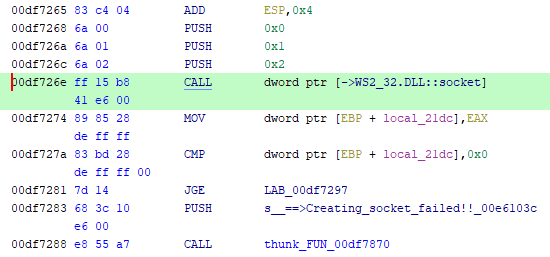
From Ghidra’s disassembly output, I set a breakpoint at 0xdf726e and advanced execution with the g command.
> bu 0x00df726e
> g
Stepping into the socket function, I could see that it handles an object with Prolog in its name.
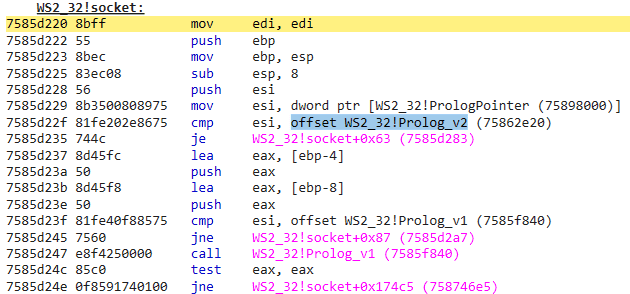
I searched for information about Prolog for a while but couldn’t find anything relevant, so I skipped it for now.
If anyone has more insight, please let me know.
The Created Socket
Next, let’s look at the line immediately after the socket function call.
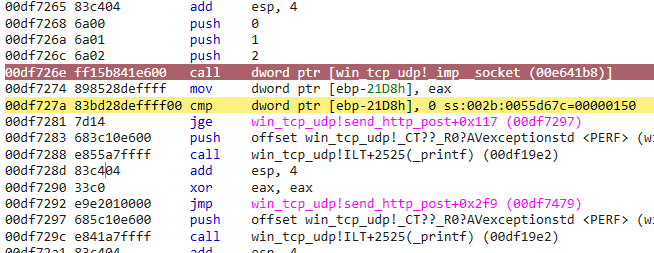
The socket function returns a file descriptor pointing to the created socket.
Looking at the EAX register, the following value was stored:
> r eax
eax=00000150
Reference: socket function (winsock2.h) - Win32 apps | Microsoft Docs
This file descriptor handle cannot be retrieved in TTD, but with live debugging it can be examined using the !handle command:
> r eax
eax=00000108

> !handle 108 f
Handle 108
  Type         	File
  Attributes   	0
  GrantedAccess	0x16019f:
         ReadControl,WriteDac,Synch
         Read/List,Write/Add,Append/SubDir/CreatePipe,ReadEA,WriteEA,ReadAttr,WriteAttr
  HandleCount  	2
  PointerCount 	65534
  No Object Specific Information available
To inspect the file object contents, kernel debugging would probably be required (I think).
Reading the sockaddr_in Structure
The next target for analysis corresponds to the following section of the source code:
struct sockaddr_in dstAddr;

memset(&dstAddr, 0, sizeof(dstAddr));
dstAddr.sin_port = htons(port);
dstAddr.sin_family = AF_INET;
dstAddr.sin_addr.s_addr = inet_addr(destination);
This allocates a sockaddr_in memory region and sets the port number, address family, and IP address.
The sockaddr_in structure has the following layout.
The in_addr structure stores an IPv4 address in 4 bytes.
sin_zero is a system-reserved field and is zero-padded.
typedef struct sockaddr_in {
#if ...
  short          sin_family;
#else
  ADDRESS_FAMILY sin_family;
#endif
  USHORT         sin_port;
  IN_ADDR        sin_addr;
  CHAR           sin_zero[8];
} SOCKADDR_IN, *PSOCKADDR_IN;
Reference: SOCKADDR_IN (ws2def.h) - Win32 apps | Microsoft Docs
Reference: in_addr (winsock2.h) - Win32 apps | Microsoft Docs
Note that sin_port and sin_addr require values in network byte order, which is why the source code uses the htons and inet_addr functions.
Reference: htons function (winsock.h) - Win32 apps | Microsoft Docs
Reference: inet_addr function (winsock2.h) - Win32 apps | Microsoft Docs
With the structure layout understood, I set a breakpoint at 0xdf7227, the address after the memset call.
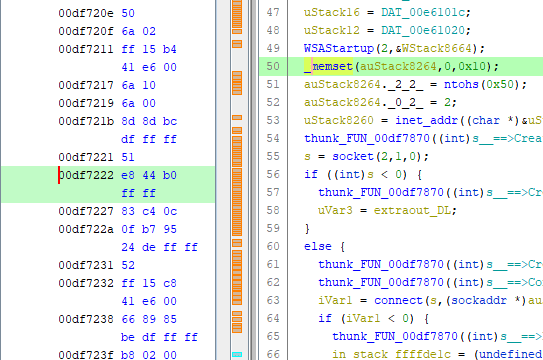
Checking the memset return value, I found that the allocated memory starts at 0x55d810.
> r eax
eax=0055d810
Looking at the memory, it appears that a 16-byte region has values set.
The sockaddr_in structure uses 2 bytes each for the port and address family, 4 bytes for the IP address, and 8 bytes for the system-reserved field.
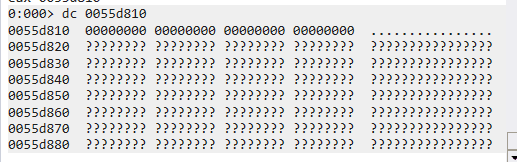
Advancing execution, the port number, address family, and IP address were written into the previously empty memory region.
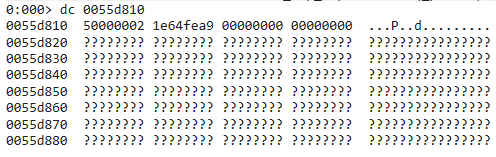
This was a bit hard to read, so I changed the display format:
> dyb 0055d810
          76543210 76543210 76543210 76543210
          -------- -------- -------- --------
0055d810  00000010 00000000 00000000 01010000  02 00 00 50
0055d814  10101001 11111110 01100100 00011110  a9 fe 64 1e
0055d818  00000000 00000000 00000000 00000000  00 00 00 00
0055d81c  00000000 00000000 00000000 00000000  00 00 00 00
Port 80 is stored as 0x0050 in network byte order (big-endian).
The 4 bytes starting at 0x55d814 contain the IP address, also in network byte order.
Summary
I spent the end of the year doing socket programming and reverse-engineering.
Hope the new year brings good things.