This page has been machine-translated from the original page.
In this chapter, we will actually verify how the communication filtering functionality using WFP, explained in the previous chapter, works.
To verify the behavior, we will use a user-mode program that can add various filters to a specified layer.
The source code for the user-mode program used in this sample is published in the following repository.
URL: https://github.com/kash1064/book06-wfp-samples
Table of Contents
Overview of the Sample Program
The code for the sample program (UserModeWFPFilter) downloaded from the repository above can be built with Visual Studio 2022.
This program has the following two functions.
- Add filters to a specific layer according to settings hardcoded in the program
- Delete all filters registered by the program
All filters registered by this program are associated with its own WFP provider, Simple WFP User-Mode Provider.
To restore the configuration, the program deletes all filters associated with this provider.
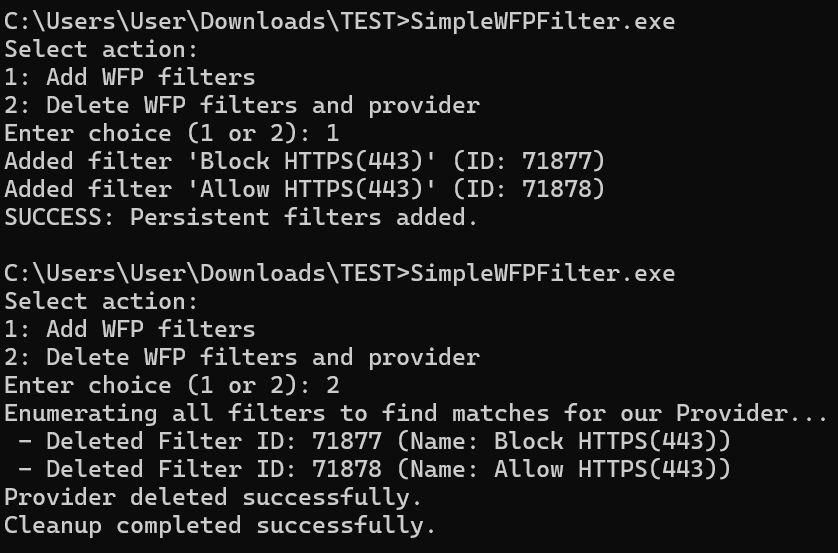
The following is a screenshot of adding and deleting filters with this sample program.
Defining the Filters Added by the Program
In this sample program, filters can be added by adding elements to the rules array of the FILTER_RULES structure defined as a global variable.
struct FILTER_RULES
{
	const GUID filterKey;
	const GUID layerKey;
	const GUID subLayerKey;
	const wchar_t* name;
	const wchar_t* description;
	UINT16 port;
	const wchar_t* appPath;
	FWP_ACTION_TYPE action;
	UINT64 weight;
};

const FILTER_RULES rules[] = {
	{ FILTER_KEY_1, FWPM_LAYER_ALE_AUTH_CONNECT_V4, FWPM_SUBLAYER_UNIVERSAL, L"Block HTTPS(443)", L"Block HTTPS(443)", 443, NULL, FWP_ACTION_BLOCK, 0xFFFFFFFFFFFFFFF1 },

	{ FILTER_KEY_2, FWPM_LAYER_ALE_AUTH_CONNECT_V4, FWPM_SUBLAYER_UNIVERSAL, L"Allow HTTPS(443)", L"Allow HTTPS(443)", 443, NULL, FWP_ACTION_PERMIT, 0xFFFFFFFFFFFFFFF2 },
};
Members of FILTER_RULES such as filterKey, layerKey, and subLayerKey correspond to members of the FWPM_FILTER0 structure, which stores information associated with a WFP filter.1
The FWPM_FILTER0 structure is defined as follows and contains the information required to register a filter.
typedef struct FWPM_FILTER0_ {
  GUID                   filterKey;
  FWPM_DISPLAY_DATA0     displayData;
  UINT32                 flags;
  GUID                   *providerKey;
  FWP_BYTE_BLOB          providerData;
  GUID                   layerKey;
  GUID                   subLayerKey;
  FWP_VALUE0             weight;
  UINT32                 numFilterConditions;
  FWPM_FILTER_CONDITION0 *filterCondition;
  FWPM_ACTION0           action;
  union {
    UINT64 rawContext;
    GUID   providerContextKey;
  };
  GUID                   *reserved;
  UINT64                 filterId;
  FWP_VALUE0             effectiveWeight;
} FWPM_FILTER0;
In the example above, FILTER_KEY_1, a GUID hardcoded in the program, is used as filterKey.
This filterKey is used to uniquely identify the filter.
The next members, layerKey and subLayerKey, indicate the GUIDs of the layer and sublayer to which the filter will be added, respectively.
The layers to which filters can be added in WFP and their identifiers are organized in the public documentation.2
FWPM_LAYER_ALE_AUTH_CONNECT_V4, used in the example above, specifies an inspectable ALE layer for outbound TCP connection requests using IPv4.
Also, FWPM_SUBLAYER_UNIVERSAL is the identifier of the default sublayer, which hosts all filters that are not assigned to any other sublayer.3
Both the name and description members are used for the filter’s displayData. This is defined as the FWPM_DISPLAY_DATA0 structure.4
typedef struct FWPM_DISPLAY_DATA0_ {
  wchar_t *name;
  wchar_t *description;
} FWPM_DISPLAY_DATA0;
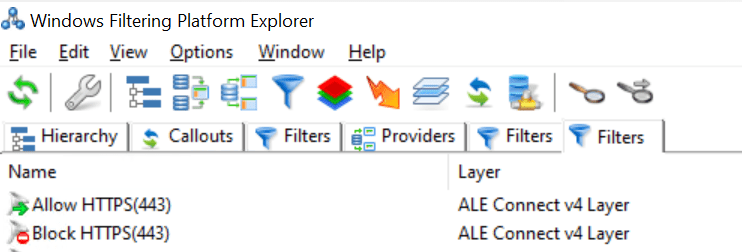
Names specified here, such as Block HTTPS(443), are registered as filter names and can be checked by viewing the list of filters with tools such as WFP Explorer.
The port and appPath members are used to specify the port number and application path used as filter conditions, respectively.
In the example above, only port 443 is used as a filter condition, and because the application path is not included in the conditions, NULL is specified for appPath.
The final members, action and weight, are values used to specify the action when the filter condition matches and the filter’s weight, respectively.
action specifies a value of the FWP_ACTION_TYPE enumeration included in FWPM_ACTION0, which defines the action to take when the filter condition matches. FWP_ACTION_BLOCK means blocking traffic, and FWP_ACTION_PERMIT means allowing traffic.5
Although the sample program used in this chapter does not handle them, if you use a callout driver, values such as FWP_ACTION_CALLOUT_TERMINATING, FWP_ACTION_CALLOUT_INSPECTION, or FWP_ACTION_CALLOUT_UNKNOWN may be used as the type.
The weight member is used as the weight of the FWPM_FILTER0 structure and specifies the filter’s priority (weight) within a sublayer.
Types such as FWP_UINT64 and FWP_UINT8 can be used for weight, but this sample program uses FWP_UINT64.
That completes the definition of the FILTER_RULES structure used by the sample program in this chapter.
In this chapter, to observe how WFP filters network traffic, we will register various filters in the system by adding or removing rules from the rules array of the FILTER_RULES structure and then rebuilding the program.
For example, if you want to add a filter that blocks all outbound access by Microsoft Edge in the FWPM_SUBLAYER_UNIVERSAL sublayer of the FWPM_LAYER_ALE_AUTH_CONNECT_V4 layer, add the following element to the rules array.
{ FILTER_KEY_3, FWPM_LAYER_ALE_AUTH_CONNECT_V4, FWPM_SUBLAYER_UNIVERSAL, L"Block Edge", L"Block Edge", 0, L"C:\\Program Files (x86)\\Microsoft\\Edge\\Application\\msedge.exe", FWP_ACTION_BLOCK, 0xFFFFFFFFFFFFFFF1 }Registering Filters Using BFE
Adding and deleting filters used by WFP are performed mainly by the Base Filtering Engine (BFE), a user-mode service.
Applications communicate with the BFE through the management functions provided by the platform and can perform various operations such as adding and deleting filters.6
The following summarizes the sequence of operations the sample program in this chapter performs when it adds or deletes filters.
- Use the
FwpmEngineOpen0function to open a session to the filter engine. - Start a transaction in the session.
- Register a custom provider.
- Register filters associated with the registered custom provider.
- After all filters are registered, commit the transaction to apply the changes.
The details of each step are explained below.
Opening a Session to the Filter Engine
To register filters for communication filtering in WFP, you first need to open a session to the filter engine.
Most WFP function calls are executed within the context of a session.
A session is destroyed when the client calls FwpmEngineClose0 or when the client process exits.7
In the sample program, the operation of opening a session to the filter engine is implemented as the OpenFilterEngine function, and the handle to the session opened with FwpmEngineOpen0 is stored in engineHandle.
DWORD OpenFilterEngine(
    HANDLE* engineHandle
)
{
	if (engineHandle == NULL) {
		return ERROR_INVALID_PARAMETER;
	}

	return FwpmEngineOpen0(
		NULL,
		RPC_C_AUTHN_WINNT,
		NULL,
		NULL,
		engineHandle);
}
FwpmEngineOpen0 is a function used to open a session to the filter engine and is defined as follows.8
The handle to the opened session to the filter engine is returned in engineHandle.
DWORD FwpmEngineOpen0(
  [in, optional] const wchar_t             *serverName,
  [in]           UINT32                    authnService,
  [in, optional] SEC_WINNT_AUTH_IDENTITY_W *authIdentity,
  [in, optional] const FWPM_SESSION0       *session,
  [out]          HANDLE                    *engineHandle
);
The second parameter, authnService, specifies the authentication service to use.
Also, authIdentity is a parameter that can specify the authentication and authorization credentials used to access the filter engine, but it can be set to NULL; if NULL is specified, the credentials of the calling thread are used.
Starting a Transaction
After opening a session to the filter engine, use the FwpmTransactionBegin0 function to explicitly start a transaction in the current session.
This transaction enforces strict ACID properties (atomicity, consistency, isolation, and durability), and if the session ends while the transaction is being executed, the transaction is automatically aborted.9
FwpmTransactionBegin0, which starts a transaction, is defined as follows and is executed by passing it the engineHandle obtained with FwpmEngineOpen0.10
Also, the second parameter, flags, is a value that specifies whether the transaction is a “read/write transaction” or a “read-only transaction.”
In the sample program, 0 is used for flags because it starts a read/write transaction.
DWORD FwpmTransactionBegin0(
  [in] HANDLE engineHandle,
  [in] UINT32 flags
);
Registering a Custom Provider
This sample program registers a custom provider named Simple WFP User-Mode Provider.
The provider is registered using the FwpmProviderAdd0 function.11
This function takes as an argument the provider information defined by the FWPM_PROVIDER0 structure.12
Also, the third parameter, sd, can specify a security descriptor for the provider object to be added, but in this sample program, NULL is specified to use the default security descriptor.
typedef struct FWPM_PROVIDER0_ {
  GUID               providerKey;
  FWPM_DISPLAY_DATA0 displayData;
  UINT32             flags;
  FWP_BYTE_BLOB      providerData;
  wchar_t            *serviceName;
} FWPM_PROVIDER0;

DWORD FwpmProviderAdd0(
  [in]           HANDLE               engineHandle,
  [in]           const FWPM_PROVIDER0 *provider,
  [in, optional] PSECURITY_DESCRIPTOR sd
);
The following is an excerpt from the part of the sample program that registers the custom provider.
In the DefineProvider function, information such as the GUID defined as PROVIDER_KEY and the provider name is assigned to provider, an object of the FWPM_PROVIDER0 structure.
void DefineProvider(FWPM_PROVIDER0* provider)
{
	if (provider == NULL) {
		return;
	}

	provider->providerKey = PROVIDER_KEY;
	provider->displayData.name = (wchar_t*)L"Simple WFP User-Mode Provider";
	provider->displayData.description = (wchar_t*)L"Provider for simple WFP user-mode filter example.";
	provider->flags = FWPM_PROVIDER_FLAG_PERSISTENT;
}

/* 省略 */

DefineProvider(&provider);
result = FwpmProviderAdd0(engineHandle, &provider, NULL);
if (result == FWP_E_ALREADY_EXISTS) {
	printf("Provider already exists. Continuing...\n");
	result = ERROR_SUCCESS;
}
else if (result != ERROR_SUCCESS) {
	printf("Error: ProviderAdd failed (0x%x)\n", result);
	CleanupWfp(&engineHandle);
	return result;
}
Registering Filters
After registering the custom provider, the filters are registered based on the information in the rules array of the FILTER_RULES structure described earlier.
for (const auto& rule : rules) {

   FWPM_FILTER0 filter = { 0 };
   FWPM_FILTER_CONDITION0 condition[9] = { 0 };
   UINT32 conditionCount = 0;

   DefineFilterConditions(
      condition,
      rule.port,
      rule.appPath,
      &conditionCount
   );

   BuildFilter(
      &filter,
      condition,
      conditionCount,
      rule,
      PROVIDER_KEY
   );

   UINT64 filterId = 0;
   result = AddFilterObject(
      engineHandle,
      &filter,
      &filterId
   );

   if (result != ERROR_SUCCESS) {
   printf("Error: FwpmFilterAdd0 failed. Code: 0x%x\n", result);
   FwpmTransactionAbort0(engineHandle);
   CleanupWfp(&engineHandle);
   return result;
   }

   printf("Added filter '%S' (ID: %llu)\n", rule.name, filterId);

}
In the loop, the DefineFilterConditions function, which is called first, creates objects of the FWPM_FILTER_CONDITION0 structure that defines filter conditions.13
This structure is defined as follows and includes members of the FWP_MATCH_TYPE enumeration14 and the FWP_CONDITION_VALUE0 structure15.
typedef struct FWPM_FILTER_CONDITION0_ {
  GUID                 fieldKey;
  FWP_MATCH_TYPE       matchType;
  FWP_CONDITION_VALUE0 conditionValue;
} FWPM_FILTER_CONDITION0;
For fieldKey, the first member of the FWPM_FILTER_CONDITION0 structure, you specify the GUID to use as a condition for the filter being registered.
The keys available here are defined as filtering condition identifiers.16
For example, if you use the destination port number as a filter condition, you can use FWPM_CONDITION_IP_REMOTE_PORT; if you use the path of the source application as a condition, you can use FWPM_CONDITION_ALE_APP_ID.
The FWP_MATCH_TYPE enumeration defines various kinds of matching used for filter conditions.
The filters added in the sample program basically use FWP_MATCH_EQUAL, so they function as simple filters that determine whether the configured value matches the condition.
Depending on the FWP_MATCH_TYPE enumeration used for the filter condition, you can also flexibly create filters that determine whether a value is greater than or less than the value set as the condition.
On the other hand, the FWP_CONDITION_VALUE0 structure contains information about the value used when matching filter conditions.
If FWPM_CONDITION_IP_REMOTE_PORT is used for fieldKey, for example, the integer value of the destination port number used for the condition is registered as follows.
conditionValue.type = FWP_UINT16;
conditionValue.uint16 = remotePort;
After creating objects of the FWPM_FILTER_CONDITION0 structure that define the filter conditions, the next step is to create an object of the FWPM_FILTER0 structure.
This structure contains the state of the filter and is defined as follows.17
typedef struct FWPM_FILTER0_ {
  GUID                   filterKey;
  FWPM_DISPLAY_DATA0     displayData;
  UINT32                 flags;
  GUID                   *providerKey;
  FWP_BYTE_BLOB          providerData;
  GUID                   layerKey;
  GUID                   subLayerKey;
  FWP_VALUE0             weight;
  UINT32                 numFilterConditions;
  FWPM_FILTER_CONDITION0 *filterCondition;
  FWPM_ACTION0           action;
  union {
    UINT64 rawContext;
    GUID   providerContextKey;
  };
  GUID                   *reserved;
  UINT64                 filterId;
  FWP_VALUE0             effectiveWeight;
} FWPM_FILTER0;
In the sample program, the BuildFilter function is used to create filter, an object of the FWPM_FILTER0 structure.
Most of the values registered here, such as the filter name and description, the GUIDs of the layer and sublayer, and the filter action, are values defined as global variables as members of FILTER_RULES.
void BuildFilter(
	FWPM_FILTER0* filter,
	FWPM_FILTER_CONDITION0* condition,
	UINT32 conditionCount,
	const FILTER_RULES& rule,
	const GUID& providerKey)
{
	if (filter == NULL || condition == NULL || conditionCount == 0) {
		return;
	}

	filter->displayData.name = (wchar_t*)rule.name;
	filter->displayData.description = (wchar_t*)rule.description;
	filter->filterKey = rule.filterKey;
	filter->providerKey = const_cast<GUID*>(&providerKey);
	filter->layerKey = rule.layerKey;
	filter->subLayerKey = rule.subLayerKey;
	filter->action.type = rule.action;
	filter->weight.type = FWP_UINT64;
	filter->weight.uint64 = const_cast<UINT64*>(&rule.weight);
	filter->numFilterConditions = conditionCount;
	filter->filterCondition = condition;
	filter->flags = FWPM_FILTER_FLAG_PERSISTENT;
}
After creating the FWPM_FILTER0 structure object, the final step is to register the filter using the FwpmFilterAdd0 function.
FwpmFilterAdd0 is a function provided to register a new filter in the system and is called with a session handle and a FWPM_FILTER0 structure object as parameters.18
DWORD FwpmFilterAdd0(
  [in]            HANDLE               engineHandle,
  [in]            const FWPM_FILTER0   *filter,
  [in, optional]  PSECURITY_DESCRIPTOR sd,
  [out, optional] UINT64               *id
);
Committing the Transaction
After all filter registrations are complete, call the FwpmTransactionCommit0 function to commit the transaction you started.19
This completes filter registration by the user-mode program.
result = FwpmTransactionCommit0(engineHandle);
if (result != ERROR_SUCCESS) {
	printf("Error: Commit failed (0x%x)\n", result);
	FwpmTransactionAbort0(engineHandle);
}
else {
	printf("SUCCESS: Persistent filters added.\n");
}
Checking How Filter Arbitration Works
Now that we have confirmed the behavior of adding filters with the user-mode sample program, we will use this sample program to check various filtering behaviors in practice.
Blocking Connections to a Specific Port Number
First, add a filter with the following conditions defined in FILTER_RULES in the sample program.
{
  FILTER_KEY_1,
  FWPM_LAYER_ALE_AUTH_CONNECT_V4,
  FWPM_SUBLAYER_UNIVERSAL,
  L"Block HTTPS(443)",
  L"Block HTTPS(443)",
  443,
  NULL,
  FWP_ACTION_BLOCK,
  0xFFFFFFFFFFFFFFF1
}
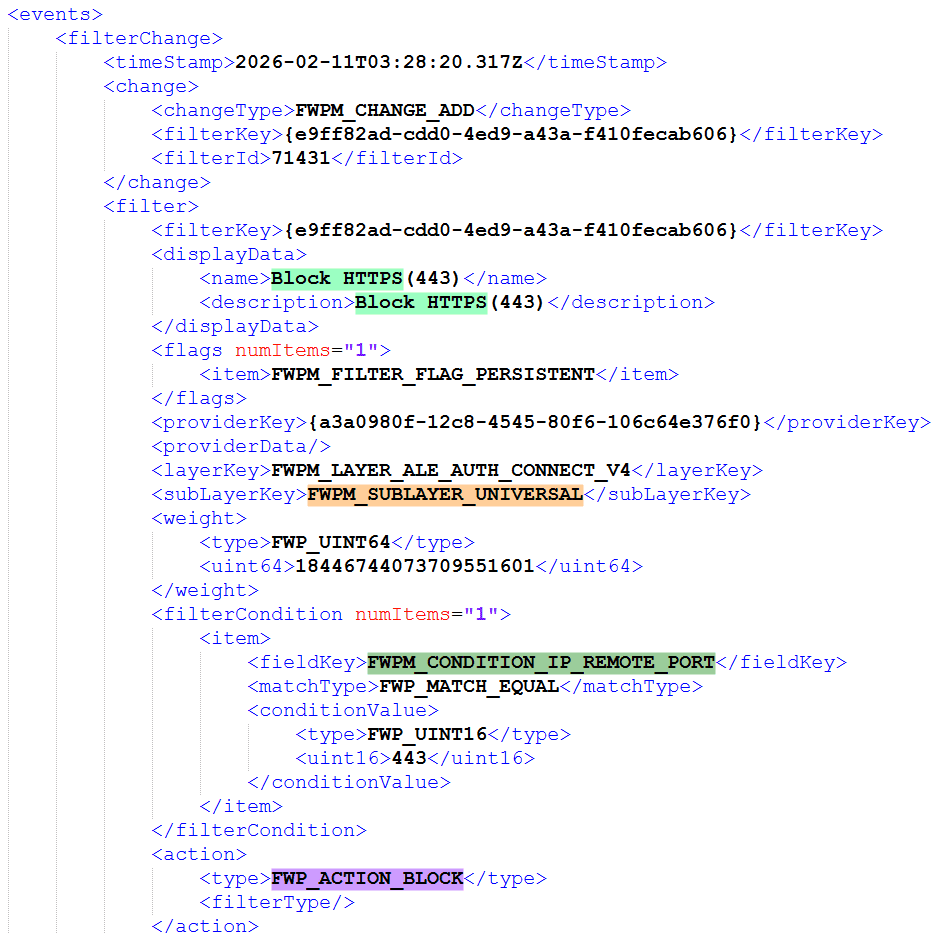
If you inspect the event generated when this filter is registered with wfpdiag, you can confirm that a filter with a condition that blocks all traffic to remote port 443 has been added to the FWPM_LAYER_ALE_AUTH_CONNECT_V4 layer.
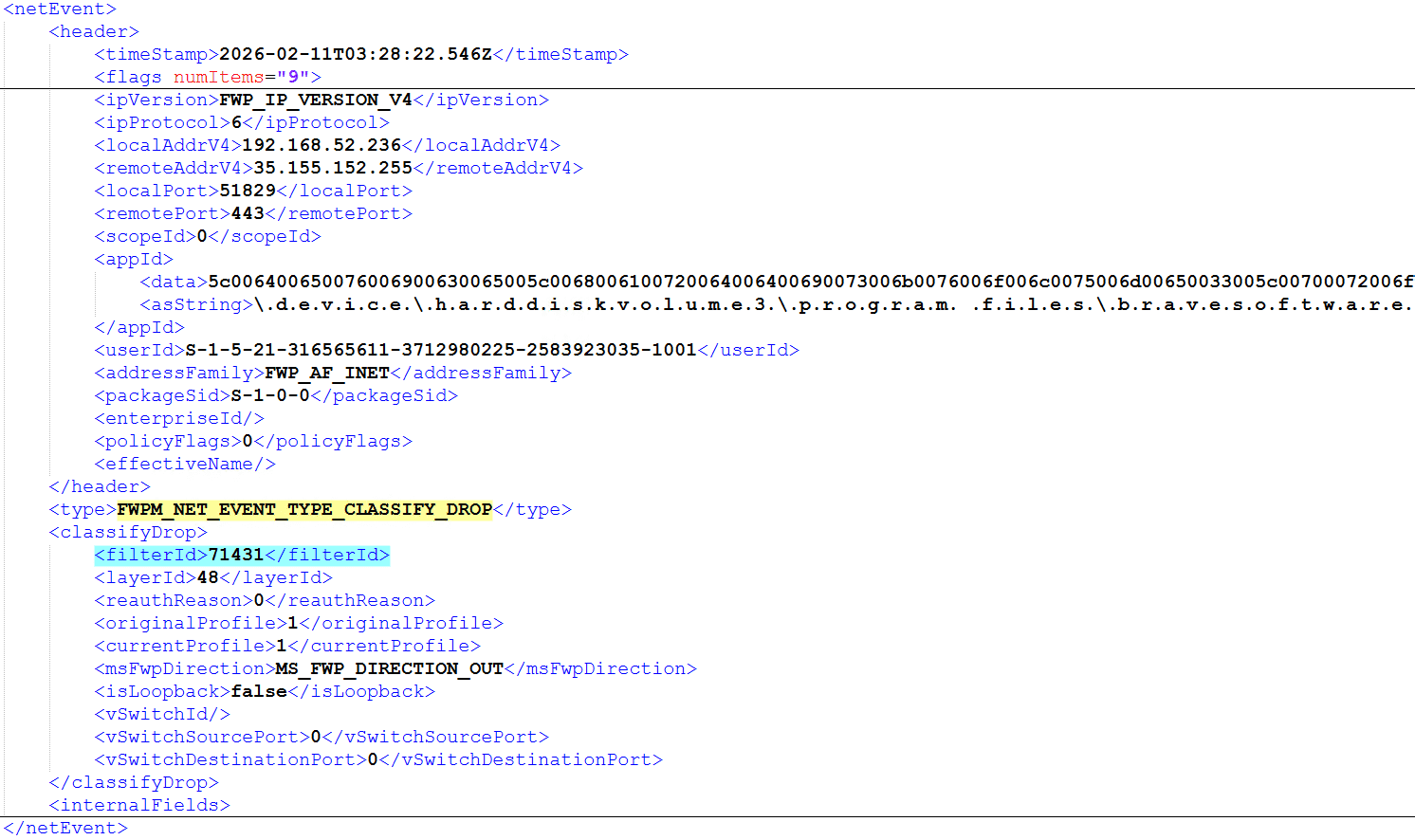
Also, if you inspect the event processed by this filter’s filterId, 71431, you can confirm that traffic to port 443 from various applications was dropped by this filter.
Checking the Effect of Filter Weight Within the Same Sublayer
Next, while keeping the Block HTTPS(443) filter configuration that blocks all traffic to port 443 unchanged, add a filter to the FWPM_SUBLAYER_UNIVERSAL sublayer of the same FWPM_LAYER_ALE_AUTH_CONNECT_V4 layer that allows all traffic from msedge.exe.
At this time, the Allow Edge filter’s Weight is specified as a value 1 smaller than the Block HTTPS(443) filter’s Weight.
{
  FILTER_KEY_2,
  FWPM_LAYER_ALE_AUTH_CONNECT_V4,
  FWPM_SUBLAYER_UNIVERSAL,
  L"Allow Edge",
  L"Allow Edge",
  0,
  L"C:\\Program Files (x86)\\Microsoft\\Edge\\Application\\msedge.exe",
  FWP_ACTION_PERMIT,
  0xFFFFFFFFFFFFFFF0
}
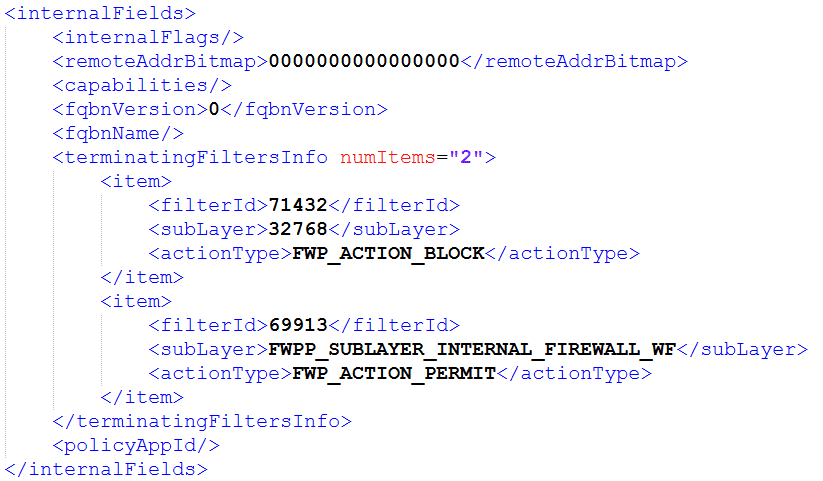
If these two filters are registered, the Allow Edge filter will not take effect, and all traffic to port 443 by msedge.exe will be blocked.
Also, the count of terminatingFiltersInfo in netEvents, which indicates that this traffic was dropped, does not increase, showing that the evaluation result within the FWPM_SUBLAYER_UNIVERSAL sublayer applied FWP_ACTION_BLOCK, the filter with the highest Weight.
Next, change the Weight of the Allow Edge filter to 0xFFFFFFFFFFFFFFFF, and then register the filters again.
This time, traffic to port 443 becomes possible only when using msedge.exe.
This behavior shows that when conflicting filters are registered within the same sublayer, the action of the filter with the highest Weight is used for the decision.
Checking the Effect of Weight Across Different Sublayers
Next, we will check the behavior when conflicting filters are registered in different sublayers of the same layer.
First, like filters, sublayers have a Weight value that represents priority, and network traffic inspected at a given layer passes through all sublayers of that layer in order of sublayer Weight.
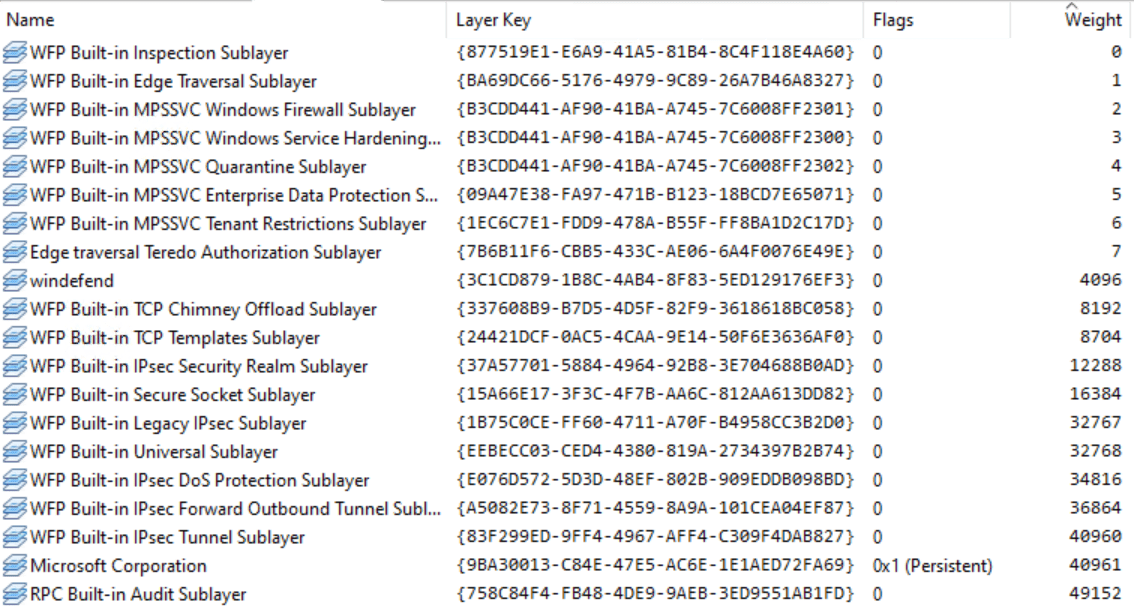
The major difference between this evaluation and the filter evaluation described in the previous section is that even if a matching filter is found in a higher-priority sublayer, evaluation still proceeds through all lower-priority sublayers.
To confirm this behavior, change the FILTER_RULES settings in the sample program as follows.
const FILTER_RULES rules[] = {
	{ FILTER_KEY_1, FWPM_LAYER_ALE_AUTH_CONNECT_V4, FWPM_SUBLAYER_MPSSVC_QUARANTINE, L"Block HTTPS(443)", L"Block HTTPS(443)", 443, NULL, FWP_ACTION_BLOCK, 0xFFFFFFFFFFFFFFF1 },
	{ FILTER_KEY_2, FWPM_LAYER_ALE_AUTH_CONNECT_V4, FWPM_SUBLAYER_UNIVERSAL, L"Allow Edge", L"Allow Edge", 0, L"C:\\Program Files (x86)\\Microsoft\\Edge\\Application\\msedge.exe", FWP_ACTION_PERMIT, 0xFFFFFFFFFFFFFFFF },
};
Here, Block HTTPS(443), which blocks all traffic to port 443, and Allow Edge, which allows traffic from msedge.exe, are assigned to different sublayers of the same layer.
The FWPM_SUBLAYER_MPSSVC_QUARANTINE to which the Block HTTPS(443) filter is assigned has a Weight of 4.
Meanwhile, FWPM_SUBLAYER_UNIVERSAL, to which the Allow Edge filter is assigned, has a Weight of 32768, so in terms of registered sublayer priority, FWPM_SUBLAYER_UNIVERSAL, which holds the Allow Edge filter, has the higher priority.
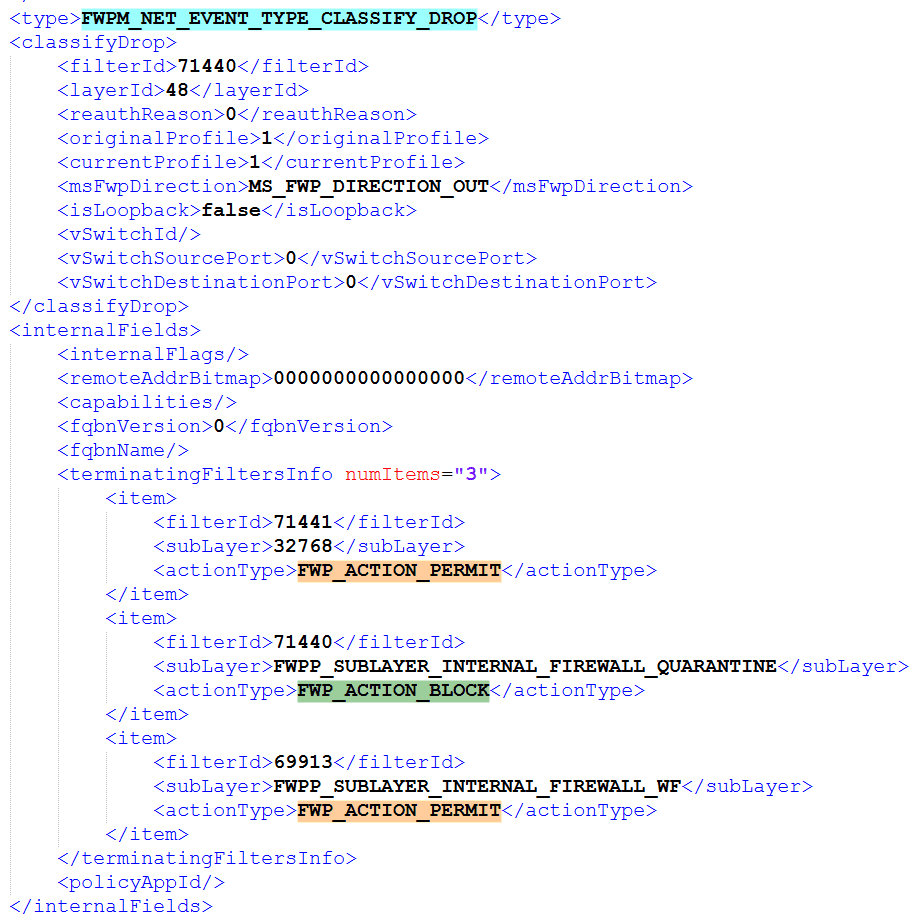
However, if the filters are registered with this configuration, communication by msedge.exe is not allowed, and all traffic to port 443 is blocked.
As explained in Chapter 1, in the case of sublayers, even if a matching filter is registered in a sublayer with a higher Weight, all sublayers in the layer are evaluated before the final action is determined.
Also, the final action is determined based on WFP’s policy rules, and basically a “block” action overrides an “allow” action.
Therefore, as this test result shows, even when traffic is “allowed” in a sublayer with a higher Weight, if it is “blocked” in another sublayer, the final decision is “block” except in exceptional circumstances.
In fact, the results in netevents also show that the count of evaluated filters in terminatingFiltersInfo increased to 3, confirming that both the Allow Edge filter (filterId:71441) and the Block HTTPS(443) filter (filterId:71440) were evaluated, and that the final decision was to drop the traffic.
Summary
In this chapter, we reviewed the basic operations for registering and deleting WFP filters from a user-mode program via the BFE.
Using the FWPM_LAYER_ALE_AUTH_CONNECT_V4 layer as an example, we also verified the differences in evaluation results between filters in the same sublayer and filters in different sublayers, confirming the actual behavior of WFP filtering.
In the next chapter, we will use a callout driver to extend classification processing and handle dynamic allow/block control through coordination with user mode.
Table of Contents for This Book
- Preface
- Chapter 1: WFP Overview and Architecture
- Chapter 2: Sample for Access Control with WFP
- Chapter 3: Sample for Access Control with a Callout Driver
-
↩FWPM_FILTER0structure (fwpmtypes.h) https://learn.microsoft.com/ja-jp/windows/win32/api/fwpmtypes/ns-fwpmtypes-fwpm_filter0 -
Management filtering layer identifiers https://learn.microsoft.com/windows-hardware/drivers/network/management-filtering-layer-identifiers
↩ -
Filtering sublayer identifiers https://learn.microsoft.com/ja-jp/windows/win32/fwp/management-filtering-sublayer-identifiers
↩ -
↩FWPM_DISPLAY_DATA0structure (fwptypes.h) https://learn.microsoft.com/ja-jp/windows/win32/api/fwptypes/ns-fwptypes-fwpmdisplaydata0 -
↩FWPM_ACTION0structure (fwpmtypes.h) https://learn.microsoft.com/ja-jp/windows/win32/api/fwpmtypes/ns-fwpmtypes-fwpm_action0 -
Management Functions https://learn.microsoft.com/ja-jp/windows/win32/fwp/fwp-mgmt-functions
↩ -
Sessions https://learn.microsoft.com/ja-jp/windows/win32/fwp/object-management#sessions
↩ -
FwpmEngineOpen0 function (fwpmu.h) https://learn.microsoft.com/ja-jp/windows/win32/api/fwpmu/nf-fwpmu-fwpmengineopen0
↩ -
Transactions https://learn.microsoft.com/ja-jp/windows/win32/fwp/object-management#transactions
↩ -
FwpmTransactionBegin0 function (fwpmu.h) https://learn.microsoft.com/ja-jp/windows/win32/api/fwpmu/nf-fwpmu-fwpmtransactionbegin0
↩ -
FwpmProviderAdd0 function (fwpmu.h) https://learn.microsoft.com/ja-jp/windows/win32/api/fwpmu/nf-fwpmu-fwpmprovideradd0
↩ -
FwpmProviderAdd0 function (fwpmu.h) https://learn.microsoft.com/ja-jp/windows/win32/api/fwpmu/nf-fwpmu-fwpmprovideradd0
↩ -
↩FWPM_FILTER_CONDITION0structure (fwpmtypes.h) https://learn.microsoft.com/ja-jp/windows/win32/api/fwpmtypes/ns-fwpmtypes-fwpmfiltercondition0 -
↩FWP_MATCH_TYPEenumeration (fwptypes.h) https://learn.microsoft.com/ja-jp/windows/win32/api/fwptypes/ne-fwptypes-fwpmatchtype -
↩FWP_CONDITION_VALUE0structure (fwptypes.h) https://learn.microsoft.com/ja-jp/windows/win32/api/fwptypes/ns-fwptypes-fwpconditionvalue0 -
Filtering condition identifiers https://learn.microsoft.com/ja-jp/windows/win32/fwp/filtering-condition-identifiers-
↩ -
↩FWPM_FILTER0structure (fwpmtypes.h) https://learn.microsoft.com/ja-jp/windows/win32/api/fwpmtypes/ns-fwpmtypes-fwpm_filter0 -
FwpmFilterAdd0 function (fwpmu.h) https://learn.microsoft.com/ja-jp/windows/win32/api/fwpmu/nf-fwpmu-fwpmfilteradd0
↩ -
FwpmFilterAdd0 function (fwpmu.h) https://learn.microsoft.com/ja-jp/windows/win32/api/fwpmu/nf-fwpmu-fwpmfilteradd0
↩