This page has been machine-translated from the original page.
In the previous chapter, I explained a simple user-mode program that registers WFP filters and blocks or permits communication.
Next, I will explain WFP Callout drivers, which are also widely used in software such as antivirus products and EDR.
Several sample programs for WFP Callout drivers are published in the official Windows-driver-samples repository under ./network/trans/.
In particular, the inspect sample published in that repository implements the basic functionality of traffic inspection with a WFP Callout driver, and can be regarded as one sample that is close to how antivirus products and EDR use WFP.
However, that sample program is implemented in roughly 3,000 lines of code, and it is a bit too complex to explain step by step starting from an overview of WFP Callout drivers.
So, in this chapter, I will use a simple kernel-driver sample, created with reference to the official sample code above, that has the minimum functionality needed to understand basic traffic processing with a Callout driver.
The sample program explained in this chapter can also be downloaded from the following repository.
URL: https://github.com/kash1064/book06-wfp-samples
Table of Contents
-
Controlling Traffic by Coordinating the Callout Driver with a User-Mode Program
- Summary
- Afterword
- Table of Contents for This Book
Overview of the Sample Program
The sample program explained in this chapter is a relatively simple Callout driver created to understand WFP Callouts.
This kernel driver implements the following functions, and in particular it implements important WFP Callout functionality for antivirus products and EDR in a simple form.
- Registering Callout functions with the kernel-mode WFP engine and adding filters at the ALE layer to invoke those Callouts
- Blocking traffic based on decisions made by a resident user-mode program
- Excluding traffic related to specific applications from blocking
Of the operations in item 1, registering Callout functions must be performed by the kernel driver, but adding filters to invoke the Callout can be done from either kernel mode or user mode.1
Because of that, filters are often registered from the user-mode program side in general, but in this sample program the driver running in kernel mode also implements filter addition.
Running the Sample Program
Building this sample program generates the following files, so first copy all of them to a virtual machine with test-signing mode enabled.
- KernelWFPCalloutDriver.sys
- KernelWFPCalloutDriver.cer
- UserModeCalloutSample.exe
Next, register the copied KernelWFPCalloutDriver.sys in the system as KernelWFPCalloutDriver.
A kernel driver can be installed with the sc command and similar tools, but this time I will use OSR Driver Loader to register and start the service as shown below.
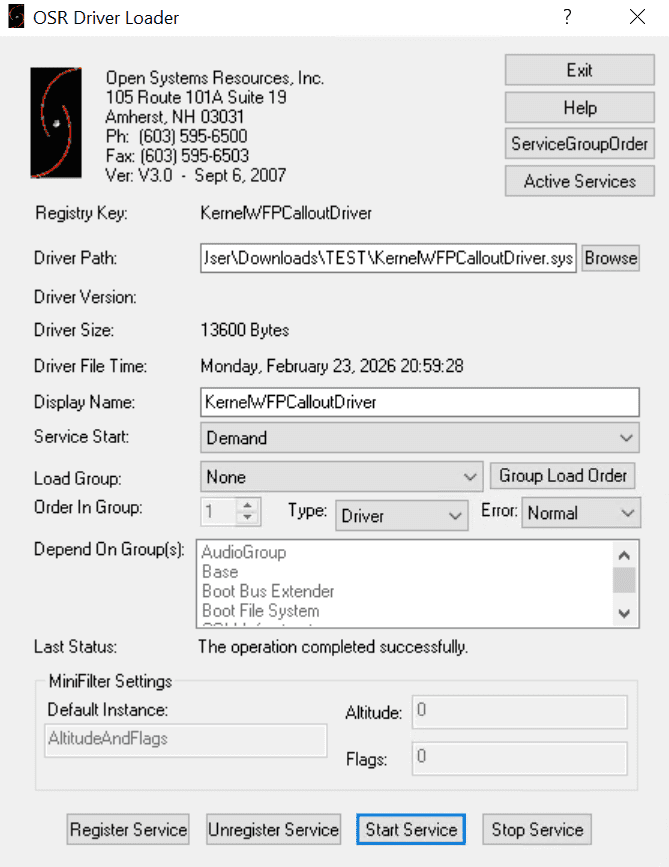
After KernelWFPCalloutDriver has been registered and started, run the user-mode program UserModeCalloutSample.exe.
At that time, you can specify whether to permit or block the traffic filtered by the Callout by using either permit or block as the command-line argument.
UserModeCalloutSample.exe [permit|block]If you actually run this sample program, you can confirm how UserModeCalloutSample.exe instructed the Callout driver to handle traffic.
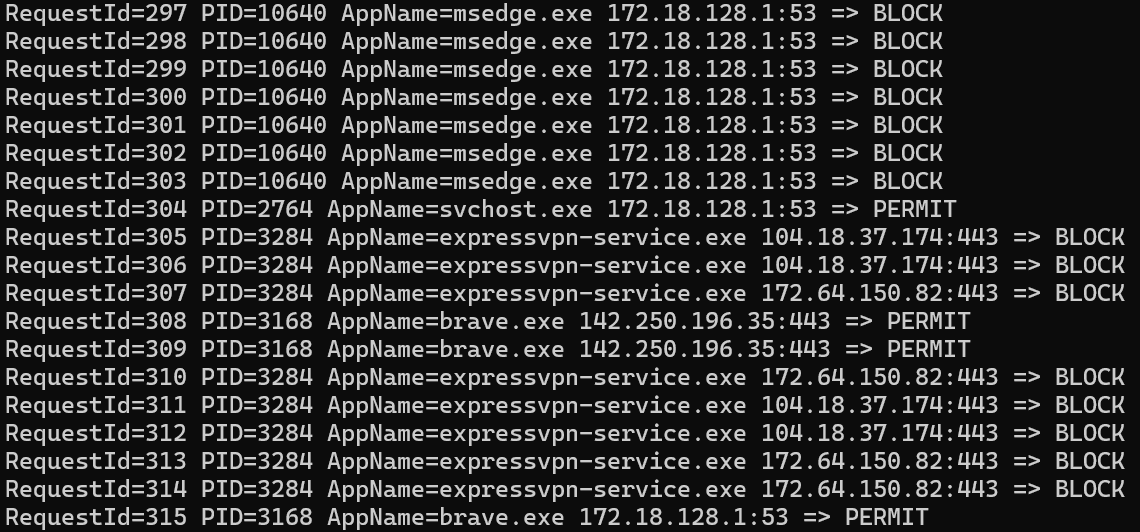
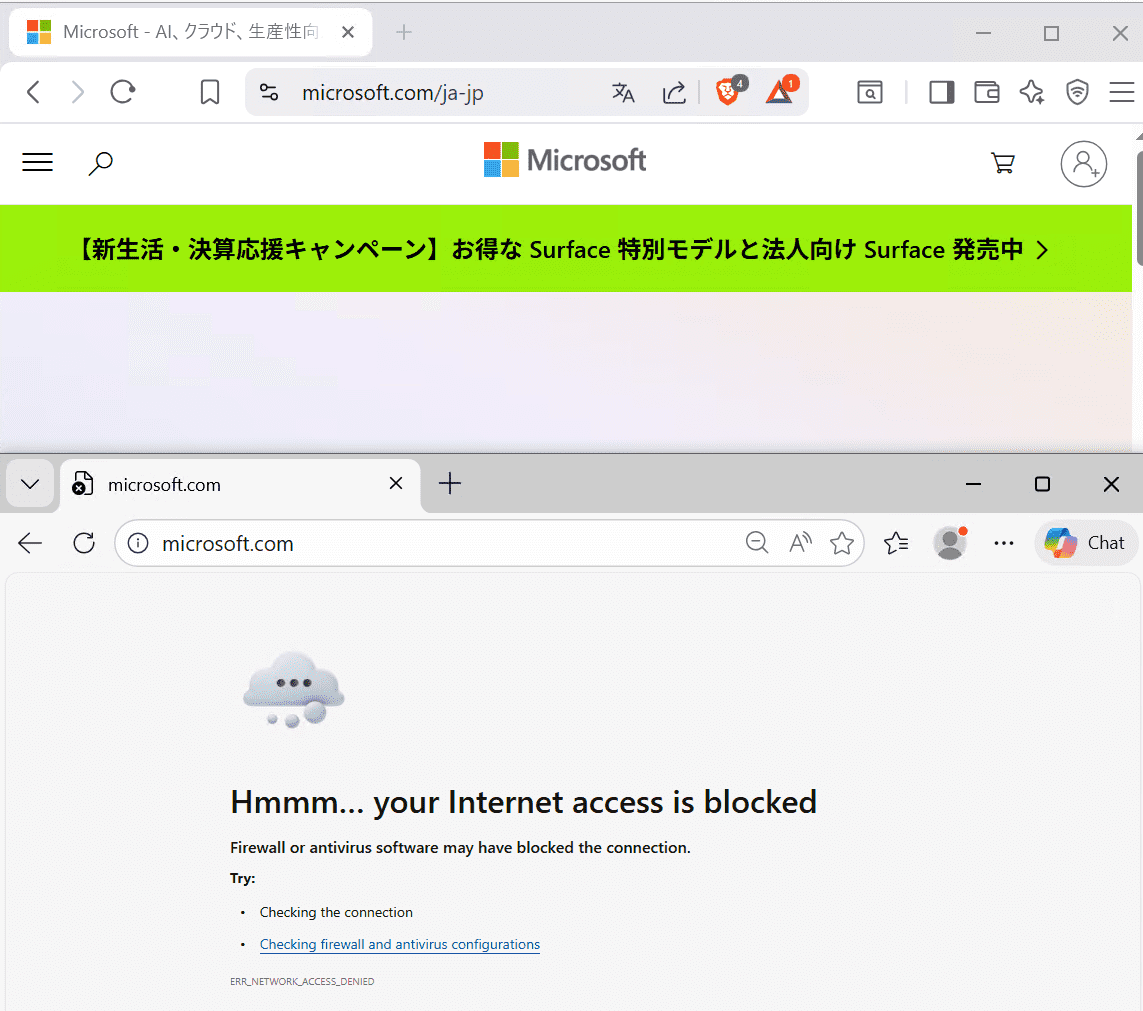
Also, within this sample program, some processes required for name resolution and similar tasks, as well as traffic from the Brave browser, are defined as permitted.
For that reason, when UserModeCalloutSample.exe is run with block, communication by applications subject to blocking, such as Microsoft Edge, is blocked, while communication by permitted applications such as Brave succeeds.
About the Sample Program Implementation
Registering the Driver
First, this kernel driver is implemented as a WDM driver, and the DriverEntry function that performs initialization mainly carries out the following operations.
- Initializing objects used in the driver, such as the device name (
SampleWfpCallout), a spin lock, a semaphore, and lists - Initializing several required IRP handlers
- Initializing the device object and registering the symbolic link
- Registering WFP Callout filters
In this sample program, the traffic-blocking decision made by the Callout is delegated to a resident user-mode program.
For that reason, inside DriverEntry, DispatchDeviceControl is registered as the IRP handler corresponding to IRP_MJ_DEVICE_CONTROL, so that information can be exchanged between the user-mode program and the kernel driver.
In addition, the RegisterCalloutAndFilter function called from there registers the Callout functions and WFP filters.
Most of the processing performed in RegisterCalloutAndFilter is almost the same as the filter-registration operation in the sample program used in Chapter 2: it opens a session to the engine, starts a transaction, registers the WFP sublayer and filters, and then commits the transaction.
However, because this driver registers Callout filters, unlike the sample program used in Chapter 2 it also registers Callouts by using FwpsCalloutRegister3 and FwpmCalloutAdd.
The details of those operations are explained in the next section.
Registering Callout Functions
In the RegisterCalloutAndFilter function implemented on the sample-driver side, the Callout function is first registered by using FwpsCalloutRegister3.2
FWPS_CALLOUT3 callout = {};
callout.calloutKey = CALLOUT_KEY;
callout.classifyFn = (FWPS_CALLOUT_CLASSIFY_FN3)SampleClassify;
callout.notifyFn = (FWPS_CALLOUT_NOTIFY_FN3)SampleNotify;
callout.flowDeleteFn = SampleFlowDelete;

status = FwpsCalloutRegister3(
            deviceObject,
            &callout,
            &gCalloutId
        );
The FwpsCalloutRegister3 function registers the function pointers in the FWPS_CALLOUT3 structure as Callout functions.3
The FWPS_CALLOUT3 structure defines the information required for a Callout driver to register function pointers.
That structure is defined as follows.
typedef struct FWPS_CALLOUT3_ {
  GUID                                calloutKey;
  UINT32                              flags;
  FWPS_CALLOUT_CLASSIFY_FN3           classifyFn;
  FWPS_CALLOUT_NOTIFY_FN3             notifyFn;
  FWPS_CALLOUT_FLOW_DELETE_NOTIFY_FN0 flowDeleteFn;
} FWPS_CALLOUT3;
Among these parameters, classifyFn and notifyFn correspond to pointers to the functions to register, and are passed as pointers to the FWPS_CALLOUT_CLASSIFY_FN3 callback type4 and the FWPS_CALLOUT_NOTIFY_FN3 callback type5, respectively.
In this code, SampleClassify, a function defined in this driver’s code, is set in classifyFn, and SampleNotify is set in notifyFn.
The FWPS_CALLOUT3 structure, which defines information about the function pointers registered by FwpsCalloutRegister3, includes two kinds of function pointers: classifyFn (FWPS_CALLOUT_CLASSIFY_FN3), which is a Callout function invoked when there is network data to be processed by the Callout, and notifyFn (FWPS_CALLOUT_NOTIFY_FN3), which is invoked to notify events related to the Callout.
The Classification Callout Function Registered in classifyFn
In this sample program, SampleClassify is implemented as the Callout function for classification processing.
A classification Callout function is the function that processes network data through the Callout, and it is called by the filter engine together with several pieces of data.6
When this classification Callout function is invoked, information such as the FWPS_INCOMING_VALUES0 structure and the FWPS_INCOMING_METADATA_VALUES0 structure is provided as parameters.
First, the FWPS_INCOMING_VALUES0 structure7 passed to the classification Callout function is defined as follows, in a form that contains the FWPS_INCOMING_VALUE0 structure8, which holds the actual data.
typedef struct FWPS_INCOMING_VALUE0_ {
  FWP_VALUE0 value;
} FWPS_INCOMING_VALUE0;

typedef struct FWPS_INCOMING_VALUES0_ {
  UINT16               layerId;
  UINT32               valueCount;
  FWPS_INCOMING_VALUE0 *incomingValue;
} FWPS_INCOMING_VALUES0;
The incomingValue field of FWPS_INCOMING_VALUES0 is a pointer to an array of FWPS_INCOMING_VALUE0 structures that contain the actual data (FWP_VALUE0), and valueCount is the number of elements in the array passed as incomingValue.
Likewise, the FWPS_INCOMING_METADATA_VALUES0 structure passed as a parameter to the classification Callout function contains various kinds of metadata given to the Callout function by the filter engine.
In this sample program, a filter is registered on the FWPM_LAYER_ALE_AUTH_CONNECT_V4 layer, and the runtime filtering layer9 used by the Callout function is FWPS_LAYER_ALE_AUTH_CONNECT_V4.10
Therefore, the data in the FWPS_INCOMING_VALUES0 structure (incomingValue) passed as a parameter to the classification Callout function can be accessed by using values from the FWPS_FIELDS_ALE_AUTH_CONNECT_V4 enumeration11 as data-field identifiers, as shown below.12
remoteAddressV4 = inFixedValues->incomingValue[FWPS_FIELD_ALE_AUTH_CONNECT_V4_IP_REMOTE_ADDRESS].value.uint32;

remotePort = inFixedValues->incomingValue[FWPS_FIELD_ALE_AUTH_CONNECT_V4_IP_REMOTE_PORT].value.uint16;

localPort = inFixedValues->incomingValue[FWPS_FIELD_ALE_AUTH_CONNECT_V4_IP_LOCAL_PORT].value.uint16;

ipProtocol = inFixedValues->incomingValue[FWPS_FIELD_ALE_AUTH_CONNECT_V4_IP_PROTOCOL].value.uint8;

aleFlags = inFixedValues->incomingValue[FWPS_FIELD_ALE_AUTH_CONNECT_V4_FLAGS].value.uint32;
In the SampleClassify function called for classification processing, several pieces of metadata included in the FWPS_INCOMING_METADATA_VALUES0 structure (inMetaValues) received as a parameter are also evaluated.
For example, the code below refers to the metadata-field identifiers (currentMetadataValues), which indicate the metadata values set in the structure, checks whether process ID information can be obtained from the presence or absence of the FWPS_METADATA_FIELD_PROCESS_ID bit, and, when it can be obtained, stores that process ID information in processId.13
if ((inMetaValues->currentMetadataValues & FWPS_METADATA_FIELD_PROCESS_ID) != 0)
{
    processId = inMetaValues->processId;
}
After that, in the classification Callout function SampleClassify, the driver evaluates whether the network traffic notified to the Callout function is traffic for which “ALE flow reauthorization” has been requested, and if it is not a reauthorization request, it suspends traffic processing by using FwpsPendOperation0.
On the other hand, if the notified network traffic is a reauthorization request, the traffic is blocked or permitted based on the decision result from the user-mode program.
This coordination between the Callout function and the user-mode program is explained later.
The Event Notification Callout Function Registered in notifyFn
In this sample program, SampleNotify is implemented as the event-notification Callout function.
Unlike the classification Callout function explained in the previous section, the event-notification Callout function is called when events such as filter addition or deletion occur.14
In this sample program, the event-notification Callout SampleNotify is implemented very simply as follows: it receives, as a parameter, a value of the FWPS_CALLOUT_NOTIFY_TYPE enumeration (notifyType) that contains information about the kind of event that occurred, and outputs the occurrence of the event as a debug message based on that result.
switch (notifyType)
{
    case FWPS_CALLOUT_NOTIFY_ADD_FILTER:
        DbgPrintEx(
            DPFLTR_IHVDRIVER_ID,
            DPFLTR_INFO_LEVEL,
            "Sample callout: filter added\n"
        );
        break;

    case FWPS_CALLOUT_NOTIFY_DELETE_FILTER:
        DbgPrintEx(
            DPFLTR_IHVDRIVER_ID,
            DPFLTR_INFO_LEVEL,
            "Sample callout: filter deleted\n"
        );
        break;

    default:
        break;
}
return STATUS_SUCCESS;
Controlling Traffic by Coordinating the Callout Driver with a User-Mode Program
In the sample program explained in this chapter, the decision result from the user-mode program is used to block traffic through the Callout driver.
In this section, I will explain in detail the coordination between the Callout driver and the user-mode program, which is the core function of this sample program.
Coordination Between the Callout Driver and the User-Mode Program
A WFP Callout driver can use the classification Callout function registered in classifyFn to transfer the information contained in each parameter received by the Callout function to a user-mode program, and can block or permit network traffic based on the decision result from that user-mode program.
Such operations are often performed asynchronously, but the way they are implemented differs depending on the layer that is used.
In this sample program, processing is performed at the ALE Connect layer, so the operation is first suspended by calling FwpsPendOperation0 from the function registered as classifyFn, and then, when processing on the user-mode-program side becomes possible, FwpsCompleteOperation0 is called to complete the classification processing.15
The FwpsPendOperation0 function16 is called by a Callout function to temporarily suspend classification processing that needs to wait for the completion of another operation by a user-mode program or similar component.
This function is defined as follows, and it is called by passing the completionHandle included in the FWPS_INCOMING_METADATA_VALUES0 structure, which is provided as a parameter when the classification Callout function is invoked, and by storing the handle corresponding to the suspended operation as completionContext.
The handle kept in completionContext is used when FwpsCompleteOperation0 is called.
NTSTATUS FwpsPendOperation0(
  [in]  HANDLE completionHandle,
  [out] HANDLE *completionContext
);
The FwpsCompleteOperation0 function17 is called to resume a suspended operation, and it receives the completionContext that was saved when classification processing was suspended as a parameter.
void FwpsCompleteOperation0(
[in]           HANDLE           completionContext,
[in, optional] PNET_BUFFER_LIST netBufferList
);
Suspending Classification in the Sample Program
On the kernel-driver side of this sample program, classification is suspended inside the SampleClassify function, which is registered as the classification Callout function, as follows.
- Refer to the filtering condition flags18 included in the
FWPS_INCOMING_VALUES0structure (inFixedValues) and check whether theFWP_CONDITION_FLAG_IS_REAUTHORIZEflag is present (that is, determine whether this is a new connection) - If the target is a new connection, call
FwpsPendOperation0to suspend processing - Temporarily save information about the connection request in
pending, a memory region allocated from the nonpaged pool, for coordination with the user-mode program
Specifically, the call to FwpsPendOperation0 and the saving of information into pending are implemented with the following code.
status = FwpsPendOperation0(
            (HANDLE)inMetaValues->completionHandle,
            &completionContext
         );

/* 省略 */

PENDING_CLASSIFY* pending = \
    (PENDING_CLASSIFY*)ExAllocatePool2(
        POOL_FLAG_NON_PAGED,
        sizeof(PENDING_CLASSIFY),
        'pfCW'
    );

/* 省略 */

RtlZeroMemory(pending, sizeof(*pending));
pending->RequestId = (UINT64)InterlockedIncrement64(&gNextRequestId);
pending->CompletionContext = completionContext;
pending->ProcessId = processId;
pending->RemoteAddressV4 = remoteAddressV4;
pending->RemotePort = remotePort;
pending->LocalPort = localPort;
pending->IpProtocol = ipProtocol;
pending->Queued = TRUE;
After acquiring a spin lock for safe operation, the information saved by the code above is added to the relevant lists by using InsertTailList.
The semaphore count is also incremented by KeReleaseSemaphore.
KIRQL oldIrql;
KeAcquireSpinLock(&gPendingLock, &oldIrql);
InsertTailList(&gOutstandingList, &pending->OutstandingEntry);
InsertTailList(&gPendingQueue, &pending->QueueEntry);
KeReleaseSpinLock(&gPendingLock, oldIrql);
KeReleaseSemaphore(&gPendingSemaphore, IO_NO_INCREMENT, 1, FALSE);
This information is used when coordinating with the user-mode program.
After SampleClassify performs the suspension processing above for a first-time connection, it finally returns FWP_ACTION_BLOCK with the FWPS_CLASSIFY_OUT_FLAG_ABSORB flag, which silently discards blocked data without recording it in the event log or auditing it.
classifyOut->actionType = FWP_ACTION_BLOCK;
classifyOut->flags |= FWPS_CLASSIFY_OUT_FLAG_ABSORB;
classifyOut->rights &= ~FWPS_RIGHT_ACTION_WRITE;
This completes the suspension of the connection by the Callout function.
Processing IOCTLs
In this sample program, coordination with the user-mode program is performed by using IRP_MJ_DEVICE_CONTROL and the corresponding IRP handler function DispatchDeviceControl.
Here, one of the following custom-defined IOCTLs sent from the user-mode program by DeviceIoControl is handled.
IOCTL_WFP_GET_NEXT_REQUESTIOCTL_WFP_SUBMIT_DECISION
IOCTL_WFP_GET_NEXT_REQUEST is used by the user-mode program to obtain, from the kernel-driver side, information about connection requests that were suspended by the Callout function.
On the other hand, IOCTL_WFP_SUBMIT_DECISION is used by the user-mode program to notify the decision result for a request obtained from the kernel-driver side.
Requests for IOCTL_WFP_GET_NEXT_REQUEST are issued from the user-mode-program side with the following code.
BOOL ok = DeviceIoControl(
    device,
    IOCTL_WFP_GET_NEXT_REQUEST,
    nullptr,
    0,
    &request,
    sizeof(request),
    &bytesReturned,
    nullptr);
The request passed as a parameter is an object of the USER_CLASSIFY_REQUEST structure, and it is used to receive information about traffic to be classified from the kernel-driver side.
typedef struct _USER_CLASSIFY_REQUEST
{
    unsigned long long RequestId;
    unsigned long long ProcessId;
    unsigned long RemoteAddressV4;
    unsigned short RemotePort;
    unsigned short Reserved;
} USER_CLASSIFY_REQUEST;
On the kernel-driver side, when an IOCTL request for IOCTL_WFP_GET_NEXT_REQUEST is received, the following operations are mainly performed.
- Confirm that the driver is not stopping, and use the
KeWaitForSingleObjectfunction20 to ensure thatgPendingSemaphoreis in the signaled state and that at least one pending event exists - If a pending event exists, take one event from
gPendingQueue, which is used as the queue, and store its information as aPENDING_CLASSIFYstructure - Finally, store the
USER_CLASSIFY_REQUESTstructure and the corresponding information in the output buffer specified by the user-mode program when callingDeviceIoControl
Of the operations above, the processing that passes information obtained from the queue to the user-mode program is implemented mainly by the following code.
KIRQL oldIrql;
PENDING_CLASSIFY* pending = nullptr;
USER_CLASSIFY_REQUEST* request = (USER_CLASSIFY_REQUEST*)irp->AssociatedIrp.SystemBuffer;

KeAcquireSpinLock(&gPendingLock, &oldIrql);
if (!IsListEmpty(&gPendingQueue))
{
    PLIST_ENTRY queueEntry = RemoveHeadList(&gPendingQueue);
    pending = CONTAINING_RECORD(queueEntry, PENDING_CLASSIFY, QueueEntry);
    pending->Queued = FALSE;
}
KeReleaseSpinLock(&gPendingLock, oldIrql);


if (pending == nullptr)
{
    status = STATUS_RETRY;
}
else
{
    DbgPrintEx(DPFLTR_IHVDRIVER_ID, DPFLTR_INFO_LEVEL,
        "Sample callout: dispatch request id=%llu pid=%llu\n",
        pending->RequestId,
        pending->ProcessId);
    request->RequestId = pending->RequestId;
    request->ProcessId = pending->ProcessId;
    request->RemoteAddressV4 = pending->RemoteAddressV4;
    request->RemotePort = pending->RemotePort;
    request->Reserved = 0;
    information = sizeof(USER_CLASSIFY_REQUEST);
    status = STATUS_SUCCESS;
}
On the other hand, when an IOCTL request corresponding to IOCTL_WFP_SUBMIT_DECISION is received, the kernel-driver side mainly performs the following operations.
- Save the decision result for the traffic sent from the user-mode program
- Retrieve, from the list, information about the traffic whose
RequestIdmatches theRequestIdcontained in the information received from the user-mode program - Allocate, in the nonpaged pool, an entry that contains the traffic information and its decision result, and add it to the list that is consulted when an ALE flow reauthorization request causes the
FWP_CONDITION_FLAG_IS_REAUTHORIZEflag to be set - Pass parameters related to the pending target traffic to
FwpsCompleteOperation0and execute it
These operations are implemented mainly as follows.
DECISION_ENTRY* decisionEntry = \
    (DECISION_ENTRY*)ExAllocatePool2(
        POOL_FLAG_NON_PAGED,
        sizeof(DECISION_ENTRY), 'dfCW'
    );

/* 省略 */

RtlZeroMemory(decisionEntry, sizeof(*decisionEntry));
decisionEntry->ProcessId = pending->ProcessId;
decisionEntry->RemoteAddressV4 = pending->RemoteAddressV4;
decisionEntry->RemotePort = pending->RemotePort;
decisionEntry->LocalPort = pending->LocalPort;
decisionEntry->IpProtocol = pending->IpProtocol;
decisionEntry->Block = (decision->Block != 0) ? TRUE : FALSE;


KeAcquireSpinLock(&gPendingLock, &oldIrql);
InsertTailList(&gDecisionList, &decisionEntry->ListEntry);
KeReleaseSpinLock(&gPendingLock, oldIrql);

DbgPrintEx(DPFLTR_IHVDRIVER_ID, DPFLTR_INFO_LEVEL,
    "Sample callout: submit decision id=%llu block=%lu\n",
    decision->RequestId,
    decision->Block);

CompleteAndFreePending(pending);
status = STATUS_SUCCESS;
information = sizeof(USER_CLASSIFY_DECISION);
At this point, information exchange with the user-mode program has taken place, and the information including the final decision result has been added to gDecisionList, the list consulted when an ALE flow reauthorization request causes the FWP_CONDITION_FLAG_IS_REAUTHORIZE flag to be set.
Finally, that decision result is used so that the Callout function can block or permit traffic.
Performing Traffic Classification
As described above, inside SampleClassify, which is registered as the classification Callout function, the first connection request was suspended by FwpsPendOperation0, and the function waited to receive the decision result from the user-mode program side.
After that, when the kernel driver receives the IOCTL request corresponding to IOCTL_WFP_SUBMIT_DECISION from the user-mode program side, it calls FwpsCompleteOperation0 for the suspended traffic.
When FwpsCompleteOperation0 is called for pending traffic, it triggers an ALE flow reauthorization request.21
After that, the classification Callout function is invoked again for that ALE flow reauthorization request, and this time the following section of code is executed.
if ((aleFlags & FWP_CONDITION_FLAG_IS_REAUTHORIZE) != 0)
{
    KIRQL oldIrql;
    DECISION_ENTRY* decision = nullptr;
    BOOLEAN block = TRUE;

    KeAcquireSpinLock(&gPendingLock, &oldIrql);
    decision = TakeDecisionLocked(processId, remoteAddressV4, remotePort, localPort, ipProtocol);
    KeReleaseSpinLock(&gPendingLock, oldIrql);

    if (decision != nullptr)
    {
        block = decision->Block;
        ExFreePoolWithTag(decision, 'dfCW');
    }

    classifyOut->actionType = block ? FWP_ACTION_BLOCK : FWP_ACTION_PERMIT;
    if (block)
    {
        classifyOut->rights &= ~FWPS_RIGHT_ACTION_WRITE;
    }
    DbgPrintEx(DPFLTR_IHVDRIVER_ID, DPFLTR_INFO_LEVEL,
        "Sample callout: reauth decision pid=%llu action=%s\n",
        processId,
        block ? "BLOCK" : "PERMIT");
    return;
}
In this code, the information containing the final decision result received from the user-mode program is retrieved from the list, and based on that result, actionType is set to FWP_ACTION_BLOCK or FWP_ACTION_PERMIT, thereby blocking or permitting traffic through the Callout.
Summary
In this chapter, I explained a basic implementation for controlling traffic at the ALE layer by using a WFP Callout driver.
Traffic analysis and similar operations performed in coordination with a user-mode program, as explained in this chapter, form the foundation of how antivirus products and EDR make use of WFP.
WFP Callouts can implement many operations beyond what was covered in this chapter, including stream inspection and re-injection, but I think the sample program explained in this chapter serves as the minimum foundation for understanding them.
Afterword
Thank you very much for reading to the end.
In this book, I have explained things step by step, from the basic architecture of Windows Filtering Platform (WFP), to filter registration in user mode, and then to traffic control with a Callout driver.
In particular, from the perspective of implementations that become important in antivirus products and EDR, I tried to structure it so that readers could understand, in as practical a form as possible, the questions of which layer to use, what information to use, and how to make decisions.
At the same time, there are many topics in WFP that this book could not fully cover.
For example, more complex stream inspection and re-injection behavior are topics that I think are worth exploring further when discussing WFP in the context of antivirus products and EDR.
I hope this book will serve as a foothold when you begin to understand or implement security features using WFP.
Table of Contents for This Book
- Preface
- Chapter 1: Overview and Architecture of WFP
- Chapter 2: Sample for Access Control with WFP
- Chapter 3: Sample for Access Control with a Callout Driver
-
Windows Kernel Programming, Second Edition p.493 (by Pavel Yosifovich / Independently published / 2023)
↩ -
FwpsCalloutRegister3 function (fwpsk.h) https://learn.microsoft.com/ja-jp/windows-hardware/drivers/ddi/fwpsk/nf-fwpsk-fwpscalloutregister3
↩ -
↩FWPS_CALLOUT3structure (fwpsk.h) https://learn.microsoft.com/ja-jp/windows-hardware/drivers/ddi/fwpsk/ns-fwpsk-fwps_callout3 -
↩FWPS_CALLOUT_CLASSIFY_FN3callback function (fwpsk.h) https://learn.microsoft.com/ja-jp/windows-hardware/drivers/ddi/fwpsk/nc-fwpsk-fwpscalloutclassify_fn3 -
↩FWPS_CALLOUT_NOTIFY_FN3callback function (fwpsk.h) https://learn.microsoft.com/ja-jp/windows-hardware/drivers/ddi/fwpsk/nc-fwpsk-fwpscalloutnotify_fn3 -
Processing Classify Callouts https://learn.microsoft.com/ja-jp/windows-hardware/drivers/network/processing-classify-callouts
↩ -
↩FWPS_INCOMING_VALUES0structure (fwpstypes.h) https://learn.microsoft.com/ja-jp/windows/win32/api/fwpstypes/ns-fwpstypes-fwpsincomingvalues0 -
↩FWPS_INCOMING_VALUE0structure (fwpstypes.h) https://learn.microsoft.com/ja-jp/windows/win32/api/fwpstypes/ns-fwpstypes-fwpsincomingvalue0 -
Run-time filtering layer identifiers https://learn.microsoft.com/ja-jp/windows-hardware/drivers/network/run-time-filtering-layer-identifiers
↩ -
Filtering layer identifiers https://learn.microsoft.com/ja-jp/windows/win32/fwp/management-filtering-layer-identifiers-#remarks
↩ -
↩FWPS_FIELDS_ALE_AUTH_CONNECT_V4enumeration (fwpsk.h) https://learn.microsoft.com/ja-jp/windows-hardware/drivers/ddi/fwpsk/ne-fwpsk-fwpsfieldsaleauthconnectv4 -
Data field identifiers https://learn.microsoft.com/ja-jp/windows-hardware/drivers/network/data-field-identifiers
↩ -
Metadata field identifiers https://learn.microsoft.com/ja-jp/windows-hardware/drivers/network/metadata-field-identifiers
↩ -
Processing Notify Callouts https://learn.microsoft.com/ja-jp/windows-hardware/drivers/network/processing-notify-callouts
↩ -
Processing Classify Callouts Asynchronously https://learn.microsoft.com/ja-jp/windows-hardware/drivers/network/processing-classify-callouts-asynchronously
↩ -
FwpsPendOperation0 function (fwpsk.h) https://learn.microsoft.com/ja-jp/windows-hardware/drivers/ddi/fwpsk/nf-fwpsk-fwpspendoperation0
↩ -
FwpsCompleteOperation0 function (fwpsk.h) https://learn.microsoft.com/ja-jp/windows-hardware/drivers/ddi/fwpsk/nf-fwpsk-fwpscompleteoperation0
↩ -
Filtering condition flags https://learn.microsoft.com/ja-jp/windows-hardware/drivers/network/filtering-condition-flags
↩ -
Types of Callouts https://learn.microsoft.com/ja-jp/windows-hardware/drivers/network/types-of-callouts
↩ -
KeWaitForSingleObject function (wdm.h) https://learn.microsoft.com/ja-jp/windows-hardware/drivers/ddi/wdm/nf-wdm-kewaitforsingleobject
↩ -
Pending Connection Reauthorization https://learn.microsoft.com/ja-jp/windows/win32/fwp/ale-re-authorization#pending-connection-reauthorization
↩