This page has been machine-translated from the original page.
I had been using angr with template scripts without much thought, but recently I ran into a problem “where angr should work but doesn’t,” so I took it as a good opportunity to learn a bit more about it.
When I actually used it properly, it turned out to be a far more powerful tool than I imagined, so I’m writing it up as an article along with some sample code — even if it only covers a fraction of what it can do.
I plan to use this as a cheat sheet, so I’ll keep adding to it going forward.
Table of Contents
What is angr?
angr is an analysis tool capable of performing various kinds of static analysis on binaries, including dynamic symbolic execution.
angr can be used as a Python module.
angr first loads a binary into a project and then instantiates several built-in classes.
Reference: angr documentation
When using angr in CTF, you typically use symbolic execution with symbolic variables to track how the program state changes, and leverage the internal SMT solver (z3, etc.) to reverse-compute the input value needed to produce a given output.
Symbolic Execution
angr performs analysis through symbolic execution using symbolic variables — not an emulator.
The SimulationManager holds state (SimState) in units called stashes, and can step through and filter those states.
During symbolic execution, angr fetches program instructions and applies them to produce a sequence of updated SimState objects.
The initial stash is active. A SimState from which no further states can be derived after stepping is placed into the deadended stash.
Using the explore() method of SimulationManager, you can search only for SimStates that reach a specific address and discard all others.
You can also add constraints to symbolic variables (defined as Bitvectors) to reverse-compute the input that produces a given output.
To solve for a Flag in a straightforward case, you can use a script like the following:
import angr

proj = angr.Project("chall", auto_load_libs=False)
obj = proj.loader.main_object
print("Entry", hex(obj.entry))

find = 0x401654
avoids = [0x4016ca,0x4011a9]

init_state = proj.factory.entry_state()
simgr = proj.factory.simgr(init_state)
simgr.explore(find=find, avoid=avoids)

# Output
simgr.found[0].posix.dumps(0)
Below I summarize the classes and objects commonly used in CTF when performing symbolic execution with angr.
The Factory Class
Factory is one of the most frequently used classes in angr and is used to obtain code blocks and SimState objects for simulation.
For example, you can retrieve a code block and read or modify registers and memory as follows:
import angr
proj = angr.Project("chall", auto_load_libs=False)

# Extract a basic code block
block = proj.factory.block(proj.entry)
block.pp()

# Create a SimState object including the program's memory, registers, and filesystem
state = proj.factory.entry_state()

# Get the register value at the current state
state.regs
state.regs.rax

# Get the memory at the entry point
state.mem[proj.entry].int.resolved

# Overwrite a register value with an arbitrary value
state.regs.rax = state.solver.BVV(3, 64)

# Overwrite a memory location with an arbitrary value
state.mem[0x1000].long = 4
Note: in angr, numbers are handled as bitvector objects.
You can specify either 32-bit or 64-bit to match the CPU.
# Convert an int to a 32-bit BVV
bv = state.solver.BVV(0x1234, 32)

# Convert a BVV to an int
state.solver.eval(bv)
SimulationManager
This is the object you use most often when solving CTF problems.
SimulationManager lets you simulate program execution.
# Create a simulation manager
simgr = proj.factory.simulation_manager(state)
SimulationManager holds states in units called stashes.
The initial stash given at initialization is active.
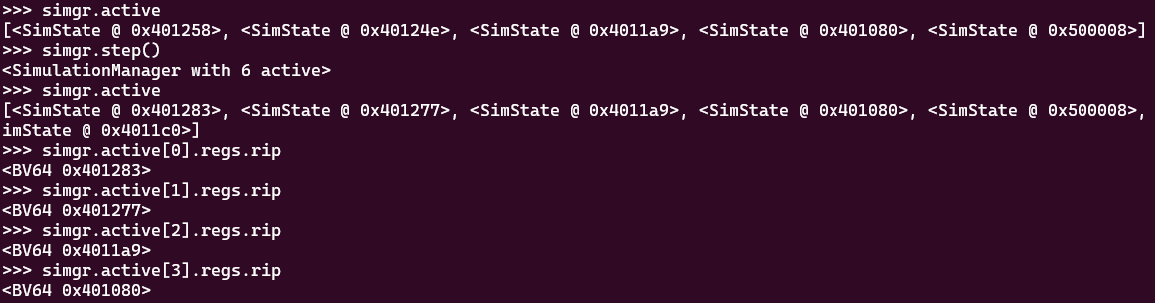
When you perform symbolic execution with simgr.step(), you can see states being added to the active stash one by one.
Therefore, after advancing execution for a while, inspecting elements in active shows that states have been updated.
Analysis Techniques with SimulationManager
Pre-defining the Flag String Length
You can create a symbolic variable for the Flag with constraints as follows:
import angr
import claripy

# Create a symbolic variable 'flag' for 20 characters (8-bit bitvector)
flag = claripy.BVS('flag', 20*8, explicit_name=True)

# Create a SimState object including the program's memory, registers, and filesystem
# state = proj.factory.blank_state(addr=funcaddr, add_options={angr.options.LAZY_SOLVES})
state = proj.factory.entry_state()

# Add constraints to the 20-character symbolic variable
for i in range(19):
    state.solver.add(flag.get_byte(i) >= 0x21)
    state.solver.add(flag.get_byte(i) <= 0x7f)
Adding Constraints on the Flag String
If certain characters have already been identified, you can add constraints on those positions for more efficient exploration:
# If a character at a specific position is already known, add it as a constraint
state.add_constraints(argv1.chop(8)[0] == 'C')
state.add_constraints(argv1.chop(8)[1] == 'T')
state.add_constraints(argv1.chop(8)[2] == 'F')
state.add_constraints(argv1.chop(8)[3] == '{')
Applying the Flag Symbolic Variable at the Right Location
The Flag symbolic variable you create must be applied at the appropriate location in accordance with the binary’s implementation.
# When the Flag needs to be supplied as a command-line argument
argv1 = claripy.BVS("argv1", 0xE * 8)
state = proj.factory.entry_state(args=["./fairlight", argv1])

# When calling a function with the Flag as its argument
flag = claripy.BVS('flag', 20*8, explicit_name=True)
buf = 0x606000 # buffer to store flag(.data)
funcaddr = 0x400646 # entry point of crazy function

state = proj.factory.blank_state(addr=funcaddr, add_options={angr.options.LAZY_SOLVES})

# insert flag into memory by hand
# state.memory.store(buf, flag, endness='Iend_LE')
state.memory.store(buf, flag, endness='Iend_BE')
state.regs.rdi = buf
Improving Performance
You can sometimes improve performance by automatically discarding stashes like deadended:
Also, angr’s default maximum number of symbolic bytes that can be read from memory is 60 bytes; for longer Flags, analysis may not work correctly.
In such cases you can specify the appropriate byte size by changing state.libc.buf_symbolic_bytes.
# Disable automatic loading of external libraries to improve performance
proj = angr.Project('./chall', auto_load_libs=False)

# Specifying LAZY_SOLVES defers symbol resolution, which can improve performance (may reduce accuracy)
state = proj.factory.entry_state(args=["./chall", argv1], add_options={angr.options.LAZY_SOLVES})

# Change the maximum number of symbolic bytes read from memory
state.libc.buf_symbolic_bytes = input_size + 1

# Automatically discard the avoid and deadended stashes
simgr.explore(find=find, avoid=avoids, step_func=lambda lsm: lsm.drop(stash='avoid').drop(stash='deadended'))
Changing the Exploration Strategy
simgr = proj.factory.simulation_manager(state)
explorer = angr.exploration_techniques.Explorer(find=lambda s: s.solver.eval(s.regs.dl) == 0x43 and s.solver.eval(s.regs.rip) == 0x401641)
simgr.use_technique(explorer)
simgr.run()
Retrieving Register and Stack Information During Exploration
# With a stash advanced to an arbitrary state via simgr.step() etc.
current_state = simgr.active[0]

# Read the value of the RAX register
current_state.regs.rax

# Get RSP information
current_state.regs.rsp

p_BV64 = current_state.mem[0x7fffffffffeffa8].uint64_t.resolved
current_state.solver.eval(p_BV64)
current_state.solver.eval_upto(p_BV64,10)
Solving CTF Problems with angr
Here I solve CTF problems introduced in the official angr documentation using angr.
Reference: CTF Challenge Examples - angr documentation
HackCon 2016 - angry-reverser
Analyzing the binary in Ghidra reveals that it validates the input to determine whether the Flag is correct.
However, the validation function performs extremely complex repeated computations as shown below, making it very difficult to identify the Flag through static analysis alone.
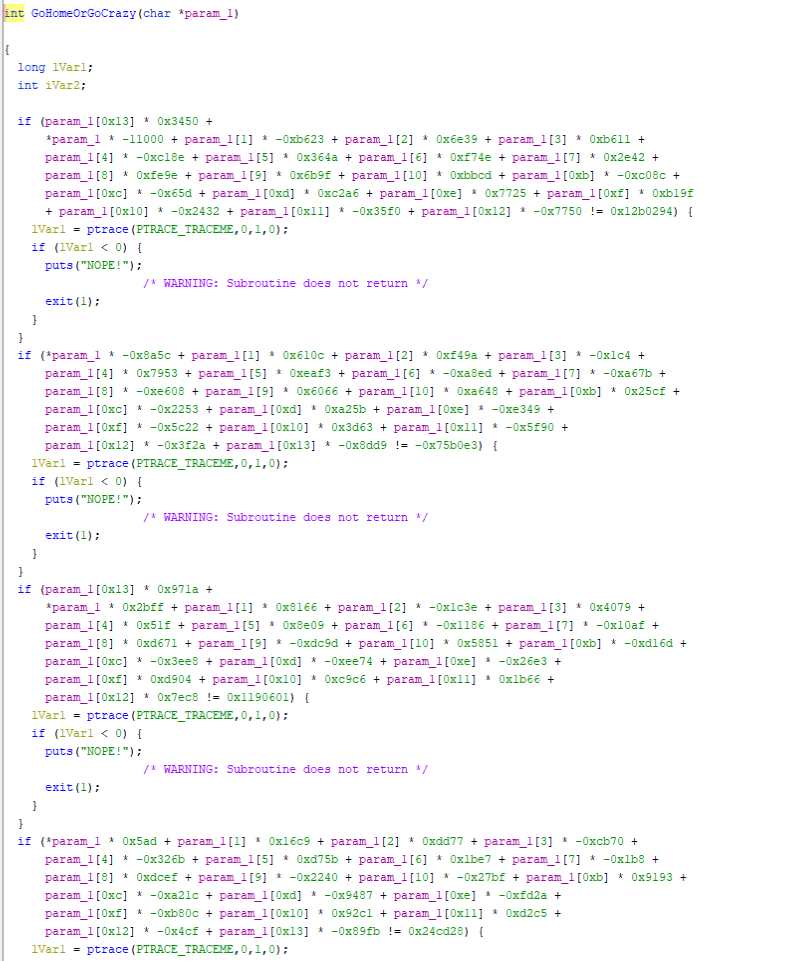
When trying to find the correct input with angr, a simple SimulationManager script as shown in Symbolic Execution never finishes.
So let’s read the example solve script:
import angr
import claripy

def main():
    flag    = claripy.BVS('flag', 20*8, explicit_name=True) # symbolized flag, we know the length by looking at the assembly code
    buf     = 0x606000 # buffer to store flag
    crazy   = 0x400646 # entry point of crazy function
    find    = 0x405a6e # end of crazy function

    # Offset of 'FAIL' blocks in Crazy(from pwntools--e.search(asm('mov ecx, 0')))
    avoids = [0x402c3c, 0x402eaf, 0x40311c, 0x40338b, 0x4035f8, 0x403868,
              0x403ad5, 0x403d47, 0x403fb9, 0x404227, 0x404496, 0x40470a,
              0x404978, 0x404bec, 0x404e59, 0x4050c7, 0x405338, 0x4055a9,
              0x4057f4, 0x405a2b]

    proj = angr.Project('./yolomolo', auto_load_libs=False)
    # Create blank state starting from crazy function
    # LAZY_SOLVES is very important here because we are actually collecting constraints for an equation Ax=b, where A is 20 by 20, x and b are 20 by 1
    state = proj.factory.blank_state(addr=crazy, add_options={angr.options.LAZY_SOLVES})
    # insert flag into memory by hand
    # state.memory.store(buf, flag, endness='Iend_LE')
    state.memory.store(buf, flag, endness='Iend_BE')
    state.regs.rdi = buf

    # each character of flag should be between 0x30 and 0x7f
    for i in range(19):
        state.solver.add(flag.get_byte(i) >= 0x21)
        state.solver.add(flag.get_byte(i) <= 0x7f)

    simgr = proj.factory.simulation_manager(state)

    simgr.explore(find=find, avoid=avoids)
    found = simgr.found[0]
    return found.solver.eval(flag, cast_to=bytes)

def test():
    assert main() == b"HACKCON{VVhYS04ngrY}"

if __name__ in '__main__':
    import logging
    logging.getLogger('angr.sim_manager').setLevel(logging.DEBUG)
    print(main())
This code creates a symbolic variable flag with a constraint that it consists of printable ASCII characters.
It then stores the variable in big-endian format into a free area of the data section using state.memory.store(buf, flag, endness='Iend_BE'), sets that address in rdi, and creates a SimState with the Flag-validation function GoHomeOrGoCrazy as its entry point.
This is a key technique worth remembering.
SecurityFest 2016 - fairlight
Next is a pattern where the Flag must be supplied as a command-line argument.
Here, the Flag is identified by passing a symbolic variable as the args of entry_state.
import angr
import claripy

def main():
    proj = angr.Project('./fairlight', load_options={"auto_load_libs": False})
    argv1 = claripy.BVS("argv1", 0xE * 8)
    state = proj.factory.entry_state(args=["./fairlight", argv1])

    simgr = proj.factory.simulation_manager(state)
    simgr.explore(find=0x4018f7, avoid=0x4018f9)
    found = simgr.found[0]
    return found.solver.eval(argv1, cast_to=bytes)

def test():
    res = main()
    print(repr(res))
    assert res == b'4ngrman4gem3nt'


if __name__ == '__main__':
    import logging
    logging.getLogger('angr.sim_manager').setLevel(logging.DEBUG)
    print(main())
Solving Constraints with z3py
angr uses z3 internally as its SMT solver for constraint solving.
Therefore, knowing how to write constraint-solving code in z3py is useful when using angr.
You can also specify detailed constraints derived from decompilation results to identify the Flag.
Constraint: Match a Popcount (Bit Sum) Function
from z3 import *
from math import *

s = Solver()
i1 = BitVec('i1', 64)
i2 = BitVec('i2', 64)

# Define a function to compute the sum of bits (popcount)
def HW(bvec):
  return Sum([ZeroExt(int(ceil(log2(bvec.size()))), Extract(i,i,bvec)) for i in range(bvec.size())])

# Define a function that returns 0 or 1 based on the popcount
def volcano(x):
  w = HW(x)
  return If(And(w > 16, w < 27), 1, 0)

def digitValue(c):
    dv = StrToInt(c)
    return If(dv == -1, 1, dv)

if s.check() == sat:
    print(s.model())
else:
    print("unsat")
Constraint: Match the Number of Decimal Digits
from z3 import *

s = Solver()
i1 = BitVec('i1', 64)
i2 = BitVec('i2', 64)

# Count decimal digits by converting to string
# https://stackoverflow.com/questions/tagged/z3py
i1 = BV2Int(i1)
i2 = BV2Int(i2)
s.add(Length(IntToStr(i1)) == Length(IntToStr(i2)))

if s.check() == sat:
    print(s.model())
else:
    print("unsat")
Constraint: Match the Sum of Decimal Digits
from z3 import *
from math import *

s = Solver()
i1 = BitVec('i1', 64)
i2 = BitVec('i2', 64)

# Constraint that x and y have the same digit sum in decimal
# https://stackoverflow.com/questions/76654949/z3-iterate-over-string-to-add-up-only-numbers-python-api
add_only_numbers = RecFunction('add_only_numbers', StringSort(), IntSort())
w = FreshConst(StringSort())
RecAddDefinition( add_only_numbers
                , [w]
                , If ( Length(w) == 0
                     , 1
                     , digitValue(Extract(w, 0, 1)) + add_only_numbers(Extract(w, 1, Length(w) - 1))
                     )
                )
s.add(add_only_numbers(IntToStr(i1)) == add_only_numbers(IntToStr(i2)))

if s.check() == sat:
    print(s.model())
else:
    print("unsat")
Shift and Rotate-Shift Operations in z3py
You can perform shift operations on BitVec in z3py. (Regular Python shift operators also work.)
# Create a 4-byte BitVec and add constraints on each character byte
buf = BitVec("buf", 32)
for i in range(4):
    # LShR(>>)
    s.add((LShR(buf,8*i) & 0xFF) >= 0x21)
    s.add((LShR(buf,8*i) & 0xFF) <= 0x7e)

# Similarly, to use only 3 bytes, specify constraints as follows
buf2 = BitVec("buf2", 32)
s.add(buf2 >> 24 == 0)
for i in range(3):
    # LShR(>>)
    s.add((LShR(buf2,8*i) & 0xFF) >= 0x30)
    s.add((LShR(buf2,8*i) & 0xFF) <= 0x39)


# Rotate-shift (equivalent to ror(1*b,15) in the following implementation)
# def ror(a,b): return (LShR(a,b)|(a<<(32-b))) & N
RotateRight((a * b), 15)

# Equivalent to rol((a * b), 11) in the following implementation
# def rol(a,b): return ror(a,32-b) # RotateLeft
RotateLeft((a * b), 11)
Reference: Z3: z3py Namespace Reference
Solving CTF Problems with z3py
Below are examples of solving CTF problem constraints with z3py.
n00bz CTF 2023 - zzz
Decompiling the given ELF binary in Ghidra produced the following result:
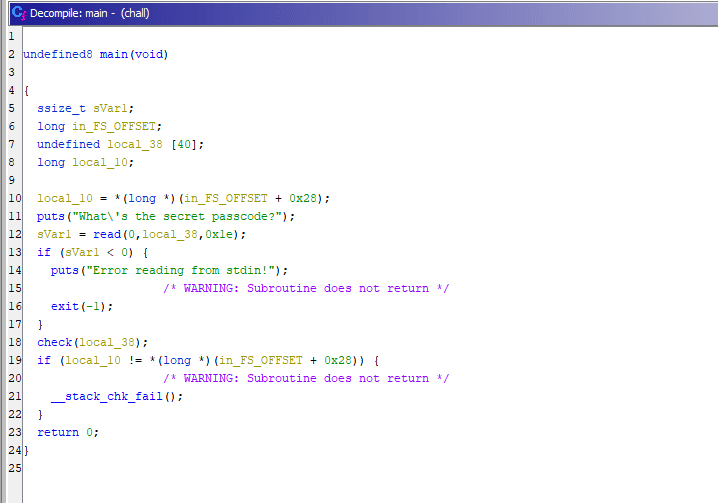
The read function reads 0x1e bytes from fd=0, meaning it reads from stdin and passes the data to the check function.
The check function decompiled as follows:
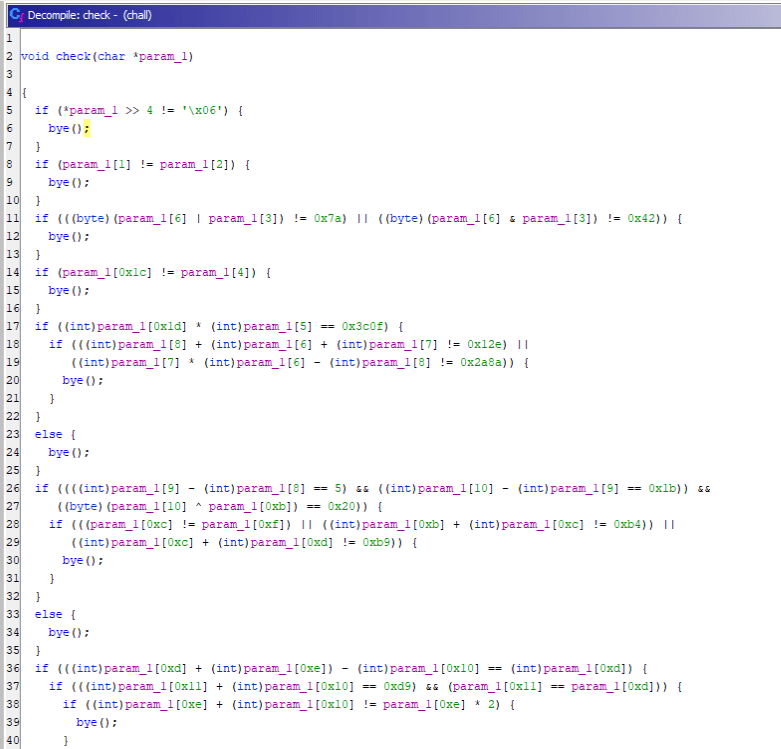
I created a Solver with the following constraints based on the Ghidra decompilation and was able to obtain the Flag:
from z3 import *
flag = [BitVec(f"flag[{i}]", 8) for i in range(0x1e)]
s = Solver()

# Add custom constraints
s.add(flag[0] == ord("n"))
s.add(flag[1] == ord("0"))
s.add(flag[2] == ord("0"))
s.add(flag[3] == ord("b"))
s.add(flag[4] == ord("z"))
s.add(flag[5] == ord("{"))
s.add(flag[0x1e-1] == ord("}"))
for i in range(0x1e):
    s.add(And(
        (flag[i] >= 0x21),
        (flag[i] <= 0x7e)
    ))

# Problem constraints
s.add(flag[0] >> 4 == 0x6)
s.add(flag[1] == flag[2])
s.add(And(
    ((flag[6] | flag[3]) == 0x7a),
    ((flag[6] & flag[3]) == 0x42)
))
s.add(flag[0x1c] == flag[4])
s.add(And(
    (flag[0x1d] * flag[5] == 0x3c0f),
    And(
        (flag[8] + flag[6] + flag[7] == 0x12e),
        (flag[7] * flag[6] - flag[8] == 0x2a8a)
    )
))

s.add(And(
    And(
        (flag[9] - flag[8] == 5),
        (flag[10] - flag[9] == 0x1b),
        (flag[10] ^ flag[0xb] == 0x20)
    ),
    And(
        (flag[0xc] == flag[0xf]),
        (flag[0xb] + flag[0xc] == 0xb4),
        (flag[0xc] + flag[0xd] == 0xb9)
    )
))

s.add(And(
    (flag[0xd] + flag[0xe] - flag[0x10] == flag[0xd]),
    And(
        (flag[0x11] + flag[0x10] == 0xd9),
        (flag[0x11] == flag[0xd])
    ),
    And(flag[0xe] + flag[0x10] == flag[0xe] * 2)
))

s.add(And(
        And(
            (flag[0x12] == ord('Z')),
            (flag[0x12] == flag[0x13]),
            ((flag[0x15] ^ flag[0x13] ^ flag[0x14]) == 0x7f)
        ),
        ((flag[0x14] ^ flag[0x15] ^ flag[0x16]) == flag[0x15]),
        (flag[0x15] == ord('_')),
        (flag[6] + flag[0x18] == 0xb4)
))

s.add(flag[0x18] + ~flag[0x17] == -0x21)
s.add(flag[0x19] == flag[9])
s.add(And(
    (flag[0x1b] + flag[0x1a] == 0xd4),
    (flag[0x1b] == flag[0x1c])
))

while s.check() == sat:
    m = s.model()
    for c in flag:
        print(chr(m[c].as_long()),end="")
    print("")
    break
SEKAI CTF - Guardians of the Kernel
- Makes use of rotate-shift operations
- It is not necessary to add every intermediate computation in z3py as a constraint — you can assign values to regular variables and only add the final value as a constraint
Reference: SEKAI CTF 2023 Writeup
Summary
I had been copy-pasting angr without understanding it, but in practice it turns out to be an extremely powerful tool — one that, including the content I couldn’t cover here, has the potential to be highly effective for solving all kinds of CTF problems.
I plan to use this article as a cheat sheet and add to it as I go.
Past Problems Solved with angr
- Using angr’s hook feature to go for a flag via unintended solution on X’mas Eve: technique using hooks
- ångstromCTF 2024 Writeup - Polyomino: angr problem solved with
state.memory.store
Past Problems Solved with z3
- Cyber Apocalypse CTF 2024 - Metagaming: solving a VM problem with Z3
- GPN CTF 2024 Writeup - Archventure time: implemented a solver using various Z3 techniques
- Iris CTF 2024 Writeup - Secure Computing: solving computations inside a seccomp filter with Z3
- TetCTF 2024 Writeup - babyasm: wasm problem solved with Z3
- n00bzCTF 2023 Writeup - zzz: simple Z3 Flag-identification problem
- SEKAI CTF 2023 Writeup - Guardians of the Kernel: problem using heavy shift operations in Z3
- 1337UP CTF 2023 Writeup - FlagChecker: simple Z3 problem