This page has been machine-translated from the original page. In this book, based on the Scanner File System Minifilter Driver sample code published in the official Windows Driver Samples repository1, I explain how real-time file scanning works in AntiVirus software for Windows.
However, for many readers, the term “file system minifilter driver” in Windows is probably unfamiliar.
So before reading Scanner sample code, this chapter organizes and explains the basic overview of Windows file system minifilter drivers.
A full treatment of minifilter drivers would easily exceed 100 pages.
Therefore, this chapter only covers the prerequisite concepts needed to read Scanner source code, and does not provide a full beginner guide to file system minifilter drivers or Filter Manager.
For details, please refer to Microsoft documentation below.
URL: About file system filter drivers
https://learn.microsoft.com/ja-jp/windows-hardware/drivers/ifs/about-file-system-filter-drivers
Table of Contents
- What Is a File System Minifilter Driver?
- Registering Minifilter Drivers with File System Filter Manager
- Minifilter Driver Hierarchy (Altitude)
- Using DbgPrint
- Registering IRP Routines and Callback Functions
- Attaching Context to Files
- Inspecting Minifilter Information from Debugger
- Chapter Summary
What Is a File System Minifilter Driver?
In Windows, file system filter drivers running in kernel mode can monitor, modify, and filter file I/O operations.2
Windows provides two file system filter driver models: “legacy file system filter drivers” and “minifilter drivers.”3
Of these, legacy file system filter drivers are difficult to develop because implementation considerations are very complex.
They also have disadvantages compared to minifilters, such as not being unloadable while the system is running, so they are not recommended.4
The minifilter driver discussed in this book is also a file system filter driver, but it works as a client of File System Filter Manager (FltMgr.sys), which is loaded as a legacy file system filter driver.
File System Filter Manager is a kernel driver provided by the system to implement features needed by file system filter drivers.5
Because minifilter drivers can filter I/O indirectly through Filter Manager, they are generally more efficient and safer to implement than legacy file system filter drivers.
Registering Minifilter Drivers with File System Filter Manager
By using interfaces provided by File System Filter Manager, minifilter drivers can implement I/O request handling more easily and efficiently.
Minifilter drivers can filter IRP (I/O Request Packets)-based operations through this interface.
Unlike legacy file system filter drivers, minifilters do not need to implement all standard IRP dispatch functions. They can define callback routines only for I/O requests they want to filter.
For each target I/O request, minifilters can register both a “Preoperation Callback Routine” and a “Postoperation Callback Routine.”
This allows callbacks both when an I/O request is received and when completion of that I/O operation is notified.
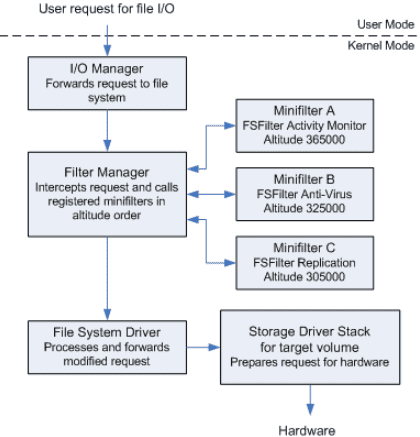
The figure below (quoted from documentation) shows the I/O stack model using File System Filter Manager and minifilter drivers.7
Minifilter Driver Hierarchy (Altitude)
As shown above, Filter Manager is loaded between Windows I/O Manager and file system drivers.
Each minifilter registered with Filter Manager has a value called Altitude.
Altitude defines the order in which minifilters receive and return IRP requests in the I/O stack.
When Filter Manager receives an I/O request, “Preoperation Callback Routine” runs from minifilters with higher Altitude first (descending order).
When Filter Manager receives completion of an I/O operation, “Postoperation Callback Routine” runs in reverse order, from lower Altitude first (ascending order).8
Altitude values are assigned within ranges based on filter type.
The filter type used to define this range is called a Load Order Group.
Mapping between Load Order Group and Altitude ranges is documented below.
URL: Load order groups and altitudes for minifilter drivers
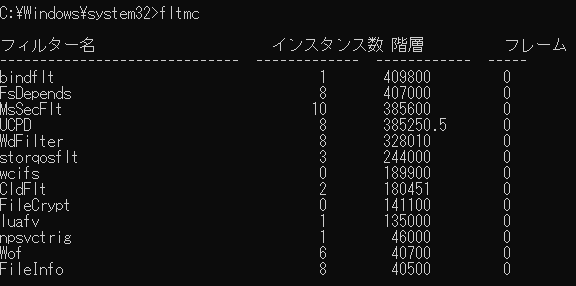
For example, minifilter drivers used by AntiVirus software such as Microsoft Defender Antivirus belong to “FSFilter AntiVirus,” where Altitude is in range 320000 to 329999.
If you run fltmc on a machine where Microsoft Defender Antivirus is still installed, you can see WdFilter Altitude as 328010.
For minifilter drivers that must be officially installed on Windows, you need to request Load Order Group assignment from Microsoft.9
The list of filters assigned Altitude by Microsoft is published at the URL below and updated once or twice a year.
URL: Allocated filter altitudes
https://learn.microsoft.com/ja-jp/windows-hardware/drivers/ifs/allocated-altitudes
One reason these restrictions exist is to avoid situations where intended behavior of a minifilter is unintentionally not guaranteed.10
For example, if one minifilter scans data and another encrypts data, an encryption minifilter executing before the scanner on write requests could encrypt data before scanning, causing scanning problems.
Avoiding such issues and allowing each minifilter function to work properly is one key purpose of restricting Altitude ranges by Load Order Group.
Building a Small Minifilter Driver
In this chapter, as preparation for reading Scanner code in later chapters, we implement a simple minifilter driver.
Extract the sample code repository downloaded in Chapter 1 and open nullFilter.sln in [filesys] > [miniFilter] > [nullFilter] with Visual Studio.
URL: Windows-driver-samples
https://github.com/Microsoft/Windows-driver-samples
nullFilter is a simple minifilter driver that only registers itself with Filter Manager.
Because nullFilter has no callback function registration, it performs no filtering, as its name suggests.
First, look at the DriverEntry function, which is called first when the driver is loaded.
status = FltRegisterFilter(
    DriverObject,
    &FilterRegistration,
    &NullFilterData.FilterHandle
);

FLT_ASSERT(
    NT_SUCCESS( status )
);

if (NT_SUCCESS( status )) {

    status = FltStartFiltering(
        NullFilterData.FilterHandle
    );

    if (!NT_SUCCESS( status )) {
        FltUnregisterFilter(
            NullFilterData.FilterHandle
        );
    }
}
Here we focus on three functions used in DriverEntry.
FltRegisterFilterFltStartFilteringFltUnregisterFilter
Registering a Minifilter Driver with FltRegisterFilter
FltRegisterFilter11, called first, registers a minifilter driver using a pointer to FLT_REGISTRATION12.
It receives three arguments:
NTSTATUS FLTAPI FltRegisterFilter(
  [in]  PDRIVER_OBJECT         Driver,
  [in]  const FLT_REGISTRATION *Registration,
  [out] PFLT_FILTER            *RetFilter
);
The first member Driver receives the driver object pointer passed to DriverEntry.
The second member receives a pointer to FLT_REGISTRATION, and the third receives a pointer where the registered minifilter pointer is stored.
The FLT_REGISTRATION structure contains registration data required for minifilter registration.
In nullFilter, it is defined as follows.
CONST FLT_REGISTRATION FilterRegistration = {

 sizeof(
    FLT_REGISTRATION
 ),                       //  Size
 FLT_REGISTRATION_VERSION,//  Version
 0,                       //  Flags

 NULL,                    //  Context
 NULL,                    //  Operation callbacks

 NullUnload,              //  FilterUnload

 NULL,                    //  InstanceSetup
 NullQueryTeardown,       //  InstanceQueryTeardown
 NULL,                    //  InstanceTeardownStart
 NULL,                    //  InstanceTeardownComplete

 NULL,                    //  GenerateFileName
 NULL,                    //  GenerateDestinationFileName
 NULL                     //  NormalizeNameComponent

};
FLT_REGISTRATION specifies its own size and target Windows version (revision level).
Usually, FLT_REGISTRATION_VERSION defined in fltKernel.h is used.
FLT_REGISTRATION can also include ContextRegistration (context array) and OperationRegistration (IRP routine callbacks).
nullFilter does not register those in this stage, so context and callback registration are discussed later.
FilterUnload stores a pointer to the FilterUnloadCallback routine.
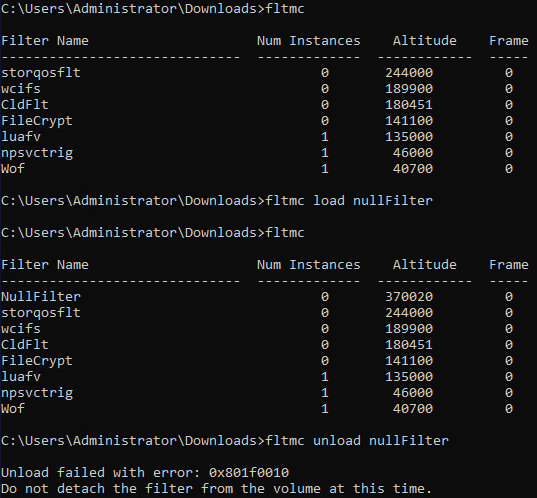
This routine is called when unloading a minifilter driver. If it is NULL, the minifilter cannot be unloaded.
In nullFilter, this is NullUnload, which calls FltUnregisterFilter.
If you build nullFilter after setting FilterUnloadCallback to NULL, fltmc unload fails with an error, as shown below.
FLT_REGISTRATION also registers instance-related callbacks such as InstanceSetupCallback and InstanceQueryTeardownCallback.
This chapter does not go deep into instances, but a minifilter attached to a specific volume at a specific Altitude is called a minifilter instance.13
In nullFilter, only InstanceQueryTeardownCallback is registered; the rest are NULL.
InstanceQueryTeardownCallback runs when detaching a minifilter instance.
Instances can be detached by FltDetachVolume14 or FilterDetach15, and InstanceQueryTeardownCallback can validate detach operations.
Starting Filter Processing with FltStartFiltering
After successful registration with FltRegisterFilter, call FltStartFiltering16 to start filtering.
This function receives a pointer to the minifilter registered by FltRegisterFilter.
NTSTATUS FLTAPI FltStartFiltering(
  [in] PFLT_FILTER Filter
);
When this request completes, Filter Manager treats the minifilter as active and starts I/O filtering.
If processing fails, nullFilter calls FltUnregisterFilter17 to unload.
When FltUnregisterFilter runs, registered callbacks are removed, contexts are deleted, and per-instance teardown callbacks are invoked.
Building and Installing nullFilter
Now build nullFilter in Visual Studio and load it into the VM.
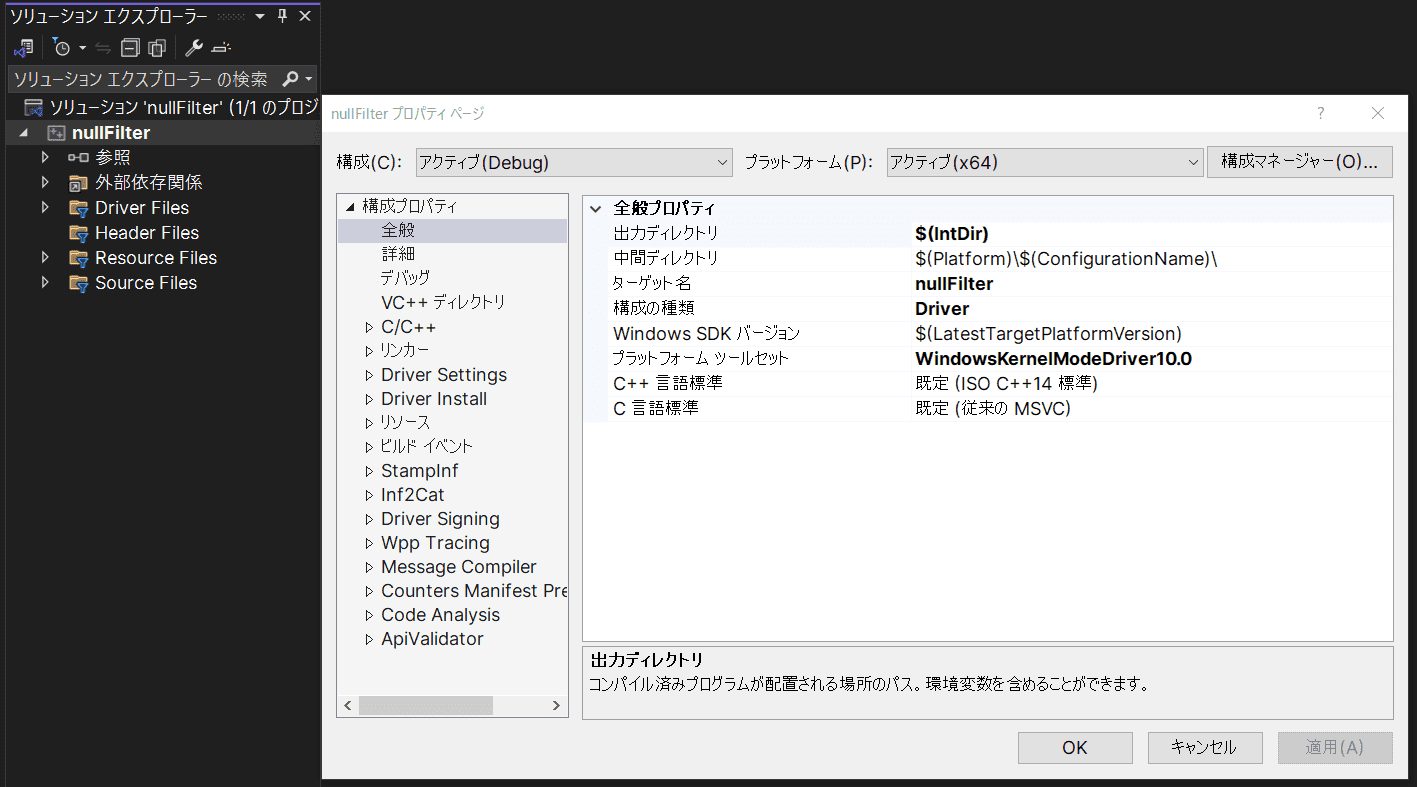
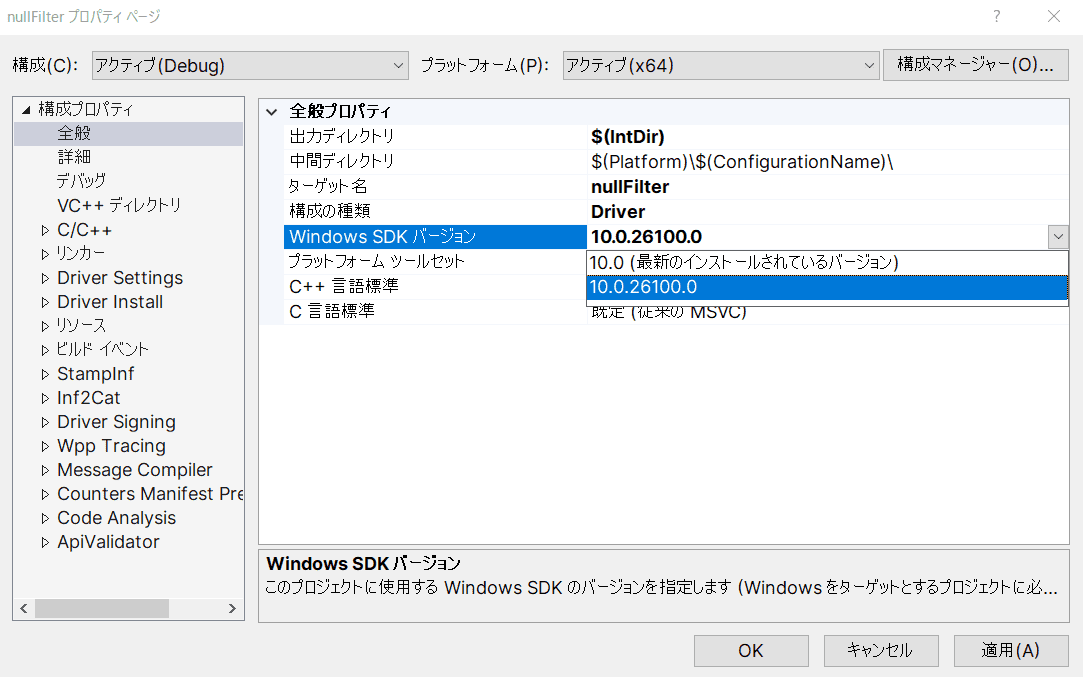
Open nullFilter.sln and set [Windows SDK Version] in project properties to the installed SDK/WDK version.
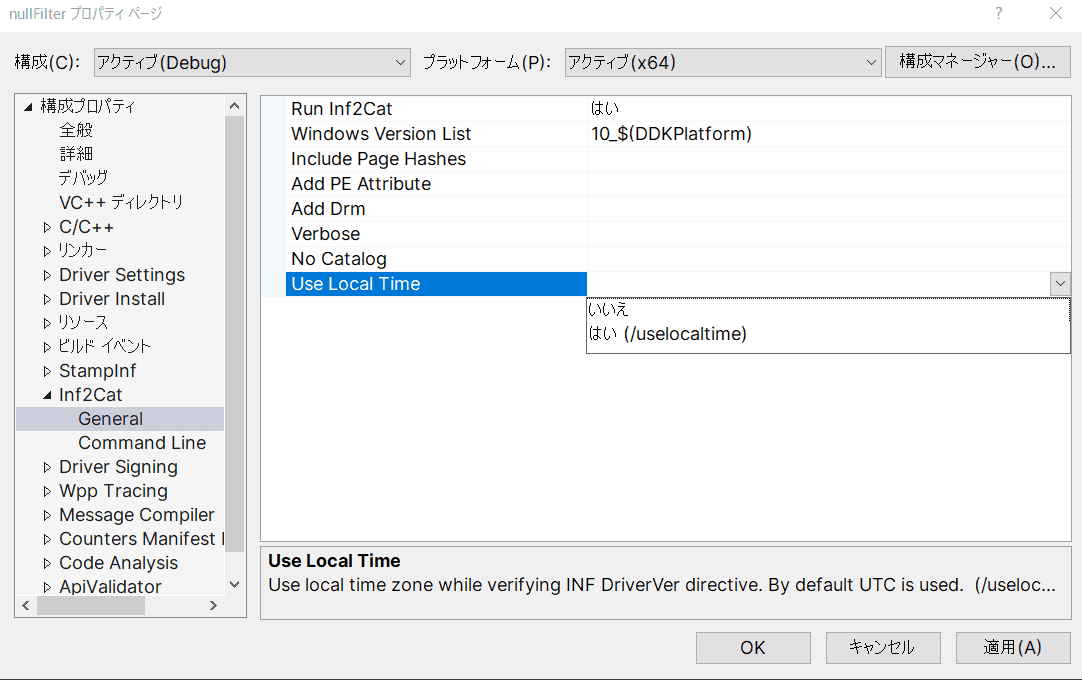
Then open [Inf2Cat] > [General] and enable [Use Local Time].
This avoids 22.9.7: DriverVer set to a date in the future (postdated DriverVer not allowed) in environments using Japan timezone.
After minimum property updates, build from [Build] > [Build Solution].
If build succeeds, output files are placed by default under ./x64/Debug/nullFilter relative to nullFilter.sln.
Verify these three files are generated.
nullFilter.sysnullFilter.infnullFilter.cat
These are all required components of a driver package.18
nullFilter.sys is the minifilter PE file.
nullFilter.inf contains driver installation configuration, including supported OS versions and catalog file name.
nullFilter.cat contains cryptographic hashes of files in the driver package, used by Windows to verify driver integrity.
The catalog file itself must also be digitally signed.
Copy these files to the VM.
Then right-click nullFilter.inf and run [Install].
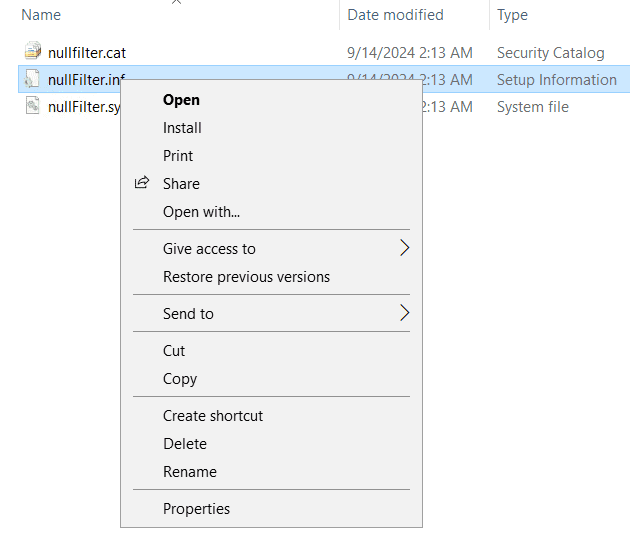
If installation succeeds, NullFilter.sys is copied to C:\Windows\System32\drivers, and driver information is registered in service registry.
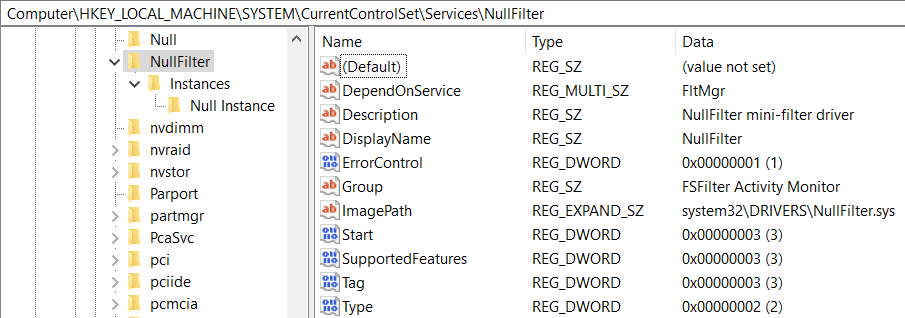
The registry includes driver type, name, image path, startup settings, and more.
For example, the [Instance] key includes attachment settings and Altitude.

After installation, load minifilter with fltmc19.
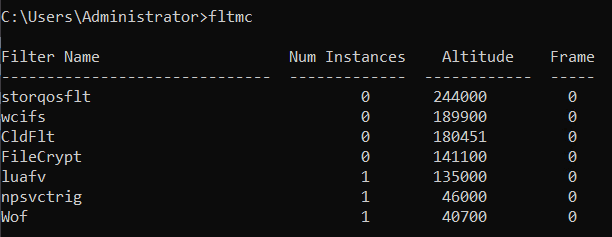
Run elevated Command Prompt and execute fltmc.
At this point nullFilter is installed but not yet loaded to Filter Manager, so it does not appear in the list.
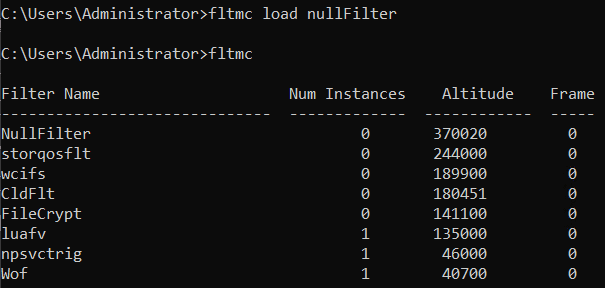
Then run fltmc load nullFilter.
Now nullFilter is registered and loaded as a minifilter.
Altitude appears as 370020, as configured in registry during installation.
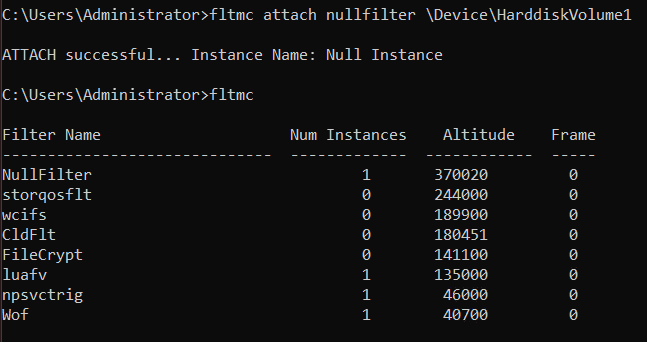
Then use fltmc attach to attach the loaded nullFilter instance to a volume.
You can confirm volume names with fltmc volumes.
Finally, run fltmc unload nullFilter to unload it and verify it disappears from fltmc list.
Using DbgPrint
So far, nullFilter performs no filtering.
To deepen understanding, we now modify nullFilter gradually and verify behavior in the VM.
First, add DbgPrintEx20 to NullUnload and NullQueryTeardown to verify callbacks run during detach and unload.
This code is published in branch 01-add-debug-comment of the repository below.
URL: MFLab 01-add-debug-comment
https://github.com/kash1064/MFLab/tree/01-add-debug-comment
Build and reinstall this code in the VM. Use Debug build configuration for this section.
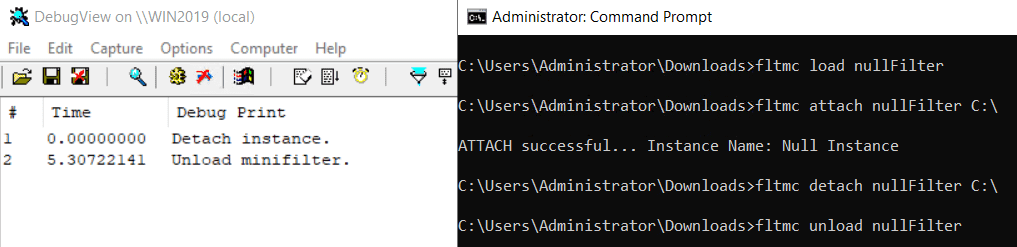
After reinstalling, launch Dbgview.exe (Sysinternals Suite) in VM and enable [Capture Kernel] and [Enable Verbose Kernel Output] from [Capture].
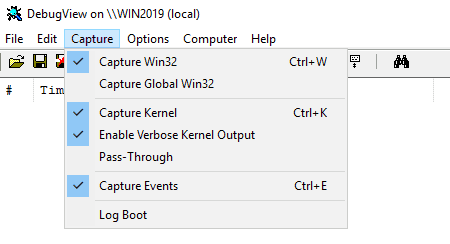
Now detaching or unloading with fltmc shows debug output from the added DbgPrintEx calls.
Registering IRP Routines and Callback Functions
Next, add filtering behavior by registering IRP routines and callback functions.
To do this, set OperationRegistration in FLT_REGISTRATION to a pointer to an array of FLT_OPERATION_REGISTRATION.
In this example, we register IRP_MJ_CREATE with callbacks FuncPreCreate and FuncPostCreate.
const FLT_OPERATION_REGISTRATION Callbacks[] = {

    { IRP_MJ_CREATE,
      0,
      FuncPreCreate,
      FuncPostCreate},

    { IRP_MJ_OPERATION_END }
};
{ IRP_MJ_OPERATION_END } is mandatory as the last element.21
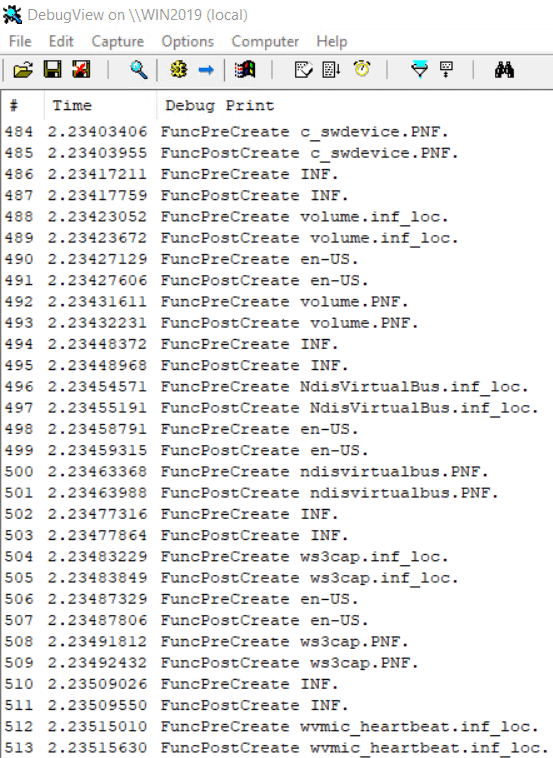
Both callbacks in this test only print target file names.
/* same code as source */As shown in source, minifilter driver uses FltGetFileNameInformation22 and FltParseFileNameInformation23 to query/parse file information and access it through FLT_FILE_NAME_INFORMATION24.25
The changed code is published in branch 02-add-irp-callback-routine.
URL: MFLab 02-add-irp-callback-routine
https://github.com/kash1064/MFLab/tree/02-add-irp-callback-routine
Build and attach as before. Although it now has callbacks and is no longer truly nullFilter, names are unchanged.
After attachment, you can confirm both FuncPreCreate and FuncPostCreate are called and file names are output for IRP_MJ_CREATE.
Attaching Context to Files
Finally, add file context functionality to the minifilter.
A context is a structure a minifilter can attach to Filter Manager objects.26
As long as the target object exists, context can be accessed consistently and used across I/O operations.
One reason AntiVirus minifilter drivers attach contexts is performance improvement.
For example, data calculated in a Preoperation callback can be stored in context and reused in Postoperation callback.
To attach context, set ContextRegistration in FLT_REGISTRATION to an array of FLT_CONTEXT_REGISTRATION27.
For this test, add the structures below.
typedef struct _DATA_CONTEXT {

    UNICODE_STRING message;

} DATA_CONTEXT, * PDATA_CONTEXT;

const FLT_CONTEXT_REGISTRATION ContextRegistration[] = {

    { FLT_FILE_CONTEXT,
      0,
      NULL,
      sizeof(DATA_CONTEXT),
      'galF' },

    { FLT_CONTEXT_END }
};
FLT_CONTEXT_END must be the final element.
Actual context assignment is implemented in FuncPostCreate.
First, try to retrieve existing file context with FltGetFileContext28.
status = FltGetFileContext(
    Data->Iopb->TargetInstance,
    Data->Iopb->TargetFileObject,
    &dataContext
);
If not found, allocate and set context with FltAllocateContext29 and FltSetFileContext30.
status = FltAllocateContext(
    NullFilterData.FilterHandle,
    FLT_FILE_CONTEXT,
    sizeof(DATA_CONTEXT),
    PagedPool,
    &dataContext
);

status = FltSetFileContext(
    Data->Iopb->TargetInstance,
    Data->Iopb->TargetFileObject,
    FLT_SET_CONTEXT_KEEP_IF_EXISTS,
    dataContext,
    NULL
);
In this sample, if file name is test.txt, write File is test.txt!! into context; otherwise write Not valid file.
Code is published in branch 03-add-file-context.
URL: MFLab 03-add-file-context
https://github.com/kash1064/MFLab/tree/03-add-file-context
After building, reinstalling, and creating test.txt, context is attached. On later IRP_MJ_CREATE requests for the same file, text in context can be referenced.

Inspecting Minifilter Information from Debugger
So far we implemented callbacks and file context attachment on top of nullFilter.
Finally, attach a kernel debugger to VM and inspect minifilter information.
After attaching debugger, run !fltkd.filters first.
!fltkd31 is a debugger extension for minifilter driver debugging.
!fltkd.filters shows loaded minifilters, Altitudes, and volume-attached instances.
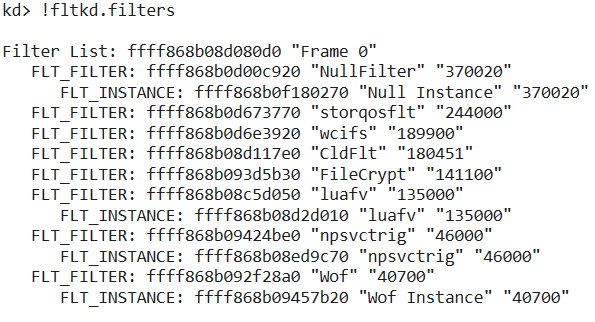
Then run !fltkd.filter <minifilter address> using nullFilter address found in !fltkd.filters to dump detailed configuration.
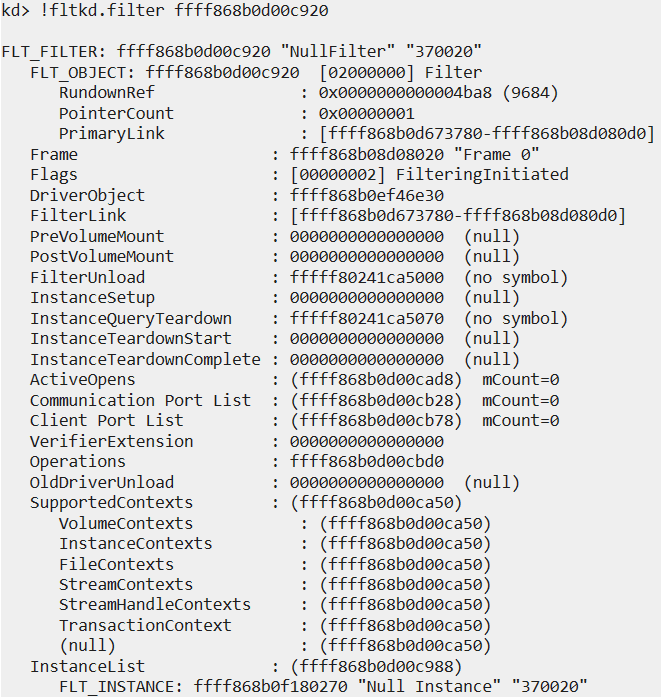
Likewise, run !fltkd.instance <instance address> with instance address found via !fltkd.filters to dump instance information.
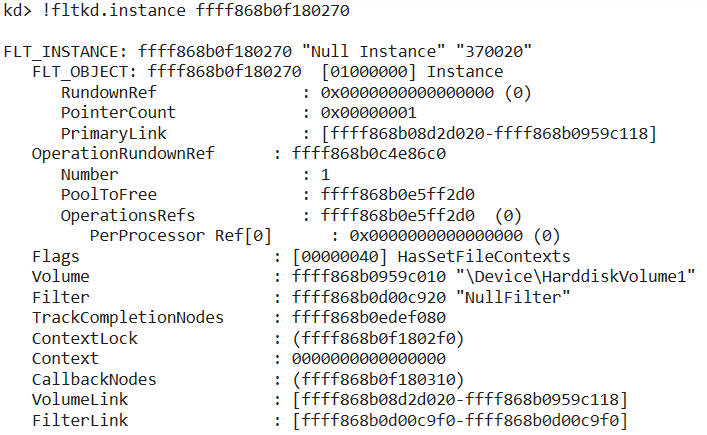
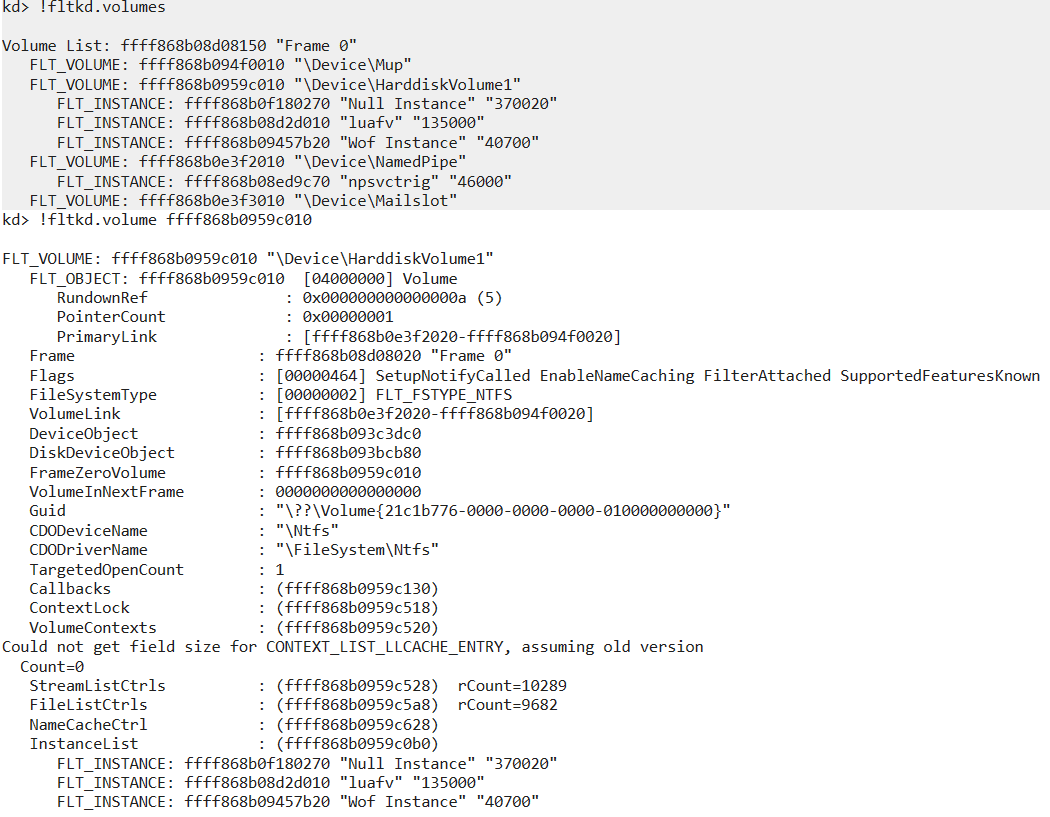
Volume information for attached instances can also be checked with !fltkd.volumes and !fltkd.volume <volume address>.
Chapter Summary
This chapter explained introductory information about registration and implementation of Windows file system minifilter drivers through the nullFilter sample driver.
In the next chapter, we explain implementation of AntiVirus software for Windows through Scanner sample code.
Table of Contents
- Preface
- Chapter 1: Setup Environment Used in This Book
- Chapter 2: Introduction to File System Minifilter Drivers
- Chapter 3: Reading the Scanner Sample Code
- Chapter 4: Kernel Debugging Scanner with WinDbg
-
Windows Driver Samples - scanner: https://github.com/microsoft/Windows-driver-samples/tree/main/filesys/miniFilter/scanner
↩ -
About file system filter drivers https://learn.microsoft.com/ja-jp/windows-hardware/drivers/ifs/about-file-system-filter-drivers
↩ -
Windows Internals 7th Ed. Vol.2 p.653-654 (Andrea Allievi, Alex Ionescu)
↩ -
Advantages of the filter manager model https://learn.microsoft.com/ja-jp/windows-hardware/drivers/ifs/advantages-of-the-filter-manager-model
↩ -
Windows Internals 7th Ed. Vol.2 p.654
↩ -
Filter Manager concepts https://learn.microsoft.com/ja-jp/windows-hardware/drivers/ifs/filter-manager-concepts
↩ -
Filter Manager concepts https://learn.microsoft.com/ja-jp/windows-hardware/drivers/ifs/filter-manager-concepts
↩ -
Requesting filter altitude identifiers https://learn.microsoft.com/ja-jp/windows-hardware/drivers/ifs/minifilter-altitude-request
↩ -
Windows Kernel Programming, Second Edition p.388
↩ -
FltRegisterFilter https://learn.microsoft.com/ja-jp/windows-hardware/drivers/ddi/fltkernel/nf-fltkernel-fltregisterfilter
↩ -
↩FLT_REGISTRATIONstructure https://learn.microsoft.com/ja-jp/windows-hardware/drivers/ddi/fltkernel/ns-fltkernel-fltregistration -
Filter Manager concepts https://learn.microsoft.com/ja-jp/windows-hardware/drivers/ifs/filter-manager-concepts
↩ -
FltDetachVolume https://learn.microsoft.com/ja-jp/windows-hardware/drivers/ddi/fltkernel/nf-fltkernel-fltdetachvolume
↩ -
FilterDetach https://learn.microsoft.com/ja-jp/windows/win32/api/fltuser/nf-fltuser-filterdetach
↩ -
FltStartFiltering https://learn.microsoft.com/ja-jp/windows-hardware/drivers/ddi/fltkernel/nf-fltkernel-fltstartfiltering
↩ -
FltUnregisterFilter https://learn.microsoft.com/ja-jp/windows-hardware/drivers/ddi/fltkernel/nf-fltkernel-fltunregisterfilter
↩ -
Components of a driver package https://learn.microsoft.com/ja-jp/windows-hardware/drivers/install/components-of-a-driver-package
↩ -
Fltmc.exe https://learn.microsoft.com/ja-jp/windows-hardware/drivers/ifs/development-and-testing-tools
↩ -
DbgPrintEx https://learn.microsoft.com/ja-jp/windows-hardware/drivers/ddi/wdm/nf-wdm-dbgprintex
↩ -
↩FLT_OPERATION_REGISTRATIONstructure https://learn.microsoft.com/ja-jp/windows-hardware/drivers/ddi/fltkernel/ns-fltkernel-fltoperation_registration -
FltGetFileNameInformation https://learn.microsoft.com/ja-jp/windows-hardware/drivers/ddi/fltkernel/nf-fltkernel-fltgetfilenameinformation
↩ -
FltParseFileNameInformation https://learn.microsoft.com/ja-jp/windows-hardware/drivers/ddi/fltkernel/nf-fltkernel-fltparsefilenameinformation
↩ -
↩FLT_FILE_NAME_INFORMATIONstructure https://learn.microsoft.com/ja-jp/windows-hardware/drivers/ddi/fltkernel/ns-fltkernel-fltfilenameinformation -
Windows Kernel Programming, Second Edition p.398
↩ -
Managing contexts in a minifilter https://learn.microsoft.com/ja-jp/windows-hardware/drivers/ifs/managing-contexts-in-a-minifilter-driver
↩ -
↩FLT_CONTEXT_REGISTRATIONstructure https://learn.microsoft.com/ja-jp/windows-hardware/drivers/ddi/fltkernel/ns-fltkernel-fltcontext_registration -
FltGetFileContext https://learn.microsoft.com/ja-jp/windows-hardware/drivers/ddi/fltkernel/nf-fltkernel-fltgetfilecontext
↩ -
FltAllocateContext https://learn.microsoft.com/ja-jp/windows-hardware/drivers/ddi/fltkernel/nf-fltkernel-fltallocatecontext
↩ -
FltSetFileContext https://learn.microsoft.com/ja-jp/windows-hardware/drivers/ddi/fltkernel/nf-fltkernel-fltsetfilecontext
↩ -
!fltkd extension https://learn.microsoft.com/ja-jp/windows-hardware/drivers/ifs/development-and-testing-tools
↩