This page has been machine-translated from the original page. In this chapter, we learn how real-time file scanning works in AntiVirus software for Windows through explanation of the Scanner File System Minifilter Driver sample code.
To make implementation easier to understand, this book does not explain source code linearly from line 1. Instead, it follows actual runtime behavior.
Because of space limits, this chapter quotes only part of the code rather than full source.
When extracting code, for readability, I may include related structures or global variables together and remove comments. Therefore, code snippets in this book may not exactly match original source layout.
Original source is available in the repository below. I recommend downloading Scanner minifilter source code before reading this chapter.
URL: Windows-driver-samples - Scanner
https://github.com/microsoft/Windows-driver-samples
Table of Contents
Scanner at a Glance
Compared with other samples in the same repository, such as AvScan, Scanner is implemented very simply.
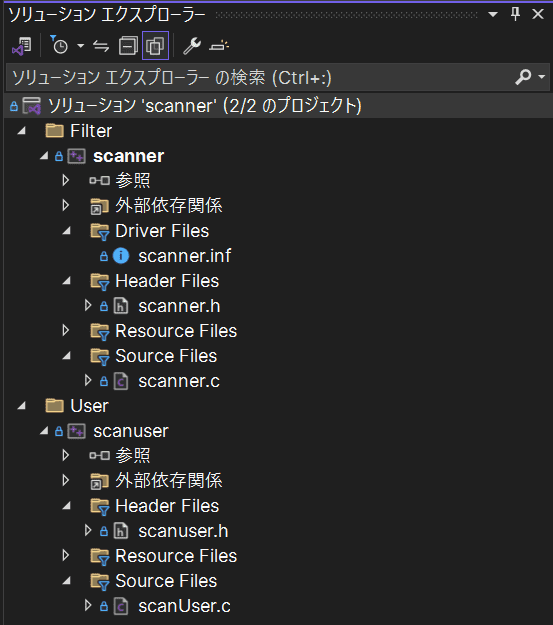
Scanner consists of two components: a kernel-mode minifilter driver and a user-mode program, mainly implemented in scanner.c and scanUser.c.
The following diagram shows an overview image of Scanner.
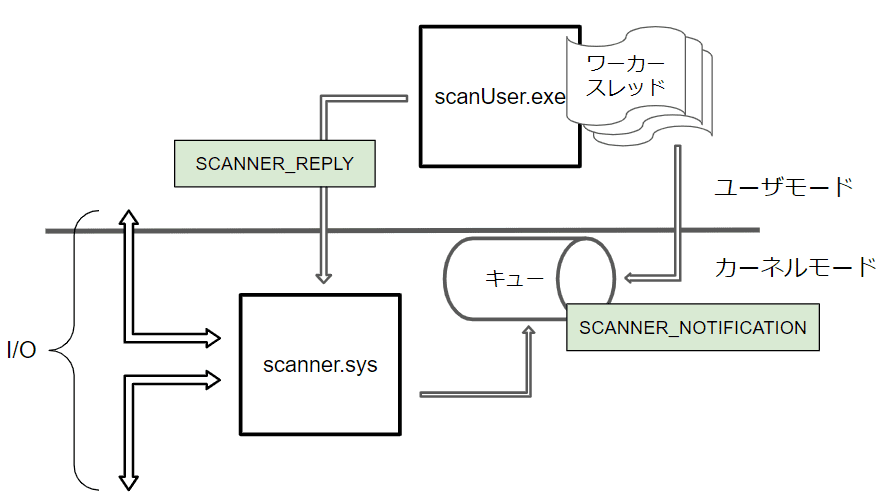
The minifilter driver registered by scanner.sys filters selected I/O requests in the system.
At that time, the minifilter driver sends information including scan target data to scanuser.exe, a user-mode client program.
Data sent from minifilter driver is scanned by worker threads in scanuser.exe, and the result is returned to the minifilter driver.
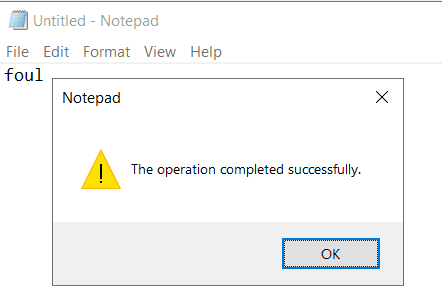
If scanned data contains the malicious signature string foul, the minifilter rejects the I/O request and blocks operations such as file open and write.
Scanner is intentionally simplified sample code, so many parts differ from real commercial AntiVirus software.
For example, in Scanner, detection signatures are hardcoded in the program.
In commercial products, signatures are usually included in component files distributed daily by software vendors.
These component files are often called definition files or pattern files.
Major commercial AntiVirus software usually includes many detection technologies beyond signature-based detection.
So component files from each vendor may include various information in addition to pattern signatures.
Scanner minifilter attempts file scanning only for IRP_MJ_CREATE, IRP_MJ_CLEANUP, and IRP_MJ_WRITE.
Commercial products register callback functions for many more request types.
In fact, AvScan sample code additionally registers filtering for IRP_MJ_FILE_SYSTEM_CONTROL and IRP_MJ_SET_INFORMATION, making it closer to commercial behavior.
Also, Scanner limits scan size to 1024 bytes, and scan target data is read by minifilter driver and then sent to user mode.
Such small size limit and kernel-side file read behavior are also different from typical commercial implementations.
Despite these differences, Scanner is still a very useful sample for understanding real-time file scanning based on minifilter drivers.
DriverEntry in Scanner Minifilter Driver
Initialization and Minifilter Registration
First, check DriverEntry in scanner.c.
DriverEntry performs important initialization such as filter and callback registration.
At the start, Scanner calls ExInitializeDriverRuntime1 so non-paged pool allocations use NonPagedPoolNx, where execution is disabled.
ExInitializeDriverRuntime( DrvRtPoolNxOptIn );Next, it registers minifilter with Filter Manager using FltRegisterFilter.
status = FltRegisterFilter(
    DriverObject,
    &FilterRegistration,
    &ScannerData.Filter
);

if (!NT_SUCCESS( status )) {

    return status;
}
FilterRegistration and ScannerData.Filter are global variables.
FLT_REGISTRATION pointed by FilterRegistration specifies context and callback arrays for IRP routines.
SCANNER_DATA ScannerData;

typedef struct _SCANNER_DATA {
    PDRIVER_OBJECT DriverObject;
    PFLT_FILTER Filter;
    PFLT_PORT ServerPort;
    PEPROCESS UserProcess;
    PFLT_PORT ClientPort;

} SCANNER_DATA, *PSCANNER_DATA;

const FLT_REGISTRATION FilterRegistration = {
  sizeof( FLT_REGISTRATION ),
  FLT_REGISTRATION_VERSION,
  0,
  ContextRegistration,
  Callbacks,
  ScannerUnload,
  ScannerInstanceSetup,
  ScannerQueryTeardown,
  NULL,
  NULL,
  NULL,
  NULL,
  NULL
};
Loading Configuration for Scan Targets
After FltRegisterFilter succeeds, Scanner runs custom function ScannerInitializeScannedExtensions.
This loads configuration from service registry and registers file extensions to scan.
status = ScannerInitializeScannedExtensions(
    DriverObject, RegistryPath
);

if (!NT_SUCCESS( status )) {

    status = STATUS_SUCCESS;

    ScannedExtensions = &ScannedExtensionDefault;
    ScannedExtensionCount = 1;
}
You can access extension information with these globals:
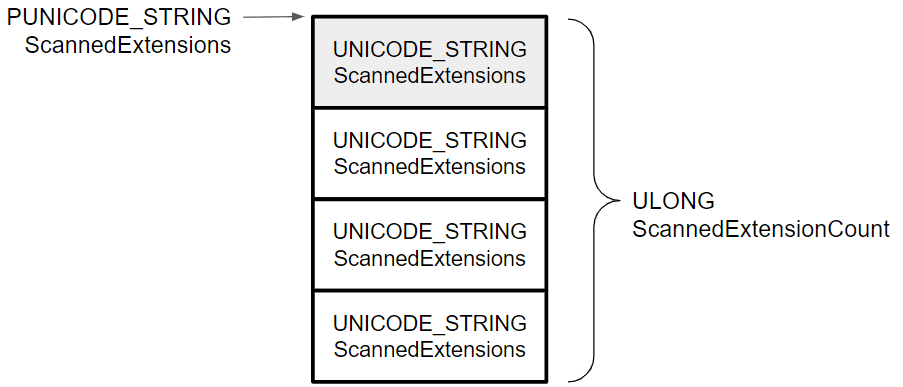
PUNICODE_STRING ScannedExtensions;
ULONG ScannedExtensionCount;
Loaded configuration is defined in scanner.inf, and by default includes exe,doc,txt,bat,cmd,inf.
ScannedExtensions stores these entries continuously at the pointed memory region.
In kernel debugger, you can confirm six extensions defined in scanner.inf are stored in order.
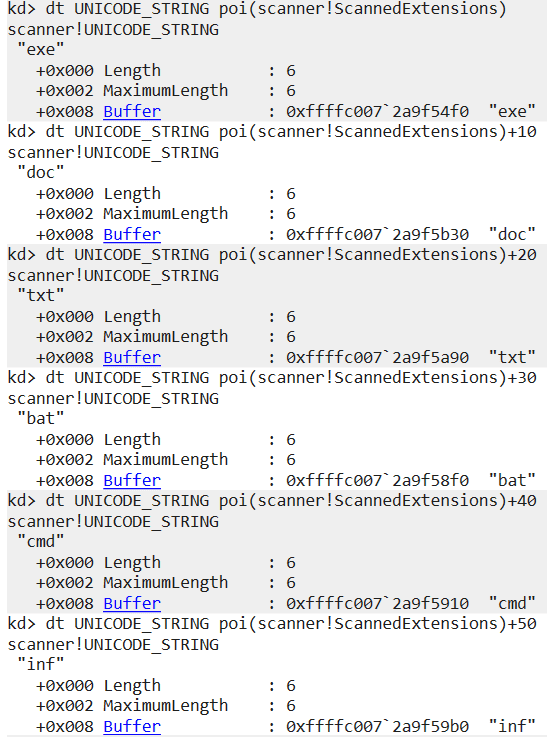
This extension list is used later to decide whether each file should be scanned during I/O filtering.
File scanning is one of the most resource-intensive behaviors in AntiVirus software.
In most cases, real-time file scanning is a trade-off with system performance.
So commercial products usually include tuning mechanisms to reduce scan cost and improve system availability.
Many products let users include or exclude file extensions from scanning.
Scanner only has this extension check and no other major tuning.
If you read AvScan sample, you can see additional practical skip conditions.
Waiting for User-mode Program Connection
After loading extension settings, Scanner sets up communication with user-mode client program.
It initializes UNICODE_STRING uniString with \\ScannerPort, then calls FltBuildDefaultSecurityDescriptor2 to set access mask FLT_PORT_ALL_ACCESS in SECURITY_DESCRIPTOR pointed by sd.
RtlInitUnicodeString( &uniString, ScannerPortName );

PSECURITY_DESCRIPTOR sd;

status = FltBuildDefaultSecurityDescriptor(
    &sd,
    FLT_PORT_ALL_ACCESS
);
These are used when connecting kernel-mode Scanner minifilter and user-mode scanUser program.
If this security descriptor is used, the object is accessible only by system or administrators.3
Then it initializes OBJECT_ATTRIBUTES with InitializeObjectAttributes4 and creates communication port with FltCreateCommunicationPort5.
InitializeObjectAttributes(
    &oa,
    &uniString,
    OBJ_CASE_INSENSITIVE | OBJ_KERNEL_HANDLE,
    NULL,
    sd
);

status = FltCreateCommunicationPort(
    ScannerData.Filter,
    &ScannerData.ServerPort,
    &oa,
    NULL,
    ScannerPortConnect,
    ScannerPortDisconnect,
    NULL,
    1
);
With OBJ_KERNEL_HANDLE, the handle is expected to be accessible only from kernel mode.
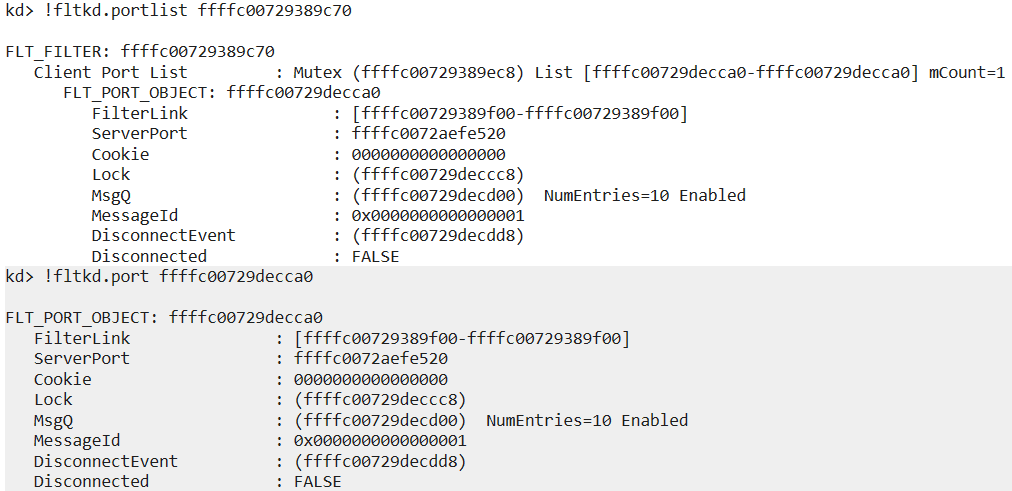
If user program is connected, you can inspect port information with !fltkd.portlist <filter address>.
Starting Filtering by Scanner Minifilter Driver
If FltCreateCommunicationPort succeeds, Scanner starts filtering with FltStartFiltering and exits DriverEntry.
status = FltStartFiltering( ScannerData.Filter );

if (NT_SUCCESS( status )) {

    return STATUS_SUCCESS;
}
Collaboration with User-mode Program
Scanner minifilter collaborates with user-mode scanUser through communication port created in DriverEntry.
scanUser is mainly implemented in scanUser.c.
Start scanUser Program
To understand behavior, begin with main.
At start, it checks command-line arguments and updates global requestCount and threadCount.
requestCount controls requests per worker thread, and threadCount controls number of worker threads.
#define SCANNER_DEFAULT_REQUEST_COUNT 5
#define SCANNER_DEFAULT_THREAD_COUNT  2
#define SCANNER_MAX_THREAD_COUNT      64
requestCount must be positive. threadCount must be 1-64.
If invalid, Usage() prints Usage: scanuser [requests per thread] [number of threads(1-64)] and exits.
Connect from scanUser to Minifilter Port
After updating counts, scanUser tries to connect to minifilter communication port using FilterConnectCommunicationPort6 with port name \\ScannerPort.
When successful, the new connection handle is stored in port.
Then it creates an I/O completion port with CreateIoCompletionPort7 and associates the connection handle.
I/O completion port8 is a queue object for efficient asynchronous I/O handling with associated handles.
This allows multiple user-mode threads to efficiently process requests received from minifilter.
For details, see Windows Internals 7th Ed. Vol.1.9
Then handles are stored in SCANNER_THREAD_CONTEXT and passed as thread parameters.
Start ScannerWorker Threads
main allocates memory for SCANNER_MESSAGE using calloc and then starts threadCount worker threads with CreateThread.
The thread start routine is ScannerWorker, and pointer to SCANNER_THREAD_CONTEXT is passed.
What ScannerWorker Does
ScannerWorker runs as worker thread in scanUser.
It scans data received from minifilter and returns results.
Main processing is inside while (TRUE) loop.
It first calls GetQueuedCompletionStatus10 to dequeue completion packets from Context->Completion handle.
When receive succeeds, it gets SCANNER_MESSAGE address from OVERLAPPED pointer using CONTAINING_RECORD.
SCANNER_MESSAGE includes FILTER_MESSAGE_HEADER, SCANNER_NOTIFICATION, and OVERLAPPED.
FILTER_MESSAGE_HEADER11 is required header for messages received from minifilter driver.
SCANNER_NOTIFICATION is Scanner-specific and stores scan target contents.
scanUser takes Notification, passes target data to ScanBuffer, and receives scan result.
ScanBuffer is very simple: it only checks whether string foul exists.
If found, it returns TRUE.
That result is inverted and stored in replyMessage.Reply.SafeToOpen, then returned to minifilter with FilterReplyMessage12.
Reply uses SCANNER_REPLY_MESSAGE, composed of FILTER_REPLY_HEADER13 and SCANNER_REPLY.
SCANNER_REPLY has only one boolean member: SafeToOpen.
As above, ScannerWorker scans received data and returns result.
If hardcoded signature is detected, minifilter blocks I/O and file save fails.
You can confirm this by trying to save a file containing that string while Scanner is running.
IRP Routines and Callback Functions
Next, check implementation of callbacks registered by Scanner minifilter.
It registers this FLT_OPERATION_REGISTRATION array:
const FLT_OPERATION_REGISTRATION Callbacks[] = {

    { IRP_MJ_CREATE,
      0,
      ScannerPreCreate,
      ScannerPostCreate},

    { IRP_MJ_CLEANUP,
      0,
      ScannerPreCleanup,
      NULL},

    { IRP_MJ_WRITE,
      0,
      ScannerPreWrite,
      NULL},

#if (WINVER>=0x0602)

    { IRP_MJ_FILE_SYSTEM_CONTROL,
      0,
      ScannerPreFileSystemControl,
      NULL
    },

#endif

    { IRP_MJ_OPERATION_END}
};
So it handles pre/post callbacks for IRP_MJ_CREATE, and pre callbacks for IRP_MJ_CLEANUP, IRP_MJ_WRITE, and IRP_MJ_FILE_SYSTEM_CONTROL.
IRP_MJ_CREATE and ScannerPreCreate
IRP_MJ_CREATE14 is sent when opening handles for file objects or device objects.
For this request, Scanner registers ScannerPreCreate and ScannerPostCreate.
ScannerPreCreate is a small function that checks whether requester process is trusted (scanuser.exe).
If trusted, it returns FLT_PREOP_SUCCESS_NO_CALLBACK; otherwise FLT_PREOP_SUCCESS_WITH_CALLBACK.
If preoperation returns FLT_PREOP_SUCCESS_NO_CALLBACK, Filter Manager does not call postoperation callback.16
If it returns FLT_PREOP_SUCCESS_WITH_CALLBACK, postoperation callback is called on completion.17
So ScannerPreCreate effectively skips scanning for trusted process requests.
IRP_MJ_CREATE and ScannerPostCreate
ScannerPostCreate runs after IRP_MJ_CREATE completion.
It requests file scan through ScannerpScanFileInUserMode.
Before scanning, it validates Data->IoStatus.Status; if I/O failed or status is STATUS_REPARSE, it exits.
If I/O succeeded, it gets file name and extension with FltGetFileNameInformation and FltParseFileNameInformation, then checks if extension should be scanned.
If extension matches configured scan targets, it requests user-mode scan and receives result in safeToOpen.
If file is malicious (foul), it calls FltCancelFileOpen19, sets status to STATUS_ACCESS_DENIED, and blocks operation.
If not malicious and file is opened with write access, it allocates stream-handle context and sets RescanRequired = TRUE so it can be rescanned later.
Requesting User-mode Scan in ScannerpScanFileInUserMode
ScannerpScanFileInUserMode receives pointers to FLT_INSTANCE and FILE_OBJECT, and stores user-mode scan result in SafeToOpen.
It verifies communication port, gets volume from instance using FltGetVolumeFromInstance20, reads file data, stores it in nonpaged pool buffer, and sends it to user-mode via FltSendMessage21 using SCANNER_NOTIFICATION.
After reply is received, it updates *SafeToOpen from SCANNER_REPLY.
(As noted in source, repeatedly allocating/freeing large nonpaged buffers for scanning is not ideal for performance. Commercial software often scans directly in user mode.)
IRP_MJ_WRITE and ScannerPreWrite
Scanner registers ScannerPreWrite for IRP_MJ_WRITE.
It checks communication port, then calls FltGetStreamHandleContext22 to get stream-handle context; if context is not present, it returns without scanning.
After confirming target has context, it verifies write length (Data->Iopb->Parameters.Write.Length) is not zero.
If MDL is present, it resolves write buffer via MmGetSystemAddressForMdlSafe; otherwise uses WriteBuffer directly.
Then it sends write data to user-mode scan via FltSendMessage similarly to create path.
If malicious string is found in write data, it replaces Data->IoStatus.Status with STATUS_ACCESS_DENIED and blocks write access.
Chapter Summary
This chapter explained implementation of Scanner File System Minifilter Driver sample code.
Real commercial AntiVirus software is not as simple as Scanner and includes many protection features beyond file scanning.
Still, as shown by many vendors in the [FSFilter Anti-Virus] category, many products rely on minifilter drivers in some way.
So understanding Scanner sample implementation is a meaningful first step in learning AntiVirus software.
Table of Contents
- Preface
- Chapter 1: Setup Environment Used in This Book
- Chapter 2: Introduction to File System Minifilter Drivers
- Chapter 3: Reading the Scanner Sample Code
- Chapter 4: Kernel Debugging Scanner with WinDbg
-
ExInitializeDriverRuntime https://learn.microsoft.com/ja-jp/windows-hardware/drivers/ddi/wdm/nf-wdm-exinitializedriverruntime
↩ -
FltBuildDefaultSecurityDescriptor https://learn.microsoft.com/ja-jp/windows-hardware/drivers/ddi/fltkernel/nf-fltkernel-fltbuilddefaultsecuritydescriptor
↩ -
FltBuildDefaultSecurityDescriptor https://learn.microsoft.com/ja-jp/windows-hardware/drivers/ddi/fltkernel/nf-fltkernel-fltbuilddefaultsecuritydescriptor
↩ -
InitializeObjectAttributes macro https://learn.microsoft.com/ja-jp/windows/win32/api/ntdef/nf-ntdef-initializeobjectattributes
↩ -
FltCreateCommunicationPort https://learn.microsoft.com/ja-jp/windows-hardware/drivers/ddi/fltkernel/nf-fltkernel-fltcreatecommunicationport
↩ -
FilterConnectCommunicationPort https://learn.microsoft.com/ja-jp/windows/win32/api/fltuser/nf-fltuser-filterconnectcommunicationport
↩ -
CreateIoCompletionPort https://learn.microsoft.com/ja-jp/windows/win32/api/ioapiset/nf-ioapiset-createiocompletionport
↩ -
I/O completion ports https://learn.microsoft.com/ja-jp/windows/win32/fileio/i-o-completion-ports
↩ -
Windows Internals 7th Ed. Vol.1 p.606
↩ -
GetQueuedCompletionStatus https://learn.microsoft.com/ja-jp/windows/win32/api/ioapiset/nf-ioapiset-getqueuedcompletionstatus
↩ -
↩FILTER_MESSAGE_HEADERhttps://learn.microsoft.com/ja-jp/windows-hardware/drivers/ddi/fltuserstructures/ns-fltuserstructures-filtermessage_header -
FilterReplyMessage https://learn.microsoft.com/ja-jp/windows/win32/api/fltuser/nf-fltuser-filterreplymessage
↩ -
↩FILTER_REPLY_HEADERhttps://learn.microsoft.com/ja-jp/windows-hardware/drivers/ddi/fltuserstructures/ns-fltuserstructures-filterreply_header -
↩IRP_MJ_CREATEhttps://learn.microsoft.com/ja-jp/windows-hardware/drivers/kernel/irp-mj-create -
Returning
↩FLT_PREOP_SUCCESS_NO_CALLBACKhttps://learn.microsoft.com/ja-jp/windows-hardware/drivers/ifs/returning-flt-preop-success-no-callback -
Returning
↩FLT_PREOP_SUCCESS_WITH_CALLBACKhttps://learn.microsoft.com/ja-jp/windows-hardware/drivers/ifs/returning-flt-preop-success-with-callback -
FltCancelFileOpen https://learn.microsoft.com/ja-jp/windows-hardware/drivers/ddi/fltkernel/nf-fltkernel-fltcancelfileopen
↩ -
FltGetVolumeFromInstance https://learn.microsoft.com/ja-jp/windows-hardware/drivers/ddi/fltkernel/nf-fltkernel-fltgetvolumefrominstance
↩ -
FltSendMessage https://learn.microsoft.com/ja-jp/windows-hardware/drivers/ddi/fltkernel/nf-fltkernel-fltsendmessage
↩ -
FltGetStreamHandleContext https://learn.microsoft.com/ja-jp/windows-hardware/drivers/ddi/fltkernel/nf-fltkernel-fltgetstreamhandlecontext
↩