This page has been machine-translated from the original page.
Table of contents
Overview of AMSI
AMSI (Windows Antimalware Scan Interface), introduced in Windows 10, can be described in one line as “a generic standard interface for integrating applications and services with anti-malware products running on the machine.”
The following is a simplified image of AMSI.
As shown in this figure, AMSI allows each application to pass scan target data to anti-malware products running on the system, and receive the scan result.
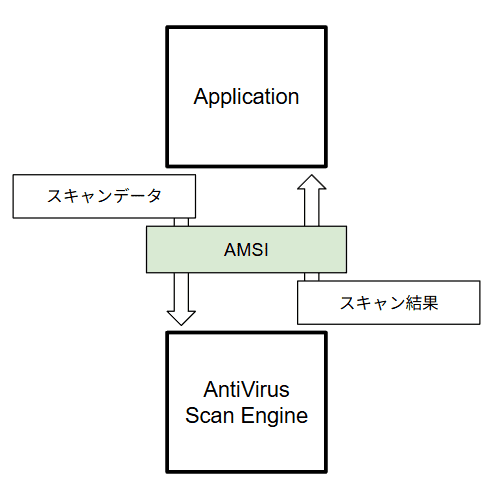
As shown above, applications can use AMSI to use anti-malware products registered on the system to determine whether the data they process is malicious.
AMSI also provides a standard interface that does not depend on a specific anti-malware vendor. Therefore, various product vendors can register AMSI providers for scanning data.1
Many anti-malware vendors provide AMSI providers, including Microsoft Defender Antivirus, which is built into Windows.
You can check a list of vendors that provide AMSI providers in the whoamsi repository, but please note that the information has not been updated for the last few years, so it may not be complete.2
Applications that use AMSI
In Windows, AMSI is integrated into components such as the following.
- User Account Control - UAC (privilege elevation for EXE, COM, MSI, and ActiveX installation)
- PowerShell (scripts, interactive interface, or dynamic code evaluation)
- Windows Script Host (
wscript.exeandcscript.exe) - JavaScript and VBScript
- Office VBA macros
In addition to the above, services such as SharePoint Server and Exchange Server can also use AMSI-based protection.3 4
All of these services and applications protect users by using AMSI to block malicious code execution and malicious web requests.
Endpoint protection by AMSI
About script-based threats
Traditional anti-malware products assumed that malware executables would be created on disk.
However, by 2015 when AMSI was released, script-based attacks using built-in system tools such as PowerShell had spread rapidly.5
Such script-based attacks use legitimate tools built into the OS.6
In many cases, these attacks create and execute malicious code in memory and do not create files on disk.7
Even when malware is distributed through files, script-based malware can use advanced encryption or obfuscation, which made detection by traditional signature matching very difficult.8
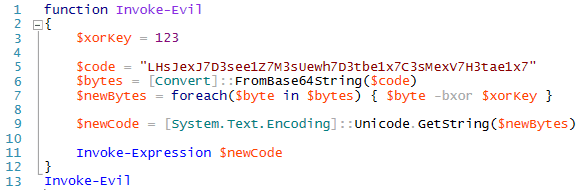
Because of this, many malicious attackers used these techniques to evade anti-malware detection and succeed in attacks, which made them a major threat.
Stronger protection with AMSI
The release of AMSI significantly strengthened protection against these threats.9
For example, even when fileless malware attacks use PowerShell, the malicious executable code placed in memory can be scanned through AMSI, allowing attacks to be blocked before they succeed.
Even if scripts use obfuscation, AMSI can scan the final plain executable code that is passed to the script engine after deobfuscation, which makes it much harder for attackers to evade detection.
Other benefits of AMSI
Protection enhanced by AMSI is not limited to script-based threats described above.
AMSI scan requests can be embedded not only in script engines like PowerShell, but also in many other types of applications.
Therefore, it is possible to scan various content through AMSI, such as web requests received from outside or text submitted by users through input forms, and block malicious requests or text submissions.
The fight against malicious attackers
As described so far, AMSI has been integrated into many applications since its release and has protected users and systems from many threats.
However, as with all security products, AMSI is also in a constant cat-and-mouse game with attackers who try to evade detection in more sophisticated ways.
For example, in 2018 AMSI was newly integrated into Office VBA, which made it possible to effectively detect and block malware that used VBA macros to evade anti-malware detection.10
However, while detection against malware abusing Office VBA macros improved, techniques abusing Excel 4.0 (XLM) macros released before VBA (1993) increased to evade AMSI integrated with Office VBA.11
To address this trend, Microsoft integrated AMSI into Excel 4.0 (XLM) macros in 2021.
At the time of writing, Excel 4.0 (XLM) macros are disabled by default to protect users.12
As shown above, AMSI has protected users and systems by integrating with various applications to counter new attack techniques continuously created by malicious attackers.
Of course, techniques used by malicious attackers evolve daily, so protection by AMSI is not absolute.
Still, AMSI is clearly one of the best solutions for defending against threats that abuse script engines and Office macros.
For this reason, users and system administrators should properly understand what threats these features protect against, so important security functions such as AMSI are not disabled without sufficient risk assessment.
How applications use AMSI scans
Now, let us look at how applications use AMSI scans that have these benefits.
Any application can use APIs provided as interfaces for AMSI, as shown below, to request scans from AMSI providers registered on the system.
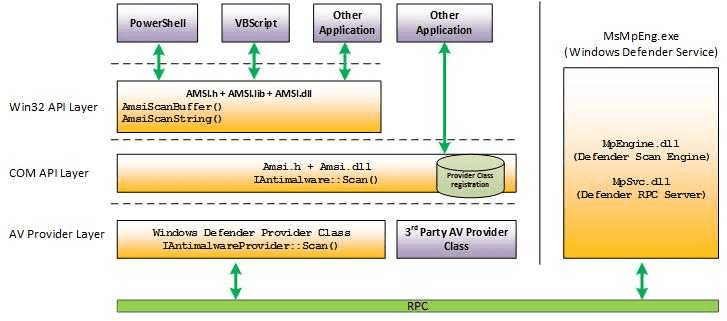
An AMSI provider that receives a scan request usually uses an anti-malware scan engine installed on the system as needed, checks whether the requested content is malicious, and returns the result.
By default, MpOav.dll is registered as an AMSI provider,
and Microsoft Defender Antivirus running on the system scans requested data through the AMSI API.13
Based on the requested content and provider logic, AMSI providers registered on the system usually return one of the following results.14
AMSI_RESULT_CLEANAMSI_RESULT_NOT_DETECTEDAMSI_RESULT_BLOCKED_BY_ADMIN_STARTAMSI_RESULT_BLOCKED_BY_ADMIN_ENDAMSI_RESULT_DETECTED
Details are explained from Chapter 2 onward.
For example, when AMSI_RESULT_NOT_DETECTED is returned for a scan request,
the requesting application can perform actions such as blocking script execution to protect the endpoint.
Check providers registered on the system
Next, we check information about AMSI providers registered on the system.
First, the list of registered AMSI providers can be checked in the registry key HKEY_LOCAL_MACHINE\SOFTWARE\Microsoft\AMSI\Providers.
By default, you can see {2781761E-28E0-4109-99FE-B9D127C57AFE} under this key,
which is the provider ID.

This ID matches the CLSID of the AMSI provider registered as a COM server.
So if you check the matching CLSID key under HKEY_LOCAL_MACHINE\SOFTWARE\Classes\CLSID\{CLSID},
you can confirm that HKEY_LOCAL_MACHINE\SOFTWARE\Classes\CLSID\{2781761E-28E0-4109-99FE-B9D127C57AFE} exists as shown below,
and from there you can reference information about Microsoft Defender components.

In the example above, only Microsoft Defender IOfficeAntivirus installed by default is registered. If a third-party anti-malware product is installed, a third-party AMSI provider may also be registered.
Block script execution with AMSI
Next, we verify actual behavior where AMSI scans and detects PowerShell and VBScript.15
In this chapter, we not only confirm that script execution is blocked,
but also identify which content was actually scanned and detected by AMSI
by checking events from the ETW provider Microsoft-Antimalware-Scan-Interface.
Preparation
To test AMSI detection and collect ETW traces during detection, perform the following steps in advance on a Windows machine (for example, a VM).
1. Start an ETW event trace session with logman.
Run the following command in an elevated command prompt
to start an ETW trace session for events from Microsoft-Antimalware-Scan-Interface.
logman start AMSITrace -p Microsoft-Antimalware-Scan-Interface Event1 -bs 64 -nb 16 256 -o %USERPROFILE%\Downloads\AMSITrace.etl -etsThis command uses logman to capture information from the ETW provider Microsoft-Antimalware-Scan-Interface.16
Captured events are saved as AMSITrace.etl in your user profile’s Downloads folder.
If you want another location, change the output path specified by -o.
To stop the trace session and stop capturing events, run:
logman stop AMSITrace -etsMany public blogs by security vendors, including “Better know a data source: Antimalware Scan Interface,” show command examples without buffer options like -bs 64 -nb 16 256.17
logman start AMSITrace -p Microsoft-Antimalware-Scan-Interface Event1 -o AMSITrace.etl -etsHowever, if you start an ETW trace session without sufficient buffer size, large events may be dropped and not included in the saved ETL file.18
If you want to check whether events larger than the configured buffer were lost,
use xperf from Windows Performance Toolkit (WPT) instead of logman.19
# Start trace session
xperf.exe -start AMSITrace -on Microsoft-Antimalware-Scan-Interface -BufferSize 64 -MinBuffers 16 -MaxBuffers 256 -f %USERPROFILE%\Downloads\AMSITrace.etl

# Stop trace session
xperf.exe -stop AMSITrace
With xperf, if ETW event loss occurs, you see warnings such as:
xperf: warning: Session "AMSITrace" lost 1 events.

2. Import the Get-AMSIEvent cmdlet
After enabling ETW event capture, install a tool to analyze the captured events.
Captured ETW trace events can be analyzed with the standard Get-WinEvent cmdlet,
but this cmdlet does not interpret each field in AMSI/Debug events very well.20
So here we use AMSITools.psm1, provided in the article “Better know a data source: Antimalware Scan Interface.”
To use this tool, download AMSITools.psm1 from the following forked repository
and place it on your machine.
https://gist.github.com/kash1064/7e752a71f6ef48ab32e1323d764b8774
Then import AMSITools.psm1 with the following cmdlet
to enable Get-AMSIEvent for event analysis.
Import-Module C:\Tools\AMSI\AMSITools.psm1After import, you can analyze the saved ETL file with:
Get-AMSIEvent "$($env:USERPROFILE)\Downloads\AMSITrace.etl"Block PowerShell script execution with AMSI
Now that we can capture events from Microsoft-Antimalware-Scan-Interface,
we first verify that AMSI blocks execution of a PowerShell script.
For AMSI testing, we use the following script provided in public documentation.21
# Save this sample AMSI powershell script as AMSI_PoSh_script.ps1
$testString = "AMSI Test Sample: " + "7e72c3ce-861b-4339-8740-0ac1484c1386"
Invoke-Expression $testString
If you save this script to a file such as evil.ps1 and execute it in PowerShell,
you can confirm that script execution is blocked as shown below.

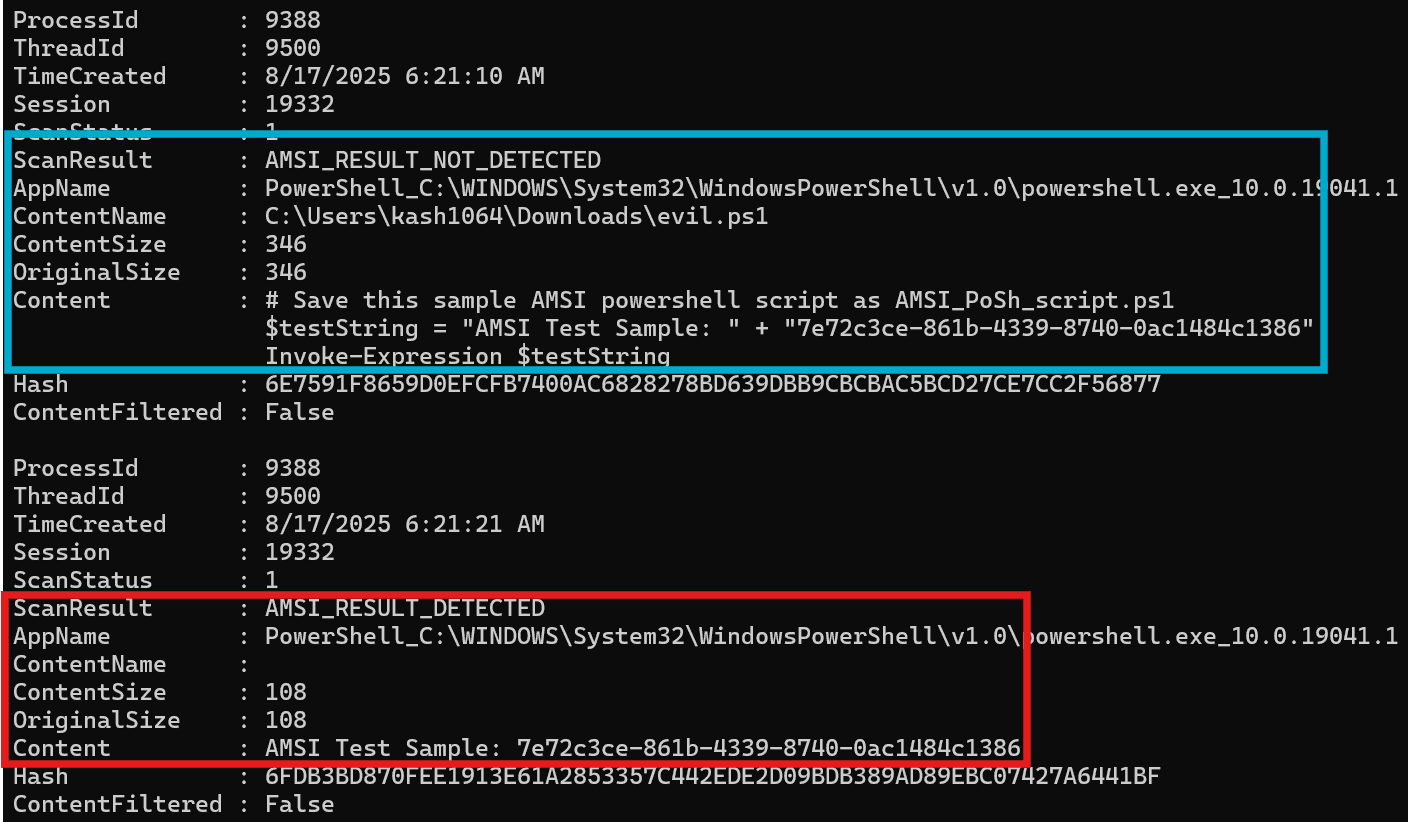
If you analyze the ETW trace captured during this block with
Get-AMSIEvent "$($env:USERPROFILE)\Downloads\AMSITrace.etl",
you can confirm that no detection occurred when the whole script was evaluated (AMSI_RESULT_NOT_DETECTED),
but detection occurred (AMSI_RESULT_DETECTED) when the concatenated string
AMSI Test Sample: 7e72c3ce-861b-4339-8740-0ac1484c1386 was evaluated.
We also test with an obfuscated version of the test detection string
AMSI Test Sample: 7e72c3ce-861b-4339-8740-0ac1484c1386.21
$base64 = "FHJ+YHoTZ1ZARxNgUl5DX1YJEwRWBAFQAFBWHgsFAlEeBwAACh4LBAcDHgNSUAIHCwdQAgALBRQ="
$bytes = [Convert]::FromBase64String($base64)
$string = -join ($bytes | %{ [char] ($_ -bxor 0x33) })
iex $string
Even with this script, after deobfuscation,
AMSI detection occurs at the point where the string
'AMSI Test Sample: 7e72c3ce-861b-4339-8740-0ac1484c1386' is evaluated.21
This shows that by using AMSI integrated into PowerShell, even highly obfuscated code can be scanned after decryption, and threats can be detected.
Block VBScript script execution with AMSI
Next, we confirm that AMSI also blocks script execution in VBScript.
For VBScript as well, we use the following test script provided in public documentation.
Dim result
result = eval("AMSI Test Sample:" + "7e72c3ce-861b-4339-8740-0ac1484c1386")
WScript.Echo result
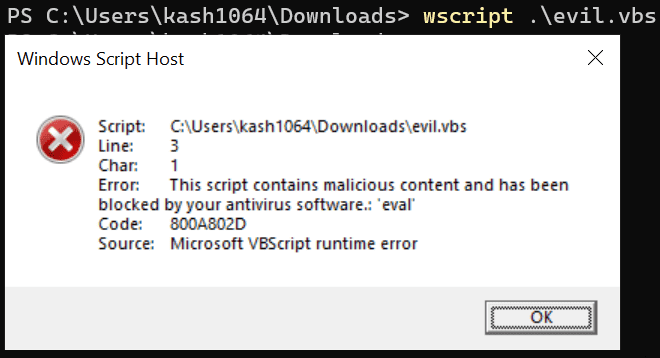
If you save this as evil.vbs and execute it,
you see an error window like below, confirming that execution was blocked.
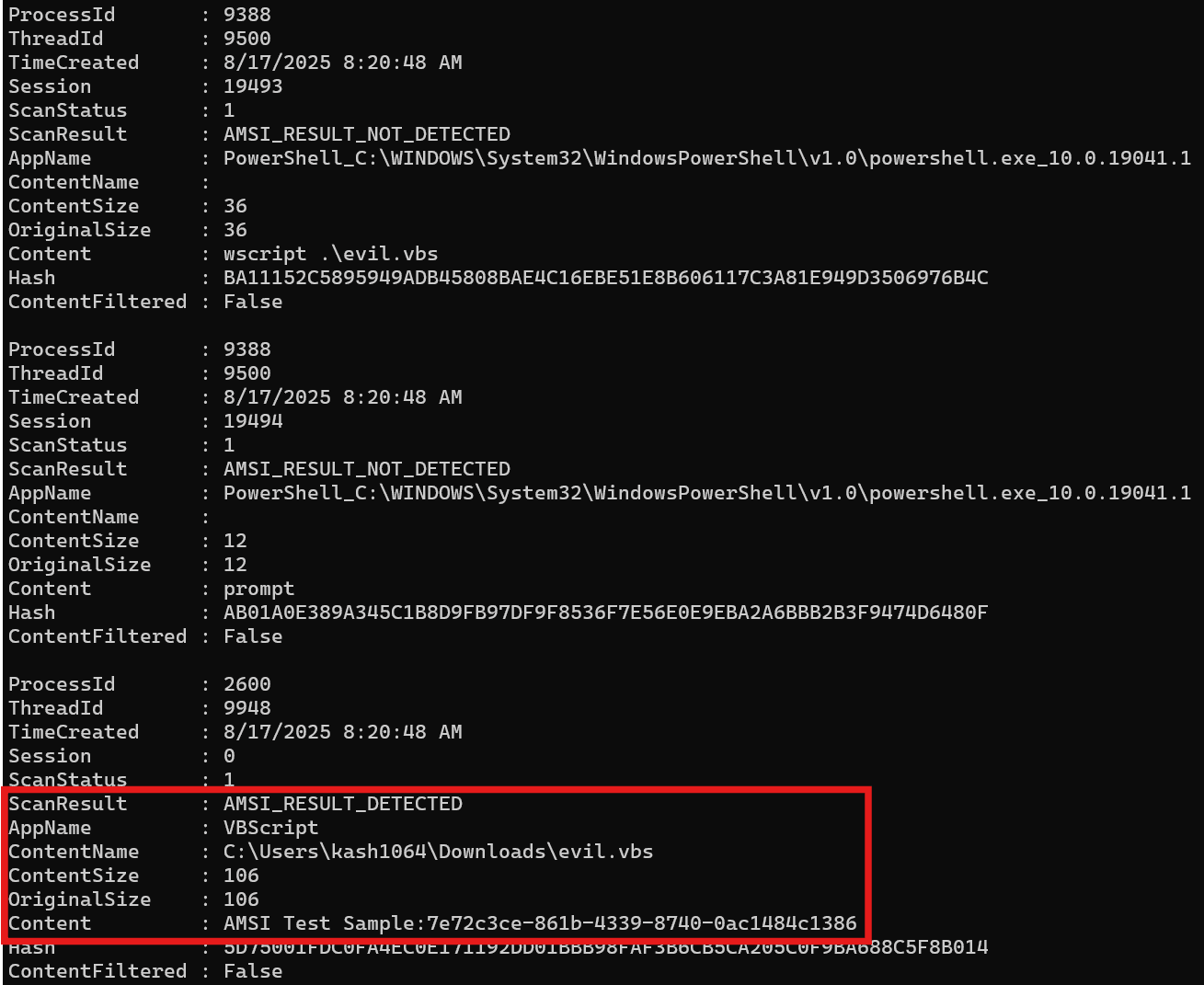
If you analyze the ETW trace captured at that time, you can confirm that, as with PowerShell, AMSI detection occurred when the test detection string was evaluated.
Chapter 1 Summary
In this chapter, I introduced an overview of AMSI, the benefits of using its protection features, and how to inspect events when detection actually occurs through AMSI.
From the next chapter, using sample code, I will explain how AMSI is integrated into applications in practice, and how providers process AMSI scan requests.
Book table of contents
- Foreword
- Chapter 1: About AMSI (Windows Antimalware Scan Interface)
- Chapter 2: AMSI Client Interface
- Chapter 3: AMSI Provider
- Chapter 4: Customizing the Sample Programs
- Chapter 5: AMSI Integrated into PowerShell
-
Antimalware Scan Interface (AMSI) https://learn.microsoft.com/ja-jp/windows/win32/amsi/antimalware-scan-interface-portal
↩ -
whoamsi https://github.com/subat0mik/whoamsi
↩ -
Configure AMSI integration with SharePoint Server https://learn.microsoft.com/en-us/sharepoint/security-for-sharepoint-server/configure-amsi-integration
↩ -
Exchange Server AMSI integration https://learn.microsoft.com/ja-jp/exchange/antispam-and-antimalware/amsi-integration-with-exchange
↩ -
INVESTIGATING POWERSHELL ATTACKS (FireEye, Inc. / 2014)
↩ -
A technique called “Living off the land,” where legitimate tools installed on a system are abused.
↩ -
“Fileless malware” runs in memory without creating files or downloading/installing files.
↩ -
How the Antimalware Scan Interface (AMSI) helps you defend against malware https://learn.microsoft.com/ja-jp/windows/win32/amsi/how-amsi-helps
↩ -
How the Antimalware Scan Interface (AMSI) helps you defend against malware https://learn.microsoft.com/ja-jp/windows/win32/amsi/how-amsi-helps
↩ -
Office VBA + AMSI: Parting the veil on malicious macros https://www.microsoft.com/en-us/security/blog/2018/09/12/office-vba-amsi-parting-the-veil-on-malicious-macros/
↩ -
XLM + AMSI: New runtime defense against Excel 4.0 macro malware https://www.microsoft.com/en-us/security/blog/2021/03/03/xlm-amsi-new-runtime-defense-against-excel-4-0-macro-malware/
↩ -
Excel 4.0 (XLM) macros now restricted by default for customer protection https://techcommunity.microsoft.com/blog/excelblog/excel-4-0-xlm-macros-now-restricted-by-default-for-customer-protection/3057905
↩ -
Evading EDR p.186 (Matt Hand / No Starch Press / 2023)
↩ -
↩AMSI_RESULTenumeration https://learn.microsoft.com/ja-jp/windows/win32/api/amsi/ne-amsi-amsi_result -
AMSI demonstrations with Microsoft Defender for Endpoint https://learn.microsoft.com/ja-jp/defender-endpoint/mde-demonstration-amsi
↩ -
logman https://learn.microsoft.com/ja-jp/windows-server/administration/windows-commands/logman
↩ -
Better know a data source: Antimalware Scan Interface https://redcanary.com/blog/threat-detection/better-know-a-data-source/amsi/
↩ -
logman create trace https://learn.microsoft.com/ja-jp/windows-server/administration/windows-commands/logman-create-trace
↩ -
Windows Performance Toolkit https://learn.microsoft.com/ja-jp/windows-hardware/test/wpt/
↩ -
Microsoft.PowerShell.Diagnostics Get-WinEvent https://learn.microsoft.com/en-us/powershell/module/microsoft.powershell.diagnostics/get-winevent
↩ -
AMSI demonstrations with Microsoft Defender for Endpoint https://learn.microsoft.com/ja-jp/defender-endpoint/mde-demonstration-amsi
↩ -
How the Antimalware Scan Interface (AMSI) helps you defend against malware https://learn.microsoft.com/ja-jp/windows/win32/amsi/how-amsi-helps
↩