This page has been machine-translated from the original page. In this chapter, I introduce how AMSI integration into client applications explained in Chapter 2 is used in real products.
In this book, as a real product example, I use PowerShell, whose source code is public as OSS.
As shown in the image below, unlike the sample program in Chapter 2,
PowerShell requests scans from AMSI providers using functions such as AmsiScanBuffer
wrapped at the Win32 API layer, not COM API layer IAmsiStream::Scan.
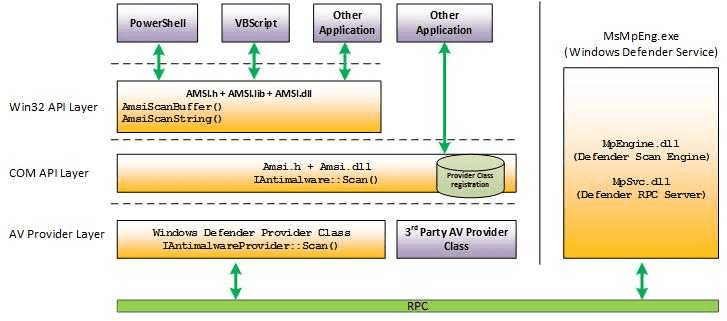
However, even when using Win32 API layer functions, basic AMSI scan flow is equivalent to the sample explained in Chapter 2.
In this chapter, based on public PowerShell source code, I explain behavior of the part that requests AMSI scans and decides whether code should run based on results.
Detailed PowerShell behavior and full implementation are outside this book’s scope, so this chapter focuses only on relevant parts.
Table of contents
Get PowerShell source code
PowerShell source code provided as OSS can be obtained from: https://github.com/PowerShell/PowerShell
In this chapter, I use source code from: https://github.com/PowerShell/PowerShell/tree/v7.5.0
If Git is available, run these commands to view the same source code.
# Clone GitHub repository
git clone https://github.com/PowerShell/PowerShell.git

# Move to cloned folder
cd PowerShell

# Checkout v7.5.0 tag
git checkout v7.5.0
AMSI scan requests by PowerShell
First, identify how PowerShell requests AMSI scans.
As shown in the image below, PowerShell requests AMSI scans using Win32 API function AmsiScanBuffer.
In this chapter, we verify runtime behavior when PowerShell scans using AmsiScanBuffer.
About AmsiScanBuffer function
AmsiScanBuffer is a Win32 API function used to request content scan in a buffer through AMSI providers.1
It is called with arguments such as a HAMSICONTEXT handle and target data buffer.
HRESULT AmsiScanBuffer(
  [in]           HAMSICONTEXT amsiContext,
  [in]           PVOID        buffer,
  [in]           ULONG        length,
  [in]           LPCWSTR      contentName,
  [in, optional] HAMSISESSION amsiSession,
  [out]          AMSI_RESULT  *result
);
AmsiScanBuffer is implemented in amsi.dll.
Because Microsoft publishes public symbols for amsi.dll, it is relatively easy to debug.
Investigate call stack when AmsiScanBuffer is called
First, use WinDbg to obtain call stack at AmsiScanBuffer invocation.
If you set a breakpoint on amsi!AmsiScanBuffer in WinDbg
and then execute a command in the debugged PowerShell prompt,
you can get a call stack like below.
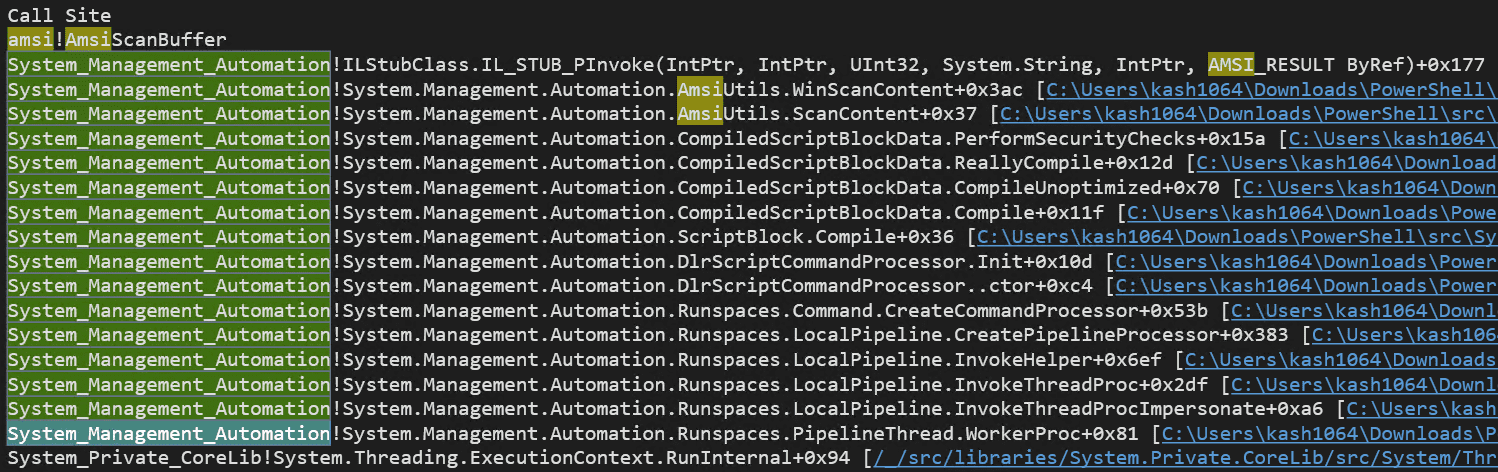
From this call stack, you can see that:
AmsiUtils.ScanContentimplemented inSystem.Management.Automation.dllcallsAmsiUtils.WinScanContent, which finally calls- Win32 API function
AmsiScanBuffer.
You can also confirm that this call originates from
CompiledScriptBlockData.PerformSecurityChecks,
also implemented in System.Management.Automation.dll.
This book does not cover full PowerShell internals,
but this PerformSecurityChecks is called by
ReallyCompile in System.Management.Automation
when scripts executed in PowerShell are finally compiled before execution.2
Operation that calls PerformSecurityChecks is defined in
src/System.Management.Automation/engine/runtime/CompiledScriptBlock.cs as follows.
private void ReallyCompile(bool optimize)
{
/* omitted */

  PerformSecurityChecks();

  Compiler compiler = new Compiler();
  compiler.Compile(this, optimize);

/* omitted */
}PerformSecurityChecks, which calls AmsiUtils.WinScanContent and directly starts AMSI scan requests,
is also defined in CompiledScriptBlock.cs.
PerformSecurityChecks method
Below is an excerpt from PerformSecurityChecks,
where PowerShell requests AMSI scan and returns an execution error when result is AMSI_RESULT_DETECTED.
private void PerformSecurityChecks()
{
  /* omitted */

  var scriptExtent = scriptBlockAst.Extent;
  var scriptFile = scriptExtent.File;

  /* omitted */

  // Call the AMSI API to determine
  // if the script block has malicious content
  var amsiResult = AmsiUtils.ScanContent(
                        scriptExtent.Text,
                        scriptFile
                   );

  if (amsiResult == \
     AmsiUtils.AmsiNativeMethods.AMSI_RESULT.AMSI_RESULT_DETECTED
  )
  {
    var parseError = new ParseError(
          scriptExtent,
          "ScriptContainedMaliciousContent",
          ParserStrings.ScriptContainedMaliciousContent
        );
        throw new ParseException(new[] { parseError });
  }

  /* omitted */
}
Inside this method, AmsiUtils.ScanContent(scriptExtent.Text, scriptFile); is executed,
and the result is stored in amsiResult.
Then amsiResult is evaluated.
If it is AMSI_RESULT_DETECTED,
PowerShell returns ParseError with error ID ScriptContainedMaliciousContent
and blocks execution.
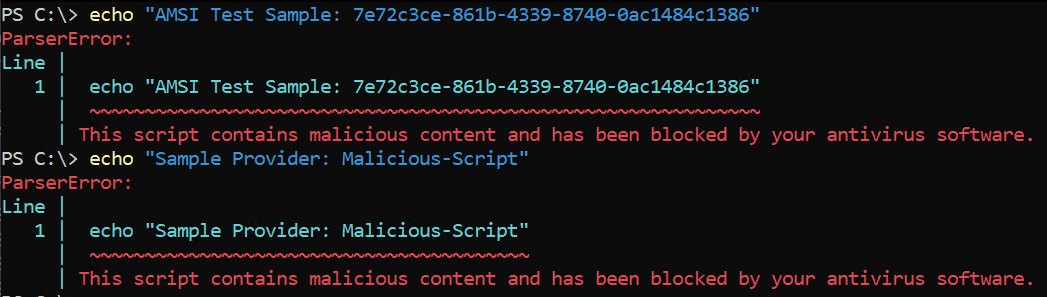
This is why an error screen like below appears when malicious PowerShell script execution is blocked by AMSI.

From here, we explain flow from AmsiUtils.ScanContent call to receiving scan result through AMSI.
AmsiUtils.ScanContent method
ScanContent is called by PowerShell to request string buffer scans through AMSI.
It is defined in src/System.Management.Automation/security/SecuritySupport.cs.
When called from PerformSecurityChecks,
it receives two arguments:
content (string buffer to scan)
and sourceMetadata (script file name and related metadata),
and passes them directly to WinScanContent.
internal static AmsiNativeMethods.AMSI_RESULT
    ScanContent(
        string content,
        string sourceMetadata
    )
{
#if UNIX
  return AmsiNativeMethods.AMSI_RESULT.AMSI_RESULT_NOT_DETECTED;

#else
  return WinScanContent(
            content,
            sourceMetadata,
            warmUp: false
        );
#endif
}
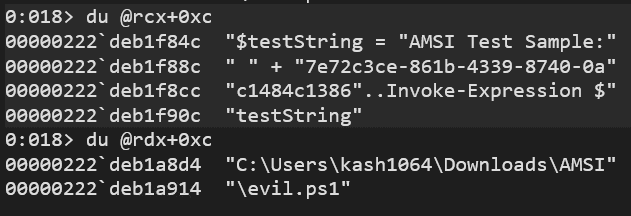
For open source PowerShell, you can build debug binaries and use private symbols, which makes it easy to check function arguments at call time.

Of course, you can inspect argument strings without private symbols, but using private symbols is clearly smoother and more reliable.
AmsiUtils.WinScanContent method
WinScanContent is an internal method also defined in
src/System.Management.Automation/security/SecuritySupport.cs.
As shown above, it is called from ScanContent with:
internal static AmsiNativeMethods.AMSI_RESULT WinScanContent(
    string content,
    string sourceMetadata,
    bool warmUp)
Argument warmUp indicates AMSI component warm-up mode.
If True, no actual scan is performed and AMSI_RESULT_NOT_DETECTED is returned.
So in normal scans where ScanContent calls WinScanContent,
warmUp is forced to hardcoded False.
At the start of WinScanContent,
there is code that checks EICAR test malware string as shown below.
This code appears to run only when internal debug flag InternalTestHooks.UseDebugAmsiImplementation is True,
so we ignore it in this chapter.
const string EICAR_STRING = "X5O!P%@AP[4\\PZX54(P^)7CC)7}$EICAR-STANDARD-ANTIVIRUS-TEST-FILE!$H+H*";
if (InternalTestHooks.UseDebugAmsiImplementation)
{
  if (content.Contains(EICAR_STRING, StringComparison.Ordinal))
  {
    return AmsiNativeMethods.AMSI_RESULT.AMSI_RESULT_DETECTED;
  }
}
As a side note, this behavior can be tested by running these commands in PowerShell:
set UseDebugAmsiImplementation to True, then run a command containing EICAR string.
# Set UseDebugAmsiImplementation flag to True
[System.Management.Automation.Internal.InternalTestHooks]::SetTestHook('UseDebugAmsiImplementation', $true)

# Execute command containing Eicar test malware string
[ScriptBlock]::Create('X5O!P%@AP[4\PZX54(P^)7CC)7}$EICAR-STANDARD-ANTIVIRUS-TEST-FILE!$H+H*') | Out-Null
Below is the actual result of running those commands.

In later code, several checks are performed before AMSI scan.
First, PowerShell checks whether AMSI component initialization succeeded.
If initialization failed, it returns AMSI_RESULT_NOT_DETECTED without requesting scan.
// If we had a previous initialization failure,
// just return the neutral result.
if (s_amsiInitFailed)
{
  PSEtwLog.LogAmsiUtilStateEvent(
          "ScanContent-InitFail",
          $"{s_amsiContext}-{s_amsiSession}"
      );
  return AmsiNativeMethods.AMSI_RESULT.AMSI_RESULT_NOT_DETECTED;
}
Besides initialization failure,
as described earlier, warmUp == True also causes
WinScanContent to return AMSI_RESULT_NOT_DETECTED without scan request.
If these checks pass,
WinScanContent calls Win32 API AmsiScanBuffer to get content scan result.
AmsiNativeMethods.AMSI_RESULT result = \
    AmsiNativeMethods.AMSI_RESULT.AMSI_RESULT_CLEAN;

// Run AMSI content scan
int hr;
unsafe
{
  fixed (char* buffer = content)
  {
    var buffPtr = new IntPtr(buffer);
    hr = AmsiNativeMethods.AmsiScanBuffer(
            s_amsiContext,
            buffPtr,
            (uint)(content.Length * sizeof(char)),
            sourceMetadata,
            s_amsiSession,
            ref result
        );
    }
}
Although called as a method in class AmsiNativeMethods,
it is actually an external method declaration of AmsiScanBuffer in amsi.dll.
[DefaultDllImportSearchPaths(DllImportSearchPath.System32)]
[DllImport("amsi.dll", EntryPoint = "AmsiScanBuffer", CallingConvention = CallingConvention.StdCall)]
internal static extern int AmsiScanBuffer(
System.IntPtr amsiContext,
  System.IntPtr buffer,
  uint length,
  [In][MarshalAs(UnmanagedType.LPWStr)] string contentName,
  System.IntPtr amsiSession,
  ref AMSI_RESULT result
);
Scan behavior after calling AmsiScanBuffer
Unfortunately, AmsiScanBuffer implementation in amsi.dll is not public,
so this book does not explain all internal behavior.
But since Microsoft publishes public symbols for amsi.dll, debugging is still relatively easy.
If you capture call stack after AmsiScanBuffer is called,
you can see CAmsiAntimalware::Scan called from AmsiScanBuffer,
and then IAntimalwareProvider::Scan overridden by each registered AMSI provider is executed in order.
# Microsoft Defender AntiVirus call
MpOav!CComMpOfficeAV::Scan
amsi!CAmsiAntimalware::Scan+0xf0
amsi!AmsiScanBuffer+0xd3
/* omitted */

# SampleAmsiProvider call
AmsiProvider!SampleAmsiProvider::Scan
amsi!CAmsiAntimalware::Scan+0xf0
amsi!AmsiScanBuffer+0xd3
/* omitted */
This confirms that even when scanning is requested via AmsiScanBuffer,
registered AMSI providers scan content through the flow explained in Chapters 3 and 4.
Also, the result shows that requested data is scanned by all AMSI providers registered in the system.
In practice, both of the following are detected by AMSI:
AMSI Test Sample: 7e72c3ce-861b-4339-8740-0ac1484c1386(detected only by Microsoft Defender provider)Sample Provider: Malicious-Script(test string for sample provider implemented in Chapter 4)
Chapter 5 Summary
In this chapter, I explained runtime flow of content scanning performed by AMSI integrated into real PowerShell.
As described, even if script files are obfuscated with advanced methods and bypass file-scan detection, AMSI scans can be embedded in logic up to final code compilation.
This allows anti-malware engines to scan deobfuscated payloads and block threats before execution.
Afterword
Thank you very much for reading this book to the end.
Following my previous publication “A part of Anti-Virus - Learn Windows AntiVirus and Minifilter Drivers with Sample Code”1, this time I explained the overview and mechanism of AMSI based on official AmsiStream and AmsiProvider sample code.
The real-time file scan feature of anti-malware explained in my previous book is widely recognized as a relatively simple mechanism: scan and remove clear, tangible threats called “malware” (including viruses).
For this reason, even many general users without deep security or IT knowledge recognize the need to install anti-malware products capable of file scanning. In some cases, it is not uncommon for users to pay for and purchase commercial anti-malware products.
On the other hand, although AMSI provides very powerful protection and is highly troublesome for malicious attackers, its mechanism and security benefits are not widely known.
As a result, compared with file scanning, AMSI tends to be undervalued by general users and easily disabled.
It is true that security features such as AMSI are provided with trade-offs against usability, and for general users they may sometimes be perceived only as inconvenient.
However, to reduce cases where powerful security features like AMSI are disabled without sufficient risk consideration, which leads to compromises that could have been prevented, I hope this book helps more users understand the benefits and necessity of AMSI.
This book focused on AMSI, but I would like to continue introducing various AntiVirus mechanisms in the future.
If this book increased your interest in AntiVirus software, please look forward to my next work.
Again, thank you very much for reading this book.